buttons CHEVROLET MALIBU 2012 7.G User Guide
[x] Cancel search | Manufacturer: CHEVROLET, Model Year: 2012, Model line: MALIBU, Model: CHEVROLET MALIBU 2012 7.GPages: 398, PDF Size: 6.06 MB
Page 158 of 398
Black plate (8,1)Chevrolet Malibu Owner Manual - 2012
7-8 Infotainment System
Storing Radio Stations
Drivers are encouraged to store
radio station while the vehicle is
parked, seeDefensive Driving on
page 9‑3. Tune to stored radio
stations using the presets, favorites
button, and steering wheel controls,
if the vehicle has this feature.
Radios that have a FAV button store
radio stations as favorites, up to
36 stations can be programmed as
favorites using the six softkeys
below the radio station frequency
tabs and by using the FAV button.
Press the FAV button to go through
up to six pages of favorites, each
having six favorite stations available
per page. Each page of favorites
can contain any combination of AM,
FM, or XM, if equipped, stations.
Radios that do not have a FAV
button store radio stations as
presets, up to 18 stations
(six FM1, six FM2, and six AM),
can be programmed on the
six numbered pushbuttons. Storing a Radio Station as a
Preset
Radios that have numbered
pushbuttons store radio stations as
presets.
Up to 18 stations (six FM1, six FM2,
and six AM), can be programmed
on the six numbered buttons.
To store preset stations:
1. Tune to a radio station.
2. Press and hold one of the
six numbered pushbuttons for
three seconds until a beep
sounds.
3. Repeat Steps 1 and 2 to store additional radio stations.
Storing a Radio Station as a
Favorite
Radio that have a FAV button store
radio stations as favorites.
To store a station as a favorite:
1. Tune to a radio station.
2. Press the FAV button to display the page where the station will
be stored. 3. Press and hold one of the
six softkeys until a beep sounds.
4. Repeat Steps 1 through 3 to store additional radio stations.
The number of favorites pages can
be setup using the MENU button.
To setup the number of favorites
pages:
1. Press the MENU button.
2. Press the softkey located below the FAV 1-6 tab.
3. Select the number of favorites pages by pressing the softkey
located below the displayed
page numbers.
4. Press the FAV button, or let the menu time out, to return to the
original main radio screen
showing the radio station
frequency tabs and to begin
the process of programming
favorites.
Page 166 of 398
Black plate (16,1)Chevrolet Malibu Owner Manual - 2012
7-16 Infotainment System
Playing a CD
When a CD is inserted into the
player the CD symbol displays, and
as each new track starts to play the
track number displays.
If the ignition or radio is turned off
when a CD is in the player, the CD
stays in the player. If the ignition or
radio is turned on when a CD is in
the player, the CD starts to play
where it stopped, if it was the last
selected audio source.
Buttons and Knobs
The buttons and knobs on the radio
control the following features.
f(Tune):Turn to select tracks on
the CD.
©SEEK: Press to go to the start of
the current track, if more than ten
seconds have played. Press and
hold or press multiple times to
continue moving backward through
the tracks on the CD.
¨SEEK: Press to go to the next
track. Press and hold or press
multiple times to continue moving
forward through the tracks on
the CD.
sREV (Reverse): Press and hold
to reverse playback quickly within a
track. Sound is heard at a reduced
volume and the elapsed time of the
track displays. Release to resume
playing the track.
\FWD (Fast Forward): Press
and hold to advance playback
quickly within a track. Sound is
heard at a reduced volume and the
elapsed time of the track displays.
Release to resume playing the
track.
4(Information): Press to display
available additional information
about the current track.
BAND: Press to listen to the radio
while a CD is playing. The CD
remains inside the CD player. CD/AUX (CD/Auxiliary):
Press to
play a CD while listening to the
radio or a portable audio device.
Press this button again and the
system automatically searches for
an auxiliary input device, such as a
portable audio player. If a portable
audio player is not connected,
No Aux Input Device Found may
display.
Softkeys
The five softkeys below the radio
display are used to control functions
that display as tabs.
The softkeys below the radio display
control the following features.
RDM (Random): Tracks can be
listened to in random, rather than
sequential order.
To use random:
1. Press the softkey below RDM
tab until Random Current Disc
displays.
2. Press the softkey again to turn off random play.
Page 168 of 398
Black plate (18,1)Chevrolet Malibu Owner Manual - 2012
7-18 Infotainment System
Playing an MP3
Order of Play
Tracks are played in the following
order:
.Play begins from the first track in
the first playlist and continues
sequentially through all tracks in
each playlist. When the last
track of the last playlist has
played, play continues from the
first track of the first playlist.
.Play begins from the first track in
the first folder and continues
sequentially through all tracks in
each folder. When the last track
of the last folder has played,
play continues from the first
track of the first folder.
When playback starts from a new
folder, the new track name displays
unless folder mode has been
chosen as the default display, then
the new folder name displays. Buttons and Knobs
The buttons and knobs on the radio
control the following features.
f(Tune):
Turn to select MP3 files
on the disc.
©SEEK: Press to go to the start of
the track, if more than ten seconds
have played. Press and hold or
press multiple times to continue
moving backward through tracks.
¨SEEK: Press to go to the next
track. Press and hold or press
multiple times to continue moving
forward through tracks.
sREV (Reverse): Press and hold
to reverse playback quickly. Sound
is heard at a reduced volume and
the elapsed time of the track
displays. Release
sREV to
resume playing.
\FWD (Fast Forward): Press
and hold to advance playback
quickly. Sound is heard at a reduced
volume and the elapsed time of the
track displays. Release
\FWD to
resume playing.
4(Information): Press to display
available additional information
about the current track.
BAND: Press to listen to the
radio while an MP3 disc is playing.
The MP3 disc remains inside the
CD player.
CD/AUX (CD/Auxiliary): Press to
play an MP3 disc while listening to
the radio or a portable audio device.
Press this button again and the
system automatically searches for
an auxiliary input device, such as a
portable audio player. If a portable
audio player is not connected,
No Aux Input Device Found may
display.
Page 172 of 398
Black plate (22,1)Chevrolet Malibu Owner Manual - 2012
7-22 Infotainment System
Order of Play
Tracks are played in the following
order:
.Play begins from the first track in
the first playlist and continues
sequentially through all tracks in
each playlist. When the last
track of the last playlist has
played, play continues from the
first track of the first playlist.
.Play begins from the first track in
the first folder and continues
sequentially through all tracks in
each folder. When the last track
of the last folder has played,
play continues from the first
track of the first folder.
When play enters a new folder, the
display does not automatically show
the new folder name unless the
folder mode has been chosen as
the default display. The new track
name displays.
Connecting a USB Storage
Device or iPod
The radio buttons, knobs and
softkeys are used to control a USB
storage device or an iPod when it is
connected to the USB port.
To connect a USB storage device,
connect the device to the USB port
located on the front of the radio.
To connect an iPod, connect one
end of the USB cable that came
with the iPod to the iPod’s dock
connector and connect the other
end to the USB port located on the
front of the radio. If the vehicle is on
and the USB connection works,
“OK to disconnect” and a GM logo
may appear on the iPod and iPod
appears on the radio's display.
The iPod charges while it is
connected to the USB port if the
ingition is in the ACC/ACCESSORY
or ON/RUN position. When the
ignition is turned OFF, the iPod automatically powers off and will not
charge or draw power from the
vehicle's battery.
Older iPod's that are not supported
can still be used by connecting it to
the 3.5 mm (1/8 in) auxiliary input
jack using a 3.5 mm (1/8 in) cable.
Using a USB Storage Device
or iPod
The buttons and knobs on the
radio and the softkeys below the
radio display are used to control a
USB storage device or an iPod.
Buttons and Knobs
The buttons and knobs on the radio
control the following features.
f(Tune):
Turn to select files.
©SEEK:Press to go to the start of
the track, if more than ten seconds
have played. Press and hold
©SEEK or press it multiple times
to continue moving backward
through tracks.
Page 176 of 398
Black plate (26,1)Chevrolet Malibu Owner Manual - 2012
7-26 Infotainment System
Voice Recognition
The Bluetooth system uses voice
recognition to interpret voice
commands to dial phone numbers
and name tags.
For additional information, say
“Help”while you are in a voice
recognition menu.
Noise: Keep interior noise levels to
a minimum. The system may not
recognize voice commands if there
is too much background noise.
When to Speak: A short tone
sounds after the system responds
indicating when it is waiting for a
voice command. Wait until the tone
and then speak.
How to Speak: Speak clearly in a
calm and natural voice.
Audio System
When using the in‐vehicle Bluetooth
system, sound comes through the
vehicle's front audio system
speakers and overrides the audio
system. Use the audio system
volume knob, during a call, to
change the volume level. The
adjusted volume level remains in
memory for later calls. To prevent
missed calls, a minimum volume
level is used if the volume is turned
down too low.
Bluetooth Controls
Use the buttons located on the
steering wheel to operate the
in‐vehicle Bluetooth system.
See Steering Wheel Controls on
page 5‑2 for more information.
b/g(Push To Talk): Press to
answer incoming calls, to confirm
system information, and to start
speech recognition.
x/c(Mute/End Call): Press to
end a call, reject a call, or to cancel
an operation.
Pairing
A Bluetooth cell phone must be
paired to the Bluetooth system and
then connected to the vehicle before
it can be used. See your cell phone
manufacturers user guide for
Bluetooth functions before pairing
the cell phone. If a Bluetooth phone
is not connected, calls will be made
using OnStar
®Hands‐Free Calling,
if available. See OnStar Overview
on page 14‑1 for more information.
Pairing Information
.A Bluetooth phone with MP3
capability cannot be paired to
the vehicle as a phone and an
MP3 player at the same time.
.Up to five cell phones can be
paired to the Bluetooth system.
.The pairing process is disabled
when the vehicle is moving.
.Pairing only needs to be
completed once, unless the
pairing information on the cell
phone changes or the cell phone
is deleted from the system.
Page 186 of 398
Black plate (4,1)Chevrolet Malibu Owner Manual - 2012
8-4 Climate Controls
When the vehicle or fan is turned off
and back on, the system defaults to
outside air automatically. Only use
recirculation mode when it is
needed for comfort, since window
fogging can occur.
To improve fuel efficiency and to
cool the vehicle faster, recirculation
may be automatically selected in
warm weather. The recirculation
light will not come on. To override
this feature, select outside air.
Rear Window Defogger
The rear window defogger uses a
warming grid to remove fog or frost
from the rear window.
1REAR:Press to turn the
rear window defogger on or off.
An indicator light comes on to show
that the rear window defogger is on.
Be sure to clear as much snow from
the rear window as possible. If driving below 80 km/h (50 mph),
the rear window defogger turns off
about 15 minutes after the button is
pressed. If turned on again, the
defogger only runs for about
seven minutes before turning off.
The defogger can also be turned
off by turning off the engine.
If the vehicle's speed is maintained
above 80 km/h (50 mph), the rear
window defogger remains on once
the button is pressed.
If the vehicle has heated outside
mirrors, the surface of the outside
mirrors heat when the rear window
defogger is activated. See
Heated
Mirrors on page 2‑14.
Notice: Do not use anything
sharp on the inside of the rear
window. If you do, you could cut
or damage the warming grid, and
the repairs would not be covered
by the vehicle warranty. Do not
attach a temporary vehicle
license, tape, a decal, or anything
similar to the defogger grid. Remote Start Climate Control
Operation
For vehicles with the remote start
feature, when it is activated the
climate control system heats or
cools the inside of the vehicle using
the modes that were set before the
vehicle was turned off. The climate
control knobs will remain active
during a remote start. However,
the climate control buttons will be
inactive until the ignition is turned
on by the key. If the fan is off, the
climate control system will not
operate during remote start.
See
Remote Keyless Entry (RKE)
System Operation on page 2‑3.
Page 189 of 398

Black plate (7,1)Chevrolet Malibu Owner Manual - 2012
Climate Controls 8-7
Select from the following:
H(Vent):Air is directed to the
instrument panel outlets.
)(Bi-Level): Air is divided
between the instrument panel
outlets and the floor outlets.
6(Floor): Air is directed to the
floor outlets with some air directed
to the side window outlets.
-(Defog): This mode clears the
windows of fog or moisture. Air is
directed to the floor and windshield
outlets.
0(Defrost): This mode clears the
windows of fog or frost more quickly.
The system automatically controls
the fan speed if defrost is selected
from the AUTO mode. If the outside
temperature is 4°C (40°F) or
warmer, the air conditioning
compressor automatically runs to
help dehumidify the air and dry the
windshield. The air conditioning
indicator light blinks three times if
the compressor is turned off while
in this mode.
#(Air Conditioning): Press turn
the air conditioning on and off.
An indicator light turns on to show
the air conditioning is on.
When air conditioning is selected or
is in AUTO mode, the system runs
the air conditioning automatically to
cool and dehumidify the air entering
the vehicle.
On hot days, open the windows long
enough to let hot inside air escape.
This reduces the time it takes for the
vehicle to cool down. Then keep
the windows closed for the air
conditioner to work its best.
On cool, but sunny days while using
manual operation of the automatic
system, use bi-level to deliver warm
air to the floor and cooler air to the
instrument panel outlets. To warm or
cool the air delivered, press the
temperature buttons to the desired
setting. In AUTO mode the system cools
and dehumidifies the air inside
the vehicle. Also while in AUTO
mode, the system maximizes its
performance by using recirculation
as necessary.
Heating:
On cold days when using
manual operation of the automatic
system, use floor mode to deliver air
to the floor outlets. To warm or cool
the air delivered, press
xorwto
the desired temperature setting.
To use the automatic mode, turn the
knob to AUTO and press
xorwto
adjust the temperature.
:(Outside Air): Press to
turn the outside air mode on.
An indicator light comes on to show
it is on. Air from outside the vehicle
will circulate throughout the vehicle.
The outside air mode can be used
with all modes, but it cannot be
used with the recirculation mode.
Pressing this button cancels the
recirculation mode.
Page 191 of 398
Black plate (9,1)Chevrolet Malibu Owner Manual - 2012
Climate Controls 8-9
Remote Start Climate Control
Operation
For vehicles with remote start, when
it is activated the climate control
system heats and cools the inside of
the vehicle using the previous
system settings before the vehicle
was turned off. The climate control
knobs will remain active during a
remote start. However, the climate
control buttons will be inactive until
the ignition is turned on by the key.
If the fan is off, the climate control
system will not operate during
remote start.
With the automatic climate control
system, the climate control displays
“RS”in place of the temperature
to indicate that remote start is
activated. For best performance,
turn both the fan and mode knobs to
AUTO. If the temperature is cold
enough and the mode knob is set to
AUTO, the system begins in defrost
to clear the windows. See Remote
Keyless Entry (RKE) System
Operation on page 2‑3.Air Vents
Use the lever located in the center
of each outlet by moving it either up
and down or side-to-side, to change
the direction and amount of airflow
in the vehicle.
Operation Tips
.Clear away any ice, snow,
or leaves from the air inlets at
the base of the windshield that
may block the flow of air into the
vehicle.
.Do not use non-GM approved
hood deflectors as they could
adversely affect the performance
of the system.
.Keep the path under the front
seats clear of objects to help
circulate the air inside of the
vehicle more effectively.
.When an objectionable odor
outside the vehicle is
encountered, use the
recirculation mode, with the
temperature knob at a
comfortable setting to prevent
the odor from entering the
vehicle through the ventilation
system. This can be helpful
when driving through a long
tunnel with poor ventilation.
However, extended usage of this
mode in cold or cool weather
can cause window fogging.
Page 226 of 398
Black plate (34,1)Chevrolet Malibu Owner Manual - 2012
9-34 Driving and Operating
{WARNING
Cruise control can be dangerous
where you cannot drive safely at
a steady speed. So, do not use
the cruise control on winding
roads or in heavy traffic.
Cruise control can be dangerous
on slippery roads. On such roads,
fast changes in tire traction can
cause excessive wheel slip, and
you could lose control. Do not use
cruise control on slippery roads.
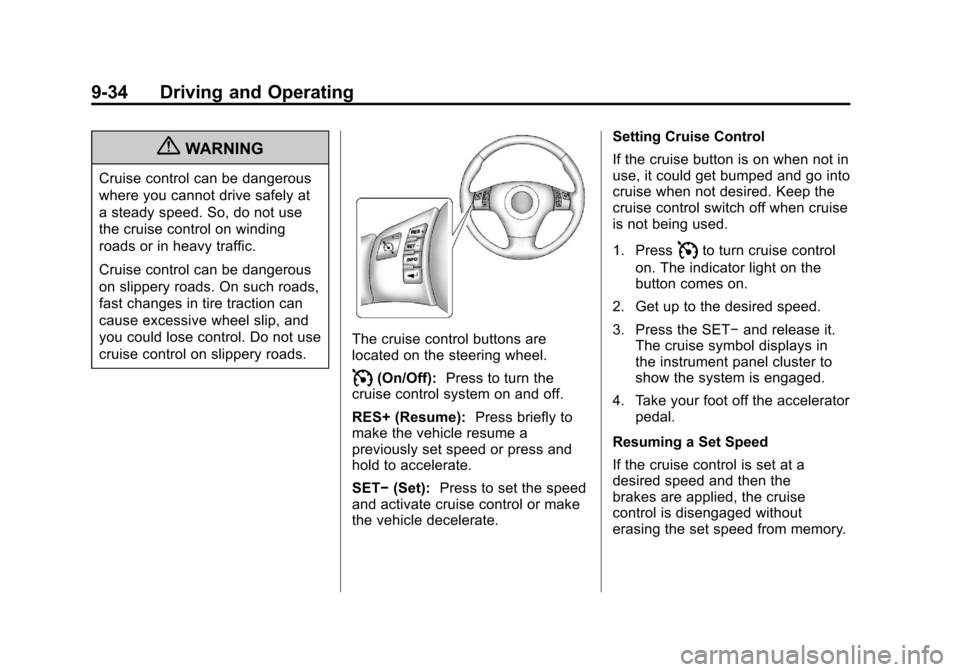
The cruise control buttons are
located on the steering wheel.
I(On/Off):Press to turn the
cruise control system on and off.
RES+ (Resume): Press briefly to
make the vehicle resume a
previously set speed or press and
hold to accelerate.
SET− (Set): Press to set the speed
and activate cruise control or make
the vehicle decelerate. Setting Cruise Control
If the cruise button is on when not in
use, it could get bumped and go into
cruise when not desired. Keep the
cruise control switch off when cruise
is not being used.
1. Press
Ito turn cruise control
on. The indicator light on the
button comes on.
2. Get up to the desired speed.
3. Press the SET− and release it.
The cruise symbol displays in
the instrument panel cluster to
show the system is engaged.
4. Take your foot off the accelerator pedal.
Resuming a Set Speed
If the cruise control is set at a
desired speed and then the
brakes are applied, the cruise
control is disengaged without
erasing the set speed from memory.
Page 253 of 398
Black plate (13,1)Chevrolet Malibu Owner Manual - 2012
Vehicle Care 10-13
the next 1 000 km (600 mi). It is
possible that, if driving under the
best conditions, the oil life system
might indicate that an oil change
is not necessary for up to a year.
The engine oil and filter must be
changed at least once a year and,
at this time, the system must be
reset. Your dealer has trained
service people who will perform this
work and reset the system. It is also
important to check the oil regularly
over the course of an oil drain
interval and keep it at the proper
level.
If the system is ever reset
accidentally, the oil must be
changed at 5 000 km (3,000 mi)
since the last oil change.
Remember to reset the oil life
system whenever the oil is changed.How to Reset the Engine Oil
Life System
Reset the system whenever the
engine oil is changed so that the
system can calculate the next
engine oil change. To reset the
system:
1. Turn the ignition to ON/RUN,with the engine off.
2. Press and hold the DIC INFO and reset buttons, on the left
side of the steering wheel,
at the same time to enter the
personalization menu. The OIL
LIFE RESET message displays.
See Driver Information Center
(DIC) on page 5‑24 andEngine
Oil Messages on page 5‑27. 3. Press and hold the reset button
until the DIC display shows
ACKNOWLEDGED.
4. Turn the key to LOCK/OFF.
The system is reset when the
CHANGE OIL SOON message
is off.
If the CHANGE OIL SOON
message comes back on when the
vehicle is started, the engine oil life
system has not reset. Repeat the
procedure.