remote control CHEVROLET MALIBU 2012 7.G User Guide
[x] Cancel search | Manufacturer: CHEVROLET, Model Year: 2012, Model line: MALIBU, Model: CHEVROLET MALIBU 2012 7.GPages: 398, PDF Size: 6.06 MB
Page 139 of 398
Black plate (33,1)Chevrolet Malibu Owner Manual - 2012
Instruments and Controls 5-33
UNLOCK HORN
This feature, which allows the
vehicle's horn to chirp on the first
press of the unlock button on the
Remote Keyless Entry (RKE)
transmitter, can be enabled or
disabled. When UNLOCK HORN
appears on the display, press and
hold the reset button for at least
one second to scroll through the
available settings:
OFF (default):The horn will not
chirp when the unlock button on the
RKE transmitter is pressed.
ON: The horn will chirp on the first
press of the unlock button on the
RKE transmitter.
See Remote Keyless Entry (RKE)
System Operation on page 2‑3 for
more information.
To select a setting and move on
to the next feature, press the
information button while the desired
setting is displayed on the DIC. LIGHT FLASH
This feature, which allows the
vehicle's exterior hazard/turn signal
lighting to flash every time the lock,
unlock, or trunk release buttons on
the Remote Keyless Entry (RKE)
transmitter are pressed, can be
enabled or disabled. When LIGHT
FLASH appears on the display,
press and hold the reset button for
at least one second to scroll through
the available settings:
OFF:
The exterior hazard/turn
signal lighting will not flash when
the lock, unlock, or trunk release
buttons on the RKE transmitter are
pressed.
ON (default): The exterior hazard/
turn signal lighting will flash when
the lock, unlock, or trunk release
buttons on the RKE transmitter are
pressed.
See Remote Keyless Entry (RKE)
System Operation on page 2‑3 for
more information. To select a setting and move on
to the next feature, press the
information button while the desired
setting is displayed on the DIC.
DELAY LOCK
This feature, which delays the
actual locking of the vehicle, can be
enabled or disabled. When DELAY
LOCK appears on the display, press
and hold the reset button for at least
one second to scroll through the
available settings:
ON (default):
The doors will not
lock until five seconds after the last
door is closed. You can temporarily
override delayed locking by
pressing the power lock switch or
the lock button on the Remote
Keyless Entry (RKE) transmitter a
second time.
OFF: The doors will lock
immediately when pressing the
power lock switch or the lock button
on the RKE transmitter.
Page 140 of 398
Black plate (34,1)Chevrolet Malibu Owner Manual - 2012
5-34 Instruments and Controls
SeePower Door Locks on page 2‑7,
Delayed Locking on page 2‑8, and
Remote Keyless Entry (RKE)
System Operation on page 2‑3 for
more information.
To select a setting and move on to
the next feature, press the
information button while the desired
setting is displayed on the DIC.
AUTO UNLK (Unlock)
This feature, which allows the
vehicle to automatically unlock
certain doors, can be enabled or
disabled. When AUTO UNLK
appears on the display, press and
hold the reset button for at least
one second to scroll through the
available settings:
ALL (default): All of the doors will
automatically unlock.
DRIVER: The driver's door will
automatically unlock. NONE:
None of the doors will
automatically unlock. You will need
to manually unlock the doors.
See Automatic Door Locks on
page 2‑8 for more information.
To select a setting and move on to
the next feature, press the
information button while the desired
setting is displayed on the DIC.
UNLK (Unlock)
This screen displays only if DRIVER
or ALL is selected for the AUTO
UNLK feature. This feature
determines when the automatic door
unlocking will occur. When UNLK
appears on the display, press and
hold the reset button for at least
one second to scroll through the
available settings:
KEY OFF: The door(s) will unlock
when the key is turned off.
SHIFT TO P (Park) (default):
The door(s) will unlock when the
vehicle is shifted into P (Park). See
Automatic Door Locks on
page 2‑8 for more information.
To select a setting and move on to
the next feature, press the
information button while the desired
setting is displayed on the DIC.
EXT (Exterior) LIGHTS
This feature, which allows the
vehicle's exterior perimeter lighting
to turn on each time the unlock
button on the Remote Keyless Entry
(RKE) transmitter is pressed, can be
enabled or disabled. When EXT
LIGHTS appears on the display,
press and hold the reset button for
at least one second to scroll through
the available settings:
OFF: The exterior perimeter
lighting will not turn on when the
unlock button on the RKE
transmitter is pressed.
ON (default): The exterior
perimeter lighting will turn on when
the unlock button on the RKE
transmitter is pressed.
Page 141 of 398
Black plate (35,1)Chevrolet Malibu Owner Manual - 2012
Instruments and Controls 5-35
SeeRemote Keyless Entry (RKE)
System Operation on page 2‑3 for
more information.
To select a setting and move on
to the next feature, press the
information button while the desired
setting is displayed on the DIC.
LANGUAGE
This feature allows you to select the
language in which the DIC will
display. When LANGUAGE appears
on the display, press and hold the
reset button for at least one second
to scroll through the available
settings:
ENGLISH (default): All messages
will appear in English.
FRENCH: All messages will appear
in French.
SPANISH: All messages will
appear in Spanish.
GERMAN: All messages will
appear in German. To select a setting and exit out of
the personalization menu mode,
press the information button while
the desired setting is displayed on
the DIC.
Exiting Personalization Menu
The personalization menu will be
exited when any of the following
conditions occur:
.A ten second time period has
elapsed.
.The ignition is turned off.
.The end of the personalization
menu list is reached.
Page 149 of 398
Black plate (7,1)Chevrolet Malibu Owner Manual - 2012
Lighting 6-7
This is because the generator
(alternator) may not be spinning
fast enough at idle to produce all of
the power needed for very high
electrical loads.
A high electrical load occurs when
several of the following are on, such
as: headlamps, high beams, fog
lamps, rear window defogger,
climate control fan at high speed,
heated seats, engine cooling fans,
trailer loads, and loads plugged into
accessory power outlets.
EPM works to prevent excessive
discharge of the battery. It does this
by balancing the generator's output
and the vehicle's electrical needs.
It can increase engine idle speed to
generate more power whenever
needed. It can temporarily reduce
the power demands of some
accessories.Normally, these actions occur in
steps or levels, without being
noticeable. In rare cases at the
highest levels of corrective action,
this action may be noticeable to the
driver. If so, a DIC message might
be displayed, such as BATTERY
SAVER ACTIVE, BATTERY
VOLTAGE LOW, or LOW BATTERY.
If one of these messages displays,
it is recommended that the driver
reduce the electrical loads as much
as possible. See
Driver Information
Center (DIC) on page 5‑24.
Battery Power Protection
The vehicle has a battery run-down
protection feature designed to
protect the vehicle's battery.
When any interior lamp (trunk,
reading, or visor vanity) is left on
while the ignition is turned off, the
battery run-down protection system
will automatically shut the lamp(s)
off after 20 minutes. This will avoid
draining the battery. To reactivate the interior lamps,
do one of the following:
.Turn on the ignition.
.Turn the exterior lamp control off
and then on.
.Open a door.
.Press any Remote Keyless
Entry (RKE) transmitter button
(if equipped).
.Press the remote trunk release
button.
.Press the power door lock
switch.
The battery run-down feature will
also be activated when any door
on the vehicle is left open and the
ignition is in LOCK/OFF.
Page 186 of 398
Black plate (4,1)Chevrolet Malibu Owner Manual - 2012
8-4 Climate Controls
When the vehicle or fan is turned off
and back on, the system defaults to
outside air automatically. Only use
recirculation mode when it is
needed for comfort, since window
fogging can occur.
To improve fuel efficiency and to
cool the vehicle faster, recirculation
may be automatically selected in
warm weather. The recirculation
light will not come on. To override
this feature, select outside air.
Rear Window Defogger
The rear window defogger uses a
warming grid to remove fog or frost
from the rear window.
1REAR:Press to turn the
rear window defogger on or off.
An indicator light comes on to show
that the rear window defogger is on.
Be sure to clear as much snow from
the rear window as possible. If driving below 80 km/h (50 mph),
the rear window defogger turns off
about 15 minutes after the button is
pressed. If turned on again, the
defogger only runs for about
seven minutes before turning off.
The defogger can also be turned
off by turning off the engine.
If the vehicle's speed is maintained
above 80 km/h (50 mph), the rear
window defogger remains on once
the button is pressed.
If the vehicle has heated outside
mirrors, the surface of the outside
mirrors heat when the rear window
defogger is activated. See
Heated
Mirrors on page 2‑14.
Notice: Do not use anything
sharp on the inside of the rear
window. If you do, you could cut
or damage the warming grid, and
the repairs would not be covered
by the vehicle warranty. Do not
attach a temporary vehicle
license, tape, a decal, or anything
similar to the defogger grid. Remote Start Climate Control
Operation
For vehicles with the remote start
feature, when it is activated the
climate control system heats or
cools the inside of the vehicle using
the modes that were set before the
vehicle was turned off. The climate
control knobs will remain active
during a remote start. However,
the climate control buttons will be
inactive until the ignition is turned
on by the key. If the fan is off, the
climate control system will not
operate during remote start.
See
Remote Keyless Entry (RKE)
System Operation on page 2‑3.
Page 191 of 398
Black plate (9,1)Chevrolet Malibu Owner Manual - 2012
Climate Controls 8-9
Remote Start Climate Control
Operation
For vehicles with remote start, when
it is activated the climate control
system heats and cools the inside of
the vehicle using the previous
system settings before the vehicle
was turned off. The climate control
knobs will remain active during a
remote start. However, the climate
control buttons will be inactive until
the ignition is turned on by the key.
If the fan is off, the climate control
system will not operate during
remote start.
With the automatic climate control
system, the climate control displays
“RS”in place of the temperature
to indicate that remote start is
activated. For best performance,
turn both the fan and mode knobs to
AUTO. If the temperature is cold
enough and the mode knob is set to
AUTO, the system begins in defrost
to clear the windows. See Remote
Keyless Entry (RKE) System
Operation on page 2‑3.Air Vents
Use the lever located in the center
of each outlet by moving it either up
and down or side-to-side, to change
the direction and amount of airflow
in the vehicle.
Operation Tips
.Clear away any ice, snow,
or leaves from the air inlets at
the base of the windshield that
may block the flow of air into the
vehicle.
.Do not use non-GM approved
hood deflectors as they could
adversely affect the performance
of the system.
.Keep the path under the front
seats clear of objects to help
circulate the air inside of the
vehicle more effectively.
.When an objectionable odor
outside the vehicle is
encountered, use the
recirculation mode, with the
temperature knob at a
comfortable setting to prevent
the odor from entering the
vehicle through the ventilation
system. This can be helpful
when driving through a long
tunnel with poor ventilation.
However, extended usage of this
mode in cold or cool weather
can cause window fogging.
Page 243 of 398

Black plate (3,1)Chevrolet Malibu Owner Manual - 2012
Vehicle Care 10-3
California Proposition
65 Warning
Most motor vehicles, including this
one, contain and/or emit chemicals
known to the State of California to
cause cancer and birth defects or
other reproductive harm. Engine
exhaust, many parts and systems,
many fluids, and some component
wear by-products contain and/or
emit these chemicals.
California Perchlorate
Materials Requirements
Certain types of automotive
applications, such as airbag
initiators, seat belt pretensioners,
and lithium batteries contained in
Remote Keyless Entry transmitters,
may contain perchlorate materials.
Special handling may be necessary.
For additional information, see
www.dtsc.ca.gov/hazardouswaste/
perchlorate.
Accessories and
Modifications
Adding non‐dealer accessories or
making modifications to the vehicle
can affect vehicle performance and
safety, including such things as
airbags, braking, stability, ride and
handling, emissions systems,
aerodynamics, durability, and
electronic systems like antilock
brakes, traction control, and stability
control. These accessories or
modifications could even cause
malfunction or damage not covered
by the vehicle warranty.Damage to vehicle components
resulting from modifications or the
installation or use of non‐GM
certified parts, including control
module or software modifications, is
not covered under the terms of the
vehicle warranty and may affect
remaining warranty coverage for
affected parts.
GM Accessories are designed to
complement and function with other
systems on the vehicle. See your
dealer to accessorize the vehicle
using genuine GM Accessories
installed by a dealer technician.
Also, see
Adding Equipment to
the Airbag-Equipped Vehicle on
page 3‑31.
Page 281 of 398
Black plate (41,1)Chevrolet Malibu Owner Manual - 2012
Vehicle Care 10-41
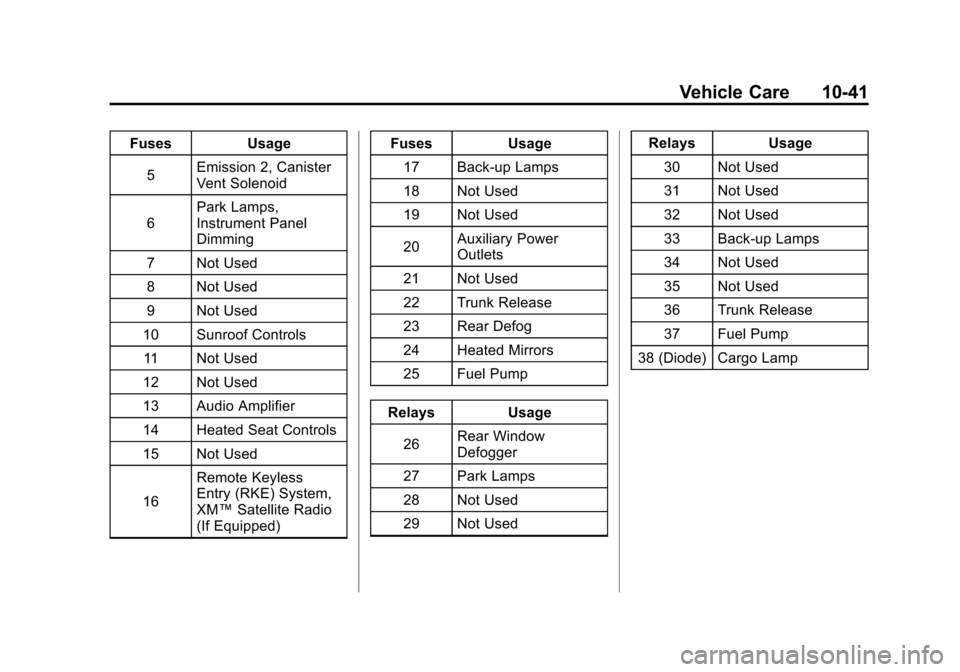
FusesUsage
5 Emission 2, Canister
Vent Solenoid
6 Park Lamps,
Instrument Panel
Dimming
7 Not Used
8 Not Used
9 Not Used
10 Sunroof Controls
11 Not Used
12 Not Used
13 Audio Amplifier
14 Heated Seat Controls
15 Not Used
16 Remote Keyless
Entry (RKE) System,
XM™
Satellite Radio
(If Equipped) Fuses
Usage
17 Back-up Lamps
18 Not Used
19 Not Used
20 Auxiliary Power
Outlets
21 Not Used
22 Trunk Release
23 Rear Defog
24 Heated Mirrors
25 Fuel Pump
Relays Usage
26 Rear Window
Defogger
27 Park Lamps
28 Not Used
29 Not Used Relays
Usage
30 Not Used
31 Not Used
32 Not Used
33 Back-up Lamps
34 Not Used
35 Not Used
36 Trunk Release
37 Fuel Pump
38 (Diode) Cargo Lamp
Page 382 of 398
Black plate (4,1)Chevrolet Malibu Owner Manual - 2012
14-4 OnStar
Connections
OnStar Hands-Free Calling allows
calls to be made and received from
the vehicle. The vehicle can also be
controlled from a cell phone through
the OnStar mobile app. See
www.onstar.com for coverage maps.
Hands-Free Calling
1. PushX. System responds:
“OnStar ready.”
2. Say “Dial.”System responds:
“Please say the name or number
to call.”
3. Say the entire number without pausing, including a “1”and the
area code. System responds:
“OK calling.”
Retrieve My Number
1. PushX. System responds:
“OnStar ready.”
2. Say “My Number.” System
responds: “Your OnStar
Hands-Free Calling number is.”
End a Call
PushX. System responds:
“Call ended.”
Store a Name Tag for Speed
Dialing
1. PushX. System responds:
“OnStar ready.”
2. Say “Store.” System responds:
“Please say the number you
would like to store.”
3. Say the entire number without pausing. System responds:
“Please say the name tag.”
4. Pick a name tag. “System
responds: ”About to store
5. Say “Yes”or“No” to try again.
System responds: “OK, storing
Place a Call Using a Stored
Number
1. PushX. System responds:
“OnStar ready.”
2. Say “Call
System responds: “OK, calling
Verify Minutes and Expiration
PushXand say “minutes” then
“verify” to check how many minutes
remain and their expiration date.
OnStar Mobile App
With an iPhone®or
Android™-based mobile device,
an OnStar mobile app can be
downloaded. The vehicle can be
remote started, if equipped, or the
doors can be unlocked from
anywhere there is cell phone
service. It can also check the fuel
level, tire pressure, and oil life.
Page 392 of 398

Black plate (6,1)Chevrolet Malibu Owner Manual - 2012
i-6 INDEX
Highway Hypnosis . . . . . . . . . . . . . . 9-7
Hill and Mountain Roads . . . . . . . . 9-8
Hood . . . . . . . . . . . . . . . . . . . . . . . . . . 10-4
Horn . . . . . . . . . . . . . . . . . . . . . . . . . . . . 5-3
How to Wear Safety BeltsProperly . . . . . . . . . . . . . . . . . . . . . . 3-10
I
Ignition Positions . . . . . . . . . . . . . . 9-16
Ignition TransmissionLock Check . . . . . . . . . . . . . . . . . 10-28
Immobilizer . . . . . . . . . . . . . . . . . . . . 2-12
Infants and Young Children, Restraints . . . . . . . . . . . . . . . . . . . . 3-35
Infotainment . . . . . . . . . . . . . . . . . . . . 7-1
Instrument Cluster . . . . . . . . . . . . . 5-10
Instrument Panel Storage Area . . . . . . . . . . . . . . . . . . 4-1
Introduction . . . . . . . . . . . . . . . . . . . . . . . iii
J
Jump Starting . . . . . . . . . . . . . . . . . 10-83
K
Key and Lock Messages . . . . . . . 5-28
Keyless Entry Remote (RKE) System . . . . . . . . 2-3
Keys . . . . . . . . . . . . . . . . . . . . . . . . . . . . 2-2
L
Labeling, Tire Sidewall . . . . . . . . 10-44
Lamp Messages . . . . . . . . . . . . . . . 5-28
Lamps Daytime Running (DRL) . . . . . . . 6-2
Dome . . . . . . . . . . . . . . . . . . . . . . . . . . 6-6
Exterior Controls . . . . . . . . . . . . . . . 6-1
Exterior Lamps OffReminder . . . . . . . . . . . . . . . . . . . . 6-2
License Plate . . . . . . . . . . . . . . . 10-33
Malfunction Indicator . . . . . . . . . 5-16
Reading . . . . . . . . . . . . . . . . . . . . . . . 6-6
Lap-Shoulder Belt . . . . . . . . . . . . . 3-12
LATCH System Replacing Parts after aCrash . . . . . . . . . . . . . . . . . . . . . . . 3-48
LATCH, Lower Anchors and
Tethers for Children . . . . . . . . . . 3-42 Light
Electronic Stability
Control (ESC), Off . . . . . . . . . . . 5-20
Electronic Stability Control (ESC)/Traction Control
System (TCS) Indicator
Warning . . . . . . . . . . . . . . . . . . . . . 5-20
Lighting Entry/Exit . . . . . . . . . . . . . . . . . . . . . . 6-6
Illumination Control . . . . . . . . . . . . 6-5
Parade Dimming . . . . . . . . . . . . . . . 6-6
Lights Airbag Readiness . . . . . . . . . . . . . 5-14
Antilock Brake System(ABS) Warning . . . . . . . . . . . . . . 5-19
Brake System Warning . . . . . . . 5-18
Charging System . . . . . . . . . . . . . 5-16
Cruise Control . . . . . . . . . . . . . . . . 5-23
Engine Coolant
Temperature Warning . . . . . . . 5-21
Engine Oil Pressure . . . . . . . . . . 5-22
Flash-to-Pass . . . . . . . . . . . . . . . . . . 6-2
High-Beam On . . . . . . . . . . . . . . . . 5-23