radio CHEVROLET MALIBU 2016 8.G Infotainment Manual
[x] Cancel search | Manufacturer: CHEVROLET, Model Year: 2016, Model line: MALIBU, Model: CHEVROLET MALIBU 2016 8.GPages: 94, PDF Size: 1.05 MB
Page 80 of 94
Chevrolet Malibu Limited/Cruze Limited MyLink Infotainment System
(GMNA-Localizing-U.S./Canada-9282853) - 2016 - crc - 4/16/15
Bluetooth Phone/Devices 79
Making a Call Using the
Infotainment Controls
To make a call:1. Press
5or5/>once on the
radio or the Phone screen
button.
2. Touch Enter Number.
3. Enter the phone number.
4. Select OK to start dialing the number.
5. Select Call to place the call.
To make a call using voice
recognition, see “Making a Call”
later in this section.
Accepting or Declining a Call
When an incoming call is received,
the infotainment system mutes and
a ring tone is heard in the vehicle.
Using the Infotainment Controls
Turn the TUNE/MENU or MENU/
SEL knob to “Answer”or“Decline”
and press the TUNE/MENU or
MENU/SEL knob or touch Accept or
Decline on the screen. Using Steering Wheel Controls
Press
b/gto answer or$/ito
decline the call.
Call Waiting Using the
Infotainment Controls
Call waiting must be supported on
the Bluetooth phone and enabled by
the wireless service carrier to work.
Switching Between Calls (Call
Waiting Calls Only)
To switch between calls turn and
press the TUNE/MENU or MENU/
SEL knob and select Switch Call or
touch Switch Call on the screen.
Call Waiting Using Steering
Wheel Controls
Call waiting must be supported on
the cell phone and enabled by the
wireless service carrier.
. Press
5or5/>to answer an
incoming call when another call
is active. The original call is
placed on hold.
. Press
5or5/>again to return
to the original call. .
To decline answering the
incoming call, touch Decline on
the screen or take no action.
. Press
$/ito disconnect the
current call and switch to the call
on hold.
Conference Calling Using the
Infotainment Controls
Conference calling and three-way
calling must be supported on the
Bluetooth phone and enabled by the
wireless service carrier to work. This
feature is only supported when the
vehicle is not moving.
To start a conference while in a
current call:
1. Turn and press the TUNE/ MENU or MENU/SEL knob and
touch Enter Number.
2. Enter the phone number and touch OK.
3. After the call has been placed, turn the TUNE/MENU or
MENU/SEL knob and touch
Merge Calls.
Page 83 of 94
Chevrolet Malibu Limited/Cruze Limited MyLink Infotainment System
(GMNA-Localizing-U.S./Canada-9282853) - 2016 - crc - 4/16/15
82 Bluetooth Phone/Devices
Not all phones support all functions
and work with Bluetooth. The radio
only supports the receipt of SMS
text messages. A request may need
to be accepted on the phone or
some phone settings may need to
be changed to allow text messaging
to function. See the cell phone
manufacturer’s user guide.
Using Text Messaging
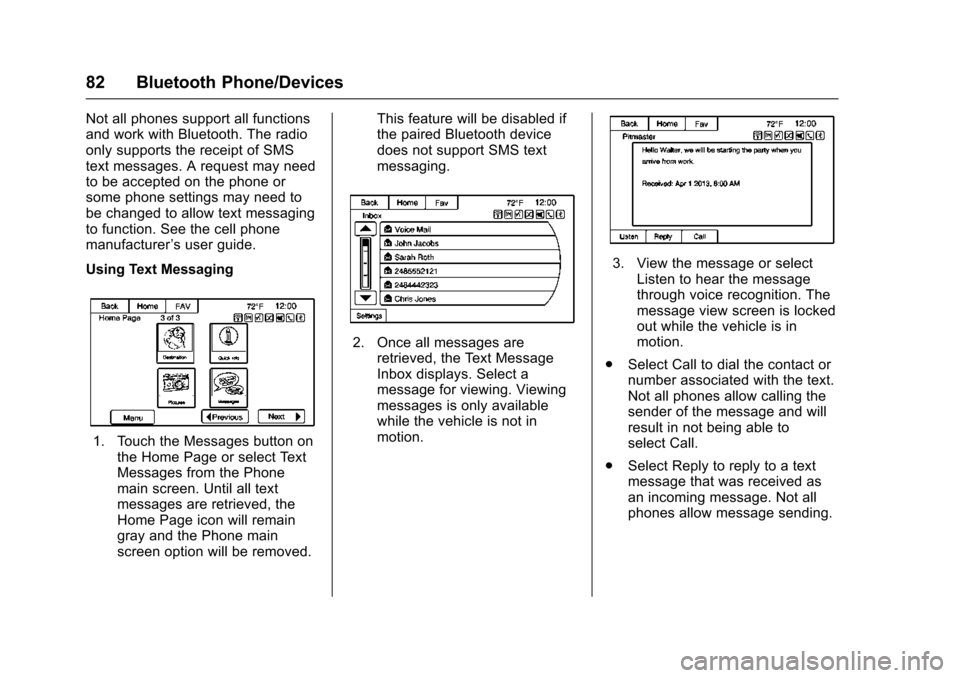
1. Touch the Messages button on the Home Page or select Text
Messages from the Phone
main screen. Until all text
messages are retrieved, the
Home Page icon will remain
gray and the Phone main
screen option will be removed. This feature will be disabled if
the paired Bluetooth device
does not support SMS text
messaging.
2. Once all messages are
retrieved, the Text Message
Inbox displays. Select a
message for viewing. Viewing
messages is only available
while the vehicle is not in
motion.
3. View the message or selectListen to hear the message
through voice recognition. The
message view screen is locked
out while the vehicle is in
motion.
. Select Call to dial the contact or
number associated with the text.
Not all phones allow calling the
sender of the message and will
result in not being able to
select Call.
. Select Reply to reply to a text
message that was received as
an incoming message. Not all
phones allow message sending.
Page 86 of 94
Chevrolet Malibu Limited/Cruze Limited MyLink Infotainment System
(GMNA-Localizing-U.S./Canada-9282853) - 2016 - crc - 4/16/15
Trademarks and License Agreements 85
Trademarks and
License Agreements
FCC Information
See“Radio Frequency Statement”
in the owner manual.
“Made for iPod,” and“Made for
iPhone,” mean that an electronic
accessory has been designed to
connect specifically to iPod or
iPhone and has been certified by
the developer to meet Apple
performance standards. Apple is not
responsible for the operation of this
device or its compliance with safety
and regulatory standards. Please
note that the use of this accessory
with iPod or iPhone may affect
wireless performance. iPhone
®,
iPod®, iPod classic®, iPod nano®, iPod shuffle
®, and iPod touch®are
trademarks of Apple Inc., registered
in the U.S. and other countries.
Fees and Taxes: Subscription fee,
taxes, one time activation fee, and
other fees may apply. Subscription
fee is consumer only. All fees and
programming subject to change.
Subscriptions subject to Customer
Agreement available at
www.siriusxm.com. SiriusXM
®
service only available in the
48 contiguous United States and
Canada.
In Canada: Some deterioration of
service may occur in extreme
northern latitudes. This is beyond
the control of SiriusXM
®Satellite
Radio.
Explicit Language Notice: Channels
with frequent explicit language are
indicated with an “XL”preceding the channel name. Channel blocking is
available for SiriusXM Satellite
Radio receivers by notifying
SiriusXM:
.
USA: 866-635-2349 or see
www.siriusxm.com.
. Canada: 877-209-0079 or see
www.xmradio.ca.
It is prohibited to copy, decompile,
disassemble, reverse engineer,
hack, manipulate, or otherwise
make available any technology or
software incorporated in receivers
compatible with the SiriusXM
Satellite Radio System or that
support the SiriusXM website, the
Online Service or any of its content.
Furthermore, the AMBER voice
compression software included in
this product is protected by
intellectual property rights including
patent rights, copyrights, and trade
secrets of Digital Voice
Systems, Inc.
General Requirements:
1. A License Agreement from SiriusXM is required for any
product that incorporates
Page 87 of 94
Chevrolet Malibu Limited/Cruze Limited MyLink Infotainment System
(GMNA-Localizing-U.S./Canada-9282853) - 2016 - crc - 4/16/15
86 Trademarks and License Agreements
SiriusXM Technology and/or for
use of any of the SiriusXM
marks to be manufactured,
distributed, or marketed in the
SiriusXM Service Area.
2. For products to be distributed, marketed, and/or sold in
Canada, a separate agreement
is required with Canadian
Satellite Radio Inc. (operating
as XM Canada).
Gracenote
Gracenote®, Gracenote logo and
logotype, and the "Powered by
Gracenote" logo are either a
registered trademark or a trademark
of Gracenote, Inc. in the United
States and/or other countries.
Bluetooth
The Bluetooth®word mark and
logos are owned by the Bluetooth®
SIG, Inc. and any use of such marks
by General Motors is under license.
Other trademarks and trade names
are those of their respective owners.
Pandora (If Equipped)
Pandora is a registered trademark
of Pandora Media, Inc., used under
license.
Map End User License
Agreement (Optional
Equipment Applies Where
Equipped)
END USER TERMS
The Map Data Disc (“Data”) is
provided for your personal, internal
use only and not for resale. It is
protected by copyright, and is
subject to the following terms (this
“End User License Agreement”) and
conditions which are agreed to by
you, on the one hand, and HERE
North America, LLC (“HERE”) and
its licensors (including their
licensors and suppliers) on the
other hand.
The Data for areas of Canada
includes information taken with
permission from Canadian
authorities, including: © Her Majesty
the Queen in Right of Canada, © Queen's Printer for Ontario,
© Canada Post Corporation,
GeoBase
®.
HERE holds a nonexclusive license
from the United States Postal
Service
®to publish and sell ZIP+4®
information.
© United States Postal Service
®
2015. Prices are not established,
controlled, or approved by the
United States Postal Service
®. The
following trademarks and
registrations are owned by the
USPS: United States Postal
Service, USPS, and ZIP+4.
In addition, the Lonely Planet Travel
Guide content is subject to the
following supplier notices (if
equipped):
© 2015 Lonely Planet Publications
Pty Ltd. All rights reserved.
PANASONIC and its content
providers have tried to make this
information as accurate as possible,
but it is provided “as is”and
PANASONIC and its content
providers accept no responsibility
for any loss, injury or inconvenience
Page 88 of 94
Chevrolet Malibu Limited/Cruze Limited MyLink Infotainment System
(GMNA-Localizing-U.S./Canada-9282853) - 2016 - crc - 4/16/15
Trademarks and License Agreements 87
resulting from this information. You
should verify critical information (like
visas, health and safety) before you
travel.
TERMS AND CONDITIONS
Personal Use Only. You agree to
use this Data together with the
General Motors MyLink or IntelliLink
Connected Navigation Radio
Platform for the solely personal,
non-commercial purposes for which
you were licensed, and not for
service bureau, time-sharing or
other similar purposes. Accordingly,
but subject to the restrictions set
forth in the following paragraphs,
you agree not to otherwise
reproduce, copy, modify, decompile,
disassemble, create any derivative
works of, or reverse engineer any
portion of this Data, and may not
transfer or distribute it in any form,
for any purpose, except to the
extent permitted by mandatory laws.
Restrictions
Except where you have been
specifically licensed to do so by
PANASONIC, and without limiting
the preceding paragraph, you maynot (a) use this Data with any
products, systems, or applications
installed or otherwise connected to
or in communication with vehicles,
capable of vehicle navigation,
positioning, dispatch, real time route
guidance, fleet management or
similar applications; or (b) with or in
communication with any positioning
devices or any mobile or
wireless-connected electronic or
computer devices, including without
limitation cellular phones, palmtop
and handheld computers, pagers,
and personal digital assistants
or PDAs
Warning
The Data may contain inaccurate or
incomplete information due to the
passage of time, changing
circumstances, sources used and
the nature of collecting
comprehensive geographic data,
any of which may lead to incorrect
results.
No Warranty
This Data is provided to you
“as is,”
and you agree to use it at your own
risk. PANASONIC and its licensors (and their licensors and suppliers)
make no guarantees,
representations or warranties of any
kind, express or implied, arising by
law or otherwise, including but not
limited to, content, quality, accuracy,
completeness, effectiveness,
reliability, fitness for a particular
purpose, usefulness, use or results
to be obtained from this Data,
or that the Data or server will be
uninterrupted or error-free.
Disclaimer of Warranty
PANASONIC AND ITS LICENSORS
(INCLUDING THEIR LICENSORS
AND SUPPLIERS) DISCLAIM ANY
WARRANTIES, EXPRESS OR
IMPLIED, OF QUALITY,
PERFORMANCE,
MERCHANTABILITY, FITNESS
FOR A PARTICULAR PURPOSE
OR NON-INFRINGEMENT. Some
States, Territories and Countries do
not allow certain warranty
exclusions, so to that extent the
above exclusion may not apply
to you.
Page 91 of 94

Chevrolet Malibu Limited/Cruze Limited MyLink Infotainment System
(GMNA-Localizing-U.S./Canada-9282853) - 2016 - crc - 4/16/15
90 Index
IndexA
Accepting or Declining a Call . . . . 79
Adding or Removing XMCategories . . . . . . . . . . . . . . . . . . . . . 19
Agreements
Trademarks and License . . . . . . . . 85
Alpha-Numeric Keyboard . . . . . . . . 51
AM . . . . . . . . . . . . . . . . . . . . . . . . . . . . . . 23
AM-FM Radio . . . . . . . . . . . . . . . . . . . . 15
Antenna Multi-band. . . . . . . . . . . . . . . . . . . . . . . 23
Audio Bluetooth. . . . . . . . . . . . . . . . . . . . . . . . 42
Audio Players
CD . . . . . . . . . . . . . . . . . . . . . . . . . . . . . . 34
Audio System . . . . . . . . . . . . . . . . . . . . 75
Autostore . . . . . . . . . . . . . . . . . . . . . . . . . 8
Auxiliary Devices . . . . . . . . . . . . . . . . . . . . . . . . . 41
B
Bluetooth . . . . . . . . . . . . . . . . . . . . 75, 86
Bluetooth Audio . . . . . . . . . . . . . . . . . 42
Bluetooth Controls . . . . . . . . . . . . . . . 75
C
Call Waiting Using Steering
Wheel Controls . . . . . . . . . . . . . . . . . 79
Call Waiting Using the Infotainment Controls . . . . . . . . . . 79
Canceling Voice Recognition . . . . 68
CD Player . . . . . . . . . . . . . . . . . . . . . . . 34
Cellular Phone Usage . . . . . . . . . . . 23
Cleaning High Gloss Surfaces and Vehicle Information and
Radio Displays . . . . . . . . . . . . . . . . . 14
Clearing the System . . . . . . . . . . . . . 81
Conference Calling Using the Infotainment Controls . . . . . . . . . . 79
Configure Menu . . . . . . . . . . . . . . . . . 60
Controls Steering Wheel. . . . . . . . . . . . . . . . . . . 9
Coverage Explanations . . . . . . . . . . 67
Customer Assistance . . . . . . . . . . . . . 3
D
Database Coverage Explanations . . . . . . . . . . . . . . . . . . . 67
Destination . . . . . . . . . . . . . . . . . . . . . . 50
Destination Download
OnStar
®. . . . . . . . . . . . . . . . . . . . . . . . . 59
Detailed Areas . . . . . . . . . . . . . . . . . . . 48
Page 92 of 94

Chevrolet Malibu Limited/Cruze Limited MyLink Infotainment System
(GMNA-Localizing-U.S./Canada-9282853) - 2016 - crc - 4/16/15
Index 91
DevicesAuxiliary. . . . . . . . . . . . . . . . . . . . . . . . . 41
USB. . . . . . . . . . . . . . . . . . . . . . . . . . . . . 35
Display Settings . . . . . . . . . . . . . . . . . 65
Driving on a Route . . . . . . . . . . . . . . . 50
Dual Tone Multi-Frequency (DTMF) Tones . . . . . . . . . . . . . . . . . . 80
E
Ending a Call . . . . . . . . . . . . . . . . . . . . 80
Error Messages . . . . . . . . . . . . . . . . . 35
F
Finding a Station . . . . . . . . . . . . . . . . 16
FM . . . . . . . . . . . . . . . . . . . . . . . . . . . . . . 23
G
Global Positioning
System (GPS) . . . . . . . . . . . . . . . . . . 65
Gracenote . . . . . . . . . . . . . . . . . . . . . . . 86
Gracenote
®. . . . . . . . . . . . . . . . . . . . . . 35
Guidance Problems with the Route . . . . . . . . 66
H
Hands-Free Phone . . . . . . . . . . . . . . 80
Helpful Hints for SpeakingCommands . . . . . . . . . . . . . . . . . . . . . 68
Home Page . . . . . . . . . . . . . . . . . . . . . . . 9
Home Page Customization . . . . . . 10
Home Page Features . . . . . . . . . . . . 10
I
If the System Needs Service . . . . . 67
Information Quick. . . . . . . . . . . . . . . . . . . . . . . . . . . . 24
Infotainment . . . . . . . . . . . . . . . . . . . . . . 2
Infotainment Control Buttons . . . . . . 6
Infotainment System Overview . . . 3
Infotainment System Settings . . . . 15
Internet Radio Pandora. . . . . . . . . . . . . . . . . . . . . . . . . 24
Stitcher. . . . . . . . . . . . . . . . . . . . . . . . . . 29
L
Languages . . . . . . . . . . . . . . . . . . . . . . 60
Launching Pandora . . . . . . . . . . . . . . 25
Launching Stitcher . . . . . . . . . . . . . . . 29
Loading and Ejecting Discs . . . . . . 34
M
Making a Call Using PhoneBook and Infotainment
Controls . . . . . . . . . . . . . . . . . . . . . . . . 78
Making a Call Using the Infotainment Controls . . . . . . . . . . 79
Map Adjustments . . . . . . . . . . . . . . . . 47
Map Data Updates . . . . . . . . . . . . . . . 67 Map End User License
Agreement (Optional
Equipment Applies Where
Equipped) . . . . . . . . . . . . . . . . . . . . . . 86
Map Scales . . . . . . . . . . . . . . . . . . . . . . 47
Maps . . . . . . . . . . . . . . . . . . . . . . . . . . . . 48
Menu Configure. . . . . . . . . . . . . . . . . . . . . . . . 60
Menu with Route Guidance Active . . . . . . . . . . . . . . . . . . . . . . . . . . 57
Messaging
Text . . . . . . . . . . . . . . . . . . . . . . . . . . . . . 81
Mixed-Band Presets . . . . . . . . . . . . . 17
Multi-band Antenna . . . . . . . . . . . . . . 23
Muting a Call . . . . . . . . . . . . . . . . . . . . 80
My Media Commands . . . . . . . . . . . 70
N
Navigation Destination. . . . . . . . . . . . . . . . . . . . . . 50
Using the System . . . . . . . . . . . . . . . 45
Navigation Commands (If Equipped) . . . . . . . . . . . . . . . . . . . . . . 71
Navigation Settings . . . . . . . . . . . . . . 62
Navigation Settings Button . . . . . . 62
Navigation Symbols . . . . . . . . . . . . . 48
Page 93 of 94

Chevrolet Malibu Limited/Cruze Limited MyLink Infotainment System
(GMNA-Localizing-U.S./Canada-9282853) - 2016 - crc - 4/16/15
92 Index
O
OnStar System . . . . . . . . . . . . . . . . . . 44
OnStar®Destination
Download . . . . . . . . . . . . . . . . . . . . . . 59
OnStar
®with 4G LTE . . . . . . . . . . . . 44
Other Commands . . . . . . . . . . . . . . . . 71
Overview . . . . . . . . . . . . . . . . . . . . . .2, 75
P
Pairing with Infotainment Controls . . . . . . . . . . . . . . . . . . . . . . . . 76
Pairing with Voice Recognition . . . 77
Pandora (If Equipped) . . . . . . . . . . . 86
Pandora Internet Radio . . . . . . . . . . 24
Pandora Troubleshooting . . . . . . . . 27
Phone Commands . . . . . . . . . . . . . . . 70
Phone Settings . . . . . . . . . . . . . . . . . . 62
Pictures . . . . . . . . . . . . . . . . . . . . . . . . . 32
Playing an Audio CD . . . . . . . . . . . . 34
Playing from a USB . . . . . . . . . . . . . . 35
Playing from an iPhone or iPad
®. . . . . . . . . . . . . . . . . . . . . . . . 40
Playing from an iPod®. . . . . . . . . . . 39
Playing the Radio . . . . . . . . . . . . . . . . 15
Positioning
Vehicle . . . . . . . . . . . . . . . . . . . . . . . . . . 66
Problems with Route Guidance . . . . . . . . . . . . . . . . . . . . . . 66
Q
Quick Info . . . . . . . . . . . . . . . . . . . . . . . 24
R
Radio Commands . . . . . . . . . . . . . . . 69
Radio Data System (RDS) . . . . . . . 17
Radio Reception . . . . . . . . . . . . . . . . . 23
Radio Settings . . . . . . . . . . . . . . . . . . . 61
RadiosAM-FM Radio . . . . . . . . . . . . . . . . . . . 15
Satellite . . . . . . . . . . . . . . . . . . . . . . . . . 18
Recognition Voice. . . . . . . . . . . . . . . . . . . . . . . . . . . . 68
Route Options . . . . . . . . . . . . . . . . . . . 57
S
Satellite Radio . . . . . . . . . . . . . . . . . . . 18
Scroll Features . . . . . . . . . . . . . . . . . . 48
Servicing System . . . . . . . . . . . . . . . . 67
Settings Commands . . . . . . . . . . . . . 71
SiriusXM Categories . . . . . . . . . . . . . 18
SiriusXM NavTraffic
®(If
Equipped) . . . . . . . . . . . . . . . . . . . . . . 19
SiriusXM Travel Link (If Available) . . . . . . . . . . . . . . . . . . . . . . 20
SiriusXM
®Satellite Radio . . . . . . . . 18
SiriusXM®Satellite Radio
Service . . . . . . . . . . . . . . . . . . . . . . . . . 23 Software Updates . . . . . . . . . . . . . . . 14
Steering Wheel Controls . . . . . . . . . . 9
Stitcher Internet Radio . . . . . . . . . . . 29
Stitcher Troubleshooting . . . . . . . . . 31
Storing Radio Station Presets . . . 17
Symbols
Navigation. . . . . . . . . . . . . . . . . . . . . . . 48
System Global Positioning. . . . . . . . . . . . . . . 65
Infotainment. . . . . . . . . . . . . . . . . . . . . . 2
T
Text Messaging . . . . . . . . . . . . . . . . . . 81
Time and Date . . . . . . . . . . . . . . . . . . . 61
Touch Screen Buttons . . . . . . . . . . . . 8
Trademarks and LicenseAgreements . . . . . . . . . . . . . . . . . . . . 85
Transferring a Call . . . . . . . . . . . . . . . 80
TuneSelect . . . . . . . . . . . . . . . . . . . . . . 18
U
Updates Map Data . . . . . . . . . . . . . . . . . . . . . . . 67
Software . . . . . . . . . . . . . . . . . . . . . . . . 14
USB . . . . . . . . . . . . . . . . . . . . . . . . . . . . . 35
USB Media Formats . . . . . . . . . . . . . 35
USB Troubleshooting . . . . . . . . . . . . 41
Using Destination Download . . . . . 59
Using the Navigation System . . . . 45