horn CHEVROLET MALIBU 2016 8.G User Guide
[x] Cancel search | Manufacturer: CHEVROLET, Model Year: 2016, Model line: MALIBU, Model: CHEVROLET MALIBU 2016 8.GPages: 420, PDF Size: 7.86 MB
Page 156 of 420
Chevrolet Malibu Owner Manual (GMNA-Localizing-U.S./Canada/Mexico-
9087641) - 2016 - crc - 9/3/15
Instruments and Controls 155
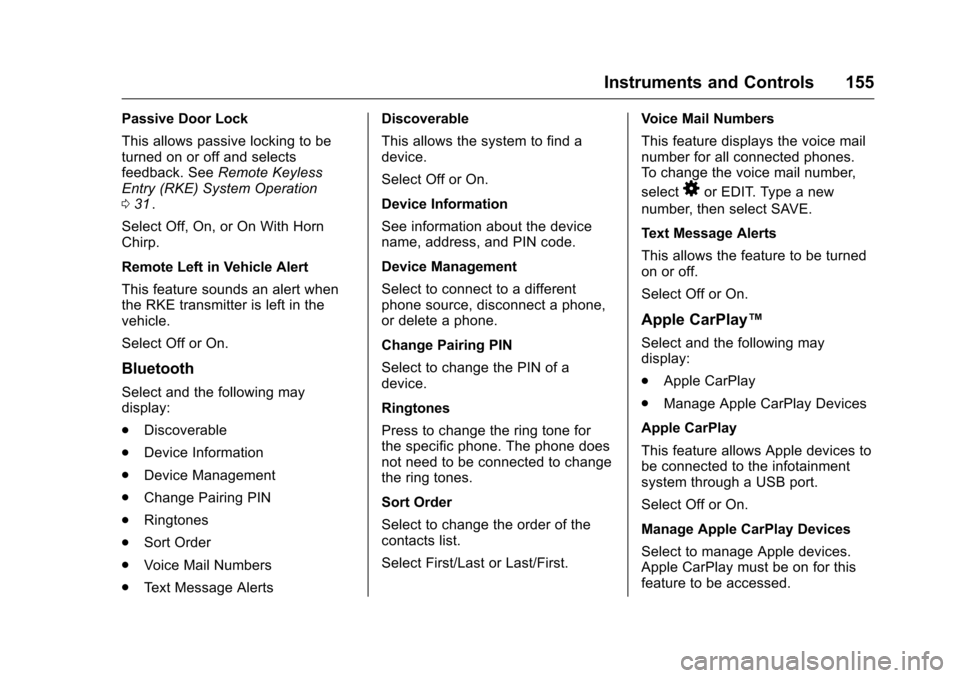
Passive Door Lock
This allows passive locking to be
turned on or off and selects
feedback. SeeRemote Keyless
Entry (RKE) System Operation
0 31
ii.
Select Off, On, or On With Horn
Chirp.
Remote Left in Vehicle Alert
This feature sounds an alert when
the RKE transmitter is left in the
vehicle.
Select Off or On.
Bluetooth
Select and the following may
display:
. Discoverable
. Device Information
. Device Management
. Change Pairing PIN
. Ringtones
. Sort Order
. Voice Mail Numbers
. Text Message Alerts Discoverable
This allows the system to find a
device.
Select Off or On.
Device Information
See information about the device
name, address, and PIN code.
Device Management
Select to connect to a different
phone source, disconnect a phone,
or delete a phone.
Change Pairing PIN
Select to change the PIN of a
device.
Ringtones
Press to change the ring tone for
the specific phone. The phone does
not need to be connected to change
the ring tones.
Sort Order
Select to change the order of the
contacts list.
Select First/Last or Last/First.
Voice Mail Numbers
This feature displays the voice mail
number for all connected phones.
To change the voice mail number,
select
8or EDIT. Type a new
number, then select SAVE.
Text Message Alerts
This allows the feature to be turned
on or off.
Select Off or On.
Apple CarPlay™
Select and the following may
display:
. Apple CarPlay
. Manage Apple CarPlay Devices
Apple CarPlay
This feature allows Apple devices to
be connected to the infotainment
system through a USB port.
Select Off or On.
Manage Apple CarPlay Devices
Select to manage Apple devices.
Apple CarPlay must be on for this
feature to be accessed.
Page 315 of 420
Chevrolet Malibu Owner Manual (GMNA-Localizing-U.S./Canada/Mexico-
9087641) - 2016 - crc - 9/3/15
314 Vehicle Care
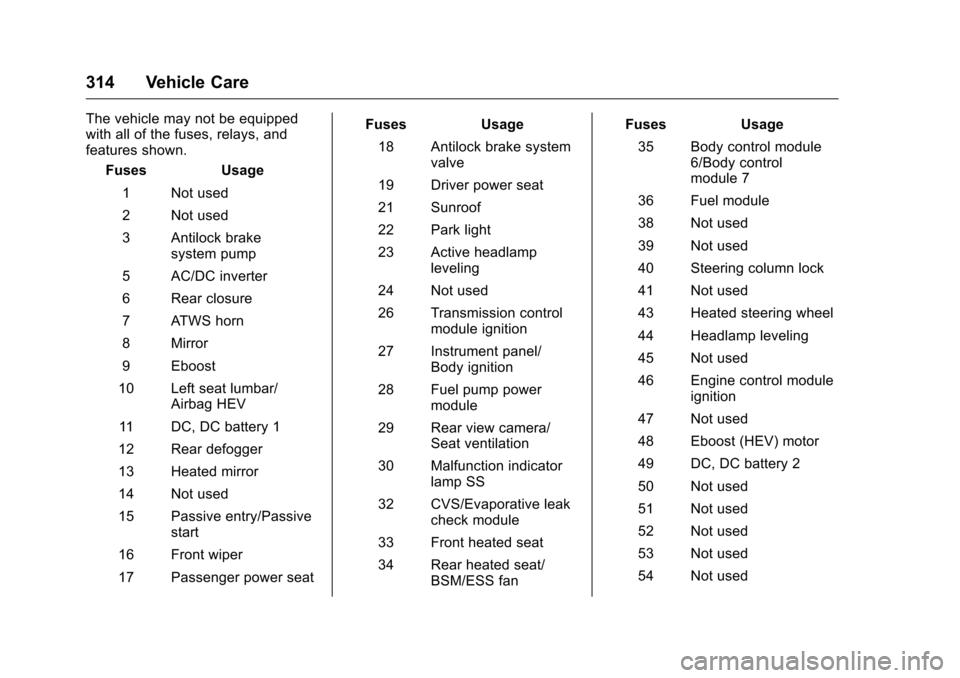
The vehicle may not be equipped
with all of the fuses, relays, and
features shown.Fuses Usage
1 Not used
2 Not used
3 Antilock brake system pump
5 AC/DC inverter
6 Rear closure
7 ATWS horn
8 Mirror
9 Eboost
10 Left seat lumbar/ Airbag HEV
11 DC, DC battery 1
12 Rear defogger
13 Heated mirror
14 Not used
15 Passive entry/Passive start
16 Front wiper
17 Passenger power seat Fuses Usage
18 Antilock brake system valve
19 Driver power seat
21 Sunroof
22 Park light
23 Active headlamp leveling
24 Not used
26 Transmission control module ignition
27 Instrument panel/ Body ignition
28 Fuel pump power module
29 Rear view camera/ Seat ventilation
30 Malfunction indicator lamp SS
32 CVS/Evaporative leak check module
33 Front heated seat
34 Rear heated seat/ BSM/ESS fan Fuses Usage
35 Body control module 6/Body control
module 7
36 Fuel module
38 Not used
39 Not used
40 Steering column lock
41 Not used
43 Heated steering wheel
44 Headlamp leveling
45 Not used
46 Engine control module ignition
47 Not used
48 Eboost (HEV) motor
49 DC, DC battery 2
50 Not used
51 Not used
52 Not used
53 Not used
54 Not used
Page 316 of 420
Chevrolet Malibu Owner Manual (GMNA-Localizing-U.S./Canada/Mexico-
9087641) - 2016 - crc - 9/3/15
Vehicle Care 315
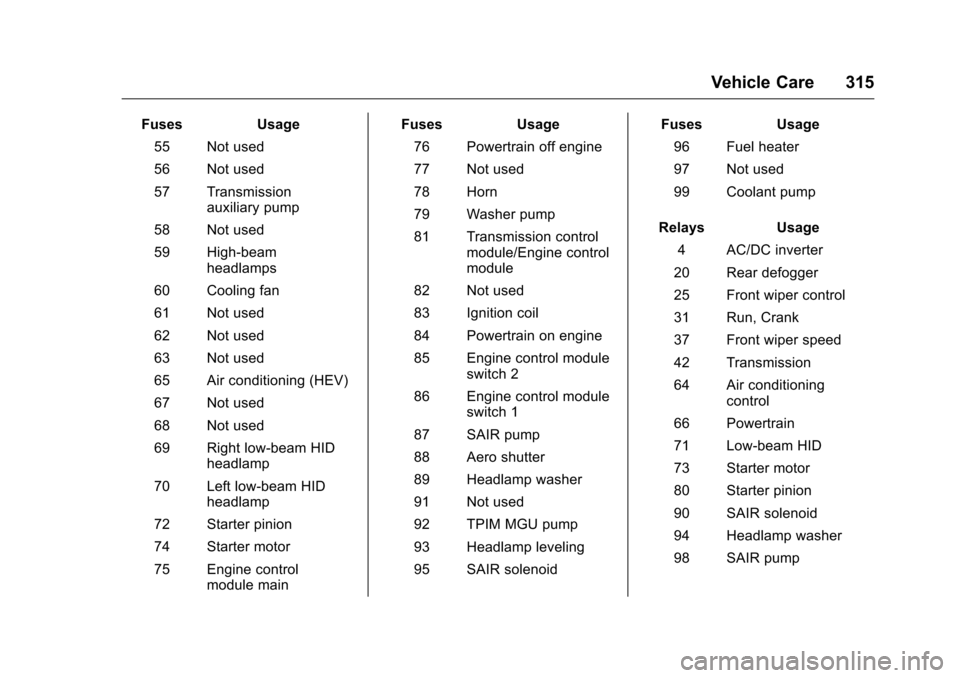
FusesUsage
55 Not used
56 Not used
57 Transmission auxiliary pump
58 Not used
59 High-beam headlamps
60 Cooling fan
61 Not used
62 Not used
63 Not used
65 Air conditioning (HEV)
67 Not used
68 Not used
69 Right low-beam HID headlamp
70 Left low-beam HID headlamp
72 Starter pinion
74 Starter motor
75 Engine control module main Fuses
Usage
76 Powertrain off engine
77 Not used
78 Horn
79 Washer pump
81 Transmission control module/Engine control
module
82 Not used
83 Ignition coil
84 Powertrain on engine
85 Engine control module switch 2
86 Engine control module switch 1
87 SAIR pump
88 Aero shutter
89 Headlamp washer
91 Not used
92 TPIM MGU pump
93 Headlamp leveling
95 SAIR solenoid Fuses
Usage
96 Fuel heater
97 Not used
99 Coolant pump
Relays Usage
4 AC/DC inverter
20 Rear defogger
25 Front wiper control
31 Run, Crank
37 Front wiper speed
42 Transmission
64 Air conditioning control
66 Powertrain
71 Low-beam HID
73 Starter motor
80 Starter pinion
90 SAIR solenoid
94 Headlamp washer
98 SAIR pump
Page 331 of 420
Chevrolet Malibu Owner Manual (GMNA-Localizing-U.S./Canada/Mexico-
9087641) - 2016 - crc - 9/3/15
330 Vehicle Care
could prevent the TPMS from
functioning properly. SeeBuying
New Tires 0333
ii.
. Operating electronic devices or
being near facilities using radio
wave frequencies similar to the
TPMS could cause the TPMS
sensors to malfunction.
If the TPMS is not functioning
properly it cannot detect or signal a
low tire condition. See your dealer
for service if the TPMS malfunction
light and DIC message comes on
and stays on.
TPMS Sensor Matching
Process
Each TPMS sensor has a unique
identification code. The identification
code needs to be matched to a new
tire/wheel position after rotating the
vehicle’s tires or replacing one or
more of the TPMS sensors. The
TPMS sensor matching process
should also be performed after
replacing a spare tire with a road
tire containing the TPMS sensor.
The malfunction light and the DIC
message should go off at the next
ignition cycle. The sensors are matched to the tire/wheel positions,
using a TPMS relearn tool, in the
following order: driver side front tire,
passenger side front tire, passenger
side rear tire, and driver side rear.
See your dealer for service or to
purchase a relearn tool. A TPMS
relearn tool can also be purchased.
See Tire Pressure Monitor Sensor
Activation Tool at
www.gmtoolsandequipment.com or
call 1-800-GM TOOLS
(1-800-468-6657).
There are two minutes to match the
first tire/wheel position, and
five minutes overall to match all four
tire/wheel positions. If it takes
longer, the matching process stops
and must be restarted.
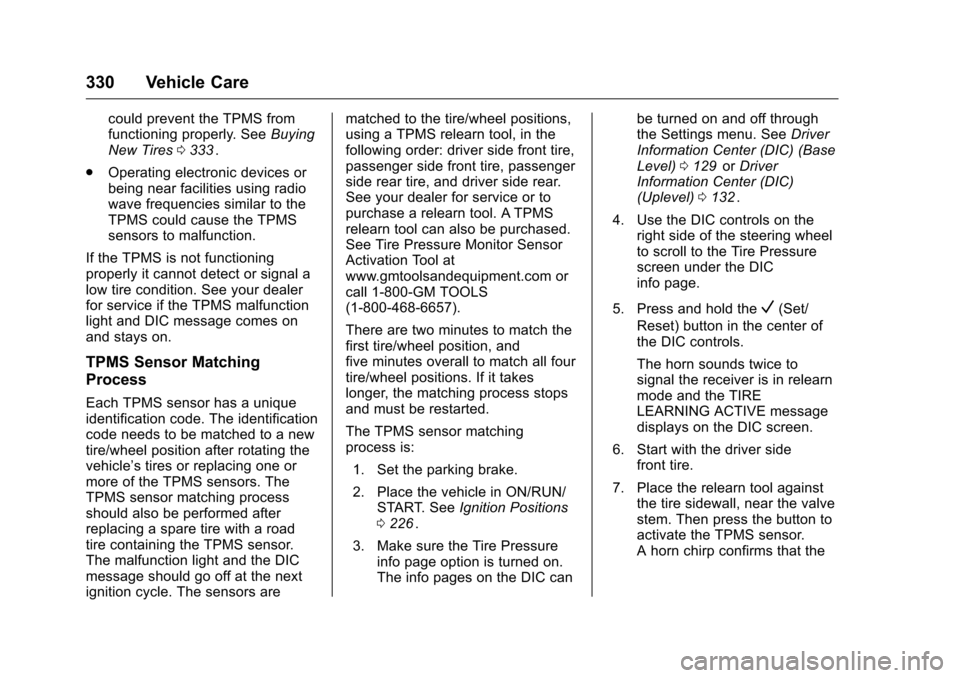
The TPMS sensor matching
process is:
1. Set the parking brake.
2. Place the vehicle in ON/RUN/ START. See Ignition Positions
0 226
ii.
3. Make sure the Tire Pressure info page option is turned on.
The info pages on the DIC can be turned on and off through
the Settings menu. See
Driver
Information Center (DIC) (Base
Level) 0129
iior Driver
Information Center (DIC)
(Uplevel) 0132
ii.
4. Use the DIC controls on the right side of the steering wheel
to scroll to the Tire Pressure
screen under the DIC
info page.
5. Press and hold the
V(Set/
Reset) button in the center of
the DIC controls.
The horn sounds twice to
signal the receiver is in relearn
mode and the TIRE
LEARNING ACTIVE message
displays on the DIC screen.
6. Start with the driver side front tire.
7. Place the relearn tool against the tire sidewall, near the valve
stem. Then press the button to
activate the TPMS sensor.
A horn chirp confirms that the
Page 332 of 420
Chevrolet Malibu Owner Manual (GMNA-Localizing-U.S./Canada/Mexico-
9087641) - 2016 - crc - 9/3/15
Vehicle Care 331
sensor identification code has
been matched to this tire and
wheel position.
8. Proceed to the passenger side front tire, and repeat the
procedure in Step 7.
9. Proceed to the passenger side rear tire, and repeat the
procedure in Step 7.
10. Proceed to the driver side rear tire, and repeat the procedure
in Step 7. The horn sounds two
times to indicate the sensor
identification code has been
matched to the driver side rear
tire, and the TPMS sensor
matching process is no longer
active. The TIRE LEARNING
ACTIVE message on the DIC
display screen goes off.
11. Turn the ignition off.
12. Set all four tires to the recommended air pressure
level as indicated on the Tire
and Loading Information label.Tire Inspection
We recommend that the tires,
including the spare tire, if the
vehicle has one, be inspected
for signs of wear or damage at
least once a month.
Replace the tire if:
.The indicators at three or
more places around the tire
can be seen.
.There is cord or fabric
showing through the tire's
rubber.
.The tread or sidewall is
cracked, cut, or snagged
deep enough to show cord or
fabric.
.The tire has a bump, bulge,
or split.
.The tire has a puncture, cut,
or other damage that cannot
be repaired well because of
the size or location of the
damage.
Tire Rotation
Tires should be rotated every
12 000 km (7,500 mi). See
Maintenance Schedule 0368
ii.
Tires are rotated to achieve a
more uniform wear for all tires.
The first rotation is the most
important.
Anytime unusual wear is
noticed, rotate the tires as soon
as possible, check for proper tire
inflation pressure, and check for
damaged tires or wheels. If the
unusual wear continues after the
rotation, check the wheel
alignment. See When It Is Time
for New Tires 0332
iiand Wheel
Replacement 0336
ii.
Page 402 of 420
Chevrolet Malibu Owner Manual (GMNA-Localizing-U.S./Canada/Mexico-
9087641) - 2016 - crc - 9/3/15
OnStar 401
(no Internet connection, 3G,
4G, 4G LTE), and signal quality
(poor, good, excellent).
3. To change the SSID or password, press
Qor call
1-888-4ONSTAR to connect
with an Advisor.
OnStar RemoteLink
®Mobile App
(If Equipped)
Download the OnStar RemoteLink
mobile app to select Apple
®iOS,
Android™, BlackBerry®,
or Windows®mobile devices.
OnStar Subscribers can access the
following services from a mobile
device:
. Remotely start/stop the vehicle,
if factory-equipped.
. Lock/unlock doors, if equipped
with automatic locks.
. Activate the horn and lamps.
. Check the vehicle’s fuel level, oil
life, or tire pressure,
if factory-equipped with the Tire
Pressure Monitor System.
. Send directions to the vehicle. .
Locate the vehicle on a map
(U.S. market only).
. Turn the vehicle's Wi-Fi hotspot
on/off, manage settings, and
monitor data consumption,
if equipped.
For OnStar RemoteLink information
and compatibility, see
www.onstar.com (U.S.) or
www.onstar.ca (Canada).
Remote Services
Contact an OnStar Advisor to
unlock the doors or sound the horn
and flash the lamps.
OnStar AtYourService
OnStar Advisors can provide special
offers from restaurants and retailers
on your route, help locate hotels,
or book a room.
OnStar Hands-Free Calling
Make and receive calls with the
built-in wireless calling service,
which requires available minutes. Make a Call
1. Press
=. System responds:
“OnStar ready.”
2. Say “Call.”System responds:
“Call. Please say the name or
number to call.”
3. Say the entire number without pausing, including a “1”and the
area code. System responds:
“OK, calling.”
Calling 911 Emergency
1. Press=. System responds:
“OnStar ready.”
2. Say “Call.”System responds:
“Call. Please say the name or
number to call.”
3. Say “911”without pausing.
System responds: “911.”
4. Say “Call.”System responds:
“OK, dialing 911.”
Retrieve My Number
1. Press=. System responds:
“OnStar ready.”
Page 413 of 420
Chevrolet Malibu Owner Manual (GMNA-Localizing-U.S./Canada/Mexico-
9087641) - 2016 - crc - 9/3/15
412 Index
Front Pedestrian Braking(FPB) System . . . . . . . . . . . . . . . . . 261
Front Seats Adjustment . . . . . . . . . . . . . . . . . . . . . 55
Heated and Ventilated . . . . . . . . . . 59
Fuel . . . . . . . . . . . . . . . . . . . . . . . . . . . . 267 Additives . . . . . . . . . . . . . . . . . . . . . 269
Economy Driving . . . . . . . . . . . . . . . 28
Filling a Portable Fuel
Container . . . . . . . . . . . . . . . . . . . 272
Filling the Tank . . . . . . . . . . . . . . . 269
Foreign Countries . . . . . . . . . . . . 269
Gauge . . . . . . . . . . . . . . . . . . . . . . . . .116
Low Fuel Warning Light . . . . . . . 126
Requirements, California . . . . . 268
System Messages . . . . . . . . . . . . 139
Fuses . . . . . . . . . . . . . . . . . . . . . . . . . . 311 Engine Compartment FuseBlock . . . . . . . . . . . . . . . . . . . . . . . . 312
Instrument Panel Fuse Block . . . . . . . . . . . . . . . . . . . . . . . . 316
G
Garage Door Opener . . . . . . . . . . . 157
Programming . . . . . . . . . . . . . . . . . 157
Gauges
Engine CoolantTemperature . . . . . . . . . . . . . . . . .117
Fuel . . . . . . . . . . . . . . . . . . . . . . . . . . .116 Gauges (cont'd)
Odometer . . . . . . . . . . . . . . . . . . . . . .115
Power Indicator . . . . . . . . . . . . . . . .116
Speedometer . . . . . . . . . . . . . . . . . .115
Tachometer . . . . . . . . . . . . . . . . . . . .115
Trip Odometer . . . . . . . . . . . . . . . . .115
Warning Lights and
Indicators . . . . . . . . . . . . . . . . . . . 109
General Information
Service and Maintenance . . . . . 367
Towing . . . . . . . . . . . . . . . . . . . . . . . . 273
Vehicle Care . . . . . . . . . . . . . . . . . . 280
Glove Box . . . . . . . . . . . . . . . . . . . . . . 100
GM Mobility Reimbursement Program . . . . . . . . . . . . . . . . . . . . . . . 387
H
Halogen Bulbs . . . . . . . . . . . . . . . . . . 306
Hands-Free Phone . . . . . . . . . . . . . 192
Hazard Warning Flashers . . . . . . . 164
Head Restraints . . . . . . . . . . . . . . . . . 54
HeadlampsAiming . . . . . . . . . . . . . . . . . . . . . . . . 306
Automatic . . . . . . . . . . . . . . . . . . . . . 163
Bulb Replacement . . . . . . . . . . . . 306
Daytime RunningLamps (DRL) . . . . . . . . . . . . . . . . 163
Flash-to-Pass . . . . . . . . . . . . . . . . . 163 Headlamps (cont'd)
Headlamps, Front Turn
Signal, Sidemarker, and
Parking Lamps . . . . . . . . . . . . . . 306
High-Beam On Light . . . . . . . . . . 127
High/Low Beam Changer . . . . . 163
Lamps On Reminder . . . . . . . . . 127
Heated Steering Wheel . . . . . . . . . . . . . . . 104
Heated and Ventilated Front Seats . . . . . . . . . . . . . . . . . . . . . . . . . . 59
Heated Mirrors . . . . . . . . . . . . . . . . . . . 47
Heater Engine . . . . . . . . . . . . . . . . . . . . . . . . 230
Heating and Air Conditioning . . . 206
High Voltage Devices and Wiring . . . . . . . . . . . . . . . . . . . . . . . . . 310
High-Beam On Light . . . . . . . . . . . . 127
High-Speed Operation . . . . . . . . . . 326
Hill and Mountain Roads . . . . . . . . 220
Hill Start Assist (HSA) . . . . . . . . . . 240
Home Page . . . . . . . . . . . . . . . . . . . . . 172
Hood . . . . . . . . . . . . . . . . . . . . . . . . . . . 282
Horn . . . . . . . . . . . . . . . . . . . . . . . . . . . . 104
How to Wear Safety Belts
Properly . . . . . . . . . . . . . . . . . . . . . . . . 64