power steering CHEVROLET MALIBU 2016 8.G Owners Manual
[x] Cancel search | Manufacturer: CHEVROLET, Model Year: 2016, Model line: MALIBU, Model: CHEVROLET MALIBU 2016 8.GPages: 420, PDF Size: 7.86 MB
Page 6 of 420
Chevrolet Malibu Owner Manual (GMNA-Localizing-U.S./Canada/Mexico-
9087641) - 2016 - crc - 9/3/15
In Brief 5
In Brief
Instrument Panel
Instrument Panel Overview . . . . . . 6
Initial Drive Information
Initial Drive Information . . . . . . . . . . 8
Stop/Start System . . . . . . . . . . . . . . . 8
Remote Keyless Entry (RKE)System . . . . . . . . . . . . . . . . . . . . . . . . 8
Remote Vehicle Start . . . . . . . . . . . 8
Door Locks . . . . . . . . . . . . . . . . . . . . . 9
Windows . . . . . . . . . . . . . . . . . . . . . . . . 9
Seat Adjustment . . . . . . . . . . . . . . . 10
Memory Features . . . . . . . . . . . . . . 12
Second Row Seats . . . . . . . . . . . . 12
Heated and Ventilated Seats . . . 12
Head Restraint Adjustment . . . . 12
Safety Belts . . . . . . . . . . . . . . . . . . . . 13
Passenger Sensing System . . . 13
Mirror Adjustment . . . . . . . . . . . . . . 13
Steering Wheel Adjustment . . . . 14
Interior Lighting . . . . . . . . . . . . . . . . 14
Exterior Lighting . . . . . . . . . . . . . . . 15
Windshield Wiper/Washer . . . . . . 16
Climate Controls . . . . . . . . . . . . . . . 17
Transmission . . . . . . . . . . . . . . . . . . 18
Vehicle Features
Infotainment System . . . . . . . . . . . 19 Radio(s) . . . . . . . . . . . . . . . . . . . . . . . 20
Satellite Radio . . . . . . . . . . . . . . . . . 20
Portable Audio Devices . . . . . . . . 20
Bluetooth
®. . . . . . . . . . . . . . . . . . . . . 20
Steering Wheel Controls . . . . . . . 21
Cruise Control . . . . . . . . . . . . . . . . . 21
Driver Information
Center (DIC) . . . . . . . . . . . . . . . . . 22
Forward Collision Alert (FCA) System . . . . . . . . . . . . . . . . . . . . . . . 22
Front Automatic Braking (FAB) System . . . . . . . . . . . . . . . . . . . . . . . 22
Front Pedestrian Braking (FPB) System . . . . . . . . . . . . . . . . . . . . . . . 23
Lane Keep Assist (LKA) . . . . . . . 23
Lane Change Alert (LCA) . . . . . . 23
Rear Vision Camera (RVC) . . . . 23
Rear Cross Traffic Alert (RCTA) System . . . . . . . . . . . . . . . . . . . . . . . 23
Parking Assist . . . . . . . . . . . . . . . . . 24
Automatic Parking Assist (APA) . . . . . . . . . . . . . . . . . . 24
Power Outlets . . . . . . . . . . . . . . . . . 24
Universal Remote System . . . . . 24
Sunroof . . . . . . . . . . . . . . . . . . . . . . . . 25
Hybrid Features
Hybrid Features . . . . . . . . . . . . . . . 25
High Voltage Safety Information . . . . . . . . . . . . . . . . . . . 26
Regenerative Braking . . . . . . . . . . 26 Battery . . . . . . . . . . . . . . . . . . . . . . . . . 27
Service . . . . . . . . . . . . . . . . . . . . . . . . 27
Performance and Maintenance
Traction Control/Electronic
Stability Control . . . . . . . . . . . . . . 27
Tire Pressure Monitor . . . . . . . . . . 27
Engine Oil Life System . . . . . . . . 28
Driving for Better Fuel Economy . . . . . . . . . . . . . . . . . . . . . 28
Roadside Assistance Program . . . . . . . . . . . . . . . . . . . . . . 29
Page 8 of 420
Chevrolet Malibu Owner Manual (GMNA-Localizing-U.S./Canada/Mexico-
9087641) - 2016 - crc - 9/3/15
In Brief 7
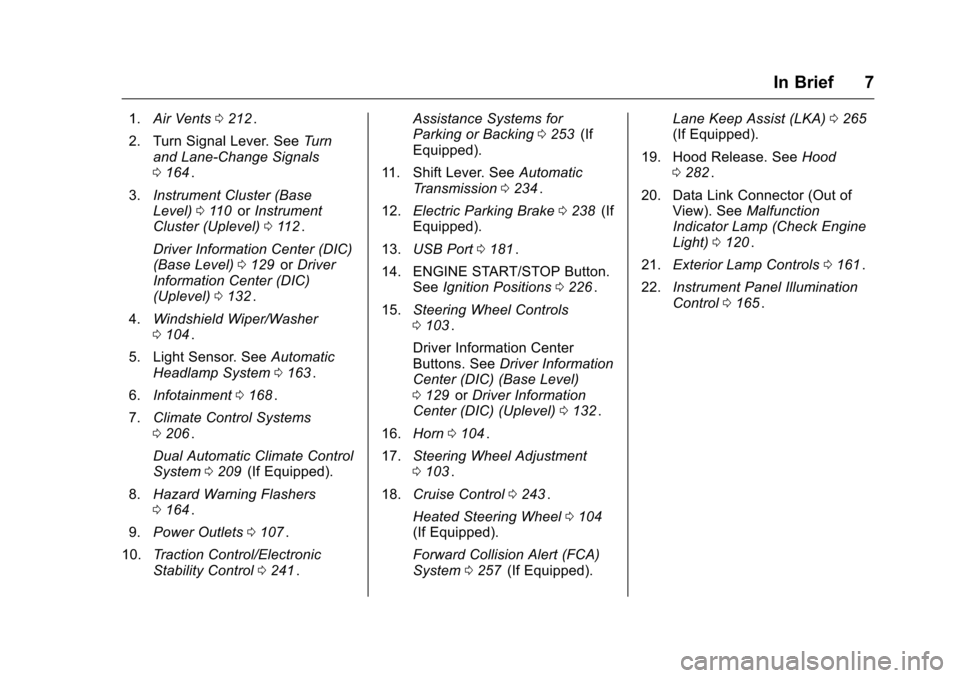
1.Air Vents 0212ii.
2. Turn Signal Lever. See Turn
and Lane-Change Signals
0 164
ii.
3. Instrument Cluster (Base
Level) 0110
iior Instrument
Cluster (Uplevel) 0112ii.
Driver Information Center (DIC)
(Base Level) 0129
iior Driver
Information Center (DIC)
(Uplevel) 0132
ii.
4. Windshield Wiper/Washer
0104
ii.
5. Light Sensor. See Automatic
Headlamp System 0163
ii.
6. Infotainment 0168
ii.
7. Climate Control Systems
0206
ii.
Dual Automatic Climate Control
System 0209
ii(If Equipped).
8. Hazard Warning Flashers
0164
ii.
9. Power Outlets 0107
ii.
10. Traction Control/Electronic
Stability Control 0241
ii. Assistance Systems for
Parking or Backing
0253
ii(If
Equipped).
11. Shift Lever. See Automatic
Transmission 0234
ii.
12. Electric Parking Brake 0238
ii(If
Equipped).
13. USB Port 0181
ii.
14. ENGINE START/STOP Button. SeeIgnition Positions 0226
ii.
15. Steering Wheel Controls
0103
ii.
Driver Information Center
Buttons. See Driver Information
Center (DIC) (Base Level)
0 129
iior Driver Information
Center (DIC) (Uplevel) 0132ii.
16. Horn 0104
ii.
17. Steering Wheel Adjustment
0103
ii.
18. Cruise Control 0243
ii.
Heated Steering Wheel 0104
ii(If Equipped).
Forward Collision Alert (FCA)
System 0257
ii(If Equipped). Lane Keep Assist (LKA)
0265
ii(If Equipped).
19. Hood Release. See Hood
0 282
ii.
20. Data Link Connector (Out of View). See Malfunction
Indicator Lamp (Check Engine
Light) 0120
ii.
21. Exterior Lamp Controls 0161
ii.
22. Instrument Panel Illumination
Control 0165
ii.
Page 13 of 420
Chevrolet Malibu Owner Manual (GMNA-Localizing-U.S./Canada/Mexico-
9087641) - 2016 - crc - 9/3/15
12 In Brief
Memory Features
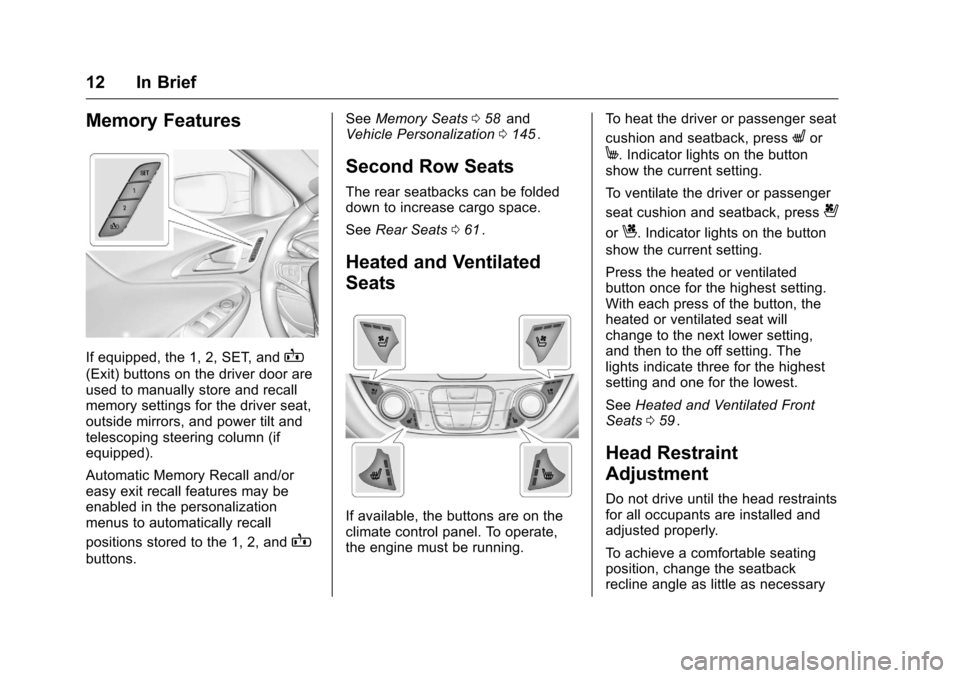
If equipped, the 1, 2, SET, andB
(Exit) buttons on the driver door are
used to manually store and recall
memory settings for the driver seat,
outside mirrors, and power tilt and
telescoping steering column (if
equipped).
Automatic Memory Recall and/or
easy exit recall features may be
enabled in the personalization
menus to automatically recall
positions stored to the 1, 2, and
B
buttons.See
Memory Seats 058
iiand
Vehicle Personalization 0145ii.
Second Row Seats
The rear seatbacks can be folded
down to increase cargo space.
See Rear Seats 061
ii.
Heated and Ventilated
Seats
If available, the buttons are on the
climate control panel. To operate,
the engine must be running. To heat the driver or passenger seat
cushion and seatback, press
Lor
M. Indicator lights on the button
show the current setting.
To ventilate the driver or passenger
seat cushion and seatback, press
{
orC. Indicator lights on the button
show the current setting.
Press the heated or ventilated
button once for the highest setting.
With each press of the button, the
heated or ventilated seat will
change to the next lower setting,
and then to the off setting. The
lights indicate three for the highest
setting and one for the lowest.
See Heated and Ventilated Front
Seats 059
ii.
Head Restraint
Adjustment
Do not drive until the head restraints
for all occupants are installed and
adjusted properly.
To achieve a comfortable seating
position, change the seatback
recline angle as little as necessary
Page 15 of 420
Chevrolet Malibu Owner Manual (GMNA-Localizing-U.S./Canada/Mexico-
9087641) - 2016 - crc - 9/3/15
14 In Brief
Exterior Mirrors
To adjust a mirror:1. Press
}or|to choose the
driver or passenger mirror.
2. Press the arrows on the control pad to move each mirror in the
desired direction.
See Power Mirrors 047
ii.
Steering Wheel
Adjustment
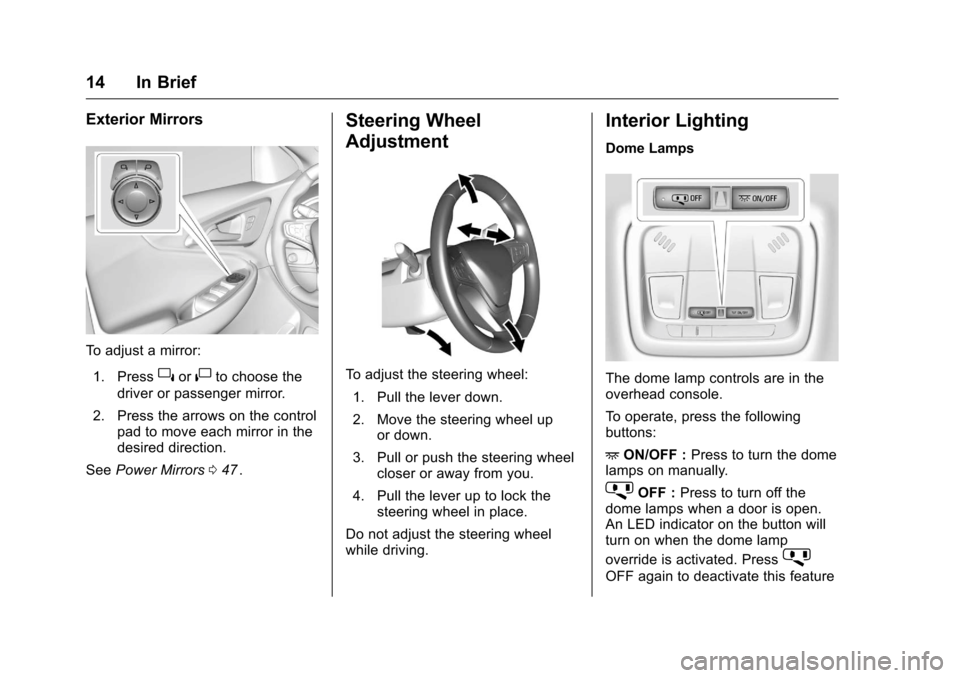
To adjust the steering wheel:
1. Pull the lever down.
2. Move the steering wheel up or down.
3. Pull or push the steering wheel closer or away from you.
4. Pull the lever up to lock the steering wheel in place.
Do not adjust the steering wheel
while driving.
Interior Lighting
Dome Lamps
The dome lamp controls are in the
overhead console.
To operate, press the following
buttons:
+ ON/OFF : Press to turn the dome
lamps on manually.
jOFF : Press to turn off the
dome lamps when a door is open.
An LED indicator on the button will
turn on when the dome lamp
override is activated. Press
j
OFF again to deactivate this feature
Page 20 of 420
Chevrolet Malibu Owner Manual (GMNA-Localizing-U.S./Canada/Mexico-
9087641) - 2016 - crc - 9/3/15
In Brief 19
pedal. L2 (Low 2) provides moderate
braking and L1 (Low 1) provides
maximum braking below 80 km/h
(50 mph). When the battery reaches
full charge the engine may run to
maintain braking.
To use this feature:1. Move the shift lever to L (Low). The transmission will enter
L2 (Low 2).
2. Press + (Plus) or −(Minus) on
the shift lever to shift between
L2 (Low 2) and L1 (Low 1).
See Manual Mode 0235
ii.
Vehicle Features
Infotainment System
Base radio information is included in
this manual. See the infotainment
manual for information on other
available infotainment systems.
Read the following pages to
become familiar with these features.
{Warning
Taking your eyes off the road for
too long or too often while using
any infotainment feature can
cause a crash. You or others
could be injured or killed. Do not
give extended attention to
infotainment tasks while driving.
Limit your glances at the vehicle
displays and focus your attention
on driving. Use voice commands
whenever possible.
The infotainment system has built-in
features intended to help avoid
distraction by disabling some
functions when driving. These functions may gray out when they
are unavailable. Many infotainment
features are also available through
the instrument cluster and steering
wheel controls.
Before driving:
.
Become familiar with the
operation, faceplate buttons, and
screen buttons.
. Set up the audio by presetting
favorite stations, setting the
tone, and adjusting the
speakers.
. Set up phone numbers in
advance so they can be called
easily by pressing a single
button or by using a single voice
command if equipped with
Bluetooth phone capability.
See Defensive Driving 0217
ii.
To play the infotainment system with
the ignition off, see Retained
Accessory Power (RAP) 0231
ii.
Page 25 of 420
Chevrolet Malibu Owner Manual (GMNA-Localizing-U.S./Canada/Mexico-
9087641) - 2016 - crc - 9/3/15
24 In Brief
your vehicle's path while in
R (Reverse). In addition, beeps will
sound.
SeeAssistance Systems for Parking
or Backing 0253
ii.
Parking Assist
If equipped, Front and Rear Parking
Assist (FRPA) uses sensors on the
front and rear bumpers to assist
with parking and avoiding objects
during low-speed parking
maneuvers. It operates at speeds
less than 8 km/h (5 mph). The
system may display a warning
triangle on the RVC screen and a
graphic on the instrument cluster to
provide the object distance. In
addition, multiple beeps may occur
if very close to an object.
See Assistance Systems for Parking
or Backing 0253
ii.
Automatic Parking
Assist (APA)
If equipped, the APA system helps
to search for and maneuver the
vehicle into parallel or perpendicular parking spots using automatic
steering, DIC displays, and beeps.
When the vehicle speed is below
30 km/h (18 mph), press
Oto
enable the system.
See “Automatic Parking Assist
(APA)” underAssistance Systems
for Parking or Backing 0253
ii.
Power Outlets
The accessory power outlets can be
used to plug in electrical equipment,
such as a cell phone or MP3 player.
There are two accessory power
outlets:
.
One on the center stack below
the climate control system.
. One on the rear of the center
floor console.
Open the protective cover to use the
accessory power outlet.
See Power Outlets 0107
ii.
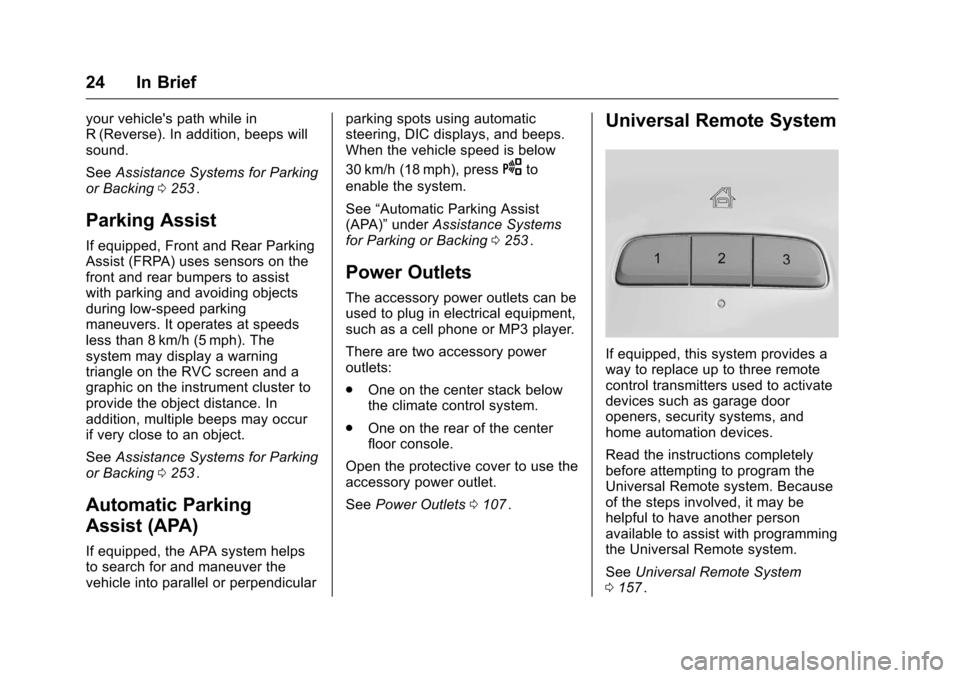
Universal Remote System
If equipped, this system provides a
way to replace up to three remote
control transmitters used to activate
devices such as garage door
openers, security systems, and
home automation devices.
Read the instructions completely
before attempting to program the
Universal Remote system. Because
of the steps involved, it may be
helpful to have another person
available to assist with programming
the Universal Remote system.
See Universal Remote System
0 157
ii.
Page 59 of 420
Chevrolet Malibu Owner Manual (GMNA-Localizing-U.S./Canada/Mexico-
9087641) - 2016 - crc - 9/3/15
58 Seats and Restraints
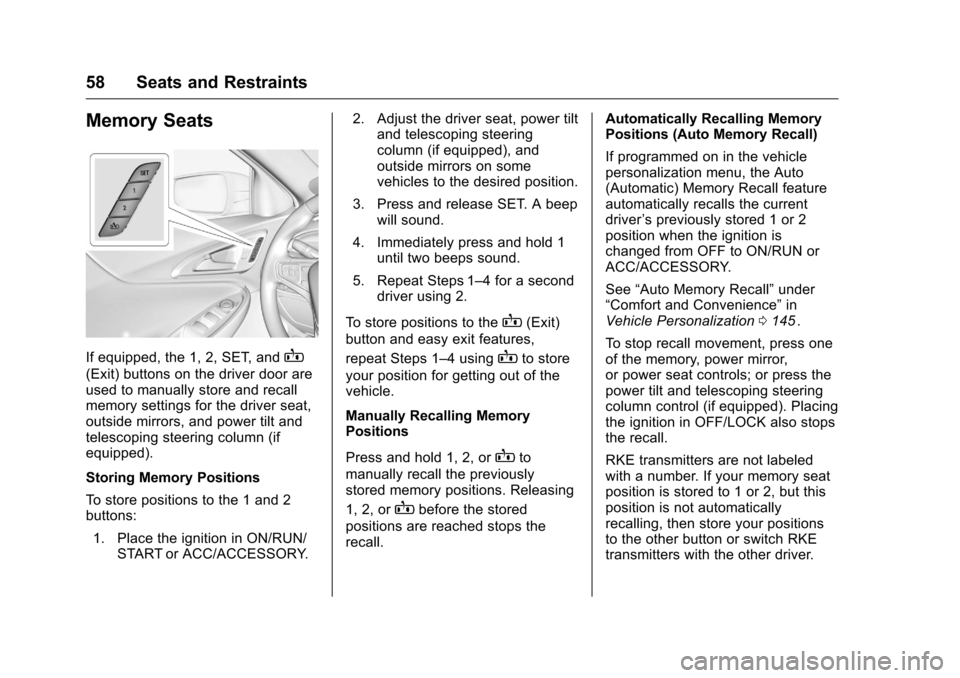
Memory Seats
If equipped, the 1, 2, SET, andB
(Exit) buttons on the driver door are
used to manually store and recall
memory settings for the driver seat,
outside mirrors, and power tilt and
telescoping steering column (if
equipped).
Storing Memory Positions
To store positions to the 1 and 2
buttons:1. Place the ignition in ON/RUN/ START or ACC/ACCESSORY. 2. Adjust the driver seat, power tilt
and telescoping steering
column (if equipped), and
outside mirrors on some
vehicles to the desired position.
3. Press and release SET. A beep will sound.
4. Immediately press and hold 1 until two beeps sound.
5. Repeat Steps 1–4 for a second driver using 2.
To store positions to the
B(Exit)
button and easy exit features,
repeat Steps 1–4 using
Bto store
your position for getting out of the
vehicle.
Manually Recalling Memory
Positions
Press and hold 1, 2, or
Bto
manually recall the previously
stored memory positions. Releasing
1, 2, or
Bbefore the stored
positions are reached stops the
recall. Automatically Recalling Memory
Positions (Auto Memory Recall)
If programmed on in the vehicle
personalization menu, the Auto
(Automatic) Memory Recall feature
automatically recalls the current
driver
’s previously stored 1 or 2
position when the ignition is
changed from OFF to ON/RUN or
ACC/ACCESSORY.
See “Auto Memory Recall” under
“Comfort and Convenience” in
Vehicle Personalization 0145
ii.
To stop recall movement, press one
of the memory, power mirror,
or power seat controls; or press the
power tilt and telescoping steering
column control (if equipped). Placing
the ignition in OFF/LOCK also stops
the recall.
RKE transmitters are not labeled
with a number. If your memory seat
position is stored to 1 or 2, but this
position is not automatically
recalling, then store your positions
to the other button or switch RKE
transmitters with the other driver.
Page 60 of 420
Chevrolet Malibu Owner Manual (GMNA-Localizing-U.S./Canada/Mexico-
9087641) - 2016 - crc - 9/3/15
Seats and Restraints 59
In some vehicles the Driver ID may
be displayed for the first few ignition
cycles if the vehicle’s driver has
changed.
Easy Exit Recall
If programmed on in the vehicle
personalization menu, the easy exit
feature automatically recalls the
previously stored exit position when
exiting the vehicle. See“Storing
Memory Positions” previously in this
section. See also Vehicle
Personalization 0145
ii.
Easy exit recall automatically
activates when one of the following
occurs:
. The vehicle is turned off and the
driver door is opened within a
short time.
. The vehicle is turned off with the
driver door open.
To stop recall movement, press one
of the memory, driver seat, outside
mirror, or power tilt and telescoping
steering column controls. Obstructions
If something has blocked the driver
seat and/or power tilt and
telescoping steering column (if
equipped) while recalling a memory
position, the recall may stop.
Remove the obstruction. Then do
one of the following:
.
If automatically or manually
recalling the stored memory
position, press and hold the
appropriate manual control for
two seconds. Try recalling again
by pressing the appropriate
memory button.
. If automatically recalling the
position, press and hold the
appropriate manual control for
the memory item that is not
recalling for two seconds. Try
recalling again by opening the
driver door and pressing
Kon
the RKE transmitter.
. If recalling the exit position,
press and hold the appropriate
manual control for the exit
feature not recalling for
two seconds. Then try recalling
the exit position again. If the memory position is still not
recalling, see your dealer for
service.
Heated and Ventilated
Front Seats
{Warning
If you cannot feel temperature
change or pain to the skin, the
seat heater may cause burns. To
reduce the risk of burns, people
with such a condition should use
care when using the seat heater,
especially for long periods of
time. Do not place anything on
the seat that insulates against
heat, such as a blanket, cushion,
cover, or similar item. This may
cause the seat heater to
overheat. An overheated seat
heater may cause a burn or may
damage the seat.
Page 103 of 420
Chevrolet Malibu Owner Manual (GMNA-Localizing-U.S./Canada/Mexico-
9087641) - 2016 - crc - 9/3/15
102 Instruments and Controls
Instruments and
Controls
Controls
Steering Wheel Adjustment . . . 103
Steering Wheel Controls . . . . . . 103
Heated Steering Wheel . . . . . . . 104
Horn . . . . . . . . . . . . . . . . . . . . . . . . . . 104
Windshield Wiper/Washer . . . . 104
Compass . . . . . . . . . . . . . . . . . . . . . 105
Clock . . . . . . . . . . . . . . . . . . . . . . . . . 106
Power Outlets . . . . . . . . . . . . . . . . 107
Wireless Charging . . . . . . . . . . . . 108
Warning Lights, Gauges, and
Indicators
Warning Lights, Gauges, andIndicators . . . . . . . . . . . . . . . . . . . 109
Instrument Cluster (Base Level) . . . . . . . . . . . . . . . . . . . . . . . 110
Instrument Cluster
(Uplevel) . . . . . . . . . . . . . . . . . . . . 112
Speedometer . . . . . . . . . . . . . . . . . 115
Odometer . . . . . . . . . . . . . . . . . . . . . 115
Trip Odometer . . . . . . . . . . . . . . . . 115
Tachometer (Non-Hybrid) . . . . . 115
Fuel Gauge . . . . . . . . . . . . . . . . . . . 116
Power Indicator Gauge (Hybrid) . . . . . . . . . . . . . . . . . . . . . 116 Engine Coolant Temperature
Gauge . . . . . . . . . . . . . . . . . . . . . . 117
Safety Belt Reminders . . . . . . . . 117
Airbag Readiness Light . . . . . . . 118
Passenger Airbag Status Indicator . . . . . . . . . . . . . . . . . . . . . 118
Charging System Light . . . . . . . 119
Malfunction Indicator Lamp (Check Engine Light) . . . . . . . . 120
Brake System Warning Light . . . . . . . . . . . . . . . . . . . . . . . . 122
Electric Parking Brake Light . . . . . . . . . . . . . . . . . . . . . . . . 122
Service Electric Parking Brake Light . . . . . . . . . . . . . . . . . . . . . . . . 122
Antilock Brake System (ABS) Warning Light . . . . . . . . . . . . . . . 123
Lane Keep Assist (LKA) Light . . . . . . . . . . . . . . . . . . . . . . . . 123
Vehicle Ahead Indicator . . . . . . 123
Pedestrian Ahead Indicator . . . 124
Traction Off Light . . . . . . . . . . . . . 124
StabiliTrak
®OFF Light . . . . . . . . 124
Traction Control System (TCS)/ StabiliTrak
®Light . . . . . . . . . . . 125
Tire Pressure Light . . . . . . . . . . . 125
Engine Oil Pressure Light . . . . 125
Low Fuel Warning Light (Uplevel) . . . . . . . . . . . . . . . . . . . . 126
Low Fuel Warning Light (Base Level) . . . . . . . . . . . . . . . . . . . . . . . 126 Security Light . . . . . . . . . . . . . . . . . 127
Vehicle Ready Light
(Hybrid) . . . . . . . . . . . . . . . . . . . . . 127
High-Beam On Light . . . . . . . . . . 127
Lamps On Reminder . . . . . . . . . 127
Cruise Control Light . . . . . . . . . . 127
Door Ajar Light (Uplevel) . . . . . 128
Information Displays
Center Stack Display . . . . . . . . . 128
Power Flows (Hybrid) . . . . . . . . . 128
Energy Information (Hybrid) . . . . . . . . . . . . . . . . . . . . . 129
Driver Information Center (DIC) (Base Level) . . . . . . . . . . . . . . . . 129
Driver Information Center (DIC) (Uplevel) . . . . . . . . . . . . . . . . . . . . 132
Vehicle Messages
Vehicle Messages . . . . . . . . . . . . 136
Battery Voltage and Charging
Messages . . . . . . . . . . . . . . . . . . . 136
Brake System Messages . . . . . 136
Compass Messages . . . . . . . . . . 137
Cruise Control Messages . . . . . 137
Door Ajar Messages . . . . . . . . . . 138
Engine Cooling System Messages . . . . . . . . . . . . . . . . . . . 138
Engine Oil Messages . . . . . . . . . 139
Engine Power Messages . . . . . 139
Fuel System Messages . . . . . . . 139
Page 144 of 420
Chevrolet Malibu Owner Manual (GMNA-Localizing-U.S./Canada/Mexico-
9087641) - 2016 - crc - 9/3/15
Instruments and Controls 143
SERVICE STABILITRAK
This message displays if there is a
problem with the StabiliTrak system.
If this message appears, try to reset
the system. Stop; turn off the engine
for at least 15 seconds; then start
the engine again. If this message
still comes on, it means there is a
problem. See your dealer for
service. The vehicle is safe to drive;
however, you do not have the
benefit of StabiliTrak, so reduce
your speed and drive accordingly.
Airbag System Messages
SERVICE AIRBAG
This message displays if there is a
problem with the airbag system. See
your dealer for service.
Security Messages
THEFT ATTEMPTED
This message displays if the vehicle
detects a tamper condition.
Service Vehicle Messages
SERVICE AC SYSTEM
This message displays if there is a
problem with the air conditioning
system. Take the vehicle to your
dealer for service.
SERVICE KEYLESS START
SYSTEM
This message is displayed if there is
a problem with the pushbutton start
system. Take the vehicle to your
dealer for service.
SERVICE VEHICLE SOON
This message displays if there is a
problem with the vehicle. Take the
vehicle to your dealer for service.
Steering System
Messages
SERVICE POWER STEERING
This message displays and a chime
may sound when there may be a
problem with the power steering
system. If this message displays
and a reduction in steeringperformance or loss of power
steering assistance is noticed, see
your dealer.
STEERING ASSIST IS
REDUCED DRIVE WITH CARE
This message can appear for
several reasons. Take the vehicle to
your dealer if the problem persists.
Starting the Vehicle
Messages
INITIALIZING
—WAIT TO
SHIFT
In extreme cold temperatures the
hybrid vehicle can take up to
30 seconds to start. Wait to shift
from P (Park) while the vehicle is
starting.
PRESS BRAKE TO START
This message displays when
attempting to start the vehicle
without first pressing the brake
pedal.