display CHEVROLET MALIBU 2017 9.G User Guide
[x] Cancel search | Manufacturer: CHEVROLET, Model Year: 2017, Model line: MALIBU, Model: CHEVROLET MALIBU 2017 9.GPages: 419, PDF Size: 7.81 MB
Page 60 of 419
Chevrolet Malibu Owner Manual (GMNA-Localizing-U.S./Canada/Mexico-10122664) - 2017 - crc - 5/23/16
Seats and Restraints 59
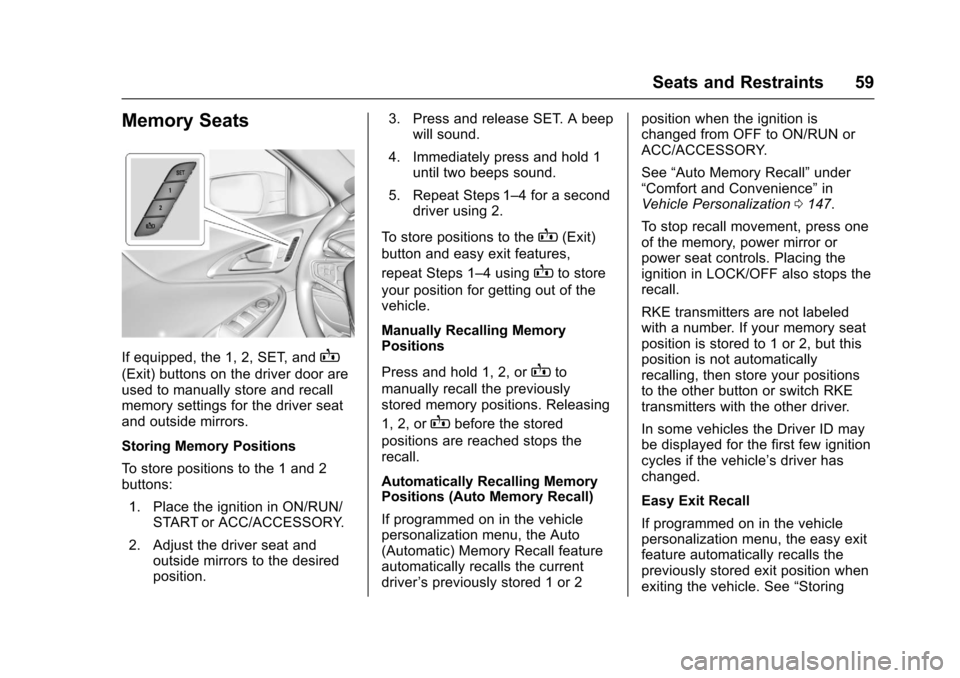
Memory Seats
If equipped, the 1, 2, SET, andB
(Exit) buttons on the driver door areused to manually store and recallmemory settings for the driver seatand outside mirrors.
Storing Memory Positions
To s t o r e p o s i t i o n s t o t h e 1 a n d 2buttons:
1. Place the ignition in ON/RUN/START or ACC/ACCESSORY.
2. Adjust the driver seat andoutside mirrors to the desiredposition.
3. Press and release SET. A beepwill sound.
4. Immediately press and hold 1until two beeps sound.
5. Repeat Steps 1–4foraseconddriver using 2.
To s t o r e p o s i t i o n s t o t h eB(Exit)
button and easy exit features,
repeat Steps 1–4usingBto store
your position for getting out of thevehicle.
Manually Recalling MemoryPositions
Press and hold 1, 2, orBto
manually recall the previouslystored memory positions. Releasing
1, 2, orBbefore the stored
positions are reached stops therecall.
Automatically Recalling MemoryPositions (Auto Memory Recall)
If programmed on in the vehiclepersonalization menu, the Auto(Automatic) Memory Recall featureautomatically recalls the currentdriver’spreviouslystored1or2
position when the ignition ischanged from OFF to ON/RUN orACC/ACCESSORY.
See“Auto Memory Recall”under“Comfort and Convenience”inVehicle Personalization0147.
To s t o p r e c a l l m o v e m e n t , p r e s s o n eof the memory, power mirror orpower seat controls. Placing theignition in LOCK/OFF also stops therecall.
RKE transmitters are not labeledwith a number. If your memory seatposition is stored to 1 or 2, but thisposition is not automaticallyrecalling, then store your positionsto the other button or switch RKEtransmitters with the other driver.
In some vehicles the Driver ID maybe displayed for the first few ignitioncycles if the vehicle’sdriverhaschanged.
Easy Exit Recall
If programmed on in the vehiclepersonalization menu, the easy exitfeature automatically recalls thepreviously stored exit position whenexiting the vehicle. See“Storing
Page 63 of 419
Chevrolet Malibu Owner Manual (GMNA-Localizing-U.S./Canada/Mexico-10122664) - 2017 - crc - 5/23/16
62 Seats and Restraints
Rear Seats
Rear Seat Reminder
Look in Rear Seat ReminderFeature
If equipped, this message displaysunder certain conditions indicatingthere may be an item or passengerin the rear seat. Check beforeexiting the vehicle.
This feature will activate when asecond row door is opened whilethe vehicle is on or up to 10 minutesbefore the vehicle is turned on,including if the vehicle was startedremotely. There will be an alertwhen the vehicle is turned off. Thealert does not directly detect objectsin the rear seat; instead, undercertain conditions, it detects when arear door is opened and closed,indicating that there may besomething in the rear seat.
The feature is active only once eachtime the vehicle is turned on and off,and will require reactivation byopening and closing the second rowdoors. There may be an alert evenwhen there is nothing in the rear
seat; for example, if a child enteredthe vehicle through the rear doorand left the vehicle without thevehicle being shut off.
The feature can be turned on or offthroughVehiclePersonalization0147.
Folding the Seatback
Either side of the seatback can befolded down for more cargo space.Fold a seatback only when thevehicle is not moving.
Caution
Folding a rear seat with the safety
belts still fastened may cause
damage to the seat or the safety
belts. Always unbuckle the safety
belts and return them to their
normal stowed position before
folding a rear seat.
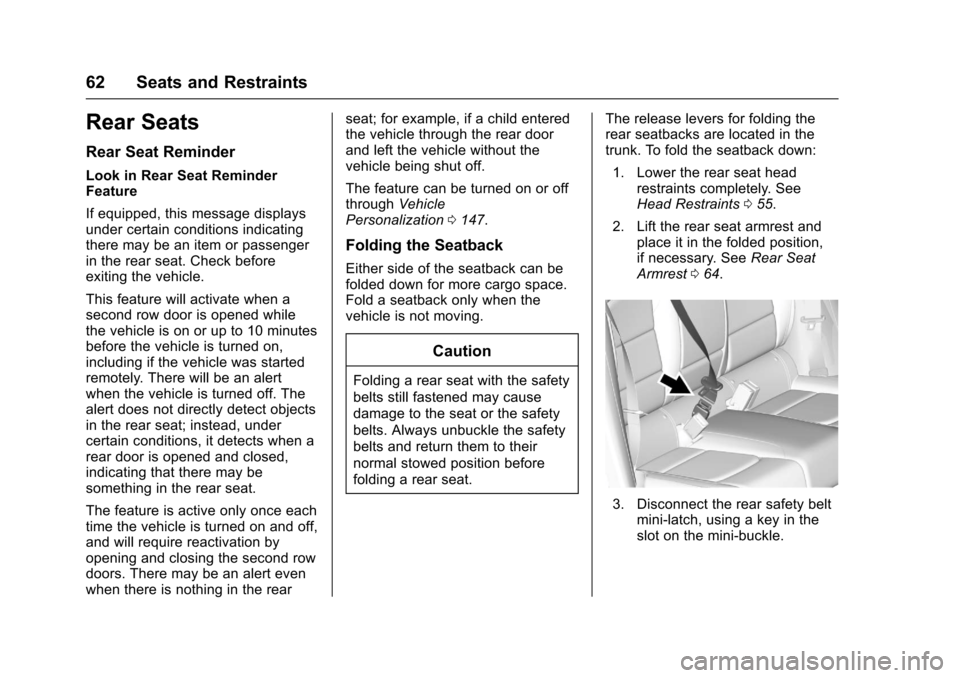
The release levers for folding therear seatbacks are located in thetrunk. To fold the seatback down:
1. Lower the rear seat headrestraints completely. SeeHead Restraints055.
2. Lift the rear seat armrest andplace it in the folded position,if necessary. SeeRear SeatArmrest064.
3. Disconnect the rear safety beltmini-latch, using a key in theslot on the mini-buckle.
Page 77 of 419
Chevrolet Malibu Owner Manual (GMNA-Localizing-U.S./Canada/Mexico-10122664) - 2017 - crc - 5/23/16
76 Seats and Restraints
prevent the driver from seeing out ofthe windshield or being able to steerthe vehicle, nor does it preventpeople from leaving the vehicle.
{Warning
When an airbag inflates, there
may be dust in the air. This dust
could cause breathing problems
for people with a history of
asthma or other breathing trouble.
To a v o i d t h i s , e v e r y o n e i n t h e
vehicle should get out as soon as
it is safe to do so. If you have
breathing problems but cannot
get out of the vehicle after an
airbag inflates, then get fresh air
by opening a window or a door.
If you experience breathing
problems following an airbag
deployment, you should seek
medical attention.
The vehicle has a feature that mayautomatically unlock the doors, turnon the interior lamps and hazardwarning flashers, and shut off thefuel system after the airbags inflate.
The feature may also activate,without airbag inflation, after anevent that exceeds a predeterminedthreshold. You can lock the doors,and turn off the interior lamps, andturn off the hazard warning flashersby using the controls for thosefeatures.
{Warning
Acrashsevereenoughtoinflate
the airbags may have also
damaged important functions in
the vehicle, such as the fuel
system, brake and steering
systems, etc. Even if the vehicle
appears to be drivable after a
moderate crash, there may be
concealed damage that could
make it difficult to safely operate
the vehicle.
Use caution if you should attempt
to restart the engine after a crash
has occurred.
Hybrid vehicles have a high voltagebattery and a standard 12-voltbattery. If an airbag inflates or the
vehicle has been in a crash, thevehicle's sensing system may shutdown the high voltage system.When this occurs, the high voltagebattery is disconnected and thevehicle is not charging the 12-voltbattery or the electrical system. Thevehicle may start but it shuts downonce the 12-volt battery is depleted.The airbag readiness light and/orthe 12-volt battery warning light aredisplayed. Before the vehicle can beoperated again, it must be servicedat your dealer.
In many crashes severe enough toinflate the airbag, windshields arebroken by vehicle deformation.Additional windshield breakage mayalso occur from the front outboardpassenger airbag.
.Airbags are designed to inflateonly once. After an airbaginflates, you will need some newparts for the airbag system.If you do not get them, theairbag system will not be thereto help protect you in anothercrash. A new system will includeairbag modules and possibly
Page 104 of 419
Chevrolet Malibu Owner Manual (GMNA-Localizing-U.S./Canada/Mexico-10122664) - 2017 - crc - 5/23/16
Instruments and Controls 103
Instruments and
Controls
Controls
Steering Wheel Adjustment . . . 104Steering Wheel Controls . . . . . . 104Heated Steering Wheel . . . . . . . 105Horn . . . . . . . . . . . . . . . . . . . . . . . . . . 105Windshield Wiper/Washer . . . . 105Compass . . . . . . . . . . . . . . . . . . . . . 106Clock . . . . . . . . . . . . . . . . . . . . . . . . . 107Power Outlets . . . . . . . . . . . . . . . . 108Wireless Charging . . . . . . . . . . . . 109
Warning Lights, Gauges, and
Indicators
Warning Lights, Gauges, andIndicators . . . . . . . . . . . . . . . . . . . . 111Instrument Cluster (BaseLevel) . . . . . . . . . . . . . . . . . . . . . . . 112Instrument Cluster(Uplevel) . . . . . . . . . . . . . . . . . . . . 114Speedometer . . . . . . . . . . . . . . . . . 117Odometer . . . . . . . . . . . . . . . . . . . . . 117Trip Odometer . . . . . . . . . . . . . . . . 117Ta c h o m e t e r ( N o n - H y b r i d ) . . . . . 11 7Fuel Gauge . . . . . . . . . . . . . . . . . . . 118Power Indicator Gauge(Hybrid) . . . . . . . . . . . . . . . . . . . . . 119
Engine Coolant TemperatureGauge . . . . . . . . . . . . . . . . . . . . . . 119Safety Belt Reminders . . . . . . . . 120Airbag Readiness Light . . . . . . . 120Passenger Airbag StatusIndicator . . . . . . . . . . . . . . . . . . . . 121Charging System Light . . . . . . . 122Malfunction Indicator Lamp(Check Engine Light) . . . . . . . . 122Brake System WarningLight . . . . . . . . . . . . . . . . . . . . . . . . 124Electric Parking BrakeLight . . . . . . . . . . . . . . . . . . . . . . . . 124Service Electric Parking BrakeLight . . . . . . . . . . . . . . . . . . . . . . . . 125Antilock Brake System (ABS)Warning Light . . . . . . . . . . . . . . . 125Lane Keep Assist (LKA)Light . . . . . . . . . . . . . . . . . . . . . . . . 125Vehicle Ahead Indicator . . . . . . 126Pedestrian Ahead Indicator . . . 126Traction Off Light . . . . . . . . . . . . . 126StabiliTrak®OFF Light . . . . . . . . 127Traction Control System (TCS)/StabiliTrak®Light . . . . . . . . . . . 127Tire Pressure Light . . . . . . . . . . . 127Engine Oil Pressure Light . . . . 128Low Fuel Warning Light(Uplevel) . . . . . . . . . . . . . . . . . . . . 128Low Fuel Warning Light (BaseLevel) . . . . . . . . . . . . . . . . . . . . . . . 129
Security Light . . . . . . . . . . . . . . . . . 129Vehicle Ready Light(Hybrid) . . . . . . . . . . . . . . . . . . . . . 129High-Beam On Light . . . . . . . . . . 129Lamps On Reminder . . . . . . . . . 130Cruise Control Light . . . . . . . . . . 130Door Ajar Light (Uplevel) . . . . . 130
Information Displays
Power Flows (Hybrid) . . . . . . . . . 131Energy Information(Hybrid) . . . . . . . . . . . . . . . . . . . . . 131Driver Information Center (DIC)(Base Level) . . . . . . . . . . . . . . . . 131Driver Information Center (DIC)(Uplevel) . . . . . . . . . . . . . . . . . . . . 134
Vehicle Messages
Vehicle Messages . . . . . . . . . . . . 138Battery Voltage and ChargingMessages . . . . . . . . . . . . . . . . . . . 138Brake System Messages . . . . . 138Compass Messages . . . . . . . . . . 139Cruise Control Messages . . . . . 139Door Ajar Messages . . . . . . . . . . 140Engine Cooling SystemMessages . . . . . . . . . . . . . . . . . . . 140Engine Oil Messages . . . . . . . . . 141Engine Power Messages . . . . . 141Fuel System Messages . . . . . . . 141Key and Lock Messages . . . . . 141
Page 106 of 419
Chevrolet Malibu Owner Manual (GMNA-Localizing-U.S./Canada/Mexico-10122664) - 2017 - crc - 5/23/16
Instruments and Controls 105
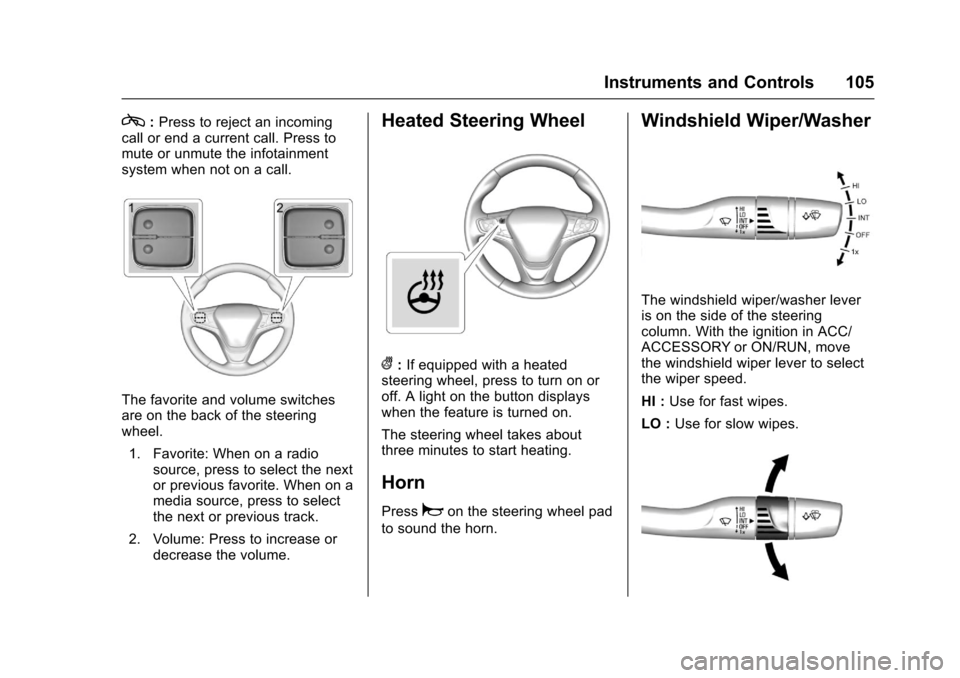
c:Press to reject an incomingcall or end a current call. Press tomute or unmute the infotainmentsystem when not on a call.
The favorite and volume switchesare on the back of the steeringwheel.
1. Favorite: When on a radiosource, press to select the nextor previous favorite. When on amedia source, press to selectthe next or previous track.
2. Volume: Press to increase ordecrease the volume.
Heated Steering Wheel
(:If equipped with a heatedsteering wheel, press to turn on oroff. A light on the button displayswhen the feature is turned on.
The steering wheel takes aboutthree minutes to start heating.
Horn
Pressaon the steering wheel pad
to sound the horn.
Windshield Wiper/Washer
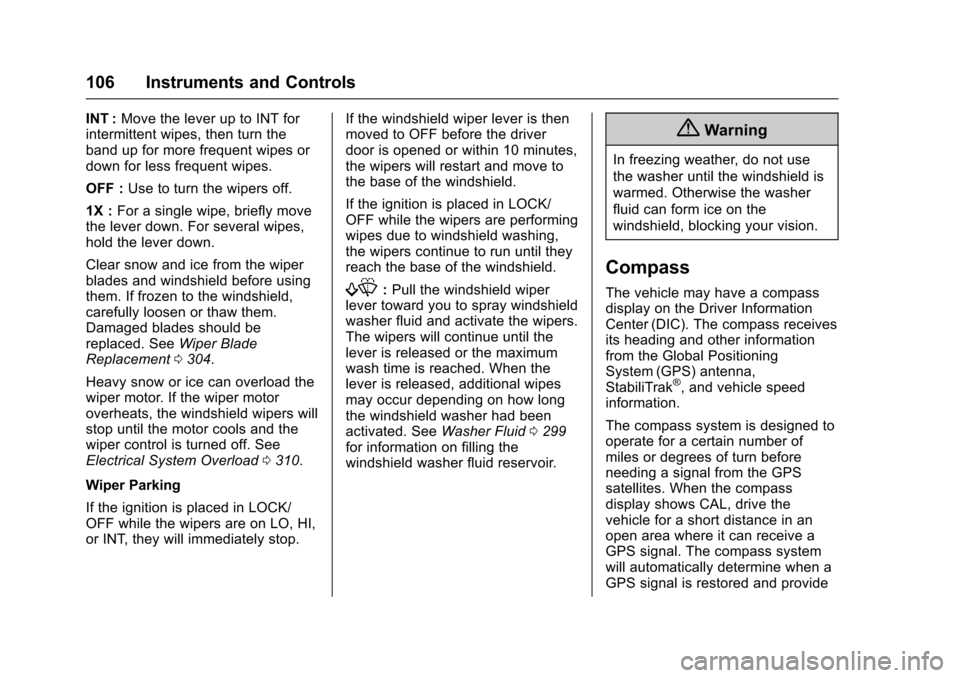
The windshield wiper/washer leveris on the side of the steeringcolumn. With the ignition in ACC/ACCESSORY or ON/RUN, movethe windshield wiper lever to selectthe wiper speed.
HI :Use for fast wipes.
LO :Use for slow wipes.
Page 107 of 419
Chevrolet Malibu Owner Manual (GMNA-Localizing-U.S./Canada/Mexico-10122664) - 2017 - crc - 5/23/16
106 Instruments and Controls
INT :Move the lever up to INT forintermittent wipes, then turn theband up for more frequent wipes ordown for less frequent wipes.
OFF :Use to turn the wipers off.
1X :For a single wipe, briefly movethe lever down. For several wipes,hold the lever down.
Clear snow and ice from the wiperblades and windshield before usingthem. If frozen to the windshield,carefully loosen or thaw them.Damaged blades should bereplaced. SeeWiper BladeReplacement0304.
Heavy snow or ice can overload thewiper motor. If the wiper motoroverheats, the windshield wipers willstop until the motor cools and thewiper control is turned off. SeeElectrical System Overload0310.
Wiper Parking
If the ignition is placed in LOCK/OFF while the wipers are on LO, HI,or INT, they will immediately stop.
If the windshield wiper lever is thenmoved to OFF before the driverdoor is opened or within 10 minutes,the wipers will restart and move tothe base of the windshield.
If the ignition is placed in LOCK/OFF while the wipers are performingwipes due to windshield washing,the wipers continue to run until theyreach the base of the windshield.
f:Pull the windshield wiperlever toward you to spray windshieldwasher fluid and activate the wipers.The wipers will continue until thelever is released or the maximumwash time is reached. When thelever is released, additional wipesmay occur depending on how longthe windshield washer had beenactivated. SeeWasher Fluid0299for information on filling thewindshield washer fluid reservoir.
{Warning
In freezing weather, do not use
the washer until the windshield is
warmed. Otherwise the washer
fluid can form ice on the
windshield, blocking your vision.
Compass
The vehicle may have a compassdisplay on the Driver InformationCenter (DIC). The compass receivesits heading and other informationfrom the Global PositioningSystem (GPS) antenna,StabiliTrak®,andvehiclespeedinformation.
The compass system is designed tooperate for a certain number ofmiles or degrees of turn beforeneeding a signal from the GPSsatellites. When the compassdisplay shows CAL, drive thevehicle for a short distance in anopen area where it can receive aGPS signal. The compass systemwill automatically determine when aGPS signal is restored and provide
Page 108 of 419
Chevrolet Malibu Owner Manual (GMNA-Localizing-U.S./Canada/Mexico-10122664) - 2017 - crc - 5/23/16
Instruments and Controls 107
aheadingagain.SeeCompassMessages0139for the messagesthat may be displayed for thecompass.
Clock
Radio without Touchscreen
The infotainment system controlsare used to access the time anddate settings through the menusystem. SeeOperation0176onhow to use the menu system.
Setting the Time and Date
1. Press MENU, then selectSettings.
2. Select Time and Date.
3. Select Set Time or Set Date.
4. Turn MENU to change thevalue.
5. Press MENU to select the nextvalue.
6. Turn MENU to change thevalue.
7. To exit without saving, pressBACK at any time; or to saveand return to the Time andDate menu, press MENUmultiple times.
Auto Set
When Auto Set is enabled, the timecannot be manually set.
From the Set Time or SetDate menu:
1. Press the preset button underAuto Set.
2. Turn MENU to select Off(Manual) or On-Cell Network,then press MENU to select itand return to the Time andDate menu.
3. To exit without saving, pressBACK at any time.
Setting the 12/24 Hour Format
From the Set Time menu:
1. Press the preset button under12-24 HR to change between12 hour and 24 hour modes.
2. To return to the Time and Datemenu, press BACK at any time.
Radio with Touchscreen
The infotainment system controlsare used to access the time anddate settings through the menusystem. SeeOperation0176onhow to use the menu system.
Setting the Time and Date
When Auto Set is enabled the timecannot be manually set.
1. Press{,thentouchSettings.
2. Touch Time and Date, then SetTime or Set Date.
3. Touch + or✓to adjust thevalue.
4. TouchRorQto adjust AM or
PM for 12 hour format.
5. Touch0to return to the
Time and Date menu.
Auto Set
1. Press{,thentouchSettings.
2. Touch Time and Date, thenAuto Set.
3. Select from the availableselections.
Page 111 of 419
Chevrolet Malibu Owner Manual (GMNA-Localizing-U.S./Canada/Mexico-10122664) - 2017 - crc - 5/23/16
110 Instruments and Controls
wireless charging feature may notcorrectly indicate charging when thevehicle is in RAP. SeeRetainedAccessory Power (RAP)0230.
The operating temperature is✓20 °C(✓4°F) to 60°C (140°F) for thecharging system and 0 °C (32 °F) to35 °C (95 °F) for the mobile device.
{Warning
Remove all metal objects from the
charging pocket before charging
your mobile device. Metal objects,
such as coins, keys, rings,
or paper clips, between the phone
and the charger will become very
hot. On the rare occasion that the
charging system does not detect
ametalobject,andtheobject
gets wedged between the phone
and the charger, remove the
phone and allow the metallic
object to cool before removing it
from the charging pocket, to
prevent burns.
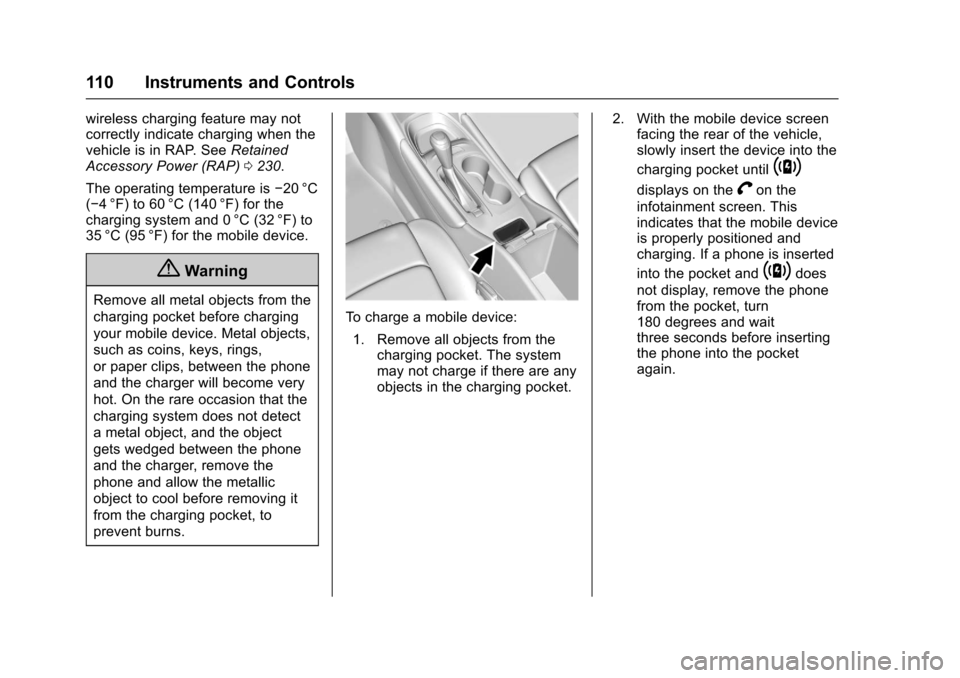
To c h a r g e a m o b i l e d e v i c e :
1. Remove all objects from thecharging pocket. The systemmay not charge if there are anyobjects in the charging pocket.
2. With the mobile device screenfacing the rear of the vehicle,slowly insert the device into the
charging pocket until~
displays on theVon the
infotainment screen. Thisindicates that the mobile deviceis properly positioned andcharging. If a phone is inserted
into the pocket and~does
not display, remove the phonefrom the pocket, turn180 degrees and waitthree seconds before insertingthe phone into the pocketagain.
Page 117 of 419
Chevrolet Malibu Owner Manual (GMNA-Localizing-U.S./Canada/Mexico-10122664) - 2017 - crc - 5/23/16
116 Instruments and Controls
Cluster Menu
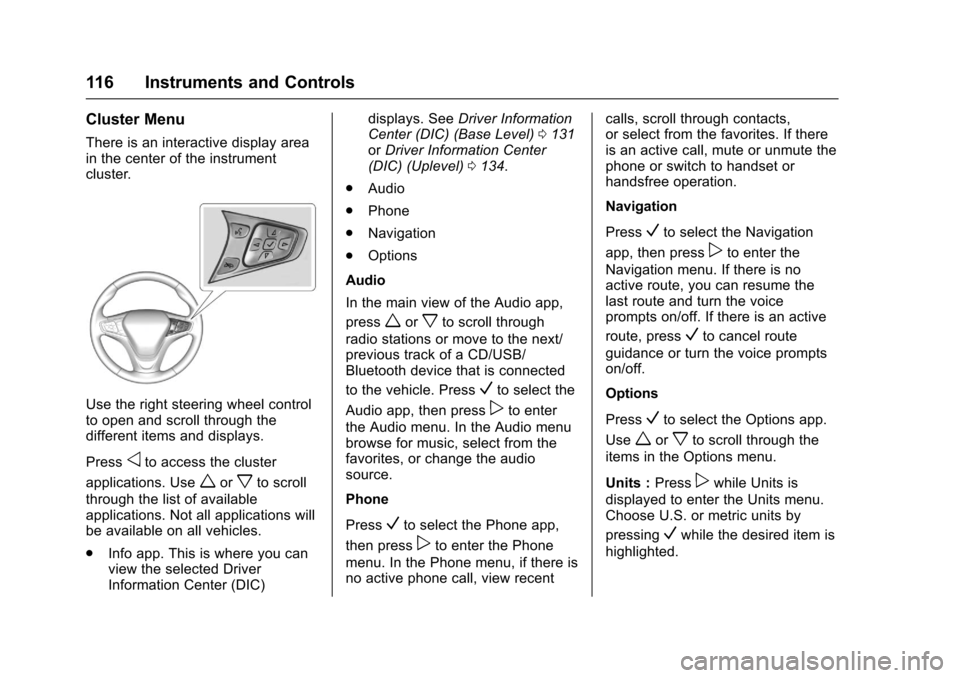
There is an interactive display areain the center of the instrumentcluster.
Use the right steering wheel controlto open and scroll through thedifferent items and displays.
Pressoto access the cluster
applications. Useworxto scroll
through the list of availableapplications. Not all applications willbe available on all vehicles.
.Info app. This is where you canview the selected DriverInformation Center (DIC)
displays. SeeDriver InformationCenter (DIC) (Base Level)0131orDriver Information Center(DIC) (Uplevel)0134.
.Audio
.Phone
.Navigation
.Options
Audio
In the main view of the Audio app,
pressworxto scroll through
radio stations or move to the next/previous track of a CD/USB/Bluetooth device that is connected
to the vehicle. PressVto select the
Audio app, then presspto enter
the Audio menu. In the Audio menubrowse for music, select from thefavorites, or change the audiosource.
Phone
PressVto select the Phone app,
then presspto enter the Phone
menu. In the Phone menu, if there isno active phone call, view recent
calls, scroll through contacts,or select from the favorites. If thereis an active call, mute or unmute thephone or switch to handset orhandsfree operation.
Navigation
PressVto select the Navigation
app, then presspto enter the
Navigation menu. If there is noactive route, you can resume thelast route and turn the voiceprompts on/off. If there is an active
route, pressVto cancel route
guidance or turn the voice promptson/off.
Options
PressVto select the Options app.
Useworxto scroll through the
items in the Options menu.
Units :Presspwhile Units is
displayed to enter the Units menu.Choose U.S. or metric units by
pressingVwhile the desired item is
highlighted.
Page 118 of 419
Chevrolet Malibu Owner Manual (GMNA-Localizing-U.S./Canada/Mexico-10122664) - 2017 - crc - 5/23/16
Instruments and Controls 117
Info Pages :Presspwhile Info
Pages is displayed to enter the InfoPages menu and select the items tobe displayed in the Info app. SeeDriver Information Center (DIC)(Base Level)0131orDriverInformation Center (DIC)(Uplevel)0134.
Speed Warning :The SpeedWarning display allows the driver toset a speed that they do not want toexceed. To set the Speed Warning,
presspwhen Speed Warning is
displayed. Pressworxto adjust
the value. PressVto set the speed.
Once the speed is set, this feature
can be turned off by pressingV
while viewing this page. If theselected speed limit is exceeded, apop-up warning is displayed with achime.
Speedometer
The speedometer shows thevehicle's speed in either kilometersper hour (km/h) or miles perhour (mph).
Odometer
The odometer shows how far thevehicle has been driven, in eitherkilometers or miles.
Trip Odometer
The trip odometer shows how farthe vehicle has been driven sincethe trip odometer was last reset.
The trip odometer is accessed andreset through the Driver InformationCenter (DIC). SeeDriverInformation Center (DIC) (BaseLevel)0131orDriver InformationCenter (DIC) (Uplevel)0134.
Tachometer (Non-Hybrid)
The tachometer displays the enginespeed in revolutions perminute (rpm).
For vehicles with the Stop/Startsystem, when the ignition is in ON/RUN, the tachometer indicates thevehicle status. When pointing toAUTO STOP, the engine is off butthe vehicle is on and can move. The
engine could auto start at any time.When the indicator points to OFF,the vehicle is off.
When the engine is on, thetachometer will indicate the engine’srevolutions per minute (rpm). Thetachometer may vary by severalhundred rpm’s, during Auto Stopmode, when the engine is shuttingoff and restarting.
Aslightbumpmaybefeltwhenthetransmission is determining themost fuel efficient operating range.
Caution
If the engine is operated with the
rpm’sinthewarningareaatthe
high end of the tachometer, the
vehicle could be damaged, and
the damage would not be covered
by the vehicle warranty. Do not
operate the engine with the rpm’s
in the warning area.