lock CHEVROLET MALIBU 2017 9.G User Guide
[x] Cancel search | Manufacturer: CHEVROLET, Model Year: 2017, Model line: MALIBU, Model: CHEVROLET MALIBU 2017 9.GPages: 419, PDF Size: 7.81 MB
Page 34 of 419
Chevrolet Malibu Owner Manual (GMNA-Localizing-U.S./Canada/Mexico-10122664) - 2017 - crc - 5/23/16
Keys, Doors, and Windows 33
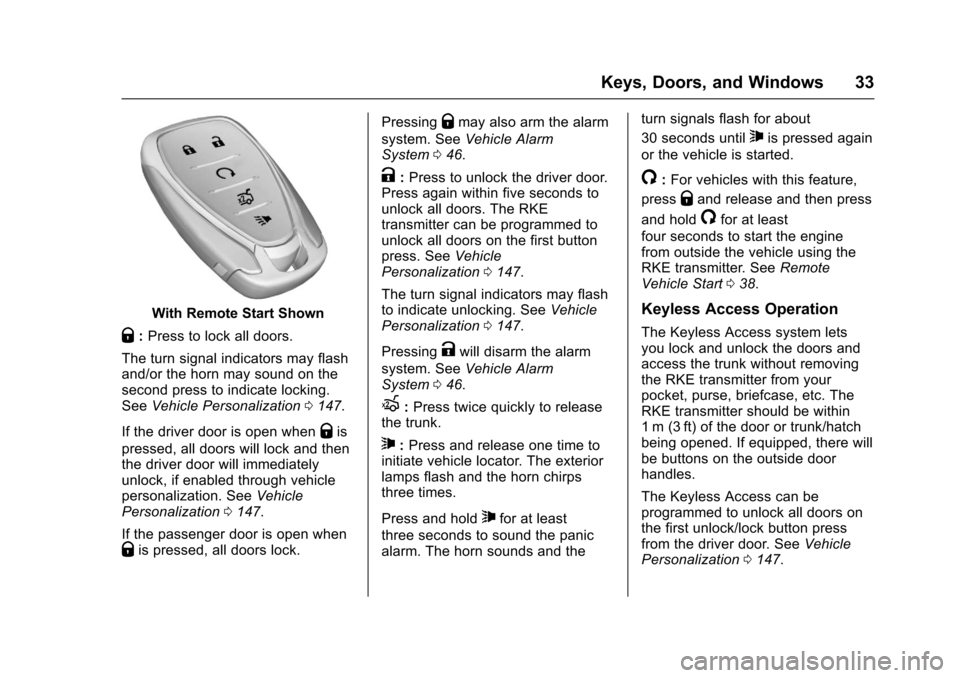
With Remote Start Shown
Q:Press to lock all doors.
The turn signal indicators may flashand/or the horn may sound on thesecond press to indicate locking.SeeVehicle Personalization0147.
If the driver door is open whenQis
pressed, all doors will lock and thenthe driver door will immediatelyunlock, if enabled through vehiclepersonalization. SeeVehiclePersonalization0147.
If the passenger door is open whenQis pressed, all doors lock.
PressingQmay also arm the alarm
system. SeeVehicle AlarmSystem046.
K:Press to unlock the driver door.Press again within five seconds tounlock all doors. The RKEtransmitter can be programmed tounlock all doors on the first buttonpress. SeeVehiclePersonalization0147.
The turn signal indicators may flashto indicate unlocking. SeeVehiclePersonalization0147.
PressingKwill disarm the alarm
system. SeeVehicle AlarmSystem046.
X:Press twice quickly to releasethe trunk.
7:Press and release one time toinitiate vehicle locator. The exteriorlamps flash and the horn chirpsthree times.
Press and hold7for at least
three seconds to sound the panicalarm. The horn sounds and the
turn signals flash for about
30 seconds until7is pressed again
or the vehicle is started.
/:For vehicles with this feature,
pressQand release and then press
and hold/for at least
four seconds to start the enginefrom outside the vehicle using theRKE transmitter. SeeRemoteVehicle Start038.
Keyless Access Operation
The Keyless Access system letsyou lock and unlock the doors andaccess the trunk without removingthe RKE transmitter from yourpocket, purse, briefcase, etc. TheRKE transmitter should be within1m (3ft) of the door or trunk/hatchbeing opened. If equipped, there willbe buttons on the outside doorhandles.
The Keyless Access can beprogrammed to unlock all doors onthe first unlock/lock button pressfrom the driver door. SeeVehiclePersonalization0147.
Page 35 of 419
Chevrolet Malibu Owner Manual (GMNA-Localizing-U.S./Canada/Mexico-10122664) - 2017 - crc - 5/23/16
34 Keys, Doors, and Windows
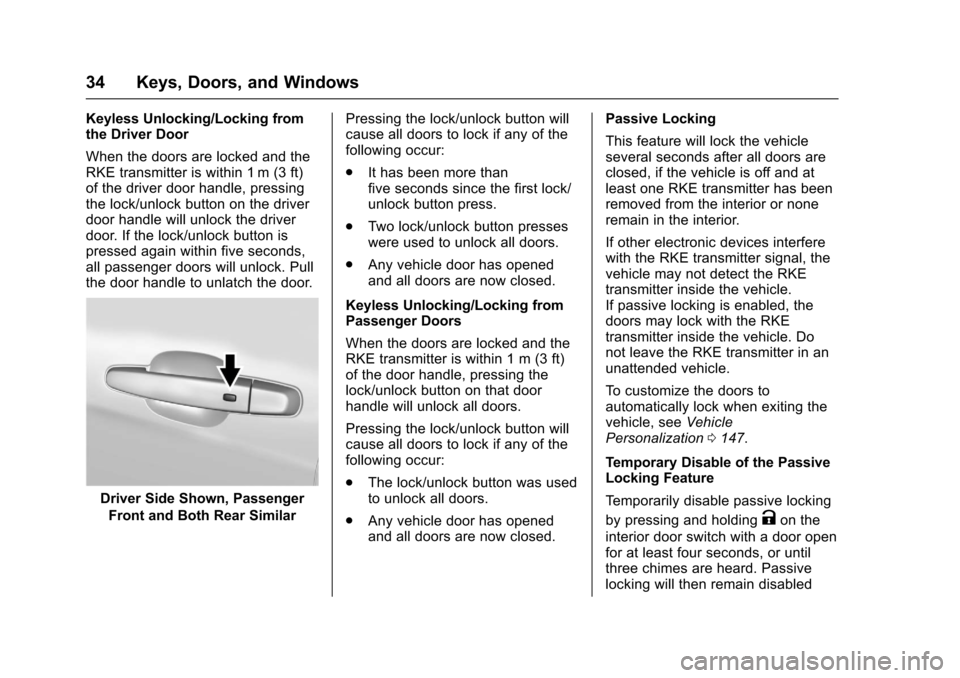
Keyless Unlocking/Locking fromthe Driver Door
When the doors are locked and theRKE transmitter is within 1 m (3 ft)of the driver door handle, pressingthe lock/unlock button on the driverdoor handle will unlock the driverdoor. If the lock/unlock button ispressed again within five seconds,all passenger doors will unlock. Pullthe door handle to unlatch the door.
Driver Side Shown, Passenger
Front and Both Rear Similar
Pressing the lock/unlock button willcause all doors to lock if any of thefollowing occur:
.It has been more thanfive seconds since the first lock/unlock button press.
.Tw o l o c k / u n l o c k b u t t o n p r e s s e swere used to unlock all doors.
.Any vehicle door has openedand all doors are now closed.
Keyless Unlocking/Locking fromPassenger Doors
When the doors are locked and theRKE transmitter is within 1 m (3 ft)of the door handle, pressing thelock/unlock button on that doorhandle will unlock all doors.
Pressing the lock/unlock button willcause all doors to lock if any of thefollowing occur:
.The lock/unlock button was usedto unlock all doors.
.Any vehicle door has openedand all doors are now closed.
Passive Locking
This feature will lock the vehicleseveral seconds after all doors areclosed, if the vehicle is off and atleast one RKE transmitter has beenremoved from the interior or noneremain in the interior.
If other electronic devices interferewith the RKE transmitter signal, thevehicle may not detect the RKEtransmitter inside the vehicle.If passive locking is enabled, thedoors may lock with the RKEtransmitter inside the vehicle. Donot leave the RKE transmitter in anunattended vehicle.
To c u s t o m i z e t h e d o o r s t oautomatically lock when exiting thevehicle, seeVehiclePersonalization0147.
Temporary Disable of the PassiveLocking Feature
Te m p o r a r i l y d i s a b l e p a s s i v e l o c k i n g
by pressing and holdingKon the
interior door switch with a door openfor at least four seconds, or untilthree chimes are heard. Passivelocking will then remain disabled
Page 36 of 419
Chevrolet Malibu Owner Manual (GMNA-Localizing-U.S./Canada/Mexico-10122664) - 2017 - crc - 5/23/16
Keys, Doors, and Windows 35
untilQon the interior door is
pressed, or until the vehicle isturned on.
Remote Left In Vehicle Alert
When the vehicle is turned off and aremote is left in the vehicle, the hornwill chirp three times after all doorsare closed. To turn on or off seeVehicle Personalization0147.
Remote No Longer In Vehicle Alert
If the vehicle is on, with a dooropen, and then all doors are closed,the vehicle will check for an RKEtransmitter(s) inside. If an RKEtransmitter is not detected, the DICwill display NO REMOTEDETECTED and the horn will chirpthree times.
This occurs only once each time thevehicle is driven. SeeVehiclePersonalization0147
Keyless Trunk Opening
Press the touch pad on the rear ofthe trunk to open it if the RKEtransmitter is within 1 m (3 ft) of thetrunk.
Keyed Access
To a c c e s s a v e h i c l e w i t h a d e a dtransmitter battery, seeDoorLocks040.
Programming Transmitters to
the Vehicle
Only RKE transmitters programmedto the vehicle will work. If atransmitter is lost or stolen, areplacement can be purchased andprogrammed through your dealer.The vehicle can be reprogrammedso that lost or stolen transmitters nolonger work. Any remainingtransmitters will need to bereprogrammed. Each vehicle canhave up to eight transmittersmatched to it.
Programming with RecognizedTransmitters
Anewtransmittercanbeprogrammed to the vehicle whenthere are two recognizedtransmitters. To program, the vehiclemust be off and all of thetransmitters, both currentlyrecognized and new, must bewith you.
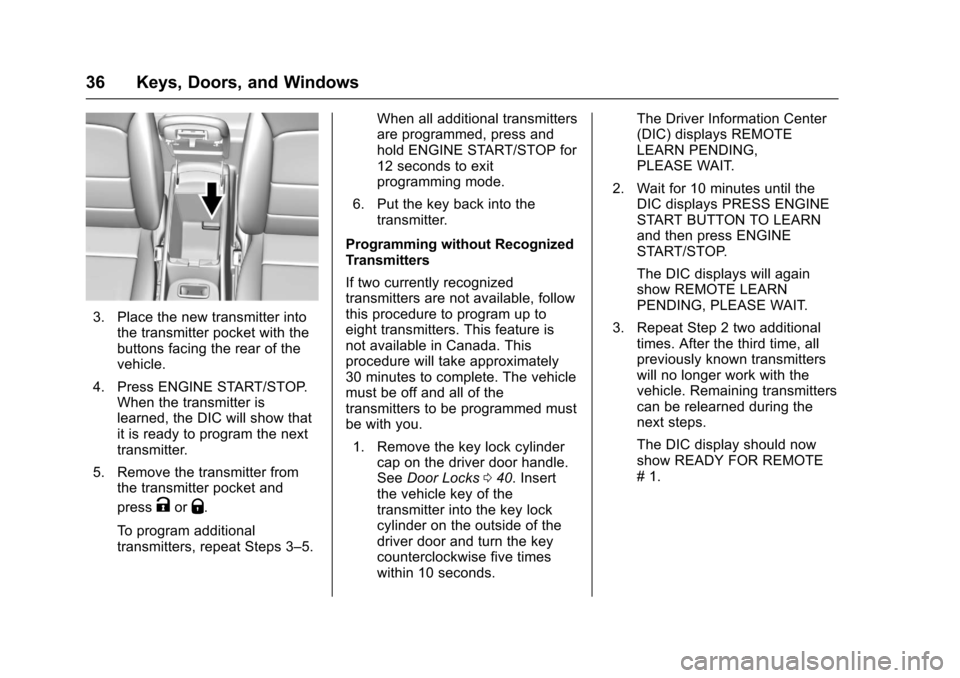
1. Place the two recognizedtransmitter(s) in the transmitterpocket with the buttons facingthe rear of the vehicle. Thetransmitter pocket is inside thecenter console storage area.
2. Remove the key lock cylindercap on the driver door handle.SeeDoor Locks040.Insertthe vehicle key of the newtransmitter into the key lockcylinder on the outside of thedriver door and turn the keycounterclockwise five timeswithin 10 seconds.
The Driver Information Center(DIC) displays READY FORREMOTE #2, 3, 4 or 5.
Page 37 of 419
Chevrolet Malibu Owner Manual (GMNA-Localizing-U.S./Canada/Mexico-10122664) - 2017 - crc - 5/23/16
36 Keys, Doors, and Windows
3. Place the new transmitter intothe transmitter pocket with thebuttons facing the rear of thevehicle.
4. Press ENGINE START/STOP.When the transmitter islearned, the DIC will show thatit is ready to program the nexttransmitter.
5. Remove the transmitter fromthe transmitter pocket and
pressKorQ.
To p r o g r a m a d d i t i o n a ltransmitters, repeat Steps 3–5.
When all additional transmittersare programmed, press andhold ENGINE START/STOP for12 seconds to exitprogramming mode.
6. Put the key back into thetransmitter.
Programming without RecognizedTransmitters
If two currently recognizedtransmitters are not available, followthis procedure to program up toeight transmitters. This feature isnot available in Canada. Thisprocedure will take approximately30 minutes to complete. The vehiclemust be off and all of thetransmitters to be programmed mustbe with you.
1. Remove the key lock cylindercap on the driver door handle.SeeDoor Locks040.Insertthe vehicle key of thetransmitter into the key lockcylinder on the outside of thedriver door and turn the keycounterclockwise five timeswithin 10 seconds.
The Driver Information Center(DIC) displays REMOTELEARN PENDING,PLEASE WAIT.
2. Wait for 10 minutes until theDIC displays PRESS ENGINESTART BUTTON TO LEARNand then press ENGINESTART/STOP.
The DIC displays will againshow REMOTE LEARNPENDING, PLEASE WAIT.
3. Repeat Step 2 two additionaltimes. After the third time, allpreviously known transmitterswill no longer work with thevehicle. Remaining transmitterscan be relearned during thenext steps.
The DIC display should nowshow READY FOR REMOTE#1.
Page 38 of 419
Chevrolet Malibu Owner Manual (GMNA-Localizing-U.S./Canada/Mexico-10122664) - 2017 - crc - 5/23/16
Keys, Doors, and Windows 37
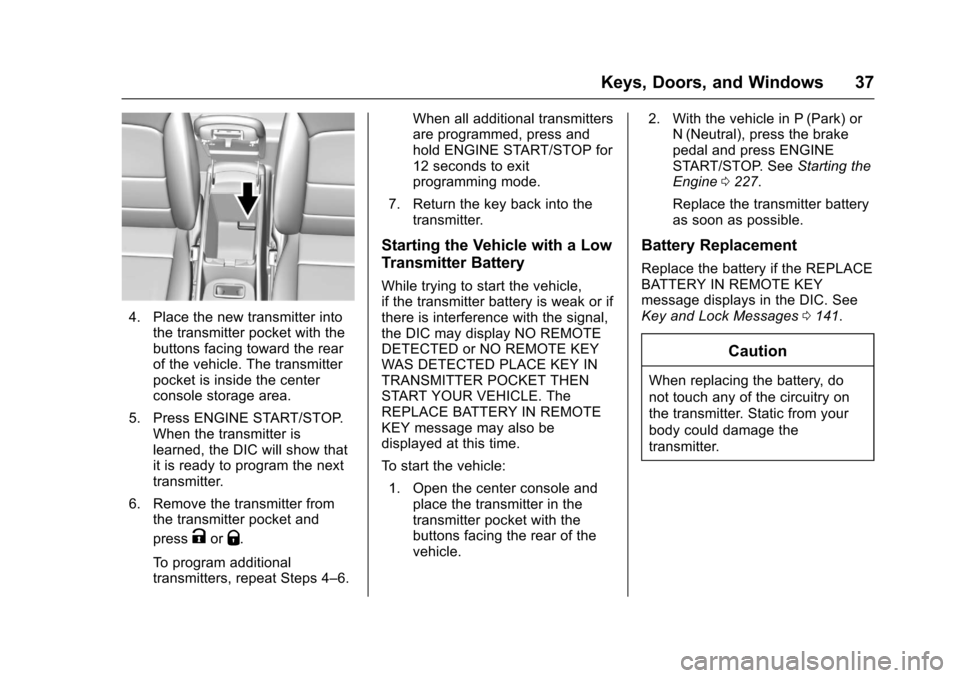
4. Place the new transmitter intothe transmitter pocket with thebuttons facing toward the rearof the vehicle. The transmitterpocket is inside the centerconsole storage area.
5. Press ENGINE START/STOP.When the transmitter islearned, the DIC will show thatit is ready to program the nexttransmitter.
6. Remove the transmitter fromthe transmitter pocket and
pressKorQ.
To p r o g r a m a d d i t i o n a ltransmitters, repeat Steps 4–6.
When all additional transmittersare programmed, press andhold ENGINE START/STOP for12 seconds to exitprogramming mode.
7. Return the key back into thetransmitter.
Starting the Vehicle with a Low
Transmitter Battery
While trying to start the vehicle,if the transmitter battery is weak or ifthere is interference with the signal,the DIC may display NO REMOTEDETECTED or NO REMOTE KEYWAS DETECTED PLACE KEY INTRANSMITTER POCKET THENSTART YOUR VEHICLE. TheREPLACE BATTERY IN REMOTEKEY message may also bedisplayed at this time.
To s t a r t t h e v e h i c l e :
1. Open the center console andplace the transmitter in thetransmitter pocket with thebuttons facing the rear of thevehicle.
2. With the vehicle in P (Park) orN(Neutral), press the brakepedal and press ENGINESTART/STOP. SeeStarting theEngine0227.
Replace the transmitter batteryas soon as possible.
Battery Replacement
Replace the battery if the REPLACEBATTERY IN REMOTE KEYmessage displays in the DIC. SeeKey and Lock Messages0141.
Caution
When replacing the battery, do
not touch any of the circuitry on
the transmitter. Static from your
body could damage the
transmitter.
Page 40 of 419
Chevrolet Malibu Owner Manual (GMNA-Localizing-U.S./Canada/Mexico-10122664) - 2017 - crc - 5/23/16
Keys, Doors, and Windows 39
conditions. The rear defog indicatorlight does not come on during aremote start.
If the vehicle has heated seats, theymay come on during a remote start.SeeHeated and Ventilated FrontSeats060.
Laws in some local communitiesmay restrict the use of remotestarters. For example, some lawsrequire a person using remote startto have the vehicle in view. Checklocal regulations for anyrequirements.
Other conditions can affect theperformance of the transmitter. SeeRemote Keyless Entry (RKE)System032.
Do not use remote start if thevehicle is low on fuel.
Starting the Engine Using RemoteStart
To s t a r t t h e e n g i n e u s i n g t h e r e m o t estart feature:
1. Press and releaseQ.
2. Immediately after completing
Step 1, press and hold/for at
least four seconds or until theturn signal lamps flash. Theturn signal lamps flashingconfirms the request to remotestart the vehicle has beenreceived.
When the engine starts, the parkinglamps will turn on and remain on aslong as the engine is running. Thedoors will be locked and the climatecontrol system may come on.
The engine will continue to run for10 minutes. After 30 seconds,repeat the steps if a 10-minuteextension is desired. Remote startcan be extended only once.
Start the vehicle before driving.
Extending Engine Run Time
The engine run time can beextended by another 10 minutes,if during the first 10 minutesSteps 1 and 2 are repeated whilethe engine is still running. Anextension can be requested30 seconds after starting. When theremote start is extended, the
second 10-minute period is addedon to the first 10 minutes for a totalof 20 minutes.
The remote start can only beextended once.
Amaximumoftworemotestarts,or a single start with an extension,is allowed between ignition cycles.
The vehicle's ignition must beturned on and then back off beforethe remote start procedure can beused again.
Canceling a Remote Start
To c a n c e l a r e m o t e s t a r t , d o o n e o fthe following:
.Aim the RKE transmitter at the
vehicle and press and hold/
until the parking lamps turn off.
.Turn on the hazard warningflashers.
.Turn the vehicle on and then off.
Page 41 of 419
Chevrolet Malibu Owner Manual (GMNA-Localizing-U.S./Canada/Mexico-10122664) - 2017 - crc - 5/23/16
40 Keys, Doors, and Windows
Conditions in Which Remote StartWill Not Work
The remote vehicle start feature willnot operate if:
.Atransmitterisinthevehicle.
.The hood is not closed.
.The hazard warning flashersare on.
.The malfunction indicator lampis on.
.The engine coolant temperatureis too high.
.The oil pressure is low.
.Tw o r e m o t e v e h i c l e s t a r t s , o r asingle remote start with anextension, have alreadybeen used.
.The vehicle is not in P (Park).
Door Locks
{Warning
Unlocked doors can be
dangerous.
.Passengers, especiallychildren, can easily openthe doors and fall out of amoving vehicle. The doorscan be unlocked andopened while the vehicle ismoving. The chance ofbeing thrown out of thevehicle in a crash isincreased if the doors arenot locked. So, allpassengers should wearsafety belts properly and thedoors should be lockedwhenever the vehicle isdriven.
.Yo u n g c h i l d r e n w h o g e t i n t ounlocked vehicles may beunable to get out. A childcan be overcome byextreme heat and can sufferpermanent injuries or even
(Continued)
Warning (Continued)
death from heat stroke.Always lock the vehiclewhenever leaving it.
.Outsiders can easily enterthrough an unlocked doorwhen you slow down or stopthe vehicle. Locking thedoors can help prevent thisfrom happening.
To l o c k o r u n l o c k t h e d o o r s f r o m t h eoutside:
.PressQorKon the Remote
Keyless Entry (RKE) transmitter.SeeRemote Keyless Entry(RKE) System Operation032.
.Use the key in the driver door.The key lock cylinder is coveredwith a cap.
Page 42 of 419
Chevrolet Malibu Owner Manual (GMNA-Localizing-U.S./Canada/Mexico-10122664) - 2017 - crc - 5/23/16
Keys, Doors, and Windows 41
To l o c k o r u n l o c k t h e d o o r s f r o m t h einside:
.PressQorKon the power door
lock switch.
.Pull the door handle once tounlock the door. Pull the handleagain to unlatch it.
If the vehicle loses power, only thedriver door can be locked usingthe key.
Keyless Access
The RKE transmitter must be within1m(3ft)ofthedoorortrunkbeingopened. Press the button on thedoor handle to open. See“KeylessAccess Operation”inRemoteKeyless Entry (RKE) SystemOperation032.
Key Cylinder Access
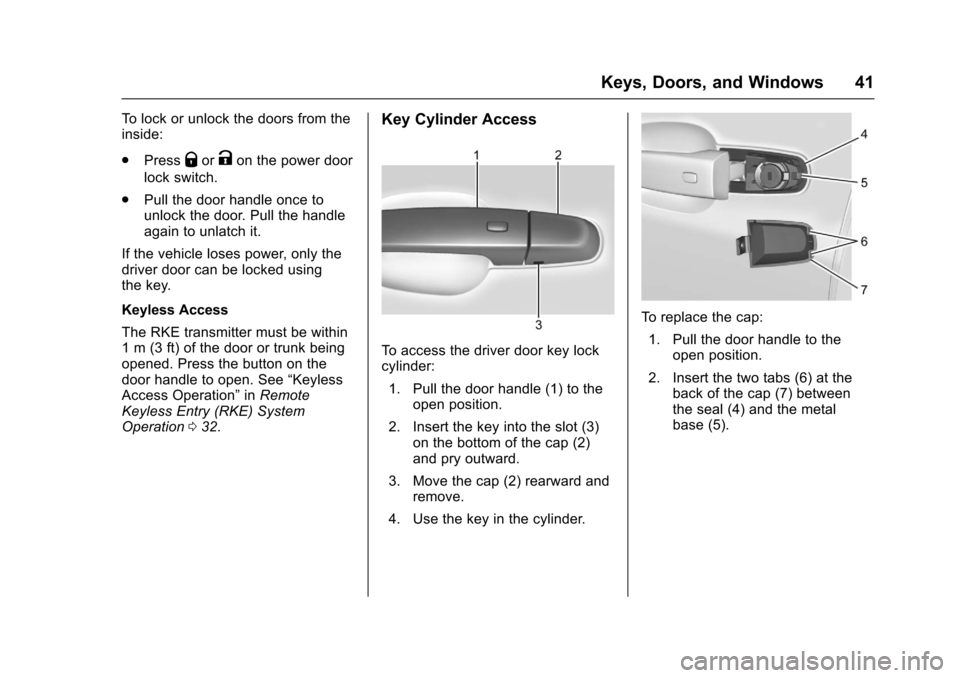
To a c c e s s t h e d r i v e r d o o r k e y l o c kcylinder:
1. Pull the door handle (1) to theopen position.
2. Insert the key into the slot (3)on the bottom of the cap (2)and pry outward.
3. Move the cap (2) rearward andremove.
4. Use the key in the cylinder.
To r e p l a c e t h e c a p :
1. Pull the door handle to theopen position.
2. Insert the two tabs (6) at theback of the cap (7) betweenthe seal (4) and the metalbase (5).
Page 43 of 419
Chevrolet Malibu Owner Manual (GMNA-Localizing-U.S./Canada/Mexico-10122664) - 2017 - crc - 5/23/16
42 Keys, Doors, and Windows
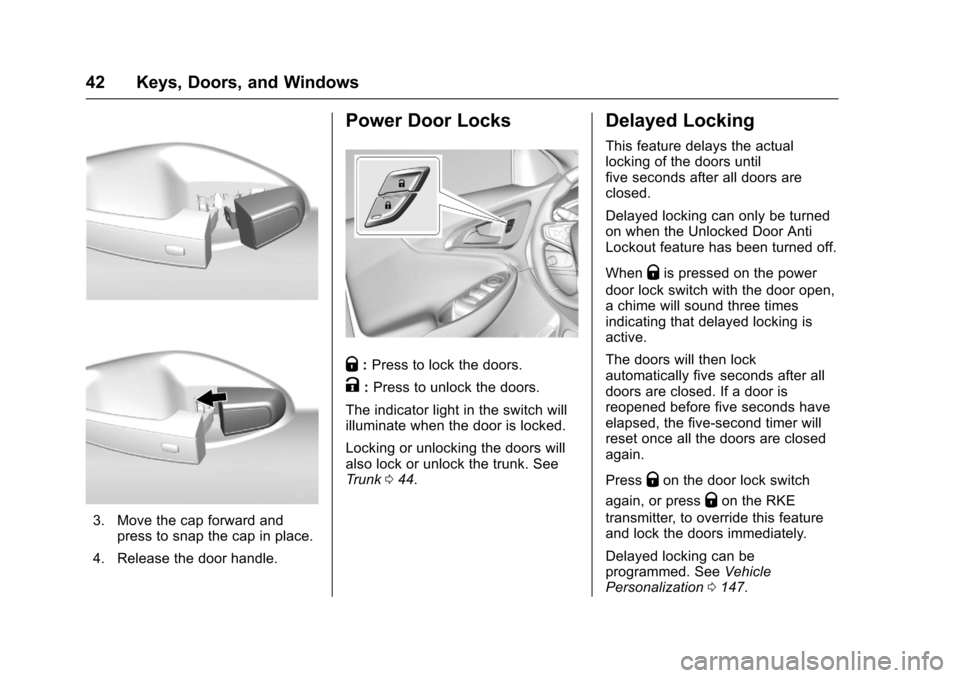
3. Move the cap forward andpress to snap the cap in place.
4. Release the door handle.
Power Door Locks
Q:Press to lock the doors.
K:Press to unlock the doors.
The indicator light in the switch willilluminate when the door is locked.
Locking or unlocking the doors willalso lock or unlock the trunk. SeeTr u n k044.
Delayed Locking
This feature delays the actuallocking of the doors untilfive seconds after all doors areclosed.
Delayed locking can only be turnedon when the Unlocked Door AntiLockout feature has been turned off.
WhenQis pressed on the power
door lock switch with the door open,achimewillsoundthreetimesindicating that delayed locking isactive.
The doors will then lockautomatically five seconds after alldoors are closed. If a door isreopened before five seconds haveelapsed, the five-second timer willreset once all the doors are closedagain.
PressQon the door lock switch
again, or pressQon the RKE
transmitter, to override this featureand lock the doors immediately.
Delayed locking can beprogrammed. SeeVehiclePersonalization0147.
Page 44 of 419
Chevrolet Malibu Owner Manual (GMNA-Localizing-U.S./Canada/Mexico-10122664) - 2017 - crc - 5/23/16
Keys, Doors, and Windows 43
Automatic Door Locks
The doors will lock automaticallywhen all doors are closed, theignition is on, and the vehicle isshifted out of P (Park).
To u n l o c k t h e d o o r s :
.PressKon the power door lock
switch.
.Shift the transmission intoP(Park).
Automatic door locking cannot bedisabled. Automatic door unlockingcan be programmed. SeeVehiclePersonalization0147.
Lockout Protection
If the vehicle is in ACC/ACCESSORY or ON/RUN/STARTand the power door lock switch ispressed with the driver door open,all the doors will lock and only thedriver door will unlock.
If the vehicle is off and locking isrequested while a door is open,when all doors are closed thevehicle will check for RKEtransmitters inside. If an RKE
transmitter is detected and thenumber of RKE transmitters insidehas not reduced, the driver door willunlock and the horn will chirp threetimes.
Lockout Protection can be manuallyoverridden with the driver door open
by pressing and holdingQon the
power door lock switch.
Unlocked Door Anti-Lockout
If Unlocked Door Anti-Lockout isturned on and the vehicle is off, thedriver door is open, and locking isrequested, all the doors will lock andonly the driver door will unlock. TheUnlocked Door Anti-Lockout featurecan be turned on or off using thevehicle personalization menus. SeeVehicle Personalization0147.
Safety Locks
The rear door safety locks preventpassengers from opening the reardoors from inside the vehicle.
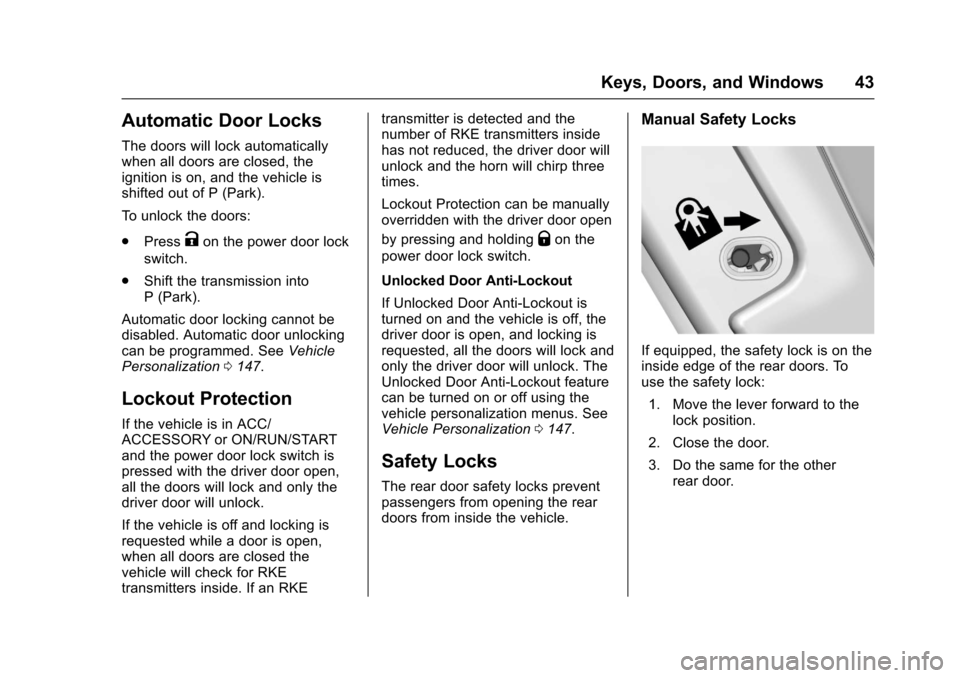
Manual Safety Locks
If equipped, the safety lock is on theinside edge of the rear doors. Touse the safety lock:
1. Move the lever forward to thelock position.
2. Close the door.
3. Do the same for the otherrear door.