trunk CHEVROLET MALIBU 2017 9.G User Guide
[x] Cancel search | Manufacturer: CHEVROLET, Model Year: 2017, Model line: MALIBU, Model: CHEVROLET MALIBU 2017 9.GPages: 419, PDF Size: 7.81 MB
Page 47 of 419
Chevrolet Malibu Owner Manual (GMNA-Localizing-U.S./Canada/Mexico-10122664) - 2017 - crc - 5/23/16
46 Keys, Doors, and Windows
Vehicle Security
This vehicle has theft-deterrentfeatures; however, they do not makethe vehicle impossible to steal.
Vehicle Alarm System
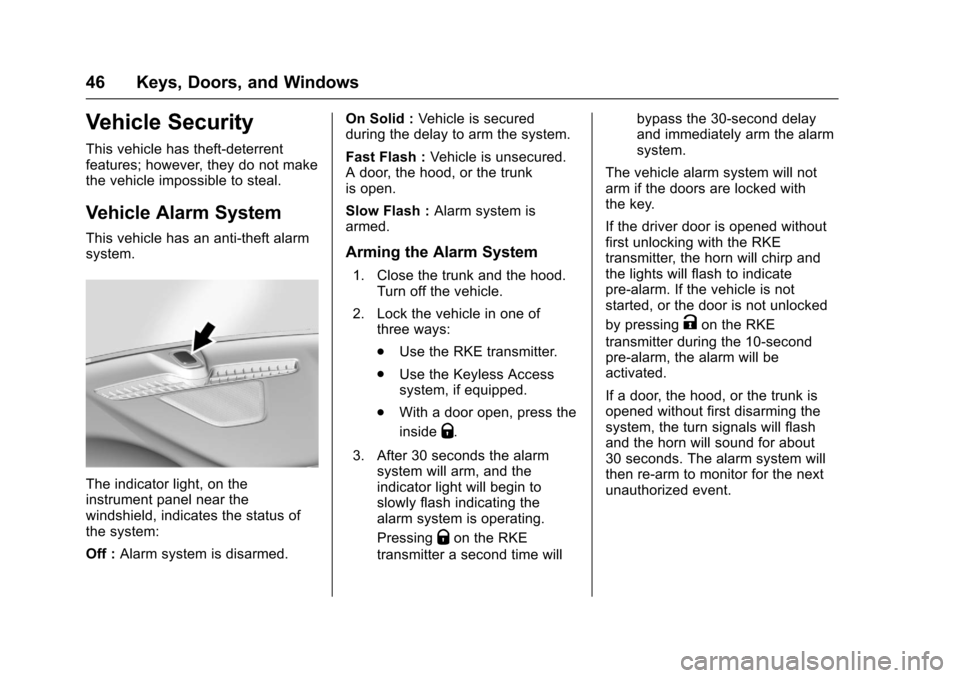
This vehicle has an anti-theft alarmsystem.
The indicator light, on theinstrument panel near thewindshield, indicates the status ofthe system:
Off :Alarm system is disarmed.
On Solid :Ve h i c l e i s s e c u r e dduring the delay to arm the system.
Fast Flash :Vehicle is unsecured.Adoor,thehood,orthetrunkis open.
Slow Flash :Alarm system isarmed.
Arming the Alarm System
1. Close the trunk and the hood.Turn off the vehicle.
2. Lock the vehicle in one ofthree ways:
.Use the RKE transmitter.
.Use the Keyless Accesssystem, if equipped.
.With a door open, press the
insideQ.
3. After 30 seconds the alarmsystem will arm, and theindicator light will begin toslowly flash indicating thealarm system is operating.
PressingQon the RKE
transmitter a second time will
bypass the 30-second delayand immediately arm the alarmsystem.
The vehicle alarm system will notarm if the doors are locked withthe key.
If the driver door is opened withoutfirst unlocking with the RKEtransmitter, the horn will chirp andthe lights will flash to indicatepre-alarm. If the vehicle is notstarted, or the door is not unlocked
by pressingKon the RKE
transmitter during the 10-secondpre-alarm, the alarm will beactivated.
If a door, the hood, or the trunk isopened without first disarming thesystem, the turn signals will flashand the horn will sound for about30 seconds. The alarm system willthen re-arm to monitor for the nextunauthorized event.
Page 63 of 419
Chevrolet Malibu Owner Manual (GMNA-Localizing-U.S./Canada/Mexico-10122664) - 2017 - crc - 5/23/16
62 Seats and Restraints
Rear Seats
Rear Seat Reminder
Look in Rear Seat ReminderFeature
If equipped, this message displaysunder certain conditions indicatingthere may be an item or passengerin the rear seat. Check beforeexiting the vehicle.
This feature will activate when asecond row door is opened whilethe vehicle is on or up to 10 minutesbefore the vehicle is turned on,including if the vehicle was startedremotely. There will be an alertwhen the vehicle is turned off. Thealert does not directly detect objectsin the rear seat; instead, undercertain conditions, it detects when arear door is opened and closed,indicating that there may besomething in the rear seat.
The feature is active only once eachtime the vehicle is turned on and off,and will require reactivation byopening and closing the second rowdoors. There may be an alert evenwhen there is nothing in the rear
seat; for example, if a child enteredthe vehicle through the rear doorand left the vehicle without thevehicle being shut off.
The feature can be turned on or offthroughVehiclePersonalization0147.
Folding the Seatback
Either side of the seatback can befolded down for more cargo space.Fold a seatback only when thevehicle is not moving.
Caution
Folding a rear seat with the safety
belts still fastened may cause
damage to the seat or the safety
belts. Always unbuckle the safety
belts and return them to their
normal stowed position before
folding a rear seat.
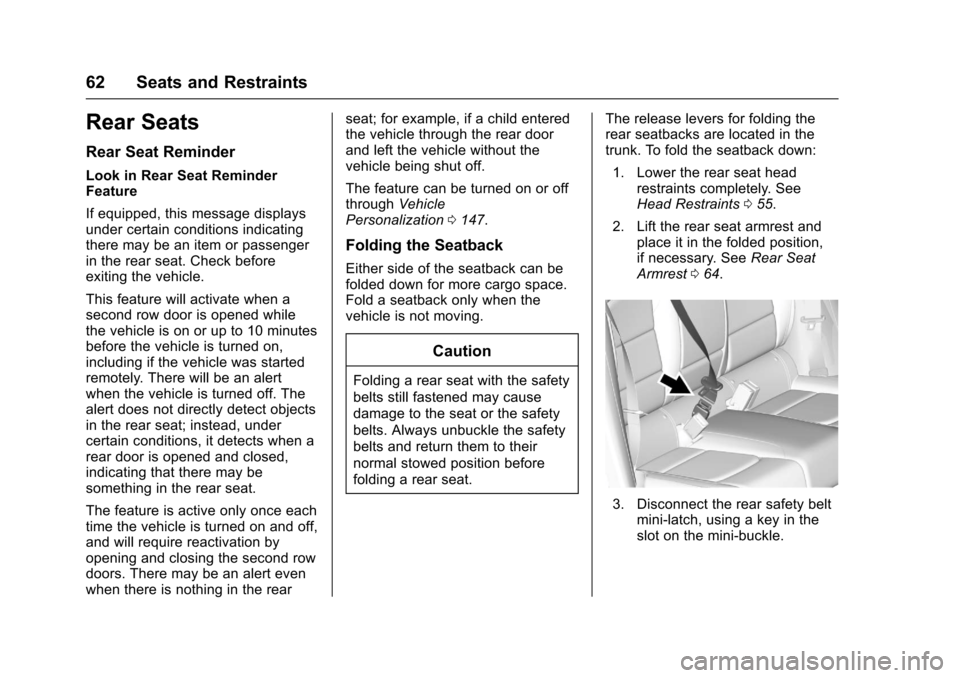
The release levers for folding therear seatbacks are located in thetrunk. To fold the seatback down:
1. Lower the rear seat headrestraints completely. SeeHead Restraints055.
2. Lift the rear seat armrest andplace it in the folded position,if necessary. SeeRear SeatArmrest064.
3. Disconnect the rear safety beltmini-latch, using a key in theslot on the mini-buckle.
Page 64 of 419
Chevrolet Malibu Owner Manual (GMNA-Localizing-U.S./Canada/Mexico-10122664) - 2017 - crc - 5/23/16
Seats and Restraints 63
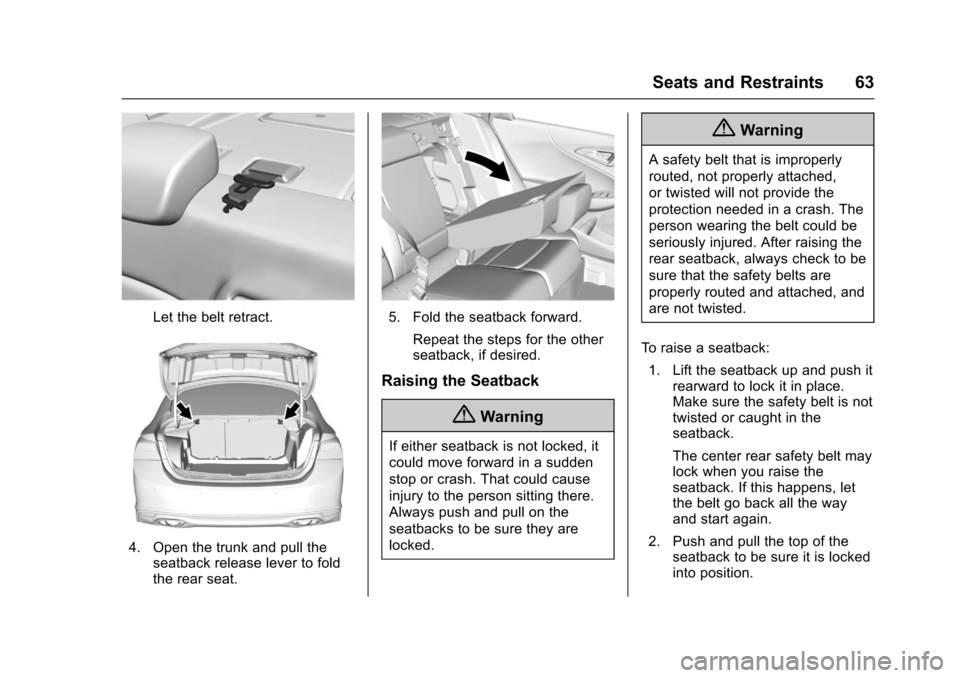
Let the belt retract.
4. Open the trunk and pull theseatback release lever to foldthe rear seat.
5. Fold the seatback forward.
Repeat the steps for the otherseatback, if desired.
Raising the Seatback
{Warning
If either seatback is not locked, it
could move forward in a sudden
stop or crash. That could cause
injury to the person sitting there.
Always push and pull on the
seatbacks to be sure they are
locked.
{Warning
Asafetybeltthatisimproperly
routed, not properly attached,
or twisted will not provide the
protection needed in a crash. The
person wearing the belt could be
seriously injured. After raising the
rear seatback, always check to be
sure that the safety belts are
properly routed and attached, and
are not twisted.
To r a i s e a s e a t b a c k :
1. Lift the seatback up and push itrearward to lock it in place.Make sure the safety belt is nottwisted or caught in theseatback.
The center rear safety belt maylock when you raise theseatback. If this happens, letthe belt go back all the wayand start again.
2. Push and pull the top of theseatback to be sure it is lockedinto position.
Page 103 of 419
Chevrolet Malibu Owner Manual (GMNA-Localizing-U.S./Canada/Mexico-10122664) - 2017 - crc - 5/23/16
102 Storage
Center Console Storage
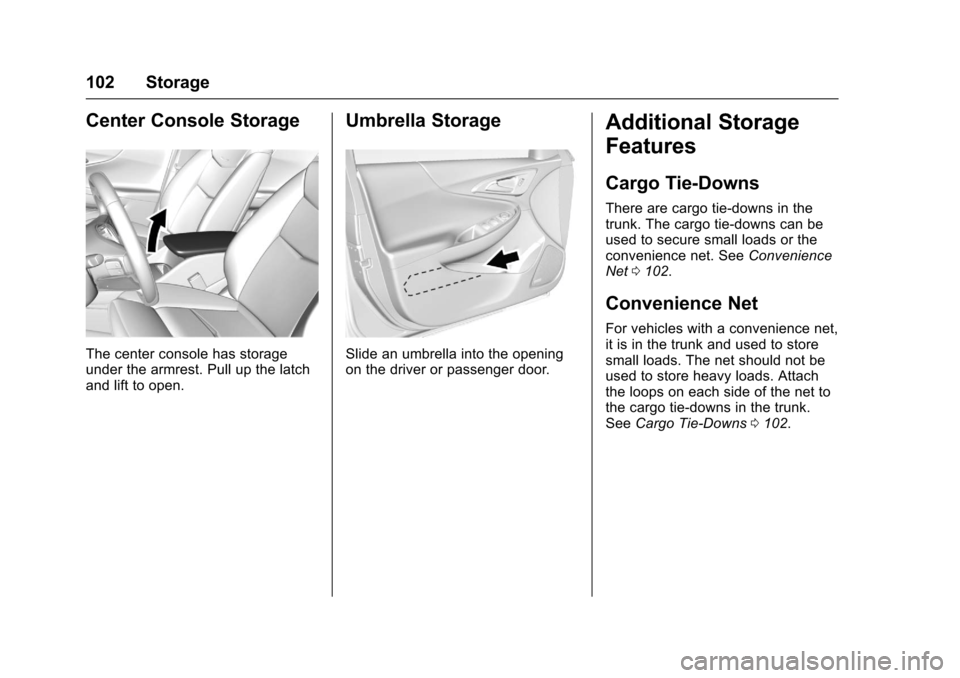
The center console has storageunder the armrest. Pull up the latchand lift to open.
Umbrella Storage
Slide an umbrella into the openingon the driver or passenger door.
Additional Storage
Features
Cargo Tie-Downs
There are cargo tie⇣downs in thetrunk. The cargo tie⇣downs can beused to secure small loads or theconvenience net. SeeConvenienceNet0102.
Convenience Net
For vehicles with a convenience net,it is in the trunk and used to storesmall loads. The net should not beused to store heavy loads. Attachthe loops on each side of the net tothe cargo tie-downs in the trunk.SeeCargo Tie-Downs0102.
Page 141 of 419
Chevrolet Malibu Owner Manual (GMNA-Localizing-U.S./Canada/Mexico-10122664) - 2017 - crc - 5/23/16
140 Instruments and Controls
Door Ajar Messages
DOOR OPEN
This message will display, alongwith a symbol on the DIC showingwhich door, when the vehicle hasbeen shifted out of P (Park) or startsto move and a door is open. Closethe door completely.
HOOD OPEN
This message will display when thehood is open. Close the hoodcompletely.
REAR DOOR UNLOCKED
This message will display when thevehicle is in D (Drive) and a reardoor handle is pulled.
TRUNK OPEN
This message will display when thetrunk is open. Close the trunkcompletely.
Engine Cooling System
Messages
A/C OFF DUE TO HIGH
ENGINE TEMP
This message displays when theengine coolant becomes hotter thanthe normal operating temperature.To a v o i d a d d e d s t r a i n o n a h o tengine, the air conditioningcompressor automatically turns off.When the coolant temperaturereturns to normal, the airconditioning compressor turns backon. You can continue to drive thevehicle.
If this message continues to appear,have the system repaired by yourdealer as soon as possible to avoiddamage to the engine.
COOLANT LEVEL LOW ADD
COOLANT
This message will display if thecoolant is low. SeeEngineCoolant0295.
ENGINE OVERHEATED—
IDLE ENGINE
This message displays when theengine coolant temperature is toohot. Stop and allow the vehicle toidle until it cools down.
ENGINE OVERHEATED—
STOP ENGINE
This message displays and acontinuous chime sounds if theengine cooling system reachesunsafe temperatures for operation.Stop and turn off the vehicle assoon as it is safe to do so to avoidsevere damage. This messageclears when the engine has cooledto a safe operating temperature.
Page 272 of 419
Chevrolet Malibu Owner Manual (GMNA-Localizing-U.S./Canada/Mexico-10122664) - 2017 - crc - 5/23/16
Driving and Operating 271
The vehicle has a capless refuelingsystem and does not have a fuelcap. The filling nozzle must be fullyinserted and latched prior to startingfuel flow.
{Warning
If a fire starts while you are
refueling, do not remove the
nozzle. Shut off the flow of fuel by
shutting off the pump or by
notifying the station attendant.
Leave the area immediately.
Filling the Tank With a PortableGas Can
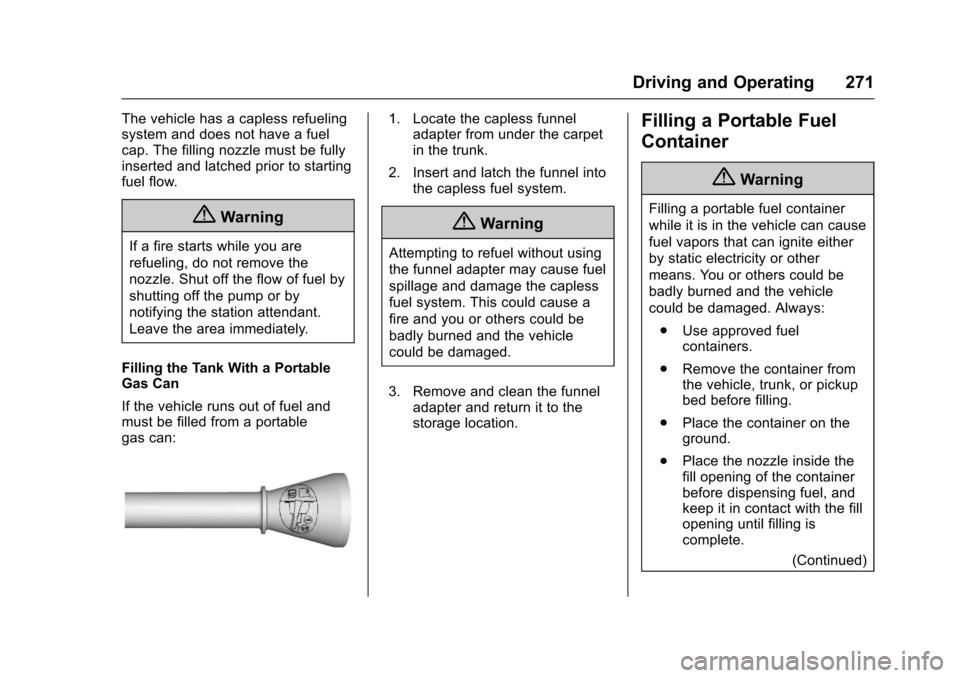
If the vehicle runs out of fuel andmust be filled from a portablegas can:
1. Locate the capless funneladapter from under the carpetin the trunk.
2. Insert and latch the funnel intothe capless fuel system.
{Warning
Attempting to refuel without using
the funnel adapter may cause fuel
spillage and damage the capless
fuel system. This could cause a
fire and you or others could be
badly burned and the vehicle
could be damaged.
3. Remove and clean the funneladapter and return it to thestorage location.
Filling a Portable Fuel
Container
{Warning
Filling a portable fuel container
while it is in the vehicle can cause
fuel vapors that can ignite either
by static electricity or other
means. You or others could be
badly burned and the vehicle
could be damaged. Always:
.Use approved fuelcontainers.
.Remove the container fromthe vehicle, trunk, or pickupbed before filling.
.Place the container on theground.
.Place the nozzle inside thefill opening of the containerbefore dispensing fuel, andkeep it in contact with the fillopening until filling iscomplete.
(Continued)
Page 274 of 419
Chevrolet Malibu Owner Manual (GMNA-Localizing-U.S./Canada/Mexico-10122664) - 2017 - crc - 5/23/16
Driving and Operating 273
.Turn off Forward AutomaticBraking when towing. SeeForward Automatic Braking(FAB)0260.
.The Front Pedestrian Brakingsystem should be set to Alert orOff when towing. SeeFrontPedestrian Braking (FPB)System0261.
{Warning
When towing a trailer, exhaust
gases may collect at the rear of
the vehicle and enter if the
liftgate, trunk/hatch, or rear-most
window is open.
When towing a trailer:
.Do not drive with theliftgate, trunk/hatch,or rear-most window open.
.Fully open the air outlets onor under the instrumentpanel.
(Continued)
Warning (Continued)
.Also adjust the climatecontrol system to a settingthat brings in only outsideair. See“Climate ControlSystems”in the Index.
For information about carbon
monoxide, seeEngine
Exhaust0232.
To w i n g a t r a i l e r r e q u i r e s a c e r t a i namount of experience. Thecombination you are driving islonger and not as responsive as thevehicle itself. Get acquainted withthe handling and braking of the rigbefore setting out for the open road.
Before starting, check all trailer hitchparts and attachments, safetychains, electrical connectors, lamps,tires, and mirrors. If the trailer haselectric brakes, start thecombination moving and then applythe trailer brake controller by handto be sure the brakes work.
During the trip, check occasionallyto be sure that the load is secureand the lamps and any trailerbrakes still work.
Towing with a Stability Control
System
When towing, the sound of thestability control system might beheard. The system is reacting to thevehicle movement caused by thetrailer, which mainly occurs duringcornering. This is normal whentowing heavier trailers.
Following Distance
Stay at least twice as far behind thevehicle ahead as you would whendriving the vehicle without a trailer.This can help to avoid situationsthat require heavy braking andsudden turns.
Passing
More passing distance is neededwhen towing a trailer. Because therig is longer, it is necessary to gofarther beyond the passed vehiclebefore returning to the lane.
Page 302 of 419
Chevrolet Malibu Owner Manual (GMNA-Localizing-U.S./Canada/Mexico-10122664) - 2017 - crc - 5/23/16
Vehicle Care 301
{Warning
If too much brake fluid is added, it
can spill on the engine and burn,
if the engine is hot enough. You
or others could be burned, and
the vehicle could be damaged.
Add brake fluid only when work is
done on the brake hydraulic
system.
When the brake fluid falls to a lowlevel, the brake warning light comeson. SeeBrake System WarningLight0124.
Brake fluid absorbs water over timewhich degrades the effectiveness ofthe brake fluid. Replace brake fluidat the specified intervals to preventincreased stopping distance. SeeMaintenance Schedule0369.
What to Add
Use only GM approved DOT 3brake fluid from a clean, sealedcontainer. SeeRecommendedFluids and Lubricants0377.
{Warning
The wrong or contaminated brake
fluid could result in damage to the
brake system. This could result in
the loss of braking leading to a
possible injury. Always use the
proper GM approved brake fluid.
Caution
If brake fluid is spilled on the
vehicle's painted surfaces, the
paint finish can be damaged.
Immediately wash off any painted
surface.
Battery - North America
The original equipment battery ismaintenance free. Do not removethe cap and do not add fluid.
The non-hybrid vehicle has astandard 12-volt battery under thehood. SeeEngine CompartmentOverview0283.
Refer to the replacement numbershown on the original battery labelwhen a new 12-volt battery isneeded.
Hybrid Vehicle
The hybrid vehicle 12-volt battery isin the trunk on the driver side.Hybrid vehicles also have a highvoltage battery. Only a trainedservice technician with the properknowledge and tools should inspect,test, or replace the high voltagebattery. See your dealer if the highvoltage battery needs service. Thedealer has information on how torecycle the high voltage battery.
The hybrid high voltage battery iscooled with air drawn from thevehicle interior. The cold air intakefor the battery is under the rearseat. Do not block the area in frontof the cold air intake.
Page 308 of 419
Chevrolet Malibu Owner Manual (GMNA-Localizing-U.S./Canada/Mexico-10122664) - 2017 - crc - 5/23/16
Vehicle Care 307
Taillamps, Turn Signal,
Stoplamps, and Back-Up
Lamps (LS and LT)
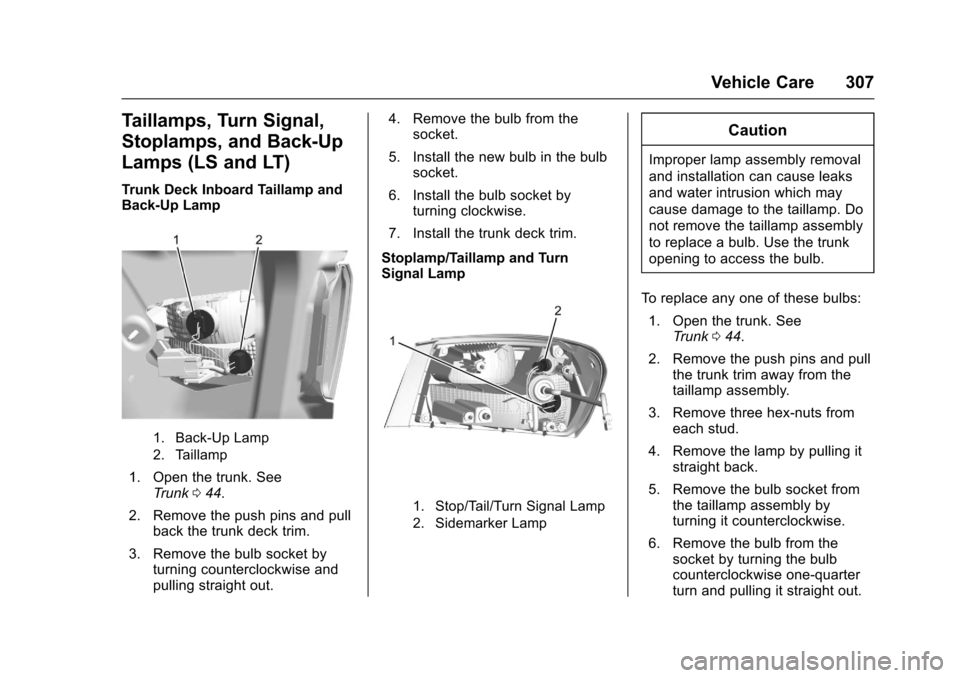
Trunk Deck Inboard Taillamp andBack-Up Lamp
1. Back-Up Lamp
2. Taillamp
1. Open the trunk. SeeTr u n k044.
2. Remove the push pins and pullback the trunk deck trim.
3. Remove the bulb socket byturning counterclockwise andpulling straight out.
4. Remove the bulb from thesocket.
5. Install the new bulb in the bulbsocket.
6. Install the bulb socket byturning clockwise.
7. Install the trunk deck trim.
Stoplamp/Taillamp and TurnSignal Lamp
1. Stop/Tail/Turn Signal Lamp
2. Sidemarker Lamp
Caution
Improper lamp assembly removal
and installation can cause leaks
and water intrusion which may
cause damage to the taillamp. Do
not remove the taillamp assembly
to replace a bulb. Use the trunk
opening to access the bulb.
To r e p l a c e a n y o n e o f t h e s e b u l b s :
1. Open the trunk. SeeTr u n k044.
2. Remove the push pins and pullthe trunk trim away from thetaillamp assembly.
3. Remove three hex-nuts fromeach stud.
4. Remove the lamp by pulling itstraight back.
5. Remove the bulb socket fromthe taillamp assembly byturning it counterclockwise.
6. Remove the bulb from thesocket by turning the bulbcounterclockwise one-quarterturn and pulling it straight out.
Page 309 of 419
Chevrolet Malibu Owner Manual (GMNA-Localizing-U.S./Canada/Mexico-10122664) - 2017 - crc - 5/23/16
308 Vehicle Care
7. Install a new bulb into thesocket.
8. Install the bulb socket into thetaillamp assembly by turning itclockwise.
9. Install the trunk trim, hex nuts,and push pins.
Taillamps, Turn Signal,
Stoplamps, and Back-Up
Lamps (LTZ)
Caution
Improper lamp assembly removal
and installation can cause leaks
and water intrusion which may
cause damage to the taillamp. Do
not remove the taillamp assembly
to replace a bulb. Use the trunk
opening to access the bulb.
The stoplamp/taillamp and trunkdeck inboard taillamp are LEDs. Toreplace, see your dealer.
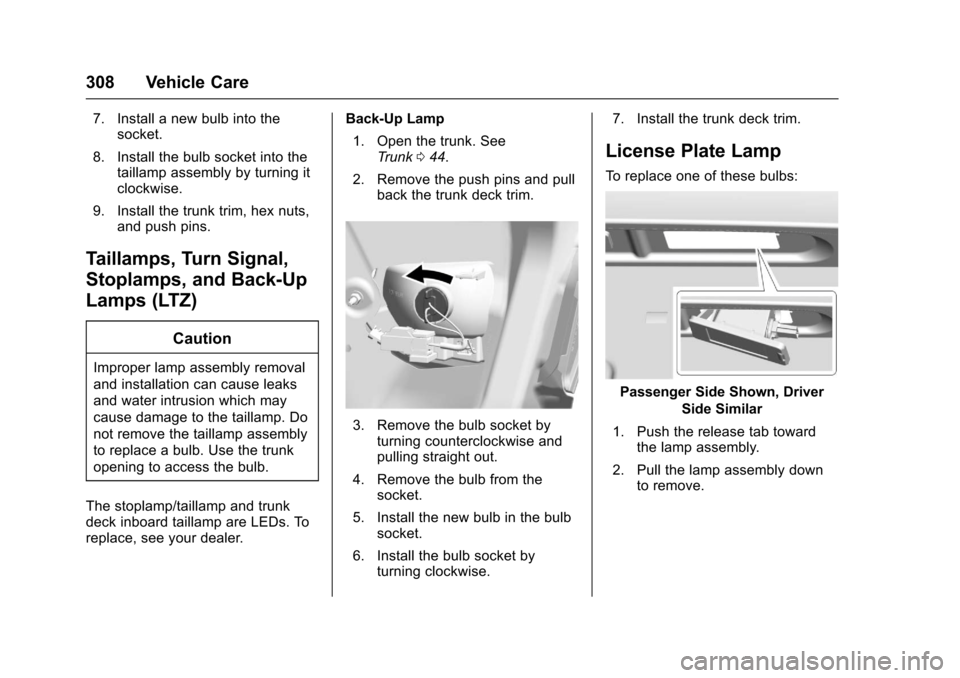
Back-Up Lamp
1. Open the trunk. SeeTr u n k044.
2. Remove the push pins and pullback the trunk deck trim.
3. Remove the bulb socket byturning counterclockwise andpulling straight out.
4. Remove the bulb from thesocket.
5. Install the new bulb in the bulbsocket.
6. Install the bulb socket byturning clockwise.
7. Install the trunk deck trim.
License Plate Lamp
To r e p l a c e o n e o f t h e s e b u l b s :
Passenger Side Shown, Driver
Side Similar
1. Push the release tab towardthe lamp assembly.
2. Pull the lamp assembly downto remove.