remote control CHEVROLET MALIBU 2017 9.G Owner's Manual
[x] Cancel search | Manufacturer: CHEVROLET, Model Year: 2017, Model line: MALIBU, Model: CHEVROLET MALIBU 2017 9.GPages: 419, PDF Size: 7.81 MB
Page 161 of 419
Chevrolet Malibu Owner Manual (GMNA-Localizing-U.S./Canada/Mexico-10122664) - 2017 - crc - 5/23/16
160 Instruments and Controls
instructions refer to a garage dooropener, but can be used for otherdevices.
Do not use the Universal Remotesystem with any garage door openerthat does not have the stop andreverse feature. This includes anygarage door opener modelmanufactured before April 1, 1982.
Read these instructions completelybefore programming the UniversalRemote system. It may help to haveanother person assist with theprogramming process.
Keep the original hand-heldtransmitter for use in other vehiclesas well as for future programming.Erase the programming whenvehicle ownership is terminated.See“Erasing Universal RemoteSystem Buttons”later in thissection.
To p r o g r a m a g a r a g e d o o r o p e n e r ,park outside directly in line with andfacing the garage door openerreceiver. Clear all people andobjects near the garage door.
Make sure the hand-held transmitterhas a new battery for quick andaccurate transmission of theradio-frequency signal.
Programming the Universal
Remote System
For questions or help programmingthe Universal Remote system, call1-800-355-3515 or seewww.homelink.com.
Programming involvestime-sensitive actions, and may timeout causing the procedure to berepeated.
To p r o g r a m u p t o t h r e e d e v i c e s :
1. Hold the end of the hand-heldtransmitter about 3 to 8 cm (1to 3 in) away from theUniversal Remote systembuttons with the indicator lightin view. The hand-heldtransmitter was supplied by themanufacturer of the garagedoor opener receiver.
2. At the same time, press andhold both the hand-heldtransmitter button and one ofthe three Universal Remote
system buttons to be used tooperate the garage door. Donot release either button untilthe indicator light changes fromaslowtoarapidflash.Thenrelease both buttons.
Some garage door openersmay require substitution ofStep 2 with the procedureunder“Radio Signals forCanada and Some GateOperators”later in this section.
3. Press and hold the newlyprogrammed Universal Remotesystem button for five secondswhile watching the indicatorlight and garage dooractivation.
.If the indicator light stays oncontinuously or the garagedoor moves when thebutton is pressed, thenprogramming is complete.There is no need tocomplete Steps 4–6.
.If the indicator light doesnot come on or the garagedoor does not move, asecond button press may
Page 162 of 419
Chevrolet Malibu Owner Manual (GMNA-Localizing-U.S./Canada/Mexico-10122664) - 2017 - crc - 5/23/16
Instruments and Controls 161
be required. For a secondtime, press and hold thenewly programmed buttonfor five seconds. If the lightstays on or the garage doormoves, programming iscomplete.
.If the indicator light blinksrapidly for two seconds,then changes to a solid lightand the garage door doesnot move, continue withprogramming Steps 4–6.
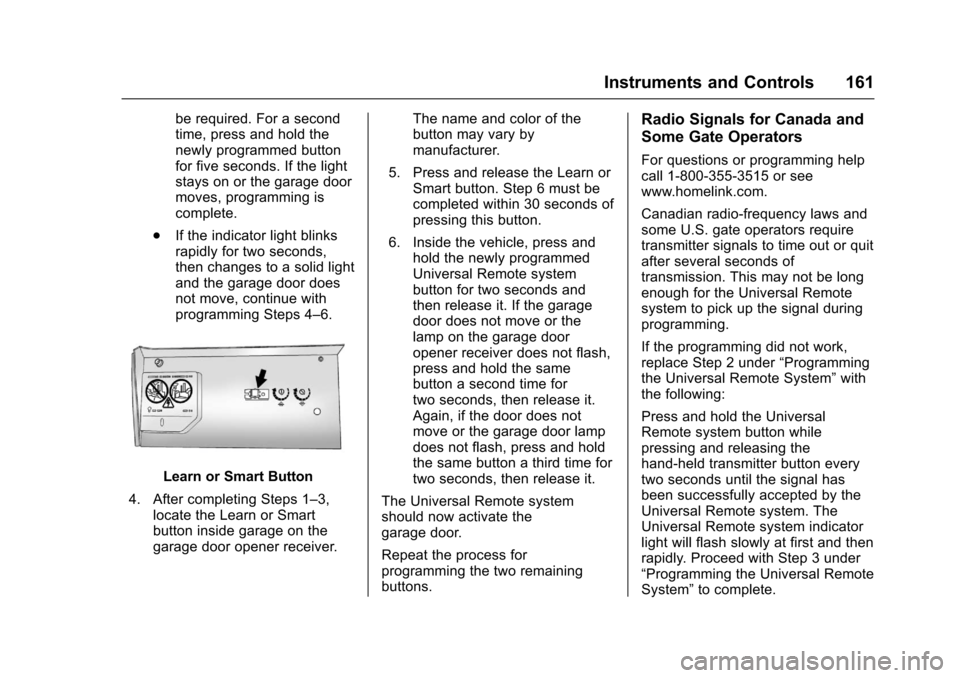
Learn or Smart Button
4. After completing Steps 1–3,locate the Learn or Smartbutton inside garage on thegarage door opener receiver.
The name and color of thebutton may vary bymanufacturer.
5. Press and release the Learn orSmart button. Step 6 must becompleted within 30 seconds ofpressing this button.
6. Inside the vehicle, press andhold the newly programmedUniversal Remote systembutton for two seconds andthen release it. If the garagedoor does not move or thelamp on the garage dooropener receiver does not flash,press and hold the samebutton a second time fortwo seconds, then release it.Again, if the door does notmove or the garage door lampdoes not flash, press and holdthe same button a third time fortwo seconds, then release it.
The Universal Remote systemshould now activate thegarage door.
Repeat the process forprogramming the two remainingbuttons.
Radio Signals for Canada and
Some Gate Operators
For questions or programming helpcall 1-800-355-3515 or seewww.homelink.com.
Canadian radio-frequency laws andsome U.S. gate operators requiretransmitter signals to time out or quitafter several seconds oftransmission. This may not be longenough for the Universal Remotesystem to pick up the signal duringprogramming.
If the programming did not work,replace Step 2 under“Programmingthe Universal Remote System”withthe following:
Press and hold the UniversalRemote system button whilepressing and releasing thehand-held transmitter button everytwo seconds until the signal hasbeen successfully accepted by theUniversal Remote system. TheUniversal Remote system indicatorlight will flash slowly at first and thenrapidly. Proceed with Step 3 under“Programming the Universal RemoteSystem”to complete.
Page 163 of 419
Chevrolet Malibu Owner Manual (GMNA-Localizing-U.S./Canada/Mexico-10122664) - 2017 - crc - 5/23/16
162 Instruments and Controls
Universal Remote System
Operation
Using the Universal Remote
System
Press and hold the appropriateUniversal Remote system button forat least one-half second. Theindicator light will come on while thesignal is being transmitted.
Erasing Universal Remote
System Buttons
Erase all programmed buttons whenvehicle ownership is terminated.
To e r a s e :
1. Press and hold the two outsidebuttons until the indicator lightbegins to flash. This shouldtake about 10 seconds.
2. Release both buttons.
Reprogramming a Single
Universal Remote System
Button
To r e p r o g r a m a n y o f t h e s y s t e mbuttons:
1. Press and hold any one of thebuttons. Do not release thebutton.
2. The indicator light will begin toflash after 20 seconds. Withoutreleasing the button, proceedwith Step 1 under“Programming the UniversalRemote System.”
Page 170 of 419
Chevrolet Malibu Owner Manual (GMNA-Localizing-U.S./Canada/Mexico-10122664) - 2017 - crc - 5/23/16
Lighting 169
Lighting Features
Entry Lighting
Some exterior lamps and most ofthe interior lamps turn on briefly atnight or in areas with limited lightingwhen the Remote Keyless Entry
(RKE) transmitterKbutton is
pressed. SeeRemote Keyless Entry(RKE) System Operation032.Afterabout 30 seconds the exterior lampsturn off, then the dome lamps andremaining interior lamps dim to off.Entry lighting can be disabledmanually by changing the ignitionout of the OFF position, or by
pressing the RKE transmitterQ
button.
This feature can be changed. SeeVehicle Personalization0147.
Exit Lighting
Some exterior lamps and interiorlights come on at night, or in areaswith limited lighting, when the driverdoor is opened after the ignition isturned off. The dome lamp comeson after the ignition is changed to
the OFF position. The exteriorlamps and dome lamp remain on forasetamountoftime,thenautomatically turn off.
The exterior lamps turn offimmediately by turning the exteriorlamp control off.
This feature can be changed. SeeVehicle Personalization0147.
Battery Load
Management
The vehicle has Electric PowerManagement (EPM), whichestimates the battery's temperatureand state of charge. It then adjuststhe voltage for best performanceand extended life of the battery.
When the battery's state of chargeis low, the voltage is raised slightlyto quickly bring the charge back up.When the state of charge is high,the voltage is lowered slightly toprevent overcharging. If the vehiclehas a voltage display on the DriverInformation Center (DIC), you may
see the voltage move up or down.This is normal. If there is a problem,an alert will be displayed.
The battery can be discharged atidle if the electrical loads are veryhigh. This is true for all vehicles.This is because the generator(alternator) may not be spinning fastenough at idle to produce all thepower that is needed for very highelectrical loads.
Ahighelectricalloadoccurswhenseveral of the following are on, suchas: headlamps, high beams, foglamps, rear window defogger,climate control fan at high speed,heated seats, engine cooling fans,trailer loads, and loads plugged intoaccessory power outlets.
EPM works to prevent excessivedischarge of the battery. It does thisby balancing the generator's outputand the vehicle's electrical needs.It can increase engine idle speed togenerate more power, wheneverneeded. It can temporarily reducethe power demands of someaccessories.
Page 208 of 419
Chevrolet Malibu Owner Manual (GMNA-Localizing-U.S./Canada/Mexico-10122664) - 2017 - crc - 5/23/16
Climate Controls 207
Rear Window Defogger
K:Press to turn the rear windowdefogger on or off. An indicator lighton the button comes on to show thatthe rear window defogger is on. Thedefogger turns off when the ignitionis placed in the ACC/ACCESSORYor LOCK/OFF position.
The upper lines on the rear windoware antenna grids and are notintended to defrost the glass.
The rear window defogger can beset to automatic operation. See“Climate and Air Quality”underVehicle Personalization0147.When Auto Rear Defog is selected,the rear window defogger turns onautomatically when the interiortemperature is cold and the outsidetemperature is about 7 °C (44 °F)and below. The auto rear defoggerturns off automatically.
If the vehicle is equipped withheated outside mirrors, they turn onwhen the rear window defoggerbutton is on and help to clear fog orfrost from the surface of the mirror.SeeHeated Mirrors049.
Caution
Do not try to clear frost or other
material from the inside of the
front windshield and rear window
with a razor blade or anything
else that is sharp. This may
damage the rear window
defogger grid and affect the
radio's ability to pick up stations
clearly. The repairs would not be
covered by the vehicle warranty.
LorM:If equipped, pressLorMto heat the driver or passenger seat.SeeHeated and Ventilated FrontSeats060.
Remote Start Climate ControlOperation :If equipped with remotestart, the climate control systemmay run when the vehicle is startedremotely. The system uses thedriver’sprevioussettingstoheatorcool the inside of the vehicle. Therear defog may come on duringremote start based on cold ambientconditions. The rear defog indicatorlight does not come on during aremote start. The front heated seatswill turn on if it is cold outside. Theheated seat indicator lights do notcome on during a remote start.
Page 212 of 419
Chevrolet Malibu Owner Manual (GMNA-Localizing-U.S./Canada/Mexico-10122664) - 2017 - crc - 5/23/16
Climate Controls 211
defogger button is on and help toclear fog or frost from the surface ofthe mirror. SeeHeated Mirrors049.
Caution
Do not try to clear frost or other
material from the inside of the
front windshield and rear window
with a razor blade or anything
else that is sharp. This may
damage the rear window
defogger grid and affect the
radio's ability to pick up stations
clearly. The repairs would not be
covered by the vehicle warranty.
Driver and Passenger Heated andVentilated Seats :If equipped,
pressLorMto heat the driver or
passenger seat.
If equipped, press{orCto
ventilate the driver or passengerseat. SeeHeated and VentilatedFront Seats060.
Remote Start Climate ControlOperation :If equipped with remotestart, the climate control systemmay run when the vehicle is startedremotely. The system will use thedefrost setting if it is cold outside orturn on using the coldest settings ifit is hot outside. The rear defog maycome on during remote start basedon cold ambient conditions. Therear defog indicator light does notcome on during a remote start. Thefront heated seats will turn on if it iscold outside. The heated seatindicator lights do not come onduring a remote start.
Sensor
The solar sensor, on top of theinstrument panel near thewindshield, monitors the solar heat.
The climate control system uses thesensor information to adjust thetemperature, fan speed,recirculation, and air delivery modefor best comfort.
Do not cover the sensor; otherwisethe automatic climate control systemmay not work properly.
Air Vents
Use the louvers on the air vents tochange the direction of the airflow,or to open and close off the airflow.
Page 401 of 419
Chevrolet Malibu Owner Manual (GMNA-Localizing-U.S./Canada/Mexico-10122664) - 2017 - crc - 5/23/16
400 OnStar
from each other and use acombination of letters, numbers,and symbols to increase thesecurity.
.Change the default name of theSSID (Service Set Identifier).This is your network’snamethatis visible to other wirelessdevices. Choose a unique nameand avoid family names orvehicle descriptions.
OnStar Wi-Fi®Hotspot (IfEquipped)
The vehicle may have a built-inWi-Fi hotspot that provides accessto the Internet and web content at4G LTE speed. Up to seven mobiledevices can be connected. A dataplan is required. Use the in-vehiclecontrols only when it is safe todo so.
1. To retrieve Wi-Fi hotspot
information, press=,waitfor
the prompt, then say“Wi-Fisettings.”On some vehicles,touch Wi-Fi Settings on thescreen.
2. The Wi-Fi settings will displaythe Wi-Fi hotspot name (SSID),password, and on somevehicles, the connection type(no Internet connection, 3G,4G, 4G LTE), and signal quality(poor, good, excellent).
3. To change the SSID or
password, pressQor call
1-888-4ONSTAR to connectwith an Advisor.
After initial set-up, your vehicle’sWi-Fi hotspot will connectautomatically to your mobiledevices. Manage data usage byturning Wi-Fi on or off on yourmobile device, using theRemoteLink mobile app, or bycontacting an OnStar Advisor.
OnStar RemoteLink®Mobile App(If Equipped)
Download the OnStar RemoteLinkmobile app to select Apple®iOS,Android™,BlackBerry®,or Windows®mobile devices.OnStar Subscribers can access thefollowing services from a mobiledevice:
.Remotely start/stop the vehicle,if factory-equipped.
.Lock/unlock doors, if equippedwith automatic locks.
.Activate the horn and lamps.
.Check the vehicle’sfuellevel,oillife, or tire pressure,if factory-equipped with the TirePressure Monitor System.
.Send directions to the vehicle.
.Locate the vehicle on a map(U.S. market only).
.Turn the vehicle's Wi-Fi hotspoton/off, manage settings, andmonitor data consumption,if equipped.
For OnStar RemoteLink informationand compatibility, seewww.onstar.com (U.S.) orwww.onstar.ca (Canada).
Remote Services
Contact an OnStar Advisor tounlock the doors or sound the hornand flash the lamps.
Page 403 of 419
Chevrolet Malibu Owner Manual (GMNA-Localizing-U.S./Canada/Mexico-10122664) - 2017 - crc - 5/23/16
402 OnStar
OnStar Additional
Information
In-Vehicle Audio Messages
Audio messages may play importantinformation at the following times:
.Prior to vehicle purchase.
PressQto set up an account.
.With the OnStar Basic Plan,every 60 days.
.After change in ownership andat 90 days.
Transferring Service
PressQto request account transfer
eligibility information. The Advisorcan cancel or change accountinformation.
Selling/Transferring the
Vehicle
Call 1-888-4ONSTAR(1-888-466-7827) immediately toterminate your OnStar services ifthe vehicle is disposed of, sold,transferred, or if the lease ends.
Reactivation for Subsequent
Owners
PressQand follow the prompts to
speak to an Advisor as soon aspossible. The Advisor will updatevehicle records and explain OnStarservice options.
How OnStar Service Works
Automatic Crash Response,Emergency Services, Crisis Assist,Stolen Vehicle Assistance,Advanced Vehicle Diagnostics,Remote Services, RoadsideAssistance, Turn-by-TurnNavigation, and Hands-Free Callingare available on most vehicles. Notall OnStar services are availableeverywhere or on all vehicles. Formore information, a full descriptionof OnStar services, systemlimitations, and OnStar User Terms,Privacy Statement, and SoftwareTe r m s :
.Call 1-888-4ONSTAR(1-888-466-7827).
.See www.onstar.com (U.S.).
.See www.onstar.ca (Canada).
.Call TTY 1-877-248-2080.
.PressQto speak with an
Advisor.
OnStar services cannot work unlessthe vehicle is in a place whereOnStar has an agreement with awireless service provider for servicein that area. The wireless serviceprovider must also have coverage,network capacity, reception, andtechnology compatible with OnStarservices. Service involving locationinformation about the vehicle cannotwork unless GPS signals areavailable, unobstructed, andcompatible with the OnStarhardware. OnStar services may notwork if the OnStar equipment is notproperly installed or it has not beenproperly maintained. If equipment orsoftware is added, connected,or modified, OnStar services maynot work. Other problems beyondthe control of OnStar—such ashills, tall buildings, tunnels, weather,electrical system design andarchitecture of the vehicle, damage
Page 413 of 419

Chevrolet Malibu Owner Manual (GMNA-Localizing-U.S./Canada/Mexico-10122664) - 2017 - crc - 5/23/16
412 Index
Horn . . . . . . . . . . . . . . . . . . . . . . . . . . . . 105
How to Wear Safety Belts
Properly . . . . . . . . . . . . . . . . . . . . . . . . 65
HVAC . . . . . . . . . . . . . . . . . . . . . . 205, 208
I
Ignition Positions . . . . . . . . . . . . . . . 225
Immobilizer . . . . . . . . . . . . . . . . . . . . . . 47
Indicator
Pedestrian Ahead . . . . . . . . . . . . 126
Vehicle Ahead . . . . . . . . . . . . . . . . 126
Infants and Young Children,
Restraints . . . . . . . . . . . . . . . . . . . . . . 85
Information
Energy . . . . . . . . . . . . . . . . . . . . . . . 131
Infotainment . . . . . . . . . . . . . . . . . . . . 171
Infotainment System . . . . . . . . . . . . 396
Instrument Cluster . . . . . . . . . 112, 114
Instrument Panel Overview . . . . . . . 6
Interior Rearview Mirrors . . . . . . . . . 49
Introduction . . . . . . . . . . . . . . . . . . . . . . . 2
J
Jump Starting - North
America . . . . . . . . . . . . . . . . . . . . . . . 352
K
Key and Lock Messages . . . . . . . . 141
Keyless Entry
Remote (RKE) System . . . . . . . . . 32
Keys . . . . . . . . . . . . . . . . . . . . . . . . . . . . . 31
L
Labeling, Tire Sidewall . . . . . . . . . . 320
Lamps
Courtesy . . . . . . . . . . . . . . . . . . . . . . 168
Daytime Running (DRL) . . . . . . 165
Dome . . . . . . . . . . . . . . . . . . . . . . . . . 168
Exterior Controls . . . . . . . . . . . . . . 163
Exterior Lamps Off
Reminder . . . . . . . . . . . . . . . . . . . 165
Exterior Lighting Battery
Saver . . . . . . . . . . . . . . . . . . . . . . . 170
License Plate . . . . . . . . . . . . . . . . . 308
Malfunction Indicator . . . . . . . . . 122
Messages . . . . . . . . . . . . . . . . . . . . 142
On Reminder . . . . . . . . . . . . . . . . . 130
Reading . . . . . . . . . . . . . . . . . . . . . . 168
Lane Change Alert (LCA) . . . . . . . 264
Lane Departure
Warning (LDW) . . . . . . . . . . . . . . . . 266
Lane Keep Assist (LKA) . . . . . . . . 266
Lane Keep Assist Light . . . . . . . . . 125
Lap-Shoulder Belt . . . . . . . . . . . . . . . 66
LATCH System
Replacing Parts after a
Crash . . . . . . . . . . . . . . . . . . . . . . . . . 95
LATCH, Lower Anchors and
Te t h e r s f o r C h i l d r e n . . . . . . . . . . . . 9 0
LED Lighting . . . . . . . . . . . . . . . . . . . . 305
Light
Ready Indicator . . . . . . . . . . . . . . . 129
Vehicle Ready . . . . . . . . . . . . . . . . 129
Lighting
Entry . . . . . . . . . . . . . . . . . . . . . . . . . 169
Exit . . . . . . . . . . . . . . . . . . . . . . . . . . . 169
Illumination Control . . . . . . . . . . . 167
LED . . . . . . . . . . . . . . . . . . . . . . . . . . 305
Lights . . . . . . . . . . . . . . . . . . . . . . . . . . . 125
Airbag Readiness . . . . . . . . . . . . . 120
Antilock Brake System
(ABS) Warning . . . . . . . . . . . . . . 125
Brake System Warning . . . . . . . 124
Charging System . . . . . . . . . . . . . 122
Cruise Control . . . . . . . . . . . . . . . . 130
Door Ajar . . . . . . . . . . . . . . . . . . . . . 130
Electric Parking Brake . . . . . . . . 124
Engine Oil Pressure . . . . . . . . . . 128
Flash-to-Pass . . . . . . . . . . . . . . . . . 165
High-Beam On . . . . . . . . . . . . . . . . 129
High/Low Beam Changer . . . . . 165
Low Fuel Warning . . . . . . . 128, 129
Page 416 of 419

Chevrolet Malibu Owner Manual (GMNA-Localizing-U.S./Canada/Mexico-10122664) - 2017 - crc - 5/23/16
Index 415
Proposition
65 Warning,
California . . . . . . . . . . . .279, 301, 352
Propulsion Power Messages . . . 144
R
Radio Frequency Statement . . . . 393
Radio Reception . . . . . . . . . . . . . . . . 182
Radios
AM-FM Radio . . . . . . . . . . . . . . . . . 178
Satellite . . . . . . . . . . . . . . . . . . . . . . . 181
Reading Lamps . . . . . . . . . . . . . . . . . 168
Ready Indicator . . . . . . . . . . . . . . . . . 129
Rear Seat Armrest . . . . . . . . . . . . . . . 64
Rear Seats . . . . . . . . . . . . . . . . . . . . . . 62
Rear Vision Camera (RVC) . . . . . 253
Rearview Mirrors . . . . . . . . . . . . . . . . 49
Automatic Dimming . . . . . . . . . . . . . 49
Reclining Seatbacks . . . . . . . . . . . . . 57
Recommended Fluids and
Lubricants . . . . . . . . . . . . . . . . . . . . . 377
Records
Maintenance . . . . . . . . . . . . . . . . . . 379
Recreational Vehicle Towing . . . . 356
Regenerative Braking . . . . . . . . . . . 240
Reimbursement Program,
GM Mobility . . . . . . . . . . . . . . . . . . . 387
Remote Keyless Entry (RKE)
System . . . . . . . . . . . . . . . . . . . . . . . . . 32
Remote Vehicle Start . . . . . . . . . . . . 38
Replacement Bulbs . . . . . . . . . . . . . 309
Replacement Parts
Airbags . . . . . . . . . . . . . . . . . . . . . . . . . 82
Maintenance . . . . . . . . . . . . . . . . . . 378
Replacing Airbag System . . . . . . . . 82
Replacing LATCH System
Parts after a Crash . . . . . . . . . . . . . 95
Replacing Safety Belt System
Parts after a Crash . . . . . . . . . . . . . 70
Reporting Safety Defects
Canadian Government . . . . . . . . 394
General Motors . . . . . . . . . . . . . . . 394
U.S. Government . . . . . . . . . . . . . 393
Restraints
Where to Put . . . . . . . . . . . . . . . . . . . 89
Retained Accessory
Power (RAP) . . . . . . . . . . . . . . . . . . 230
Reverse Tilt Mirrors . . . . . . . . . . . . . . 49
Ride Control Systems
Messages . . . . . . . . . . . . . . . . . . . . 145
Roads
Driving, Wet . . . . . . . . . . . . . . . . . . 218
Roadside Assistance
Program . . . . . . . . . . . . . . . . . . . . . . . 387
Roof
Sunroof . . . . . . . . . . . . . . . . . . . . . . . . . 52
Rotation, Tires . . . . . . . . . . . . . . . . . . 331
Routing, Engine Drive Belt . . . . . . 382
Running the Vehicle While
Parked . . . . . . . . . . . . . . . . . . . . . . . . 233
S
Safety Belts . . . . . . . . . . . . . . . . . . . . . 64
Care . . . . . . . . . . . . . . . . . . . . . . . . . . . . 69
Extender . . . . . . . . . . . . . . . . . . . . . . . . 69
How to Wear Safety Belts
Properly . . . . . . . . . . . . . . . . . . . . . . . 65
Lap-Shoulder Belt . . . . . . . . . . . . . . 66
Reminders . . . . . . . . . . . . . . . . . . . . 120
Replacing after a Crash . . . . . . . . 70
Use During Pregnancy . . . . . . . . . . 69
Safety Defects Reporting
Canadian Government . . . . . . . . 394
General Motors . . . . . . . . . . . . . . . 394
U.S. Government . . . . . . . . . . . . . 393
Safety Locks . . . . . . . . . . . . . . . . . . . . . 43
Safety System Check . . . . . . . . . . . . 69
Satellite Radio . . . . . . . . . . . . . . . . . . 181
Scheduling Appointments . . . . . . . 389
Sealant Kit, Tire . . . . . . . . . . . . . . . . 339
Seats
Adjustment, Front . . . . . . . . . . . . . . . 56
Head Restraints . . . . . . . . . . . . . . . . 55
Heated and Ventilated Front . . . . 60
Lumbar Adjustment, Front . . . . . . 57
Memory . . . . . . . . . . . . . . . . . . . . . . . . . 59