remote start CHEVROLET MALIBU 2017 9.G Owners Manual
[x] Cancel search | Manufacturer: CHEVROLET, Model Year: 2017, Model line: MALIBU, Model: CHEVROLET MALIBU 2017 9.GPages: 419, PDF Size: 7.81 MB
Page 5 of 419
Chevrolet Malibu Owner Manual (GMNA-Localizing-U.S./Canada/Mexico-10122664) - 2017 - crc - 5/23/16
4 Introduction
Q:OnStar
O:Power
9:Ready
/:Remote Vehicle Start
>:Safety Belt Reminders
7:Tire Pressure Monitor
d:Traction Control/StabiliTrak®
a:Under Pressure
M:Windshield Washer Fluid
Page 6 of 419
Chevrolet Malibu Owner Manual (GMNA-Localizing-U.S./Canada/Mexico-10122664) - 2017 - crc - 6/1/16
In Brief 5
In Brief
Instrument Panel
Instrument Panel Overview . . . . . . 6
Initial Drive Information
Initial Drive Information . . . . . . . . . . 8Stop/Start System . . . . . . . . . . . . . . . 8Remote Keyless Entry (RKE)System . . . . . . . . . . . . . . . . . . . . . . . . 8Remote Vehicle Start . . . . . . . . . . . 8Door Locks . . . . . . . . . . . . . . . . . . . . . 9Trunk Release . . . . . . . . . . . . . . . . . . 9Windows . . . . . . . . . . . . . . . . . . . . . . . 10Seat Adjustment . . . . . . . . . . . . . . . 10Memory Features . . . . . . . . . . . . . . 12Second Row Seats . . . . . . . . . . . . 12Heated and Ventilated Seats . . . 12Head Restraint Adjustment . . . . 13Safety Belts . . . . . . . . . . . . . . . . . . . . 13Passenger Sensing System . . . 13Mirror Adjustment . . . . . . . . . . . . . . 14Steering Wheel Adjustment . . . . 14Interior Lighting . . . . . . . . . . . . . . . . 15Exterior Lighting . . . . . . . . . . . . . . . 16Windshield Wiper/Washer . . . . . . 16Climate Controls . . . . . . . . . . . . . . . 17Transmission . . . . . . . . . . . . . . . . . . 18
Vehicle Features
Infotainment System . . . . . . . . . . . 19Radio(s) . . . . . . . . . . . . . . . . . . . . . . . 20Satellite Radio . . . . . . . . . . . . . . . . . 20Portable Audio Devices . . . . . . . . 20Bluetooth®..................... 20Steering Wheel Controls . . . . . . . 21Cruise Control . . . . . . . . . . . . . . . . . 22Driver InformationCenter (DIC) . . . . . . . . . . . . . . . . . 22Forward Collision Alert (FCA)System . . . . . . . . . . . . . . . . . . . . . . . 23Forward AutomaticBraking (FAB) . . . . . . . . . . . . . . . . 23Front Pedestrian Braking (FPB)System . . . . . . . . . . . . . . . . . . . . . . . 23Lane Keep Assist (LKA) . . . . . . . 23Lane Change Alert (LCA) . . . . . . 24Rear Vision Camera (RVC) . . . . 24Rear Cross Traffic Alert (RCTA)System . . . . . . . . . . . . . . . . . . . . . . . 24Parking Assist . . . . . . . . . . . . . . . . . 24Automatic ParkingAssist (APA) . . . . . . . . . . . . . . . . . . 24Power Outlets . . . . . . . . . . . . . . . . . 24Universal Remote System . . . . . 25Sunroof . . . . . . . . . . . . . . . . . . . . . . . . 25
Hybrid Features
Hybrid Features . . . . . . . . . . . . . . . 26
High Voltage SafetyInformation . . . . . . . . . . . . . . . . . . . 26Regenerative Braking(Hybrid Only) . . . . . . . . . . . . . . . . . 27Battery . . . . . . . . . . . . . . . . . . . . . . . . . 27Service . . . . . . . . . . . . . . . . . . . . . . . . 27
Performance and Maintenance
Traction Control/ElectronicStability Control . . . . . . . . . . . . . . 27Tire Pressure Monitor . . . . . . . . . . 28Fuel (1.5L and 1.8LEngines) . . . . . . . . . . . . . . . . . . . . . 28Fuel (2.0L Engine) . . . . . . . . . . . . . 28E85 or FlexFuel . . . . . . . . . . . . . . . . 29Engine Oil Life System . . . . . . . . 29Driving for Better FuelEconomy . . . . . . . . . . . . . . . . . . . . . 29Roadside AssistanceProgram . . . . . . . . . . . . . . . . . . . . . . 30
Page 9 of 419
Chevrolet Malibu Owner Manual (GMNA-Localizing-U.S./Canada/Mexico-10122664) - 2017 - crc - 6/1/16
8 In Brief
Initial Drive
Information
This section provides a briefoverview about some of theimportant features that may or maynot be on your specific vehicle.
For more detailed information, referto each of the features which can befound later in this owner manual.
Stop/Start System
The vehicle may have a fuel savingstop/start system to shut off theengine and help conserve fuel.
When the brakes are applied andthe vehicle is at a complete stop,the engine may turn off. When thebrake pedal is released or theaccelerator pedal is pressed, theengine will restart. SeeStarting theEngine0227.
Remote Keyless Entry
(RKE) System
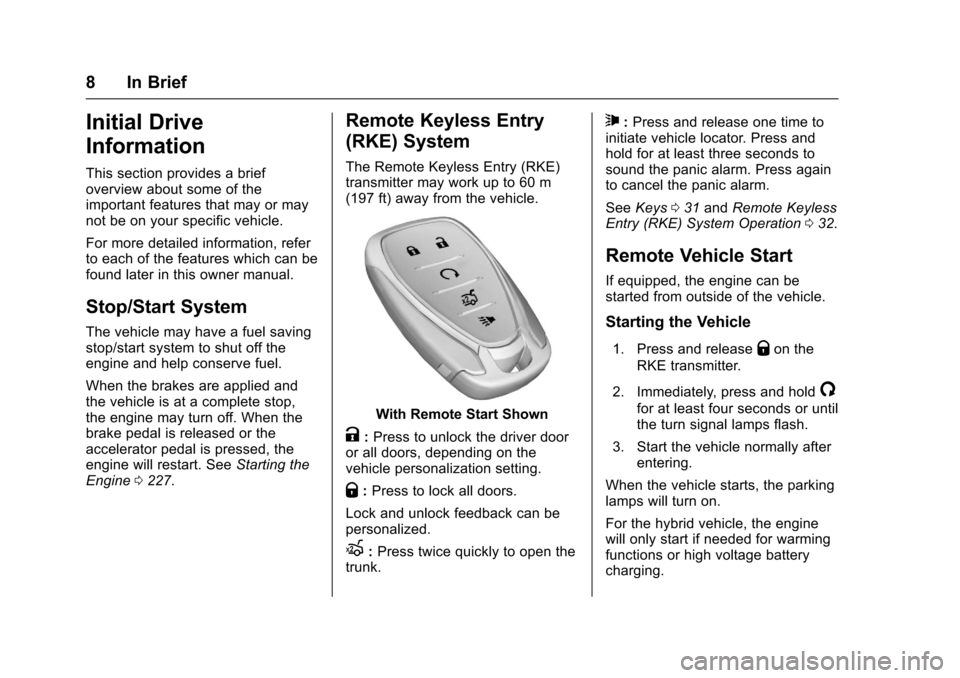
The Remote Keyless Entry (RKE)transmitter may work up to 60 m(197 ft) away from the vehicle.
With Remote Start Shown
K:Press to unlock the driver dooror all doors, depending on thevehicle personalization setting.
Q:Press to lock all doors.
Lock and unlock feedback can bepersonalized.
X:Press twice quickly to open thetrunk.
7:Press and release one time toinitiate vehicle locator. Press andhold for at least three seconds tosound the panic alarm. Press againto cancel the panic alarm.
SeeKeys031andRemote KeylessEntry (RKE) System Operation032.
Remote Vehicle Start
If equipped, the engine can bestarted from outside of the vehicle.
Starting the Vehicle
1. Press and releaseQon the
RKE transmitter.
2. Immediately, press and hold/
for at least four seconds or untilthe turn signal lamps flash.
3. Start the vehicle normally afterentering.
When the vehicle starts, the parkinglamps will turn on.
For the hybrid vehicle, the enginewill only start if needed for warmingfunctions or high voltage batterycharging.
Page 10 of 419
Chevrolet Malibu Owner Manual (GMNA-Localizing-U.S./Canada/Mexico-10122664) - 2017 - crc - 6/1/16
In Brief 9
Remote start can be extended.
Canceling a Remote Start
To c a n c e l a r e m o t e s t a r t , d o o n e o fthe following:
.Press and hold/until the
parking lamps turn off.
.Turn on the hazard warningflashers.
.Turn the vehicle on and then off.
SeeRemote Vehicle Start038.
Door Locks
To l o c k o r u n l o c k t h e d o o r s f r o m t h eoutside:
.PressQorKon the Remote
Keyless Entry (RKE) transmitter.SeeRemote Keyless Entry(RKE) System Operation032.
.Use the key in the driver door.The key lock cylinder has acover. SeeDoor Locks040.
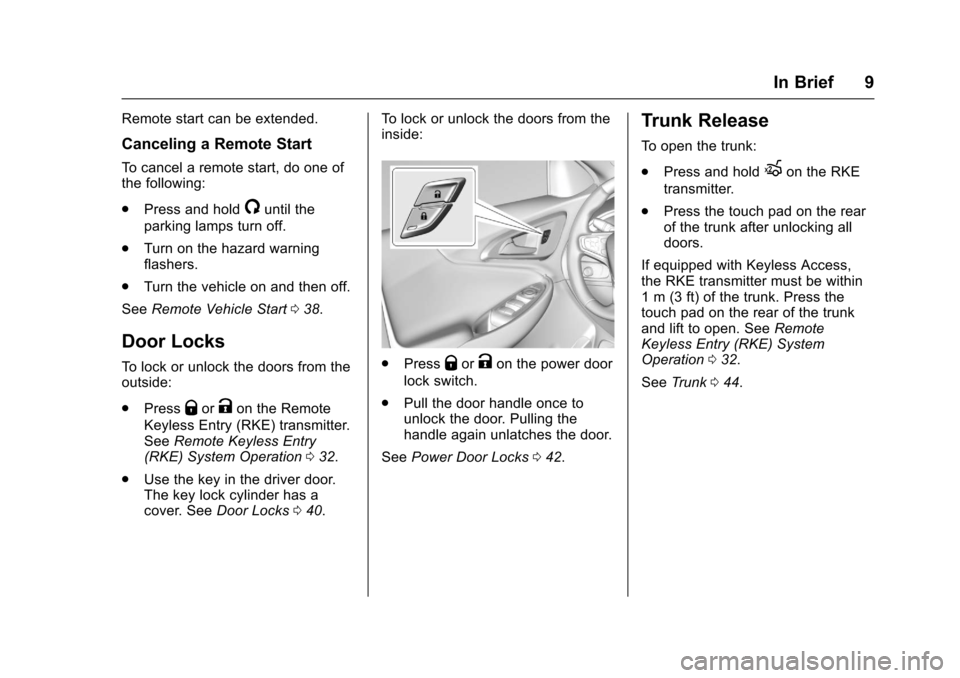
To l o c k o r u n l o c k t h e d o o r s f r o m t h einside:
.PressQorKon the power door
lock switch.
.Pull the door handle once tounlock the door. Pulling thehandle again unlatches the door.
SeePower Door Locks042.
Trunk Release
To o p e n t h e t r u n k :
.Press and holdXon the RKE
transmitter.
.Press the touch pad on the rearof the trunk after unlocking alldoors.
If equipped with Keyless Access,the RKE transmitter must be within1m(3ft)ofthetrunk.Pressthetouch pad on the rear of the trunkand lift to open. SeeRemoteKeyless Entry (RKE) SystemOperation032.
SeeTr u n k044.
Page 32 of 419
Chevrolet Malibu Owner Manual (GMNA-Localizing-U.S./Canada/Mexico-10122664) - 2017 - crc - 5/23/16
Keys, Doors, and Windows 31
Keys, Doors, and
Windows
Keys and Locks
Keys . . . . . . . . . . . . . . . . . . . . . . . . . . . 31Remote Keyless Entry (RKE)System . . . . . . . . . . . . . . . . . . . . . . . 32Remote Keyless Entry (RKE)System Operation . . . . . . . . . . . . 32Remote Vehicle Start . . . . . . . . . . 38Door Locks . . . . . . . . . . . . . . . . . . . . 40Power Door Locks . . . . . . . . . . . . . 42Delayed Locking . . . . . . . . . . . . . . . 42Automatic Door Locks . . . . . . . . . 43Lockout Protection . . . . . . . . . . . . . 43Safety Locks . . . . . . . . . . . . . . . . . . . 43
Doors
Trunk . . . . . . . . . . . . . . . . . . . . . . . . . . 44
Vehicle Security
Vehicle Security . . . . . . . . . . . . . . . . 46Vehicle Alarm System . . . . . . . . . 46Immobilizer . . . . . . . . . . . . . . . . . . . . 47Immobilizer Operation . . . . . . . . . 47
Exterior Mirrors
Convex Mirrors . . . . . . . . . . . . . . . . 48Power Mirrors . . . . . . . . . . . . . . . . . . 48
Folding Mirrors . . . . . . . . . . . . . . . . . 49Heated Mirrors . . . . . . . . . . . . . . . . . 49Reverse Tilt Mirrors . . . . . . . . . . . . 49
Interior Mirrors
Interior Rearview Mirrors . . . . . . . 49Manual Rearview Mirror . . . . . . . . 49Automatic Dimming RearviewMirror . . . . . . . . . . . . . . . . . . . . . . . . . 49
Windows
Windows . . . . . . . . . . . . . . . . . . . . . . . 50Power Windows . . . . . . . . . . . . . . . 50Sun Visors . . . . . . . . . . . . . . . . . . . . . 52
Roof
Sunroof . . . . . . . . . . . . . . . . . . . . . . . . 52
Keys and Locks
Keys
{Warning
Leaving children in a vehicle with
aRemoteKeylessEntry(RKE)
transmitter is dangerous and
children or others could be
seriously injured or killed. They
could operate the power windows
or other controls or make the
vehicle move. The windows will
function with the RKE transmitter
in the vehicle, and children or
others could be caught in the path
of a closing window. Do not leave
children in a vehicle with an RKE
transmitter.
Page 34 of 419
Chevrolet Malibu Owner Manual (GMNA-Localizing-U.S./Canada/Mexico-10122664) - 2017 - crc - 5/23/16
Keys, Doors, and Windows 33
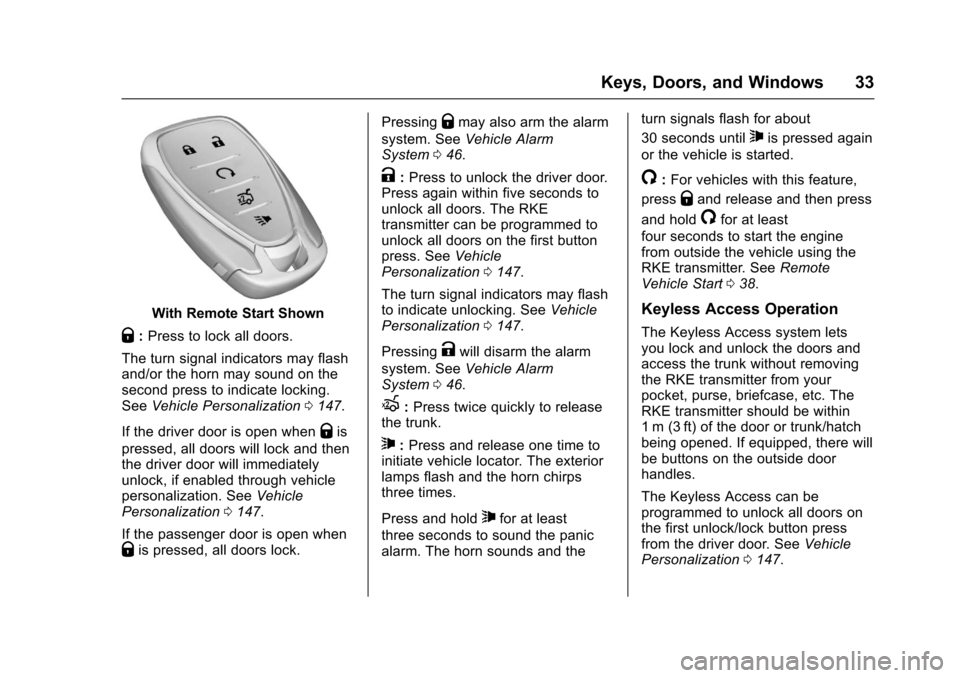
With Remote Start Shown
Q:Press to lock all doors.
The turn signal indicators may flashand/or the horn may sound on thesecond press to indicate locking.SeeVehicle Personalization0147.
If the driver door is open whenQis
pressed, all doors will lock and thenthe driver door will immediatelyunlock, if enabled through vehiclepersonalization. SeeVehiclePersonalization0147.
If the passenger door is open whenQis pressed, all doors lock.
PressingQmay also arm the alarm
system. SeeVehicle AlarmSystem046.
K:Press to unlock the driver door.Press again within five seconds tounlock all doors. The RKEtransmitter can be programmed tounlock all doors on the first buttonpress. SeeVehiclePersonalization0147.
The turn signal indicators may flashto indicate unlocking. SeeVehiclePersonalization0147.
PressingKwill disarm the alarm
system. SeeVehicle AlarmSystem046.
X:Press twice quickly to releasethe trunk.
7:Press and release one time toinitiate vehicle locator. The exteriorlamps flash and the horn chirpsthree times.
Press and hold7for at least
three seconds to sound the panicalarm. The horn sounds and the
turn signals flash for about
30 seconds until7is pressed again
or the vehicle is started.
/:For vehicles with this feature,
pressQand release and then press
and hold/for at least
four seconds to start the enginefrom outside the vehicle using theRKE transmitter. SeeRemoteVehicle Start038.
Keyless Access Operation
The Keyless Access system letsyou lock and unlock the doors andaccess the trunk without removingthe RKE transmitter from yourpocket, purse, briefcase, etc. TheRKE transmitter should be within1m (3ft) of the door or trunk/hatchbeing opened. If equipped, there willbe buttons on the outside doorhandles.
The Keyless Access can beprogrammed to unlock all doors onthe first unlock/lock button pressfrom the driver door. SeeVehiclePersonalization0147.
Page 37 of 419
Chevrolet Malibu Owner Manual (GMNA-Localizing-U.S./Canada/Mexico-10122664) - 2017 - crc - 5/23/16
36 Keys, Doors, and Windows
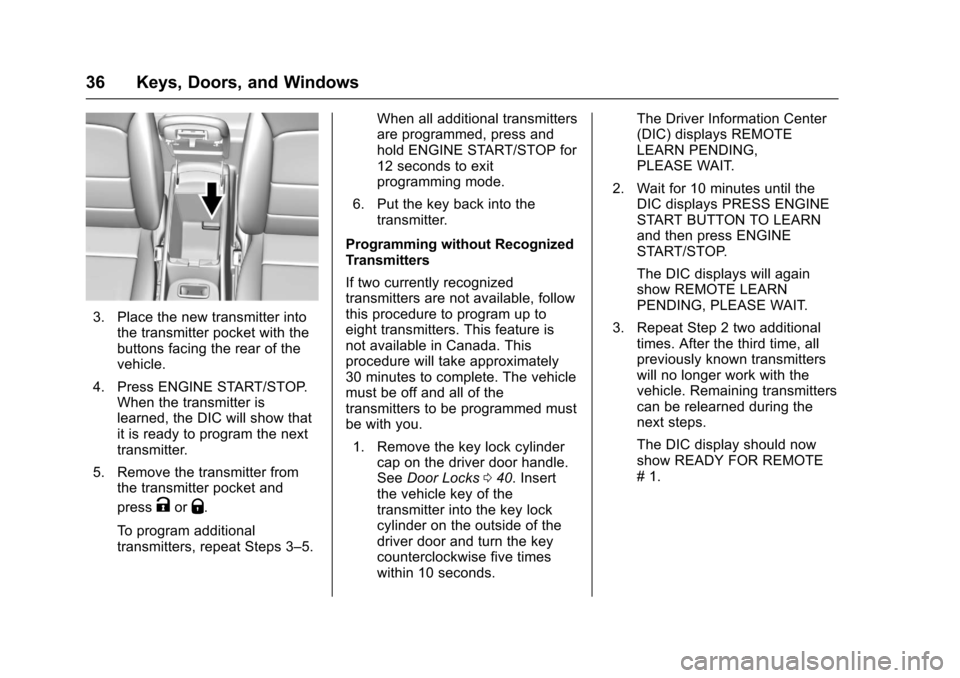
3. Place the new transmitter intothe transmitter pocket with thebuttons facing the rear of thevehicle.
4. Press ENGINE START/STOP.When the transmitter islearned, the DIC will show thatit is ready to program the nexttransmitter.
5. Remove the transmitter fromthe transmitter pocket and
pressKorQ.
To p r o g r a m a d d i t i o n a ltransmitters, repeat Steps 3–5.
When all additional transmittersare programmed, press andhold ENGINE START/STOP for12 seconds to exitprogramming mode.
6. Put the key back into thetransmitter.
Programming without RecognizedTransmitters
If two currently recognizedtransmitters are not available, followthis procedure to program up toeight transmitters. This feature isnot available in Canada. Thisprocedure will take approximately30 minutes to complete. The vehiclemust be off and all of thetransmitters to be programmed mustbe with you.
1. Remove the key lock cylindercap on the driver door handle.SeeDoor Locks040.Insertthe vehicle key of thetransmitter into the key lockcylinder on the outside of thedriver door and turn the keycounterclockwise five timeswithin 10 seconds.
The Driver Information Center(DIC) displays REMOTELEARN PENDING,PLEASE WAIT.
2. Wait for 10 minutes until theDIC displays PRESS ENGINESTART BUTTON TO LEARNand then press ENGINESTART/STOP.
The DIC displays will againshow REMOTE LEARNPENDING, PLEASE WAIT.
3. Repeat Step 2 two additionaltimes. After the third time, allpreviously known transmitterswill no longer work with thevehicle. Remaining transmitterscan be relearned during thenext steps.
The DIC display should nowshow READY FOR REMOTE#1.
Page 38 of 419
Chevrolet Malibu Owner Manual (GMNA-Localizing-U.S./Canada/Mexico-10122664) - 2017 - crc - 5/23/16
Keys, Doors, and Windows 37
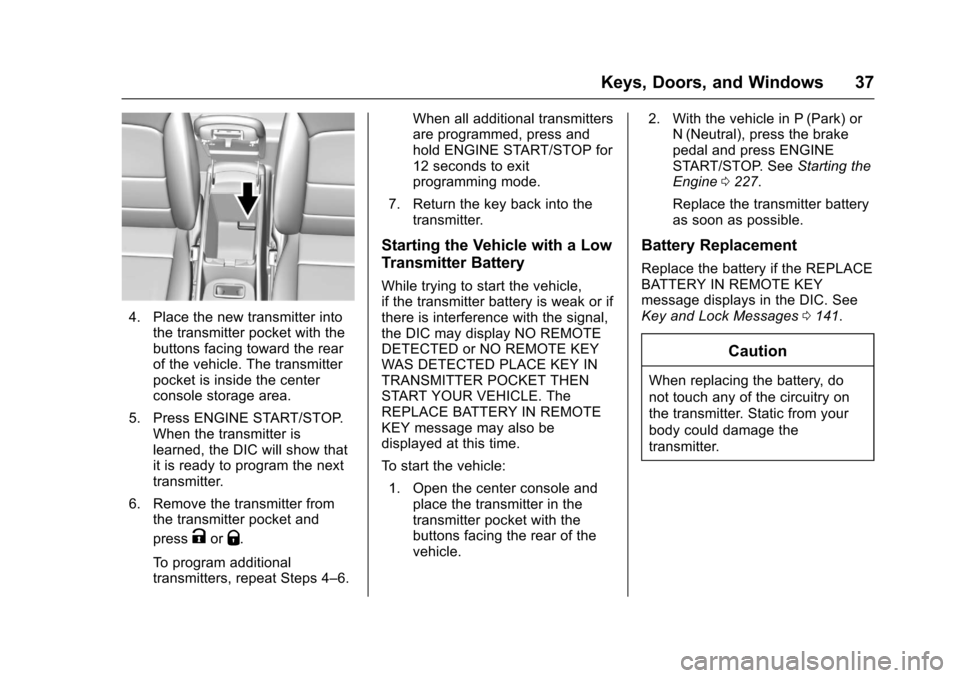
4. Place the new transmitter intothe transmitter pocket with thebuttons facing toward the rearof the vehicle. The transmitterpocket is inside the centerconsole storage area.
5. Press ENGINE START/STOP.When the transmitter islearned, the DIC will show thatit is ready to program the nexttransmitter.
6. Remove the transmitter fromthe transmitter pocket and
pressKorQ.
To p r o g r a m a d d i t i o n a ltransmitters, repeat Steps 4–6.
When all additional transmittersare programmed, press andhold ENGINE START/STOP for12 seconds to exitprogramming mode.
7. Return the key back into thetransmitter.
Starting the Vehicle with a Low
Transmitter Battery
While trying to start the vehicle,if the transmitter battery is weak or ifthere is interference with the signal,the DIC may display NO REMOTEDETECTED or NO REMOTE KEYWAS DETECTED PLACE KEY INTRANSMITTER POCKET THENSTART YOUR VEHICLE. TheREPLACE BATTERY IN REMOTEKEY message may also bedisplayed at this time.
To s t a r t t h e v e h i c l e :
1. Open the center console andplace the transmitter in thetransmitter pocket with thebuttons facing the rear of thevehicle.
2. With the vehicle in P (Park) orN(Neutral), press the brakepedal and press ENGINESTART/STOP. SeeStarting theEngine0227.
Replace the transmitter batteryas soon as possible.
Battery Replacement
Replace the battery if the REPLACEBATTERY IN REMOTE KEYmessage displays in the DIC. SeeKey and Lock Messages0141.
Caution
When replacing the battery, do
not touch any of the circuitry on
the transmitter. Static from your
body could damage the
transmitter.
Page 39 of 419
Chevrolet Malibu Owner Manual (GMNA-Localizing-U.S./Canada/Mexico-10122664) - 2017 - crc - 5/23/16
38 Keys, Doors, and Windows
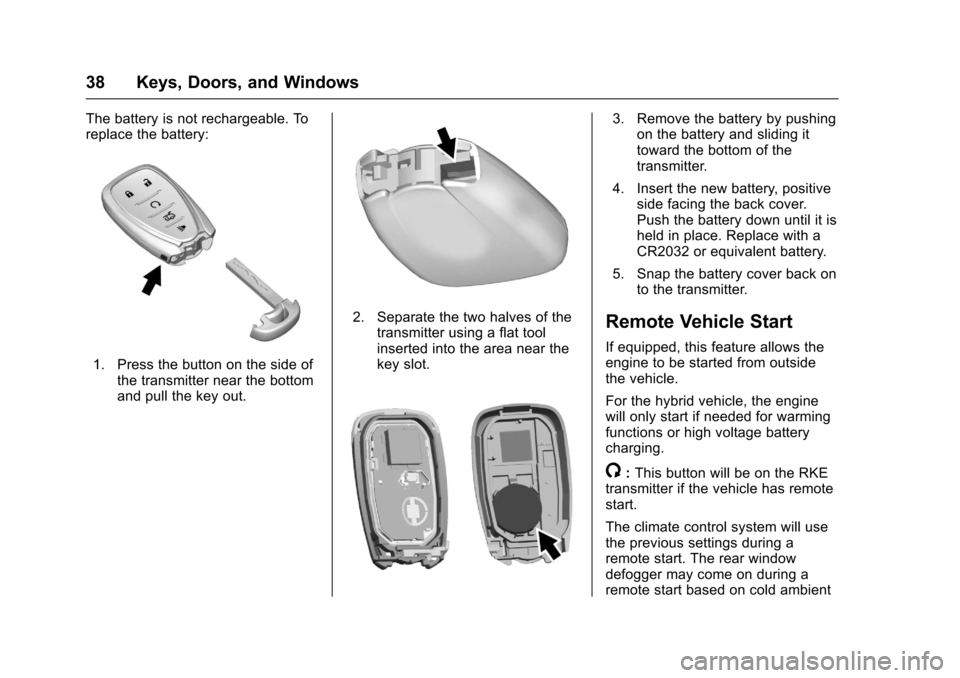
The battery is not rechargeable. Toreplace the battery:
1. Press the button on the side ofthe transmitter near the bottomand pull the key out.
2. Separate the two halves of thetransmitter using a flat toolinserted into the area near thekey slot.
3. Remove the battery by pushingon the battery and sliding ittoward the bottom of thetransmitter.
4. Insert the new battery, positiveside facing the back cover.Push the battery down until it isheld in place. Replace with aCR2032 or equivalent battery.
5. Snap the battery cover back onto the transmitter.
Remote Vehicle Start
If equipped, this feature allows theengine to be started from outsidethe vehicle.
For the hybrid vehicle, the enginewill only start if needed for warmingfunctions or high voltage batterycharging.
/:This button will be on the RKEtransmitter if the vehicle has remotestart.
The climate control system will usethe previous settings during aremote start. The rear windowdefogger may come on during aremote start based on cold ambient
Page 40 of 419
Chevrolet Malibu Owner Manual (GMNA-Localizing-U.S./Canada/Mexico-10122664) - 2017 - crc - 5/23/16
Keys, Doors, and Windows 39
conditions. The rear defog indicatorlight does not come on during aremote start.
If the vehicle has heated seats, theymay come on during a remote start.SeeHeated and Ventilated FrontSeats060.
Laws in some local communitiesmay restrict the use of remotestarters. For example, some lawsrequire a person using remote startto have the vehicle in view. Checklocal regulations for anyrequirements.
Other conditions can affect theperformance of the transmitter. SeeRemote Keyless Entry (RKE)System032.
Do not use remote start if thevehicle is low on fuel.
Starting the Engine Using RemoteStart
To s t a r t t h e e n g i n e u s i n g t h e r e m o t estart feature:
1. Press and releaseQ.
2. Immediately after completing
Step 1, press and hold/for at
least four seconds or until theturn signal lamps flash. Theturn signal lamps flashingconfirms the request to remotestart the vehicle has beenreceived.
When the engine starts, the parkinglamps will turn on and remain on aslong as the engine is running. Thedoors will be locked and the climatecontrol system may come on.
The engine will continue to run for10 minutes. After 30 seconds,repeat the steps if a 10-minuteextension is desired. Remote startcan be extended only once.
Start the vehicle before driving.
Extending Engine Run Time
The engine run time can beextended by another 10 minutes,if during the first 10 minutesSteps 1 and 2 are repeated whilethe engine is still running. Anextension can be requested30 seconds after starting. When theremote start is extended, the
second 10-minute period is addedon to the first 10 minutes for a totalof 20 minutes.
The remote start can only beextended once.
Amaximumoftworemotestarts,or a single start with an extension,is allowed between ignition cycles.
The vehicle's ignition must beturned on and then back off beforethe remote start procedure can beused again.
Canceling a Remote Start
To c a n c e l a r e m o t e s t a r t , d o o n e o fthe following:
.Aim the RKE transmitter at the
vehicle and press and hold/
until the parking lamps turn off.
.Turn on the hazard warningflashers.
.Turn the vehicle on and then off.