turn signal CHEVROLET MALIBU 2017 9.G Owners Manual
[x] Cancel search | Manufacturer: CHEVROLET, Model Year: 2017, Model line: MALIBU, Model: CHEVROLET MALIBU 2017 9.GPages: 419, PDF Size: 7.81 MB
Page 8 of 419

Chevrolet Malibu Owner Manual (GMNA-Localizing-U.S./Canada/Mexico-10122664) - 2017 - crc - 6/1/16
In Brief 7
1.Air Vents0211.
2. Turn Signal Lever. SeeTu r nand Lane-ChangeSignals0167.
3.Instrument Cluster (BaseLevel)011 2orInstrumentCluster (Uplevel)011 4.
Driver Information Center (DIC)(Base Level)0131orDriverInformation Center (DIC)(Uplevel)0134.
4.Windshield Wiper/Washer0105.
5. Light Sensor. SeeAutomaticHeadlamp System0166.
6.Infotainment0171.
7.Climate ControlSystems0205.
Dual Automatic Climate ControlSystem0208(If Equipped).
8.Hazard WarningFlashers0166.
9.Power Outlets0108.
10.Tr a c t i o n C o n t r o l / E l e c t r o n i cStability Control0241.
Assistance Systems forParking or Backing0253(If Equipped).
11 . S h i f t L e v e r. S e eAutomaticTr a n s m i s s i o n0233.
12.Electric Parking Brake0238.
13.USB Port0184.
14. ENGINE START/STOP Button.SeeIgnition Positions0225.
15.Steering Wheel Controls0104.
Driver Information CenterButtons. SeeDriver InformationCenter (DIC) (Base Level)0131orDriver InformationCenter (DIC) (Uplevel)0134.
16.Horn0105.
17.Steering WheelAdjustment0104.
18.Cruise Control0243.
Adaptive Cruise Control0245(If Equipped).
Heated Steering Wheel0105(If Equipped).
Forward Collision Alert (FCA)System0258(If Equipped).
Lane Keep Assist (LKA)0266(If Equipped).
19. Hood Release. SeeHood0281.
20. Data Link Connector (Out ofView). SeeMalfunctionIndicator Lamp (Check EngineLight)0122.
21.Exterior Lamp Controls0163.
22.Instrument Panel IlluminationControl0167.
Page 9 of 419
Chevrolet Malibu Owner Manual (GMNA-Localizing-U.S./Canada/Mexico-10122664) - 2017 - crc - 6/1/16
8 In Brief
Initial Drive
Information
This section provides a briefoverview about some of theimportant features that may or maynot be on your specific vehicle.
For more detailed information, referto each of the features which can befound later in this owner manual.
Stop/Start System
The vehicle may have a fuel savingstop/start system to shut off theengine and help conserve fuel.
When the brakes are applied andthe vehicle is at a complete stop,the engine may turn off. When thebrake pedal is released or theaccelerator pedal is pressed, theengine will restart. SeeStarting theEngine0227.
Remote Keyless Entry
(RKE) System
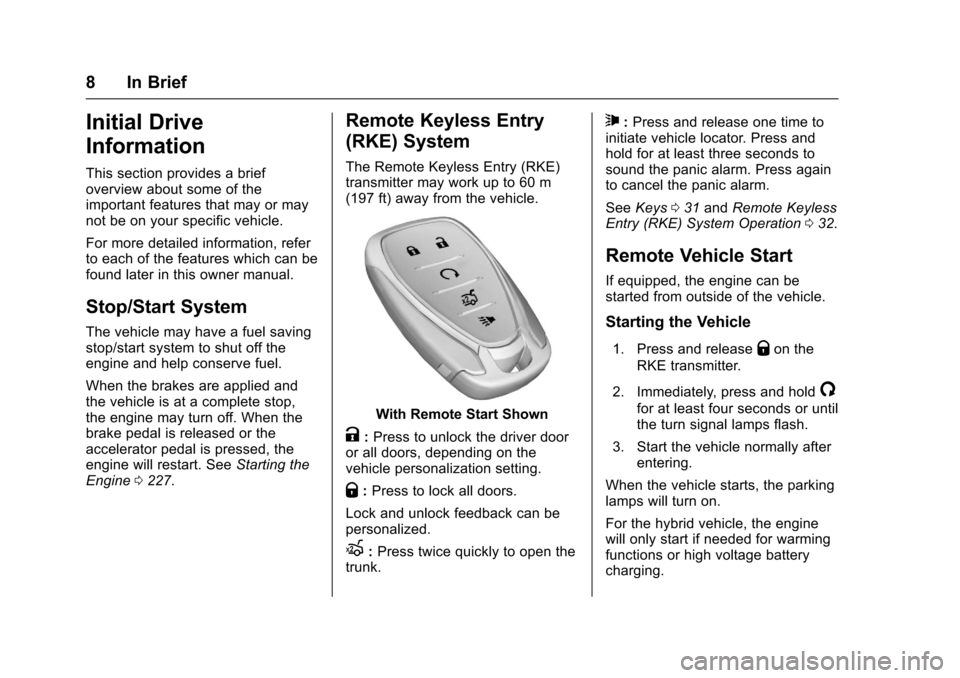
The Remote Keyless Entry (RKE)transmitter may work up to 60 m(197 ft) away from the vehicle.
With Remote Start Shown
K:Press to unlock the driver dooror all doors, depending on thevehicle personalization setting.
Q:Press to lock all doors.
Lock and unlock feedback can bepersonalized.
X:Press twice quickly to open thetrunk.
7:Press and release one time toinitiate vehicle locator. Press andhold for at least three seconds tosound the panic alarm. Press againto cancel the panic alarm.
SeeKeys031andRemote KeylessEntry (RKE) System Operation032.
Remote Vehicle Start
If equipped, the engine can bestarted from outside of the vehicle.
Starting the Vehicle
1. Press and releaseQon the
RKE transmitter.
2. Immediately, press and hold/
for at least four seconds or untilthe turn signal lamps flash.
3. Start the vehicle normally afterentering.
When the vehicle starts, the parkinglamps will turn on.
For the hybrid vehicle, the enginewill only start if needed for warmingfunctions or high voltage batterycharging.
Page 24 of 419
Chevrolet Malibu Owner Manual (GMNA-Localizing-U.S./Canada/Mexico-10122664) - 2017 - crc - 6/1/16
In Brief 23
Forward Collision Alert
(FCA) System
If equipped, FCA may help avoid orreduce the harm caused byfront-end crashes. FCA provides a
green indicator,V,whenavehicle
is detected ahead. This indicatordisplays amber if you follow avehicle much too closely. Whenapproaching a vehicle ahead tooquickly, FCA provides a red flashingalert on the windshield and rapidlybeeps.
SeeForward Collision Alert (FCA)System0258.
Forward Automatic
Braking (FAB)
If the vehicle has Forward CollisionAlert (FCA), it also has FAB, whichincludes Intelligent BrakeAssist (IBA). When the systemdetects a vehicle ahead in your paththat is traveling in the samedirection that you may be about tocrash into, it can provide a boost tobraking or automatically brake the
vehicle. This can help avoid orlessen the severity of crashes whendriving in a forward gear.
SeeForward Automatic Braking(FAB)0260.
Front Pedestrian Braking
(FPB) System
If equipped, the FPB system mayhelp avoid or reduce the harmcaused by front-end crashes withnearby pedestrians when driving inaforwardgear.FPBdisplaysapedestrian ahead indicator when anearby pedestrian is detecteddirectly ahead. When approaching adetected pedestrian too quickly,FPB provides a red flashing alert onthe windshield and rapidly beeps.FPB can provide a boost to brakingor automatically brake the vehicle.
SeeFront Pedestrian Braking (FPB)System0261.
Lane Keep Assist (LKA)
If equipped, LKA may help avoidcrashes due to unintentional lanedepartures. It may assist by gentlyturning the steering wheel if thevehicle approaches a detected lanemarking without using a turn signalin that direction. It may also provideaLaneDepartureWarning(LDW)alert as the lane marking is crossed.The system will not assist or alert ifit detects that you are activelysteering. Override LKA by turningthe steering wheel. LKA uses acamera to detect lane markingsbetween 60 km/h (37 mph) and180 km/h (112 mph).
SeeLane Departure Warning (LDW)0266andLane Keep Assist(LKA)0266.
Page 25 of 419
Chevrolet Malibu Owner Manual (GMNA-Localizing-U.S./Canada/Mexico-10122664) - 2017 - crc - 6/1/16
24 In Brief
Lane Change Alert (LCA)
If equipped, the LCA system is alane-changing aid that assistsdrivers with avoiding lane changecrashes that occur with movingvehicles in the side blind zone (orspot) areas or with vehicles rapidlyapproaching these areas frombehind. The LCA warning displaywill light up in the correspondingoutside side mirror and will flash ifthe turn signal is on. The Side BlindZone Alert (SBZA) system isincluded as part of the LCA system.
SeeSide Blind Zone Alert (SBZA)0263andLane Change Alert(LCA)0264.
Rear Vision
Camera (RVC)
If equipped, RVC displays a view ofthe area behind the vehicle on theinfotainment display when thevehicle is shifted into R (Reverse) toaid with parking and low-speedbacking maneuvers.
SeeAssistance Systems for Parkingor Backing0253.
Rear Cross Traffic Alert
(RCTA) System
If equipped, the RCTA system usesatrianglewithanarrowdisplayedon the RVC screen to warn of trafficbehind your vehicle that may crossyour vehicle's path while inR(Reverse). In addition, beeps willsound.
SeeAssistance Systems for Parkingor Backing0253.
Parking Assist
If equipped, Front and Rear ParkingAssist (FRPA) uses sensors on thefront and rear bumpers to assistwith parking and avoiding objectsduring low-speed parkingmaneuvers. It operates at speedsless than 8 km/h (5 mph). Thesystem may display a warningtriangle on the RVC screen and agraphic on the instrument cluster toprovide the object distance. Inaddition, multiple beeps may occurif very close to an object.
SeeAssistance Systems for Parkingor Backing0253.
Automatic Parking
Assist (APA)
If equipped, the APA system helpsto search for and maneuver thevehicle into parallel or perpendicularparking spots using automaticsteering, DIC displays, and beeps.When the vehicle speed is below
30 km/h (18 mph), pressOto
enable the system.
See“Automatic Parking Assist(APA)”underAssistance Systemsfor Parking or Backing0253.
Power Outlets
The accessory power outlets can beused to plug in electrical equipment,such as a cell phone or MP3 player.
There are two accessory poweroutlets:
.One on the center stack belowthe climate control system.
.One on the rear of the centerfloor console.
Open the protective cover to use theaccessory power outlet.
Page 34 of 419
Chevrolet Malibu Owner Manual (GMNA-Localizing-U.S./Canada/Mexico-10122664) - 2017 - crc - 5/23/16
Keys, Doors, and Windows 33
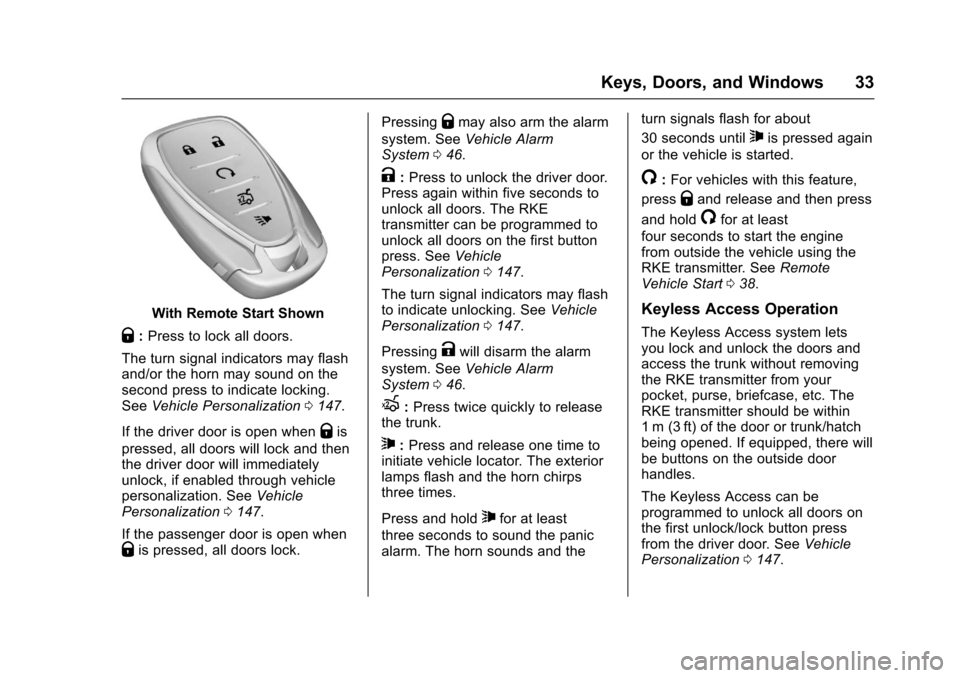
With Remote Start Shown
Q:Press to lock all doors.
The turn signal indicators may flashand/or the horn may sound on thesecond press to indicate locking.SeeVehicle Personalization0147.
If the driver door is open whenQis
pressed, all doors will lock and thenthe driver door will immediatelyunlock, if enabled through vehiclepersonalization. SeeVehiclePersonalization0147.
If the passenger door is open whenQis pressed, all doors lock.
PressingQmay also arm the alarm
system. SeeVehicle AlarmSystem046.
K:Press to unlock the driver door.Press again within five seconds tounlock all doors. The RKEtransmitter can be programmed tounlock all doors on the first buttonpress. SeeVehiclePersonalization0147.
The turn signal indicators may flashto indicate unlocking. SeeVehiclePersonalization0147.
PressingKwill disarm the alarm
system. SeeVehicle AlarmSystem046.
X:Press twice quickly to releasethe trunk.
7:Press and release one time toinitiate vehicle locator. The exteriorlamps flash and the horn chirpsthree times.
Press and hold7for at least
three seconds to sound the panicalarm. The horn sounds and the
turn signals flash for about
30 seconds until7is pressed again
or the vehicle is started.
/:For vehicles with this feature,
pressQand release and then press
and hold/for at least
four seconds to start the enginefrom outside the vehicle using theRKE transmitter. SeeRemoteVehicle Start038.
Keyless Access Operation
The Keyless Access system letsyou lock and unlock the doors andaccess the trunk without removingthe RKE transmitter from yourpocket, purse, briefcase, etc. TheRKE transmitter should be within1m (3ft) of the door or trunk/hatchbeing opened. If equipped, there willbe buttons on the outside doorhandles.
The Keyless Access can beprogrammed to unlock all doors onthe first unlock/lock button pressfrom the driver door. SeeVehiclePersonalization0147.
Page 38 of 419
Chevrolet Malibu Owner Manual (GMNA-Localizing-U.S./Canada/Mexico-10122664) - 2017 - crc - 5/23/16
Keys, Doors, and Windows 37
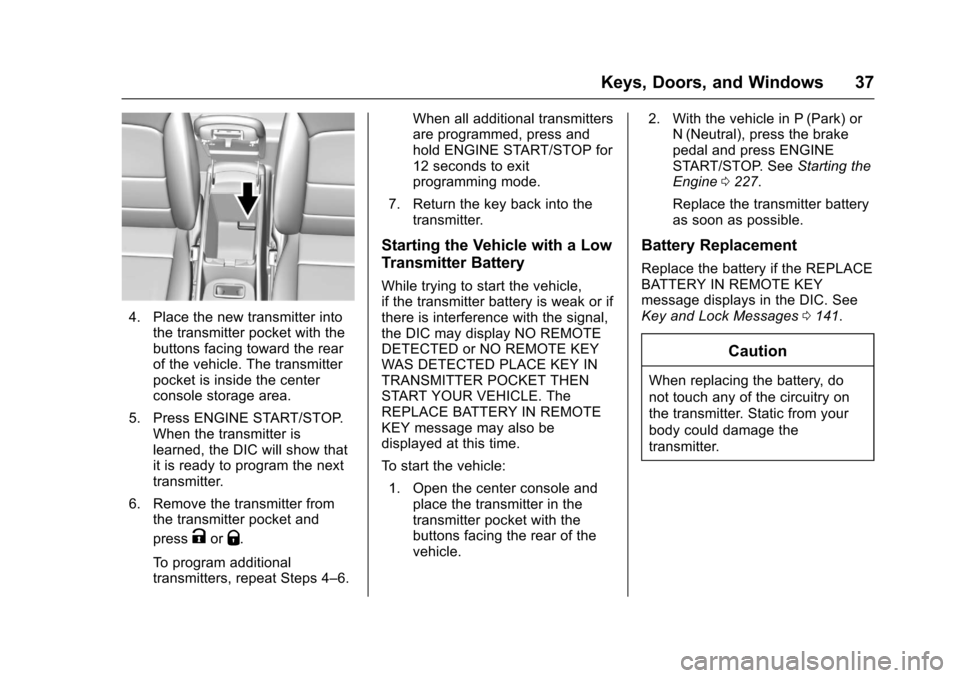
4. Place the new transmitter intothe transmitter pocket with thebuttons facing toward the rearof the vehicle. The transmitterpocket is inside the centerconsole storage area.
5. Press ENGINE START/STOP.When the transmitter islearned, the DIC will show thatit is ready to program the nexttransmitter.
6. Remove the transmitter fromthe transmitter pocket and
pressKorQ.
To p r o g r a m a d d i t i o n a ltransmitters, repeat Steps 4–6.
When all additional transmittersare programmed, press andhold ENGINE START/STOP for12 seconds to exitprogramming mode.
7. Return the key back into thetransmitter.
Starting the Vehicle with a Low
Transmitter Battery
While trying to start the vehicle,if the transmitter battery is weak or ifthere is interference with the signal,the DIC may display NO REMOTEDETECTED or NO REMOTE KEYWAS DETECTED PLACE KEY INTRANSMITTER POCKET THENSTART YOUR VEHICLE. TheREPLACE BATTERY IN REMOTEKEY message may also bedisplayed at this time.
To s t a r t t h e v e h i c l e :
1. Open the center console andplace the transmitter in thetransmitter pocket with thebuttons facing the rear of thevehicle.
2. With the vehicle in P (Park) orN(Neutral), press the brakepedal and press ENGINESTART/STOP. SeeStarting theEngine0227.
Replace the transmitter batteryas soon as possible.
Battery Replacement
Replace the battery if the REPLACEBATTERY IN REMOTE KEYmessage displays in the DIC. SeeKey and Lock Messages0141.
Caution
When replacing the battery, do
not touch any of the circuitry on
the transmitter. Static from your
body could damage the
transmitter.
Page 40 of 419
Chevrolet Malibu Owner Manual (GMNA-Localizing-U.S./Canada/Mexico-10122664) - 2017 - crc - 5/23/16
Keys, Doors, and Windows 39
conditions. The rear defog indicatorlight does not come on during aremote start.
If the vehicle has heated seats, theymay come on during a remote start.SeeHeated and Ventilated FrontSeats060.
Laws in some local communitiesmay restrict the use of remotestarters. For example, some lawsrequire a person using remote startto have the vehicle in view. Checklocal regulations for anyrequirements.
Other conditions can affect theperformance of the transmitter. SeeRemote Keyless Entry (RKE)System032.
Do not use remote start if thevehicle is low on fuel.
Starting the Engine Using RemoteStart
To s t a r t t h e e n g i n e u s i n g t h e r e m o t estart feature:
1. Press and releaseQ.
2. Immediately after completing
Step 1, press and hold/for at
least four seconds or until theturn signal lamps flash. Theturn signal lamps flashingconfirms the request to remotestart the vehicle has beenreceived.
When the engine starts, the parkinglamps will turn on and remain on aslong as the engine is running. Thedoors will be locked and the climatecontrol system may come on.
The engine will continue to run for10 minutes. After 30 seconds,repeat the steps if a 10-minuteextension is desired. Remote startcan be extended only once.
Start the vehicle before driving.
Extending Engine Run Time
The engine run time can beextended by another 10 minutes,if during the first 10 minutesSteps 1 and 2 are repeated whilethe engine is still running. Anextension can be requested30 seconds after starting. When theremote start is extended, the
second 10-minute period is addedon to the first 10 minutes for a totalof 20 minutes.
The remote start can only beextended once.
Amaximumoftworemotestarts,or a single start with an extension,is allowed between ignition cycles.
The vehicle's ignition must beturned on and then back off beforethe remote start procedure can beused again.
Canceling a Remote Start
To c a n c e l a r e m o t e s t a r t , d o o n e o fthe following:
.Aim the RKE transmitter at the
vehicle and press and hold/
until the parking lamps turn off.
.Turn on the hazard warningflashers.
.Turn the vehicle on and then off.
Page 47 of 419
Chevrolet Malibu Owner Manual (GMNA-Localizing-U.S./Canada/Mexico-10122664) - 2017 - crc - 5/23/16
46 Keys, Doors, and Windows
Vehicle Security
This vehicle has theft-deterrentfeatures; however, they do not makethe vehicle impossible to steal.
Vehicle Alarm System
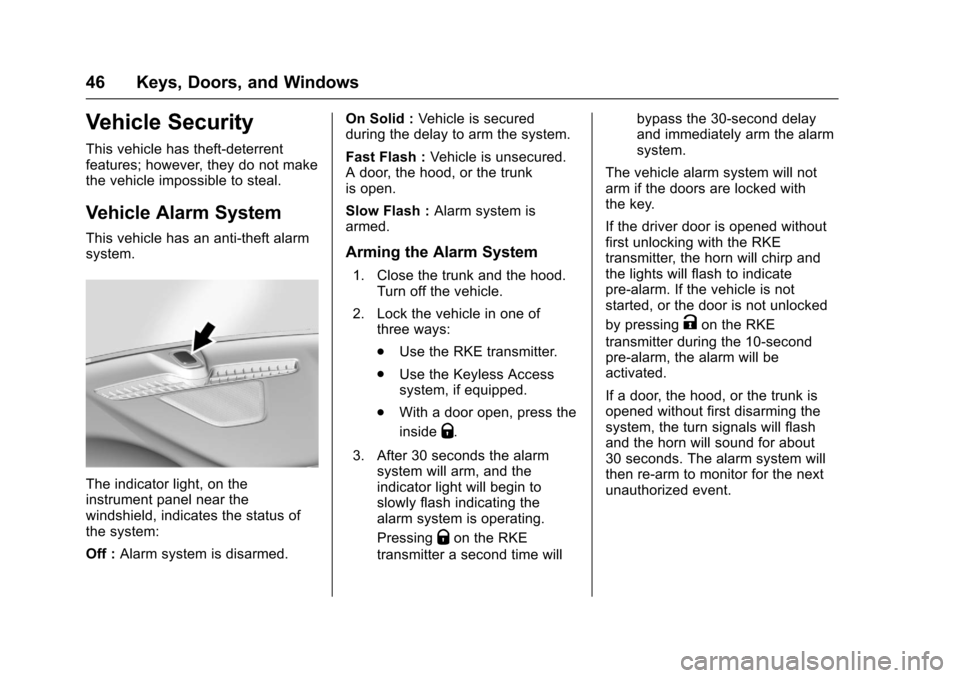
This vehicle has an anti-theft alarmsystem.
The indicator light, on theinstrument panel near thewindshield, indicates the status ofthe system:
Off :Alarm system is disarmed.
On Solid :Ve h i c l e i s s e c u r e dduring the delay to arm the system.
Fast Flash :Vehicle is unsecured.Adoor,thehood,orthetrunkis open.
Slow Flash :Alarm system isarmed.
Arming the Alarm System
1. Close the trunk and the hood.Turn off the vehicle.
2. Lock the vehicle in one ofthree ways:
.Use the RKE transmitter.
.Use the Keyless Accesssystem, if equipped.
.With a door open, press the
insideQ.
3. After 30 seconds the alarmsystem will arm, and theindicator light will begin toslowly flash indicating thealarm system is operating.
PressingQon the RKE
transmitter a second time will
bypass the 30-second delayand immediately arm the alarmsystem.
The vehicle alarm system will notarm if the doors are locked withthe key.
If the driver door is opened withoutfirst unlocking with the RKEtransmitter, the horn will chirp andthe lights will flash to indicatepre-alarm. If the vehicle is notstarted, or the door is not unlocked
by pressingKon the RKE
transmitter during the 10-secondpre-alarm, the alarm will beactivated.
If a door, the hood, or the trunk isopened without first disarming thesystem, the turn signals will flashand the horn will sound for about30 seconds. The alarm system willthen re-arm to monitor for the nextunauthorized event.
Page 50 of 419
Chevrolet Malibu Owner Manual (GMNA-Localizing-U.S./Canada/Mexico-10122664) - 2017 - crc - 5/23/16
Keys, Doors, and Windows 49
Lane Change Alert (LCA)
The vehicle may have LCA. SeeLane Change Alert (LCA)0264.
Turn Signal Indicator
The vehicle may have a turn signalindicator on the mirror housings.The indicator will flash when a turnsignal or the hazard warningflashers are used.
Folding Mirrors
Manual Folding Mirrors
The mirrors can be folded inwardtoward the vehicle to preventdamage when going through anautomatic car wash. Push the mirroroutward to return it to the originalposition.
Heated Mirrors
If equipped with heated mirrors:
K:The rear window defogger alsoheats the outside mirrors.
SeeDual Automatic Climate ControlSystem0208.
Reverse Tilt Mirrors
If equipped with memory seats, thepassenger and/or driver mirror tiltsto a preselected position when thevehicle is in R (Reverse). Thisallows the curb to be seen whenparallel parking.
The mirror(s) return to the originalposition when:
.The vehicle is shifted out ofR(Reverse),orremainsinR(Reverse)forabout30 seconds.
.The ignition is turned off.
.The vehicle is driven inR(Reverse)aboveasetspeed.
To t u r n t h i s f e a t u r e o n o r o f f , s e eVehicle Personalization0147.
Interior Mirrors
Interior Rearview Mirrors
Adjust the rearview mirror for a clearview of the area behind the vehicle.
Do not spray glass cleaner directlyon the mirror. Use a soft toweldampened with water.
Manual Rearview Mirror
If equipped, push the tab forward fordaytime use and pull it rearward fornighttime use to avoid glare of theheadlamps from behind.
Automatic Dimming
Rearview Mirror
If equipped, automatic dimmingreduces the glare of headlampsfrom behind. The dimming featurecomes on when the vehicle isstarted.
Page 107 of 419
Chevrolet Malibu Owner Manual (GMNA-Localizing-U.S./Canada/Mexico-10122664) - 2017 - crc - 5/23/16
106 Instruments and Controls
INT :Move the lever up to INT forintermittent wipes, then turn theband up for more frequent wipes ordown for less frequent wipes.
OFF :Use to turn the wipers off.
1X :For a single wipe, briefly movethe lever down. For several wipes,hold the lever down.
Clear snow and ice from the wiperblades and windshield before usingthem. If frozen to the windshield,carefully loosen or thaw them.Damaged blades should bereplaced. SeeWiper BladeReplacement0304.
Heavy snow or ice can overload thewiper motor. If the wiper motoroverheats, the windshield wipers willstop until the motor cools and thewiper control is turned off. SeeElectrical System Overload0310.
Wiper Parking
If the ignition is placed in LOCK/OFF while the wipers are on LO, HI,or INT, they will immediately stop.
If the windshield wiper lever is thenmoved to OFF before the driverdoor is opened or within 10 minutes,the wipers will restart and move tothe base of the windshield.
If the ignition is placed in LOCK/OFF while the wipers are performingwipes due to windshield washing,the wipers continue to run until theyreach the base of the windshield.
f:Pull the windshield wiperlever toward you to spray windshieldwasher fluid and activate the wipers.The wipers will continue until thelever is released or the maximumwash time is reached. When thelever is released, additional wipesmay occur depending on how longthe windshield washer had beenactivated. SeeWasher Fluid0299for information on filling thewindshield washer fluid reservoir.
{Warning
In freezing weather, do not use
the washer until the windshield is
warmed. Otherwise the washer
fluid can form ice on the
windshield, blocking your vision.
Compass
The vehicle may have a compassdisplay on the Driver InformationCenter (DIC). The compass receivesits heading and other informationfrom the Global PositioningSystem (GPS) antenna,StabiliTrak®,andvehiclespeedinformation.
The compass system is designed tooperate for a certain number ofmiles or degrees of turn beforeneeding a signal from the GPSsatellites. When the compassdisplay shows CAL, drive thevehicle for a short distance in anopen area where it can receive aGPS signal. The compass systemwill automatically determine when aGPS signal is restored and provide