check engine CHEVROLET MALIBU 2019 User Guide
[x] Cancel search | Manufacturer: CHEVROLET, Model Year: 2019, Model line: MALIBU, Model: CHEVROLET MALIBU 2019Pages: 382, PDF Size: 37.7 MB
Page 136 of 382
Chevrolet Malibu Owner Manual (GMNA-Localizing-U.S./Canada/Mexico-
12461813) - 2019 - crc - 12/11/18
136 Instruments and Controls
Oil pressure can vary with engine
speed, outside temperature, and oil
viscosity. On some models, the oil
pump will vary engine oil pressure
according to engine needs. Oil
pressure may change quickly as the
engine speed or load varies. This is
normal. If the oil pressure warning
light or Driver Information Center
(DIC) message indicates oil
pressure outside the normal
operating range, check the vehicle's
oil as soon as possible.
Air Filter Life :Shows an estimate
of the engine air filter’s remaining
useful life and the state of the
system. Engine Air Filter Life 95%
means 95% of the current air filter
life remains. Messages will display
based on the engine air filter life and
the state of the system. When the
REPLACE AT NEXT OIL CHANGE
message displays, the engine air
filter should be replaced at the time
of the next oil change. When the
REPLACE NOW message displays,
the engine air filter should be
replaced as soon as possible.The Air Filter Life display must be
reset after the engine air filter
replacement. To reset, seeEngine
Air Filter Life System0246.
Tire Pressure :Displays a vehicle
with the approximate pressures of
all four tires. Tire pressure is
displayed in either kilopascal (kPa)
or in pounds per square inch (psi).
SeeTire Pressure Monitor System
0285and
Tire Pressure Monitor Operation
0286.
Battery Voltage :Displays the
current battery voltage, if equipped.
Battery voltage changes are normal
while driving. SeeCharging System
Light0124. If there is a problem
with the battery charging system,
the DIC will display a message.
Coolant Temperature :Shows the
engine coolant temperature in either
degrees Celsius (°C) or degrees
Fahrenheit (°F).
Speed Warning :This display is
used to set the vehicle speed at
which the speed warning chime
sounds and the alert is displayed.The speed can be set by pressing
Vwhile the speed warning display
is showing.
Units :Move
worxto change
between Metric or US when the Unit
display is active. Press
Vto confirm
the setting. This will change the
displays on the DIC to the type of
measurements you select.
ECO Drive Assist Menu (ECO)
Items
Useworxto scroll through the
menu items. Not all items are
available on every vehicle.
Best Average Fuel Economy :The
bottom displays the best average
fuel economy (AFE) that is achieved
for a selected distance. The top
displays a running average of fuel
economy for the most recently
traveled selected distance. The
center bar graph displays the
instantaneous fuel economy.
Quickly press
Vto change the
settings for the distance options.
Page 140 of 382
Chevrolet Malibu Owner Manual (GMNA-Localizing-U.S./Canada/Mexico-
12461813) - 2019 - crc - 12/11/18
140 Instruments and Controls
Speed Limit :Shows the current
speed limit on vehicles with the
navigation system. The information
for this page comes from a roadway
database.
Follow Distance :When Adaptive
Cruise Control (ACC) is not
engaged, the current follow time to
the vehicle ahead is displayed as a
time value on this page. When ACC
has been engaged, the display
switches to the gap setting page.
This page shows the current gap
setting along with the vehicle ahead
indicator.
Battery Voltage :Displays the
current battery voltage, if equipped.
Battery voltage changes are normal
while driving. SeeCharging System
Light0124. If there is a problem
with the battery charging system,
the DIC will display a message.
Coolant Temperature :Shows the
engine coolant temperature in either
degrees Celsius (°C) or degrees
Fahrenheit (°F).Oil Pressure :Oil pressure is
displayed in either kilopascal (kPa)
or in pounds per square inch (psi).
Oil pressure can vary with engine
speed, outside temperature, and oil
viscosity. On some models, the oil
pump will vary engine oil pressure
according to engine needs. Oil
pressure may change quickly as the
engine speed or load varies. This is
normal. If the oil pressure warning
light or Driver Information Center
(DIC) message indicates oil
pressure outside the normal
operating range, check the vehicle's
oil as soon as possible.
Drive Cycle Info (Hybrid) :This
screen displays the distance
traveled and average fuel economy
for the current trip. The screen will
also be shown when the vehicle is
turned off displaying the previous
trip’s information.
Efficiency Gauge (Hybrid) :This
gauge is a guide to driving in an
efficient manner by keeping the
indicator in the center of the gauge..
Accel: If the indicator moves to
the right of the gauge,
acceleration is too aggressive to
optimize efficiency.
.
Brake: If the indicator moves to
the left side of the gauge,
braking is too aggressive to
optimize efficiency.
Total Power Display (Hybrid) :
Provides a numeric display of the
total power being used to propel or
stop the vehicle. The display shows
the power being provided by the
battery or charging the battery as
well as the power provided by the
engine.
EV Operation (Hybrid) :The bar
moves from left to right as the driver
requests more power from the
propulsion system. While in EV
mode, maintaining the bar in the
green zone will allow the driver to
maximize EV operation.
Blank Page :Shows no
information.
Page 170 of 382
Chevrolet Malibu Owner Manual (GMNA-Localizing-U.S./Canada/Mexico-
12461813) - 2019 - crc - 12/11/18
170 Driving and Operating
Warning (Continued)
occupants could drown. Do not
ignore police warnings and be
very cautious about trying to drive
through flowing water.
Hydroplaning
Hydroplaning is dangerous. Water
can build up under the vehicle's
tires so they actually ride on the
water. This can happen if the road is
wet enough and you are going fast
enough. When the vehicle is
hydroplaning, it has little or no
contact with the road.
There is no hard and fast rule about
hydroplaning. The best advice is to
slow down when the road is wet.
Other Rainy Weather Tips
Besides slowing down, other wet
weather driving tips include:
.
Allow extra following distance.
.
Pass with caution..
Keep windshield wiping
equipment in good shape.
.
Keep the windshield washer fluid
reservoir filled.
.
Have good tires with proper
tread depth. SeeTires0276.
.
Turn off cruise control.
Hill and Mountain Roads
Driving on steep hills or through
mountains is different than driving
on flat or rolling terrain. Tips include:
.
Keep the vehicle serviced and in
good shape.
.
Check all fluid levels and brakes,
tires, cooling system, and
transmission.
.
Shift to a lower gear when going
down steep or long hills.
{Warning
Using the brakes to slow the
vehicle on a long downhill slope
can cause brake overheating, can
(Continued)
Warning (Continued)
reduce brake performance, and
could result in a loss of braking.
Shift the transmission to a lower
gear to let the engine assist the
brakes on a steep downhill slope.
{Warning
Coasting downhill in N (Neutral)
or with the ignition off is
dangerous. This can cause
overheating of the brakes and
loss of steering assist. Always
have the engine running and the
vehicle in gear.
.
Drive at speeds that keep the
vehicle in its own lane. Do not
swing wide or cross the
center line.
.
Be alert on top of hills;
something could be in your lane
(e.g., stalled car, crash).
Page 189 of 382
Chevrolet Malibu Owner Manual (GMNA-Localizing-U.S./Canada/Mexico-
12461813) - 2019 - crc - 12/11/18
Driving and Operating 189
To set the manual parking brake,
if equipped:
Hold the brake pedal down, then
push the parking brake pedal down.
If the ignition is on, the brake
system warning light will come on.
SeeBrake System Warning Light
0126.
Caution
Driving with the parking brake on
can overheat the brake system
and cause premature wear or
damage to brake system parts.
Make sure that the parking brake
is fully released and the brake
warning light is off before driving.
To release the parking brake, hold
the regular brake pedal down, then
push down momentarily on the
parking brake pedal until you feel
the pedal release. Slowly pull your
foot up off the parking brake pedal.
If the parking brake is not released
when you begin to drive, the brakesystem warning light will be on and
a chime will sound warning you that
the parking brake is still on.
If you are towing a trailer and are
parking on a hill, seeDriving
Characteristics and Towing Tips
0224.
Electric Parking Brake
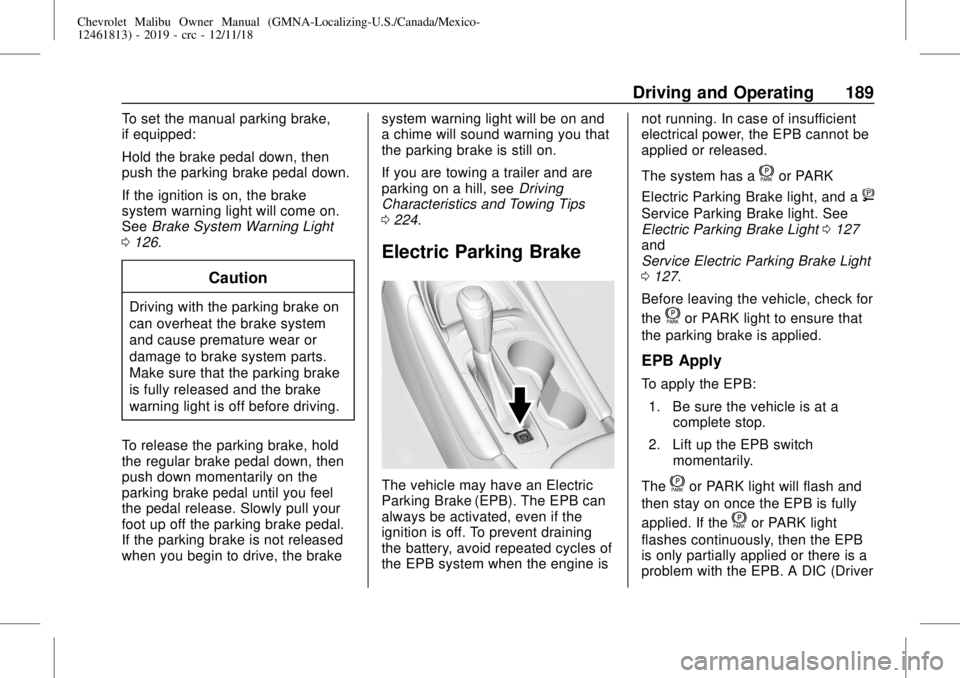
The vehicle may have an Electric
Parking Brake (EPB). The EPB can
always be activated, even if the
ignition is off. To prevent draining
the battery, avoid repeated cycles of
the EPB system when the engine isnot running. In case of insufficient
electrical power, the EPB cannot be
applied or released.
The system has a
for PARK
Electric Parking Brake light, and a
8
Service Parking Brake light. See
Electric Parking Brake Light0127
and
Service Electric Parking Brake Light
0127.
Before leaving the vehicle, check for
the
for PARK light to ensure that
the parking brake is applied.
EPB Apply
To apply the EPB:
1. Be sure the vehicle is at a
complete stop.
2. Lift up the EPB switch
momentarily.
The
for PARK light will flash and
then stay on once the EPB is fully
applied. If the
for PARK light
flashes continuously, then the EPB
is only partially applied or there is a
problem with the EPB. A DIC (Driver
Page 192 of 382
Chevrolet Malibu Owner Manual (GMNA-Localizing-U.S./Canada/Mexico-
12461813) - 2019 - crc - 12/11/18
192 Driving and Operating
Ride Control Systems
Traction Control/
Electronic Stability
Control
System Operation
The vehicle has a Traction Control
System (TCS) and StabiliTrak/
Electronic Stability Control (ESC).
These systems help limit wheel slip
and assist the driver in maintaining
control, especially on slippery road
conditions.
TCS activates if it senses that any
of the drive wheels are spinning or
beginning to lose traction. When this
happens, TCS applies the brakes to
the spinning wheels and reduces
engine power to limit wheel spin.
StabiliTrak/ESC activates when the
vehicle senses a difference between
the intended path and the direction
the vehicle is actually traveling.
StabiliTrak/ESC selectively applies
braking pressure to any one of thevehicle wheel brakes to assist the
driver in keeping the vehicle on the
intended path.
If cruise control is being used and
traction control or StabiliTrak/ESC
begins to limit wheel spin, cruise
control will disengage. Cruise
control may be turned back on when
road conditions allow.
Both systems come on
automatically when the vehicle is
started and begins to move. The
systems may be heard or felt while
they are operating or while
performing diagnostic checks. This
is normal and does not mean there
is a problem with the vehicle.
It is recommended to leave both
systems on for normal driving
conditions, but it may be necessary
to turn TCS off if the vehicle gets
stuck in sand, mud, ice, or snow.
SeeIf the Vehicle Is Stuck0172
and“Turning the Systems Off and
On”later in this section.
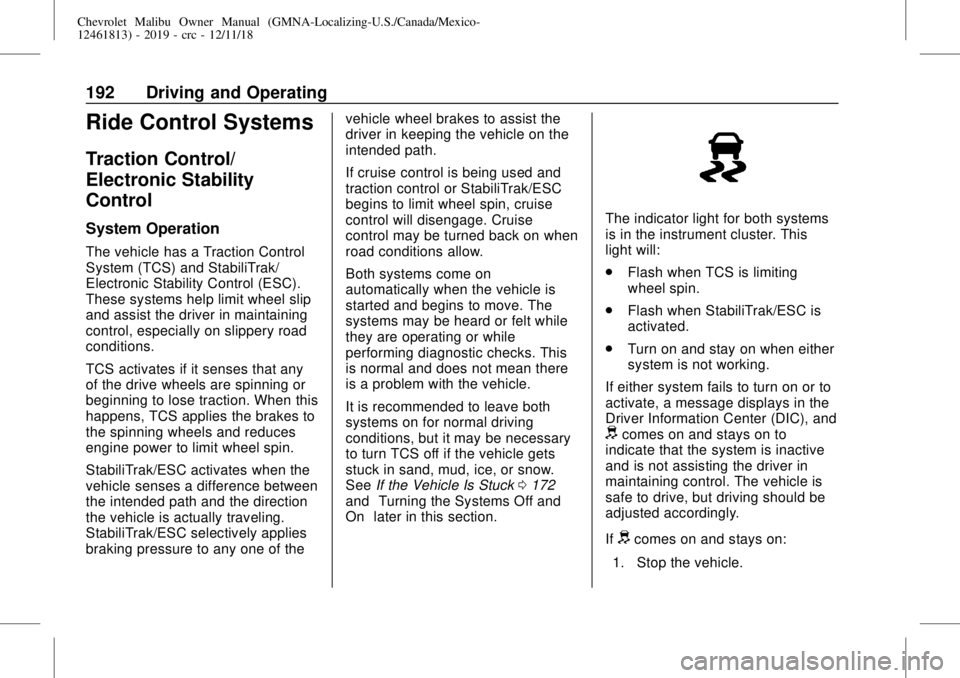
The indicator light for both systems
is in the instrument cluster. This
light will:
.
Flash when TCS is limiting
wheel spin.
.
Flash when StabiliTrak/ESC is
activated.
.
Turn on and stay on when either
system is not working.
If either system fails to turn on or to
activate, a message displays in the
Driver Information Center (DIC), and
dcomes on and stays on to
indicate that the system is inactive
and is not assisting the driver in
maintaining control. The vehicle is
safe to drive, but driving should be
adjusted accordingly.
If
dcomes on and stays on:
1. Stop the vehicle.
Page 225 of 382
Chevrolet Malibu Owner Manual (GMNA-Localizing-U.S./Canada/Mexico-
12461813) - 2019 - crc - 12/11/18
Driving and Operating 225
.
Forward Automatic Braking
System (FAB)
.
Intelligent Brake Assist (IBA)
.
Front Pedestrian Braking (FPB)
If equipped with Lane Change Alert
(LCA), the LCA detection zones that
extend back from the side of the
vehicle do not move further back
when a trailer is towed. Use caution
while changing lanes when towing a
trailer.
If equipped with Rear Cross Traffic
Alert (RCTA), use caution while
backing up when towing a trailer, as
the RCTA detection zones that
extend out from the back of the
vehicle do not move further back
when a trailer is towed.
{Warning
To prevent serious injury or death
from carbon monoxide (CO),
when towing a trailer:
(Continued)
Warning (Continued)
.
Do not drive with the
liftgate, trunk/hatch,
or rear-most window open.
.
Fully open the air outlets on
or under the instrument
panel.
.
Adjust the climate control
system to a setting that
brings in only outside air.
See“Climate Control
Systems”in the Index.
For more information about
carbon monoxide, seeEngine
Exhaust0184.
Towing a trailer requires experience.
The combination of the vehicle and
trailer is longer and not as
responsive as the vehicle itself. Get
used to the handling and braking of
the combination by driving on a
level road surface before driving on
public roads.The trailer structure, the tires, and
the brakes must be all be rated to
carry the intended cargo.
Inadequate trailer equipment can
cause the combination to operate in
an unexpected or unsafe manner.
Before driving, inspect all trailer
hitch parts and attachments, safety
chains, electrical connectors, lamps,
tires, and mirrors. SeeTowing
Equipment0229. If the trailer has
electric brakes, start the
combination moving and then
manually apply the trailer brake
controller to check that the trailer
brakes work. During the trip,
occasionally check that the cargo
and trailer are secure and that the
lamps and any trailer brakes are
working.
Towing with a Stability Control
System
When towing, the stability control
system might be heard. The system
reacts to vehicle movement caused
by the trailer, which mainly occurs
during cornering. This is normal
when towing heavier trailers.
Page 227 of 382
Chevrolet Malibu Owner Manual (GMNA-Localizing-U.S./Canada/Mexico-
12461813) - 2019 - crc - 12/11/18
Driving and Operating 227
When parking your vehicle and your
trailer on a hill:
1. Press the brake pedal, but do
not shift into P (Park) yet. Turn
the wheels into the curb if
facing downhill or into traffic if
facing uphill.
2. Have someone place chocks
under the trailer wheels.
3. When the wheel chocks are in
place, gradually release the
brake pedal to allow the chocks
to absorb the load of the trailer.
4. Reapply the brake pedal. Then
apply the parking brake and
shift into P (Park).
5. Release the brake pedal.
Leaving After Parking on a Hill
1. Apply and hold the brake
pedal.
.
Start the engine.
.
Shift into a gear.
.
Release the parking brake.
2. Let up on the brake pedal.3. Drive slowly until the trailer is
clear of the chocks.
4. Stop and have someone pick
up and store the chocks.
Maintenance When Trailer
Towing
The vehicle needs service more
often when used to tow trailers. See
Maintenance Schedule0329. It is
especially important to check the
automatic transmission fluid, engine
oil, axle lubricant, belts, cooling
system, and brake system before
and during each trip.
Check periodically that all nuts and
bolts on the trailer hitch are tight.
Engine Cooling When Trailer
Towing
The cooling system may temporarily
overheat during severe operating
conditions. SeeEngine Overheating
0253.
Trailer Towing
Caution
Towing a trailer improperly can
damage the vehicle and result in
costly repairs not covered by the
vehicle warranty. To tow a trailer
correctly, follow the directions in
this section and see your dealer
for important information about
towing a trailer with the vehicle.
Trailer Weight
{Warning
Never exceed the towing capacity
for your vehicle.
Safe trailering requires monitoring
the weight, speed, altitude, road
grades, outside temperature,
dimensions of the front of the trailer,
and how frequently the vehicle is
used to tow a trailer.
Before towing a trailer, always
separately weigh:
Page 231 of 382
Chevrolet Malibu Owner Manual (GMNA-Localizing-U.S./Canada/Mexico-
12461813) - 2019 - crc - 12/11/18
Driving and Operating 231
Conversions and
Add-Ons
Add-On Electrical
Equipment
{Warning
The Data Link Connector
(DLC) is used for vehicle service
and Emission Inspection/
Maintenance testing. See
Malfunction Indicator Lamp
(Check Engine Light)0124.
A device connected to the DLC—
such as an aftermarket fleet or
driver-behavior tracking device—
may interfere with vehicle
systems. This could affect vehicle
operation and cause a crash.
Such devices may also access
information stored in the vehicle’s
systems.
Caution
Some electrical equipment can
damage the vehicle or cause
components to not work and
would not be covered by the
vehicle warranty. Always check
with your dealer before adding
electrical equipment.
Add-on equipment can drain the
vehicle's 12-volt battery, even if the
vehicle is not operating.
The vehicle has an airbag system.
Before attempting to add anything
electrical to the vehicle, see
Servicing the Airbag-Equipped
Vehicle084and
Adding Equipment to the
Airbag-Equipped Vehicle085.
Page 232 of 382
Chevrolet Malibu Owner Manual (GMNA-Localizing-U.S./Canada/Mexico-
12461813) - 2019 - crc - 12/11/18
232 Vehicle Care
Vehicle Care
General Information
General Information . . . . . . . . . . 233
California Proposition
65 Warning . . . . . . . . . . . . . . . . . 234
California Perchlorate
Materials Requirements . . . . . 234
Accessories and
Modifications . . . . . . . . . . . . . . . . 234
Vehicle Checks
Doing Your Own
Service Work . . . . . . . . . . . . . . . 235
Hood . . . . . . . . . . . . . . . . . . . . . . . . . 235
Engine Compartment
Overview . . . . . . . . . . . . . . . . . . . . 237
Engine Oil . . . . . . . . . . . . . . . . . . . . 242
Engine Oil Life System . . . . . . . 245
Automatic Transmission
Fluid . . . . . . . . . . . . . . . . . . . . . . . . 246
Engine Air Filter Life
System . . . . . . . . . . . . . . . . . . . . . . 246
Engine Air Cleaner/Filter . . . . . . 247
Cooling System (Engine) . . . . . 248
Cooling System (Power
Electronics) . . . . . . . . . . . . . . . . . 253
Engine Overheating . . . . . . . . . . 253
Washer Fluid . . . . . . . . . . . . . . . . . 254Brakes . . . . . . . . . . . . . . . . . . . . . . . 255
Brake Fluid . . . . . . . . . . . . . . . . . . . 256
Battery - North America . . . . . . 257
Starter Switch Check . . . . . . . . . 260
Automatic Transmission Shift
Lock Control Function
Check . . . . . . . . . . . . . . . . . . . . . . . 260
Park Brake and P (Park)
Mechanism Check . . . . . . . . . . 260
Wiper Blade Replacement . . . . 261
Windshield Replacement . . . . . 262
Gas Strut(s) . . . . . . . . . . . . . . . . . . 262Headlamp Aiming
Headlamp Aiming . . . . . . . . . . . . 263
Bulb Replacement
Bulb Replacement . . . . . . . . . . . . 263
Halogen Bulbs . . . . . . . . . . . . . . . . 263
LED Lighting . . . . . . . . . . . . . . . . . 264
Headlamps, Front Turn Signal,
Sidemarker, and Parking
Lamps . . . . . . . . . . . . . . . . . . . . . . 264
Taillamps, Turn Signal,
Stoplamps, and Back-Up
Lamps (LS and LT) . . . . . . . . . . 264
Taillamps, Turn Signal,
Stoplamps, and Back-Up
Lamps (LT and Premier) . . . . . 266
License Plate Lamp . . . . . . . . . . 266
Electrical System
High Voltage Devices and
Wiring . . . . . . . . . . . . . . . . . . . . . . . 267
Electrical System Overload . . . 267
Fuses and Circuit Breakers . . . 268
Engine Compartment Fuse
Block . . . . . . . . . . . . . . . . . . . . . . . . 268
Instrument Panel Fuse
Block . . . . . . . . . . . . . . . . . . . . . . . . 273
Wheels and Tires
Tires . . . . . . . . . . . . . . . . . . . . . . . . . . 276
All-Season Tires . . . . . . . . . . . . . . 277
Winter Tires . . . . . . . . . . . . . . . . . . 277
Low-Profile Tires . . . . . . . . . . . . . 277
Summer Tires . . . . . . . . . . . . . . . . 278
Tire Sidewall Labeling . . . . . . . . 278
Tire Designations . . . . . . . . . . . . . 280
Tire Terminology and
Definitions . . . . . . . . . . . . . . . . . . 281
Tire Pressure . . . . . . . . . . . . . . . . . 284
Tire Pressure for High-Speed
Operation . . . . . . . . . . . . . . . . . . . 285
Tire Pressure Monitor
System . . . . . . . . . . . . . . . . . . . . . . 285
Tire Pressure Monitor
Operation . . . . . . . . . . . . . . . . . . . 286
Tire Inspection . . . . . . . . . . . . . . . . 291
Tire Rotation . . . . . . . . . . . . . . . . . 291
Page 242 of 382
Chevrolet Malibu Owner Manual (GMNA-Localizing-U.S./Canada/Mexico-
12461813) - 2019 - crc - 12/11/18
242 Vehicle Care
1.Engine Air Cleaner/Filter0247.
2. Engine Oil Fill Cap. See
Engine Oil0242.
3. Engine Oil Dipstick. See
Engine Oil0242.
4. Engine Cooling Fan (Out of
View). SeeCooling System
(Power Electronics)0253or
Cooling System (Engine)
0248.
5. Brake Fluid Reservoir. See
Brakes0255.
6. Coolant Surge Tank and
Pressure Cap. SeeCooling
System (Power Electronics)
0253or
Cooling System (Engine)
0248.
7.Battery - North America0257.
8. Remote Positive (+) Battery
Terminal (Under Cover). See
Jump Starting - North America
0312.
9.Engine Compartment Fuse
Block0268.10. Windshield Washer Fluid
Reservoir. SeeWasher Fluid
0254.
11. Remote Negative (-) Battery
Terminal. SeeJump Starting -
North America0312.
Engine Oil
To ensure proper engine
performance and long life, careful
attention must be paid to engine oil.
Following these simple, but
important steps will help protect
your investment:
.
Use engine oil approved to the
proper specification and of the
proper viscosity grade. See
“Selecting the Right Engine Oil”
in this section.
.
Check the engine oil level
regularly and maintain the
proper oil level. See“Checking
Engine Oil”and“When to Add
Engine Oil”in this section.
.
Change the engine oil at the
appropriate time. SeeEngine Oil
Life System0245..
Always dispose of engine oil
properly. See“What to Do with
Used Oil”later in this section.
Checking Engine Oil
Check the engine oil level regularly,
every 650 km (400 mi), especially
prior to a long trip. The engine oil
dipstick handle is a loop. See
Engine Compartment Overview
0237for the location.
{Warning
The engine oil dipstick handle
may be hot; it could burn you.
Use a towel or glove to touch the
dipstick handle.
If a low oil Driver Information Center
(DIC) message displays, check the
oil level.
Follow these guidelines:
.
To get an accurate reading, park
the vehicle on level ground.
Check the engine oil level after
the engine has been off for at
least two hours. Checking the