engine CHEVROLET MALIBU 2019 User Guide
[x] Cancel search | Manufacturer: CHEVROLET, Model Year: 2019, Model line: MALIBU, Model: CHEVROLET MALIBU 2019Pages: 382, PDF Size: 37.7 MB
Page 28 of 382
Chevrolet Malibu Owner Manual (GMNA-Localizing-U.S./Canada/Mexico-
12461813) - 2019 - crc - 12/11/18
28 In Brief
Driving for Better Fuel
Economy
Driving habits can affect fuel
mileage. Here are some driving tips
to get the best fuel economy
possible:
.
Set the climate controls to the
desired temperature after the
engine is started, or turn them
off when not required.
.
Avoid fast starts and accelerate
smoothly.
.
Brake gradually and avoid
abrupt stops.
.
Avoid idling the engine for long
periods of time.
.
When road and weather
conditions are appropriate, use
cruise control.
.
Always follow posted speed
limits or drive more slowly when
conditions require.
.
Keep vehicle tires properly
inflated.
.
Combine several trips into a
single trip..
Replace the vehicle's tires with
the same TPC Spec number
molded into the tire's sidewall
near the size.
.
Follow recommended scheduled
maintenance.
Roadside Assistance
Program
U.S.: 1-800-243-8872
TTY Users (U.S. Only):
1-888-889-2438
Canada: 1-800-268-6800
New Chevrolet owners are
automatically enrolled in the
Roadside Assistance Program.
SeeRoadside Assistance Program
0350.
Page 31 of 382
Chevrolet Malibu Owner Manual (GMNA-Localizing-U.S./Canada/Mexico-
12461813) - 2019 - crc - 12/11/18
Keys, Doors, and Windows 31
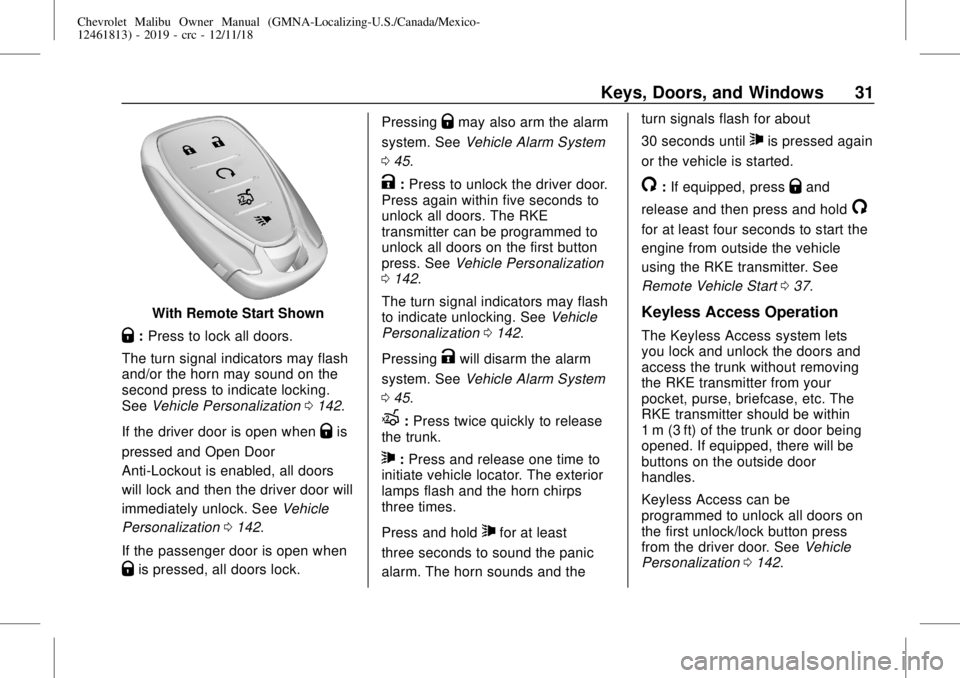
With Remote Start Shown
Q:Press to lock all doors.
The turn signal indicators may flash
and/or the horn may sound on the
second press to indicate locking.
SeeVehicle Personalization0142.
If the driver door is open when
Qis
pressed and Open Door
Anti-Lockout is enabled, all doors
will lock and then the driver door will
immediately unlock. SeeVehicle
Personalization0142.
If the passenger door is open when
Qis pressed, all doors lock.Pressing
Qmay also arm the alarm
system. SeeVehicle Alarm System
045.
K:Press to unlock the driver door.
Press again within five seconds to
unlock all doors. The RKE
transmitter can be programmed to
unlock all doors on the first button
press. SeeVehicle Personalization
0142.
The turn signal indicators may flash
to indicate unlocking. SeeVehicle
Personalization0142.
Pressing
Kwill disarm the alarm
system. SeeVehicle Alarm System
045.
X:Press twice quickly to release
the trunk.
7:Press and release one time to
initiate vehicle locator. The exterior
lamps flash and the horn chirps
three times.
Press and hold
7for at least
three seconds to sound the panic
alarm. The horn sounds and theturn signals flash for about
30 seconds until
7is pressed again
or the vehicle is started.
/:If equipped, pressQand
release and then press and hold
/
for at least four seconds to start the
engine from outside the vehicle
using the RKE transmitter. See
Remote Vehicle Start037.
Keyless Access Operation
The Keyless Access system lets
you lock and unlock the doors and
access the trunk without removing
the RKE transmitter from your
pocket, purse, briefcase, etc. The
RKE transmitter should be within
1 m (3 ft) of the trunk or door being
opened. If equipped, there will be
buttons on the outside door
handles.
Keyless Access can be
programmed to unlock all doors on
the first unlock/lock button press
from the driver door. SeeVehicle
Personalization0142.
Page 34 of 382
Chevrolet Malibu Owner Manual (GMNA-Localizing-U.S./Canada/Mexico-
12461813) - 2019 - crc - 12/11/18
34 Keys, Doors, and Windows
Key Access
To access a vehicle with a weak
transmitter battery, seeDoor Locks
039.
Programming Transmitters to
the Vehicle
Only RKE transmitters programmed
to the vehicle will work. If a
transmitter is lost or stolen, a
replacement can be purchased and
programmed through your dealer.
The vehicle can be reprogrammed
so that lost or stolen transmitters no
longer work. Any remaining
transmitters will need to be
reprogrammed. Each vehicle can
have up to eight transmitters
matched to it.
Programming with Recognized
Transmitters
A new transmitter can be
programmed to the vehicle when
there are two recognized
transmitters. To program, the vehicle
must be off and all of thetransmitters, both currently
recognized and new, must be
with you.
1. Place the two recognized
transmitters in the cupholder.
2. Remove the key lock cylinder
cap on the driver door handle.
SeeDoor Locks039. Insert
the vehicle key of the new
transmitter into the key lock
cylinder on the outside of the
driver door and turn the key
counterclockwise five times
within 10 seconds.
The DIC displays READY FOR
REMOTE #2, 3, 4 or 5.
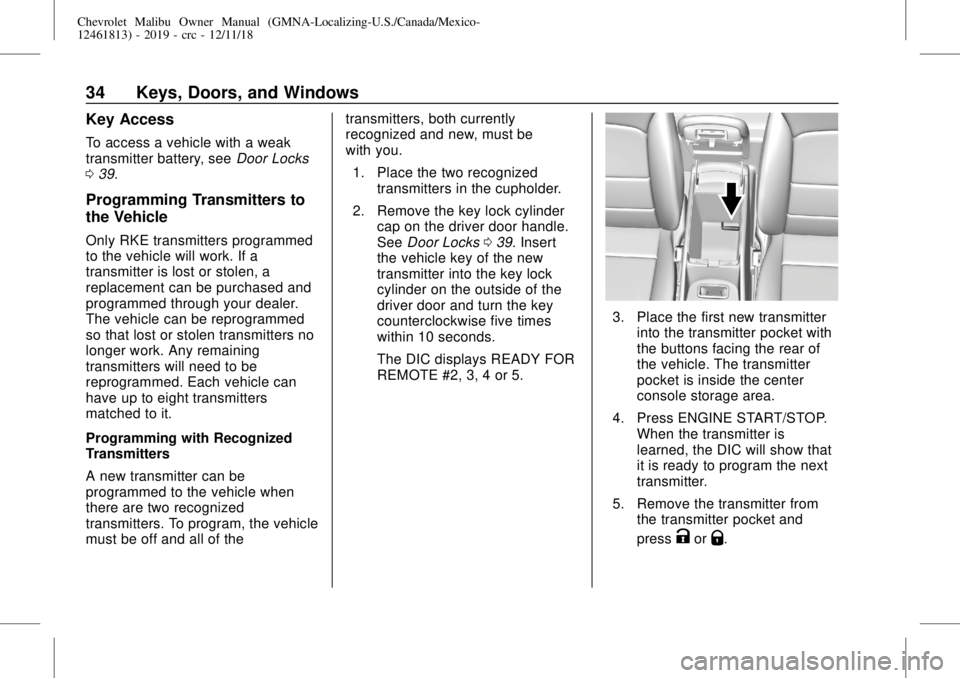
3. Place the first new transmitter
into the transmitter pocket with
the buttons facing the rear of
the vehicle. The transmitter
pocket is inside the center
console storage area.
4. Press ENGINE START/STOP.
When the transmitter is
learned, the DIC will show that
it is ready to program the next
transmitter.
5. Remove the transmitter from
the transmitter pocket and
press
KorQ.
Page 35 of 382
Chevrolet Malibu Owner Manual (GMNA-Localizing-U.S./Canada/Mexico-
12461813) - 2019 - crc - 12/11/18
Keys, Doors, and Windows 35
To program additional
transmitters, repeat Steps 3–5
for each new transmitter.
When all additional transmitters
are programmed, press and
hold ENGINE START/STOP for
12 seconds to exit
programming mode.
6. Put the key back into the
transmitter.
7. Replace the key lock cylinder
cap. SeeDoor Locks039.
Programming without Recognized
Transmitters
If two currently recognized
transmitters are not available, follow
this procedure to program up to
eight transmitters. This feature is
not available in Canada. This
procedure will take approximately
30 minutes to complete. The vehicle
must be off and all of the
transmitters to be programmed must
be with you.
1. Remove the key lock cylinder
cap on the driver door handle.
SeeDoor Locks039. Insertthe vehicle key of the
transmitter into the key lock
cylinder on the outside of the
driver door and turn the key
counterclockwise five times
within 10 seconds.
The DIC displays REMOTE
LEARN PENDING,
PLEASE WAIT.
2. Wait for 10 minutes until the
DIC displays PRESS ENGINE
START BUTTON TO LEARN
and then press ENGINE
START/STOP.
The DIC will again display
REMOTE LEARN PENDING,
PLEASE WAIT.
3. Repeat Step 2 two additional
times. After the third time, all
previously known transmitters
will no longer work with the
vehicle. Remaining transmitters
can be relearned during the
next steps.
The DIC should now display
READY FOR REMOTE # 1.
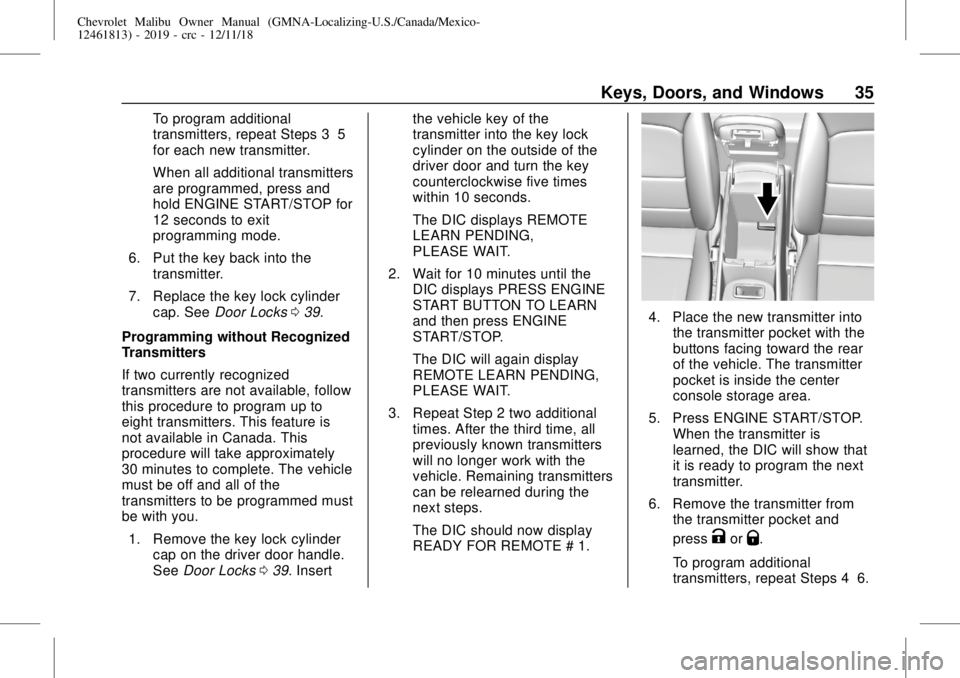
4. Place the new transmitter into
the transmitter pocket with the
buttons facing toward the rear
of the vehicle. The transmitter
pocket is inside the center
console storage area.
5. Press ENGINE START/STOP.
When the transmitter is
learned, the DIC will show that
it is ready to program the next
transmitter.
6. Remove the transmitter from
the transmitter pocket and
press
KorQ.
To program additional
transmitters, repeat Steps 4–6.
Page 36 of 382
Chevrolet Malibu Owner Manual (GMNA-Localizing-U.S./Canada/Mexico-
12461813) - 2019 - crc - 12/11/18
36 Keys, Doors, and Windows
When all additional transmitters
are programmed, press and
hold ENGINE START/STOP for
12 seconds to exit
programming mode.
7. Return the key back into the
transmitter.
8. Replace the key lock cylinder
cap. SeeDoor Locks039.
Starting the Vehicle with a Low
Transmitter Battery
While trying to start the vehicle,
if the transmitter battery is weak or if
there is interference with the signal,
the DIC may display NO REMOTE
DETECTED or NO REMOTE KEY
WAS DETECTED PLACE KEY IN
TRANSMITTER POCKET THEN
START YOUR VEHICLE. The DIC
may also display REPLACE
BATTERY IN REMOTE KEY.
To start the vehicle:
1. Open the center console and
place the transmitter in the
transmitter pocket with the
buttons facing the rear of the
vehicle.2. With the vehicle in P (Park) or
N (Neutral), press the brake
pedal and press ENGINE
START/STOP. SeeStarting the
Engine0178.
Replace the transmitter battery
as soon as possible.
Battery Replacement
Replace the battery if the DIC
displays REPLACE BATTERY IN
REMOTE KEY.
Caution
When replacing the battery, do
not touch any of the circuitry on
the transmitter. Static from your
body could damage the
transmitter.
The battery is not rechargeable. To
replace the battery:
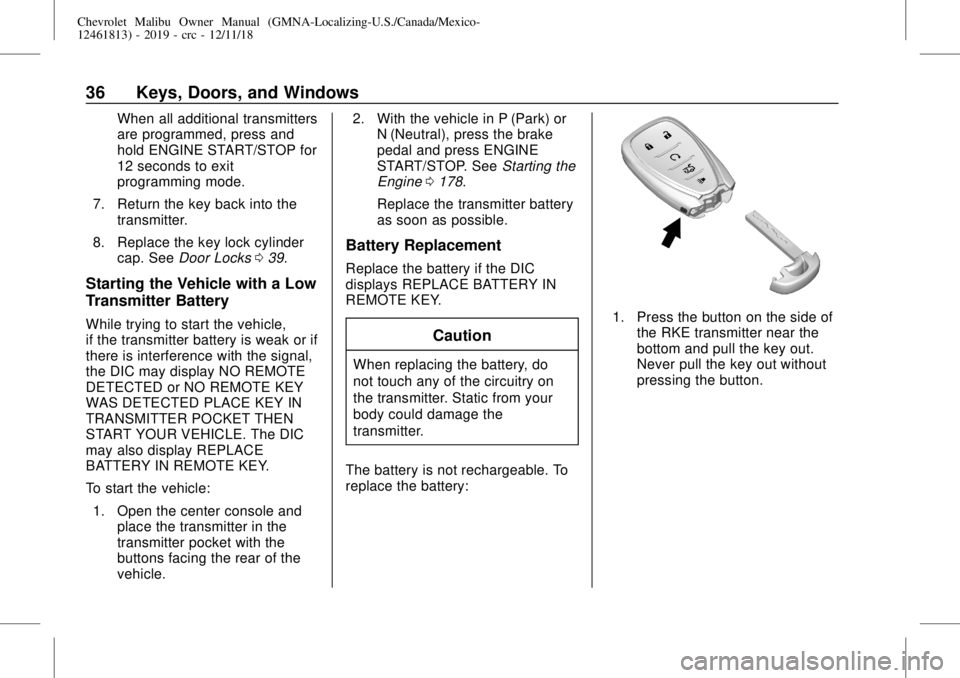
1. Press the button on the side of
the RKE transmitter near the
bottom and pull the key out.
Never pull the key out without
pressing the button.
Page 37 of 382
Chevrolet Malibu Owner Manual (GMNA-Localizing-U.S./Canada/Mexico-
12461813) - 2019 - crc - 12/11/18
Keys, Doors, and Windows 37
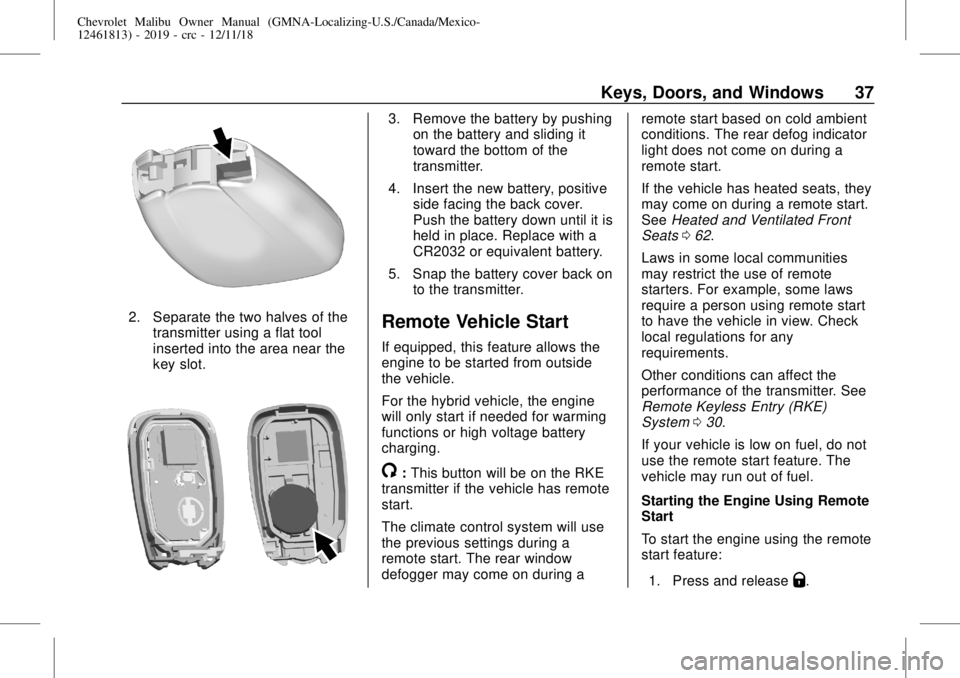
2. Separate the two halves of the
transmitter using a flat tool
inserted into the area near the
key slot.
3. Remove the battery by pushing
on the battery and sliding it
toward the bottom of the
transmitter.
4. Insert the new battery, positive
side facing the back cover.
Push the battery down until it is
held in place. Replace with a
CR2032 or equivalent battery.
5. Snap the battery cover back on
to the transmitter.
Remote Vehicle Start
If equipped, this feature allows the
engine to be started from outside
the vehicle.
For the hybrid vehicle, the engine
will only start if needed for warming
functions or high voltage battery
charging.
/:This button will be on the RKE
transmitter if the vehicle has remote
start.
The climate control system will use
the previous settings during a
remote start. The rear window
defogger may come on during aremote start based on cold ambient
conditions. The rear defog indicator
light does not come on during a
remote start.
If the vehicle has heated seats, they
may come on during a remote start.
SeeHeated and Ventilated Front
Seats062.
Laws in some local communities
may restrict the use of remote
starters. For example, some laws
require a person using remote start
to have the vehicle in view. Check
local regulations for any
requirements.
Other conditions can affect the
performance of the transmitter. See
Remote Keyless Entry (RKE)
System030.
If your vehicle is low on fuel, do not
use the remote start feature. The
vehicle may run out of fuel.
Starting the Engine Using Remote
Start
To start the engine using the remote
start feature:
1. Press and release
Q.
Page 38 of 382
Chevrolet Malibu Owner Manual (GMNA-Localizing-U.S./Canada/Mexico-
12461813) - 2019 - crc - 12/11/18
38 Keys, Doors, and Windows
2. Immediately after completing
Step 1, press and hold
/for at
least four seconds or until the
turn signal lamps flash. The
turn signal lamps flashing
confirms the request to remote
start the vehicle has been
received.
When the engine starts, the parking
lamps will turn on and remain on as
long as the engine is running. The
doors will be locked and the climate
control system may come on.
The engine will continue to run for
15 minutes. After 30 seconds,
repeat the steps if a 15-minute
extension is desired. Remote start
can be extended only once.
Start the vehicle before driving.
Extending Engine Run Time
The engine run time can be
extended by another 15 minutes,
if during the first 15 minutes
Steps 1 and 2 are repeated while
the engine is still running. An
extension can be requested
30 seconds after starting. When theremote start is extended, the
second 15-minute period is added
on to the first 15 minutes for a total
of 30 minutes.
The remote start can only be
extended once.
A maximum of two remote starts,
or a single start with an extension,
is allowed between ignition cycles.
The vehicle's ignition must be
turned on and then back off before
the remote start procedure can be
used again.
Canceling a Remote Start
To cancel a remote start, do one of
the following:
.
Aim the RKE transmitter at the
vehicle and press and hold
/
until the parking lamps turn off.
.
Turn on the hazard warning
flashers.
.
Turn the vehicle on and then off.Conditions in Which Remote Start
Will Not Work
The remote vehicle start feature will
not operate if:
.
A transmitter is in the vehicle.
.
The hood is not closed.
.
The hazard warning flashers
are on.
.
The malfunction indicator lamp
is on.
.
The engine coolant temperature
is too high.
.
The oil pressure is low.
.
Two remote vehicle starts, or a
single remote start with an
extension, have already
been used.
.
The vehicle is not in P (Park).
Page 43 of 382
Chevrolet Malibu Owner Manual (GMNA-Localizing-U.S./Canada/Mexico-
12461813) - 2019 - crc - 12/11/18
Keys, Doors, and Windows 43
1. Move the lever forward to the
lock position.
2. Close the door.
3. Do the same for the other
rear door.
To open a rear door when the safety
lock is on:
1. Unlock the door by activating
the inside handle, by pressing
the power door lock switch,
or by using the Remote
Keyless Entry (RKE)
transmitter.
2. Open the door from the
outside.
When the safety lock is enabled,
adults and older children will not be
able to open the rear door from the
inside. Cancel the safety locks to
enable the doors to open from the
inside.To cancel the safety lock:
1. Unlock the door and open it
from the outside.
2. Move the lever rearward to
unlock. Do the same for the
other door.Doors
Trunk
{Warning
Exhaust gases can enter the
vehicle if it is driven with the
liftgate, hatch/trunk open, or with
any objects that pass through the
seal between the body and the
hatch/trunk or liftgate. Engine
exhaust contains carbon
monoxide (CO) which cannot be
seen or smelled. It can cause
unconsciousness and even death.
If the vehicle must be driven with
the liftgate or hatch/trunk open:
.
Close all of the windows.
.
Fully open the air outlets on
or under the instrument
panel.
.
Adjust the climate control
system to a setting that
brings in only outside air
(Continued)
Page 44 of 382
Chevrolet Malibu Owner Manual (GMNA-Localizing-U.S./Canada/Mexico-
12461813) - 2019 - crc - 12/11/18
44 Keys, Doors, and Windows
Warning (Continued)
and set the fan speed to the
highest setting. See
“Climate Control Systems”
in the Index.
.
If the vehicle is equipped
with a power liftgate, disable
the power liftgate function.
For more information about
carbon monoxide, seeEngine
Exhaust0184.
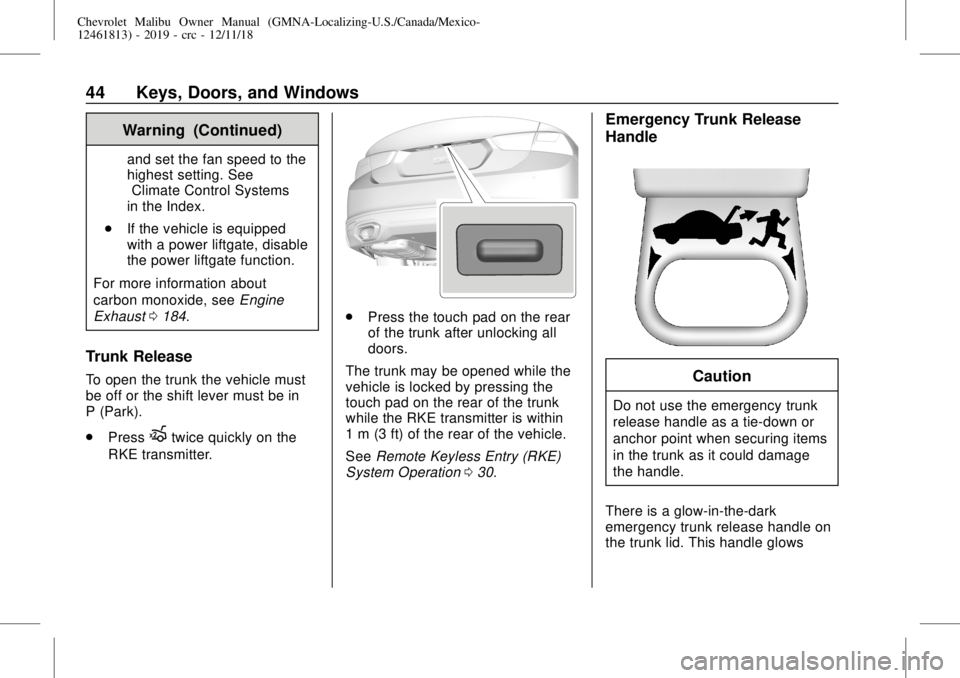
Trunk Release
To open the trunk the vehicle must
be off or the shift lever must be in
P (Park).
.
Press
Xtwice quickly on the
RKE transmitter.
.
Press the touch pad on the rear
of the trunk after unlocking all
doors.
The trunk may be opened while the
vehicle is locked by pressing the
touch pad on the rear of the trunk
while the RKE transmitter is within
1 m (3 ft) of the rear of the vehicle.
SeeRemote Keyless Entry (RKE)
System Operation030.
Emergency Trunk Release
Handle
Caution
Do not use the emergency trunk
release handle as a tie-down or
anchor point when securing items
in the trunk as it could damage
the handle.
There is a glow-in-the-dark
emergency trunk release handle on
the trunk lid. This handle glows
Page 51 of 382
Chevrolet Malibu Owner Manual (GMNA-Localizing-U.S./Canada/Mexico-
12461813) - 2019 - crc - 12/11/18
Keys, Doors, and Windows 51
Warning (Continued)
system override, make sure that
all people and obstructions are
clear of the window path.
When the engine is on, override the
automatic reversal system by pulling
and holding the window switch if
conditions prevent it from closing.
Programming the Power
Windows
Programming may be necessary if
the vehicle's battery has been
disconnected or discharged. If the
window is unable to express-up,
program each express-close
window:
1. Close all doors.
2. Turn the ignition on or to ACC/
ACCESSORY.
3. Partially open the window to be
programmed. Then close it and
continue to pull the switch
briefly after the window has
fully closed.4. Open the window and continue
to press the switch briefly after
the window has fully opened.
Sun Visors
Pull the sun visor down to block
glare. Detach the sun visor from the
center mount to pivot to the side
window, or to extend along the rod,
if available.
The vehicle may have mirror lamps.
The lamps turn on and off when the
cover is opened and closed.
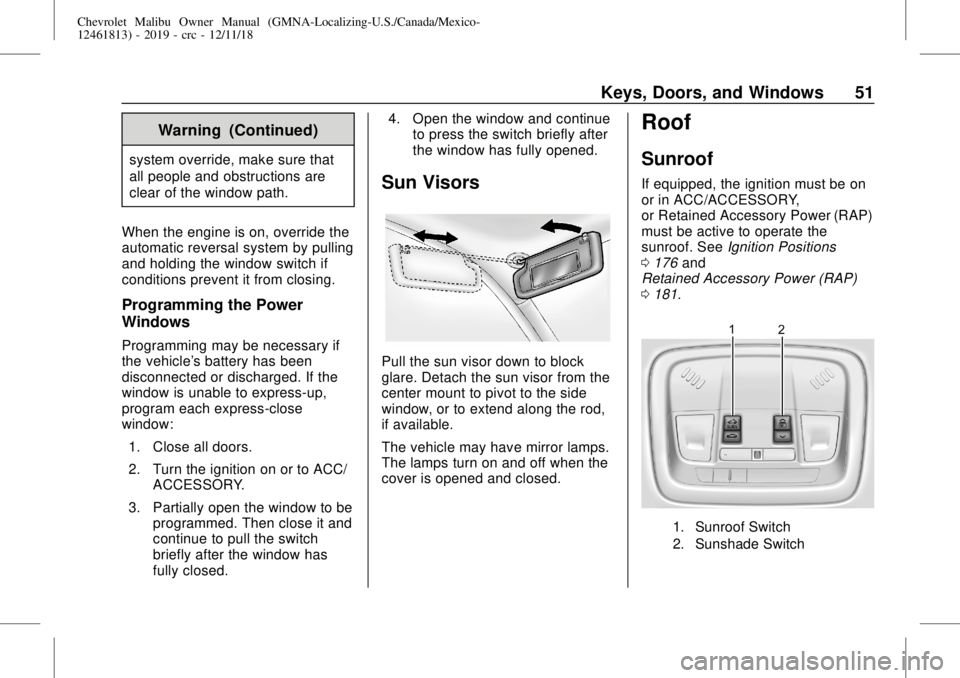
Roof
Sunroof
If equipped, the ignition must be on
or in ACC/ACCESSORY,
or Retained Accessory Power (RAP)
must be active to operate the
sunroof. SeeIgnition Positions
0176and
Retained Accessory Power (RAP)
0181.
1. Sunroof Switch
2. Sunshade Switch