Mode CHEVROLET MALIBU 2020 Owner's Guide
[x] Cancel search | Manufacturer: CHEVROLET, Model Year: 2020, Model line: MALIBU, Model: CHEVROLET MALIBU 2020Pages: 358, PDF Size: 3.27 MB
Page 137 of 358
Chevrolet Malibu Owner Manual (GMNA-Localizing-U.S./Canada/Mexico-
13555849) - 2020 - CRC - 8/16/19
136 Climate Controls
Caution
Do not try to clear frost or other
material from the inside of the
front windshield and rear window
with a razor blade or anything
else that is sharp. This may
damage the rear window
defogger grid and affect the
radio's ability to pick up stations
clearly. The repairs would not be
covered by the vehicle warranty.
Driver and Passenger Heated
Seats : If equipped, press
LorM
to heat the driver or passenger seat.
SeeHeated and Ventilated Front
Seats 041.
Remote Start Climate Control
Operation : If equipped with remote
start, the climate control system
may run when the vehicle is started
remotely. The system will determine
the best mode and temperature
setting for operation. Once the
vehicle is started with the Engine
Start/Stop button, the climate control system will begin to operate at the
last customer selected operating
mode and temperature. If equipped
with heated or ventilated seats, they
may come on during a remote start.
See
Remote Vehicle Start 016 and
Heated and Ventilated Front Seats
0 41.
Page 138 of 358
Chevrolet Malibu Owner Manual (GMNA-Localizing-U.S./Canada/Mexico-
13555849) - 2020 - CRC - 8/16/19
Climate Controls 137
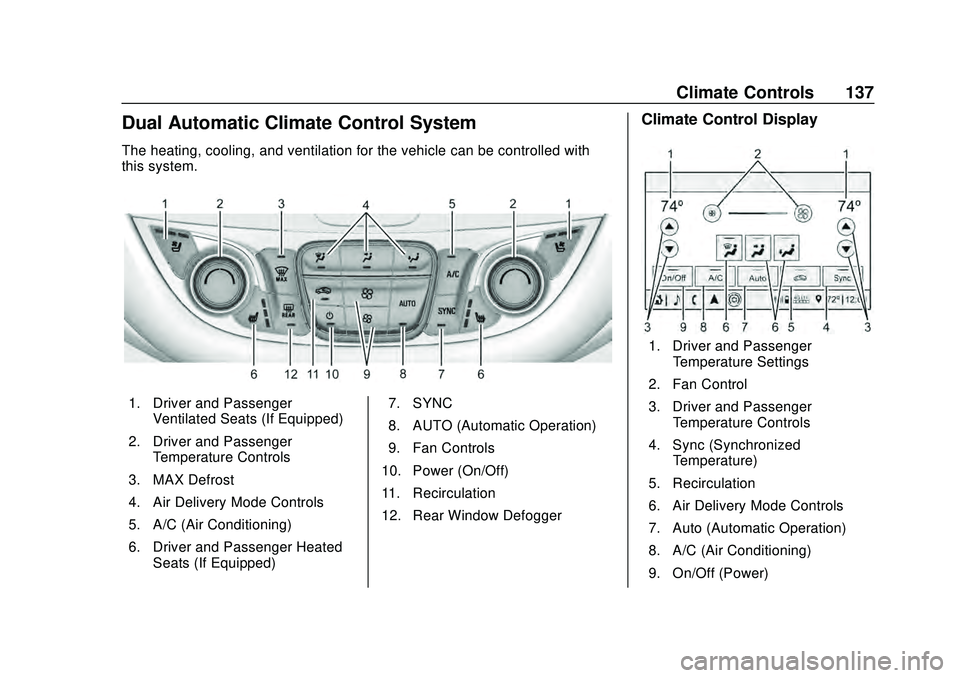
Dual Automatic Climate Control System
The heating, cooling, and ventilation for the vehicle can be controlled with
this system.
1. Driver and PassengerVentilated Seats (If Equipped)
2. Driver and Passenger Temperature Controls
3. MAX Defrost
4. Air Delivery Mode Controls
5. A/C (Air Conditioning)
6. Driver and Passenger Heated Seats (If Equipped) 7. SYNC
8. AUTO (Automatic Operation)
9. Fan Controls
10. Power (On/Off)
11. Recirculation
12. Rear Window Defogger
Climate Control Display
1. Driver and Passenger Temperature Settings
2. Fan Control
3. Driver and Passenger Temperature Controls
4. Sync (Synchronized Temperature)
5. Recirculation
6. Air Delivery Mode Controls
7. Auto (Automatic Operation)
8. A/C (Air Conditioning)
9. On/Off (Power)
Page 139 of 358
Chevrolet Malibu Owner Manual (GMNA-Localizing-U.S./Canada/Mexico-
13555849) - 2020 - CRC - 8/16/19
138 Climate Controls
The fan, air delivery mode, air
conditioning, driver and passenger
temperatures, and Sync settings
can be controlled by touching
CLIMATE on the infotainment Home
Page or the climate button in the
climate control display application
tray. A selection can then be made
on the front climate control page
displayed. See the infotainment
manual.
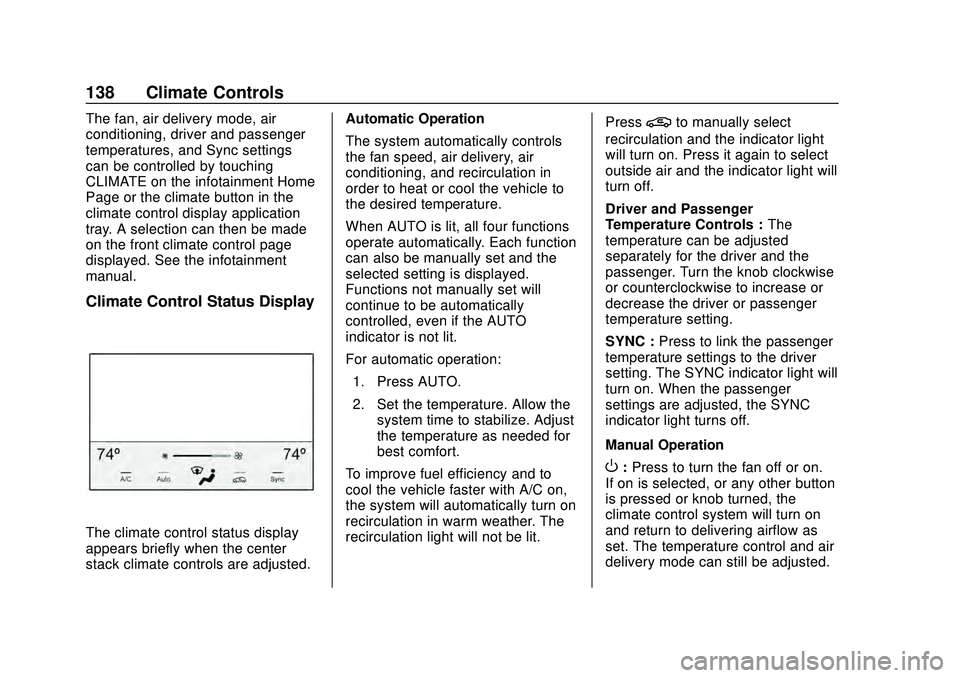
Climate Control Status Display
The climate control status display
appears briefly when the center
stack climate controls are adjusted.Automatic Operation
The system automatically controls
the fan speed, air delivery, air
conditioning, and recirculation in
order to heat or cool the vehicle to
the desired temperature.
When AUTO is lit, all four functions
operate automatically. Each function
can also be manually set and the
selected setting is displayed.
Functions not manually set will
continue to be automatically
controlled, even if the AUTO
indicator is not lit.
For automatic operation:
1. Press AUTO.
2. Set the temperature. Allow the system time to stabilize. Adjust
the temperature as needed for
best comfort.
To improve fuel efficiency and to
cool the vehicle faster with A/C on,
the system will automatically turn on
recirculation in warm weather. The
recirculation light will not be lit. Press
@to manually select
recirculation and the indicator light
will turn on. Press it again to select
outside air and the indicator light will
turn off.
Driver and Passenger
Temperature Controls : The
temperature can be adjusted
separately for the driver and the
passenger. Turn the knob clockwise
or counterclockwise to increase or
decrease the driver or passenger
temperature setting.
SYNC : Press to link the passenger
temperature settings to the driver
setting. The SYNC indicator light will
turn on. When the passenger
settings are adjusted, the SYNC
indicator light turns off.
Manual Operation
O: Press to turn the fan off or on.
If on is selected, or any other button
is pressed or knob turned, the
climate control system will turn on
and return to delivering airflow as
set. The temperature control and air
delivery mode can still be adjusted.
Page 140 of 358
Chevrolet Malibu Owner Manual (GMNA-Localizing-U.S./Canada/Mexico-
13555849) - 2020 - CRC - 8/16/19
Climate Controls 139
^:Press the large fan symbol to
increase the fan speed. Press the
small fan symbol to decrease the
fan speed. The fan speed setting
appears on the main display. When
the fan speed is decreased
completely, the fan turns off.
Pressing either button cancels
automatic fan control and the fan is
controlled manually. Press AUTO to
return to automatic operation.
Air Delivery Mode Controls :
Press
X,Y, or[to change the
direction of the airflow. Any
combination of the three buttons
can be selected. The indicator light
in the button will turn on. The
current mode appears in the display
screen. Pressing any button cancels
automatic air delivery control and
the direction of the airflow is
controlled manually. Press AUTO to
return to automatic operation.
To change the current mode, select
one or more of the following modes:
X: Air is directed to the windshield.
Y: Air is directed to the instrument
panel outlets.
[: Air is directed to the floor
outlets.
0MAX : Air is directed to the
windshield, the fan runs at a higher
speed, and the temperature of the
air is increased if not already at
maximum. This mode overrides the
previous mode selected and clears
fog or frost from the windshield
more quickly. When the button is
pressed again, the system returns
to the previous mode setting and
fan speed.
For best results, clear all snow and
ice from the windshield before
defrosting.
A/C : Press to turn the air
conditioning system on or off. If the
fan control is turned off or the
outside temperature falls below
freezing, the air conditioner will
not run.
Pressing this button cancels
automatic air conditioning and turns
off the air conditioner. Press AUTO
to return to automatic operation and the air conditioner runs
automatically as needed. When the
indicator light is on, the air
conditioner runs automatically to
cool the air inside the vehicle or to
dry the air needed to defog the
windshield faster.
M:
Press to turn on recirculation.
An indicator light comes on. Air is
recirculated to quickly cool the
inside of the vehicle or to reduce the
entry of outside air and odors.
If selected during cool or cold
weather, the windshield and
windows may fog. Turn off
recirculation to help clear the
windshield and windows.
Auto Defog : The climate control
system may have a sensor to
automatically detect high humidity
inside the vehicle. When high
humidity is detected, the climate
control system may adjust to
outside air supply and turn on the
air conditioner. The fan speed may
slightly increase to help prevent
fogging. If the climate control
Page 141 of 358
Chevrolet Malibu Owner Manual (GMNA-Localizing-U.S./Canada/Mexico-
13555849) - 2020 - CRC - 8/16/19
140 Climate Controls
system does not detect possible
window fogging, it returns to normal
operation.
To turn Auto Defog off or on, see
“Climate and Air Quality”under
Vehicle Personalization 0120.
Rear Window Defogger
K:Press to turn the rear window
defogger on or off. An indicator light
on the button comes on to show that
the rear window defogger is on. The
rear window defogger only works
when the ignition is on. The
defogger turns off when the ignition
is turned off or to ACC/
ACCESSORY.
The upper lines on the rear window
are antenna grids and are not
intended to defrost the glass.
The rear window defogger can be
set to automatic operation. See
“Climate and Air Quality” under
Vehicle Personalization 0120.
When Auto Rear Defog is selected,
the rear window defogger turns on
automatically when the interior
temperature is cold and the outside temperature is about 7 °C (45 °F)
and below. The auto rear defogger
turns off automatically.
If equipped with heated outside
mirrors, they turn on when the rear
window defogger button is on and
help to clear fog or frost from the
surface of the mirror. See
Heated
Mirrors 027.
Caution
Do not try to clear frost or other
material from the inside of the
front windshield and rear window
with a razor blade or anything
else that is sharp. This may
damage the rear window
defogger grid and affect the
radio's ability to pick up stations
clearly. The repairs would not be
covered by the vehicle warranty.
Driver and Passenger Heated and
Ventilated Seats : If equipped,
press
LorMto heat the driver or
passenger seat. If equipped, press
{orCto
ventilate the driver or passenger
seat. See Heated and Ventilated
Front Seats 041.
Remote Start Climate Control
Operation : If equipped with remote
start, the climate control system
may run when the vehicle is started
remotely. The system will determine
the best mode and temperature
setting for operation. Once the
vehicle is started with the Engine
Start/Stop button, the climate control
system will begin to operate at the
last customer selected operating
mode and temperature. If equipped
with heated or ventilated seats, they
may come on during a remote start.
See Remote Vehicle Start 016 and
Heated and Ventilated Front Seats
0 41.
Sensor
The solar sensor, on top of the
instrument panel near the
windshield, monitors the solar heat.
Page 142 of 358
Chevrolet Malibu Owner Manual (GMNA-Localizing-U.S./Canada/Mexico-
13555849) - 2020 - CRC - 8/16/19
Climate Controls 141
The climate control system uses the
sensor information to adjust the
temperature, fan speed,
recirculation, and air delivery mode
for best comfort.
Do not cover the sensor; otherwise
the automatic climate control system
may not work properly.Air Vents
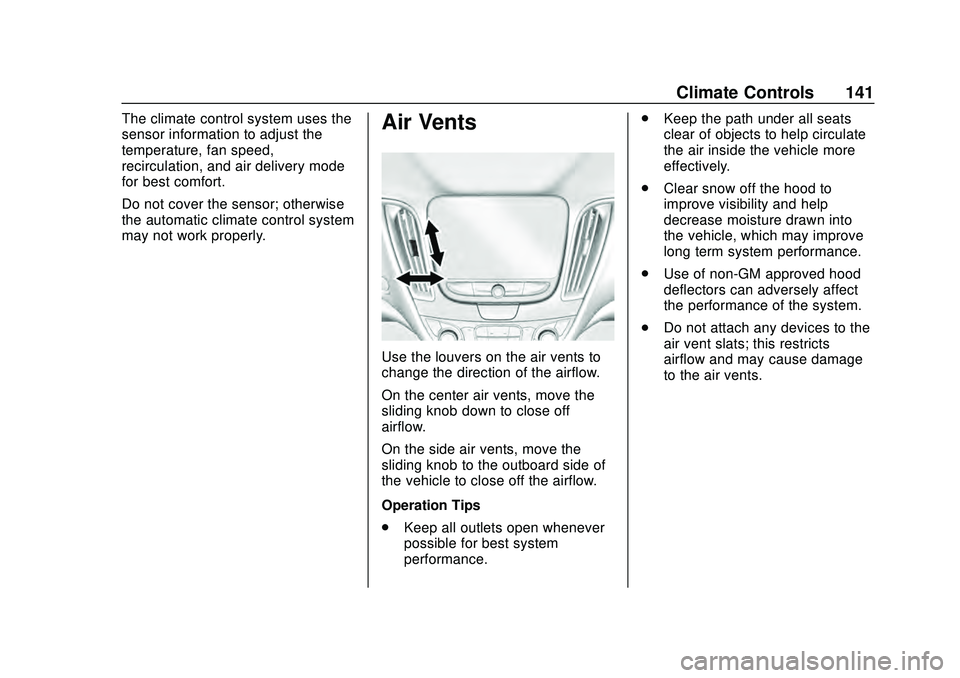
Use the louvers on the air vents to
change the direction of the airflow.
On the center air vents, move the
sliding knob down to close off
airflow.
On the side air vents, move the
sliding knob to the outboard side of
the vehicle to close off the airflow.
Operation Tips
.Keep all outlets open whenever
possible for best system
performance. .
Keep the path under all seats
clear of objects to help circulate
the air inside the vehicle more
effectively.
. Clear snow off the hood to
improve visibility and help
decrease moisture drawn into
the vehicle, which may improve
long term system performance.
. Use of non-GM approved hood
deflectors can adversely affect
the performance of the system.
. Do not attach any devices to the
air vent slats; this restricts
airflow and may cause damage
to the air vents.
Page 144 of 358
Chevrolet Malibu Owner Manual (GMNA-Localizing-U.S./Canada/Mexico-
13555849) - 2020 - CRC - 8/16/19
Driving and Operating 143
Driving and
Operating
Driving Information
Driving for Better FuelEconomy . . . . . . . . . . . . . . . . . . . . 144
Distracted Driving . . . . . . . . . . . . 144
Defensive Driving . . . . . . . . . . . . . 145
Drunk Driving . . . . . . . . . . . . . . . . . 145
Control of a Vehicle . . . . . . . . . . . 146
Braking . . . . . . . . . . . . . . . . . . . . . . . 146
Steering . . . . . . . . . . . . . . . . . . . . . . 146
Off-Road Recovery . . . . . . . . . . . 147
Loss of Control . . . . . . . . . . . . . . . 148
Driving on Wet Roads . . . . . . . . 148
Hill and Mountain Roads . . . . . 149
Winter Driving . . . . . . . . . . . . . . . . 150
If the Vehicle Is Stuck . . . . . . . . 151
Vehicle Load Limits . . . . . . . . . . . 151
Starting and Operating
New Vehicle Break-In . . . . . . . . . 155
Ignition Positions . . . . . . . . . . . . . 155
Starting the Engine . . . . . . . . . . . 157
Stop/Start System . . . . . . . . . . . . 158
Engine Heater . . . . . . . . . . . . . . . . 159
Retained Accessory Power (RAP) . . . . . . . . . . . . . . . . 160 Shifting Into Park . . . . . . . . . . . . . 160
Shifting out of Park . . . . . . . . . . . 161
Parking over Things
That Burn . . . . . . . . . . . . . . . . . . . 162
Active Fuel Management . . . . . 162
Extended Parking . . . . . . . . . . . . 162
Engine Exhaust
Engine Exhaust . . . . . . . . . . . . . . 163
Running the Vehicle While
Parked . . . . . . . . . . . . . . . . . . . . . . 163
Automatic Transmission
Automatic Transmission . . . . . . 164
Manual Mode . . . . . . . . . . . . . . . . . 165
Brakes
Antilock BrakeSystem (ABS) . . . . . . . . . . . . . . . 166
Parking Brake . . . . . . . . . . . . . . . . 167
Electric Parking Brake . . . . . . . . 168
Brake Assist . . . . . . . . . . . . . . . . . . 169
Hill Start Assist (HSA) . . . . . . . . 169
Ride Control Systems
Traction Control/Electronic Stability Control . . . . . . . . . . . . . 170
Cruise Control
Cruise Control . . . . . . . . . . . . . . . . 172
Adaptive Cruise Control . . . . . . 174
Driver Assistance Systems
Driver Assistance Systems . . . 182
Assistance Systems forParking or Backing . . . . . . . . . . 183
Assistance Systems for Driving . . . . . . . . . . . . . . . . . . . . . . 188
Forward Collision Alert (FCA) System . . . . . . . . . . . . . . . . . . . . . . 188
Automatic Emergency Braking (AEB) . . . . . . . . . . . . . . . 190
Front Pedestrian Braking (FPB) System . . . . . . . . . . . . . . . 191
Side Blind Zone Alert (SBZA) . . . . . . . . . . . . . . . . 193
Lane Change Alert (LCA) . . . . . 194
Lane Keep Assist (LKA) . . . . . . 196
Fuel
Top Tier Fuel . . . . . . . . . . . . . . . . . 198
Recommended Fuel (1.5L Engine) . . . . . . . . . . . . . . . . . . . . . 198
Recommended Fuel (2.0L Engine) . . . . . . . . . . . . . . . . . . . . . 199
Prohibited Fuels . . . . . . . . . . . . . . 199
Fuels in Foreign Countries . . . 199
Fuel Additives . . . . . . . . . . . . . . . . 200
Filling the Tank . . . . . . . . . . . . . . . 200
Filling a Portable Fuel Container . . . . . . . . . . . . . . . . . . . 202
Page 157 of 358
Chevrolet Malibu Owner Manual (GMNA-Localizing-U.S./Canada/Mexico-
13555849) - 2020 - CRC - 8/16/19
156 Driving and Operating
The RKE transmitter must be in the
vehicle for the system to operate.
If the pushbutton start is not
working, the vehicle may be near a
strong radio antenna signal causing
interference to the Keyless Access
system. SeeRemote Keyless Entry
(RKE) System Operation 08.
To shift out of P (Park), the ignition
must be on or in Service Mode, and
the brake pedal must be applied.
Stopping the Engine/LOCK/
OFF (No Indicator Lights) : When
the vehicle is stopped, press
ENGINE START/STOP once to turn
the engine off.
If the vehicle is in P (Park), the
ignition will turn off, and Retained
Accessory Power (RAP) will remain
active. See Retained Accessory
Power (RAP) 0160.
If the vehicle is not in P (Park), the
ignition will return to ACC/
ACCESSORY and display the
message SHIFT TO PARK in the
Driver Information Center (DIC).
When the vehicle is shifted into
P (Park), the ignition will turn off. Do not turn the engine off when the
vehicle is moving. This will cause a
loss of power assist in the brake
and steering systems and disable
the airbags.
If the vehicle must be shut off in an
emergency:
1. Brake using a firm and steady pressure. Do not pump the
brakes repeatedly. This may
deplete power assist, requiring
increased brake pedal force.
2. Shift the vehicle to N (Neutral). This can be done while the
vehicle is moving. After shifting
to N (Neutral), firmly apply the
brakes and steer the vehicle to
a safe location.
3. Come to a complete stop, shift to P (Park), and turn the
ignition off. The shift lever must
be in P (Park) to turn the
ignition off.
4. Set the parking brake. See Electric Parking Brake 0168.{Warning
Turning off the vehicle while
moving may cause loss of power
assist in the brake and steering
systems and disable the airbags.
While driving, only shut the
vehicle off in an emergency.
If the vehicle cannot be pulled over
and must be shut off while driving,
press and hold ENGINE START/
STOP for longer than two seconds,
or press twice in five seconds.
ACC/ACCESSORY (Amber
Indicator Light) : This mode allows
you to use some electrical
accessories when the engine is off.
With the ignition off, pressing the
button one time without the brake
pedal applied will place the ignition
system in ACC/ACCESSORY.
The ignition will switch from ACC/
ACCESSORY to off after
five minutes to prevent battery
run down.
Page 158 of 358
Chevrolet Malibu Owner Manual (GMNA-Localizing-U.S./Canada/Mexico-
13555849) - 2020 - CRC - 8/16/19
Driving and Operating 157
ON/RUN/START (Green Indicator
Light) :This mode is for driving and
starting. With the ignition off, and
the brake pedal applied, pressing
the button once will turn the ignition
on. Once engine cranking begins,
release the button. Engine cranking
will continue until the engine starts.
See Starting the Engine 0157. The
ignition will then remain on.
Service Mode
This power mode is available for
service and diagnostics, and to
verify the proper operation of the
malfunction indicator lamp as may
be required for emission inspection
purposes. With the vehicle off, and
the brake pedal not applied,
pressing and holding the button for
more than five seconds will place
the vehicle in Service Mode. The
instruments and audio systems will
operate as they do with the ignition
on, but the vehicle will not be able
to be driven. The engine will not
start in Service Mode. Press the
button again to turn the vehicle off.Starting the Engine
Move the shift lever to P (Park) or
N (Neutral). The engine will not start
in any other position. To restart the
engine when the vehicle is already
moving, use N (Neutral) only.
Caution
Do not try to shift to P (Park) if the
vehicle is moving. If you do, you
could damage the transmission.
Shift to P (Park) only when the
vehicle is stopped.
Caution
If you add electrical parts or
accessories, you could change
the way the engine operates. Any
resulting damage would not be
covered by the vehicle warranty.
See Add-On Electrical Equipment
0 210. Starting Procedure
1. With the Keyless Access system, the RKE transmitter
must be in the vehicle. Press
ENGINE START/STOP with the
brake pedal applied. When the
engine begins cranking, let go
of the button.
The idle speed will go down as
the engine gets warm. Do not
race the engine immediately
after starting it.
If the RKE transmitter is not in
the vehicle, if there is
interference, or if the RKE
transmitter battery is low, the
Driver Information Center (DIC)
will display a message. See
Driver Information Center (DIC)
(Base Level) 0113 or
Driver Information Center (DIC)
(Uplevel) 0116 and
Remote Keyless Entry (RKE)
System Operation 08.
Page 160 of 358
Chevrolet Malibu Owner Manual (GMNA-Localizing-U.S./Canada/Mexico-
13555849) - 2020 - CRC - 8/16/19
Driving and Operating 159
.The accelerator pedal is
pressed.
. The engine or transmission is
not at the required operating
temperature.
. The outside temperature is not
in the required operating range.
. The vehicle is in any gear other
than D (Drive).
. Tow/Haul Mode or other driver
modes have been selected.
. The vehicle is on a steep hill or
grade.
. The driver door has been
opened or driver seat belt has
been unbuckled.
. The hood has been opened.
. The Auto Stop has reached the
maximum allowed time. Auto Stop Disable Switch
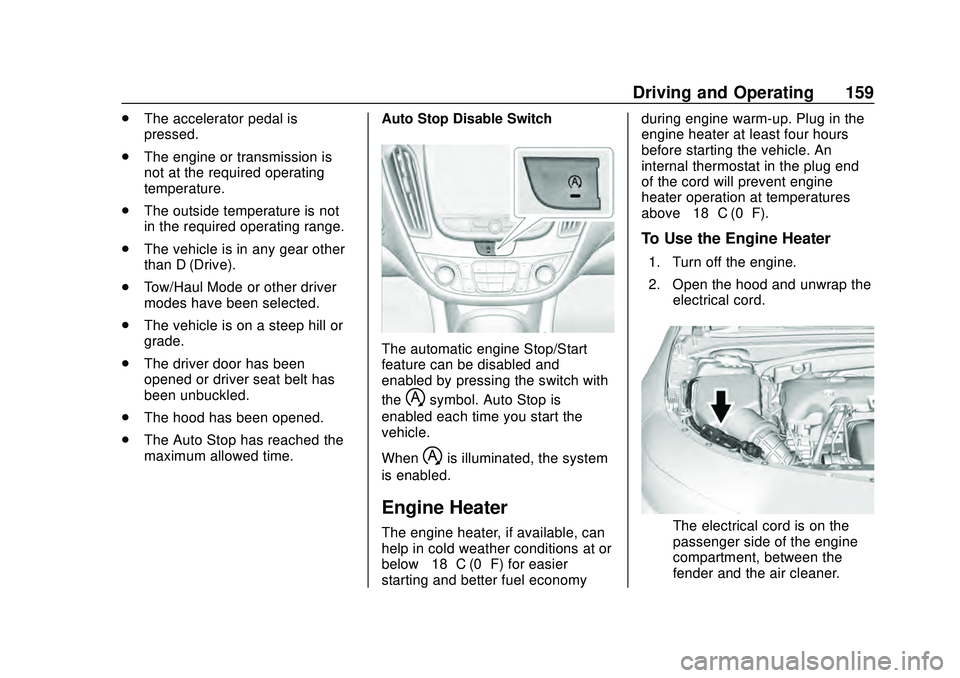
The automatic engine Stop/Start
feature can be disabled and
enabled by pressing the switch with
the
hsymbol. Auto Stop is
enabled each time you start the
vehicle.
When
his illuminated, the system
is enabled.
Engine Heater
The engine heater, if available, can
help in cold weather conditions at or
below −18 °C (0 °F) for easier
starting and better fuel economy during engine warm-up. Plug in the
engine heater at least four hours
before starting the vehicle. An
internal thermostat in the plug end
of the cord will prevent engine
heater operation at temperatures
above
−18 °C (0 °F).
To Use the Engine Heater
1. Turn off the engine.
2. Open the hood and unwrap the
electrical cord.
The electrical cord is on the
passenger side of the engine
compartment, between the
fender and the air cleaner.