roof CHEVROLET MALIBU 2022 User Guide
[x] Cancel search | Manufacturer: CHEVROLET, Model Year: 2022, Model line: MALIBU, Model: CHEVROLET MALIBU 2022Pages: 351, PDF Size: 9.4 MB
Page 77 of 351
Chevrolet Malibu Owner Manual (GMNA-Localizing-U.S./Canada-
14584249) - 2021 - CRC - 11/9/20
76 Instruments and Controls
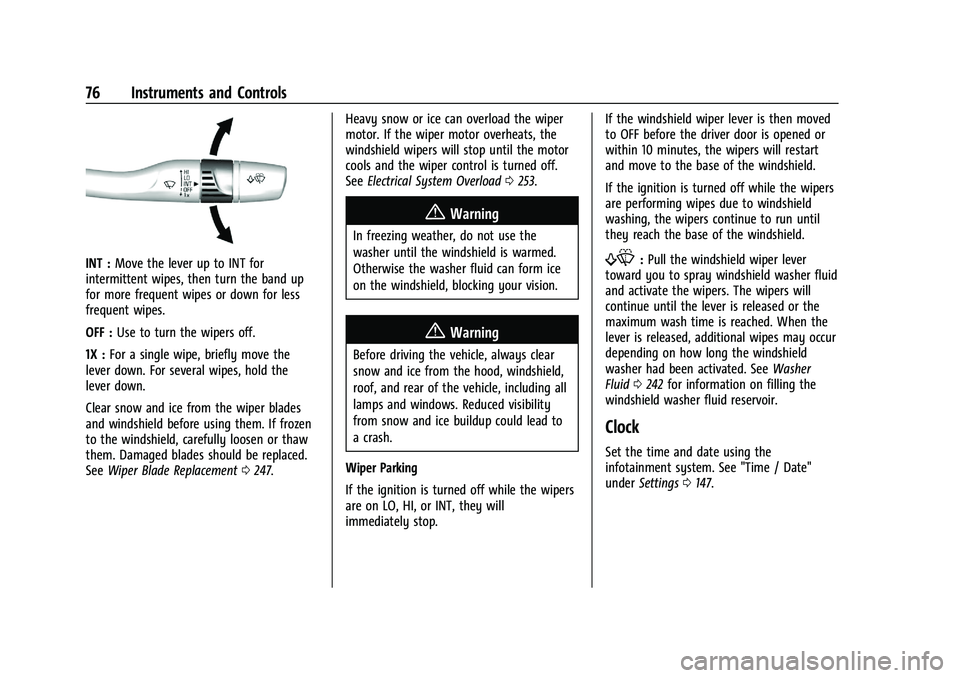
INT :Move the lever up to INT for
intermittent wipes, then turn the band up
for more frequent wipes or down for less
frequent wipes.
OFF : Use to turn the wipers off.
1X : For a single wipe, briefly move the
lever down. For several wipes, hold the
lever down.
Clear snow and ice from the wiper blades
and windshield before using them. If frozen
to the windshield, carefully loosen or thaw
them. Damaged blades should be replaced.
See Wiper Blade Replacement 0247. Heavy snow or ice can overload the wiper
motor. If the wiper motor overheats, the
windshield wipers will stop until the motor
cools and the wiper control is turned off.
See
Electrical System Overload 0253.
{Warning
In freezing weather, do not use the
washer until the windshield is warmed.
Otherwise the washer fluid can form ice
on the windshield, blocking your vision.
{Warning
Before driving the vehicle, always clear
snow and ice from the hood, windshield,
roof, and rear of the vehicle, including all
lamps and windows. Reduced visibility
from snow and ice buildup could lead to
a crash.
Wiper Parking
If the ignition is turned off while the wipers
are on LO, HI, or INT, they will
immediately stop. If the windshield wiper lever is then moved
to OFF before the driver door is opened or
within 10 minutes, the wipers will restart
and move to the base of the windshield.
If the ignition is turned off while the wipers
are performing wipes due to windshield
washing, the wipers continue to run until
they reach the base of the windshield.
f:
Pull the windshield wiper lever
toward you to spray windshield washer fluid
and activate the wipers. The wipers will
continue until the lever is released or the
maximum wash time is reached. When the
lever is released, additional wipes may occur
depending on how long the windshield
washer had been activated. See Washer
Fluid 0242 for information on filling the
windshield washer fluid reservoir.
Clock
Set the time and date using the
infotainment system. See "Time / Date"
under Settings 0147.
Page 121 of 351
Chevrolet Malibu Owner Manual (GMNA-Localizing-U.S./Canada-
14584249) - 2021 - CRC - 11/9/20
120 Infotainment System
Caution
Do not apply aftermarket glass tinting
with metallic film. The metallic film in
some tinting materials will interfere with
or distort the incoming radio reception.
Any damage caused to the backglass
antenna due to metallic tinting materials
will not be covered by the vehicle
warranty.
Multi-Band Antenna
The roof antenna is for SXM, OnStar, and
GPS (Global Positioning System). Keep clear
of obstructions for clear reception. If the
vehicle has a sunroof, and it is open,
reception can also be affected.
Audio Players
Avoiding Untrusted Media Devices
When using media devices such as SD cards,
USB devices, and mobile devices, consider
the source. Untrusted media devices could
contain files that affect system operation or
performance. Avoid use if the content or
origin cannot be trusted.
USB Port
Audio stored on a USB device may be
listened to.
The vehicle may be equipped with two USB
ports in the center console. These ports are
for data and charging. There may also be
two USB ports for charging only at the rear
of the center console.
Caution
To avoid vehicle damage, unplug all
accessories and disconnect all accessory
cables from the vehicle when not in use.
Accessory cables left plugged into the
vehicle, unconnected to a device, could be
damaged or cause an electrical short if
the unconnected end comes in contact
with liquids or another power source such
as the accessory power outlet.
Playing from a USB
A USB mass storage device can be connected
to the USB port.
Audio extensions supported by the USB may
include:
.MP3
.AAC
.OGG
.3GP
Gracenote
When plugging in a USB device, Gracenote
service builds voice tags for music. Voice
tags allow artists, albums with hard to
pronounce names, and nicknames to be used
to play music through voice recognition,
if equipped.
While indexing, infotainment features may
be available.
My Media Library
MyMedia is only available when more than
one indexed device is connected. It allows
access to content from all indexed media
sources. MyMedia will show as an available
source in the Source page.
USB MP3 Player and USB Devices
The USB MP3 players and USB devices
connected must comply with the USB Mass
Storage Class specification (USB MSC).
To play a USB device: 1. Connect the USB.
2. Touch Audio from the Home Page.
3. Touch the More option and then touch the USB device.
Page 136 of 351
Chevrolet Malibu Owner Manual (GMNA-Localizing-U.S./Canada-
14584249) - 2021 - CRC - 11/9/20
Infotainment System 135
Global Positioning System (GPS)
If equipped, the position of the vehicle is
determined by using satellite signals, various
vehicle signals, and map data.
At times, other interference such as the
satellite condition, road configuration,
condition of the vehicle, and/or other
circumstances can affect the navigation
system's ability to determine the accurate
position of the vehicle.
The GPS shows the current position of the
vehicle using signals sent by GPS satellites.
When the vehicle is not receiving signals
from the satellites, a symbol appears in the
status bar.
This system might not be available or
interference can occur if any of the
following are true:
.Signals are obstructed by tall buildings,
trees, large trucks, or a tunnel.
.Satellites are being repaired or improved.
For more information if the GPS is not
functioning properly, see Problems with
Route Guidance 0135 and
If the System Needs Service 0136.
Vehicle Positioning
At times, the position of the vehicle on the
map could be inaccurate due to one or more
of the following reasons:
.The road system has changed.
.The vehicle is driving on slippery road
surfaces such as sand, gravel, or snow.
.The vehicle is traveling on winding roads
or long, straight roads.
.The vehicle is approaching a tall building
or a large vehicle.
.The surface streets run parallel to a
freeway.
.The vehicle has been transferred by a
vehicle carrier or a ferry.
.The current position calibration is set
incorrectly.
.The vehicle is traveling at high speed.
.The vehicle changes directions more than
once, or the vehicle is turning on a turn
table in a parking lot.
.The vehicle is entering and/or exiting a
parking lot, garage, or a lot with a roof.
.The GPS signal is not received.
.A roof carrier is installed on the vehicle.
.Tire chains are installed on the vehicle.
.The tires are replaced or worn.
.The tire pressure for the tires is incorrect.
.This is the first navigation use after the
map data is updated.
.The 12-volt battery has been disconnected
for several days.
.The vehicle is driving in heavy traffic
where driving is at low speeds, and the
vehicle is stopped and started repeatedly.
Problems with Route Guidance
Inappropriate route guidance can occur
under one or more of the following
conditions:
.The turn was not made on the road
indicated.
.Route guidance might not be available
when using automatic rerouting for the
next right or left turn.
.The route might not be changed when
using automatic rerouting.
.There is no route guidance when turning
at an intersection.
.Plural names of places might be
announced occasionally.
.It could take a long time to operate
automatic rerouting during high-speed
driving.
Page 187 of 351
Chevrolet Malibu Owner Manual (GMNA-Localizing-U.S./Canada-
14584249) - 2021 - CRC - 11/9/20
186 Driving and Operating
{Warning
Plugging the cord into an ungrounded
outlet could cause an electrical shock.
Also, the wrong kind of extension cord
could overheat and cause a fire. You
could be seriously injured. Plug the cord
into a properly grounded three-prong
110-volt AC outlet. If the cord will not
reach, use a heavy-duty three-prong
extension cord rated for at least 15 amps.
4. Before starting the engine, be sure to unplug and store the cord as it was
before to keep it away from moving
engine parts.
The length of time the heater should remain
plugged in depends on several factors. Ask a
dealer in the area where you will be parking
the vehicle for the best advice on this.
Retained Accessory Power (RAP)
When the ignition is turned from on to off,
the following features (if equipped) will
continue to function for up to 10 minutes,
or until the driver door is opened. These
features will also work when the ignition is
in RUN or ACC/ACCESSORY:
.Infotainment System
.Power Windows (during RAP this
functionality will be lost when any door
is opened)
.Sunroof (during RAP this functionality will
be lost when any door is opened)
.Auxiliary Power Outlet
.Audio System
.OnStar System
Shifting Into Park
1. Hold the brake pedal down and set the parking brake. See Electric Parking Brake
0 192.
2. Move the shift lever into P (Park) by holding in the button on the shift lever
and pushing the shift lever all the way
toward the front of the vehicle.
3. Turn the ignition off.
Leaving the Vehicle with the Engine
Running
{Warning
It can be dangerous to leave the vehicle
with the engine running. It could
overheat and catch fire. (Continued)
Warning (Continued)
It is dangerous to get out of the vehicle
if the shift lever is not fully in P (Park)
with the parking brake firmly set. The
vehicle can roll.
Do not leave the vehicle when the engine
is running. If you have left the engine
running, the vehicle can move suddenly.
You or others could be injured. To be
sure the vehicle will not move, even
when you are on fairly level ground,
always set the parking brake and move
the shift lever to P (Park). SeeShifting
Into Park 0186. If you are towing a
trailer, see Driving Characteristics and
Towing Tips 0221.
If you have to leave the vehicle with the
engine running, be sure the vehicle is in
P (Park) and the parking brake is set before
you leave it. After you have moved the shift
lever into P (Park), hold the regular brake
pedal down. Then, see if you can move the
shift lever away from P (Park) without first
pressing the button.
If you can, it means that the shift lever was
not fully locked in P (Park).
Page 257 of 351
Chevrolet Malibu Owner Manual (GMNA-Localizing-U.S./Canada-
14584249) - 2021 - CRC - 11/9/20
256 Vehicle Care
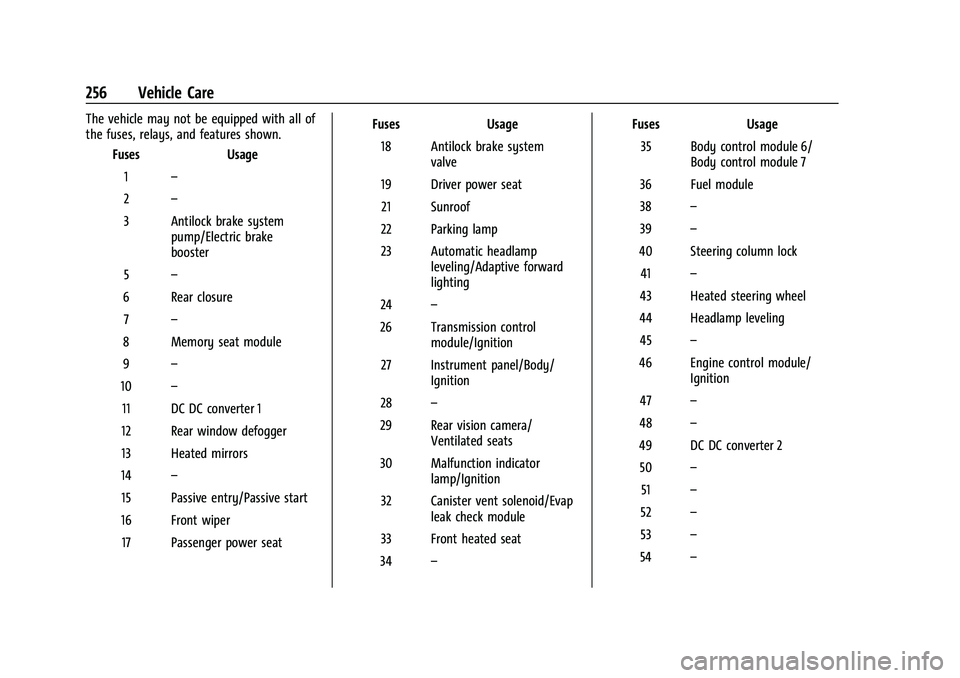
The vehicle may not be equipped with all of
the fuses, relays, and features shown.Fuses Usage
1 –
2 –
3 Antilock brake system pump/Electric brake
booster
5 –
6 Rear closure 7 –
8 Memory seat module
9 –
10 –
11 DC DC converter 1
12 Rear window defogger
13 Heated mirrors
14 –
15 Passive entry/Passive start
16 Front wiper 17 Passenger power seat Fuses
Usage
18 Antilock brake system valve
19 Driver power seat 21 Sunroof
22 Parking lamp
23 Automatic headlamp leveling/Adaptive forward
lighting
24 –
26 Transmission control module/Ignition
27 Instrument panel/Body/ Ignition
28 –
29 Rear vision camera/ Ventilated seats
30 Malfunction indicator lamp/Ignition
32 Canister vent solenoid/Evap leak check module
33 Front heated seat
34 – Fuses
Usage
35 Body control module 6/ Body control module 7
36 Fuel module
38 –
39 –
40 Steering column lock 41 –
43 Heated steering wheel
44 Headlamp leveling 45 –
46 Engine control module/ Ignition
47 –
48 –
49 DC DC converter 2 50 –
51 –
52 –
53 –
54 –
Page 306 of 351
Chevrolet Malibu Owner Manual (GMNA-Localizing-U.S./Canada-
14584249) - 2021 - CRC - 11/9/20
Service and Maintenance 305
Air Conditioning Desiccant (Replace Every
Seven Years)
The air conditioning system requires
maintenance every seven years. This service
requires replacement of the desiccant to
help the longevity and efficient operation of
the air conditioning system. This service can
be complex. See your dealer.
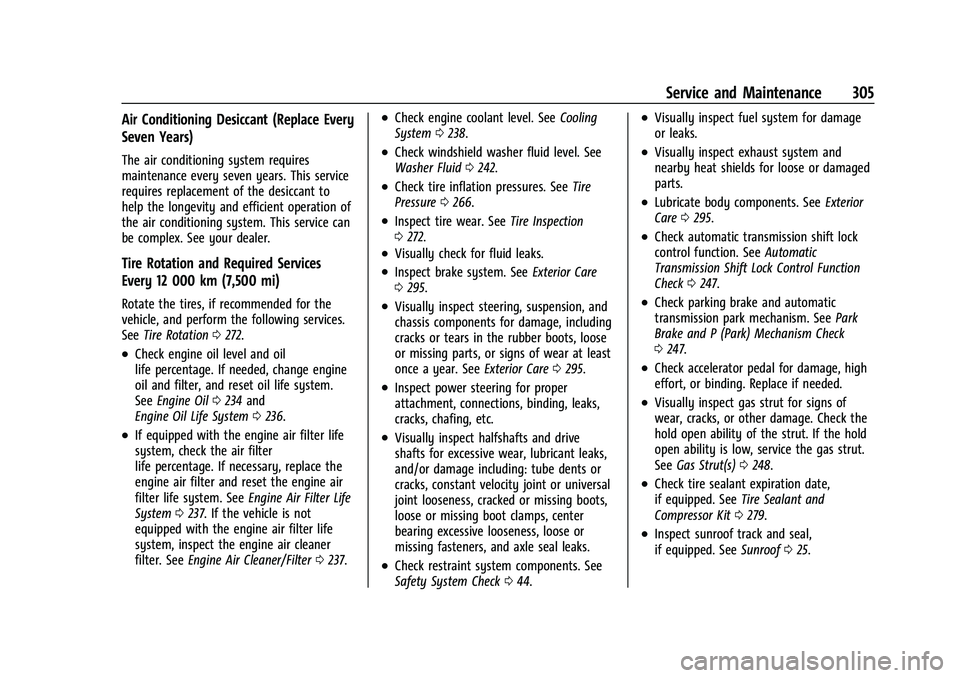
Tire Rotation and Required Services
Every 12 000 km (7,500 mi)
Rotate the tires, if recommended for the
vehicle, and perform the following services.
SeeTire Rotation 0272.
.Check engine oil level and oil
life percentage. If needed, change engine
oil and filter, and reset oil life system.
See Engine Oil 0234 and
Engine Oil Life System 0236.
.If equipped with the engine air filter life
system, check the air filter
life percentage. If necessary, replace the
engine air filter and reset the engine air
filter life system. See Engine Air Filter Life
System 0237. If the vehicle is not
equipped with the engine air filter life
system, inspect the engine air cleaner
filter. See Engine Air Cleaner/Filter 0237.
.Check engine coolant level. See Cooling
System 0238.
.Check windshield washer fluid level. See
Washer Fluid 0242.
.Check tire inflation pressures. See Tire
Pressure 0266.
.Inspect tire wear. See Tire Inspection
0 272.
.Visually check for fluid leaks.
.Inspect brake system. See Exterior Care
0 295.
.Visually inspect steering, suspension, and
chassis components for damage, including
cracks or tears in the rubber boots, loose
or missing parts, or signs of wear at least
once a year. See Exterior Care0295.
.Inspect power steering for proper
attachment, connections, binding, leaks,
cracks, chafing, etc.
.Visually inspect halfshafts and drive
shafts for excessive wear, lubricant leaks,
and/or damage including: tube dents or
cracks, constant velocity joint or universal
joint looseness, cracked or missing boots,
loose or missing boot clamps, center
bearing excessive looseness, loose or
missing fasteners, and axle seal leaks.
.Check restraint system components. See
Safety System Check 044.
.Visually inspect fuel system for damage
or leaks.
.Visually inspect exhaust system and
nearby heat shields for loose or damaged
parts.
.Lubricate body components. See Exterior
Care 0295.
.Check automatic transmission shift lock
control function. See Automatic
Transmission Shift Lock Control Function
Check 0247.
.Check parking brake and automatic
transmission park mechanism. See Park
Brake and P (Park) Mechanism Check
0 247.
.Check accelerator pedal for damage, high
effort, or binding. Replace if needed.
.Visually inspect gas strut for signs of
wear, cracks, or other damage. Check the
hold open ability of the strut. If the hold
open ability is low, service the gas strut.
See Gas Strut(s) 0248.
.Check tire sealant expiration date,
if equipped. See Tire Sealant and
Compressor Kit 0279.
.Inspect sunroof track and seal,
if equipped. See Sunroof025.
Page 347 of 351
Chevrolet Malibu Owner Manual (GMNA-Localizing-U.S./Canada-
14584249) - 2021 - CRC - 11/9/20
346 Index
PowerDoor Locks . . . . . . . . . . . . . . . . . . . . . . . . . . . . . . 16
Mirrors . . . . . . . . . . . . . . . . . . . . . . . . . . . . . . . . . . 21
Outlets . . . . . . . . . . . . . . . . . . . . . . . . . . . . . . . . . 77
Protection, Battery . . . . . . . . . . . . . . . . . . . . . 109
Retained Accessory (RAP) . . . . . . . . . . . . . . 186
Seat Adjustment . . . . . . . . . . . . . . . . . . . . . . . . 30
Windows . . . . . . . . . . . . . . . . . . . . . . . . . . . . . . . 23
Pregnancy, Using Seat Belts . . . . . . . . . . . . . . 43
Privacy Vehicle Data Recording . . . . . . . . . . . . . . . . 329
Problems with Route Guidance . . . . . . . . . . . 135
Program Courtesy Transportation . . . . . . . . . . . . . . . 325
Prohibited Fuels . . . . . . . . . . . . . . . . . . . . . . . . . .218
Proposition 65 Warning, California . . . . . . . . . . . . . . . . . . . .228, 244, 290, Back Cover
Publication Ordering Information . . . . . . . . 327
R
Radio HD Radio Technology . . . . . . . . . . . . . . . . . . . 117
Radio Data System (RDS) . . . . . . . . . . . . . . . . . 118
Radio Frequency Statement . . . . . . . . . . . . . . 328
Radio Reception . . . . . . . . . . . . . . . . . . . . . . . . . . 119
Radios AM-FM Radio . . . . . . . . . . . . . . . . . . . . . . . . . . . 116 Radios (cont'd)
Satellite . . . . . . . . . . . . . . . . . . . . . . . . . . . . . . . . . 118
Reading Lamps . . . . . . . . . . . . . . . . . . . . . . . . . . 108
Rear Seat Armrest . . . . . . . . . . . . . . . . . . . . . . . . .37
Rear Seats . . . . . . . . . . . . . . . . . . . . . . . . . . . . . . . . .35 Heated . . . . . . . . . . . . . . . . . . . . . . . . . . . . . . . . . 37
Rear Vision Camera (RVC) . . . . . . . . . . . . . . . . 205
Rearview Mirrors . . . . . . . . . . . . . . . . . . . . . . . . . .22
Automatic Dimming . . . . . . . . . . . . . . . . . . . . 22
Reclining Seatbacks . . . . . . . . . . . . . . . . . . . . . . . 30
Recognition Voice . . . . . . . . . . . . . . . . . . . . . . . . . . . . . . . . . . 136
Recommended Fuel . . . . . . . . . . . . . . . . . . . . . . . . . . . . . . . . . . . . 218
Recommended Fluids and Lubricants . . . . . . 312
Records Maintenance . . . . . . . . . . . . . . . . . . . . . . . . . . . 315
Recreational Vehicle Towing . . . . . . . . . . . . . 293
Reimbursement Program, GM Mobility . . . . . . . . . . . . . . . . . . . . . . . . . . . . . . . 323
Remote Keyless Entry (RKE) System . . . . . . . .7
Remote Vehicle Start . . . . . . . . . . . . . . . . . . . . . . 13
Replacement Parts
Airbags . . . . . . . . . . . . . . . . . . . . . . . . . . . . . . . . . 54
Maintenance . . . . . . . . . . . . . . . . . . . . . . . . . . . 313
Replacing Airbag System . . . . . . . . . . . . . . . . . . 54
Replacing LATCH System Parts after a
Crash . . . . . . . . . . . . . . . . . . . . . . . . . . . . . . . . . . . 67 Replacing Seat Belt System Parts after
a Crash . . . . . . . . . . . . . . . . . . . . . . . . . . . . . . . . . 44
Reporting Safety Defects Canadian Government . . . . . . . . . . . . . . . . . 328
General Motors . . . . . . . . . . . . . . . . . . . . . . . . 329
U.S. Government . . . . . . . . . . . . . . . . . . . . . . . 328
Restraints
Where to Put . . . . . . . . . . . . . . . . . . . . . . . . . . . 60
Retained Accessory Power (RAP) . . . . . . . . . 186
Reverse Tilt Mirrors . . . . . . . . . . . . . . . . . . . . . . . .22
Roads Driving, Wet . . . . . . . . . . . . . . . . . . . . . . . . . . . 176
Roadside Assistance Program . . . . . . . . . . . . 323
Roof Sunroof . . . . . . . . . . . . . . . . . . . . . . . . . . . . . . . . . 25
Rotation, Tires . . . . . . . . . . . . . . . . . . . . . . . . . . . 272
Routing, Engine Drive Belt . . . . . . . . . . . . . . . 319
Running the Vehicle While Parked . . . . . . . 188
S
Safety Defects Reporting
Canadian Government . . . . . . . . . . . . . . . . . 328
General Motors . . . . . . . . . . . . . . . . . . . . . . . . 329
U.S. Government . . . . . . . . . . . . . . . . . . . . . . . 328
Safety Locks . . . . . . . . . . . . . . . . . . . . . . . . . . . . . . . 17
Safety System Check . . . . . . . . . . . . . . . . . . . . . 44
Satellite Radio . . . . . . . . . . . . . . . . . . . . . . . . . . . . 118
Scheduling Appointments . . . . . . . . . . . . . . . . 324
Page 348 of 351
Chevrolet Malibu Owner Manual (GMNA-Localizing-U.S./Canada-
14584249) - 2021 - CRC - 11/9/20
Index 347
Sealant Kit, Tire . . . . . . . . . . . . . . . . . . . . . . . . . . 279
Seat Belts . . . . . . . . . . . . . . . . . . . . . . . . . . . . . . . . . 38Buckle To Drive . . . . . . . . . . . . . . . . . . . . . . . . . 39
Care . . . . . . . . . . . . . . . . . . . . . . . . . . . . . . . . . . . . 44
Extender . . . . . . . . . . . . . . . . . . . . . . . . . . . . . . . . 43
How to Wear Seat Belts Properly . . . . . . . 39
Lap-Shoulder Belt . . . . . . . . . . . . . . . . . . . . . . . 41
Reminders . . . . . . . . . . . . . . . . . . . . . . . . . . . . . . 85
Replacing after a Crash . . . . . . . . . . . . . . . . . 44
Use During Pregnancy . . . . . . . . . . . . . . . . . . 43
Seats
Adjustment, Front . . . . . . . . . . . . . . . . . . . . . . 29
Head Restraints . . . . . . . . . . . . . . . . . . . . . . . . . 27
Heated and Ventilated Front . . . . . . . . . . . . 34
Heated, Rear . . . . . . . . . . . . . . . . . . . . . . . . . . . . 37
Lumbar Adjustment, Front . . . . . . . . . . . . . . 30
Memory . . . . . . . . . . . . . . . . . . . . . . . . . . . . . . . . 32
Power Adjustment, Front . . . . . . . . . . . . . . . 30
Rear . . . . . . . . . . . . . . . . . . . . . . . . . . . . . . . . . . . . 35
Reclining Seatbacks . . . . . . . . . . . . . . . . . . . . . 30
Securing Child Restraints . . . . . . . . . . . . . . 67, 68
Security
Light . . . . . . . . . . . . . . . . . . . . . . . . . . . . . . . . . . . . 93
OnStar . . . . . . . . . . . . . . . . . . . . . . . . . . . . . . . . . 332
Vehicle . . . . . . . . . . . . . . . . . . . . . . . . . . . . . . . . . 19
Vehicle Alarm . . . . . . . . . . . . . . . . . . . . . . . . . . . 19
Service . . . . . . . . . . . . . . . . . . . . . . . . . . . . . . . . . . . . 171 Accessories and Modifications . . . . . . . . . 229 Service (cont'd)
Climate Control System . . . . . . . . . . . . . . . . 164
Doing Your Own Work . . . . . . . . . . . . . . . . . 229
Maintenance Records . . . . . . . . . . . . . . . . . . 315
Maintenance, General Information . . . . . 303
Parts Identification . . . . . . . . . . . . . . . . . . . . . 316
Scheduling Appointments . . . . . . . . . . . . . . 324
Service Electric Parking Brake Light . . . . . . . 89
Services Special Application . . . . . . . . . . . . . . . . . . . . . 309
Servicing System . . . . . . . . . . . . . . . . . . . . . . . . 136
Servicing the Airbag . . . . . . . . . . . . . . . . . . . . . . .53
Settings . . . . . . . . . . . . . . . . . . . . . . . . . . . . . . . . . . .147
Shift Lock Control Function Check, Automatic Transmission . . . . . . . . . . . . . . . . 247
Shifting
Into Park . . . . . . . . . . . . . . . . . . . . . . . . . . . . . . 186
Out of Park . . . . . . . . . . . . . . . . . . . . . . . . . . . . 187
Side Blind Zone Alert (SBZA) . . . . . . . . . . . . . .214
Signals, Turn and Lane-Change . . . . . . . . . . . 107
Software Updates . . . . . . . . . . . . . . . . . . . . . . . . . 116
Spare Tire Compact . . . . . . . . . . . . . . . . . . . . . . . . . . . . . . . 289
Special Application Services . . . . . . . . . . . . . . 309
Specifications and Capacities . . . . . . . . . . . . . . 317
Speedometer . . . . . . . . . . . . . . . . . . . . . . . . . . . . . 82
StabiliTrak OFF Light . . . . . . . . . . . . . . . . . . . . . . . . . . . . . . . 91 Start Assist, Hill . . . . . . . . . . . . . . . . . . . . . . . . . . 193
Start Vehicle, Remote . . . . . . . . . . . . . . . . . . . . . . 13
Starting the Engine . . . . . . . . . . . . . . . . . . . . . . .183
Steering . . . . . . . . . . . . . . . . . . . . . . . . . . . . . . . . . .174
Heated Wheel . . . . . . . . . . . . . . . . . . . . . . . . . . 75
Wheel Adjustment . . . . . . . . . . . . . . . . . . . . . . 75
Wheel Controls . . . . . . . . . . . . . . . . . . . . . . . . . 75
Steering Wheel Controls . . . . . . . . . . . . . . . . . . 112
Stop/Start System . . . . . . . . . . . . . . . . . . . . . . . 184
Stoplamps and Back-up Lamps Bulb Replacement . . . . . . . . . . . . . . . . . . 250, 251
Storage Areas Center Console . . . . . . . . . . . . . . . . . . . . . . . . . 72
Convenience Net . . . . . . . . . . . . . . . . . . . . . . . . 73
Glove Box . . . . . . . . . . . . . . . . . . . . . . . . . . . . . . 72
Umbrella . . . . . . . . . . . . . . . . . . . . . . . . . . . . . . . 73
Storage Compartments . . . . . . . . . . . . . . . . . . . .72
Storing the Tire Sealant and Compressor Kit . . . . . . . . . . . . . . . . . . . . . . . . . 284
Struts Gas . . . . . . . . . . . . . . . . . . . . . . . . . . . . . . . . . . . . 248
Stuck Vehicle . . . . . . . . . . . . . . . . . . . . . . . . . . . . .178
Sun Visors . . . . . . . . . . . . . . . . . . . . . . . . . . . . . . . . 24
Sunroof . . . . . . . . . . . . . . . . . . . . . . . . . . . . . . . . . . . .25
Symbols . . . . . . . . . . . . . . . . . . . . . . . . . . . . . . . . . . . .2 Navigation . . . . . . . . . . . . . . . . . . . . . . . . . . . . . 128
System Engine Air Filter Life . . . . . . . . . . . . . . . . . . . 237