ECO mode CHEVROLET MALIBU 2023 Owner's Manual
[x] Cancel search | Manufacturer: CHEVROLET, Model Year: 2023, Model line: MALIBU, Model: CHEVROLET MALIBU 2023Pages: 332, PDF Size: 6.2 MB
Page 178 of 332
Chevrolet Malibu Owner Manual (GMNA-Localizing-U.S./Canada-
16273584) - 2023 - CRC - 9/28/22
Driving and Operating 177
The engine will not start in Service Mode.
Press the button again to turn the
vehicle off.
Starting the Engine
Move the shift lever to P (Park) or
N (Neutral). The engine will not start in any
other position. To restart the engine when
the vehicle is already moving, use
N (Neutral) only.
Caution
Do not try to shift to P (Park) if the
vehicle is moving. If you do, you could
damage the transmission. Shift to P (Park)
only when the vehicle is stopped.
Caution
If you add electrical parts or accessories,
you could change the way the engine
operates. Any resulting damage would
not be covered by the vehicle warranty.
SeeAdd-On Electrical Equipment 0219. Starting Procedure
1. With the Keyless Access system, the remote key must be in the vehicle. Press
ENGINE START/STOP with the brake pedal
applied. When the engine begins
cranking, let go of the button.
The idle speed will go down as the
engine gets warm. Do not race the
engine immediately after starting it.
If the remote key is not in the vehicle,
if there is interference, or if the remote
key battery is low, the Driver
Information Center (DIC) will display a
message. See Driver Information Center
(DIC) (Base Level) 095 or
Driver Information Center (DIC) (Uplevel)
0 98 and
Remote Key Operation 07.Caution
Cranking the engine for long periods of
time, by trying to start the engine
immediately after cranking has ended,
can overheat and damage the cranking
motor, and drain the battery. Wait at
least 15 seconds between each try, to let
the cranking motor cool down. 2. If the engine does not start after five to
10 seconds, especially in very cold
weather (below −18 °C or 0 °F), it could
be flooded with too much gasoline. Try
pushing the accelerator pedal all the way
to the floor and holding it there as you
hold ENGINE START/STOP, for up to a
maximum of 15 seconds. Wait at least
15 seconds between each try, to allow
the cranking motor to cool down. When
the engine starts, let go of the button
and the accelerator. If the vehicle starts
briefly but then stops again, do the
same thing. This clears the extra gasoline
from the engine. Do not race the engine
immediately after starting it. Operate
the engine and transmission gently until
the oil warms up and lubricates all
moving parts.
Stop/Start System
The Stop/Start system will shut off the
engine to help conserve fuel. It has
components designed for the increased
number of starts.
Page 179 of 332
Chevrolet Malibu Owner Manual (GMNA-Localizing-U.S./Canada-
16273584) - 2023 - CRC - 9/28/22
178 Driving and Operating
{Warning
The automatic engine Stop/Start feature
causes the engine to shut off while the
vehicle is still on. Do not exit the vehicle
before shifting to P (Park). The vehicle
may restart and move unexpectedly.
Always shift to P (Park), and then turn
the ignition off before exiting the vehicle.
Auto Engine Stop/Start
When the brakes are applied and the vehicle
is at a complete stop, the engine may turn
off. When stopped, the tachometer displays
AUTO STOP. See Tachometer083. When the
brake pedal is released or the accelerator
pedal is pressed, the engine will restart.
To maintain vehicle performance, other
conditions may cause the engine to
automatically restart before the brake pedal
is released.
Auto Stops may not occur and/or auto
restarts may occur because:
.The climate control settings require the
engine to be running to cool or heat the
vehicle interior.
.The vehicle battery needs to charge.
.The vehicle battery has recently been
disconnected.
.Minimum vehicle speed has not been
reached since the last Auto Stop.
.The accelerator pedal is pressed.
.The engine or transmission is not at the
required operating temperature.
.The outside temperature is not in the
required operating range.
.The vehicle transmission is shifted out of
D (Drive) to any gear other than P (Park).
.Certain driver modes have been selected.
.The vehicle is on a steep hill or grade.
.The driver door has been opened or driver
seat belt has been unbuckled.
.The hood has been opened.
.The Auto Stop has reached the maximum
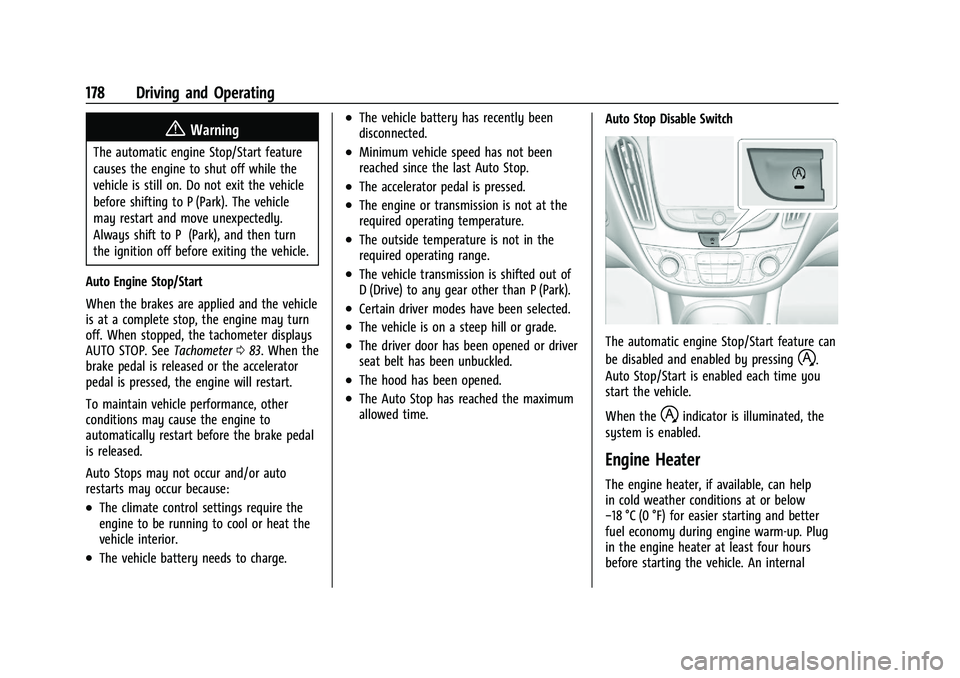
allowed time. Auto Stop Disable Switch
The automatic engine Stop/Start feature can
be disabled and enabled by pressing
h.
Auto Stop/Start is enabled each time you
start the vehicle.
When the
hindicator is illuminated, the
system is enabled.
Engine Heater
The engine heater, if available, can help
in cold weather conditions at or below
−18 °C (0 °F) for easier starting and better
fuel economy during engine warm-up. Plug
in the engine heater at least four hours
before starting the vehicle. An internal
Page 184 of 332
Chevrolet Malibu Owner Manual (GMNA-Localizing-U.S./Canada-
16273584) - 2023 - CRC - 9/28/22
Driving and Operating 183
Caution
Shifting out of P (Park) or N (Neutral) with
the engine running at high speed may
damage the transmission. The repairs
would not be covered by the vehicle
warranty. Be sure the engine is not
running at high speed when shifting the
vehicle.
Caution
A transmission hot message may display
if the automatic transmission fluid is too
hot. Driving under this condition can
damage the vehicle. Stop and idle the
engine to cool the automatic
transmission fluid. This message clears
when the transmission fluid has cooled
sufficiently.
D : This position is for normal driving.
If more power is needed for passing, press
the accelerator pedal down.
Caution
If the vehicle does not shift gears, the
transmission could be damaged. Have the
vehicle serviced right away.
If the vehicle is stopped on a hill, with your
foot off the brake pedal, the vehicle may
roll. This is normal and is due to the torque
converter designed to improve fuel economy
and performance. Use the brake to hold the
vehicle on a hill. Do not use the accelerator
pedal.
L : This position gives you access to gear
ranges. This provides more engine braking
but lower fuel economy than D (Drive). You
can use it on very steep hills, or in deep
snow or mud. See Manual Mode0183.
Operating Modes : The transmission may
operate in a lower gear than normal to
improve vehicle performance. The engine
speed may be higher and there may be an
increase in noise during the following
conditions:
.When climbing a grade
.When driving downhill
.When driving in hot temperatures, or at
high altitude
Manual Mode
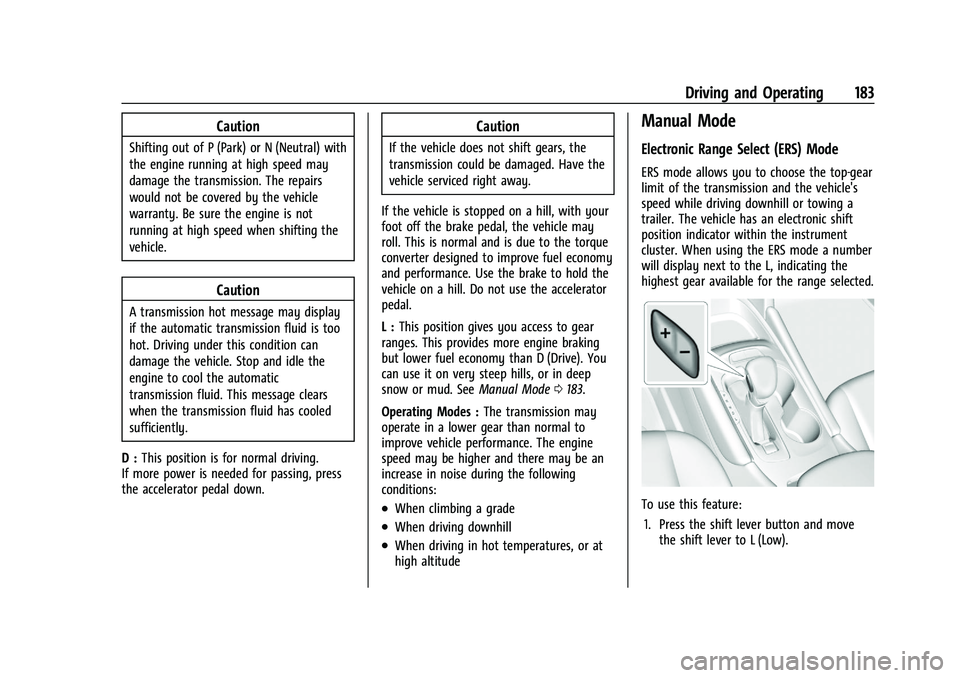
Electronic Range Select (ERS) Mode
ERS mode allows you to choose the top-gear
limit of the transmission and the vehicle's
speed while driving downhill or towing a
trailer. The vehicle has an electronic shift
position indicator within the instrument
cluster. When using the ERS mode a number
will display next to the L, indicating the
highest gear available for the range selected.
To use this feature:
1. Press the shift lever button and move the shift lever to L (Low).
Page 192 of 332
Chevrolet Malibu Owner Manual (GMNA-Localizing-U.S./Canada-
16273584) - 2023 - CRC - 9/28/22
Driving and Operating 191
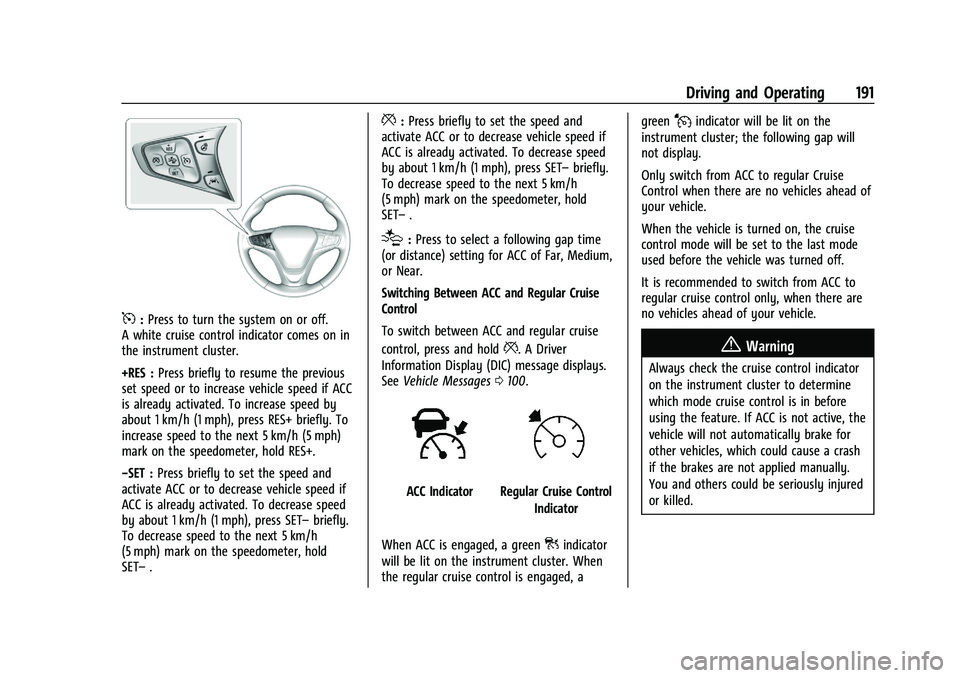
5:Press to turn the system on or off.
A white cruise control indicator comes on in
the instrument cluster.
+RES : Press briefly to resume the previous
set speed or to increase vehicle speed if ACC
is already activated. To increase speed by
about 1 km/h (1 mph), press RES+ briefly. To
increase speed to the next 5 km/h (5 mph)
mark on the speedometer, hold RES+.
−SET : Press briefly to set the speed and
activate ACC or to decrease vehicle speed if
ACC is already activated. To decrease speed
by about 1 km/h (1 mph), press SET– briefly.
To decrease speed to the next 5 km/h
(5 mph) mark on the speedometer, hold
SET– .
*:Press briefly to set the speed and
activate ACC or to decrease vehicle speed if
ACC is already activated. To decrease speed
by about 1 km/h (1 mph), press SET– briefly.
To decrease speed to the next 5 km/h
(5 mph) mark on the speedometer, hold
SET– .
[:Press to select a following gap time
(or distance) setting for ACC of Far, Medium,
or Near.
Switching Between ACC and Regular Cruise
Control
To switch between ACC and regular cruise
control, press and hold
*. A Driver
Information Display (DIC) message displays.
See Vehicle Messages 0100.
ACC IndicatorRegular Cruise Control
Indicator
When ACC is engaged, a green
]indicator
will be lit on the instrument cluster. When
the regular cruise control is engaged, a green
Jindicator will be lit on the
instrument cluster; the following gap will
not display.
Only switch from ACC to regular Cruise
Control when there are no vehicles ahead of
your vehicle.
When the vehicle is turned on, the cruise
control mode will be set to the last mode
used before the vehicle was turned off.
It is recommended to switch from ACC to
regular cruise control only, when there are
no vehicles ahead of your vehicle.
{Warning
Always check the cruise control indicator
on the instrument cluster to determine
which mode cruise control is in before
using the feature. If ACC is not active, the
vehicle will not automatically brake for
other vehicles, which could cause a crash
if the brakes are not applied manually.
You and others could be seriously injured
or killed.
Page 215 of 332
Chevrolet Malibu Owner Manual (GMNA-Localizing-U.S./Canada-
16273584) - 2023 - CRC - 9/28/22
214 Driving and Operating
The following information has many
time-tested, important trailering tips and
safety rules. Many of these are important
for your safety and that of your passengers.
Read this section carefully before towing a
trailer.
When towing a trailer:
.Become familiar with, and follow all state
and local laws that apply to trailer
towing. These requirements vary from
state to state.
.State laws may require the use of
extended side view mirrors on your
vehicle. Even if not required, you should
install extended side view mirrors if your
visibility is limited or restricted while
towing.
.Do not tow a trailer during the first
800 km (500 mi) of vehicle use to prevent
damage to the engine, axle, or other
parts.
.Perform the first oil change before heavy
towing.
.Do not drive over 80 km/h (50 mph) and
do not make starts at full throttle during
the first 800 km (500 mi) of trailer
towing,
.Tow in D (Drive). If the transmission
downshifts too often, a lower gear may
be selected using Manual Mode See
Manual Mode0183.
If equipped, the following driver assistance
features should be turned off when towing
a trailer:
.Adaptive Cruise Control (ACC)
.Super Cruise Control
.Park Assist
.Automatic Parking Assist (APA)
.Reverse Automatic Braking (RAB)
If equipped, the following driver assistance
features should be turned to alert or off
when towing a trailer:
.Automatic Emergency Braking (AEB)
.Intelligent Brake Assist (IBA)
.Front Pedestrian Braking (FPB)
If equipped with Lane Change Alert (LCA),
the LCA detection zones that extend back
from the side of the vehicle do not move
further back when a trailer is towed. Use
caution while changing lanes when towing a
trailer.
If equipped with Rear Cross Traffic Alert
(RCTA), use caution while backing up when
towing a trailer, as the RCTA detection zones that extend out from the back of the vehicle
do not move further back when a trailer is
towed.
{Warning
To prevent serious injury or death from
carbon monoxide (CO), when towing a
trailer:
.Do not drive with the liftgate, trunk/
hatch, or rear-most window open.
.Fully open the air outlets on or under
the instrument panel.
.Adjust the climate control system to a
setting that brings in only outside air.
See
“Climate Control Systems” in the
Index.
For more information about carbon
monoxide, see Engine Exhaust 0181.
Towing a trailer requires experience. The
combination of the vehicle and trailer is
longer and not as responsive as the vehicle
itself. Get used to the handling and braking
of the combination by driving on a level
road surface before driving on public roads.
The trailer structure, the tires, and the
brakes must all be rated to carry the
intended cargo. Inadequate trailer
Page 263 of 332
Chevrolet Malibu Owner Manual (GMNA-Localizing-U.S./Canada-
16273584) - 2023 - CRC - 9/28/22
262 Vehicle Care
If the turn signal lamp does not flash within
15 seconds after starting to inflate the tire,
the tire fill alert has not been activated or is
not working.
If the hazard warning flashers are on, the
tire fill alert visual feedback will not work
properly.
The TPMS will not activate the tire fill alert
properly under the following conditions:
.There is interference from an external
device or transmitter.
.The air pressure from the inflation device
is not sufficient to inflate the tire.
.There is a malfunction in the TPMS.
.There is a malfunction in the horn or turn
signal lamps.
.The identification code of the TPMS
sensor is not registered to the system.
.The battery of the TPMS sensor is low.
If the tire fill alert does not operate due to
TPMS interference, move the vehicle about
1 m (3 ft) back or forward and try again.
If the tire fill alert feature is not working,
use a tire pressure gauge.
TPMS Sensor Matching Process
Each TPMS sensor has a unique
identification code. The identification code
needs to be matched to a new tire/wheel
position after rotating the vehicle’s tires or
replacing one or more of the TPMS sensors.
The TPMS sensor matching process should
also be performed after replacing a spare
tire with a road tire containing the TPMS
sensor. The malfunction light and the DIC
message should go off at the next ignition
cycle. The sensors are matched to the
tire/wheel positions, using a TPMS relearn
tool, in the following order: driver side front
tire, passenger side front tire, passenger side
rear tire, and driver side rear. See your
dealer for service or to purchase a relearn
tool. A TPMS relearn tool can also be
purchased. See Tire Pressure Monitor Sensor
Activation Tool at
www.gmtoolsandequipment.com or call
1-800-GM TOOLS (1-800-468-6657).
There are two minutes to match the first
tire/wheel position, and five minutes overall
to match all four tire/wheel positions. If it
takes longer, the matching process stops
and must be restarted. The TPMS sensor matching process is:
1. Set the parking brake.
2. Place the vehicle in Service Mode. See Ignition Positions 0175.
3. Make sure the Tire Pressure info page option is turned on. The info pages on
the DIC can be turned on and off
through the Options menu. See Driver
Information Center (DIC) (Base Level)
0 95 or
Driver Information Center (DIC) (Uplevel)
0 98.
4. Use the DIC controls on the right side of the steering wheel to scroll to the Tire
Pressure screen under the DIC info page.
5. Press and hold
Vin the center of the
DIC controls.
The horn sounds twice to signal the
receiver is in relearn mode and the TIRE
LEARNING ACTIVE message displays on
the DIC screen.
6. Start with the driver side front tire.
7. Place the relearn tool against the tire sidewall, near the valve stem. Then press
the button to activate the TPMS sensor.
A horn chirp confirms that the sensor
identification code has been matched to
this tire and wheel position.
Page 308 of 332
Chevrolet Malibu Owner Manual (GMNA-Localizing-U.S./Canada-
16273584) - 2023 - CRC - 9/28/22
Customer Information 307
collision parts. When purchasing insurance,
we recommend that you ensure that the
vehicle will be repaired with GM original
equipment collision parts. If such insurance
coverage is not available from your current
insurance carrier, consider switching to
another insurance carrier.
If the vehicle is leased, the leasing company
may require you to have insurance that
ensures repairs with Genuine GM Original
Equipment Manufacturer (OEM) parts or
Genuine Manufacturer replacement parts.
Read the lease carefully, as you may be
charged at the end of the lease for poor
quality repairs.
If a Crash Occurs
If there has been an injury, call emergency
services for help. Do not leave the scene of
a crash until all matters have been taken
care of. Move the vehicle only if its position
puts you in danger, or you are instructed to
move it by a police officer.
Give only the necessary information to
police and other parties involved in the
crash.
For emergency towing seeRoadside
Assistance Program 0303. Gather the following information:
.Driver name, address, and telephone
number
.Driver license number
.Owner name, address, and telephone
number
.Vehicle license plate number
.Vehicle make, model, and model year
.Vehicle Identification Number (VIN)
.Insurance company and policy number
.General description of the damage to the
other vehicle
Choose a reputable repair facility that uses
quality replacement parts. See “Collision
Parts” earlier in this section.
If the airbag has inflated, see What Will You
See after an Airbag Inflates? 048.
Managing the Vehicle Damage Repair
Process
In the event that the vehicle requires
damage repairs, GM recommends that you
take an active role in its repair. If you have
a pre-determined repair facility of choice,
take the vehicle there, or have it towed
there. Specify to the facility that any
required replacement collision parts be
original equipment parts, either new Genuine GM parts or recycled original GM
parts. Remember, recycled parts will not be
covered by the GM vehicle warranty.
Insurance pays the bill for the repair, but
you must live with the repair. Depending on
your policy limits, your insurance company
may initially value the repair using
aftermarket parts. Discuss this with the
repair professional, and insist on Genuine
GM parts. Remember, if the vehicle is
leased, you may be obligated to have the
vehicle repaired with Genuine GM parts,
even if your insurance coverage does not
pay the full cost.
If another party's insurance company is
paying for the repairs, you are not obligated
to accept a repair valuation based on that
insurance company's collision policy repair
limits, as you have no contractual limits
with that company. In such cases, you can
have control of the repair and parts choices
as long as the cost stays within reasonable
limits.
Page 309 of 332
Chevrolet Malibu Owner Manual (GMNA-Localizing-U.S./Canada-
16273584) - 2023 - CRC - 9/28/22
308 Customer Information
Publication Ordering Information
Service Manuals
Service manuals have the diagnosis and
repair information on the engine/propulsion,
transmission, axle, suspension, brakes,
electrical system, steering system, body, etc.
Customer Literature
Owner’s manuals are written specifically for
owners and are intended to provide basic
operational information about the vehicle.
The owner’s manual includes the
Maintenance Schedule for all models.
Customer literature publications available for
purchase include owner’s manuals, warranty
manuals, and portfolios. Portfolios include an
owner’s manual, warranty manual,
if applicable, and zip lock bag or pouch.
Current and Past Models
Service manuals and customer literature are
available for many current and past model
year GM vehicles.
To order, call 1-800-551-4123 Monday–Friday,
8:00 a.m.–6:00 p.m. Eastern TimeFor credit card orders only (VISA,
MasterCard, or Discover), see Helm, Inc. at:
www.helminc.com.
To order by mail, write to:
Helm, Incorporated
Attention: Customer Service
47911 Halyard Drive
Plymouth, MI 48170
Make checks payable in U.S. funds.
Radio Frequency Statement
This vehicle uses license-exempt
transmitters / receivers / systems that
operate on a radio frequency that complies
with Part 15/Part 18 of the Federal
Communications Commission (FCC) rules and
with Innovation, Science and Economic
Development (ISED) Canada's license-exempt
RSS(s) / RSP-100 / ICES-GEN.
Operation is subject to the following two
conditions:
1. The device may not cause harmful interference.
2. The device must accept any interference received, including interference that may
cause undesired operation of the device. Changes or modifications to any of these
systems by other than an authorized service
facility could void authorization to use this
equipment.
Reporting Safety Defects
Reporting Safety Defects to the
United States Government
If you believe that your vehicle has a
defect which could cause a crash or
could cause injury or death, you should
immediately inform the National
Highway Traffic Safety Administration
(NHTSA) in addition to notifying General
Motors.
If NHTSA receives similar complaints, it
may open an investigation, and if it
finds that a safety defect exists in a
group of vehicles, it may order a recall
and remedy campaign. However, NHTSA
cannot become involved in individual
problems between you, your dealer,
or General Motors.
Page 327 of 332
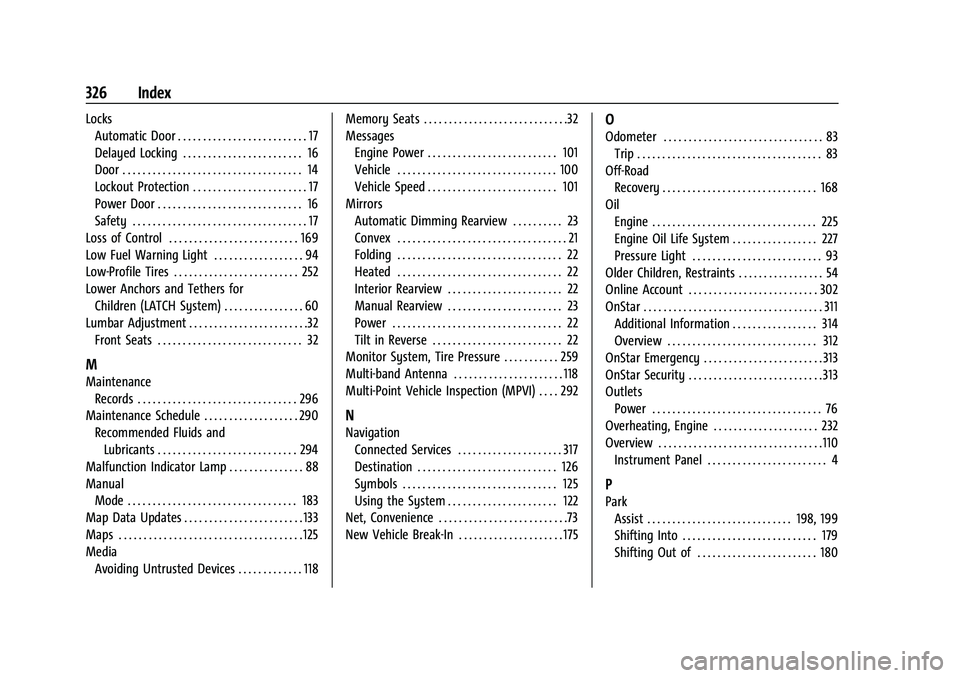
Chevrolet Malibu Owner Manual (GMNA-Localizing-U.S./Canada-
16273584) - 2023 - CRC - 9/28/22
326 Index
LocksAutomatic Door . . . . . . . . . . . . . . . . . . . . . . . . . . 17
Delayed Locking . . . . . . . . . . . . . . . . . . . . . . . . 16
Door . . . . . . . . . . . . . . . . . . . . . . . . . . . . . . . . . . . . 14
Lockout Protection . . . . . . . . . . . . . . . . . . . . . . . 17
Power Door . . . . . . . . . . . . . . . . . . . . . . . . . . . . . 16
Safety . . . . . . . . . . . . . . . . . . . . . . . . . . . . . . . . . . . 17
Loss of Control . . . . . . . . . . . . . . . . . . . . . . . . . . 169
Low Fuel Warning Light . . . . . . . . . . . . . . . . . . 94
Low-Profile Tires . . . . . . . . . . . . . . . . . . . . . . . . . 252
Lower Anchors and Tethers for Children (LATCH System) . . . . . . . . . . . . . . . . 60
Lumbar Adjustment . . . . . . . . . . . . . . . . . . . . . . . .32 Front Seats . . . . . . . . . . . . . . . . . . . . . . . . . . . . . 32
M
MaintenanceRecords . . . . . . . . . . . . . . . . . . . . . . . . . . . . . . . . 296
Maintenance Schedule . . . . . . . . . . . . . . . . . . . 290 Recommended Fluids andLubricants . . . . . . . . . . . . . . . . . . . . . . . . . . . . 294
Malfunction Indicator Lamp . . . . . . . . . . . . . . . 88
Manual Mode . . . . . . . . . . . . . . . . . . . . . . . . . . . . . . . . . . 183
Map Data Updates . . . . . . . . . . . . . . . . . . . . . . . . 133
Maps . . . . . . . . . . . . . . . . . . . . . . . . . . . . . . . . . . . . . 125
Media Avoiding Untrusted Devices . . . . . . . . . . . . . 118 Memory Seats . . . . . . . . . . . . . . . . . . . . . . . . . . . . .32
Messages
Engine Power . . . . . . . . . . . . . . . . . . . . . . . . . . 101
Vehicle . . . . . . . . . . . . . . . . . . . . . . . . . . . . . . . . 100
Vehicle Speed . . . . . . . . . . . . . . . . . . . . . . . . . . 101
Mirrors Automatic Dimming Rearview . . . . . . . . . . 23
Convex . . . . . . . . . . . . . . . . . . . . . . . . . . . . . . . . . . 21
Folding . . . . . . . . . . . . . . . . . . . . . . . . . . . . . . . . . 22
Heated . . . . . . . . . . . . . . . . . . . . . . . . . . . . . . . . . 22
Interior Rearview . . . . . . . . . . . . . . . . . . . . . . . 22
Manual Rearview . . . . . . . . . . . . . . . . . . . . . . . 23
Power . . . . . . . . . . . . . . . . . . . . . . . . . . . . . . . . . . 22
Tilt in Reverse . . . . . . . . . . . . . . . . . . . . . . . . . . 22
Monitor System, Tire Pressure . . . . . . . . . . . 259
Multi-band Antenna . . . . . . . . . . . . . . . . . . . . . . 118
Multi-Point Vehicle Inspection (MPVI) . . . . 292
N
Navigation Connected Services . . . . . . . . . . . . . . . . . . . . . 317
Destination . . . . . . . . . . . . . . . . . . . . . . . . . . . . 126
Symbols . . . . . . . . . . . . . . . . . . . . . . . . . . . . . . . 125
Using the System . . . . . . . . . . . . . . . . . . . . . . 122
Net, Convenience . . . . . . . . . . . . . . . . . . . . . . . . . .73
New Vehicle Break-In . . . . . . . . . . . . . . . . . . . . . 175
O
Odometer . . . . . . . . . . . . . . . . . . . . . . . . . . . . . . . . 83 Trip . . . . . . . . . . . . . . . . . . . . . . . . . . . . . . . . . . . . . 83
Off-Road Recovery . . . . . . . . . . . . . . . . . . . . . . . . . . . . . . . 168
Oil Engine . . . . . . . . . . . . . . . . . . . . . . . . . . . . . . . . . 225
Engine Oil Life System . . . . . . . . . . . . . . . . . 227
Pressure Light . . . . . . . . . . . . . . . . . . . . . . . . . . 93
Older Children, Restraints . . . . . . . . . . . . . . . . . 54
Online Account . . . . . . . . . . . . . . . . . . . . . . . . . . 302
OnStar . . . . . . . . . . . . . . . . . . . . . . . . . . . . . . . . . . . . 311
Additional Information . . . . . . . . . . . . . . . . . 314
Overview . . . . . . . . . . . . . . . . . . . . . . . . . . . . . . 312
OnStar Emergency . . . . . . . . . . . . . . . . . . . . . . . . 313
OnStar Security . . . . . . . . . . . . . . . . . . . . . . . . . . . 313
Outlets Power . . . . . . . . . . . . . . . . . . . . . . . . . . . . . . . . . . 76
Overheating, Engine . . . . . . . . . . . . . . . . . . . . . 232
Overview . . . . . . . . . . . . . . . . . . . . . . . . . . . . . . . . .110
Instrument Panel . . . . . . . . . . . . . . . . . . . . . . . . 4
P
ParkAssist . . . . . . . . . . . . . . . . . . . . . . . . . . . . . 198, 199
Shifting Into . . . . . . . . . . . . . . . . . . . . . . . . . . . 179
Shifting Out of . . . . . . . . . . . . . . . . . . . . . . . . 180