driver seat adjustment CHEVROLET MALIBU LIMITED 2016 8.G Owners Manual
[x] Cancel search | Manufacturer: CHEVROLET, Model Year: 2016, Model line: MALIBU LIMITED, Model: CHEVROLET MALIBU LIMITED 2016 8.GPages: 360, PDF Size: 6.15 MB
Page 6 of 360
Chevrolet Malibu Limited Owner Manual (GMNA-Localizing-U.S/Canada-
9086425) - 2016 - crc - 7/30/15
In Brief 5
In Brief
Instrument Panel
Instrument Panel Overview . . . . . . 6
Initial Drive Information
Initial Drive Information . . . . . . . . . . 8
Remote Keyless Entry (RKE)System . . . . . . . . . . . . . . . . . . . . . . . . 8
Remote Vehicle Start . . . . . . . . . . . 8
Door Locks . . . . . . . . . . . . . . . . . . . . . 9
Windows . . . . . . . . . . . . . . . . . . . . . . . . 9
Seat Adjustment . . . . . . . . . . . . . . . 10
Memory Features . . . . . . . . . . . . . . 12
Second Row Seats . . . . . . . . . . . . 12
Heated Seats . . . . . . . . . . . . . . . . . . 12
Head Restraint Adjustment . . . . 12
Safety Belts . . . . . . . . . . . . . . . . . . . . 13
Passenger Sensing System . . . 13
Mirror Adjustment . . . . . . . . . . . . . . 13
Steering Wheel Adjustment . . . . 14
Interior Lighting . . . . . . . . . . . . . . . . 14
Exterior Lighting . . . . . . . . . . . . . . . 15
Windshield Wiper/Washer . . . . . . 15
Climate Controls . . . . . . . . . . . . . . . 16
Transmission . . . . . . . . . . . . . . . . . . 17
Vehicle Features
Infotainment System . . . . . . . . . . . 18
Radio(s) . . . . . . . . . . . . . . . . . . . . . . . 18 Satellite Radio . . . . . . . . . . . . . . . . . 18
Portable Audio Devices . . . . . . . . 18
Bluetooth
®. . . . . . . . . . . . . . . . . . . . . 18
Steering Wheel Controls . . . . . . . 19
Cruise Control . . . . . . . . . . . . . . . . . 19
Driver Information Center (DIC) . . . . . . . . . . . . . . . . . 19
Forward Collision Alert (FCA) System . . . . . . . . . . . . . . . . . . . . . . . 20
Lane Departure Warning (LDW) . . . . . . . . . . . . . . . 20
Side Blind Zone Alert (SBZA) . . . . . . . . . . . . . . . . . . 20
Rear Vision Camera (RVC) . . . . 20
Rear Cross Traffic Alert (RCTA) System . . . . . . . . . . . . . . . . . . . . . . . 20
Parking Assist . . . . . . . . . . . . . . . . . 21
Power Outlets . . . . . . . . . . . . . . . . . 21
Universal Remote System . . . . . 21
Sunroof . . . . . . . . . . . . . . . . . . . . . . . . 21
Performance and Maintenance
Traction Control/Electronic Stability Control . . . . . . . . . . . . . . 22
Tire Pressure Monitor . . . . . . . . . . 23
Engine Oil Life System . . . . . . . . 23
Driving for Better Fuel Economy . . . . . . . . . . . . . . . . . . . . . 23
Roadside Assistance Program . . . . . . . . . . . . . . . . . . . . . . 24
Page 8 of 360
Chevrolet Malibu Limited Owner Manual (GMNA-Localizing-U.S/Canada-
9086425) - 2016 - crc - 7/30/15
In Brief 7
1.Air Vents 0173.
2. Turn Signal Lever. See Turn
and Lane-Change Signals
0 134.
Driver Information Center
Buttons. See Driver Information
Center (DIC) 0112.
3. Instrument Cluster 0101.
Driver Information Center (DIC)
0 112.
4. Windshield Wiper/Washer 097.
5. Storage Area (If Equipped). See Instrument Panel Storage
0 93.
6. Light Sensor. See Automatic
Headlamp System 0133.
7. Infotainment 0139.
8. CD Player 0150.
9. Climate Control Systems
0167.
Dual Automatic Climate Control
System 0170.
10. Heated Front Seats 053 (If
Equipped). 11.
Traction Control/Electronic
Stability Control 0202.
Lane Departure Warning
(LDW) 0213 (If Equipped).
12. Power Outlets 099.
13. Parking Brake 0200.
14. Shift Lever. See Automatic
Transmission 0197.
15. Hazard Warning Flashers
0134.
16. Ignition Positions (Keyless
Access) 0187 orIgnition
Positions (Key Access) 0189.
17. Steering Wheel Controls 096.
18. Horn 097.
19. Steering Wheel Adjustment
096.
20. Cruise Control 0204.
Forward Collision Alert (FCA)
System 0210 (If Equipped).
21. Hood Release. See Hood
0 227. 22. Data Link Connector (Out of
View). See Malfunction
Indicator Lamp (Check Engine
Light) 0106.
23. Storage Compartment. See Instrument Panel Storage 093.
24. Exterior Lamp Controls 0132.
Fog Lamps 0135 (If
Equipped).
Instrument Panel Illumination
Control 0135.
Page 13 of 360
Chevrolet Malibu Limited Owner Manual (GMNA-Localizing-U.S/Canada-
9086425) - 2016 - crc - 7/30/15
12 In Brief
Memory Features
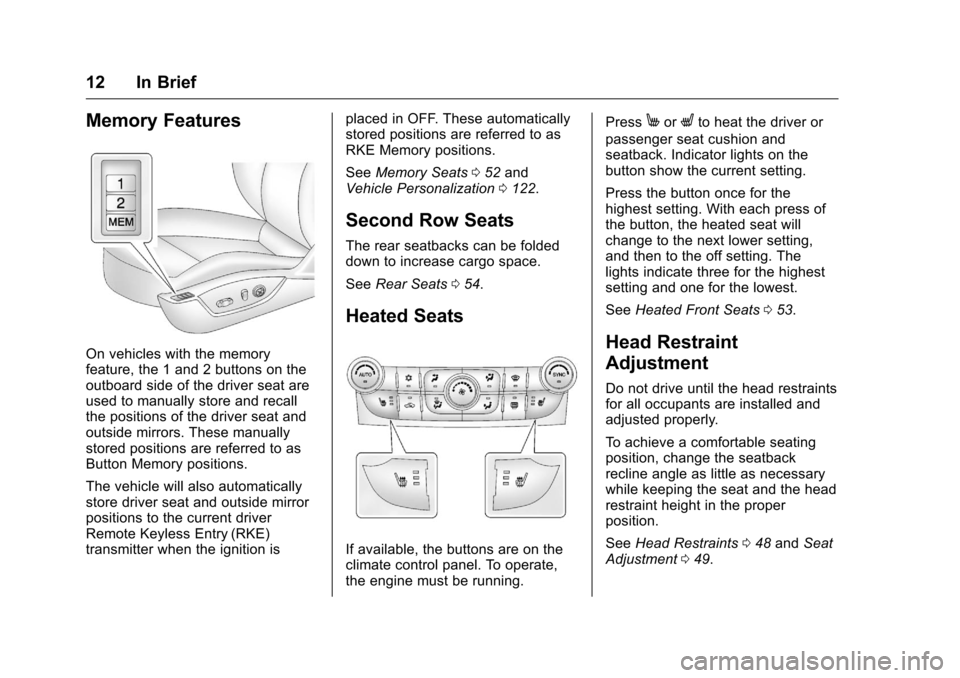
On vehicles with the memory
feature, the 1 and 2 buttons on the
outboard side of the driver seat are
used to manually store and recall
the positions of the driver seat and
outside mirrors. These manually
stored positions are referred to as
Button Memory positions.
The vehicle will also automatically
store driver seat and outside mirror
positions to the current driver
Remote Keyless Entry (RKE)
transmitter when the ignition isplaced in OFF. These automatically
stored positions are referred to as
RKE Memory positions.
See
Memory Seats 052 and
Vehicle Personalization 0122.
Second Row Seats
The rear seatbacks can be folded
down to increase cargo space.
See Rear Seats 054.
Heated Seats
If available, the buttons are on the
climate control panel. To operate,
the engine must be running. Press
MorLto heat the driver or
passenger seat cushion and
seatback. Indicator lights on the
button show the current setting.
Press the button once for the
highest setting. With each press of
the button, the heated seat will
change to the next lower setting,
and then to the off setting. The
lights indicate three for the highest
setting and one for the lowest.
See Heated Front Seats 053.
Head Restraint
Adjustment
Do not drive until the head restraints
for all occupants are installed and
adjusted properly.
To achieve a comfortable seating
position, change the seatback
recline angle as little as necessary
while keeping the seat and the head
restraint height in the proper
position.
See Head Restraints 048 and Seat
Adjustment 049.
Page 50 of 360
Chevrolet Malibu Limited Owner Manual (GMNA-Localizing-U.S/Canada-
9086425) - 2016 - crc - 7/30/15
Seats and Restraints 49
To lower the head restraint, press
the button, located on the top of the
seatback, and push the head
restraint down. Try to move the
head restraint after the button is
released to make sure that it is
locked in place.
If you are installing a child restraint
in the rear seat, see "Securing a
Child Restraint Designed for the
LATCH System" underLower
Anchors and Tethers for Children
(LATCH System) 081.Front Seats
Seat Adjustment
{Warning
You can lose control of the
vehicle if you try to adjust a driver
seat while the vehicle is moving.
Adjust the driver seat only when
the vehicle is not moving.
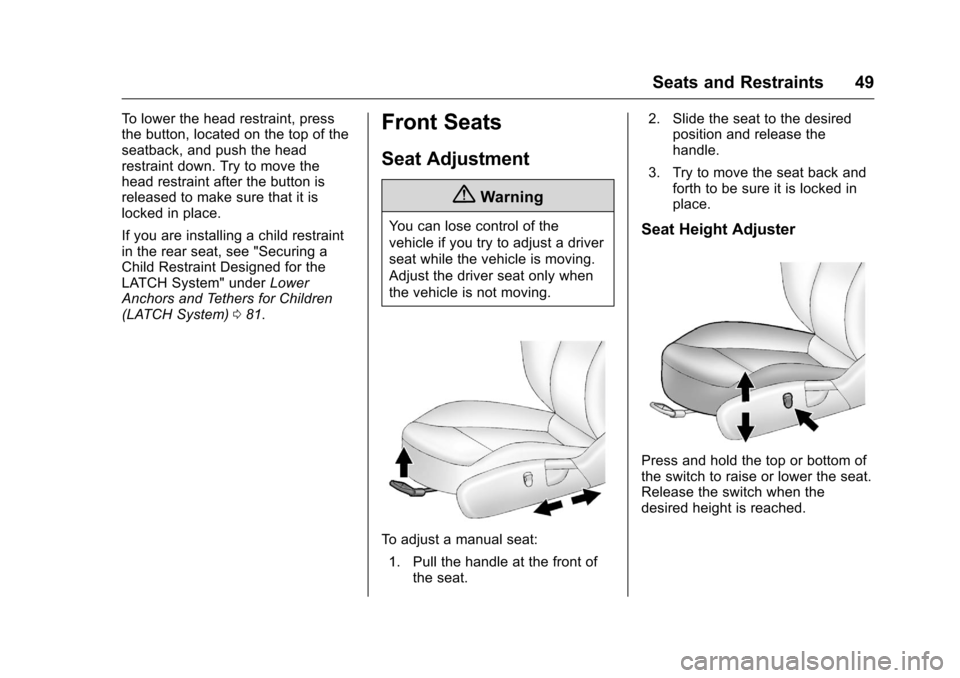
To adjust a manual seat:
1. Pull the handle at the front of the seat. 2. Slide the seat to the desired
position and release the
handle.
3. Try to move the seat back and forth to be sure it is locked in
place.
Seat Height Adjuster
Press and hold the top or bottom of
the switch to raise or lower the seat.
Release the switch when the
desired height is reached.
Page 88 of 360
Chevrolet Malibu Limited Owner Manual (GMNA-Localizing-U.S/Canada-
9086425) - 2016 - crc - 7/30/15
Seats and Restraints 87
be no more than 2.5 cm (1 in)
of movement for proper
installation.
Head Restraint Removal and
Reinstallation
The rear outboard head restraints
can be removed if they interfere with
the proper installation of the child
restraint.
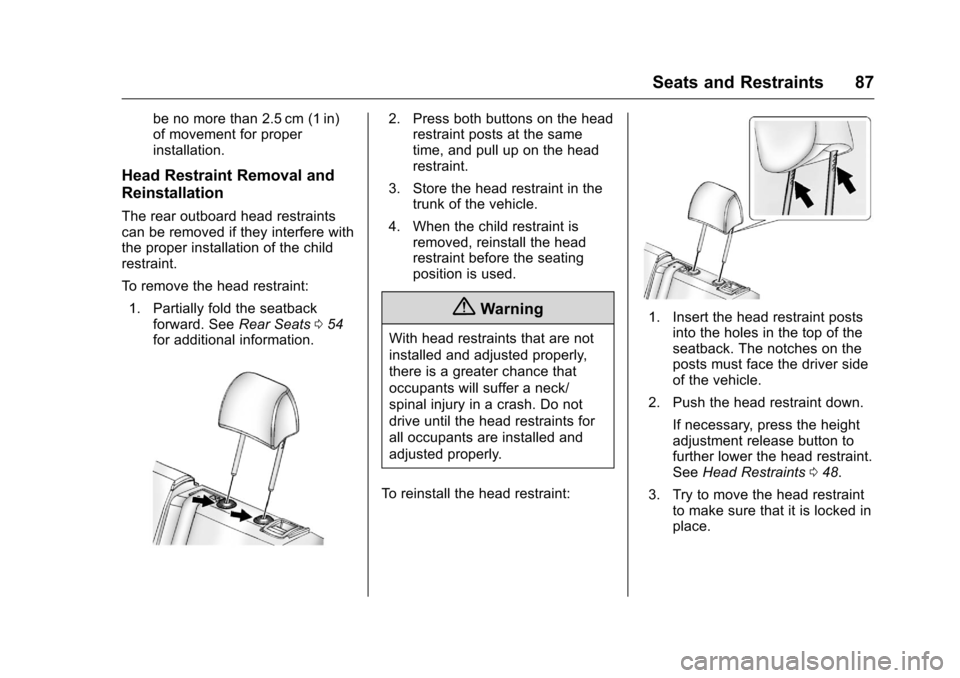
To remove the head restraint:1. Partially fold the seatback forward. See Rear Seats054
for additional information.
2. Press both buttons on the head restraint posts at the same
time, and pull up on the head
restraint.
3. Store the head restraint in the trunk of the vehicle.
4. When the child restraint is removed, reinstall the head
restraint before the seating
position is used.
{Warning
With head restraints that are not
installed and adjusted properly,
there is a greater chance that
occupants will suffer a neck/
spinal injury in a crash. Do not
drive until the head restraints for
all occupants are installed and
adjusted properly.
To reinstall the head restraint:
1. Insert the head restraint posts into the holes in the top of the
seatback. The notches on the
posts must face the driver side
of the vehicle.
2. Push the head restraint down.
If necessary, press the height
adjustment release button to
further lower the head restraint.
See Head Restraints 048.
3. Try to move the head restraint to make sure that it is locked in
place.
Page 223 of 360
Chevrolet Malibu Limited Owner Manual (GMNA-Localizing-U.S/Canada-
9086425) - 2016 - crc - 7/30/15
222 Driving and Operating
how much the vehicle is used to pull
a trailer are all important. It can
depend on any special equipment
on the vehicle, and the amount of
tongue weight the vehicle can carry.
See“Weight of the Trailer Tongue”
following.
Maximum trailer weight is calculated
assuming the tow vehicle has the
driver, a front seat passenger and
all the required tow equipment. and
it has all the required trailering
equipment. The weight of additional
optional equipment, passengers,
and cargo in the tow vehicle must
be subtracted from the maximum
trailer weight.
Ask your dealer for trailering
information or advice, or write us at
our Customer Assistance Offices.
See Customer Assistance Offices
0 327.
Weight of the Trailer Tongue
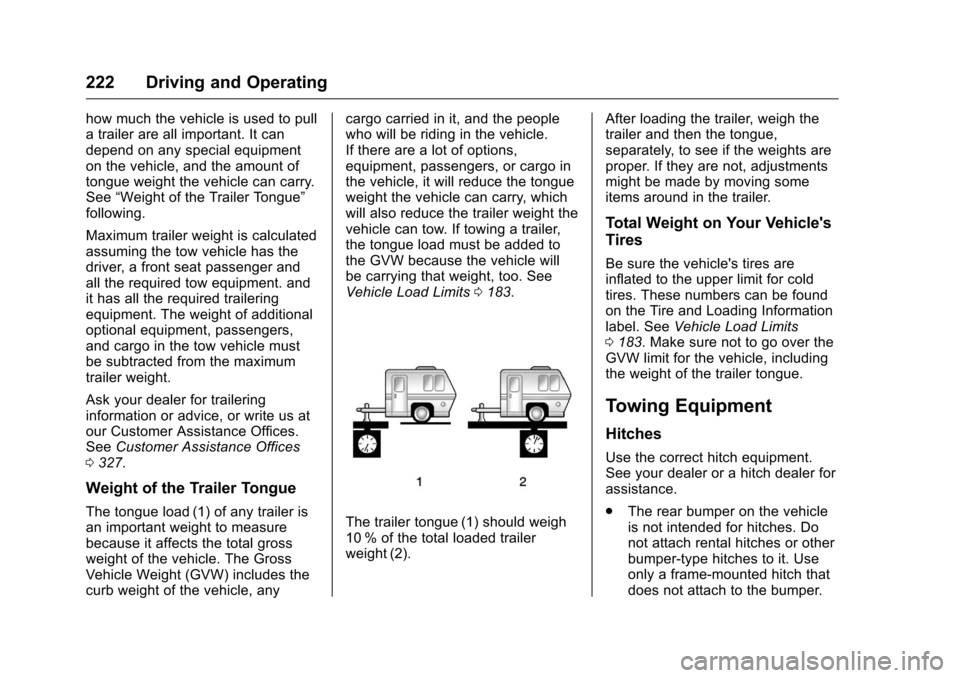
The tongue load (1) of any trailer is
an important weight to measure
because it affects the total gross
weight of the vehicle. The Gross
Vehicle Weight (GVW) includes the
curb weight of the vehicle, any cargo carried in it, and the people
who will be riding in the vehicle.
If there are a lot of options,
equipment, passengers, or cargo in
the vehicle, it will reduce the tongue
weight the vehicle can carry, which
will also reduce the trailer weight the
vehicle can tow. If towing a trailer,
the tongue load must be added to
the GVW because the vehicle will
be carrying that weight, too. See
Vehicle Load Limits
0183.The trailer tongue (1) should weigh
10 % of the total loaded trailer
weight (2). After loading the trailer, weigh the
trailer and then the tongue,
separately, to see if the weights are
proper. If they are not, adjustments
might be made by moving some
items around in the trailer.
Total Weight on Your Vehicle's
Tires
Be sure the vehicle's tires are
inflated to the upper limit for cold
tires. These numbers can be found
on the Tire and Loading Information
label. See
Vehicle Load Limits
0 183. Make sure not to go over the
GVW limit for the vehicle, including
the weight of the trailer tongue.
Towing Equipment
Hitches
Use the correct hitch equipment.
See your dealer or a hitch dealer for
assistance.
. The rear bumper on the vehicle
is not intended for hitches. Do
not attach rental hitches or other
bumper-type hitches to it. Use
only a frame-mounted hitch that
does not attach to the bumper.