clock CHEVROLET ORLANDO 2012 1.G User Guide
[x] Cancel search | Manufacturer: CHEVROLET, Model Year: 2012, Model line: ORLANDO, Model: CHEVROLET ORLANDO 2012 1.GPages: 378, PDF Size: 6.68 MB
Page 261 of 378
Black plate (27,1)Chevrolet Orlando Owner Manual - 2012
Vehicle Care 10-27
5. Install the new bulb in the bulbsocket.
6. Install the bulb socket into the headlamp assembly by turning
clockwise.
7. On the driver side, replace the battery cover.
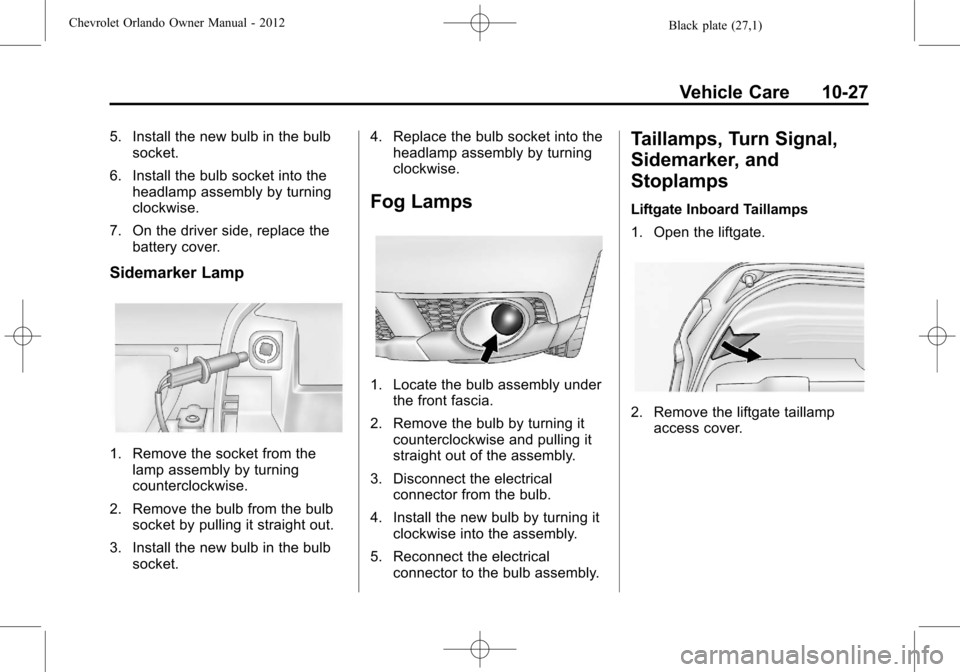
Sidemarker Lamp
1. Remove the socket from thelamp assembly by turning
counterclockwise.
2. Remove the bulb from the bulb socket by pulling it straight out.
3. Install the new bulb in the bulb socket. 4. Replace the bulb socket into the
headlamp assembly by turning
clockwise.
Fog Lamps
1. Locate the bulb assembly under
the front fascia.
2. Remove the bulb by turning it counterclockwise and pulling it
straight out of the assembly.
3. Disconnect the electrical connector from the bulb.
4. Install the new bulb by turning it clockwise into the assembly.
5. Reconnect the electrical connector to the bulb assembly.
Taillamps, Turn Signal,
Sidemarker, and
Stoplamps
Liftgate Inboard Taillamps
1. Open the liftgate.
2. Remove the liftgate taillampaccess cover.
Page 262 of 378
Black plate (28,1)Chevrolet Orlando Owner Manual - 2012
10-28 Vehicle Care
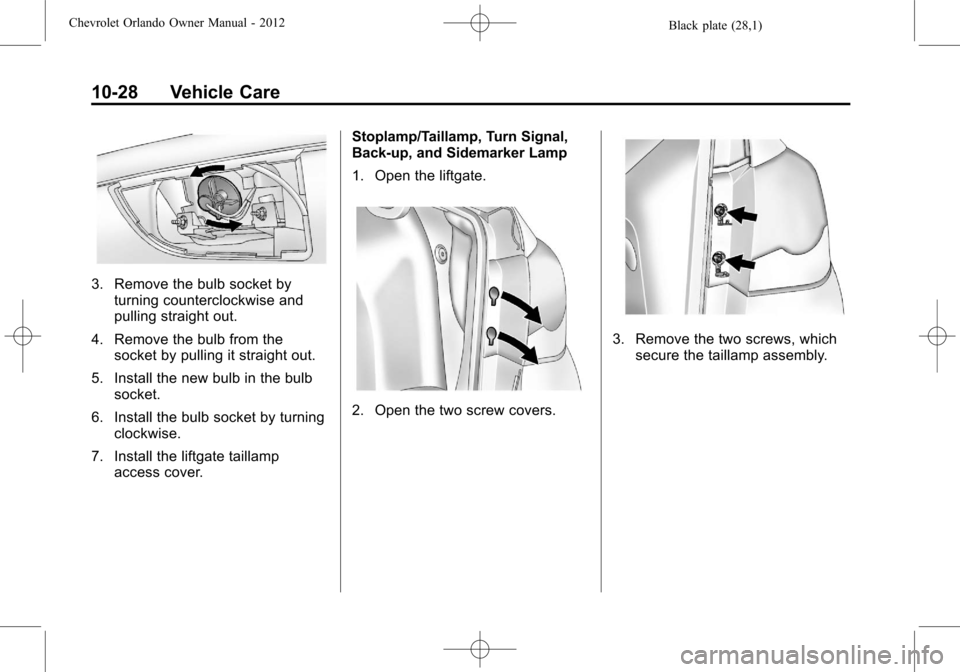
3. Remove the bulb socket byturning counterclockwise and
pulling straight out.
4. Remove the bulb from the socket by pulling it straight out.
5. Install the new bulb in the bulb socket.
6. Install the bulb socket by turning clockwise.
7. Install the liftgate taillamp access cover. Stoplamp/Taillamp, Turn Signal,
Back‐up, and Sidemarker Lamp
1. Open the liftgate.
2. Open the two screw covers.
3. Remove the two screws, which
secure the taillamp assembly.
Page 263 of 378
Black plate (29,1)Chevrolet Orlando Owner Manual - 2012
Vehicle Care 10-29
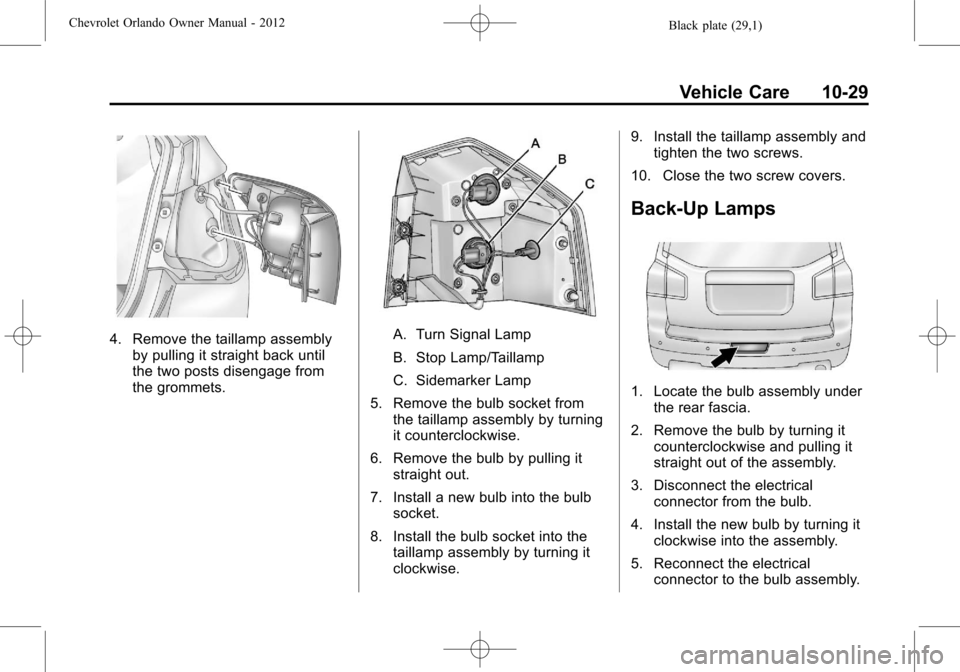
4. Remove the taillamp assemblyby pulling it straight back until
the two posts disengage from
the grommets.A. Turn Signal Lamp
B. Stop Lamp/Taillamp
C. Sidemarker Lamp
5. Remove the bulb socket from the taillamp assembly by turning
it counterclockwise.
6. Remove the bulb by pulling it straight out.
7. Install a new bulb into the bulb socket.
8. Install the bulb socket into the taillamp assembly by turning it
clockwise. 9. Install the taillamp assembly and
tighten the two screws.
10. Close the two screw covers.
Back-Up Lamps
1. Locate the bulb assembly under the rear fascia.
2. Remove the bulb by turning it counterclockwise and pulling it
straight out of the assembly.
3. Disconnect the electrical connector from the bulb.
4. Install the new bulb by turning it clockwise into the assembly.
5. Reconnect the electrical connector to the bulb assembly.
Page 264 of 378
Black plate (30,1)Chevrolet Orlando Owner Manual - 2012
10-30 Vehicle Care
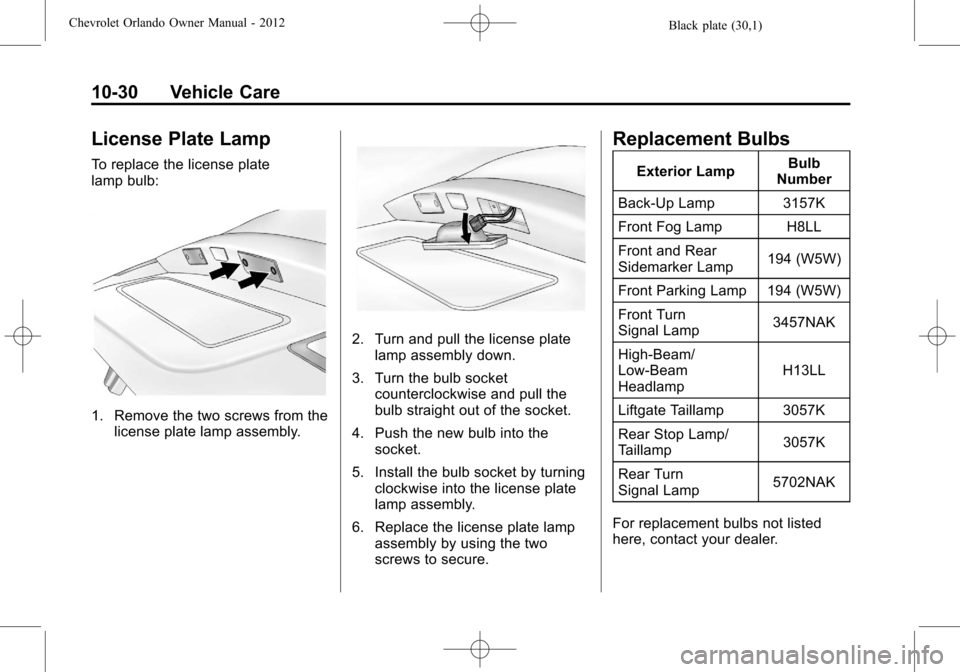
License Plate Lamp
To replace the license plate
lamp bulb:
1. Remove the two screws from thelicense plate lamp assembly.
2. Turn and pull the license platelamp assembly down.
3. Turn the bulb socket counterclockwise and pull the
bulb straight out of the socket.
4. Push the new bulb into the socket.
5. Install the bulb socket by turning clockwise into the license plate
lamp assembly.
6. Replace the license plate lamp assembly by using the two
screws to secure.
Replacement Bulbs
Exterior Lamp Bulb
Number
Back-Up Lamp 3157K
Front Fog Lamp H8LL
Front and Rear
Sidemarker Lamp 194 (W5W)
Front Parking Lamp 194 (W5W)
Front Turn
Signal Lamp 3457NAK
High‐Beam/
Low‐Beam
Headlamp H13LL
Liftgate Taillamp 3057K
Rear Stop Lamp/
Taillamp 3057K
Rear Turn
Signal Lamp 5702NAK
For replacement bulbs not listed
here, contact your dealer.
Page 294 of 378
Black plate (60,1)Chevrolet Orlando Owner Manual - 2012
10-60 Vehicle Care
Do not remove any objects that
have penetrated the tire.
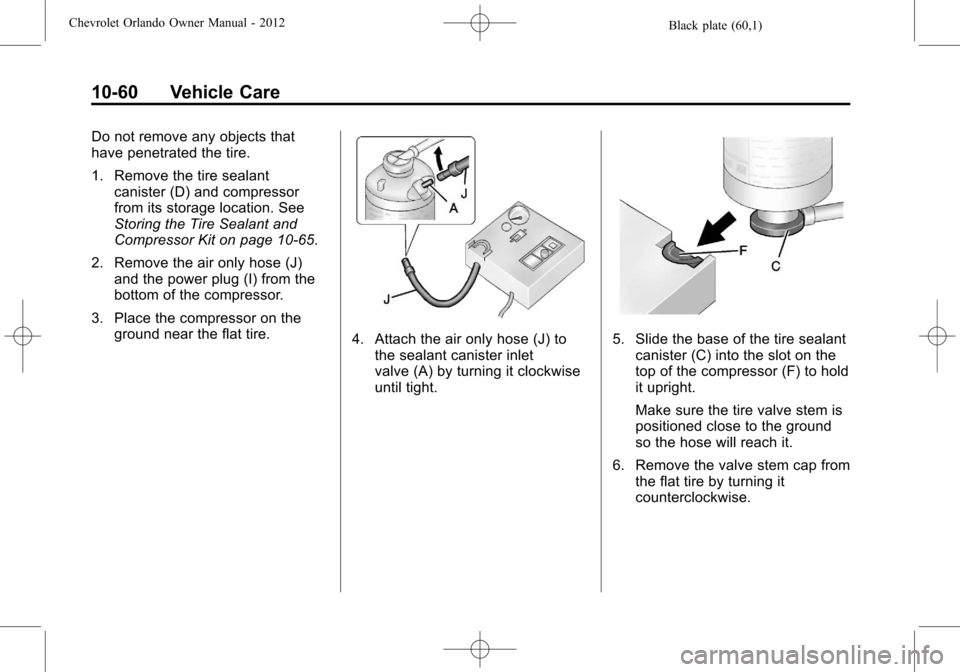
1. Remove the tire sealantcanister (D) and compressor
from its storage location. See
Storing the Tire Sealant and
Compressor Kit on page 10‑65.
2. Remove the air only hose (J) and the power plug (I) from the
bottom of the compressor.
3. Place the compressor on the ground near the flat tire.
4. Attach the air only hose (J) tothe sealant canister inlet
valve (A) by turning it clockwise
until tight.5. Slide the base of the tire sealantcanister (C) into the slot on the
top of the compressor (F) to hold
it upright.
Make sure the tire valve stem is
positioned close to the ground
so the hose will reach it.
6. Remove the valve stem cap from the flat tire by turning it
counterclockwise.
Page 295 of 378
Black plate (61,1)Chevrolet Orlando Owner Manual - 2012
Vehicle Care 10-61
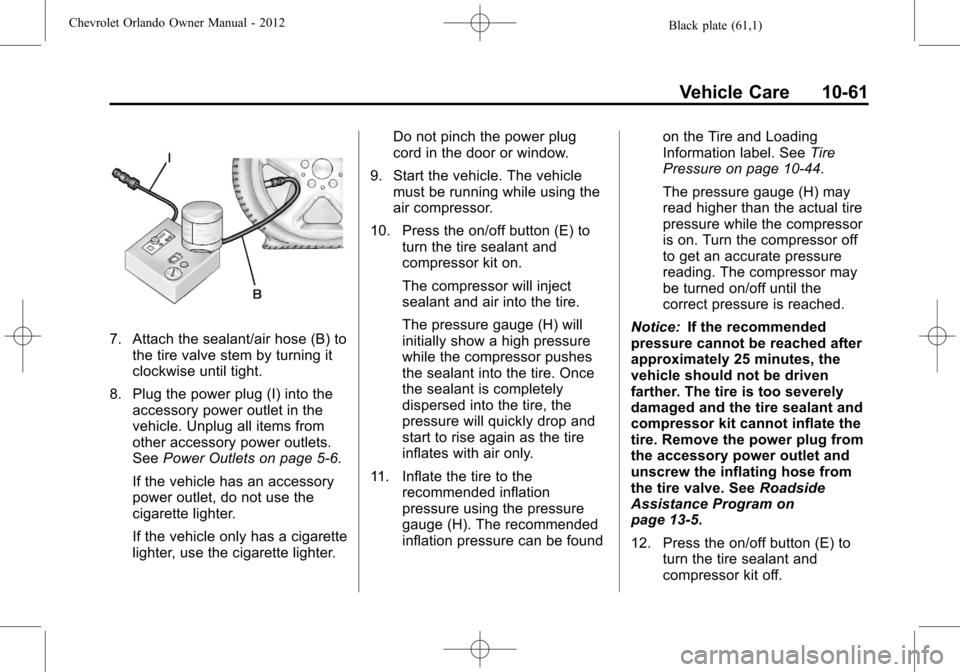
7. Attach the sealant/air hose (B) tothe tire valve stem by turning it
clockwise until tight.
8. Plug the power plug (I) into the accessory power outlet in the
vehicle. Unplug all items from
other accessory power outlets.
See Power Outlets on page 5‑6.
If the vehicle has an accessory
power outlet, do not use the
cigarette lighter.
If the vehicle only has a cigarette
lighter, use the cigarette lighter. Do not pinch the power plug
cord in the door or window.
9. Start the vehicle. The vehicle must be running while using the
air compressor.
10. Press the on/off button (E) to turn the tire sealant and
compressor kit on.
The compressor will inject
sealant and air into the tire.
The pressure gauge (H) will
initially show a high pressure
while the compressor pushes
the sealant into the tire. Once
the sealant is completely
dispersed into the tire, the
pressure will quickly drop and
start to rise again as the tire
inflates with air only.
11. Inflate the tire to the recommended inflation
pressure using the pressure
gauge (H). The recommended
inflation pressure can be found on the Tire and Loading
Information label. See
Tire
Pressure on page 10‑44.
The pressure gauge (H) may
read higher than the actual tire
pressure while the compressor
is on. Turn the compressor off
to get an accurate pressure
reading. The compressor may
be turned on/off until the
correct pressure is reached.
Notice: If the recommended
pressure cannot be reached after
approximately 25 minutes, the
vehicle should not be driven
farther. The tire is too severely
damaged and the tire sealant and
compressor kit cannot inflate the
tire. Remove the power plug from
the accessory power outlet and
unscrew the inflating hose from
the tire valve. See Roadside
Assistance Program on
page 13‑5.
12. Press the on/off button (E) to turn the tire sealant and
compressor kit off.
Page 296 of 378

Black plate (62,1)Chevrolet Orlando Owner Manual - 2012
10-62 Vehicle Care
The tire is not sealed and will
continue to leak air until the
vehicle is driven and the
sealant is distributed in the tire.
Therefore, Steps 13 through
21 must be done immediately
after Step 12.
Be careful while handling the
tire sealant and compressor kit
as it could be warm after
usage.
13. Unplug the power plug (I) from the accessory power outlet in
the vehicle.
14. Turn the sealant/air hose (B) counterclockwise to remove it
from the tire valve stem.
15. Replace the tire valve stem cap.
16. Remove the tire sealant canister (D) from the slot on
top of the compressor (F).
17. Turn the air only hose (J) counterclockwise to remove it
from the tire sealant canister
inlet valve (A). 18. Turn the sealant/air hose (B)
clockwise onto the sealant
canister inlet valve (A) to
prevent sealant leakage.
19. Return the air only hose (J) and power plug (I) back to their
original storage location.
20. If the flat tire was able to inflate
to the recommended inflation
pressure, remove the
maximum speed label from the
sealant canister and place it in
a highly visible location.
Do not exceed the speed on
this label until the damaged tire
is repaired or replaced.
21. Return the equipment to its original storage location in the
vehicle. 22. Immediately drive the vehicle
8 km (5 mi) to distribute the
sealant in the tire.
23. Stop at a safe location and check the tire pressure. Refer
to Steps 1 through 10 under
“Using the Tire Sealant and
Compressor Kit without Sealant
to Inflate a Tire (Not
Punctured).”
If the tire pressure has fallen
more than 68 kPa (10 psi)
below the recommended
inflation pressure, stop driving
the vehicle. The tire is too
severely damaged and the tire
sealant cannot seal the tire.
SeeRoadside Assistance
Program on page 13‑5.
If the tire pressure has not
dropped more than 68 kPa
(10 psi) from the recommended
inflation pressure, inflate the
tire to the recommended
inflation pressure.
Page 298 of 378

Black plate (64,1)Chevrolet Orlando Owner Manual - 2012
10-64 Vehicle Care
SeeIf a Tire Goes Flat on
page 10‑56 for other important
safety warnings.
1. Remove the compressor from its storage location. See Storing the
Tire Sealant and Compressor Kit
on page 10‑65.
2. Remove the air only hose (J) and the power plug (I) from the
bottom of the compressor.
3. Place the compressor on the ground near the flat tire.
Make sure the tire valve stem is
positioned close to the ground
so the hose will reach it.
4. Remove the valve stem cap from the flat tire by turning it
counterclockwise. 5. Attach the air only hose (J) to
the tire valve stem by turning it
clockwise until tight.
6. Plug the power plug (I) into the accessory power outlet in the
vehicle. Unplug all items from
other accessory power outlets.
See Power Outlets on page 5‑6.
If the vehicle has an accessory
power outlet, do not use the
cigarette lighter.
If the vehicle only has a cigarette
lighter, use the cigarette lighter.
Do not pinch the power plug
cord in the door or window.
7. Start the vehicle. The vehicle must be running while using the
air compressor. 8. Press the on/off button (E) to
turn the tire sealant and
compressor kit on.
The compressor will inflate the
tire with air only.
9. Inflate the tire to the recommended inflation pressure
using the pressure gauge (H).
The recommended inflation
pressure can be found on the
Tire and Loading Information
label. See Tire Pressure on
page 10‑44.
The pressure gauge (H) may
read higher than the actual tire
pressure while the compressor is
on. Turn the compressor off to
get an accurate pressure
reading. The compressor may
be turned on/off until the correct
pressure is reached.
Page 299 of 378
Black plate (65,1)Chevrolet Orlando Owner Manual - 2012
Vehicle Care 10-65
Notice:If the recommended
pressure cannot be reached after
approximately 25 minutes, the
vehicle should not be driven
farther. The tire is too severely
damaged and the tire sealant and
compressor kit cannot inflate the
tire. Remove the power plug from
the accessory power outlet and
unscrew the inflating hose from
the tire valve. See Roadside
Assistance Program on
page 13‑5.
10. Press the on/off button (E) to turn the tire sealant and
compressor kit off.
Be careful while handling the
compressor as it could be
warm after usage. 11. Unplug the power plug (I) from
the accessory power outlet in
the vehicle.
12. Turn the air only hose (J) counterclockwise to remove it
from the tire valve stem.
13. Replace the tire valve stem cap.
14. Return the air only hose (J) and power plug (I) back to their
original storage location.
15. Return the equipment to its original storage location in the
vehicle.
The tire sealant and compressor kit
has accessory adapters located in a
compartment on the bottom of its
housing that can be used to inflate
air mattresses, balls, etc.Storing the Tire Sealant
and Compressor Kit
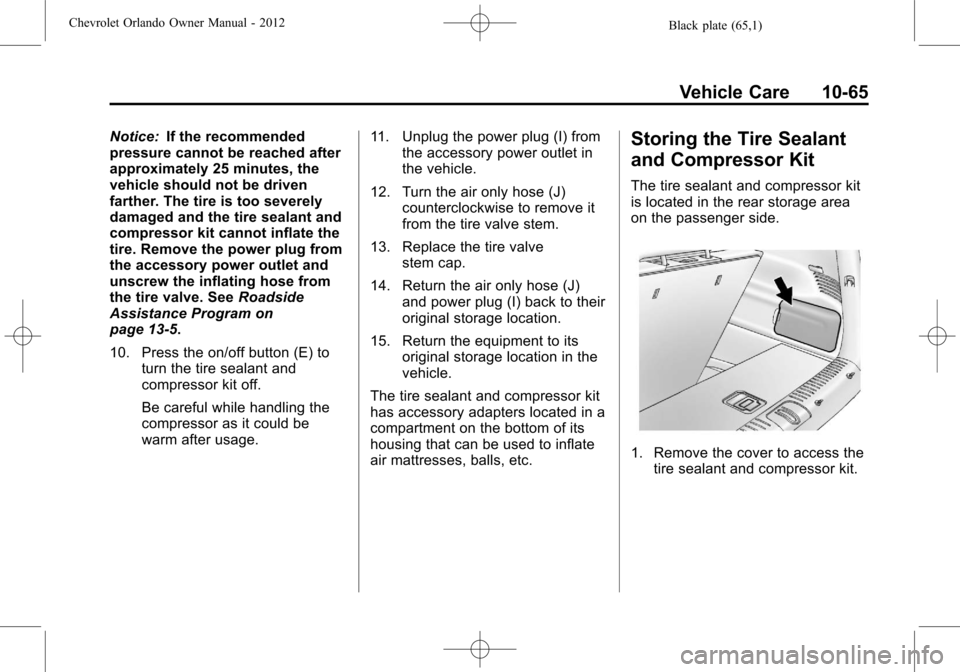
The tire sealant and compressor kit
is located in the rear storage area
on the passenger side.
1. Remove the cover to access the tire sealant and compressor kit.
Page 301 of 378
Black plate (67,1)Chevrolet Orlando Owner Manual - 2012
Vehicle Care 10-67
Removing the Spare Tire
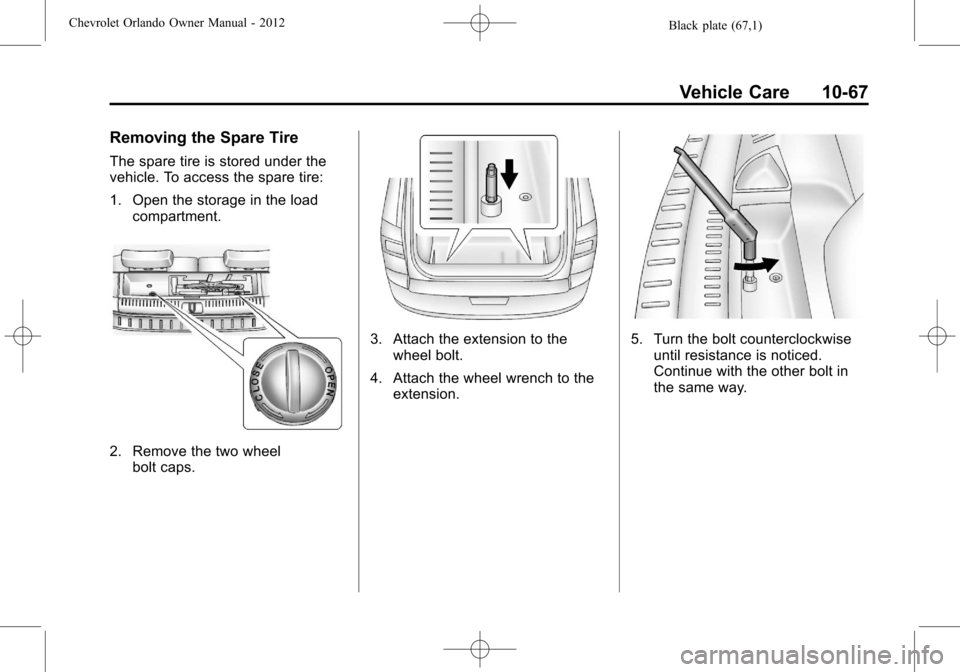
The spare tire is stored under the
vehicle. To access the spare tire:
1. Open the storage in the loadcompartment.
2. Remove the two wheelbolt caps.
3. Attach the extension to thewheel bolt.
4. Attach the wheel wrench to the extension.5. Turn the bolt counterclockwiseuntil resistance is noticed.
Continue with the other bolt in
the same way.