buttons CHEVROLET S10 1998 Owners Manual
[x] Cancel search | Manufacturer: CHEVROLET, Model Year: 1998, Model line: S10, Model: CHEVROLET S10 1998Pages: 404, PDF Size: 22.29 MB
Page 136 of 404
TUNE: Turn the lower hob to tune- in fadio stations.
SEE= Press the right arrow to:trrne 10 the next-higher
station
-and the left arrow @ tune to the next lower
station.and stay there.
SCAN: Tress both SEEK buttons- t~ listen to a few
seconds
of each radio Station. SCAN will light up: on (he
&spiky. Pres-s. the right xrrow to tune in thenext higher
st&tion:anB.
press ihe left arrow to: tune to the next, lower
station.
Press VOLUME _or both SEEK buttons to
stop sc.anning.
2. Press AM-FM.to
3. Tune in ;the Lion.
4. Press SET. (SET will appear :on the .display.)
5. Press one :of 'the hur pnshbuttons within five-
second&. Whenever you press that numbered
buttorr9
tkstation you s.et. will return.
In addition to the -four stations already. set, up.. to three
'more
stations may be preset on each band by pressing
two adj,oining.butbns at the same,. time. Just:
1. Tune in the- desi1e.d station.
2. Press SET. (SET will appear an the display.)
.3. Press two adjoining -buttons at .the same. time, within
five seconds.
Whenever you press the -game- two
buttons, the station you set will return.
4. Repeat the steps for- each pair of pushbut' is.
Setting the Tone
BASS: Slide. this lever up or downro increase m
decrease bass,
TREB: Slide this- lever up or. down to increase or
decrease treble.. .If a. statign is we-& OK noisy, .you may
want
to decre-ase;the.-tr~~~e.
-Adjusting peakem
BAL: Turn me cojnhol b-ehind the.wpper J ID IO 1 ve
the: s.ouQd :to the left or right speakers, The middle
position balances .the sound between the speakers.
FADE: Turn the.-cmtrol behind the, .lowew.knob to:move
the .somd-to the fi-oat or -rea .speakers. .The middle-
.-posiiioh balances the .somd between. the sp.e&as.
3-7
ProCarManuals.com
Page 137 of 404
A:M-FM Stereo -with Casse.tte Tape Player
(If Equipped)
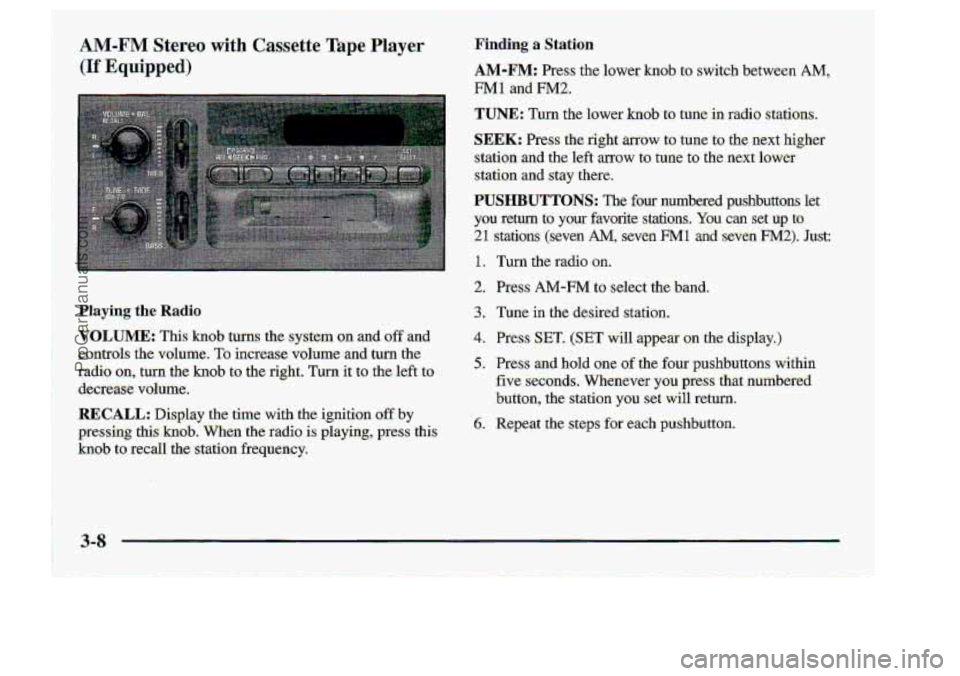
Playing the Radio
VOLUME: This hob turns the system on and .off and
controls
the. volume. To increase-volume and: tukn the
radio on, turn the knob to the ri.ght. Turn. it to:the left .to
decretise. volume.
RECALL: DispIay the time with .the ignition off by
pressing thkknob.. When the radio is playing3 press this.
hob t.0 recall' the: station. frequency.
Finding: a Station
AM-FM: Press the 10~wer knob to s-witch between AM,
FMII and FM2.
TUNE: Turn ,the lower kno-b to tumin rad-io stations.
SEEK: Press the right arrow to tune to the next higher
station and the left arrow to tune to tke next lower..
station
md stay there.
PUSHBUTTONS: The four numbered pushbuttons'let
you retwn
to your @vorite stations, You- cag set up to
21 stations (seven M, seven EN1 and seven .F"2), Just:
1. Turn the radio on.
2. .Press AM-FM .to seiect'the band.
3. Tune,in.the desired station.
4, PreSs.SET. (SET will appear on the display.)
5. :Press and hold one -of the four pushbuttons within
€ive s-econds. Whenever you press that numbered
.button,
the station you .set will return.
6.. Repeat ,the steps for each pushbutton.
ProCarManuals.com
Page 138 of 404
Tn addition ta.the fourstations already Set,, up to. three.
more stations :may.be pres.et
on each bad by pressing
two :adjoining
.buttons at the same time.. Just: ...
1. Tune in the desired station.
2. Press SET. SET^ will -appear on -the display.)
3:. Press two adjoining buttons at the same. tixne, within
five
seconds. Whenever .you pfess the same two
buttans, the station
you set will rexurn.
4. Rep-eat -the steps €or each pair o€ pushbuttom.
P.SCAN: Press both SEEK buttons, to scan throu&each
of your preset stations. The system will sc,m through
and play.each~preset station stored on your pushbuttons
for aTew seconds. Press either SEEK button or
RECALL to stop -scanning. through the preset stations.
Setting the Tone
BASS: 5licle this lever up or down to increase OT
decrease bass..
TREB: Slide this lever up, orrd.own to. increase or
decrease treble. If a station is. weak or noisy, :you May
want to decrease the treble.
ProCarManuals.com