ignition CHEVROLET S10 2003 2.G Owner's Manual
[x] Cancel search | Manufacturer: CHEVROLET, Model Year: 2003, Model line: S10, Model: CHEVROLET S10 2003 2.GPages: 432, PDF Size: 2.82 MB
Page 107 of 432

Torque Lock
If you are parking on a hill and you don't shift your
transmission into PARK (P) properly, the weight of the
vehicle may put too much force on the parking pawl in the
transmission. You may ®nd it difficult to pull the shift lever
out of PARK (P). This is called ªtorque lockº To prevent
torque lock, set the parking brake and then shift into
PARK (P) properly before you leave the driver's seat. To
®nd out how, see
Shifting Into Park (P) on page 2-33.
When you are ready to drive, move the shift lever out of
PARK (P) before you release the parking brake.
If torque lock does occur, you may need to have another
vehicle push yours a little uphill to take some of the
pressure from the parking pawl in the transmission, so
you can pull the shift lever out of PARK (P).
Shifting Out of Park (P)
Your vehicle has an automatic transmission shift lock
control system. You have to fully apply the regular
brakes before you can shift from PARK (P) when the
ignition is in RUN. See
Automatic Transmission
Operation on page 2-25.If you cannot shift out of PARK (P), ease pressure on
the shift lever±push the shift lever all the way into
PARK (P) as you maintain brake application. Then move
the shift lever into the gear you want. You must press
the shift lever button on the shift lever.
If you ever hold the brake pedal down but still can't shift
out of PARK (P), try this:
1. Turn the key to OFF.
2. Apply and hold the brake until the end of Step 4.
3. Shift the transmission to NEUTRAL (N).
4. Start the vehicle and then shift to the drive gear
you want.
5. Have the vehicle ®xed as soon as possible.
Parking Your Vehicle
If you have a manual transmission, before you get out
of your vehicle, move the shift lever into REVERSE (R),
and ®rmly apply the parking brake. Once the shift
lever has been placed into REVERSE (R) with the clutch
pedal pressed in, you can turn the ignition key to
OFF, remove the key and release the clutch.
If you are parking on a hill, or if your vehicle is pulling a
trailer, see
Towing a Trailer on page 4-54.
2-35
Page 116 of 432
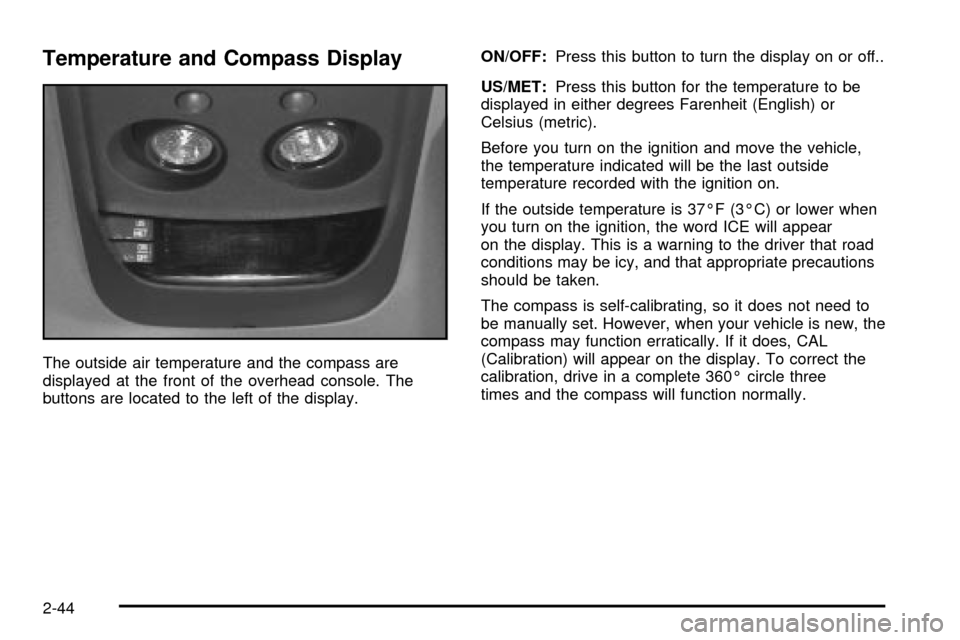
Temperature and Compass Display
The outside air temperature and the compass are
displayed at the front of the overhead console. The
buttons are located to the left of the display.ON/OFF:Press this button to turn the display on or off..
US/MET:Press this button for the temperature to be
displayed in either degrees Farenheit (English) or
Celsius (metric).
Before you turn on the ignition and move the vehicle,
the temperature indicated will be the last outside
temperature recorded with the ignition on.
If the outside temperature is 37ÉF (3ÉC) or lower when
you turn on the ignition, the word ICE will appear
on the display. This is a warning to the driver that road
conditions may be icy, and that appropriate precautions
should be taken.
The compass is self-calibrating, so it does not need to
be manually set. However, when your vehicle is new, the
compass may function erratically. If it does, CAL
(Calibration) will appear on the display. To correct the
calibration, drive in a complete 360É circle three
times and the compass will function normally.
2-44
Page 118 of 432

Driver Information Center (DIC)
If your vehicle is equipped with a Driver Information
Center (DIC), this system displays the outside air
temperature, compass direction and trip information in
the overhead console.
US/MET (United States/Metric):The US/MET (United
States/metric) button allows you to switch the display
between the English and metric system.
MODE:The MODE button can be used to toggle
between three modes of operation: OFF, COMP/TEMP
and TRIP.
COMP/TEMP (Compass/Temperature):The display
provides the outside temperature and one of eight
compass readings to indicate the direction the vehicle is
facing.Before you turn on the ignition and move the vehicle,
the temperature indicated will be the last outside
temperature recorded with the ignition on. If the outside
temperature is 37ÉF (3ÉC) or lower, the display will
toggle between the ICE and the current temperature
every eight seconds. This is a warning to the drive that
road conditions may be icy, and that appropriate
precautions should be taken.
The compass is self-calibrating, so it does not need to be
manually set. However, if C (Calibration) is displayed, the
compass will need to be calibrated. You may also place
the compass in a noncalibrated mode by pressing the
holding the MODE and US/MET buttons at the same time
while in the COMP/TEMP mode. After about 10 seconds,
the compass will display C and you can release the
buttons. Drive the vehicle in a complete 360É circle three
times at a speed of less than 5 mph (8 km/h), and the
compass will function normally. Once the calibration is
complete, the display will return to a compass reading.
2-46
Page 123 of 432

Sunroof
If your vehicle has a
sunroof, the switch is
located between the sun
visors.
The sunroof switch will only work when the ignition is on
or when the ignition is off and retained accessory
power is active. See ªRetained Accessory Powerº under
Ignition Positions on page 2-20for more information.To operate the sunroof using the power switch do the
following:
1. When vent opening the sunroof press and hold the
side of the switch with the roof symbol on it until the
roof is vented.
2. Press and hold the side of the switch with the roof
symbol on it again to fully open the roof. The roof
will stop when it is fully opened.
Releasing the switch at any time will stop the roof
at that position.
3. To close the sunroof press the side of the switch
opposite of the roof symbol and hold it until the
glass panel is seated.
2-51
Page 125 of 432

Vehicle Personalization
Memory Seat
If your vehicle has this
feature, the control located
on the outboard side of the
driver's seat looks like this.
Use this memory function to save your seat cushion and
seatback settings by using the following procedure:
1. Adjust the driver's seat to a safe and comfortable
driving position.
2. Press the SET button and then press and hold
button 1 (for Driver 1) for three seconds. A chime will
sound to let you know that the position has been
stored.
A second seating can be programmed by repeating
the procedure with a second driver and pressing
button 2 for three seconds.When your vehicle is in PARK (P) for an automatic
transmission or the parking brake is engaged for
a manual transmission, press and release the numbered
memory button you just stored. The seat will move to
the set position. You will hear one chime.
Pressing the UNLOCK button of a keyless entry
transmitter will adjust the seat to the corresponding
stored memory position. You will hear one chime.
Repeat Steps 1 and 2 to readjust the seat. The
transmitter need not be reprogrammed unless it needs
to correspond to the other numbered memory button.
If there is a third driver, use the seat adjuster switch to
adjust the seat.
Pressing any of the seat adjuster switches, the SET
button or pressing the desired memory button twice will
cause the seat to stop moving.
If you press the numbered button to adjust the seat and
start the vehicle while the seat is still adjusting,
adjustment will pause while the ignition is in START.
Adjustment will resume after the ignition is in RUN.
Setting the seat memory function for a particular driver
will also personalize the radio station presets that
have been selected. Each time the driver sets this
function, the respective radio station presets will also be
retained.
2-53
Page 137 of 432

Reducing Speed While Using Cruise
Control
·
Press the SET button at the end of the lever until you
reach the lower speed you want, then release it.
·To slow down in very small amounts, press the SET
button brie¯y. Each time you do this, you'll go about
1 mph (1.6 km/h) slower.
Passing Another Vehicle While Using
Cruise Control
Use the accelerator pedal to increase your speed.
When you take your foot off the pedal, your vehicle will
slow down to the cruise control speed you set earlier.
Using Cruise Control on Hills
How well your cruise control will work on hills depends
upon your speed, load and the steepness of the hills.
When going up steep hills, you may want to step on the
accelerator pedal to maintain your speed. When going
downhill, you may have to brake or shift to a lower gear to
keep your speed down. Of course, applying the brake
takes you out of cruise control. Many drivers ®nd this to
be too much trouble and don't use cruise control on steep
hills.
Ending Cruise Control
There are two ways to turn off the cruise control:
·Step lightly on the brake pedal or push the clutch
pedal, if you have a manual transmission.
If you have an automatic transmission and you
apply your brakes, the cruise control will shut off.
·Move the cruise switch to OFF.
Erasing Speed Memory
When you turn off the cruise control or the ignition, your
cruise control set speed memory is erased.
3-11
Page 138 of 432

Exterior Lamps
The control on the driver's side of the instrument panel
operates the exterior lamps.
The exterior lamp control has three positions:
9(Off):Turn the exterior lamps control all the way
counterclockwise to turn off the lamps and put the
system in automatic headlamp mode.
;(Parking Lamps):Turning the exterior lamps
control to this position turns on the parking lamps
together with the following:
·Sidemarker Lamps
·Taillamps
·License Plate Lamps
·Instrument Panel Lights
O(Headlamps):Turning the exterior lamps control to
this position turns on the headlamps, together with
the previously listed lamps and lights.
Automatic Headlamp System
When it is dark enough outside, your automatic
headlamp system will turn on your headlamps at the
normal brightness along with other lamps such as
the taillamps, sidemarker, parking lamps and the
instrument panel lights. The radio lights will also be dim.
Your vehicle is equipped with a light sensor on the
top of the instrument panel under the radio speaker grill.
Be sure it is not covered or the system will be on
whenever the ignition is on.
3-12
Page 139 of 432

The system may also turn on your headlamps when
driving through a parking garage, heavy overcast
weather or a tunnel. This is normal.
There is a delay in the transition between the daytime
and nighttime operation of the Daytime Running
Lamps (DRL) and the automatic headlamp systems so
that driving under bridges or bright overhead street
lights does not affect the system. The DRL and
automatic headlamp system will only be affected when
the light sensor sees a change in lighting lasting
longer than the delay.
To idle your vehicle with the automatic headlamp
system off, set the parking brake while the ignition is off.
Then start your vehicle. The automatic headlamp
system will stay off until you release the parking brake.
As with any vehicle, you should turn on the regular
headlamps when you need them.
You may be able to turn off your automatic headlamp
system. See ªDaytime Running Lamps (DRL)º later
in this section for more information.If you start your vehicle in a dark garage, the automatic
headlamp system will come on immediately. Once
you leave the garage, it will take approximately
one minute for the automatic headlamp system to
change to DRL if it is light outside. During that delay,
your instrument panel cluster may not be as bright
as usual. Make sure your instrument panel brightness
control is in the full bright position. See ªInstrument
Panel Brightness Controlº under
Interior Lamps
on page 3-15.
Lamps On Reminder
A reminder chime will sound when your headlamps or
parking lamps are manually turned on, the driver's door
is opened and your ignition is in OFF, LOCK or
ACCESSORY. To turn the chime off, turn the control
counterclockwise or turn the instrument panel brightness
thumbwheel down to the fully dimmed position. In the
automatic mode, the headlamps turn off once the ignition
key is in OFF.
3-13
Page 140 of 432

Daytime Running Lamps
Daytime Running Lamps (DRL) can make it easier for
others to see the front of your vehicle during the
day. DRL can be helpful in many different driving
conditions, but they can be especially helpful in the short
periods after dawn and before sunset. Fully functional
daytime running lamps are required on all vehicles
®rst sold in Canada.
The DRL system will make your headlamps come on at
reduced brightness when the following conditions
are met:
·The ignition is on,
·the exterior lamp control is in OFF,
·the sensor detects daytime light,
·an automatic transmission is not in PARK (P), and
·the parking brake is released.
When the DRL are on, only your headlamps will be on.
The taillamps, sidemarker and other lamps won't be
on. The instrument panel won't be lit up either.
When it begins to get dark, the headlamps will
automatically switch from DRL to the regular headlamps.The DRL system on some vehicles may turn off
temporarily while the turn signals are activated.
To idle an automatic transmission vehicle with the DRL
off, put the transmission in PARK (P). To idle a
manual transmission vehicle with the DRL off, set the
parking brake. The DRL will stay off until you shift out of
PARK (P) or release the parking brake.
The following does not apply to vehicles sold in Canada.
When necessary, you may turn off the automatic
headlamp system and the Daytime Running Lamps
(DRL) feature by following the steps below:
1. Turn the ignition to RUN.
2. Press the DOME OVERRIDE button four times
within six seconds. After the fourth press of the
button, a chime will sound informing you that
the system is off. The system will revert back to the
automatic on mode when the ignition is turned to
OFF and then to RUN again.
3. To return to the automatic mode, push the DOME
OVERRIDE button four times within six seconds
(a chime will sound), or turn the ignition to OFF and
then to RUN again.
As with any vehicle, you should turn on the regular
headlamp system when you need it.
3-14
Page 142 of 432

Exit Lighting
With exit lighting, the interior lamps will come on when
you remove the key from the ignition to help you
see while exiting the vehicle. These lights will stay on
for a short period of time and then will go out, if the
DOME OVERRIDE button is in the out position.
Front Map Lamps
If your vehicle is a Crew Cabžand has front map
lamps, they are located in the overhead console. For all
other vehicles that have this feature, they are located
on the inside rearview mirror. The front map lights
that are located on the inside rearview mirror will
automatically come on for approximately 40 seconds
when the doors are unlocked with the remote keyless
entry transmitter (if equipped) or until the ignition key is
turned to RUN or ACCESSORY. The lamps will also
stay on for approximately 40 seconds after you exit the
vehicle, unless you lock the doors with the remote
keyless entry transmitter.
You can also turn the lamps on and off by pressing the
switch near each lamp.
Dome Lamp
The dome lamp will come on when you open any door.
You can also turn the dome lamps on by turning the
instrument panel brightness thumbwheel, located next to
the exterior lamps control, all the way up to the
second notch. In this position, the dome lamps will
remain on whether a door is opened or closed.
You can use the DOME OVERRIDE button, located
below the exterior lamps control, to set the dome lamps
to come on automatically when any door is opened,
or to remain off. To turn the lamps off, press the button
in. With the button in, the dome lamps will remain off
when any door is opened. To return the lamps to
automatic operation, press the button again and return it
to the out position. With the button in this position, the
dome lamps will come on when you open any door. This
will override the illuminated entry feature, unless you
use your remote keyless entry transmitter (if equipped)
to unlock the vehicle.
3-16