ABS CHEVROLET SILVERADO 1500 2013 User Guide
[x] Cancel search | Manufacturer: CHEVROLET, Model Year: 2013, Model line: SILVERADO 1500, Model: CHEVROLET SILVERADO 1500 2013Pages: 542, PDF Size: 7.92 MB
Page 210 of 542
Black plate (10,1)Chevrolet Silverado Owner Manual - 2013 - crc2 - 8/13/12
7-10 Infotainment System
Adjusting the Speakers
(Balance/Fade) (All Except
AM-FM Radio and Radio
with CD)
BAL/FADE (Balance/Fade):To
adjust the balance or fade:
1. Press the
fknob until the
speaker control tabs display.
2. Highlight the desired speaker control tab by doing one of the
following:
.Press thefknob.
.Press the softkey under the
desired tab.
3. Adjust the setting by doing one of the following:
.Turn thefknob clockwise
or counterclockwise.
.Press the¨SEEK,
or
©SEEK.
.Press the\FWD,
or
sREV. To quickly adjust all speaker and
tone controls to the middle position,
press the
fknob for more than
two seconds.
If the Rear Seat Audio (RSA) is
turned on, the radio disables FADE
and mutes the rear speakers.
Radio Messages
Calibration Error: The audio
system has been calibrated for the
vehicle from the factory.
If Calibration Error displays, it
means that the radio has not been
configured properly for the vehicle
and it must be returned to your
dealer for service.
Locked or Loc: One of these
messages will display when the
THEFTLOCK
®system has locked
up the radio. Take the vehicle to
your dealer for service.
If any error occurs repeatedly or if
an error cannot be corrected,
contact your dealer.
Radio
AM-FM Radio
Radio Data System (RDS)
For radios with the Radio Data
System (RDS) feature, it only works
with FM stations that broadcast
RDS information. This system relies
upon receiving specific information
from these stations and only works
when the information is available.
While the radio is tuned to an
FM-RDS station, the station name
or call letters will display. In rare
cases, a radio station could
broadcast incorrect information that
causes the radio features to work
improperly. If this happens, contact
the radio station.
4(Information) (RDS Features):
For vehicles with RDS features,
press
4to display additional text
information related to the current
FM-RDS station. If information is
available, the song title information
displays on the top line of the
Page 211 of 542
Black plate (11,1)Chevrolet Silverado Owner Manual - 2013 - crc2 - 8/13/12
Infotainment System 7-11
display and artist information
displays on the bottom line. When
information is not available,“NO
INFO” displays.
Finding a Station
BAND: Press to switch between
AM, FM, or SiriusXM®, if equipped.
f(Tune): Turn to manually select
radio stations.
©SEEK: Press to seek the
previous radio station. Press and
hold for a few seconds until a beep
sounds to scan for radio stations in
descending order; press the
©
SEEK button again to stop scanning
radio stations. The radio only seeks
and scans stations with a strong
signal that are in the selected band.
For the AM-FM Radio, press and
hold the
©SEEK for four seconds
until a double beep sounds to scan
the preset stations. The station
frequency flashes while the radio is
in the scan mode.
¨SEEK: Press to seek the next
radio station. Press and hold for a
few seconds until a beep sounds to
scan for radio stations in ascending
order; press the
¨SEEK button
again to stop scanning radio
stations. The radio only seeks and
scans stations with a strong signal
that are in the selected band.
For the AM-FM Radio, press and
hold the
¨SEEK for four seconds
until a double beep sounds to scan
the preset stations. The station
frequency flashes while the radio is
in the scan mode.
sREV: Press to manually tune to
a radio station in descending order.
\FWD: Press to manually tune to
a radio station in ascending order.
FAV (Favorites): Press to select
different favorites pages for stored
radio stations.
Storing Radio Stations
Drivers are encouraged to store the
radio station while the vehicle is
parked; see Defensive Driving on
page 9‑3. Tune to stored radio
stations using the presets, favorites
button, and steering wheel controls,
if the vehicle has this feature.
Radios that have a FAV button store
radio stations as favorites. Up to
36 stations can be programmed as
favorites using the six softkeys
below the radio station frequency
tabs and by using the FAV button.
Press the FAV button to go through
up to six pages of favorites, each
having six favorite stations available
per page. Each page of favorites
can contain any combination of AM,
FM, or SiriusXM, if equipped,
stations.
Radios that do not have a FAV
button store radio stations as
presets. Up to 18 stations (6 FM1,
6 FM2, and 6 AM), can be
programmed on the six numbered
pushbuttons.
Page 212 of 542
Black plate (12,1)Chevrolet Silverado Owner Manual - 2013 - crc2 - 8/13/12
7-12 Infotainment System
Setting Preset Stations
To store presets:
1. Tune to a radio station.
2. Press and hold one of the sixnumbered pushbuttons for
three seconds until a beep
sounds.
3. Repeat Steps 1 and 2 to store additional radio stations.
Storing a Radio Station as a
Favorite
To store a station as a favorite:
1. Tune to a radio station.
2. Press the FAV button to display the page where the station will
be stored.
3. Press and hold one of the six softkeys until a beep sounds.
4. Repeat Steps 1 through 3 to store additional radio stations. The number of favorites pages can
be set up using the MENU button.
To set up the number of favorites
pages:
1. Press the MENU button.
2. Press the softkey located below
the FAV 1-6 tab.
3. Select the number of favorites pages by pressing the softkey
located below the displayed
page numbers.
4. Press the FAV button, or let the menu time out, to return to the
original main radio screen
showing the radio station
frequency tabs and to begin the
process of programming
favorites.
Satellite Radio
SiriusXM®Satellite Radio
Service
SiriusXM is a satellite radio service
that is based in the 48 contiguous
United States and 10 Canadian provinces. SiriusXM Satellite Radio
has a wide variety of programming
and commercial-free music,
coast-to-coast, and in digital-quality
sound. A service fee is required to
receive the SiriusXM service. If the
service needs to be reactivated, the
radio will display
“No Subscription
Please Renew on channel XM1.”
For more information, contact
SiriusXM at www.siriusxm.com or
call 1-866-635-2349 (U.S) and
www.xmradio.ca or call
1-877-209-0079 (Canada).
4(Information) (SiriusXM Satellite
Radio Service): For vehicles with
SiriusXM, press
4to display
additional text information related to
the current SiriusXM channel.
If information is available, the song
title information displays on the top
line of the display and artist
information displays on the bottom
line. When information is not
available, “NO INFO” displays.
Page 213 of 542
Black plate (13,1)Chevrolet Silverado Owner Manual - 2013 - crc2 - 8/13/12
Infotainment System 7-13
Finding a Channel
BAND:Press to switch between
AM, FM, or SiriusXM, if equipped.
f(Tune): Turn to manually select
an SiriusXM channel.
©SEEK: Press to go to the
previous SiriusXM channel.
¨SEEK: Press to go to the next
SiriusXM channel.
sREV: Press to go to the
previous SiriusXM category.
\FWD: Press to go to the next
SiriusXM category.
FAV (Favorites): Press to select
different favorites pages for stored
radio stations.
CAT (Category): The CAT button is
used to find SiriusXM channels
when the radio is in the XM mode.
Finding a Category (CAT)
Station
To find XM channels in a category:
1. Press the CAT button to display the category tabs. Continue
pressing the CAT button until the
desired category name displays.
.Radios with CD and DVD
can also navigate the
category list by pressing the
\FWD or thesREV
buttons.
2. Press either of the two softkeys below the desired category tab
to immediately tune to the first
SiriusXM station in that category.
To go to the previous or next
SiriusXM station in the selected
category, do one of the
following:
.Turn thefknob.
.Press the softkey below the
right or left arrows in the
category tab.
.Press©SEEK or¨SEEK.
3. To exit the category search mode, press the FAV button or
BAND button to display the
favorites again.
Adding and Removing Categories
Categories cannot be added or
removed while the vehicle is moving
faster than 8 km/h (5 mph).
To add or remove a category:
1. Press the MENU button.
2. Press the softkey located below the XM CAT tab.
3. Turn the
fknob to display the
category to add or remove.
4. Press the softkey located under the Add or Remove tab.
To restore all removed
categories, press the softkey
under the Restore All tab.
5. Repeat the steps to remove more categories.
Page 214 of 542
Black plate (14,1)Chevrolet Silverado Owner Manual - 2013 - crc2 - 8/13/12
7-14 Infotainment System
Storing SiriusXM Channels
Drivers are encouraged to store
SiriusXM channels while the vehicle
is parked; seeDefensive Driving on
page 9‑3. Tune to stored radio
stations using the presets, favorites
button, and steering wheel controls,
if the vehicle has this feature.
Up to 36 stations can be
programmed as favorites using the
six softkeys below the radio station
frequency tabs and by using the
FAV button. Press the FAV button to
go through up to six pages of
favorites, each having six favorite
stations available per page. Each
page of favorites can contain any
combination of AM, FM,
or SiriusXM, if equipped, stations.
Storing an SiriusXM Channel as a
Favorite
To store a station as a favorite:
1. Tune to an SiriusXM channel.
2. Press the FAV button to display the page where the station will
be stored. 3. Press and hold one of the six
softkeys until a beep sounds.
4. Repeat Steps 1 through 3 to store additional radio stations.
The number of favorites pages can
be set up using the MENU button.
To set up the number of favorites
pages:
1. Press the MENU button.
2. Press the softkey located below the FAV 1-6 tab.
3. Select the number of favorites pages by pressing the softkey
located below the displayed
page numbers.
4. Press the FAV button, or let the menu time out, to return to the
original main radio screen
showing the radio station
frequency tabs and to begin the
process of programming
favorites.
SiriusXM Radio Messages
XL (Explicit Language
Channels): These channels, or any
others, can be blocked at a
customer's request, by calling
1-866-635-2349 (US) or
1-877-209-0079 (Canada).
XM Updating: The encryption code
in the receiver is being updated, and
no action is required. This process
should take no longer than
30 seconds.
No XM Signal: The system is
functioning correctly, but the vehicle
is in a location that is blocking the
SiriusXM signal. When the vehicle is
moved into an open area, the signal
should return.
Loading XM: The audio system is
acquiring and processing audio and
text data. No action is needed. This
message should disappear shortly.
Channel Off Air: This channel is
not currently in service. Tune in to
another channel.
Page 221 of 542
Black plate (21,1)Chevrolet Silverado Owner Manual - 2013 - crc2 - 8/13/12
Infotainment System 7-21
Tracks are played in the following
order:
.Play begins from the first track in
the first playlist and continues
sequentially through all tracks in
each playlist. When the last
track of the last playlist has
played, play continues from the
first track of the first playlist.
.Play begins from the first track in
the first folder and continues
sequentially through all tracks in
each folder. When the last track
of the last folder has played,
play continues from the first
track of the first folder.
File System and Naming
The song name that displays is the
song name that is contained in the
ID3 tag. If the song name is not
present in the ID3 tag, then the
radio displays the file name without
the extension (such as .mp3) as the
track name. Track names longer than 32
characters or 4 pages are
shortened. The display does not
show parts of words on the last
page of text and the extension of
the file name is not displayed.
Preprogrammed Playlists
CDs that have preprogrammed
playlists reated using WinAmp™,
MusicMatch™, or Real Jukebox™
software can be accessed; however,
there is no playlist‐editing capability
using the radio. These playlists are
treated as special folders containing
compressed audio song files.
Playlists that have an .m3u or .pls
file extension and are stored on a
USB device may be supported by
the radio with a USB port.
Playlists can be changed by using
the softkeys below the
S
cand
c Ttabs, thefknob, the©SEEK
button, or the
¨SEEK button. An
MP3 CD-R or CD-RW that has been
recorded without using file folders
can be played. If a CD-R or CD-RW contains more than the maximum of
50 folders, 15 playlists, and
512 folders and files, the player
allows access and navigates up to
the maximum, but all items over the
maximum are not accessible.
Playing an MP3
4(Information):
Press to display
additional text information related to
the current song. If information is
available, the song title information
displays on the top line of the
display and artist information
displays on the bottom line. When
information is not available, “NO
INFO” displays.
f(Tune): Turn to select MP3s on
the CD currently playing.
©SEEK: Press to go to the start of
the track, if more than 10 seconds
have played. Press and hold or
press multiple times to continue
moving backward through tracks.
Page 233 of 542
Black plate (33,1)Chevrolet Silverado Owner Manual - 2013 - crc2 - 8/13/12
Infotainment System 7-33
e(Audio Stream):Press to cycle
through audio stream formats
located on the DVD-A disc. The
video screen shows the audio
stream changing.
The rear seat passenger can
navigate the DVD-V and DVD-A
menus and controls through the
remote control. See “Remote
Control” underRear Seat
Entertainment (RSE) System on
page 7‑38 for more information. The
video screen automatically turns on
when the DVD-V is inserted into the
DVD slot, and does not
automatically power on when the
DVD-A is inserted into the DVD slot.
It must be manually turned on by
the rear seat occupant through the
remote control power button.
Stopping and Resuming
Playback
To stop playing a DVD without
turning off the system, press the
c
button on the remote control,
or press the softkey located under the
cor ther/jtabs displayed
on the radio. If the radio is sourced
to something other than DVD-V,
press the DVD/CD AUX button to
make DVD-V the active source.
To resume DVD playback, press the
r/jbutton on the remote control,
or press the softkey located under
the
r/jtab on the radio. The DVD
should resume play from where it
last stopped if the disc has not been
ejected and the stop button has not
been pressed twice on the remote
control. If the disc has been ejected
or the stop button has been pressed
twice on the remote control, the disc
resumes playing at the beginning of
the disc.
CD/DVD Player Messages
Disc Format Error: This message
displays if the disc is inserted with
the disc label wrong side up, or if
the disc is damaged.
Disc Region Error: This message
displays if the disc is not from a
correct region. No Disc Inserted:
This message
displays if no disc is present when
the
Zor DVD/CD AUX button is
pressed on the radio.
Optical Error: This message
displays if the disc was inserted
upside down.
Disk Read Error: This message
displays if a disc was inserted with
an invalid or unknown format.
Player Error: This message
displays if there are disc load or
disc eject problems.
.It is very hot. When the
temperature returns to normal,
the disc should play.
.The road is very rough. When
the road becomes smoother, the
disc should play.
.The disc is dirty, scratched, wet,
or upside down.
.The air is very humid. If so, wait
about an hour and try again.
.There was a problem while
burning the disc.
Page 269 of 542
Black plate (1,1)Chevrolet Silverado Owner Manual - 2013 - crc2 - 8/13/12
Driving and Operating 9-1
Driving and
Operating
Driving Information
Distracted Driving . . . . . . . . . . . . . 9-2
Defensive Driving . . . . . . . . . . . . . 9-3
Drunk Driving . . . . . . . . . . . . . . . . . 9-3
Control of a Vehicle . . . . . . . . . . . 9-3
Braking . . . . . . . . . . . . . . . . . . . . . . . 9-3
Steering . . . . . . . . . . . . . . . . . . . . . . . 9-4
Off-Road Recovery . . . . . . . . . . . . 9-4
Loss of Control . . . . . . . . . . . . . . . . 9-5
Off-Road Driving . . . . . . . . . . . . . . 9-5
Driving on Wet Roads . . . . . . . 9-10
Highway Hypnosis . . . . . . . . . . . 9-11
Hill and Mountain Roads . . . . . 9-11
Winter Driving . . . . . . . . . . . . . . . 9-12
If the Vehicle Is Stuck . . . . . . . . 9-14
Vehicle Load Limits . . . . . . . . . . 9-15
Truck-Camper LoadingInformation . . . . . . . . . . . . . . . . . 9-21
Starting and Operating
New Vehicle Break-In . . . . . . . . 9-23
Adjustable Throttle and BrakePedal . . . . . . . . . . . . . . . . . . . . . . . 9-24
Ignition Positions . . . . . . . . . . . . 9-24 Starting the Engine . . . . . . . . . . 9-26
Fast Idle System . . . . . . . . . . . . . 9-28
Retained Accessory
Power (RAP) . . . . . . . . . . . . . . . 9-28
Engine Coolant Heater . . . . . . . 9-29
Shifting Into Park . . . . . . . . . . . . 9-29
Shifting out of Park . . . . . . . . . . 9-31
Parking (Manual
Transmission) . . . . . . . . . . . . . . 9-31
Parking over Things That Burn . . . . . . . . . . . . . . . . . . 9-32
Active Fuel Management
®. . . 9-32
Engine Exhaust
Engine Exhaust . . . . . . . . . . . . . . 9-32
Running the Vehicle While Parked . . . . . . . . . . . . . . . . . . . . . 9-33
Automatic Transmission
Automatic Transmission . . . . . 9-33
Manual Mode . . . . . . . . . . . . . . . . 9-37
Tow/Haul Mode . . . . . . . . . . . . . . 9-38
Manual Transmission
Manual Transmission . . . . . . . . 9-39
Drive Systems
Four-Wheel Drive . . . . . . . . . . . . 9-41
Brakes
Antilock Brake
System (ABS) . . . . . . . . . . . . . . 9-53
Parking Brake . . . . . . . . . . . . . . . 9-54
Brake Assist . . . . . . . . . . . . . . . . . 9-55
Hill Start Assist (HSA) . . . . . . . 9-55
Ride Control Systems
StabiliTrak®System . . . . . . . . . 9-56
Locking Rear Axle . . . . . . . . . . . 9-59
Cruise Control
Cruise Control . . . . . . . . . . . . . . . 9-59
Object Detection Systems
Ultrasonic Parking Assist . . . . 9-62
Rear Vision Camera (RVC) . . . . . . . . . . . . . 9-64
Fuel
Fuel . . . . . . . . . . . . . . . . . . . . . . . . . 9-68
Recommended Fuel . . . . . . . . . 9-69
Gasoline Specifications . . . . . . 9-69
California FuelRequirements . . . . . . . . . . . . . . 9-69
Fuels in Foreign Countries . . . 9-70
Fuel Additives . . . . . . . . . . . . . . . 9-70
Page 272 of 542
Black plate (4,1)Chevrolet Silverado Owner Manual - 2013 - crc2 - 8/13/12
9-4 Driving and Operating
Helpful braking tips to keep in mind
include:
.Keep enough distance between
you and the vehicle in front
of you.
.Avoid needless heavy braking.
.Keep pace with traffic.
If the engine ever stops while the
vehicle is being driven, brake
normally but do not pump the
brakes. Doing so could make the
pedal harder to push down. If the
engine stops, there will be some
power brake assist but it will be
used when the brake is applied.
Once the power assist is used up, it
can take longer to stop and the
brake pedal will be harder to push.
Steering
Hydraulic Power Steering
Your vehicle has hydraulic power
steering. It may require
maintenance. See Power Steering
Fluid on page 10‑24. If power steering assist is lost
because the engine stops or
because of a system malfunction,
the vehicle can be steered but may
required increased effort. See your
dealer if there is a problem.
If the vehicle is a hybrid, see the
hybrid supplement for more
information.
Curve Tips
.Take curves at a reasonable
speed.
.Reduce speed before entering a
curve.
.Maintain a reasonable steady
speed through the curve
.Wait until the vehicle is out of
the curve before accelerating
gently into the straightaway.
Steering in Emergencies
.There are some situations when
steering around a problem may
be more effective than braking.
.Holding both sides of the
steering wheel allows you to turn
180 degrees without removing
a hand.
.Antilock Brake System (ABS)
allows steering while braking.
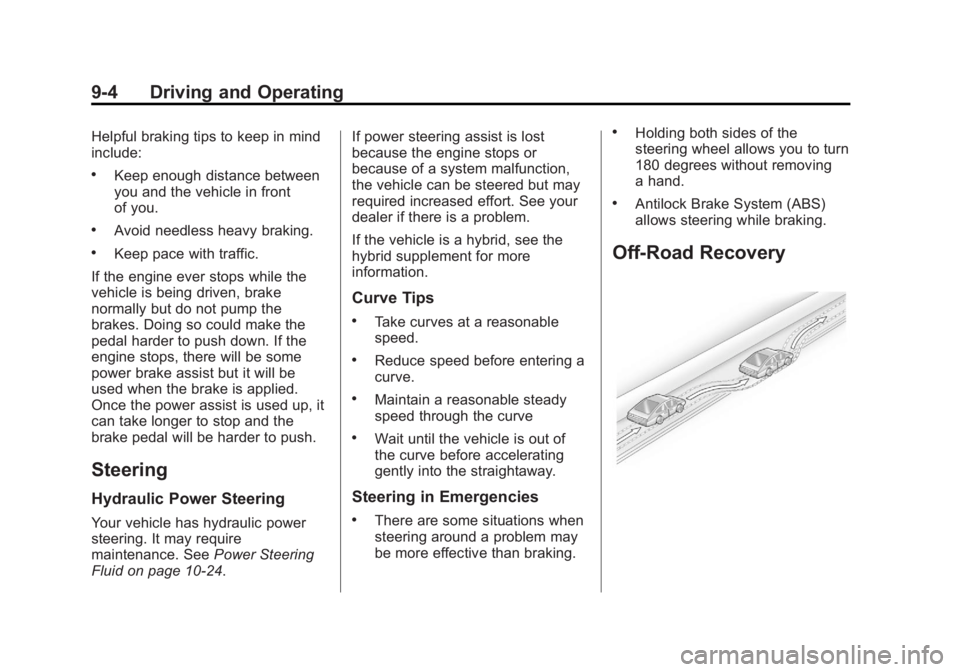
Off-Road Recovery
Page 280 of 542
Black plate (12,1)Chevrolet Silverado Owner Manual - 2013 - crc2 - 8/13/12
9-12 Driving and Operating
{WARNING
Coasting downhill in N (Neutral)
or with the ignition off is
dangerous. The brakes will have
to do all the work of slowing down
and they could get so hot that
they would not work well. You
would then have poor braking or
even none going down a hill.
Steering may also be affected
when ignition is off. You could
crash. Always have the engine
running and the vehicle in gear
when going downhill.
.Stay in your own lane. Do not
swing wide or cut across the
center of the road. Drive at
speeds that let you stay in your
own lane.
.Be alert on top of hills;
something could be in your lane
(stalled car, accident).
.Pay attention to special road
signs (falling rocks area, winding
roads, long grades, passing or
no-passing zones) and take
appropriate action.
Winter Driving
Driving on Snow or Ice
Drive carefully when there is snow
or ice between the tires and the
road, creating less traction or grip.
Wet ice can occur at about 0°C
(32°F) when freezing rain begins to
fall, resulting in even less traction.
Avoid driving on wet ice or in
freezing rain until roads can be
treated with salt or sand.
Drive with caution, whatever the
condition. Accelerate gently so
traction is not lost. Accelerating too
quickly causes the wheels to spin
and makes the surface under the
tires slick, so there is even less
traction.Try not to break the fragile traction.
If you accelerate too fast, the drive
wheels will spin and polish the
surface under the tires even more.
The Antilock Brake System (ABS)
improves vehicle stability during
hard stops on slippery roads, but
apply the brakes sooner than when
on dry pavement. See
Antilock
Brake System (ABS) on page 9‑53.
Allow greater following distance on
any slippery road and watch for
slippery spots. Icy patches can
occur on otherwise clear roads in
shaded areas. The surface of a
curve or an overpass can remain icy
when the surrounding roads are
clear. Avoid sudden steering
maneuvers and braking while
on ice.
Turn off cruise control on slippery
surfaces.