ignition CHEVROLET SILVERADO 1500 2013 Owner's Manual
[x] Cancel search | Manufacturer: CHEVROLET, Model Year: 2013, Model line: SILVERADO 1500, Model: CHEVROLET SILVERADO 1500 2013Pages: 542, PDF Size: 7.92 MB
Page 61 of 542
Black plate (21,1)Chevrolet Silverado Owner Manual - 2013 - crc2 - 8/13/12
Keys, Doors, and Windows 2-21
Vent:From the closed position,
press and hold the rear of the switch
to vent the sunroof. To close the
sunroof, press and hold the front of
the switch.
Open: From the vent position, the
sunroof can be fully opened either
manually or by using the
express-open feature. To open
manually, press the rear of the
switch to the first detent and hold
until the sunroof has reached the
desired position. To open using
express-open, press the rear of the
switch to the second detent and
release. The sunroof will move to
the full open position. To stop the
sunroof partway, press the switch a
second time.
Close: From the vent, or open
position, press and hold the front of
the switch to close the sunroof.
The sunroof also has a roller
sunshade that can be used to block
the rays of the sun. The roller
sunshade can be manually operated
with the sunroof in an open or closed position. To open the
sunshade, press and unlatch it, and
roll it back. To close, pull it forward
and latch it into the closed position.
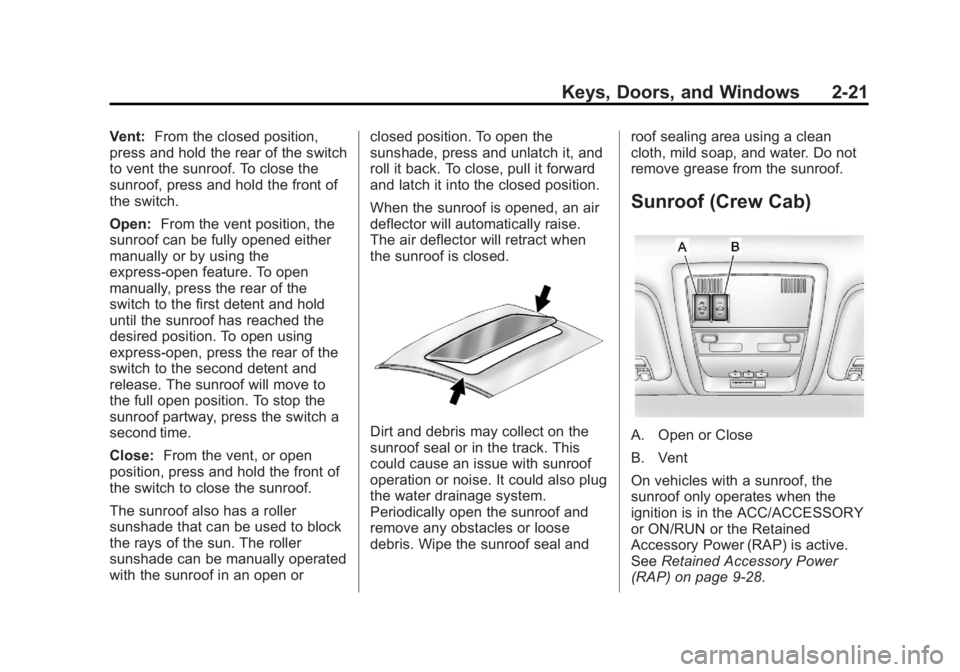
When the sunroof is opened, an air
deflector will automatically raise.
The air deflector will retract when
the sunroof is closed.
Dirt and debris may collect on the
sunroof seal or in the track. This
could cause an issue with sunroof
operation or noise. It could also plug
the water drainage system.
Periodically open the sunroof and
remove any obstacles or loose
debris. Wipe the sunroof seal and
roof sealing area using a clean
cloth, mild soap, and water. Do not
remove grease from the sunroof.
Sunroof (Crew Cab)
A. Open or Close
B. Vent
On vehicles with a sunroof, the
sunroof only operates when the
ignition is in the ACC/ACCESSORY
or ON/RUN or the Retained
Accessory Power (RAP) is active.
See
Retained Accessory Power
(RAP) on page 9‑28.
Page 71 of 542
Black plate (9,1)Chevrolet Silverado Owner Manual - 2013 - crc2 - 8/13/12
Seats and Restraints 3-9
appropriate manual control for the
memory item that is not recalling for
two seconds. Try recalling the
memory position again by pressing
the appropriate memory button.
If the memory position is still not
recalling, see your dealer for
service.
Easy Exit Driver Seat
This feature can move the seat
rearward to allow extra room to exit
the vehicle.
B(Easy Exit Driver Seat):Press
to recall the easy exit seat position.
The vehicle must be in P (Park).
If the easy exit seat feature is
programmed on in the vehicle
personalization menu, automatic
seat movement occurs when the
ignition key is removed. A single beep sounds. The driver
seat moves back approximately
8 cm (3 in). To move the seat back
farther, press
Bagain until the
seat is all the way back.
If something has blocked the driver
seat while recalling the exit position,
the recall may stop. Remove the
obstruction; then press and hold the
power seat control rearward for
two seconds. Try recalling the exit
position again. If the exit position is
still not recalling, see your dealer for
service.
See Vehicle Personalization (With
DIC Buttons) on page 5‑46.
Heated and Ventilated
Front Seats
{WARNING
If you cannot feel temperature
change or pain to the skin, the
seat heater may cause burns. To
reduce the risk of burns, people
with such a condition should use
care when using the seat heater,
especially for long periods of
time. Do not place anything on
the seat that insulates against
heat, such as a blanket, cushion,
cover, or similar item. This may
cause the seat heater to
overheat. An overheated seat
heater may cause a burn or may
damage the seat.
Page 72 of 542
Black plate (10,1)Chevrolet Silverado Owner Manual - 2013 - crc2 - 8/13/12
3-10 Seats and Restraints
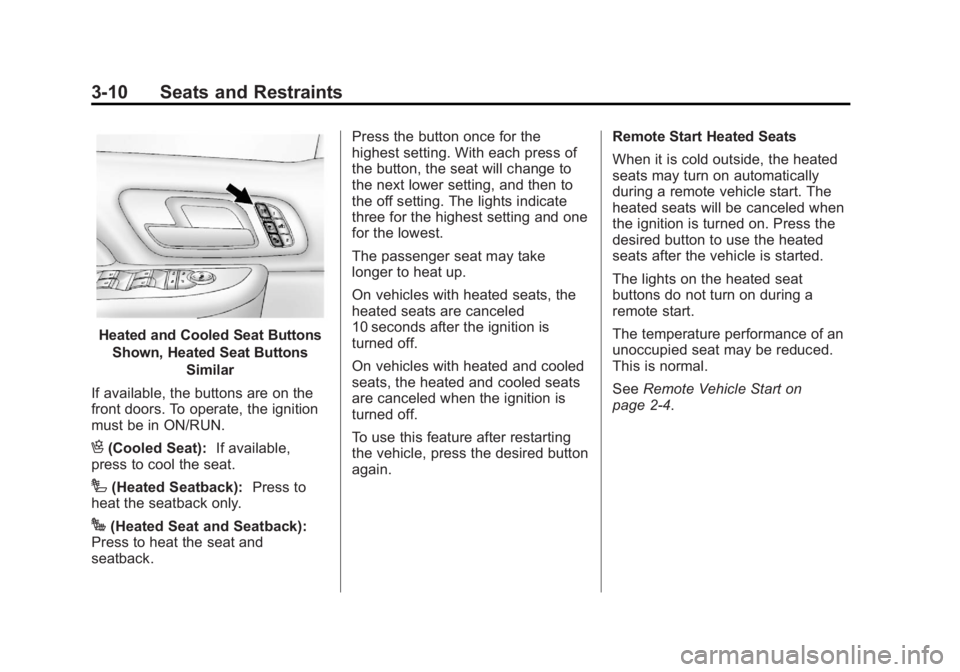
Heated and Cooled Seat ButtonsShown, Heated Seat Buttons Similar
If available, the buttons are on the
front doors. To operate, the ignition
must be in ON/RUN.
H(Cooled Seat): If available,
press to cool the seat.
I(Heated Seatback): Press to
heat the seatback only.
J(Heated Seat and Seatback):
Press to heat the seat and
seatback. Press the button once for the
highest setting. With each press of
the button, the seat will change to
the next lower setting, and then to
the off setting. The lights indicate
three for the highest setting and one
for the lowest.
The passenger seat may take
longer to heat up.
On vehicles with heated seats, the
heated seats are canceled
10 seconds after the ignition is
turned off.
On vehicles with heated and cooled
seats, the heated and cooled seats
are canceled when the ignition is
turned off.
To use this feature after restarting
the vehicle, press the desired button
again.
Remote Start Heated Seats
When it is cold outside, the heated
seats may turn on automatically
during a remote vehicle start. The
heated seats will be canceled when
the ignition is turned on. Press the
desired button to use the heated
seats after the vehicle is started.
The lights on the heated seat
buttons do not turn on during a
remote start.
The temperature performance of an
unoccupied seat may be reduced.
This is normal.
See
Remote Vehicle Start on
page 2‑4.
Page 93 of 542
Black plate (31,1)Chevrolet Silverado Owner Manual - 2013 - crc2 - 8/13/12
Seats and Restraints 3-31
United States
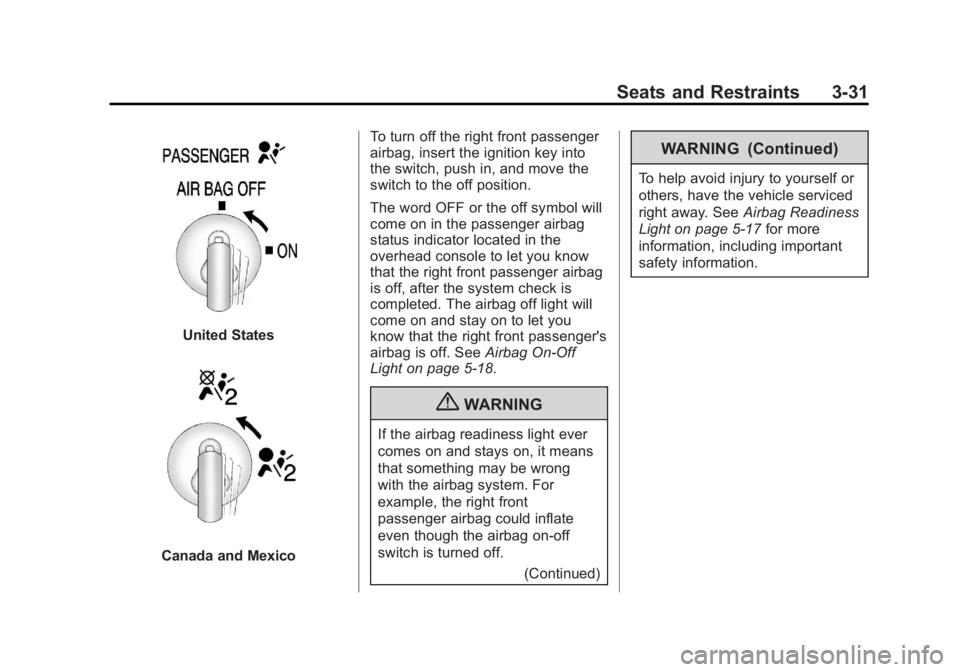
Canada and MexicoTo turn off the right front passenger
airbag, insert the ignition key into
the switch, push in, and move the
switch to the off position.
The word OFF or the off symbol will
come on in the passenger airbag
status indicator located in the
overhead console to let you know
that the right front passenger airbag
is off, after the system check is
completed. The airbag off light will
come on and stay on to let you
know that the right front passenger's
airbag is off. See
Airbag On-Off
Light on page 5‑18.
{WARNING
If the airbag readiness light ever
comes on and stays on, it means
that something may be wrong
with the airbag system. For
example, the right front
passenger airbag could inflate
even though the airbag on-off
switch is turned off.
(Continued)
WARNING (Continued)
To help avoid injury to yourself or
others, have the vehicle serviced
right away. SeeAirbag Readiness
Light on page 5‑17 for more
information, including important
safety information.
Page 94 of 542
Black plate (32,1)Chevrolet Silverado Owner Manual - 2013 - crc2 - 8/13/12
3-32 Seats and Restraints
United States
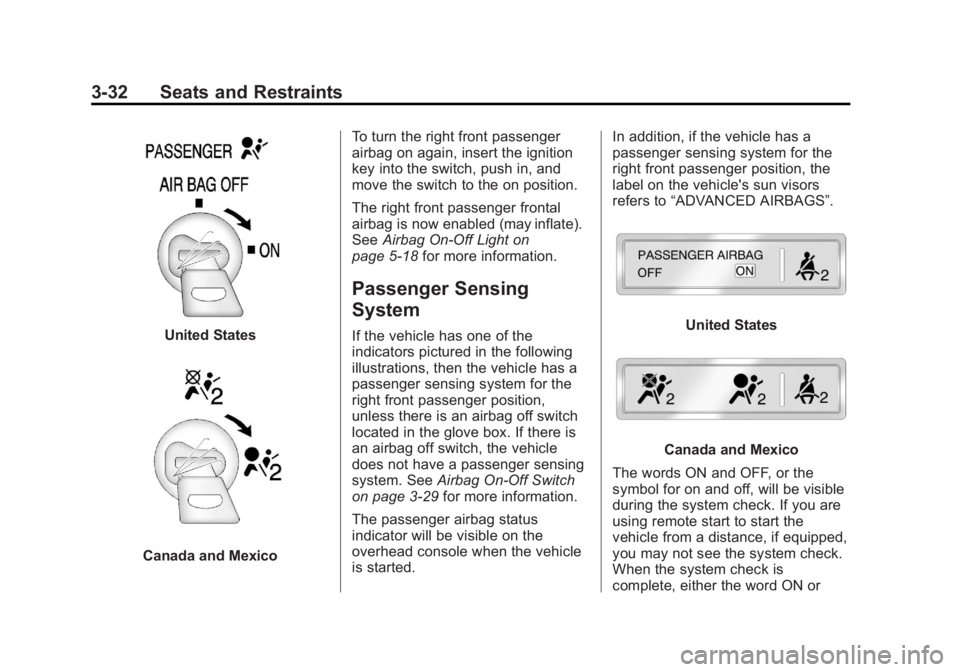
Canada and MexicoTo turn the right front passenger
airbag on again, insert the ignition
key into the switch, push in, and
move the switch to the on position.
The right front passenger frontal
airbag is now enabled (may inflate).
See
Airbag On-Off Light on
page 5‑18 for more information.
Passenger Sensing
System
If the vehicle has one of the
indicators pictured in the following
illustrations, then the vehicle has a
passenger sensing system for the
right front passenger position,
unless there is an airbag off switch
located in the glove box. If there is
an airbag off switch, the vehicle
does not have a passenger sensing
system. See Airbag On-Off Switch
on page 3‑29 for more information.
The passenger airbag status
indicator will be visible on the
overhead console when the vehicle
is started. In addition, if the vehicle has a
passenger sensing system for the
right front passenger position, the
label on the vehicle's sun visors
refers to
“ADVANCED AIRBAGS”.United States
Canada and Mexico
The words ON and OFF, or the
symbol for on and off, will be visible
during the system check. If you are
using remote start to start the
vehicle from a distance, if equipped,
you may not see the system check.
When the system check is
complete, either the word ON or
Page 137 of 542
Black plate (7,1)Chevrolet Silverado Owner Manual - 2013 - crc2 - 8/13/12
Instruments and Controls 5-7
2. Press the vehicle informationbutton until PRESS
VTO
CALIBRATE COMPASS
displays. Or, if the vehicle does
not have DIC buttons, press the
trip odometer reset stem until
CALIBRATE COMPASS
displays.
3. Press the set/reset button to start the compass calibration. Or,
if the vehicle does not have DIC
buttons, press and hold the trip
odometer reset stem for
two seconds to start the
compass calibration.
4. The DIC will display CALIBRATING: DRIVE IN
CIRCLES. Drive the vehicle in
tight circles at less than 8 km/h
(5 mph) to complete the
calibration. The DIC will display
CALIBRATION COMPLETE for a
few seconds when the
calibration is complete. The DIC
display will then return to the
previous menu.Clock
AM-FM Radio and AM‐FM
Radio with CD Player
To set the clock:
1. Turn the ignition key to ACC/ACCESSORY or ON/RUN, then
press the
Obutton to turn the
radio on.
2. Press the
Hbutton until the hour
numbers begin to flash, then
turn the
fknob to increase or
decrease the hour.
3. Press the
Hbutton until the
minute numbers begin to flash,
then turn the
fknob to increase
or decrease the minutes.
4. Press the
Hbutton until the
12HR or 24HR time format
begins to flash, then turn the
f
knob to change the time format. 5. Press the
Hbutton again until
the clock display stops flashing
to set the currently displayed
time, or wait until the flashing
stops after five seconds and the
current time displayed
automatically sets.
MP3 Radios with a Single CD
or a Single CD and DVD Player
To adjust the time and date:
1. Turn the ignition key to ACC/ ACCESSORY or ON/RUN, then
press the
Obutton to turn the
radio on.
2. Press the
Hbutton to display
HR, MIN, MM, DD, YYYY (hour,
minute, month, day, and year).
3. Press the softkey located under any one of the tabs to change
that setting.
4. To increase the time or date, do one of the following:
.Press the softkey below the
selected tab.
Page 138 of 542
Black plate (8,1)Chevrolet Silverado Owner Manual - 2013 - crc2 - 8/13/12
5-8 Instruments and Controls
.Press the¨SEEK button.
.Press the\FWD button.
.Turn thefknob clockwise.
5. To decrease the time or date, do one of the following:
.Press the©SEEK button.
.Press thesREV button.
.Turn thefknob
counterclockwise.
To change the time default setting
from 12 hour to 24 hour or to change
the date default setting from month/
day/year to day/month/year:
1. Press the
Hbutton and then the
softkey located below the
forward arrow tab. 12H, 24H, the
date MM/DD (month and day),
and DD/MM (day and month)
displays.
2. Press the softkey located below the desired option. 3. Press the
Hbutton again to
apply the desired option, or let
the screen time out.
MP3 Radio with a Six-Disc CD
Player
To set the time and date:
1. Turn the ignition key to ACC/ ACCESSORY or ON/RUN, then
press the
Obutton to turn the
radio on.
2. Press the MENU button and then the softkey under the
Htab
to display HR, MIN, MM, DD,
YYYY (hour, minute, month, day,
and year).
3. Press the softkey located under any one of the tabs to change
that setting.
4. To increase the time or date, do one of the following:
.Press the softkey below the
selected tab.
.Press the¨SEEK button.
.Press the\FWD button.
.Turn thefknob clockwise.
5. To decrease the time or date, do one of the following:
.Press the©SEEK button.
.Press thesREV button.
.Turn thefknob
counterclockwise.
To change the time default setting
from 12 hour to 24 hour or to change
the date default setting from month/
day to day/month:
1. Press the MENU button and then the softkey under the
Htab.
2. Press the softkey located below the forward arrow tab. 12H, 24H,
the date MM/DD (month and
day), and DD/MM (day and
month) displays.
3. Press the softkey located below the desired option.
Page 139 of 542
Black plate (9,1)Chevrolet Silverado Owner Manual - 2013 - crc2 - 8/13/12
Instruments and Controls 5-9
4. Press the MENU button again toapply the desired option, or let
the screen time out.
Power Outlets
Accessory power outlets can be
used to plug in electrical equipment,
such as a cell phone, MP3
player, etc.
The vehicle may have two
accessory power outlets located
below the climate control system,
or may have one accessory power
outlet and one cigarette lighter. The
cigarette lighter is designed to fit
only in the receptacle closest to the
driver.
There may be another accessory
power outlet in the rear cargo area.
If the vehicle has a floor console,
there is an accessory power outlet
inside the storage bin and one on
the rear of the floor console.
Remove the cover to access and
replace when not in use. The accessory power outlets are
powered, even when the ignition is
in LOCK/OFF. Continuing to use
power outlets while the ignition is in
LOCK/OFF may cause the vehicle's
battery to run down.
{WARNING
Power is always supplied to the
outlets. Do not leave electrical
equipment plugged in when the
vehicle is not in use because the
vehicle could catch fire and cause
injury or death.
Notice: Leaving electrical
equipment plugged in for an
extended period of time while the
vehicle is off will drain the
battery. Always unplug electrical
equipment when not in use and
do not plug in equipment that
exceeds the maximum 20 ampere
rating. Certain power accessory plugs may
not be compatible to the accessory
power outlet and could overload
vehicle or adapter fuses. If a
problem is experienced, see your
dealer.
When adding electrical equipment,
be sure to follow the proper
installation instructions included with
the equipment. See
Add-On
Electrical Equipment on page 9‑105.
Notice: Hanging heavy
equipment from the power outlet
can cause damage not covered
by the vehicle warranty. The
power outlets are designed for
accessory power plugs only, such
as cell phone charge cords.
Cigarette Lighter
To use the cigarette lighter, push it
in all the way, and let go. When it is
ready for use, the lighter pops
back out.
Notice: Holding a cigarette lighter
in while it is heating does not let
the lighter back away from the
Page 142 of 542
Black plate (12,1)Chevrolet Silverado Owner Manual - 2013 - crc2 - 8/13/12
5-12 Instruments and Controls
For vehicles with a DURAMAX®
Diesel engine, see the DURAMAX®
Diesel Supplement for more
information.
For vehicles with a Hybrid, see the
Hybrid Supplement for more
information.
Speedometer
The speedometer shows the
vehicle's speed in either kilometers
per hour (km/h) or miles per
hour (mph).
Odometer
The odometer shows how far the
vehicle has been driven, in either
kilometers or miles.
Engine Hour Meter Display
The Driver Information Center (DIC)
can also display the number of
hours the engine has run. To display
the engine hours, turn the ignition
off, then press and hold the reset
button for at least four seconds. The
hour meter displays for up to30 seconds, or until the ignition is
turned on. See
Driver Information
Center (DIC) on page 5‑29 for more
information.
Trip Odometer
The trip odometer shows how far
the vehicle has been driven since
the trip odometer was last set
to zero.
Press the reset button, located on
the instrument panel cluster next to
the voltmeter, to toggle between the
trip odometer and the regular
odometer. Holding the reset button
for approximately one second while
the trip odometer is displayed will
reset it.
To display the odometer reading
with the ignition off, press the reset
button.
See Driver Information Center (DIC)
on page 5‑29 for more information.
Tachometer
The tachometer displays the engine
speed in revolutions per minute
(rpm). For a description of how
Grade Braking affects vehicle speed
while the Tow/Haul Mode is
activated, see Tow/Haul Mode on
page 9‑38 for more information.
If the vehicle is a hybrid, see the
hybrid supplement for more
information.
Page 143 of 542
Black plate (13,1)Chevrolet Silverado Owner Manual - 2013 - crc2 - 8/13/12
Instruments and Controls 5-13
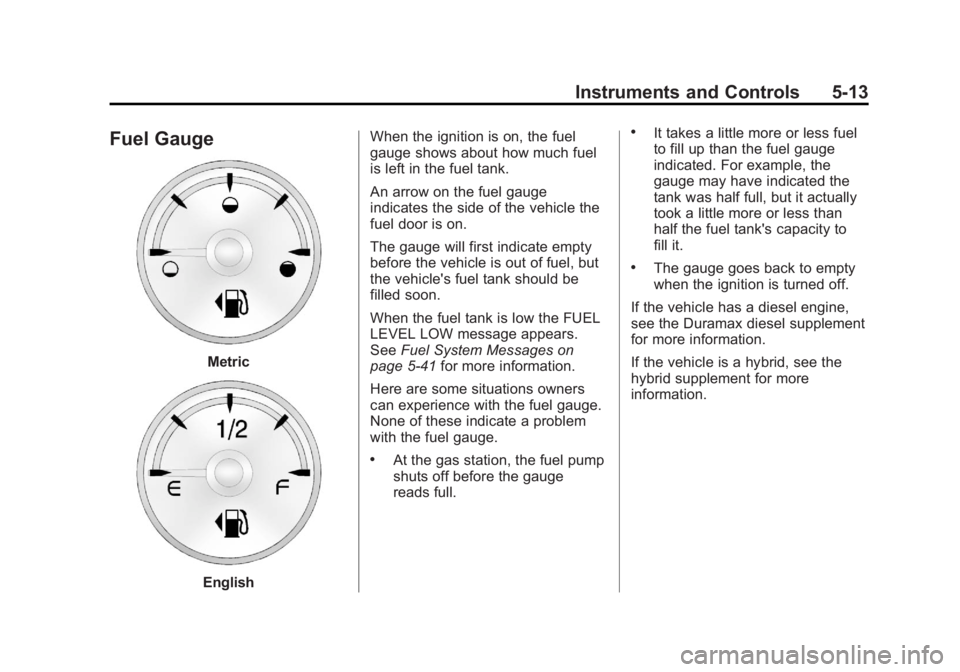
Fuel Gauge
Metric
EnglishWhen the ignition is on, the fuel
gauge shows about how much fuel
is left in the fuel tank.
An arrow on the fuel gauge
indicates the side of the vehicle the
fuel door is on.
The gauge will first indicate empty
before the vehicle is out of fuel, but
the vehicle's fuel tank should be
filled soon.
When the fuel tank is low the FUEL
LEVEL LOW message appears.
See
Fuel System Messages on
page 5‑41 for more information.
Here are some situations owners
can experience with the fuel gauge.
None of these indicate a problem
with the fuel gauge.
.At the gas station, the fuel pump
shuts off before the gauge
reads full.
.It takes a little more or less fuel
to fill up than the fuel gauge
indicated. For example, the
gauge may have indicated the
tank was half full, but it actually
took a little more or less than
half the fuel tank's capacity to
fill it.
.The gauge goes back to empty
when the ignition is turned off.
If the vehicle has a diesel engine,
see the Duramax diesel supplement
for more information.
If the vehicle is a hybrid, see the
hybrid supplement for more
information.