sunroof CHEVROLET SILVERADO 1500 2014 Owners Manual
[x] Cancel search | Manufacturer: CHEVROLET, Model Year: 2014, Model line: SILVERADO 1500, Model: CHEVROLET SILVERADO 1500 2014Pages: 542, PDF Size: 7.09 MB
Page 7 of 542
Black plate (1,1)Chevrolet Silverado Owner Manual (GMNA-Localizing-U.S./Canada/Mexico-
5853506) - 2014 - CRC 3rd Edition - 8/28/13
In Brief 1-1
In Brief
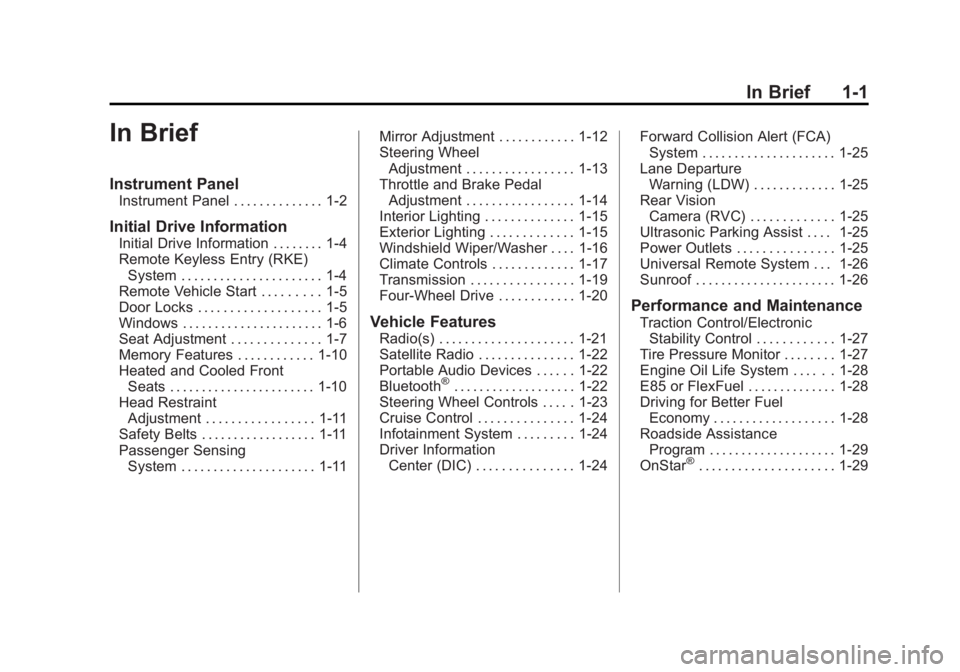
Instrument Panel
Instrument Panel . . . . . . . . . . . . . . 1-2
Initial Drive Information
Initial Drive Information . . . . . . . . 1-4
Remote Keyless Entry (RKE)System . . . . . . . . . . . . . . . . . . . . . . 1-4
Remote Vehicle Start . . . . . . . . . 1-5
Door Locks . . . . . . . . . . . . . . . . . . . 1-5
Windows . . . . . . . . . . . . . . . . . . . . . . 1-6
Seat Adjustment . . . . . . . . . . . . . . 1-7
Memory Features . . . . . . . . . . . . 1-10
Heated and Cooled Front Seats . . . . . . . . . . . . . . . . . . . . . . . 1-10
Head Restraint Adjustment . . . . . . . . . . . . . . . . . 1-11
Safety Belts . . . . . . . . . . . . . . . . . . 1-11
Passenger Sensing System . . . . . . . . . . . . . . . . . . . . . 1-11 Mirror Adjustment . . . . . . . . . . . . 1-12
Steering Wheel
Adjustment . . . . . . . . . . . . . . . . . 1-13
Throttle and Brake Pedal Adjustment . . . . . . . . . . . . . . . . . 1-14
Interior Lighting . . . . . . . . . . . . . . 1-15
Exterior Lighting . . . . . . . . . . . . . 1-15
Windshield Wiper/Washer . . . . 1-16
Climate Controls . . . . . . . . . . . . . 1-17
Transmission . . . . . . . . . . . . . . . . 1-19
Four-Wheel Drive . . . . . . . . . . . . 1-20
Vehicle Features
Radio(s) . . . . . . . . . . . . . . . . . . . . . 1-21
Satellite Radio . . . . . . . . . . . . . . . 1-22
Portable Audio Devices . . . . . . 1-22
Bluetooth
®. . . . . . . . . . . . . . . . . . . 1-22
Steering Wheel Controls . . . . . 1-23
Cruise Control . . . . . . . . . . . . . . . 1-24
Infotainment System . . . . . . . . . 1-24
Driver Information Center (DIC) . . . . . . . . . . . . . . . 1-24 Forward Collision Alert (FCA)
System . . . . . . . . . . . . . . . . . . . . . 1-25
Lane Departure Warning (LDW) . . . . . . . . . . . . . 1-25
Rear Vision
Camera (RVC) . . . . . . . . . . . . . 1-25
Ultrasonic Parking Assist . . . . 1-25
Power Outlets . . . . . . . . . . . . . . . 1-25
Universal Remote System . . . 1-26
Sunroof . . . . . . . . . . . . . . . . . . . . . . 1-26
Performance and Maintenance
Traction Control/Electronic Stability Control . . . . . . . . . . . . 1-27
Tire Pressure Monitor . . . . . . . . 1-27
Engine Oil Life System . . . . . . 1-28
E85 or FlexFuel . . . . . . . . . . . . . . 1-28
Driving for Better Fuel Economy . . . . . . . . . . . . . . . . . . . 1-28
Roadside Assistance Program . . . . . . . . . . . . . . . . . . . . 1-29
OnStar
®. . . . . . . . . . . . . . . . . . . . . 1-29
Page 32 of 542
Black plate (26,1)Chevrolet Silverado Owner Manual (GMNA-Localizing-U.S./Canada/Mexico-
5853506) - 2014 - CRC 3rd Edition - 8/28/13
1-26 In Brief
Vehicle with a Center Console
.One or two in front of the
cupholders on the center
console.
.One inside the center storage
console.
.One on the rear of the center
storage console.
Vehicles with Bench Seats
.One on the center stack below
the climate control system.
.One or two in the storage area
on the bench seat.
Lift the cover to access and replace
when not in use.
See Power Outlets on page 5-6.
Universal Remote System
If equipped with the Universal
Remote System, these buttons will
be in the front overhead console.
This system provides a way to
replace up to three remote control
transmitters used to activate
devices such as garage door
openers, security systems, and
home automation devices.
Read the instructions completely
before attempting to program the
transmitter. Because of the steps
involved, it may be helpful to have
another person assist with
programming the transmitter.
SeeUniversal Remote System on
page 5-51.
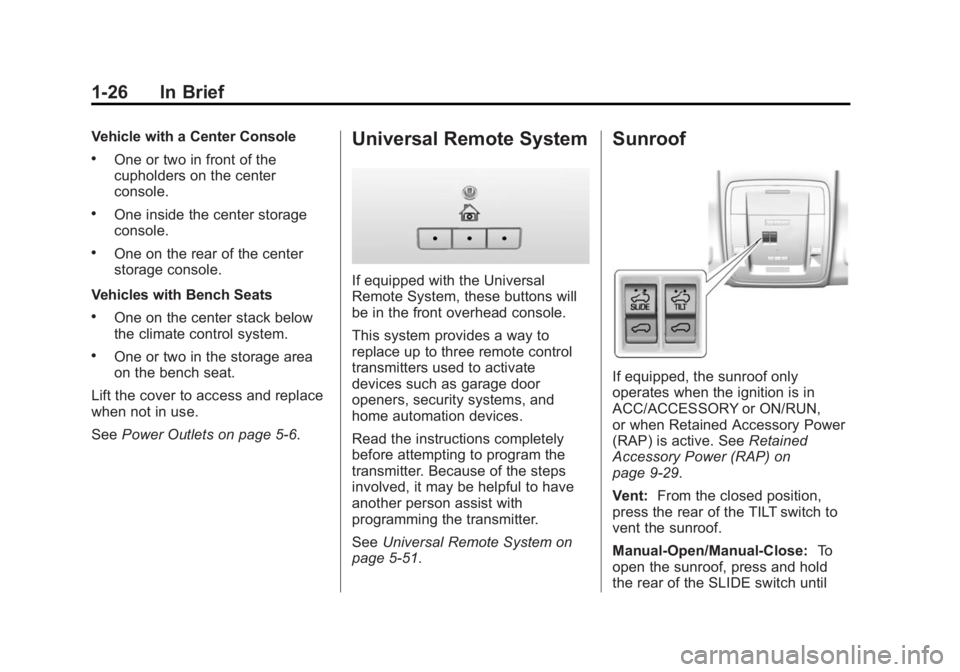
Sunroof
If equipped, the sunroof only
operates when the ignition is in
ACC/ACCESSORY or ON/RUN,
or when Retained Accessory Power
(RAP) is active. See Retained
Accessory Power (RAP) on
page 9-29.
Vent: From the closed position,
press the rear of the TILT switch to
vent the sunroof.
Manual-Open/Manual-Close: To
open the sunroof, press and hold
the rear of the SLIDE switch until
Page 33 of 542
Black plate (27,1)Chevrolet Silverado Owner Manual (GMNA-Localizing-U.S./Canada/Mexico-
5853506) - 2014 - CRC 3rd Edition - 8/28/13
In Brief 1-27
the sunroof reaches the desired
position. Press and hold the front of
the SLIDE switch to close it.
Express-Open/Express-Close:To
express-open the sunroof, fully
press and release the rear of the
SLIDE switch until the sunroof
reaches the desired position. To
express-close the sunroof, fully
press and release the front of the
SLIDE switch. Press the switch
again to stop it.
When the sunroof is opened, an air
deflector will automatically raise.
The air deflector will retract when
the sunroof is closed.
The sunroof also has a sunshade
that can be pulled forward to block
the rays of the sun. Open and close
the sunshade manually.
If an object is in the path of the
sunroof while it is closing, the
anti-pinch feature will detect the
object and stop the sunroof.
See Sunroof on page 2-22.Performance and
Maintenance
Traction Control/
Electronic Stability
Control
The vehicle has a traction control
system that limits wheel spin and
the StabiliTrak system that assists
with directional control of the vehicle
in difficult driving conditions. Both
systems come on automatically
when the vehicle is started and
begins to move.
.To turn off traction control, press
and release
gon the center
stack. The traction off light
i
displays in the instrument
cluster. The appropriate DIC
message displays. See Ride
Control System Messages on
page 5-39.
.To turn off both traction control
and StabiliTrak, press and hold
guntiliandgilluminate in the instrument cluster and the
appropriate DIC message
displays. See
Ride Control
System Messages on page 5-39.
.Press and releasegagain to
turn on both systems.
.StabiliTrak will automatically turn
on if the vehicle exceeds
56 km/h (35 mph). Traction
control will remain off.
See Traction Control/Electronic
Stability Control on page 9-56.
Tire Pressure Monitor
This vehicle may have a Tire
Pressure Monitor System (TPMS).
The low tire pressure warning light
alerts to a significant loss in
pressure of one of the vehicle's
Page 37 of 542
Black plate (1,1)Chevrolet Silverado Owner Manual (GMNA-Localizing-U.S./Canada/Mexico-
5853506) - 2014 - CRC 3rd Edition - 8/28/13
Keys, Doors, and Windows 2-1
Keys, Doors, and
Windows
Keys and Locks
Keys . . . . . . . . . . . . . . . . . . . . . . . . . . 2-1
Remote Keyless Entry (RKE)System . . . . . . . . . . . . . . . . . . . . . . 2-3
Remote Keyless Entry (RKE) System Operation . . . . . . . . . . . 2-3
Remote Vehicle Start . . . . . . . . . 2-6
Door Locks . . . . . . . . . . . . . . . . . . . 2-7
Power Door Locks . . . . . . . . . . . . 2-8
Delayed Locking . . . . . . . . . . . . . . 2-8
Automatic Door Locks . . . . . . . . . 2-9
Lockout Protection . . . . . . . . . . . . 2-9
Safety Locks . . . . . . . . . . . . . . . . . . 2-9
Doors
Tailgate . . . . . . . . . . . . . . . . . . . . . . 2-10
Vehicle Security
Vehicle Security . . . . . . . . . . . . . . 2-11
Vehicle Alarm System . . . . . . . . 2-11
Immobilizer . . . . . . . . . . . . . . . . . . 2-12
Immobilizer Operation . . . . . . . 2-12
Exterior Mirrors
Convex Mirrors . . . . . . . . . . . . . . 2-13
Manual Mirrors . . . . . . . . . . . . . . . 2-13
Trailer-Tow Mirrors . . . . . . . . . . . 2-13
Power Mirrors . . . . . . . . . . . . . . . . 2-14
Folding Mirrors . . . . . . . . . . . . . . . 2-15
Heated Mirrors . . . . . . . . . . . . . . . 2-16
Automatic Dimming Mirror . . . 2-16
Blind Spot Mirrors . . . . . . . . . . . 2-16
Reverse Tilt Mirrors . . . . . . . . . . 2-17
Interior Mirrors
Interior Rearview Mirrors . . . . . 2-18
Manual Rearview Mirror . . . . . . 2-18
Automatic Dimming Rearview Mirror . . . . . . . . . . . . . . . . . . . . . . . 2-18
Windows
Windows . . . . . . . . . . . . . . . . . . . . . 2-18
Manual Windows . . . . . . . . . . . . 2-19
Power Windows . . . . . . . . . . . . . 2-19
Rear Windows . . . . . . . . . . . . . . . 2-21
Sun Visors . . . . . . . . . . . . . . . . . . . 2-22
Roof
Sunroof . . . . . . . . . . . . . . . . . . . . . . 2-22
Keys and Locks
Keys
{Warning
Leaving children in a vehicle with
the ignition key is dangerous and
children or others could be
seriously injured or killed. They
could operate the power windows
or other controls or make the
vehicle move. The windows will
function with the keys in the
ignition, and children or others
could be caught in the path of a
closing window. Do not leave
children in a vehicle with the
ignition key.
Page 55 of 542
Black plate (19,1)Chevrolet Silverado Owner Manual (GMNA-Localizing-U.S./Canada/Mexico-
5853506) - 2014 - CRC 3rd Edition - 8/28/13
Keys, Doors, and Windows 2-19
The vehicle aerodynamics are
designed to improve fuel economy
performance. This may result in a
pulsing sound when either rear
window is down and the front
windows are up. To reduce the
sound, open either a front window
or the sunroof, if equipped.
Manual Windows
If equipped, turn the hand crank on
each door to manually raise or lower
the manual windows.
Power Windows
{Warning
Children could be seriously
injured or killed if caught in the
path of a closing window. Never
leave keys in a vehicle with
children. When there are children
in the rear seat, use the window
lockout button to prevent
operation of the windows. See
Keys on page 2-1.
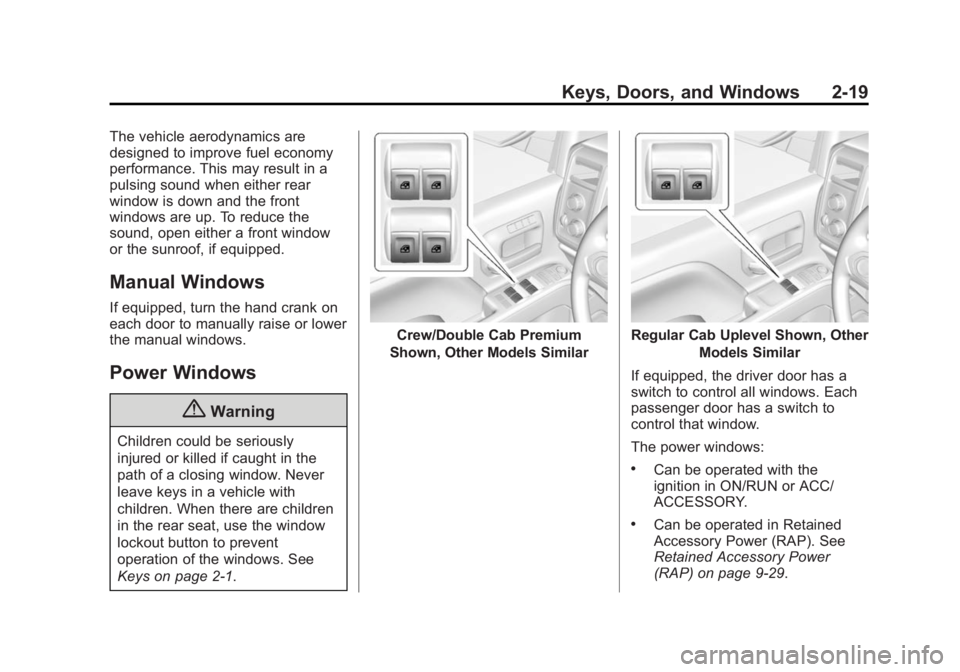
Crew/Double Cab Premium
Shown, Other Models SimilarRegular Cab Uplevel Shown, Other Models Similar
If equipped, the driver door has a
switch to control all windows. Each
passenger door has a switch to
control that window.
The power windows:
.Can be operated with the
ignition in ON/RUN or ACC/
ACCESSORY.
.Can be operated in Retained
Accessory Power (RAP). See
Retained Accessory Power
(RAP) on page 9-29.
Page 58 of 542
Black plate (22,1)Chevrolet Silverado Owner Manual (GMNA-Localizing-U.S./Canada/Mexico-
5853506) - 2014 - CRC 3rd Edition - 8/28/13
2-22 Keys, Doors, and Windows
The power sliding rear window
cannot be operated manually.
Sun Visors
Pull the sun visor down to block
glare. If equipped, detach the sun
visor from the center mount to pivot
to the side window or to extend
along the rod.
Roof
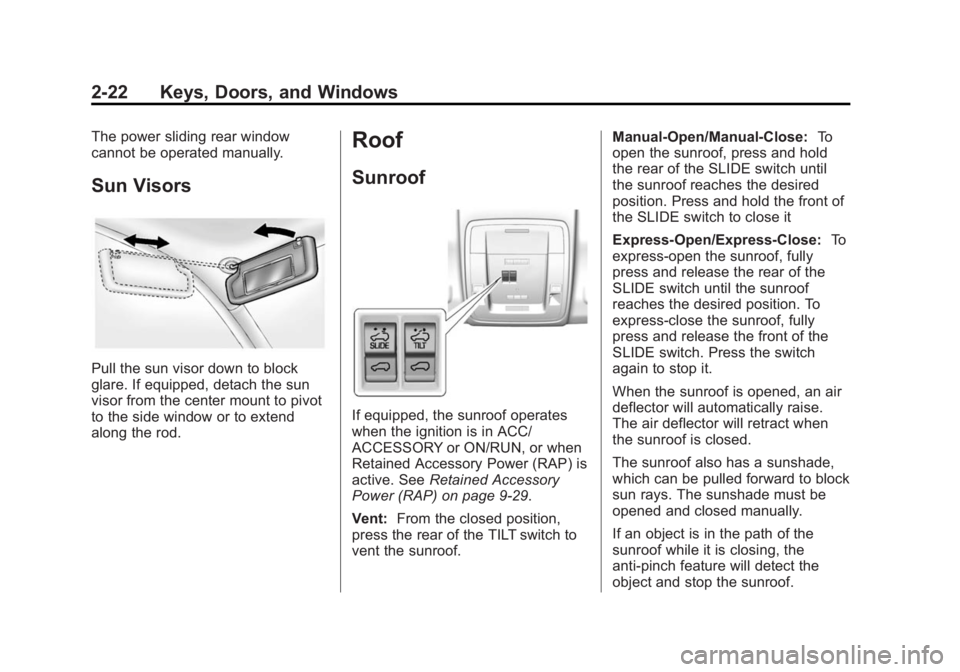
Sunroof
If equipped, the sunroof operates
when the ignition is in ACC/
ACCESSORY or ON/RUN, or when
Retained Accessory Power (RAP) is
active. SeeRetained Accessory
Power (RAP) on page 9-29.
Vent: From the closed position,
press the rear of the TILT switch to
vent the sunroof. Manual-Open/Manual-Close:
To
open the sunroof, press and hold
the rear of the SLIDE switch until
the sunroof reaches the desired
position. Press and hold the front of
the SLIDE switch to close it
Express-Open/Express-Close: To
express-open the sunroof, fully
press and release the rear of the
SLIDE switch until the sunroof
reaches the desired position. To
express-close the sunroof, fully
press and release the front of the
SLIDE switch. Press the switch
again to stop it.
When the sunroof is opened, an air
deflector will automatically raise.
The air deflector will retract when
the sunroof is closed.
The sunroof also has a sunshade,
which can be pulled forward to block
sun rays. The sunshade must be
opened and closed manually.
If an object is in the path of the
sunroof while it is closing, the
anti-pinch feature will detect the
object and stop the sunroof.
Page 59 of 542
Black plate (23,1)Chevrolet Silverado Owner Manual (GMNA-Localizing-U.S./Canada/Mexico-
5853506) - 2014 - CRC 3rd Edition - 8/28/13
Keys, Doors, and Windows 2-23
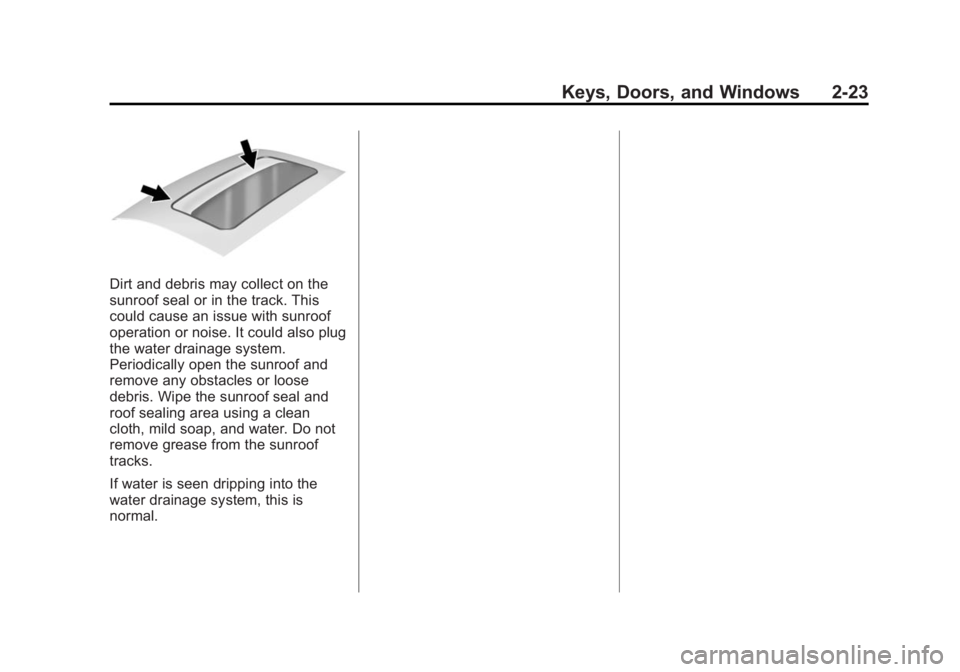
Dirt and debris may collect on the
sunroof seal or in the track. This
could cause an issue with sunroof
operation or noise. It could also plug
the water drainage system.
Periodically open the sunroof and
remove any obstacles or loose
debris. Wipe the sunroof seal and
roof sealing area using a clean
cloth, mild soap, and water. Do not
remove grease from the sunroof
tracks.
If water is seen dripping into the
water drainage system, this is
normal.
Page 214 of 542
Black plate (12,1)Chevrolet Silverado Owner Manual (GMNA-Localizing-U.S./Canada/Mexico-
5853506) - 2014 - CRC 3rd Edition - 8/28/13
7-12 Infotainment System
Fixed Mast Antenna
The fixed mast antenna will go
through most car washes as long as
it is securely attached. If the
antenna becomes slightly bent,
straighten it out by hand. If it is
badly bent, replace it.
Occasionally check that the antenna
is tight at the base. If tightening is
required, protect the paint from
damage.
Multi-Band Antenna
The roof antenna is for OnStar®,
SiriusXM®Satellite Radio, and GPS
(Global Positioning System), if the
vehicle has these features. Keep
clear of obstructions for clear
reception. If the vehicle has a
sunroof, and it is open, reception
can also be affected.
Pandora Internet Radio
If equipped, Pandora®is a free
Internet radio service that streams
personalized radio stations based
on artists, tracks, genres, and
comedians. Create stations using
the Pandora website or Smartphone
application, then use
-(thumbs up)
or
,(thumbs down) to personalize
stations. To set up an account, or for
more information, go to
www.pandora.com. Pandora may
not be available in Canada or
Mexico.
A phone or tablet with Internet
connection and the Pandora
application installed is required.
Personal cell phone data plans are
used. Make sure the latest version
is installed on the device.
Launching Pandora
Connect the iPhone to the USB
port, or connect Android®or
BlackBerry®through Bluetooth. See
Auxiliary Jack on page 7-21 or
Bluetooth (Infotainment Controls -
Base Radio) on page 7-33 or
Bluetooth (Voice Recognition - Base
Radio) on page 7-37 orBluetooth
(Overview) on page 7-31 or
Bluetooth (Infotainment Controls -
Base Connected Radio) on
page 7-42 orBluetooth (Voice
Recognition - Base Connected
Radio) on page 7-47. For first time
use, set up the stations before
connecting to the vehicle. The
Pandora icon will be available on
the Home Page.
When Pandora is chosen, the
Pandora logo will populate on the
screen and the system will display
“Acquiring Pandora Radio Station.”
Launch times can be significant.
Page 295 of 542
Black plate (29,1)Chevrolet Silverado Owner Manual (GMNA-Localizing-U.S./Canada/Mexico-
5853506) - 2014 - CRC 3rd Edition - 8/28/13
Driving and Operating 9-29
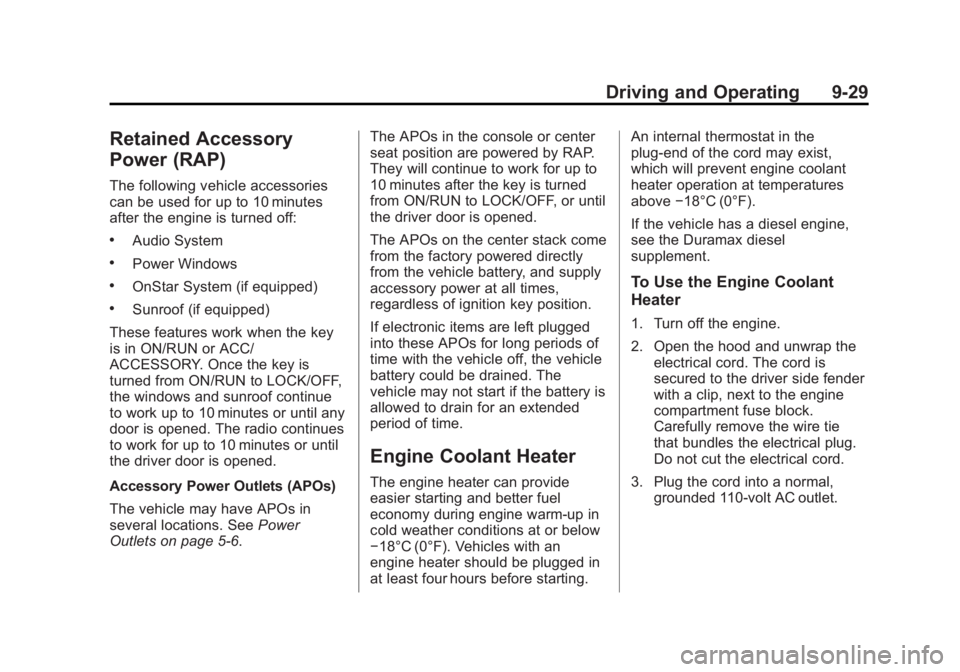
Retained Accessory
Power (RAP)
The following vehicle accessories
can be used for up to 10 minutes
after the engine is turned off:
.Audio System
.Power Windows
.OnStar System (if equipped)
.Sunroof (if equipped)
These features work when the key
is in ON/RUN or ACC/
ACCESSORY. Once the key is
turned from ON/RUN to LOCK/OFF,
the windows and sunroof continue
to work up to 10 minutes or until any
door is opened. The radio continues
to work for up to 10 minutes or until
the driver door is opened.
Accessory Power Outlets (APOs)
The vehicle may have APOs in
several locations. See Power
Outlets on page 5-6. The APOs in the console or center
seat position are powered by RAP.
They will continue to work for up to
10 minutes after the key is turned
from ON/RUN to LOCK/OFF, or until
the driver door is opened.
The APOs on the center stack come
from the factory powered directly
from the vehicle battery, and supply
accessory power at all times,
regardless of ignition key position.
If electronic items are left plugged
into these APOs for long periods of
time with the vehicle off, the vehicle
battery could be drained. The
vehicle may not start if the battery is
allowed to drain for an extended
period of time.
Engine Coolant Heater
The engine heater can provide
easier starting and better fuel
economy during engine warm-up in
cold weather conditions at or below
−18°C (0°F). Vehicles with an
engine heater should be plugged in
at least four hours before starting.An internal thermostat in the
plug-end of the cord may exist,
which will prevent engine coolant
heater operation at temperatures
above
−18°C (0°F).
If the vehicle has a diesel engine,
see the Duramax diesel
supplement.
To Use the Engine Coolant
Heater
1. Turn off the engine.
2. Open the hood and unwrap the electrical cord. The cord is
secured to the driver side fender
with a clip, next to the engine
compartment fuse block.
Carefully remove the wire tie
that bundles the electrical plug.
Do not cut the electrical cord.
3. Plug the cord into a normal, grounded 110-volt AC outlet.
Page 421 of 542
Black plate (51,1)Chevrolet Silverado Owner Manual (GMNA-Localizing-U.S./Canada/Mexico-
5853506) - 2014 - CRC 3rd Edition - 8/29/13
Vehicle Care 10-51
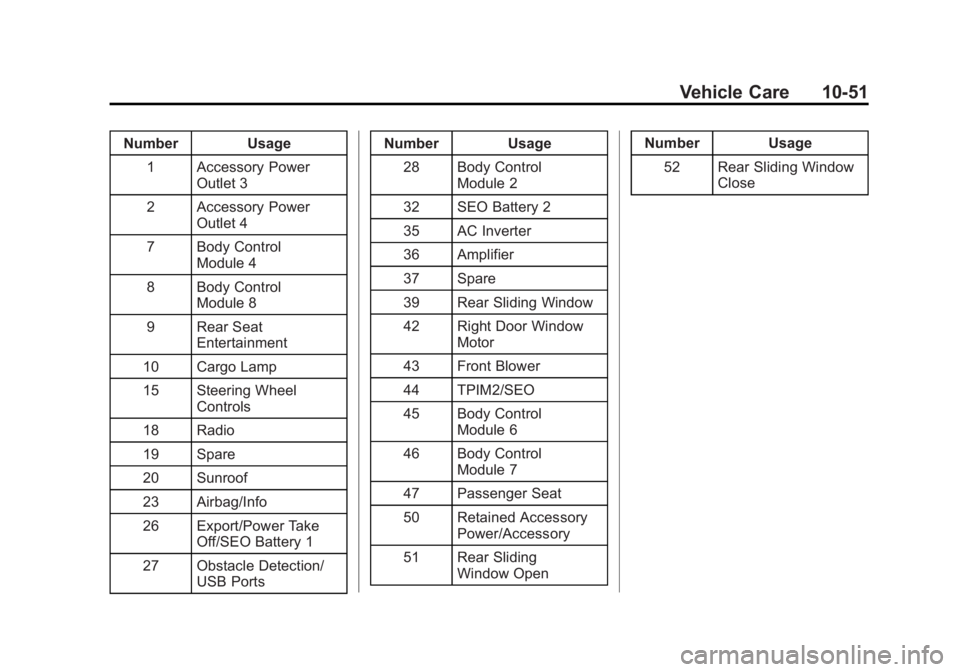
Number Usage1 Accessory Power Outlet 3
2 Accessory Power Outlet 4
7 Body Control Module 4
8 Body Control Module 8
9 Rear Seat Entertainment
10 Cargo Lamp
15 Steering Wheel Controls
18 Radio
19 Spare
20 Sunroof
23 Airbag/Info
26 Export/Power Take Off/SEO Battery 1
27 Obstacle Detection/ USB Ports Number Usage
28 Body Control Module 2
32 SEO Battery 2
35 AC Inverter
36 Amplifier
37 Spare
39 Rear Sliding Window
42 Right Door Window Motor
43 Front Blower
44 TPIM2/SEO
45 Body Control Module 6
46 Body Control Module 7
47 Passenger Seat
50 Retained Accessory Power/Accessory
51 Rear Sliding Window Open Number Usage
52 Rear Sliding Window Close