battery CHEVROLET SILVERADO 1500 2015 Service Manual
[x] Cancel search | Manufacturer: CHEVROLET, Model Year: 2015, Model line: SILVERADO 1500, Model: CHEVROLET SILVERADO 1500 2015Pages: 551, PDF Size: 6.87 MB
Page 470 of 551
Black plate (93,1)Chevrolet 2015i Silverado Owner Manual (GMNA-Localizing-U.S./Canada/
Mexico-8425172) - 2015 - CRC - 6/20/14
Vehicle Care 10-93
{Warning
Using an open flame near a
battery can cause battery gas to
explode. People have been hurt
doing this, and some have been
blinded. Use a flashlight if you
need more light.
Be sure the battery has enough
water. You do not need to add
water to the battery installed in
your new vehicle. But if a battery
has filler caps, be sure the right
amount of fluid is there. If it is low,
add water to take care of that
first. If you do not, explosive gas
could be present.
Battery fluid contains acid that
can burn you. Do not get it on
you. If you accidentally get it in
your eyes or on your skin, flush
the place with water and get
medical help immediately.
{Warning
Fans or other moving engine
parts can injure you badly. Keep
your hands away from moving
parts once the engine is running.
6. Check that the jumper cables do not have loose or missing
insulation. If they do, you could
get a shock. The vehicles could
be damaged too.
Before you connect the cables,
here are some basic things you
should know. Positive (+) will go
to positive (+) or to a remote
positive (+) terminal if the
vehicle has one. Negative (−)
will go to a heavy, unpainted
metal engine part or to a remote
negative (−) terminal if the
vehicle has one.
Do not connect positive (+) to
negative (−) or you will get a
short that would damage the
battery and maybe other parts too. And do not connect the
negative (−) cable to the
negative (−) terminal on the
dead battery because this can
cause sparks.
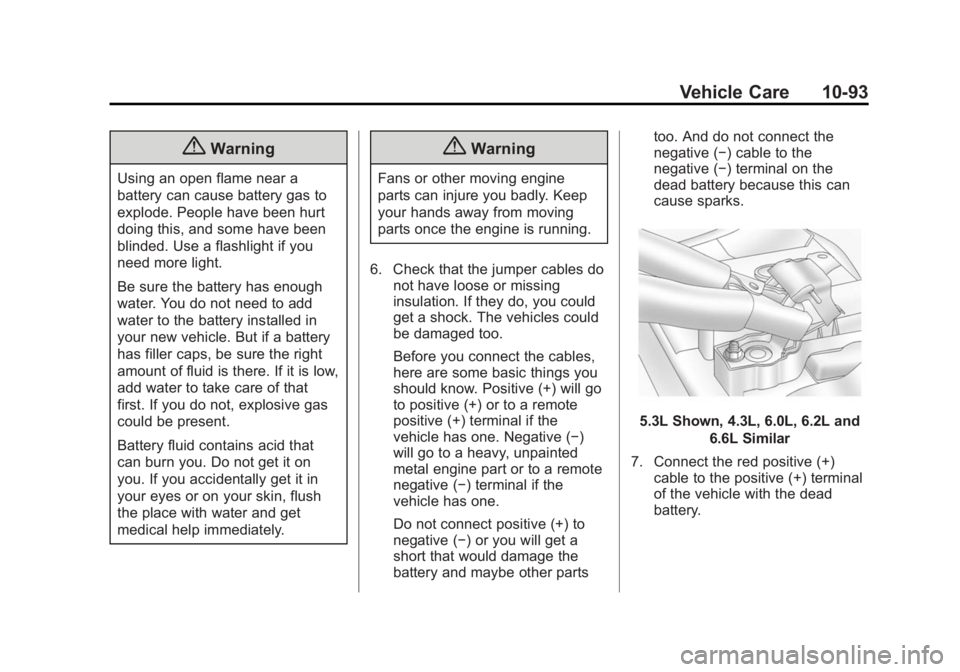
5.3L Shown, 4.3L, 6.0L, 6.2L and
6.6L Similar
7. Connect the red positive (+) cable to the positive (+) terminal
of the vehicle with the dead
battery.
Page 471 of 551
Black plate (94,1)Chevrolet 2015i Silverado Owner Manual (GMNA-Localizing-U.S./Canada/
Mexico-8425172) - 2015 - CRC - 6/20/14
10-94 Vehicle Care
8. Do not let the other end touchmetal. Connect it to the
positive (+) terminal of the good
battery. Use a remote
positive (+) terminal if the
vehicle has one.
9. Connect the black negative (−) cable to the negative (−) terminal
of the good battery. Use a
remote negative (−) terminal if
the vehicle has one.
Do not let the other end touch
anything until the next step.
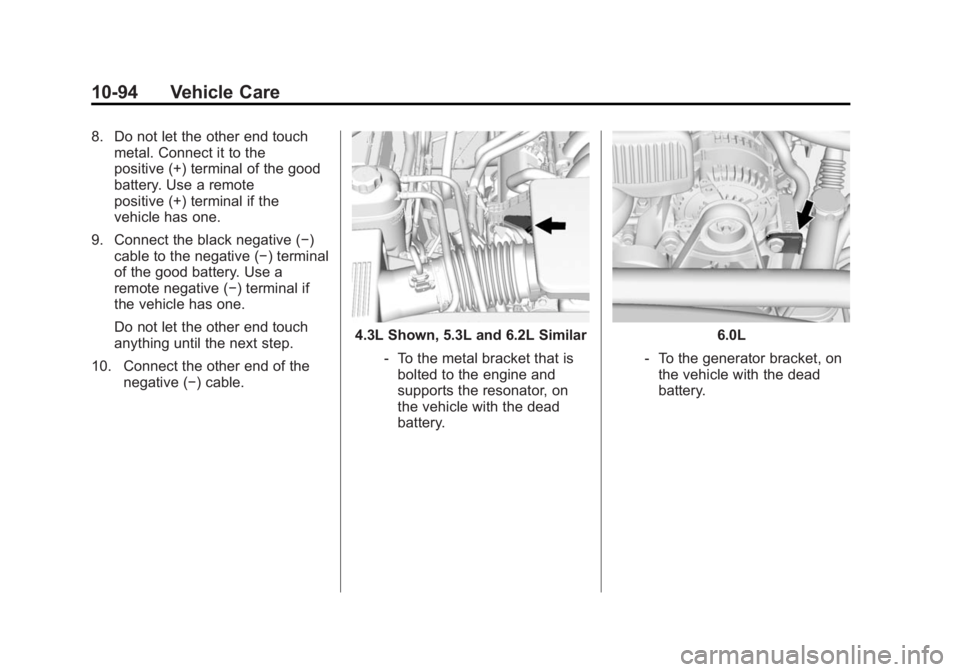
10. Connect the other end of the negative (−) cable.
4.3L Shown, 5.3L and 6.2L Similar
‐To the metal bracket that is
bolted to the engine and
supports the resonator, on
the vehicle with the dead
battery.6.0L
‐ To the generator bracket, on
the vehicle with the dead
battery.
Page 472 of 551
Black plate (95,1)Chevrolet 2015i Silverado Owner Manual (GMNA-Localizing-U.S./Canada/
Mexico-8425172) - 2015 - CRC - 6/20/14
Vehicle Care 10-95
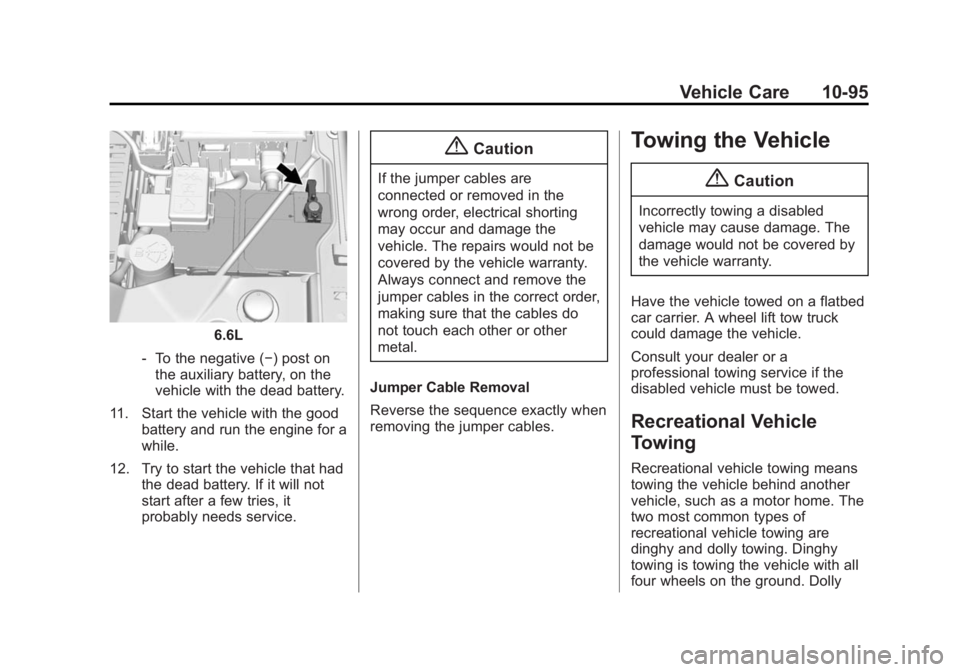
6.6L
‐ To the negative (−) post on
the auxiliary battery, on the
vehicle with the dead battery.
11. Start the vehicle with the good battery and run the engine for a
while.
12. Try to start the vehicle that had the dead battery. If it will not
start after a few tries, it
probably needs service.
{Caution
If the jumper cables are
connected or removed in the
wrong order, electrical shorting
may occur and damage the
vehicle. The repairs would not be
covered by the vehicle warranty.
Always connect and remove the
jumper cables in the correct order,
making sure that the cables do
not touch each other or other
metal.
Jumper Cable Removal
Reverse the sequence exactly when
removing the jumper cables.
Towing the Vehicle
{Caution
Incorrectly towing a disabled
vehicle may cause damage. The
damage would not be covered by
the vehicle warranty.
Have the vehicle towed on a flatbed
car carrier. A wheel lift tow truck
could damage the vehicle.
Consult your dealer or a
professional towing service if the
disabled vehicle must be towed.
Recreational Vehicle
Towing
Recreational vehicle towing means
towing the vehicle behind another
vehicle, such as a motor home. The
two most common types of
recreational vehicle towing are
dinghy and dolly towing. Dinghy
towing is towing the vehicle with all
four wheels on the ground. Dolly
Page 474 of 551
Black plate (97,1)Chevrolet 2015i Silverado Owner Manual (GMNA-Localizing-U.S./Canada/
Mexico-8425172) - 2015 - CRC - 6/20/14
Vehicle Care 10-97
{Warning
Shifting a four-wheel-drive
vehicle's transfer case into
N (Neutral) can cause the vehicle
to roll even if the transmission is
in P (Park). You or others could
be injured. Set the parking brake
before shifting the transfer case
to N (Neutral).
Follow these steps to dinghy tow:
1. Position the vehicle being towed behind the tow vehicle, facing
forward and on a level surface.
2. Securely attach the vehicle being towed to the tow vehicle.
3. Apply the parking brake and start the engine.
4. Shift the transfer case to N (Neutral). See “Shifting into
N (Neutral)” underFour-Wheel
Drive on page 9-42 for the
proper procedure. Check that
the vehicle is in N (Neutral) by shifting the transmission to
R (Reverse) and then to D
(Drive). There should be no
movement of the vehicle while
shifting.
5. With the transmission in D (Drive), turn the ignition to ACC/
ACCESSORY.
{Caution
Failure to disconnect the negative
battery cable or to have it contact
the terminals can cause damage
to the vehicle.
6. Disconnect the negative battery cable at the battery and secure
the nut and bolt. Cover the
negative battery post with a
non-conductive material to
prevent any contact with the
negative battery terminal.
7. Shift the transmission to P (Park).
{Caution
If the steering column is locked,
vehicle damage may occur.
8. Move the steering wheel to make sure the steering column
is unlocked.
9. Release the parking brake.
10. Keep the ignition key in the towed vehicle in ACC/
ACCESSORY to prevent the
steering column from locking.
Disconnecting the Towed Vehicle
Before disconnecting the towed
vehicle:
1. Park on a level surface.
2. Set the parking brake, shift the transmission to P (Park), and
move the ignition key to OFF.
3. Connect the battery.
4. Apply the brake pedal.
Page 496 of 551
Black plate (9,1)Chevrolet 2015i Silverado Owner Manual (GMNA-Localizing-U.S./Canada/
Mexico-8425172) - 2015 - CRC - 6/20/14
Service and Maintenance 11-9
Additional
Maintenance and Care
Your vehicle is an important
investment and caring for it properly
may help to avoid future costly
repairs. To maintain vehicle
performance, additional
maintenance services may be
required.
It is recommended that your dealer
perform these services—their
trained dealer technicians know
your vehicle best. Your dealer can
also perform a thorough
assessment with a multi-point
inspection to recommend when your
vehicle may need attention.
The following list is intended to
explain the services and conditions
to look for that may indicate
services are required. Battery
The battery supplies power to start
the engine and operate any
additional electrical accessories.
.To avoid break-down or failure to
start the vehicle, maintain a
battery with full cranking power.
.Trained dealer technicians have
the diagnostic equipment to test
the battery and ensure that the
connections and cables are
corrosion-free.
Belts
.Belts may need replacing if they
squeak or show signs of
cracking or splitting.
.Trained dealer technicians have
access to tools and equipment
to inspect the belts and
recommend adjustment or
replacement when necessary. Brakes
Brakes stop the vehicle and are
crucial to safe driving.
.Signs of brake wear may include
chirping, grinding, or squealing
noises, or difficulty stopping.
.Trained dealer technicians have
access to tools and equipment
to inspect the brakes and
recommend quality parts
engineered for the vehicle.
Fluids
Proper fluid levels and approved
fluids protect the vehicle’s systems
and components. See
Recommended Fluids and
Lubricants on page 11-12 for GM
approved fluids.
.Engine oil and windshield
washer fluid levels should be
checked at every fuel fill.
.Instrument cluster lights may
come on to indicate that fluids
may be low and need to be
filled.
Page 517 of 551
Black plate (6,1)Chevrolet 2015i Silverado Owner Manual (GMNA-Localizing-U.S./Canada/
Mexico-8425172) - 2015 - CRC - 6/20/14
13-6 Customer Information
.Model, year, color, and license
plate number of the vehicle.
.Odometer reading, Vehicle
Identification Number (VIN), and
delivery date of the vehicle.
.Description of the problem.
Coverage
Services are provided up to 5 years/
160 000 km (100,000 mi), whichever
comes first.
In the U.S., anyone driving the
vehicle is covered. In Canada, a
person driving the vehicle without
permission from the owner is not
covered.
Roadside Assistance is not a part of
the New Vehicle Limited Warranty.
General Motors North America and
Chevrolet reserve the right to make
any changes or discontinue the
Roadside Assistance program at
any time without notification.General Motors North America and
Chevrolet reserve the right to limit
services or payment to an owner or
driver if they decide the claims are
made too often, or the same type of
claim is made many times.
Services Provided
.Emergency Fuel Delivery:
Delivery of enough fuel for the
vehicle to get to the nearest
service station.
.Lock-Out Service:
Service to
unlock the vehicle if you are
locked out. A remote unlock may
be available if you have OnStar.
For security reasons, the driver
must present identification
before this service is given.
.Emergency Tow from a Public
Road or Highway: Tow to the
nearest Chevrolet dealer for
warranty service, or if the vehicle
was in a crash and cannot be
driven. Assistance is not given
when the vehicle is stuck in the
sand, mud, or snow.
.Flat Tire Change: Service to
change a flat tire with the spare
tire. The spare tire, if equipped,
must be in good condition and
properly inflated. It is the owner's
responsibility for the repair or
replacement of the tire if it is not
covered by the warranty.
.Battery Jump Start: Service to
jump start a dead battery.
Services Not Included in
Roadside Assistance
.Impound towing caused by
violation of any laws.
.Legal fines.
.Mounting, dismounting,
or changing of snow tires,
chains, or other traction devices.
Service is not provided if a vehicle
is in an area that is not accessible
to the service vehicle or is not a
regularly traveled or maintained
public road, which includes ice and
winter roads. Off-road use is not
covered.
Page 528 of 551
Black plate (1,1)Chevrolet 2015i Silverado Owner Manual (GMNA-Localizing-U.S./Canada/
Mexico-8425172) - 2015 - CRC - 6/20/14
OnStar 14-1
OnStar
OnStar Overview
OnStar Overview . . . . . . . . . . . . 14-1
OnStar Services
Emergency . . . . . . . . . . . . . . . . . . 14-2
Security . . . . . . . . . . . . . . . . . . . . . . 14-3
Navigation . . . . . . . . . . . . . . . . . . . 14-3
Connections . . . . . . . . . . . . . . . . . 14-4
Vehicle Diagnostics . . . . . . . . . . 14-6
OnStar Additional Information
OnStar AdditionalInformation . . . . . . . . . . . . . . . . . 14-6
OnStar Overview
=Voice Command Button
QBlue OnStar Button
>Emergency Button
This vehicle may be equipped with a
comprehensive, in-vehicle system
that can connect to a live OnStar
Advisor for Emergency, Security,
Navigation, Connection, and
Diagnostic Services. OnStar
services may require a paid
subscription. OnStar requires the
vehicle battery and electrical
system, cellular service, and GPS satellite signals to be available and
operating. OnStar acts as a link to
existing public emergency service
providers. OnStar may collect
information about you and your
vehicle, including location
information. See OnStar
’s Terms
and Conditions and Privacy
Statement for more details including
system limitations at
www.onstar.com (U.S.) or
www.onstar.ca (Canada).
The OnStar system status light is
next to the OnStar buttons. If the
status light is:
.Solid Green: System is on.
.Flashing Green: On a call.
.Red: Indicates a problem.
.Off: System is off. Press the blue
OnStar button twice to speak
with an OnStar Advisor.
Page 535 of 551
Black plate (8,1)Chevrolet 2015i Silverado Owner Manual (GMNA-Localizing-U.S./Canada/
Mexico-8425172) - 2015 - CRC - 6/20/14
14-8 OnStar
Potential Issues
OnStar cannot perform Remote
Door Unlock or Stolen Vehicle
Assistance after the vehicle has
been off continuously for five days.
After five days, OnStar can contact
Roadside Assistance and a
locksmith to help gain access to the
vehicle.
Global Positioning
System (GPS)
.Obstruction of the GPS can
occur in a large city with tall
buildings; in parking garages;
around airports; in tunnels,
underpasses; or in an area with
very dense trees. If GPS signals
are not available, the OnStar
system should still operate to
call OnStar. However, OnStar
could have difficulty identifying
the exact location.
.In emergency situations, OnStar
can use the last stored GPS
location to send to emergency
responders.A temporary loss of GPS can cause
loss of the ability to send a
Turn-by-Turn Navigation route. The
Advisor may give a verbal route or
may ask for a call back after the
vehicle is driven into an open area.
Cellular and GPS Antennas
Do not place items over or near the
antenna to prevent blocking cellular
and GPS signal reception. Cellular
reception is required for OnStar to
send remote signals to the vehicle.
Unable to Connect to OnStar
Message
If there is limited cellular coverage
or the cellular network has reached
maximum capacity, this message
may come on. Press
Qto try the
call again or try again after driving a
few miles into another cellular area.
Vehicle and Power Issues
OnStar services require a vehicle
electrical system, wireless service,
and GPS satellite technologies to be
available and operating for features to function properly. These systems
may not operate if the battery is
discharged or disconnected.
Add-on Electrical Equipment
The OnStar system is integrated
into the electrical architecture of the
vehicle. Do not add any electrical
equipment. See
Add-On Electrical
Equipment on page 9-100. Added
electrical equipment may interfere
with the operation of the OnStar
system and cause it to not operate.
Privacy
The complete OnStar Privacy
Statement may be found at
www.onstar.com (U.S.),
or www.onstar.ca (Canada). We
recommend that you review it. If you
have any questions, call
1-888-4-ONSTAR (1-888-466-7827)
or press
Qto speak with an
Advisor. Users of wireless
communications are cautioned that
the privacy of any information sent
via wireless cellular communications
cannot be assured. Third parties
Page 539 of 551
Black plate (2,1)Chevrolet 2015i Silverado Owner Manual (GMNA-Localizing-U.S./Canada/
Mexico-8425172) - 2015 - CRC - 6/20/14
i-2 INDEX
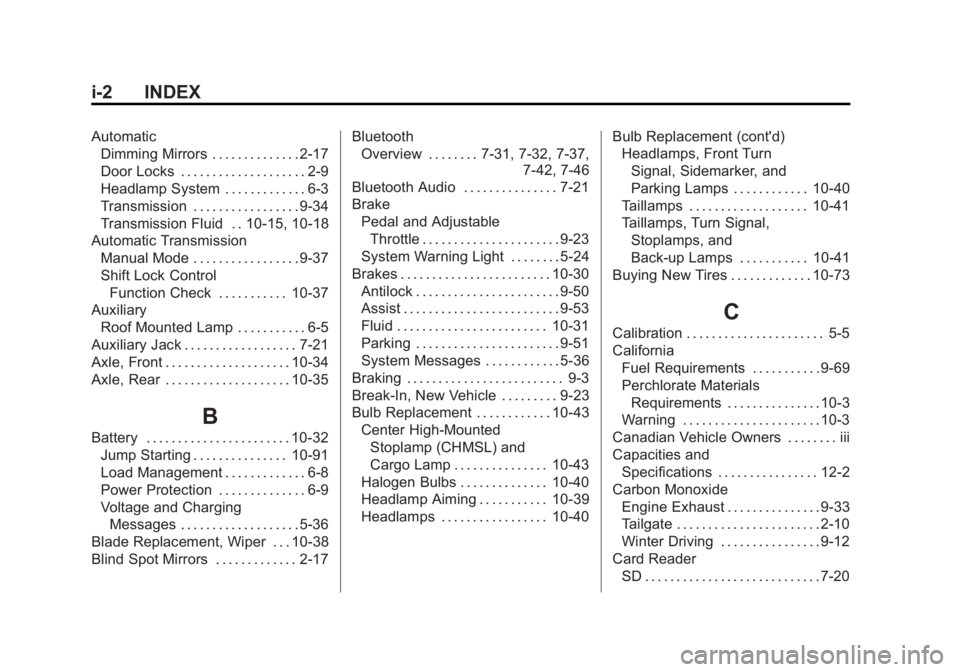
AutomaticDimming Mirrors . . . . . . . . . . . . . . 2-17
Door Locks . . . . . . . . . . . . . . . . . . . . 2-9
Headlamp System . . . . . . . . . . . . . 6-3
Transmission . . . . . . . . . . . . . . . . . 9-34
Transmission Fluid . . 10-15, 10-18
Automatic Transmission
Manual Mode . . . . . . . . . . . . . . . . . 9-37
Shift Lock ControlFunction Check . . . . . . . . . . . 10-37
Auxiliary
Roof Mounted Lamp . . . . . . . . . . . 6-5
Auxiliary Jack . . . . . . . . . . . . . . . . . . 7-21
Axle, Front . . . . . . . . . . . . . . . . . . . . 10-34
Axle, Rear . . . . . . . . . . . . . . . . . . . . 10-35
B
Battery . . . . . . . . . . . . . . . . . . . . . . . 10-32 Jump Starting . . . . . . . . . . . . . . . 10-91
Load Management . . . . . . . . . . . . . 6-8
Power Protection . . . . . . . . . . . . . . 6-9
Voltage and ChargingMessages . . . . . . . . . . . . . . . . . . . 5-36
Blade Replacement, Wiper . . . 10-38
Blind Spot Mirrors . . . . . . . . . . . . . 2-17 Bluetooth
Overview . . . . . . . . 7-31, 7-32, 7-37, 7-42, 7-46
Bluetooth Audio . . . . . . . . . . . . . . . 7-21
Brake
Pedal and AdjustableThrottle . . . . . . . . . . . . . . . . . . . . . . 9-23
System Warning Light . . . . . . . . 5-24
Brakes . . . . . . . . . . . . . . . . . . . . . . . . 10-30
Antilock . . . . . . . . . . . . . . . . . . . . . . . 9-50
Assist . . . . . . . . . . . . . . . . . . . . . . . . . 9-53
Fluid . . . . . . . . . . . . . . . . . . . . . . . . 10-31
Parking . . . . . . . . . . . . . . . . . . . . . . . 9-51
System Messages . . . . . . . . . . . . 5-36
Braking . . . . . . . . . . . . . . . . . . . . . . . . . 9-3
Break-In, New Vehicle . . . . . . . . . 9-23
Bulb Replacement . . . . . . . . . . . . 10-43 Center High-Mounted
Stoplamp (CHMSL) and
Cargo Lamp . . . . . . . . . . . . . . . 10-43
Halogen Bulbs . . . . . . . . . . . . . . 10-40
Headlamp Aiming . . . . . . . . . . . 10-39
Headlamps . . . . . . . . . . . . . . . . . 10-40 Bulb Replacement (cont'd)
Headlamps, Front Turn
Signal, Sidemarker, and
Parking Lamps . . . . . . . . . . . . 10-40
Taillamps . . . . . . . . . . . . . . . . . . . 10-41
Taillamps, Turn Signal, Stoplamps, and
Back-up Lamps . . . . . . . . . . . 10-41
Buying New Tires . . . . . . . . . . . . . 10-73
C
Calibration . . . . . . . . . . . . . . . . . . . . . . 5-5
California
Fuel Requirements . . . . . . . . . . . 9-69
Perchlorate MaterialsRequirements . . . . . . . . . . . . . . . 10-3
Warning . . . . . . . . . . . . . . . . . . . . . . 10-3
Canadian Vehicle Owners . . . . . . . . iii
Capacities and Specifications . . . . . . . . . . . . . . . . 12-2
Carbon Monoxide Engine Exhaust . . . . . . . . . . . . . . . 9-33
Tailgate . . . . . . . . . . . . . . . . . . . . . . . 2-10
Winter Driving . . . . . . . . . . . . . . . . 9-12
Card Reader
SD . . . . . . . . . . . . . . . . . . . . . . . . . . . . 7-20
Page 545 of 551
Black plate (8,1)Chevrolet 2015i Silverado Owner Manual (GMNA-Localizing-U.S./Canada/
Mexico-8425172) - 2015 - CRC - 6/20/14
i-8 INDEX
Lights (cont'd)Tire Pressure . . . . . . . . . . . . . . . . . 5-28
Tow/Haul Mode . . . . . . . . . . . . . . . 5-26
Traction Control System
(TCS)/StabiliTrak
®. . . . . . . . . . 5-27
Traction Off . . . . . . . . . . . . . . . . . . . 5-27
Locking Rear Axle . . . . . . . . . . . . . 9-56
Locks Automatic Door . . . . . . . . . . . . . . . . 2-9
Delayed Locking . . . . . . . . . . . . . . . 2-9
Door . . . . . . . . . . . . . . . . . . . . . . . . . . . 2-7
Lockout Protection . . . . . . . . . . . . . 2-9
Power Door . . . . . . . . . . . . . . . . . . . . 2-8
Safety . . . . . . . . . . . . . . . . . . . . . . . . . 2-9
Loss of Control . . . . . . . . . . . . . . . . . 9-5
Low Fuel Warning Light . . . . . . . . 5-28
Low-Profile Tires . . . . . . . . . . . . . . 10-55
Lower Anchors and Tethers for Children (LATCH
System) . . . . . . . . . . . . . . . . . . . . . . 3-44
Lumbar Adjustment . . . . . . . . . . . . . 3-4 Front Seats . . . . . . . . . . . . . . . . . . . . 3-4
M
MaintenanceRecords . . . . . . . . . . . . . . . . . . . . .11-16
Maintenance and Care Additional . . . . . . . . . . . . . . . . . . . . . 11-9
Maintenance Schedule . . . . . . . . 11-3 Recommended Fluids
and Lubricants . . . . . . . . . . . . .11-12
Transfer Case . . . . . . . . . . . . . . . . 9-42
Malfunction Indicator Lamp . . . . 5-21
Manual Mirrors . . . . . . . . . . . . . . . . 2-14
Manual Mode . . . . . . . . . . . . . . . . . . 9-37
Manual Transmission . . . . . . . . . . 9-40 Fluid . . . . . . . . . . . . . . . . . . . . . . . . 10-19
Manual Windows . . . . . . . . . . . . . . 2-20
Memory Features . . . . . . . . . . . . . . 1-10
Memory Seats . . . . . . . . . . . . . . . . . . 3-7
Messages Airbag System . . . . . . . . . . . . . . . . 5-42
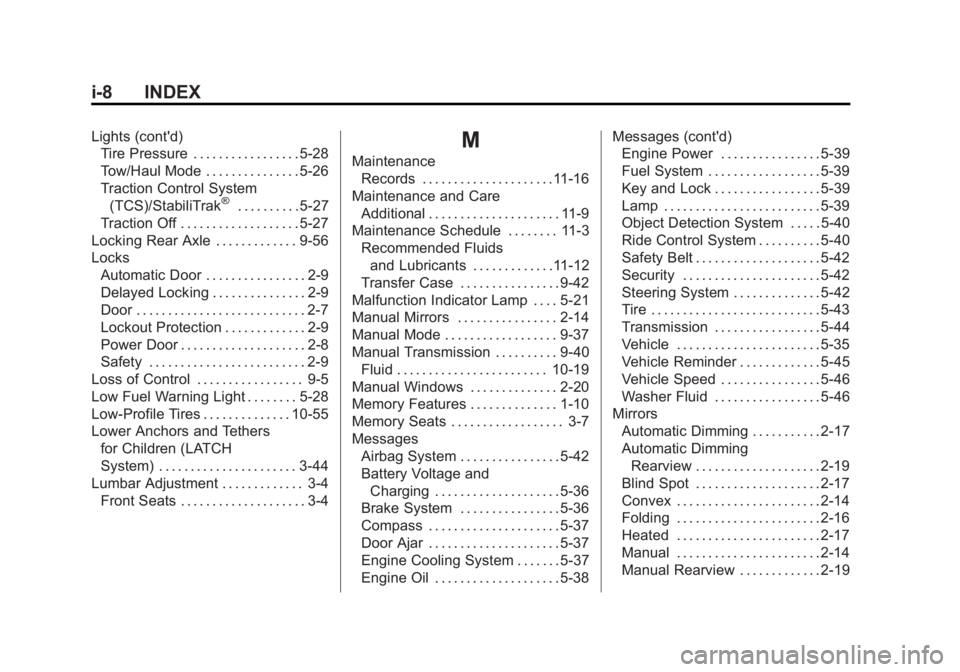
Battery Voltage andCharging . . . . . . . . . . . . . . . . . . . . 5-36
Brake System . . . . . . . . . . . . . . . . 5-36
Compass . . . . . . . . . . . . . . . . . . . . . 5-37
Door Ajar . . . . . . . . . . . . . . . . . . . . . 5-37
Engine Cooling System . . . . . . . 5-37
Engine Oil . . . . . . . . . . . . . . . . . . . . 5-38 Messages (cont'd)
Engine Power . . . . . . . . . . . . . . . . 5-39
Fuel System . . . . . . . . . . . . . . . . . . 5-39
Key and Lock . . . . . . . . . . . . . . . . . 5-39
Lamp . . . . . . . . . . . . . . . . . . . . . . . . . 5-39
Object Detection System . . . . . 5-40
Ride Control System . . . . . . . . . . 5-40
Safety Belt . . . . . . . . . . . . . . . . . . . . 5-42
Security . . . . . . . . . . . . . . . . . . . . . . 5-42
Steering System . . . . . . . . . . . . . . 5-42
Tire . . . . . . . . . . . . . . . . . . . . . . . . . . . 5-43
Transmission . . . . . . . . . . . . . . . . . 5-44
Vehicle . . . . . . . . . . . . . . . . . . . . . . . 5-35
Vehicle Reminder . . . . . . . . . . . . . 5-45
Vehicle Speed . . . . . . . . . . . . . . . . 5-46
Washer Fluid . . . . . . . . . . . . . . . . . 5-46
Mirrors Automatic Dimming . . . . . . . . . . . 2-17
Automatic Dimming
Rearview . . . . . . . . . . . . . . . . . . . . 2-19
Blind Spot . . . . . . . . . . . . . . . . . . . . 2-17
Convex . . . . . . . . . . . . . . . . . . . . . . . 2-14
Folding . . . . . . . . . . . . . . . . . . . . . . . 2-16
Heated . . . . . . . . . . . . . . . . . . . . . . . 2-17
Manual . . . . . . . . . . . . . . . . . . . . . . . 2-14
Manual Rearview . . . . . . . . . . . . . 2-19