service CHEVROLET SILVERADO 1500 2020 Workshop Manual
[x] Cancel search | Manufacturer: CHEVROLET, Model Year: 2020, Model line: SILVERADO 1500, Model: CHEVROLET SILVERADO 1500 2020Pages: 500, PDF Size: 9.71 MB
Page 278 of 500
Chevrolet Silverado Owner Manual (GMNA-Localizing-U.S./Canada/Mexico-
13337620) - 2020 - CRC - 4/11/19
Driving and Operating 277
system is clean, the system may
need service. Take the vehicle to
your dealer.
Radio Frequency Information
SeeRadio Frequency Statement
0 471.
Lane Departure Warning
(LDW) (2500/3500 Series)
If equipped, LDW may help avoid
crashes due to unintentional lane
departures. LDW uses a camera
sensor to detect the lane markings
at speeds of 56 km/h (35 mph) or
greater. It may provide an alert if the
vehicle is crossing a lane without
using a turn signal in that direction.
LDW light will not alert if the turn
signal is active in the direction of
lane departure, or if LDW detects
that you are accelerating, braking or
actively steering.
{Warning
The LDW system does not steer
the vehicle. The LDW system
may not:
. Provide enough time to
avoid a crash.
. Detect lane markings under
poor weather or visibility
conditions. This can occur if
the windshield or
headlamps are blocked by
dirt, snow, or ice; if they are
not in proper condition; or if
the sun shines directly into
the camera.
. Detect road edges.
. Detect lanes on winding or
hilly roads.
If LDW only detects lane
markings on one side of the road,
it will only warn you when
departing the lane on the side
where it has detected a lane
marking. Always keep your (Continued)
Warning (Continued)
attention on the road and
maintain proper vehicle position
within the lane, or vehicle
damage, injury, or death could
occur. Always keep the
windshield, headlamps, and
camera sensors clean and in
good repair. Do not use LDW in
bad weather conditions.
How the System Works
LDW utilizes camera sensor
installed on the windshield ahead of
the rearview mirror to detect lane
markings.
To turn LDW on and off, press
@on
the instrument panel to the left of
the steering wheel. The control
indicator will light when LDW is on.
Page 279 of 500
Chevrolet Silverado Owner Manual (GMNA-Localizing-U.S./Canada/Mexico-
13337620) - 2020 - CRC - 4/11/19
278 Driving and Operating
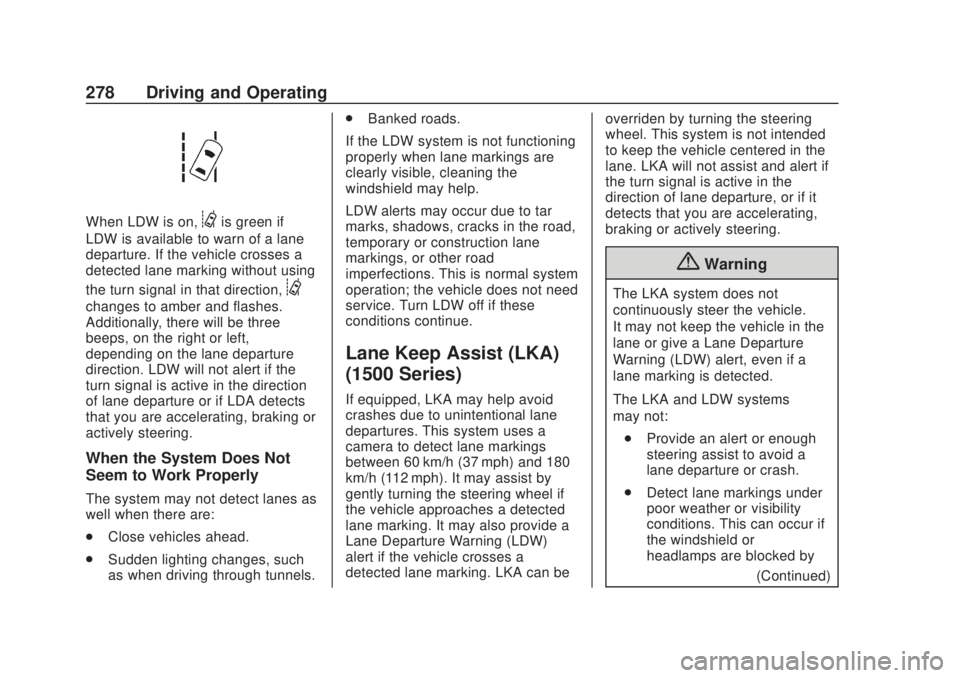
When LDW is on,@is green if
LDW is available to warn of a lane
departure. If the vehicle crosses a
detected lane marking without using
the turn signal in that direction,
@
changes to amber and flashes.
Additionally, there will be three
beeps, on the right or left,
depending on the lane departure
direction. LDW will not alert if the
turn signal is active in the direction
of lane departure or if LDA detects
that you are accelerating, braking or
actively steering.
When the System Does Not
Seem to Work Properly
The system may not detect lanes as
well when there are:
. Close vehicles ahead.
. Sudden lighting changes, such
as when driving through tunnels. .
Banked roads.
If the LDW system is not functioning
properly when lane markings are
clearly visible, cleaning the
windshield may help.
LDW alerts may occur due to tar
marks, shadows, cracks in the road,
temporary or construction lane
markings, or other road
imperfections. This is normal system
operation; the vehicle does not need
service. Turn LDW off if these
conditions continue.
Lane Keep Assist (LKA)
(1500 Series)
If equipped, LKA may help avoid
crashes due to unintentional lane
departures. This system uses a
camera to detect lane markings
between 60 km/h (37 mph) and 180
km/h (112 mph). It may assist by
gently turning the steering wheel if
the vehicle approaches a detected
lane marking. It may also provide a
Lane Departure Warning (LDW)
alert if the vehicle crosses a
detected lane marking. LKA can be overriden by turning the steering
wheel. This system is not intended
to keep the vehicle centered in the
lane. LKA will not assist and alert if
the turn signal is active in the
direction of lane departure, or if it
detects that you are accelerating,
braking or actively steering.
{Warning
The LKA system does not
continuously steer the vehicle.
It may not keep the vehicle in the
lane or give a Lane Departure
Warning (LDW) alert, even if a
lane marking is detected.
The LKA and LDW systems
may not:
. Provide an alert or enough
steering assist to avoid a
lane departure or crash.
. Detect lane markings under
poor weather or visibility
conditions. This can occur if
the windshield or
headlamps are blocked by
(Continued)
Page 281 of 500
Chevrolet Silverado Owner Manual (GMNA-Localizing-U.S./Canada/Mexico-
13337620) - 2020 - CRC - 4/11/19
280 Driving and Operating
dismiss. LKA may become
temporarily unavailable after
repeated take steering alerts.
When the System Does Not
Seem to Work Properly
The system performance may be
affected by:
.Close vehicles ahead.
. Sudden lighting changes, such
as when driving through tunnels.
. Banked roads.
. Roads with poor lane markings,
such as two-lane roads.
A system unavailable message may
display if the camera is blocked.
The LKA system does not need
service.
A camera blocked message may
display if the camera is blocked.
Some driver assistance systems
may have reduced performance or
not work at all. An LKA or LDW
unavailable message may display if
the systems are temporarily
unavailable. This message could be
due to a blocked camera. The LKA system does not need service.
Clean the outside of the windshield
behind the rearview mirror.
LKA assistance and/or LDW alerts
may occur due to tar marks,
shadows, cracks in the road,
temporary or construction lane
markings, or other road
imperfections. This is normal system
operation; the vehicle does not need
service. Turn LKA off if these
conditions continue.
Fuel
Top Tier Fuel
GM recommends the use of TOP
TIER Detergent Gasoline to keep
the engine clean, reduce engine
deposits, and maintain optimal
vehicle performance. Look for the
TOP TIER Logo or see
www.toptiergas.com for a list of TOP
TIER Detergent Gasoline marketers
and applicable countries.
Page 282 of 500
Chevrolet Silverado Owner Manual (GMNA-Localizing-U.S./Canada/Mexico-
13337620) - 2020 - CRC - 4/11/19
Driving and Operating 281
Recommended Fuel
(Except 6.2L V8 Engine)
For diesel engine vehicles, see
“Fuel for Diesel Engines”in the
Duramax diesel supplement.
If the vehicle has a yellow fuel cap
or a yellow sticker on the fuel door,
E85 or FlexFuel can be used. If the
vehicle does not have a yellow fuel
cap or yellow sticker, do not use
gasoline with ethanol levels greater
than 15% by volume. See E85 or
FlexFuel 0282.
Use regular unleaded gasoline
meeting ASTM specification D4814
with a posted octane rating of 87 —
(R+M)/2 —or higher. Do not use
gasoline with a posted octane rating
of less than 87, as this may cause
engine knock and will lower fuel
economy.
Recommended Fuel (6.2L
V8 Engine)
Premium unleaded gasoline
meeting ASTM specification D4814
with a posted octane rating of 93 —
(R+M)/2 —is highly recommended
for best performance and fuel
economy. Unleaded gasoline with
an octane rated as low as 87 can be
used. Using unleaded gasoline
rated below 93 octane, however, will
lead to reduced acceleration and
fuel economy. If knocking occurs,
use a gasoline rated at 93 octane
as soon as possible, otherwise, the
engine could be damaged. If heavy
knocking is heard when using
gasoline with a 93 octane rating, the
engine needs service. Do not use any fuel labeled E85 or
FlexFuel. Do not use gasoline with
ethanol levels greater than 15% by
volume.
Prohibited Fuels
Caution
Do not use fuels with any of the
following conditions; doing so
may damage the vehicle and void
its warranty:
. For vehicles that are not
FlexFuel, fuel labeled
greater than 15% ethanol by
volume, such as mid-level
ethanol blends (16–50%
ethanol), E85, or FlexFuel.
. Fuel with any amount of
methanol, methylal,
ferrocene, and aniline.
These fuels can corrode
metal fuel system parts or
damage plastic and rubber
parts.
(Continued)
Page 293 of 500
Chevrolet Silverado Owner Manual (GMNA-Localizing-U.S./Canada/Mexico-
13337620) - 2020 - CRC - 4/11/19
292 Driving and Operating
6. Reapply the brake pedal. Thenapply the parking brake and
shift into P (Park).
7. Release the brake pedal.
Pulling the Trailer from the Water
To pull the trailer out of the water: 1. Press and hold the brake pedal.
2. Start the engine and shift into gear.
3. Release the parking brake.
4. Let up on the brake pedal.
5. Drive slowly until the tires are clear of the chocks.
6. Stop and have someone pick up and store the chocks.
7. Slowly pull the trailer from the water.
8. Once the vehicle and trailer have been driven from the
sloped part of the boat ramp,
the vehicle can be shifted from
four-wheel-drive high. Shift into the drive mode that is
appropriate for the road
conditions.
Caution
If the vehicle tires begin to spin
and the vehicle begins to slide
toward the water, remove your
foot from the accelerator pedal
and apply the brake pedal. Seek
help to have the vehicle towed up
the ramp.
Maintenance when Trailer
Towing
The vehicle needs service more
often when used to tow trailers. See
Maintenance Schedule
0441. It is
especially important to check the
engine oil, axle lubricant, belts,
cooling system, and brake system
before and during each trip.
Check periodically to see that all
nuts and bolts on the trailer hitch
are tight.
Engine Cooling When Trailer
Towing
The cooling system may temporarily
overheat during severe operating
conditions. See Engine Overheating
0 351.
Trailer Towing
If equipped with a diesel engine,
see the Duramax diesel
supplement.
Caution
Towing a trailer improperly can
damage the vehicle and result in
costly repairs not covered by the
vehicle warranty. To tow a trailer
correctly, follow the directions in
this section and see your dealer
for important information about
towing a trailer with the vehicle.
Trailering is different than just
driving the vehicle by itself.
Trailering means changes in
handling, acceleration, braking,
durability, and fuel economy.
Page 307 of 500
Chevrolet Silverado Owner Manual (GMNA-Localizing-U.S./Canada/Mexico-
13337620) - 2020 - CRC - 4/11/19
306 Driving and Operating
.Activate the Manual Trailer
Brake Apply Lever
TRAILER GAIN: Press a Trailer
Gain button to recall the current
Trailer Gain setting. Each press and
release of the gain buttons will then
change the Trailer Gain setting.
Press the Trailer Gain (+) or (-) to
adjust. Press and hold to
continuously adjust the Trailer Gain.
To turn the output to the trailer off,
adjust the Trailer Gain setting to 0.0.
This setting can be adjusted from
0.0 to 10.0 with a trailer connected
or disconnected.
TRAILER OUTPUT: This displays
anytime a trailer with electric brakes
is connected. Output to the trailer
brakes is based on the amount of
vehicle braking present and relative
to the Trailer Gain setting. Output is
displayed from 0 to 100% for each
gain setting.
The Trailer Output will indicate “- - -
- - -” on the Trailer Brake Display
Page whenever the following occur:
. No trailer is connected. .
A trailer without electric brakes
is connected. No DIC message
displays.
. A trailer with electric brakes has
become disconnected.
A CHECK TRAILER WIRING
message displays on the DIC.
. There is a fault present in the
wiring to the trailer brakes.
A CHECK TRAILER WIRING
message displays on the DIC.
. The ITBC system is not working
due to a fault. A SERVICE
TRAILER BRAKE SYSTEM
message displays in the DIC.
Manual Trailer Brake Apply
Lever
Slide this lever right to apply the
trailer ’s electric brakes independent
of the vehicle’s brakes. Use this
lever to adjust the Trailer Gain to
achieve proper power output to the
trailer brakes. Under certain
circumstances, this lever can also
be used to apply additional trailer
braking. The trailer and vehicle
brake lamps will come on when either the vehicle brakes or trailer
brakes are applied and properly
connected.
Trailer Gain Adjustment
Procedure
Trailer Gain should be set for a
specific trailering condition and it
must be readjusted anytime vehicle
loading, trailer loading, or road
surface conditions change.
{Warning
Trailer brakes that are
over-gained or under-gained may
not stop the vehicle and the trailer
as intended and can result in a
crash. Always follow the
instructions to set the Trailer Gain
for the proper trailer stopping
performance.
To adjust Trailer Gain for each
towing condition: 1. Drive the vehicle with the trailer attached on a level road
surface representative of the
Page 309 of 500
Chevrolet Silverado Owner Manual (GMNA-Localizing-U.S./Canada/Mexico-
13337620) - 2020 - CRC - 4/11/19
308 Driving and Operating
If the CHECK TRAILER WIRING
message only reappears when
connecting the trailer wiring harness
to the vehicle, the electrical fault is
on the trailer side.
SERVICE TRAILER BRAKE
SYSTEM: This message will display
when there is a problem with the
ITBC system. If this message
continues over multiple ignition
cycles, have the vehicle serviced.
If either the CHECK TRAILER
WIRING or SERVICE TRAILER
BRAKE SYSTEM message displays
while driving, the ITBC system may
not be fully functional or may not
function at all. When traffic
conditions allow, carefully pull the
vehicle over to the side of the road
and turn the ignition off. Check the
wiring connection to the trailer and
turn the ignition back on. If either of
these messages continues, either
the vehicle or trailer needs service.
A GM dealer may be able to
diagnose and repair problems with
the trailer. However, any diagnosis
and repair of the trailer is not
covered under the vehicle warranty.Contact your trailer dealer for
assistance with trailer repairs and
trailer warranty information.
Trailer Sway
Control (TSC)
Vehicles with StabiliTrak/Electronic
Stability Control (ESC) have a
Trailer Sway Control (TSC) feature.
Trailer sway is unintended
side-to-side motion of a trailer while
towing. If the vehicle is towing a
trailer and the TSC detects that
sway is increasing, the vehicle
brakes are selectively applied at
each wheel, to help reduce
excessive trailer sway. If equipped
with the Integrated Trailer Brake
Control (ITBC) system, and the
trailer has an electric brake system,
StabiliTrak/ESC may also apply the
trailer brakes.If TSC is enabled, the Traction
Control System (TCS)/StabiliTrak/
ESC warning light will flash on the
instrument cluster. Reduce vehicle
speed by gradually removing your
foot from the accelerator. If trailer
sway continues, StabiliTrak/ESC
can reduce engine torque to help
slow the vehicle. TSC will not
function if StabiliTrak/ESC is turned
off. See
Traction Control/Electronic
Stability Control 0235.
{Warning
Trailer sway can result in a crash
and in serious injury or death,
even if the vehicle is equipped
with TSC.
(Continued)
Page 313 of 500
Chevrolet Silverado Owner Manual (GMNA-Localizing-U.S./Canada/Mexico-
13337620) - 2020 - CRC - 4/11/19
312 Driving and Operating
Trailer Feature Setup
Tow/Haul Mode Reminder
To turn the Tow/Haul Mode
Reminder setting on, touch Yes. To
turn it off, touch No.
Trailer Tire Pressure Setup
If the Trailer Tire Pressure
Monitoring System (TTPMS) is
detected, touch the Tire Pressure
Monitoring icon to set up tire
pressure monitoring.Touch Yes to
set up the sensors or touch No to
return to the previous screen.
A trailer must be electrically
connected to the vehicle before
starting the sensor-to-vehicle learn
process.
After selecting Start from the Learn
Sensors screen, use the Tool
Method or the Manual Method
(described below) to learn each tire
sensor, during which the current tire
number will be highlighted.
Each sensor has a minimum of
two minutes to learn, shown by a
timer. After a sensor is learned, a
checkmark appears next to the tire,the vehicle horn will sound, the
vehicle’s brake lamps will flash, and
all working trailer lamps will flash.
It then moves to the next sensor.
To cancel the process touch Stop.
The recommended tire pressure
must be entered for the trailer tires.
This allows the vehicle to alert when
the tire pressure is high or low.
TTPMS must learn the location of
the installed tire sensors to show
correct air pressure and
temperature for each tire. To set up,
use one of the following options or
see a tire or trailer dealer for
service. The learning process must
be repeated when the trailer tires
are rotated or replaced. See
“Editing
a Trailer Profile” later in this section
for tire pressure sensor relearn
information.
Tool Method: A TTPMS activation
tool can be purchased separately to
learn the sensor locations.
Manual Method: Without the tool,
the air pressure can be increased or
decreased in each tire for
10 seconds. Do not exceed the maximum inflation pressure found
on the tire sidewalls. Make sure to
re-adjust tire pressure to the
recommended level when the
process is complete.
Sensor Learning Steps
To complete the sensor-to-vehicle
learn process:
1. Touch Start on the Learn Sensors screen. The horn
chirps twice and the Learning
Active screen appears on the
infotainment display.
2. Start with the driver side front trailer tire.
3. Activate the tool near the valve stem or adjust the air pressure
of this tire until the horn chirps
and all working vehicle and
trailer lights flash.
The process stops without
saving the sensor locations if
this step takes more than
two minutes.
Page 317 of 500
Chevrolet Silverado Owner Manual (GMNA-Localizing-U.S./Canada/Mexico-
13337620) - 2020 - CRC - 4/11/19
316 Driving and Operating
Trailer
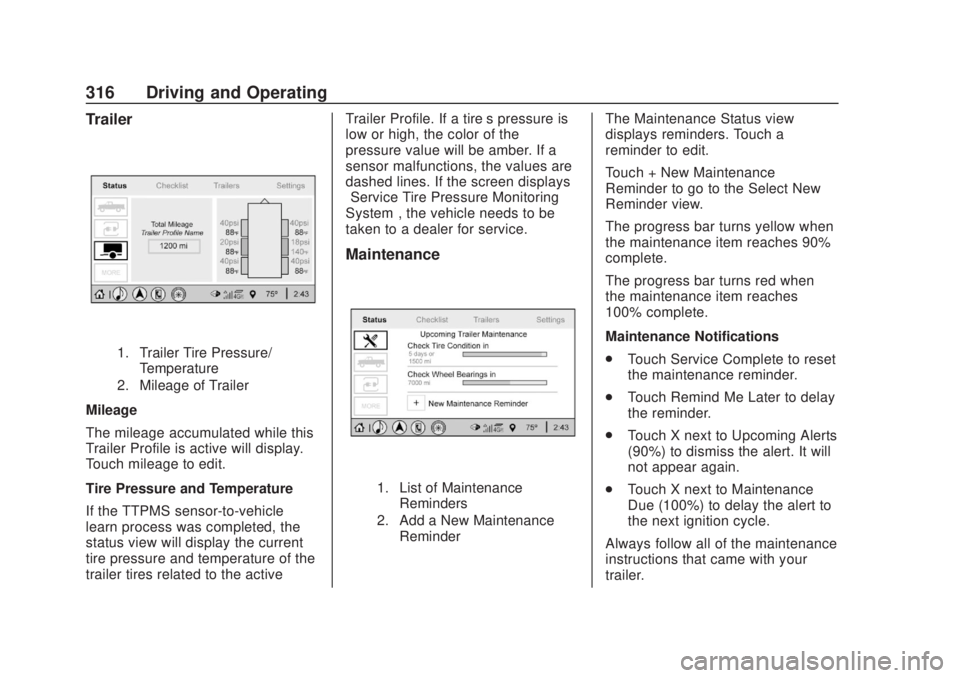
1. Trailer Tire Pressure/Temperature
2. Mileage of Trailer
Mileage
The mileage accumulated while this
Trailer Profile is active will display.
Touch mileage to edit.
Tire Pressure and Temperature
If the TTPMS sensor-to-vehicle
learn process was completed, the
status view will display the current
tire pressure and temperature of the
trailer tires related to the active Trailer Profile. If a tire’
s pressure is
low or high, the color of the
pressure value will be amber. If a
sensor malfunctions, the values are
dashed lines. If the screen displays
“Service Tire Pressure Monitoring
System”, the vehicle needs to be
taken to a dealer for service.
Maintenance
1. List of Maintenance
Reminders
2. Add a New Maintenance Reminder
The Maintenance Status view
displays reminders. Touch a
reminder to edit.
Touch + New Maintenance
Reminder to go to the Select New
Reminder view.
The progress bar turns yellow when
the maintenance item reaches 90%
complete.
The progress bar turns red when
the maintenance item reaches
100% complete.
Maintenance Notifications
.Touch Service Complete to reset
the maintenance reminder.
. Touch Remind Me Later to delay
the reminder.
. Touch X next to Upcoming Alerts
(90%) to dismiss the alert. It will
not appear again.
. Touch X next to Maintenance
Due (100%) to delay the alert to
the next ignition cycle.
Always follow all of the maintenance
instructions that came with your
trailer.
Page 322 of 500
Chevrolet Silverado Owner Manual (GMNA-Localizing-U.S./Canada/Mexico-
13337620) - 2020 - CRC - 4/11/19
Driving and Operating 321
Trailer Detection Alert
The Trailer Detection Alert setting
will be on by default. Turn it off to
disable the Trailer Detection pop-up
from displaying when a trailer is
connected. The Guest Trailer Profile
will become the active Trailer
Profile, unless another Trailer Profile
is selected manually through the
Trailering App. If this setting is
disabled while a Custom Trailer
Profile is active, that Trailer Profile
will remain the active profile until the
trailer is disconnected.
Maintenance Alerts
Touch Maintenance Alerts to view
the Maintenance Alerts settings
page. These alerts are based on the
Trailer Profile, so the settings for
each Trailer Profile must be turned
on or off. Touch a profile to view
more information or adjust the
setting for that profile.
The setting will be on by default for
each profile. All Maintenance Alerts
for that active Trailer Profile will be
received.Turn a setting off to not receive any
of the Maintenance Alerts when that
Trailer Profile is active.
Theft Alert
A theft alert can be set if a trailer is
connected and the alert is enabled.
When the trailer is disconnected
and the vehicle is off, an alarm will
sound.
Touch Theft Alert in Settings to view
the Theft Alert settings page. These
alerts are based on the Trailer
Profile, so the settings for each
Trailer Profile must be turned on or
off. Touch a profile to view more
information or adjust the setting for
that profile.
This setting will be off by default for
each Trailer Profile, including the
Guest Trailer Profile.
A smartphone will receive a
notification that the trailer related to
the selected Trailer Profile is
disconnected from the vehicle, if the
setting is on for the active Trailer
Profile, the vehicle has an OnStar or
connected service plan and thesmartphone number has been
added to the account for this
notification.
If the setting is turned off for a given
Trailer Profile, the smartphone will
not receive this security notification
even if the Trailer Profile is active.
Tow/Haul Mode Reminder
This is a reminder to turn on the
Tow/Haul Mode when towing a
trailer. See
Tow/Haul Mode 0226.
Touch Tow/Haul Mode Reminder in
Settings to view the Tow/Haul Mode
Reminder settings page. These
alerts are based on the Trailer
Profile, so the settings for each
Trailer Profile must be turned on or
off. Touch a profile to view more
information or to adjust the setting
for that profile.
This setting will default to OFF for
each Trailer Profile, including the
Guest Trailer Profile.
If Tow/Haul Mode is off and this
setting is on for a Trailer Profile,
each time the ignition is turned on a