Outside mirrors CHEVROLET SILVERADO 1500 2023 Owners Manual
[x] Cancel search | Manufacturer: CHEVROLET, Model Year: 2023, Model line: SILVERADO 1500, Model: CHEVROLET SILVERADO 1500 2023Pages: 463, PDF Size: 19.26 MB
Page 14 of 463
Chevrolet Silverado 1500 Owner Manual (GMNA-Localizing-U.S./Canada/
Mexico/Paraguay-16515119) - 2023 - CRC - 6/2/22
Keys, Doors, and Windows 13
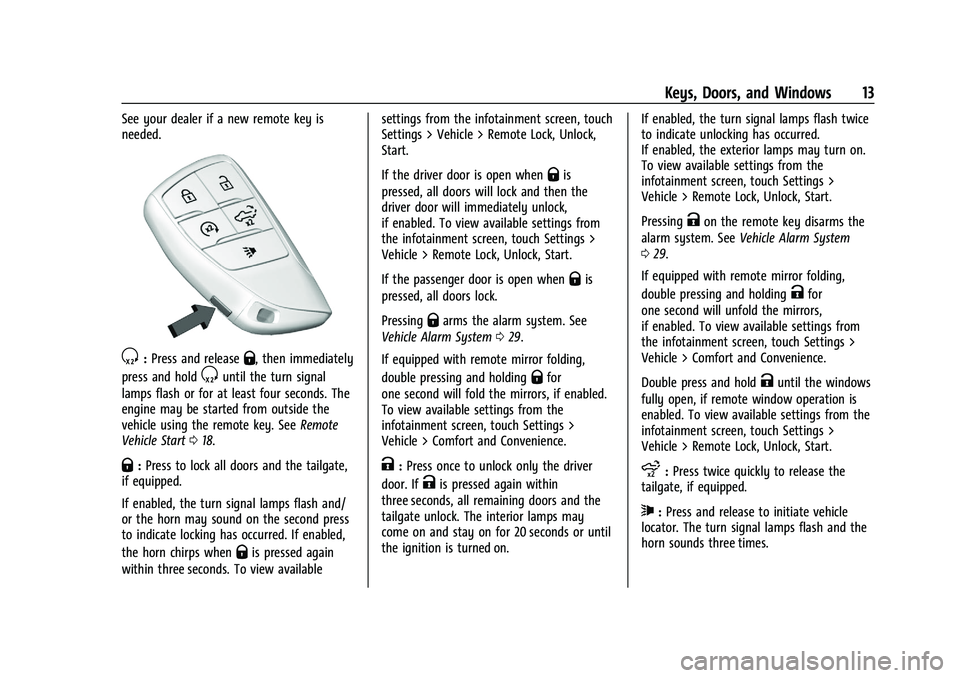
See your dealer if a new remote key is
needed.
S:Press and releaseQ, then immediately
press and hold
Suntil the turn signal
lamps flash or for at least four seconds. The
engine may be started from outside the
vehicle using the remote key. See Remote
Vehicle Start 018.
Q:Press to lock all doors and the tailgate,
if equipped.
If enabled, the turn signal lamps flash and/
or the horn may sound on the second press
to indicate locking has occurred. If enabled,
the horn chirps when
Qis pressed again
within three seconds. To view available settings from the infotainment screen, touch
Settings > Vehicle > Remote Lock, Unlock,
Start.
If the driver door is open when
Qis
pressed, all doors will lock and then the
driver door will immediately unlock,
if enabled. To view available settings from
the infotainment screen, touch Settings >
Vehicle > Remote Lock, Unlock, Start.
If the passenger door is open when
Qis
pressed, all doors lock.
Pressing
Qarms the alarm system. See
Vehicle Alarm System 029.
If equipped with remote mirror folding,
double pressing and holding
Qfor
one second will fold the mirrors, if enabled.
To view available settings from the
infotainment screen, touch Settings >
Vehicle > Comfort and Convenience.
K: Press once to unlock only the driver
door. If
Kis pressed again within
three seconds, all remaining doors and the
tailgate unlock. The interior lamps may
come on and stay on for 20 seconds or until
the ignition is turned on. If enabled, the turn signal lamps flash twice
to indicate unlocking has occurred.
If enabled, the exterior lamps may turn on.
To view available settings from the
infotainment screen, touch Settings >
Vehicle > Remote Lock, Unlock, Start.
Pressing
Kon the remote key disarms the
alarm system. See Vehicle Alarm System
0 29.
If equipped with remote mirror folding,
double pressing and holding
Kfor
one second will unfold the mirrors,
if enabled. To view available settings from
the infotainment screen, touch Settings >
Vehicle > Comfort and Convenience.
Double press and hold
Kuntil the windows
fully open, if remote window operation is
enabled. To view available settings from the
infotainment screen, touch Settings >
Vehicle > Remote Lock, Unlock, Start.
x: Press twice quickly to release the
tailgate, if equipped.
7: Press and release to initiate vehicle
locator. The turn signal lamps flash and the
horn sounds three times.
Page 33 of 463
Chevrolet Silverado 1500 Owner Manual (GMNA-Localizing-U.S./Canada/
Mexico/Paraguay-16515119) - 2023 - CRC - 6/2/22
32 Keys, Doors, and Windows
The lower portion of both the driver and
passenger mirrors is convex. A convex mirror
surface is curved so more can be seen from
the driver seat. The lower portion is
adjusted manually.
Manual Mirrors
If equipped, adjust manual mirrors by
moving the mirror up and down or left to
right to see a little of the side of the vehicle
and to have a clear view behind the vehicle.
Using hood-mounted air deflectors and
add-on convex mirror attachments could
decrease mirror performance.
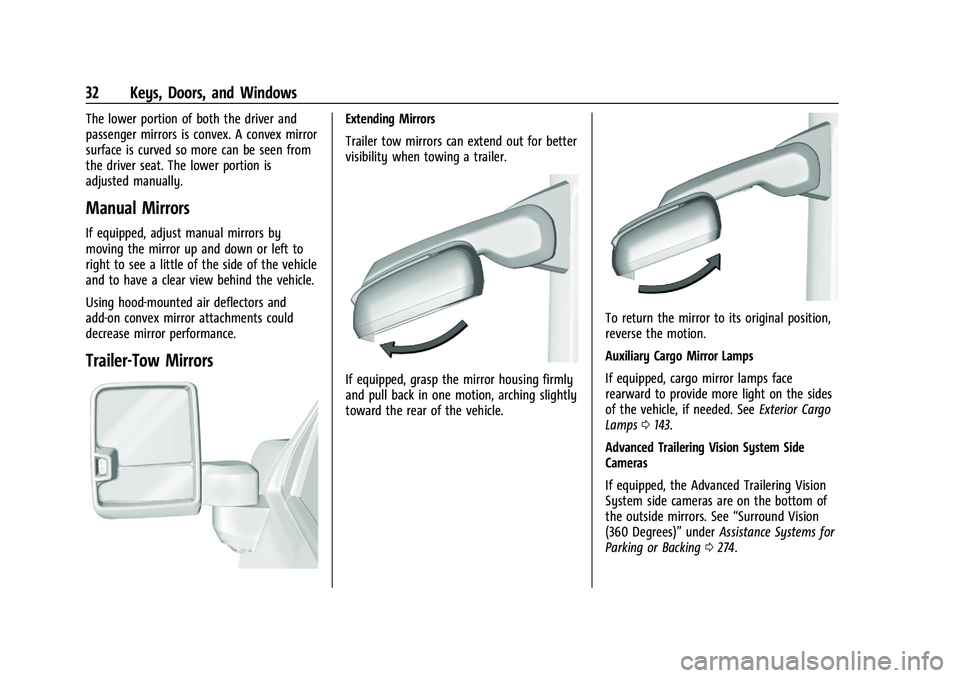
Trailer-Tow Mirrors
Extending Mirrors
Trailer tow mirrors can extend out for better
visibility when towing a trailer.
If equipped, grasp the mirror housing firmly
and pull back in one motion, arching slightly
toward the rear of the vehicle.
To return the mirror to its original position,
reverse the motion.
Auxiliary Cargo Mirror Lamps
If equipped, cargo mirror lamps face
rearward to provide more light on the sides
of the vehicle, if needed. SeeExterior Cargo
Lamps 0143.
Advanced Trailering Vision System Side
Cameras
If equipped, the Advanced Trailering Vision
System side cameras are on the bottom of
the outside mirrors. See “Surround Vision
(360 Degrees)” underAssistance Systems for
Parking or Backing 0274.
Page 34 of 463
Chevrolet Silverado 1500 Owner Manual (GMNA-Localizing-U.S./Canada/
Mexico/Paraguay-16515119) - 2023 - CRC - 6/2/22
Keys, Doors, and Windows 33
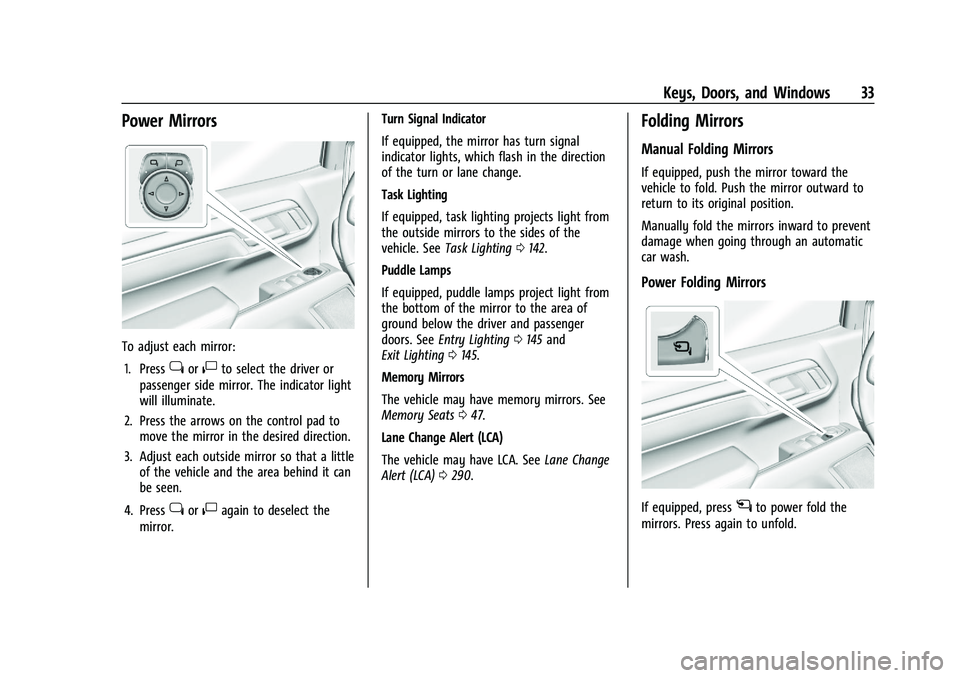
Power Mirrors
To adjust each mirror:1. Press
jor|to select the driver or
passenger side mirror. The indicator light
will illuminate.
2. Press the arrows on the control pad to move the mirror in the desired direction.
3. Adjust each outside mirror so that a little of the vehicle and the area behind it can
be seen.
4. Press
jor|again to deselect the
mirror. Turn Signal Indicator
If equipped, the mirror has turn signal
indicator lights, which flash in the direction
of the turn or lane change.
Task Lighting
If equipped, task lighting projects light from
the outside mirrors to the sides of the
vehicle. See
Task Lighting 0142.
Puddle Lamps
If equipped, puddle lamps project light from
the bottom of the mirror to the area of
ground below the driver and passenger
doors. See Entry Lighting 0145 and
Exit Lighting 0145.
Memory Mirrors
The vehicle may have memory mirrors. See
Memory Seats 047.
Lane Change Alert (LCA)
The vehicle may have LCA. See Lane Change
Alert (LCA) 0290.
Folding Mirrors
Manual Folding Mirrors
If equipped, push the mirror toward the
vehicle to fold. Push the mirror outward to
return to its original position.
Manually fold the mirrors inward to prevent
damage when going through an automatic
car wash.
Power Folding Mirrors
If equipped, pressgto power fold the
mirrors. Press again to unfold.
Page 35 of 463
Chevrolet Silverado 1500 Owner Manual (GMNA-Localizing-U.S./Canada/
Mexico/Paraguay-16515119) - 2023 - CRC - 6/2/22
34 Keys, Doors, and Windows
Resetting the Power Folding Mirrors
Reset the power folding mirrors if:
.The mirrors are accidentally obstructed
while folding.
.The mirrors are accidentally manually
folded/unfolded.
.The mirrors will not stay in the unfolded
position.
.The mirrors vibrate at normal driving
speeds.
Fold and unfold the mirrors one time using
the mirror controls to reset them to their
normal position. A noise may be heard
during the resetting of the power folding
mirrors. This sound is normal after a manual
folding operation.
Remote Mirror Folding
If equipped, press and holdQon the
remote key for approximately one second to
remotely fold the exterior mirrors. Press and
hold
Kon the remote key for
approximately one second to unfold. See
Remote Key Operation 012.
This feature can be turned on or off. To
view available settings from the
infotainment screen, touch Settings >
Vehicle > Comfort and Convenience.
Heated Mirrors
1REAR : If equipped, the rear window
defogger also heats the outside mirrors.
W: If equipped, press to turn the heated
outside mirrors on or off.
See “Rear Window Defogger” underClimate
Control Systems 0185 or
Dual Automatic Climate Control System
0 187.
Automatic Dimming Mirror
If equipped, the driver outside mirror
automatically adjusts for the glare of the
headlamps from behind. This feature comes
on when the vehicle is started.
Blind Spot Mirrors
If equipped, there is a small convex mirror
built into the upper and outer corner of the
driver outside mirror. It can show objects
that may be in the vehicle's blind zone.
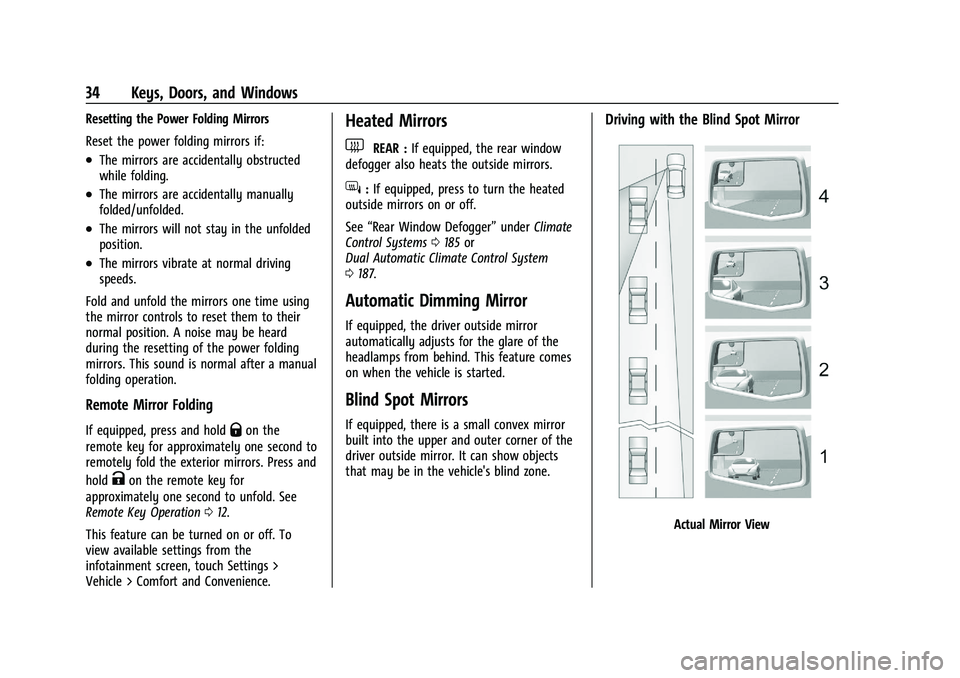
Driving with the Blind Spot Mirror
Actual Mirror View
Page 36 of 463
Chevrolet Silverado 1500 Owner Manual (GMNA-Localizing-U.S./Canada/
Mexico/Paraguay-16515119) - 2023 - CRC - 6/2/22
Keys, Doors, and Windows 35
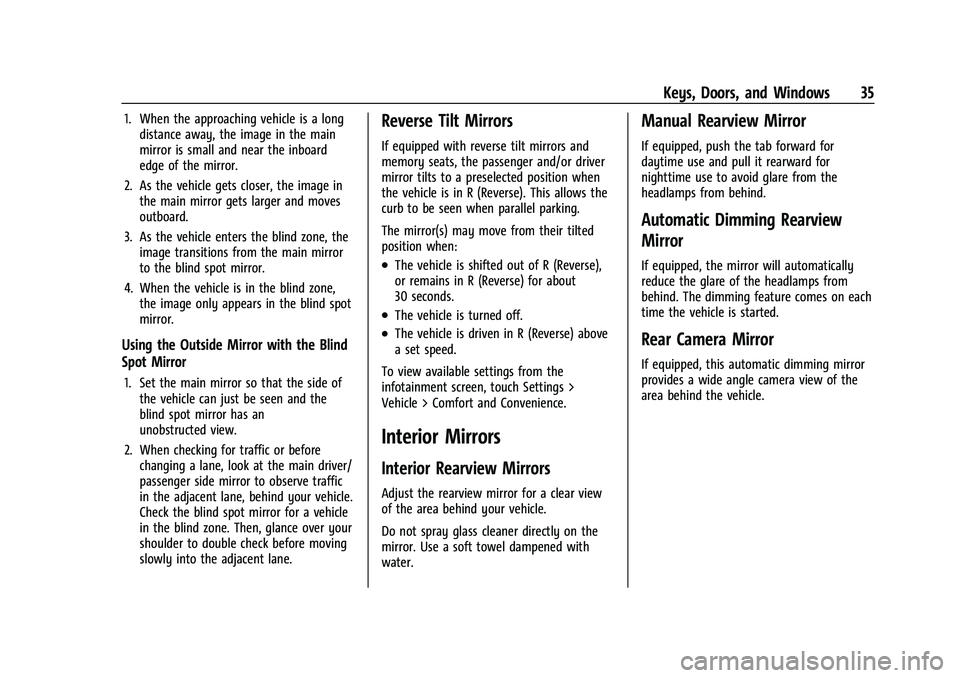
1. When the approaching vehicle is a longdistance away, the image in the main
mirror is small and near the inboard
edge of the mirror.
2. As the vehicle gets closer, the image in the main mirror gets larger and moves
outboard.
3. As the vehicle enters the blind zone, the image transitions from the main mirror
to the blind spot mirror.
4. When the vehicle is in the blind zone, the image only appears in the blind spot
mirror.
Using the Outside Mirror with the Blind
Spot Mirror
1. Set the main mirror so that the side ofthe vehicle can just be seen and the
blind spot mirror has an
unobstructed view.
2. When checking for traffic or before changing a lane, look at the main driver/
passenger side mirror to observe traffic
in the adjacent lane, behind your vehicle.
Check the blind spot mirror for a vehicle
in the blind zone. Then, glance over your
shoulder to double check before moving
slowly into the adjacent lane.
Reverse Tilt Mirrors
If equipped with reverse tilt mirrors and
memory seats, the passenger and/or driver
mirror tilts to a preselected position when
the vehicle is in R (Reverse). This allows the
curb to be seen when parallel parking.
The mirror(s) may move from their tilted
position when:
.The vehicle is shifted out of R (Reverse),
or remains in R (Reverse) for about
30 seconds.
.The vehicle is turned off.
.The vehicle is driven in R (Reverse) above
a set speed.
To view available settings from the
infotainment screen, touch Settings >
Vehicle > Comfort and Convenience.
Interior Mirrors
Interior Rearview Mirrors
Adjust the rearview mirror for a clear view
of the area behind your vehicle.
Do not spray glass cleaner directly on the
mirror. Use a soft towel dampened with
water.
Manual Rearview Mirror
If equipped, push the tab forward for
daytime use and pull it rearward for
nighttime use to avoid glare from the
headlamps from behind.
Automatic Dimming Rearview
Mirror
If equipped, the mirror will automatically
reduce the glare of the headlamps from
behind. The dimming feature comes on each
time the vehicle is started.
Rear Camera Mirror
If equipped, this automatic dimming mirror
provides a wide angle camera view of the
area behind the vehicle.
Page 38 of 463
Chevrolet Silverado 1500 Owner Manual (GMNA-Localizing-U.S./Canada/
Mexico/Paraguay-16515119) - 2023 - CRC - 6/2/22
Keys, Doors, and Windows 37
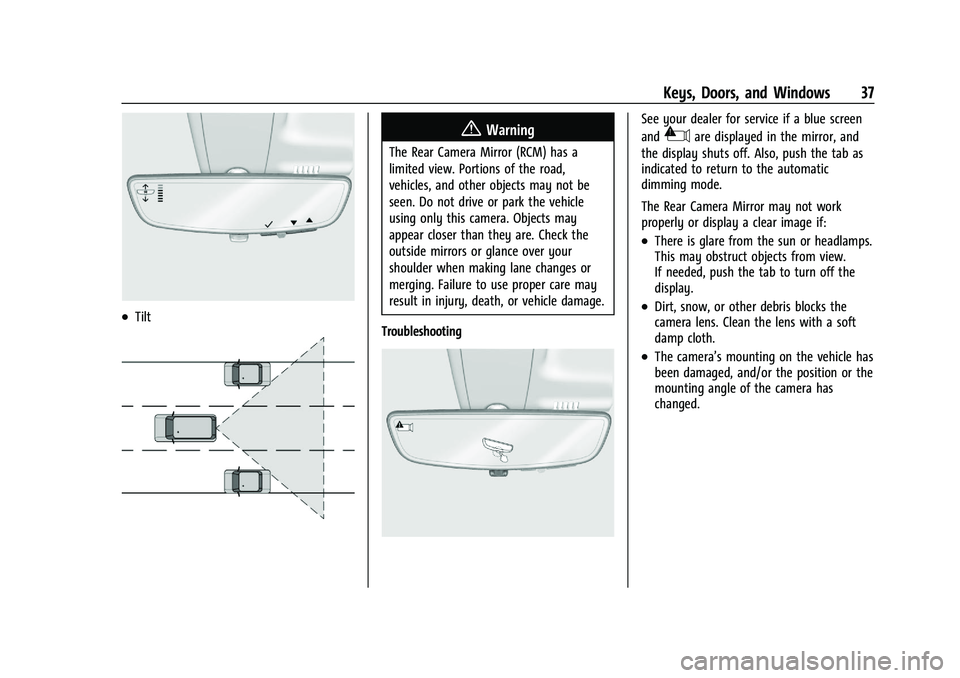
.Tilt
{Warning
The Rear Camera Mirror (RCM) has a
limited view. Portions of the road,
vehicles, and other objects may not be
seen. Do not drive or park the vehicle
using only this camera. Objects may
appear closer than they are. Check the
outside mirrors or glance over your
shoulder when making lane changes or
merging. Failure to use proper care may
result in injury, death, or vehicle damage.
Troubleshooting
See your dealer for service if a blue screen
and
3are displayed in the mirror, and
the display shuts off. Also, push the tab as
indicated to return to the automatic
dimming mode.
The Rear Camera Mirror may not work
properly or display a clear image if:
.There is glare from the sun or headlamps.
This may obstruct objects from view.
If needed, push the tab to turn off the
display.
.Dirt, snow, or other debris blocks the
camera lens. Clean the lens with a soft
damp cloth.
.The camera’s mounting on the vehicle has
been damaged, and/or the position or the
mounting angle of the camera has
changed.
Page 143 of 463
Chevrolet Silverado 1500 Owner Manual (GMNA-Localizing-U.S./Canada/
Mexico/Paraguay-16515119) - 2023 - CRC - 6/2/22
142 Lighting
Some localities have laws that require the
headlamps to be on with the fog lamps.
Task Lighting
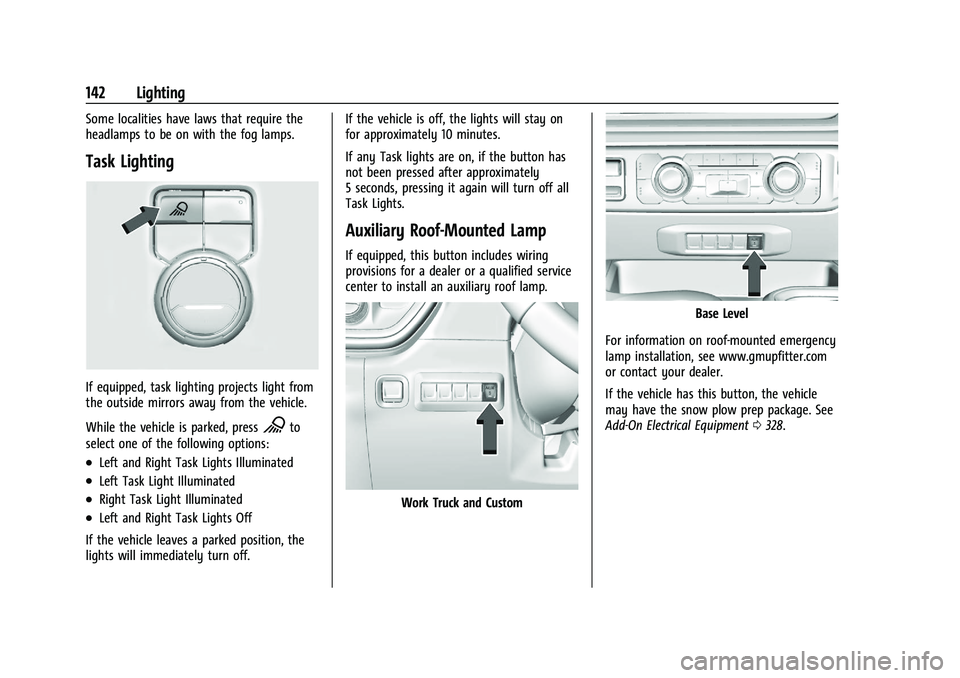
If equipped, task lighting projects light from
the outside mirrors away from the vehicle.
While the vehicle is parked, press
Kto
select one of the following options:
.Left and Right Task Lights Illuminated
.Left Task Light Illuminated
.Right Task Light Illuminated
.Left and Right Task Lights Off
If the vehicle leaves a parked position, the
lights will immediately turn off. If the vehicle is off, the lights will stay on
for approximately 10 minutes.
If any Task lights are on, if the button has
not been pressed after approximately
5 seconds, pressing it again will turn off all
Task Lights.
Auxiliary Roof-Mounted Lamp
If equipped, this button includes wiring
provisions for a dealer or a qualified service
center to install an auxiliary roof lamp.
Work Truck and Custom
Base Level
For information on roof-mounted emergency
lamp installation, see www.gmupfitter.com
or contact your dealer.
If the vehicle has this button, the vehicle
may have the snow plow prep package. See
Add-On Electrical Equipment 0328.
Page 187 of 463
Chevrolet Silverado 1500 Owner Manual (GMNA-Localizing-U.S./Canada/
Mexico/Paraguay-16515119) - 2023 - CRC - 6/2/22
186 Climate Controls
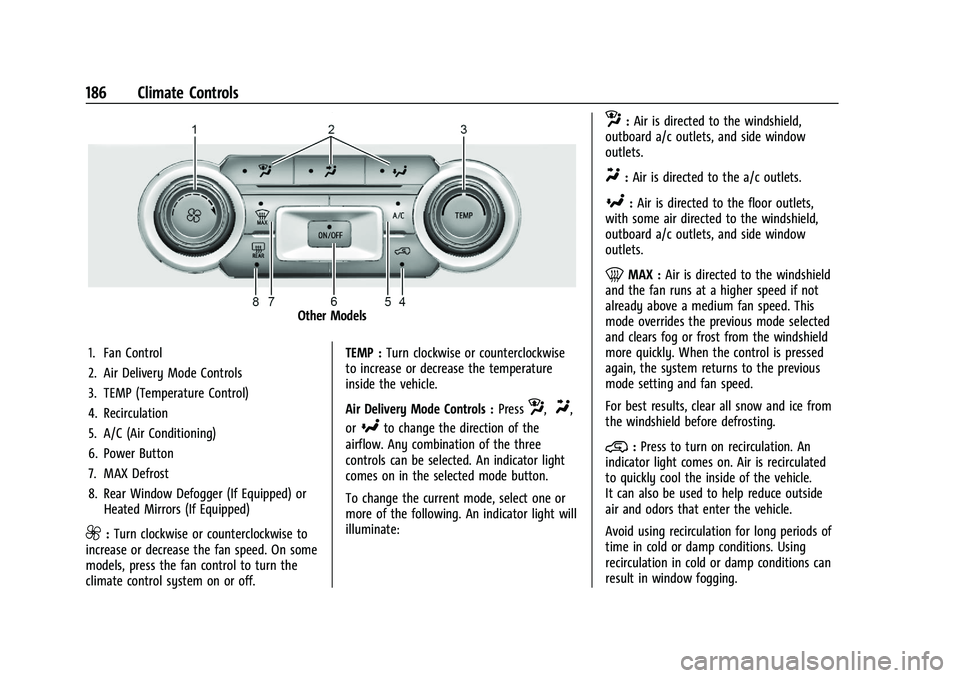
Other Models
1. Fan Control
2. Air Delivery Mode Controls
3. TEMP (Temperature Control)
4. Recirculation
5. A/C (Air Conditioning)
6. Power Button
7. MAX Defrost
8. Rear Window Defogger (If Equipped) or Heated Mirrors (If Equipped)
9:Turn clockwise or counterclockwise to
increase or decrease the fan speed. On some
models, press the fan control to turn the
climate control system on or off. TEMP :
Turn clockwise or counterclockwise
to increase or decrease the temperature
inside the vehicle.
Air Delivery Mode Controls : Press
z,Y,
or
[to change the direction of the
airflow. Any combination of the three
controls can be selected. An indicator light
comes on in the selected mode button.
To change the current mode, select one or
more of the following. An indicator light will
illuminate:
z: Air is directed to the windshield,
outboard a/c outlets, and side window
outlets.
Y: Air is directed to the a/c outlets.
[:Air is directed to the floor outlets,
with some air directed to the windshield,
outboard a/c outlets, and side window
outlets.
0MAX : Air is directed to the windshield
and the fan runs at a higher speed if not
already above a medium fan speed. This
mode overrides the previous mode selected
and clears fog or frost from the windshield
more quickly. When the control is pressed
again, the system returns to the previous
mode setting and fan speed.
For best results, clear all snow and ice from
the windshield before defrosting.
@: Press to turn on recirculation. An
indicator light comes on. Air is recirculated
to quickly cool the inside of the vehicle.
It can also be used to help reduce outside
air and odors that enter the vehicle.
Avoid using recirculation for long periods of
time in cold or damp conditions. Using
recirculation in cold or damp conditions can
result in window fogging.
Page 188 of 463
Chevrolet Silverado 1500 Owner Manual (GMNA-Localizing-U.S./Canada/
Mexico/Paraguay-16515119) - 2023 - CRC - 6/2/22
Climate Controls 187
A/C :Press to turn the air conditioning on
or off. An indicator light comes on to show
that the air conditioning is enabled. If the
fan is turned off, the air conditioner will not
run. The A/C light will stay on even if the
outside temperatures are below freezing.
Rear Window Defogger
1REAR : If equipped, press to turn the
rear window defogger on or off. An indicator
light on the button comes on to show that
the rear window defogger is on.
The rear window defogger only works when
the engine is running. The defogger turns
off if the vehicle is turned off or to
accessory mode.
If equipped with heated outside mirrors,
press
fto turn them on or off. See Heated
Mirrors 034.
Caution
Using a razor blade or sharp object to
clear the inside rear window can damage
the rear window defogger. Repairs would
not be covered by the vehicle warranty.
Do not clear the inside rear window with
sharp objects.
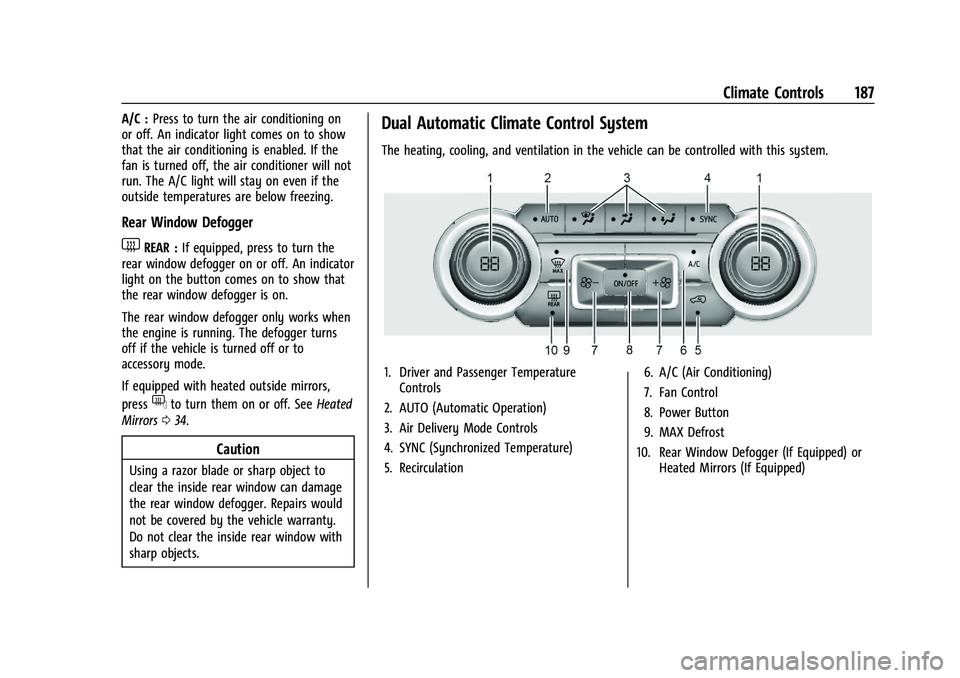
Dual Automatic Climate Control System
The heating, cooling, and ventilation in the vehicle can be controlled with this system.
1. Driver and Passenger Temperature
Controls
2. AUTO (Automatic Operation)
3. Air Delivery Mode Controls
4. SYNC (Synchronized Temperature)
5. Recirculation 6. A/C (Air Conditioning)
7. Fan Control
8. Power Button
9. MAX Defrost
10. Rear Window Defogger (If Equipped) or Heated Mirrors (If Equipped)
Page 190 of 463
Chevrolet Silverado 1500 Owner Manual (GMNA-Localizing-U.S./Canada/
Mexico/Paraguay-16515119) - 2023 - CRC - 6/2/22
Climate Controls 189
Driver and Passenger Temperature Control :
The temperature can be adjusted separately
for the driver and passenger.
Turn the knob clockwise or counterclockwise
to increase or decrease the driver or
passenger temperature setting. The driver
side or passenger side temperature display
shows the temperature setting increasing or
decreasing.
SYNC :Press to link the passenger
temperature setting to the driver setting.
The SYNC indicator light will turn on. When
the passenger setting is adjusted, the SYNC
indicator light will turn off.
Air Delivery Mode Control : Press
z,Y,
or
[to change the direction of the
airflow. Any combination of the three
controls can be selected. An indicator light
comes on in the selected mode button.
Changing the mode cancels the automatic
operation and the system goes into manual
mode. Press AUTO to return to automatic
operation.
To change the current mode, select one or
more of the following:
z: Air is directed to the windshield,
outboard A/C outlets, and side window
outlets.
Y: Air is directed to the A/C outlets.
[:Air is directed to the floor outlets,
with some air directed to the windshield,
outboard A/C outlets, and side window
outlets.
0MAX : Air is directed to the windshield
and the fan runs at a higher speed if not
already above a medium fan speed. This
mode overrides the previous mode selected
and clears fog or frost from the windshield
more quickly. When the control is pressed
again, the system returns to the previous
mode setting and fan speed.
For best results, clear all snow and ice from
the windshield before defrosting.
@: Press to turn on recirculation. An
indicator light comes on. Air is recirculated
to quickly cool the inside of the vehicle.
It can also be used to help reduce outside
air and odors that enter the vehicle.
Avoid using recirculation for long periods of
time in cold or damp conditions. Using
recirculation in cold or damp conditions can
result in window fogging. A/C :
Press to turn the air conditioning on
or off. An indicator light comes on to show
that the air conditioning is enabled. If the
fan is turned off, the air conditioner will not
run. The A/C light will stay on even if the
outside temperatures are below freezing.
Rear Window Defogger
1REAR : If equipped, press to turn the
rear window defogger on or off. An indicator
light on the button comes on to show that
the rear window defogger is on.
The rear window defogger only works when
the engine is running. The defogger can be
turned off by turning the vehicle off or to
accessory mode.
If equipped with heated outside mirrors,
press
fto turn them on or off. See Heated
Mirrors 034.
Caution
Using a razor blade or sharp object to
clear the inside rear window can damage
the rear window defogger. Repairs would
not be covered by the vehicle warranty.
Do not clear the inside rear window with
sharp objects.