brake CHEVROLET SILVERADO 1500 Z71 2018 Owners Manual
[x] Cancel search | Manufacturer: CHEVROLET, Model Year: 2018, Model line: SILVERADO 1500 Z71, Model: CHEVROLET SILVERADO 1500 Z71 2018Pages: 501, PDF Size: 6.69 MB
Page 4 of 501
Chevrolet Silverado Owner Manual (GMNA-Localizing-U.S./Canada/Mexico-
11349200) - 2018 - CRC - 2/27/18
Introduction 3
Danger, Warning, and
Caution
Warning messages found on vehicle
labels and in this manual describe
hazards and what to do to avoid or
reduce them.
{Danger
Danger indicates a hazard with a
high level of risk which will result
in serious injury or death.
{Warning
Warning indicates a hazard that
could result in injury or death.
Caution
Caution indicates a hazard that
could result in property or vehicle
damage.
A circle with a slash through it is a
safety symbol which means“Do
Not,” “Do not do this,” or“Do not let
this happen.”
Symbols
The vehicle has components and
labels that use symbols instead of
text. Symbols are shown along with
the text describing the operation or
information relating to a specific
component, control, message,
gauge, or indicator.
M: Shown when the owner ’s
manual has additional instructions
or information.
*: Shown when the service
manual has additional instructions
or information.
0: Shown when there is more
information on another page —
“see page.” Vehicle Symbol Chart
Here are some additional symbols
that may be found on the vehicle
and what they mean. See the
features in this manual for
information.
9:
Airbag Readiness Light
#:Air Conditioning
!:Antilock Brake System (ABS)
$:Brake System Warning Light
":Charging System
I: Cruise Control
`:Do Not Puncture
^:Do Not Service
B:Engine Coolant Temperature
O:Exterior Lamps
_: Flame/Fire Prohibited
.:Fuel Gauge
+: Fuses
3:Headlamp High/Low-Beam
Changer
j: ISOFIX/LATCH System Child
Restraints
Page 6 of 501
Chevrolet Silverado Owner Manual (GMNA-Localizing-U.S./Canada/Mexico-
11349200) - 2018 - CRC - 2/27/18
In Brief 5
In Brief
Instrument Panel
Instrument Panel . . . . . . . . . . . . . . . . 6
Initial Drive Information
Initial Drive Information . . . . . . . . . . 8
Remote Keyless Entry (RKE)System . . . . . . . . . . . . . . . . . . . . . . . . 8
Remote Vehicle Start . . . . . . . . . . . 9
Door Locks . . . . . . . . . . . . . . . . . . . . . 9
Windows . . . . . . . . . . . . . . . . . . . . . . . 10
Seat Adjustment . . . . . . . . . . . . . . . 11
Memory Features . . . . . . . . . . . . . . 13
Heated and Ventilated Seats . . . 14
Head Restraint Adjustment . . . . 14
Seat Belts . . . . . . . . . . . . . . . . . . . . . 14
Passenger Sensing System . . . 15
Mirror Adjustment . . . . . . . . . . . . . . 15
Steering Wheel Adjustment . . . . 17
Throttle and Brake Pedal Adjustment . . . . . . . . . . . . . . . . . . . 17
Interior Lighting . . . . . . . . . . . . . . . . 18
Exterior Lighting . . . . . . . . . . . . . . . 18
Windshield Wiper/Washer . . . . . . 19
Climate Controls . . . . . . . . . . . . . . . 19
Transmission . . . . . . . . . . . . . . . . . . 22
Four-Wheel Drive . . . . . . . . . . . . . . 23
Vehicle Features
Infotainment System . . . . . . . . . . . 24
Radio(s) . . . . . . . . . . . . . . . . . . . . . . . 24
Satellite Radio . . . . . . . . . . . . . . . . . 25
Portable Audio Devices . . . . . . . . 25
Bluetooth . . . . . . . . . . . . . . . . . . . . . . 25
Steering Wheel Controls . . . . . . . 25
Cruise Control . . . . . . . . . . . . . . . . . 26
Driver Information Center (DIC) . . . . . . . . . . . . . . . . . 26
Forward Collision Alert (FCA) System . . . . . . . . . . . . . . . . . . . . . . . 27
Forward Automatic Braking (FAB) . . . . . . . . . . . . . . . . 27
Lane Departure Warning (LDW) . . . . . . . . . . . . . . . 27
Lane Keep Assist (LKA) . . . . . . . 28
Rear Vision Camera (RVC) . . . . 28
Parking Assist . . . . . . . . . . . . . . . . . 28
Power Outlets . . . . . . . . . . . . . . . . . 28
Universal Remote System . . . . . 29
Sunroof . . . . . . . . . . . . . . . . . . . . . . . . 29
Performance and Maintenance
Traction Control/Electronic Stability Control . . . . . . . . . . . . . . 30
Tire Pressure Monitor . . . . . . . . . . 30
Fuel (Gasoline - Except L86 6.2L Engine) . . . . . . . . . . . . . 31 Fuel (Gasoline - L86 6.2L
Engine) . . . . . . . . . . . . . . . . . . . . . . . 31
Fuel (Diesel) . . . . . . . . . . . . . . . . . . . 31
E85 or FlexFuel . . . . . . . . . . . . . . . . 31
Engine Oil Life System . . . . . . . . 32
Driving for Better Fuel Economy . . . . . . . . . . . . . . . . . . . . . 32
Roadside Assistance Program . . . . . . . . . . . . . . . . . . . . . . 33
Page 8 of 501

Chevrolet Silverado Owner Manual (GMNA-Localizing-U.S./Canada/Mexico-
11349200) - 2018 - CRC - 2/27/18
In Brief 7
1.Instrument Panel Illumination
Control 0177.
2. Integrated Trailer Brake Control (ITBC) System (If Equipped).
See Towing Equipment 0318.
3. Exterior Lamp Controls 0171.
Fog Lamps 0176 (If
Equipped).
4. Air Vents 0223.
5. Turn Signal Lever. See Turn
and Lane-Change Signals
0 175.
Windshield Wiper/Washer
0 130.
6. Favorite Switches (Out of View). See Steering Wheel
Controls 0129.
Volume Switches (Out of View).
See Steering Wheel Controls
0 129.
7. Instrument Cluster 0137.
8. Hazard Warning Flashers
0175.
9. Shift Lever. See Automatic
Transmission 0257. Tow/Haul Selector Button (If
Equipped). See
Tow/Haul
Mode 0262.
Range Selection Mode (If
Equipped). See Manual Mode
0 260.
10. Light Sensor. See Automatic
Headlamp System 0174.
11. Infotainment 0181.
12. Passenger Airbag On-Off Switch (If Equipped) (Out of
View). See Airbag On-Off
Switch 084.
13. Heated and Ventilated Front
Seats 065 (If Equipped).
14. Power Outlet 110/120 Volt Alternating Current (If
Equipped). See Power Outlets
0 132.
15. Power Outlets 0132 (If
Equipped).
16.
gTraction Control/Electronic
Stability Control 0276.
0Pedal Adjust Switch (If
Equipped). See Adjustable
Throttle and Brake Pedal
0 247.
{Cargo Lamp 0177.
XParking Assist Button (If
Equipped). See Assistance
Systems for Parking or Backing
0 282.
ALane Keep Assist (LKA)
(1500 Series) 0290 (If
Equipped).
@Lane Departure Warning
(LDW) (2500/3500 Series)
0 288 (If Equipped).
5Hill Descent Control Switch
(If Equipped). See Hill Descent
Control (HDC) 0277.
qExhaust Brake Switch (If
Equipped). See “Exhaust
Brake” in the Duramax diesel
supplement.
gPower Take Off (PTO)
Switch (If Equipped). See the
Duramax diesel supplement.
Page 9 of 501
Chevrolet Silverado Owner Manual (GMNA-Localizing-U.S./Canada/Mexico-
11349200) - 2018 - CRC - 2/27/18
8 In Brief
Auxiliary Button (If Equipped).
SeeAdd-On Electrical
Equipment 0329.
jPower Assist Steps 043 (If
Equipped).
17. Instrument Panel Storage
0124 (If Equipped).
18. Climate Control Systems (with
Heater Only) 0216 orClimate
Control Systems (with Air
Conditioning) 0218 (If
Equipped).
Dual Automatic Climate Control
System 0220 (If Equipped).
19. Parking Brake Release (Manual Transmission Only, If
Equipped). See Parking Brake
0 273
20. Steering Wheel Controls 0129
(If Equipped).
Driver Information Center (DIC)
Controls (If Equipped).
See Driver Information Center
(DIC) (Base Level) 0155 or
Driver Information Center (DIC)
(Uplevel) 0156. 21. Hood Release. See
Hood
0 337.
22. Horn 0130.
23. Steering Wheel Adjustment
0129 (Out of View).
24. Cruise Control 0279.
Heated Steering Wheel 0130
(If Equipped).
Forward Collision Alert (FCA)
System 0285 (If Equipped).
25. Data Link Connector (DLC) (Out of View). See Malfunction
Indicator Lamp (Check Engine
Light) 0147.
26. Parking Brake 0273.
27. Electronic Transfer Case Knob (If Equipped). See Four-Wheel
Drive 0265.
Card Holder (If Equipped). See
Instrument Panel Storage
0 124.
Initial Drive
Information
This section provides a brief
overview about some of the
important features that may or may
not be on your specific vehicle.
For more detailed information, refer
to each of the features which can be
found later in this owner ’s manual.
Remote Keyless Entry
(RKE) System
The Remote Keyless Entry (RKE)
transmitter functions may work from
up to 60 m (197 ft) away from the
vehicle.
Page 18 of 501
Chevrolet Silverado Owner Manual (GMNA-Localizing-U.S./Canada/Mexico-
11349200) - 2018 - CRC - 2/27/18
In Brief 17
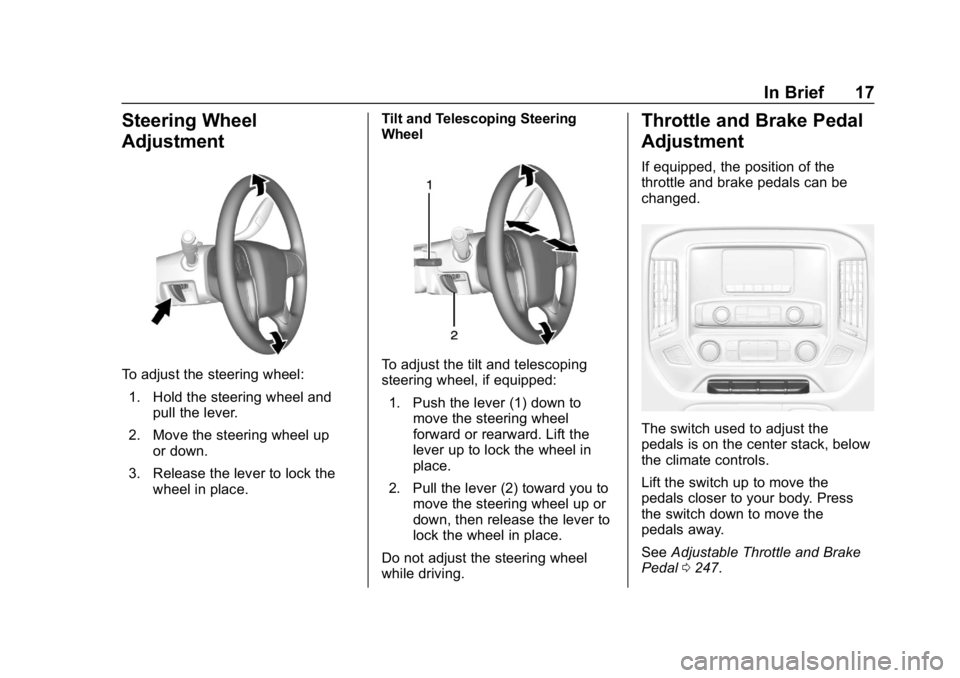
Steering Wheel
Adjustment
To adjust the steering wheel:1. Hold the steering wheel and pull the lever.
2. Move the steering wheel up or down.
3. Release the lever to lock the wheel in place. Tilt and Telescoping Steering
WheelTo adjust the tilt and telescoping
steering wheel, if equipped:
1. Push the lever (1) down to move the steering wheel
forward or rearward. Lift the
lever up to lock the wheel in
place.
2. Pull the lever (2) toward you to move the steering wheel up or
down, then release the lever to
lock the wheel in place.
Do not adjust the steering wheel
while driving.
Throttle and Brake Pedal
Adjustment
If equipped, the position of the
throttle and brake pedals can be
changed.
The switch used to adjust the
pedals is on the center stack, below
the climate controls.
Lift the switch up to move the
pedals closer to your body. Press
the switch down to move the
pedals away.
See Adjustable Throttle and Brake
Pedal 0247.
Page 28 of 501
Chevrolet Silverado Owner Manual (GMNA-Localizing-U.S./Canada/Mexico-
11349200) - 2018 - CRC - 2/27/18
In Brief 27
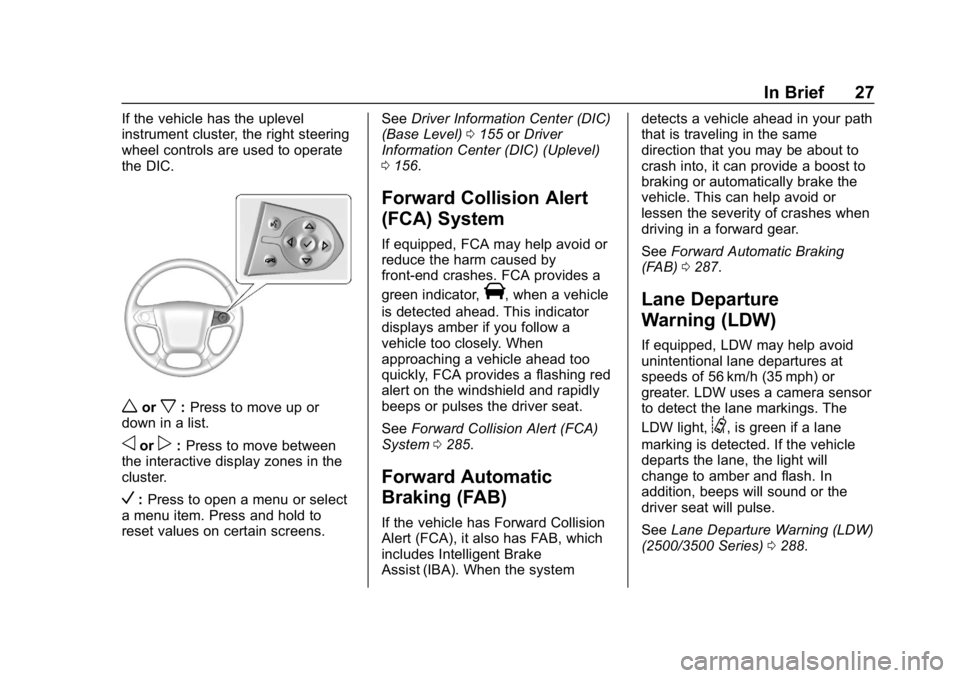
If the vehicle has the uplevel
instrument cluster, the right steering
wheel controls are used to operate
the DIC.
worx:Press to move up or
down in a list.
oorp: Press to move between
the interactive display zones in the
cluster.
V: Press to open a menu or select
a menu item. Press and hold to
reset values on certain screens. See
Driver Information Center (DIC)
(Base Level) 0155 orDriver
Information Center (DIC) (Uplevel)
0 156.
Forward Collision Alert
(FCA) System
If equipped, FCA may help avoid or
reduce the harm caused by
front-end crashes. FCA provides a
green indicator,
V, when a vehicle
is detected ahead. This indicator
displays amber if you follow a
vehicle too closely. When
approaching a vehicle ahead too
quickly, FCA provides a flashing red
alert on the windshield and rapidly
beeps or pulses the driver seat.
See Forward Collision Alert (FCA)
System 0285.
Forward Automatic
Braking (FAB)
If the vehicle has Forward Collision
Alert (FCA), it also has FAB, which
includes Intelligent Brake
Assist (IBA). When the system detects a vehicle ahead in your path
that is traveling in the same
direction that you may be about to
crash into, it can provide a boost to
braking or automatically brake the
vehicle. This can help avoid or
lessen the severity of crashes when
driving in a forward gear.
See
Forward Automatic Braking
(FAB) 0287.
Lane Departure
Warning (LDW)
If equipped, LDW may help avoid
unintentional lane departures at
speeds of 56 km/h (35 mph) or
greater. LDW uses a camera sensor
to detect the lane markings. The
LDW light,
@, is green if a lane
marking is detected. If the vehicle
departs the lane, the light will
change to amber and flash. In
addition, beeps will sound or the
driver seat will pulse.
See Lane Departure Warning (LDW)
(2500/3500 Series) 0288.
Page 33 of 501
Chevrolet Silverado Owner Manual (GMNA-Localizing-U.S./Canada/Mexico-
11349200) - 2018 - CRC - 2/27/18
32 In Brief
Engine Oil Life System
The engine oil life system calculates
engine oil life based on vehicle use
and, on most vehicles, displays a
DIC message when it is necessary
to change the engine oil and filter.
The oil life system should be reset
to 100% only following an oil
change.
Resetting the Oil Life System
To reset the engine oil life system:1. Display OIL LIFE REMAINING on the DIC. See Driver
Information Center (DIC) (Base
Level) 0155 orDriver
Information Center (DIC)
(Uplevel) 0156. If the vehicle
does not have DIC buttons, the
vehicle must be in P (Park) to
access this display.
2. Press and hold
Von the DIC,
or the trip odometer reset stem
if the vehicle does not have
DIC buttons, for several
seconds. The oil life will
change to 100%. The oil life system can also be reset
as follows:
1. Display OIL LIFE REMAINING on the DIC. See Driver
Information Center (DIC) (Base
Level) 0155 orDriver
Information Center (DIC)
(Uplevel) 0156.
2. Fully press the accelerator pedal slowly three times within
five seconds.
3. If the display changes to 100%, the system is reset.
See Engine Oil Life System 0346.
Driving for Better Fuel
Economy
Driving habits can affect fuel
mileage. Here are some driving tips
to get the best fuel economy
possible.
.
Avoid fast starts and accelerate
smoothly.
. Brake gradually and avoid
abrupt stops. .
Avoid idling the engine for long
periods of time.
. When road and weather
conditions are appropriate, use
cruise control.
. Always follow posted speed
limits or drive more slowly when
conditions require.
. Keep vehicle tires properly
inflated.
. Combine several trips into a
single trip.
. Replace the vehicle's tires with
the same TPC Spec number
molded into the tire's sidewall
near the size.
. Follow recommended scheduled
maintenance.
Page 70 of 501
Chevrolet Silverado Owner Manual (GMNA-Localizing-U.S./Canada/Mexico-
11349200) - 2018 - CRC - 2/27/18
Seats and Restraints 69
Seat Belts
This section describes how to use
seat belts properly, and some things
not to do.
{Warning
Do not let anyone ride where a
seat belt cannot be worn properly.
In a crash, if you or your
passenger(s) are not wearing
seat belts, injuries can be much
worse than if you are wearing
seat belts. You can be seriously
injured or killed by hitting things
inside the vehicle harder or by
being ejected from the vehicle. In
addition, anyone who is not
buckled up can strike other
passengers in the vehicle.
It is extremely dangerous to ride
in a cargo area, inside or outside
of a vehicle. In a collision,
passengers riding in these areas
are more likely to be seriously
injured or killed. Do not allow(Continued)
Warning (Continued)
passengers to ride in any area of
the vehicle that is not equipped
with seats and seat belts.
Always wear a seat belt, and
check that all passenger(s) are
restrained properly too.
This vehicle has indicators as a
reminder to buckle the seat belts.
See Seat Belt Reminders 0143.
Seat Belt Assurance System
This vehicle may have the Seat Belt
Assurance System, which prevents
the vehicle from shifting out of
P (Park). A message displays in the
Driver Information Center (DIC)
indicating the shift lever is locked
when the brake pedal is applied and
the seat belts for either the driver or
front outboard passenger are not
buckled. The vehicle will not shift
out of P (Park). Buckle the seat
belts to unlock the shift lever. If the front passenger seat is unoccupied,
only the driver seat belt must be
buckled to unlock the shift lever.
This system may not allow the
vehicle to shift out of P (Park) if an
object
—such as a briefcase,
handbag, grocery bag, laptop,
or other electronic device —is on
the front outboard passenger seat.
If this happens, remove the object
from the seat or buckle the
seat belt.
If the driver or front outboard
passenger unbuckles their seat belt
while driving, the seat belt reminder
chime and light(s) will come on. See
Seat Belt Reminders 0143.
The Seat Belt Assurance System
will time out 30 seconds after the
brake pedal is initially pressed.
A message displays in the DIC
indicating the shift lever is unlocked
allowing the vehicle to be shifted out
of P (Park). See “Seat Belts”and
“Child Restraints” in the Index for
information about the importance of
proper restraint use.
Page 84 of 501
Chevrolet Silverado Owner Manual (GMNA-Localizing-U.S./Canada/Mexico-
11349200) - 2018 - CRC - 2/27/18
Seats and Restraints 83
{Warning
When an airbag inflates, there
may be dust in the air. This dust
could cause breathing problems
for people with a history of
asthma or other breathing trouble.
To avoid this, everyone in the
vehicle should get out as soon as
it is safe to do so. If you have
breathing problems but cannot
get out of the vehicle after an
airbag inflates, then get fresh air
by opening a window or a door.
If you experience breathing
problems following an airbag
deployment, you should seek
medical attention.
The vehicle has a feature that may
automatically unlock the doors, turn
on the interior lamps and hazard
warning flashers, and shut off the
fuel system after the airbags inflate.
The feature may also activate,
without airbag inflation, after an
event that exceeds a predetermined
threshold. After turning the ignition off and then on again, the fuel
system will return to normal
operation; the doors can be locked,
the interior lamps can be turned off,
and the hazard warning flashers can
be turned off using the controls for
those features. If any of these
systems are damaged in the crash
they may not operate as normal.
{Warning
A crash severe enough to inflate
the airbags may have also
damaged important functions in
the vehicle, such as the fuel
system, brake and steering
systems, etc. Even if the vehicle
appears to be drivable after a
moderate crash, there may be
concealed damage that could
make it difficult to safely operate
the vehicle.
Use caution if you should attempt
to restart the engine after a crash
has occurred.
In many crashes severe enough to
inflate the airbag, windshields are
broken by vehicle deformation.
Additional windshield breakage may
also occur from the front outboard
passenger airbag.
.
Airbags are designed to inflate
only once. After an airbag
inflates, you will need some new
parts for the airbag system.
If you do not get them, the
airbag system will not be there
to help protect you in another
crash. A new system will include
airbag modules and possibly
other parts. The service manual
for the vehicle covers the need
to replace other parts.
. The vehicle has a crash sensing
and diagnostic module which
records information after a
crash. See Vehicle Data
Recording and Privacy 0473
and Event Data Recorders
0 473.
. Let only qualified technicians
work on the airbag systems.
Improper service can mean that
Page 129 of 501
Chevrolet Silverado Owner Manual (GMNA-Localizing-U.S./Canada/Mexico-
11349200) - 2018 - CRC - 2/27/18
128 Instruments and Controls
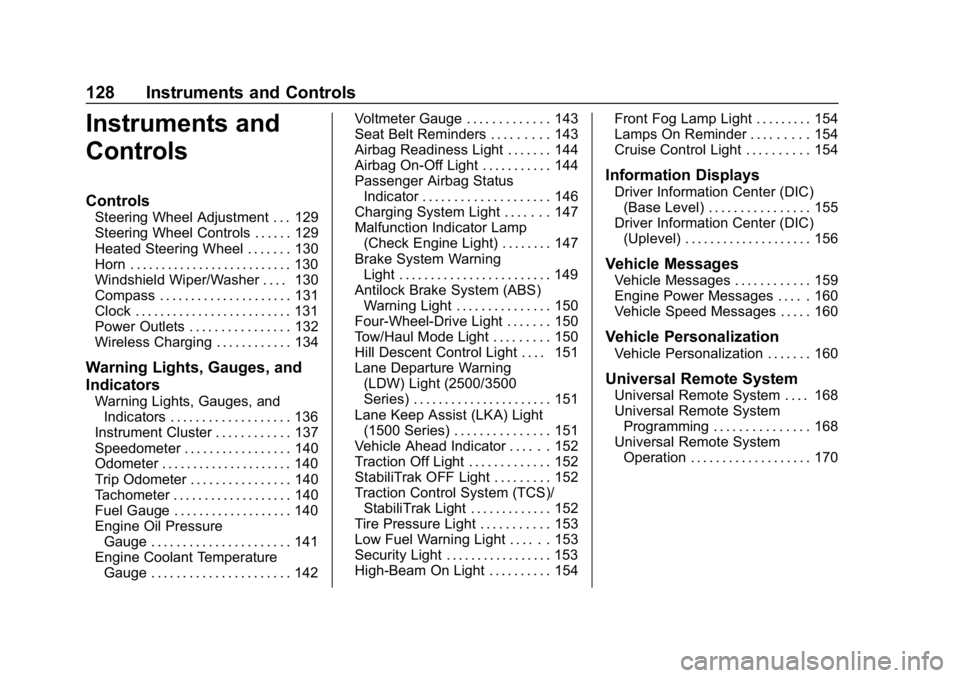
Instruments and
Controls
Controls
Steering Wheel Adjustment . . . 129
Steering Wheel Controls . . . . . . 129
Heated Steering Wheel . . . . . . . 130
Horn . . . . . . . . . . . . . . . . . . . . . . . . . . 130
Windshield Wiper/Washer . . . . 130
Compass . . . . . . . . . . . . . . . . . . . . . 131
Clock . . . . . . . . . . . . . . . . . . . . . . . . . 131
Power Outlets . . . . . . . . . . . . . . . . 132
Wireless Charging . . . . . . . . . . . . 134
Warning Lights, Gauges, and
Indicators
Warning Lights, Gauges, andIndicators . . . . . . . . . . . . . . . . . . . 136
Instrument Cluster . . . . . . . . . . . . 137
Speedometer . . . . . . . . . . . . . . . . . 140
Odometer . . . . . . . . . . . . . . . . . . . . . 140
Trip Odometer . . . . . . . . . . . . . . . . 140
Tachometer . . . . . . . . . . . . . . . . . . . 140
Fuel Gauge . . . . . . . . . . . . . . . . . . . 140
Engine Oil Pressure Gauge . . . . . . . . . . . . . . . . . . . . . . 141
Engine Coolant Temperature Gauge . . . . . . . . . . . . . . . . . . . . . . 142 Voltmeter Gauge . . . . . . . . . . . . . 143
Seat Belt Reminders . . . . . . . . . 143
Airbag Readiness Light . . . . . . . 144
Airbag On-Off Light . . . . . . . . . . . 144
Passenger Airbag Status
Indicator . . . . . . . . . . . . . . . . . . . . 146
Charging System Light . . . . . . . 147
Malfunction Indicator Lamp (Check Engine Light) . . . . . . . . 147
Brake System Warning Light . . . . . . . . . . . . . . . . . . . . . . . . 149
Antilock Brake System (ABS) Warning Light . . . . . . . . . . . . . . . 150
Four-Wheel-Drive Light . . . . . . . 150
Tow/Haul Mode Light . . . . . . . . . 150
Hill Descent Control Light . . . . 151
Lane Departure Warning (LDW) Light (2500/3500
Series) . . . . . . . . . . . . . . . . . . . . . . 151
Lane Keep Assist (LKA) Light (1500 Series) . . . . . . . . . . . . . . . 151
Vehicle Ahead Indicator . . . . . . 152
Traction Off Light . . . . . . . . . . . . . 152
StabiliTrak OFF Light . . . . . . . . . 152
Traction Control System (TCS)/ StabiliTrak Light . . . . . . . . . . . . . 152
Tire Pressure Light . . . . . . . . . . . 153
Low Fuel Warning Light . . . . . . 153
Security Light . . . . . . . . . . . . . . . . . 153
High-Beam On Light . . . . . . . . . . 154 Front Fog Lamp Light . . . . . . . . . 154
Lamps On Reminder . . . . . . . . . 154
Cruise Control Light . . . . . . . . . . 154
Information Displays
Driver Information Center (DIC)
(Base Level) . . . . . . . . . . . . . . . . 155
Driver Information Center (DIC) (Uplevel) . . . . . . . . . . . . . . . . . . . . 156
Vehicle Messages
Vehicle Messages . . . . . . . . . . . . 159
Engine Power Messages . . . . . 160
Vehicle Speed Messages . . . . . 160
Vehicle Personalization
Vehicle Personalization . . . . . . . 160
Universal Remote System
Universal Remote System . . . . 168
Universal Remote SystemProgramming . . . . . . . . . . . . . . . 168
Universal Remote System Operation . . . . . . . . . . . . . . . . . . . 170