climate control CHEVROLET SILVERADO 2003 1.G User Guide
[x] Cancel search | Manufacturer: CHEVROLET, Model Year: 2003, Model line: SILVERADO, Model: CHEVROLET SILVERADO 2003 1.GPages: 556, PDF Size: 3.56 MB
Page 183 of 556

If the driver and passenger's temperature settings
are not the same, the opposite side temperature
setting will be displayed for an additional ®ve
seconds. To make the passenger's temperature the
same as the driver's press and hold the AUTO
button for about four seconds.
When auto is selected, the air conditioning operation
and air inlet will be automatically controlled. The
air conditioning compressor will run when the
outside temperature is over about 40ÉF (4ÉC). The
air inlet will normally be set to outside air. If it's
hot outside, the air inlet may automatically switch to
recirculate inside air to help quickly cool down
your vehicle. The light on the button will illuminate
in recirculation.
2. Set the driver's and passenger's temperature.
To ®nd your comfort setting, start with a 74ÉF (23ÉC)
temperature setting and allow about 20 minutes
for the system to regulate. Turn the driver's or
passenger's side temperature knob to adjust the
temperature setting as necessary. If you choose the
temperature setting of 60ÉF (15ÉC) the system
will remain at the maximum cooling setting. If you
choose the temperature setting of 90ÉF (32ÉC)
the system will remain at the maximum heat setting.
Choosing either maximum setting will not cause
the vehicle to heat or cool any faster.Be careful not to cover the sensor located on the
top of the instrument panel near the windshield. This
sensor regulates air temperature based on sun
load, and also turns on your headlamps.
To avoid blowing cold air in cold weather, the
system will delay turning on the fan until warm air is
available. The length of delay depends on the
engine coolant temperature. Pressing the fan switch
will override this delay and change the fan to a
selected speed.
9(Off):Press this button to turn off the entire climate
control system. Outside air will still enter the vehicle, and
will be directed to the ¯oor. This direction can be changed
by pressing the mode button. The temperature can also
be adjusted using either temperature knob. Press the up
or down arrows on the fan switch, the defrost button, the
AUTO button, or the air conditioning button to turn the
system on when it is off.
3-27
Page 185 of 556

If you select recirculation while in defrost, defog or ¯oor,
the light in the button will ¯ash and then go out to let you
know that this is not allowed. This is normal and helps to
prevent fogging.
When the weather is cool or damp, operating the system
in recirculation for extended periods of time may cause
fogging of the vehicle's windows. To clear the fog, select
either defog or front defrost.
You may also notice that the A/C compressor will run
while in recirculation mode. This is normal and helps to
prevent fogging.
9(Off):Press this button to turn off the entire climate
control system. Outside air will still enter the vehicle, and
will be directed to the ¯oor. This direction can be changed
by pressing the mode button. The temperature can also
be adjusted using either temperature knob. Press the up
or down arrows on the fan switch, the defrost button, the
AUTO button, or the air conditioning button to turn the
system on when it is off.
Display
If you press the MODE button to select an air delivery
mode, the display will change to show you the selected
air delivery mode. After ten seconds, the display will
change to show the driver temperature setting and the
selected mode.
If you press the up or down arrows on the fan switch,
the display will change to show the selected fan speed.
After ten seconds, the display will change to show
the driver temperature setting and the selected mode.
Whenever you press AUTO, the display will change
to show the following:
·the current driver's set temperature and an arrow
for ®ve seconds,
·the current passenger's set temperature setting and
an arrow for ®ve seconds and
·the automatic air delivery mode and fan speed.
If the driver's and passenger's temperature settings are
the same when AUTO is pressed, the temperature
setting and both arrows will be displayed for ®ve
seconds along with the automatic air delivery mode and
fan speed. After the ®ve second update, the display
will change to show the temperature setting, both arrows
and AUTO.
3-29
Page 455 of 556

Uniform Tire Quality Grading
Quality grades can be found where applicable on the
tire sidewall between tread shoulder and maximum
section width. For example:
Treadwear 200 Traction AA Temperature A
The following information relates to the system developed
by the United States National Highway Traffic Safety
Administration, which grades tires by treadwear, traction
and temperature performance. (This applies only to
vehicles sold in the United States.) The grades are
molded on the sidewalls of most passenger car tires. The
Uniform Tire Quality Grading system does not apply to
deep tread, winter-type snow tires, space-saver or
temporary use spare tires, tires with nominal rim
diameters of 10 to 12 inches (25 to 30 cm), or to some
limited-production tires.
While the tires available on General Motors passenger
cars and light trucks may vary with respect to these
grades, they must also conform to federal safety
requirements and additional General Motors Tire
Performance Criteria (TPC) standards.
Treadwear
The treadwear grade is a comparative rating based on
the wear rate of the tire when tested under controlled
conditions on a speci®ed government test course. For
example, a tire graded 150 would wear one and a half
(1.5) times as well on the government course as a tire
graded 100. The relative performance of tires depends
upon the actual conditions of their use, however, and may
depart signi®cantly from the norm due to variations in
driving habits, service practices and differences in road
characteristics and climate.
Traction ± AA, A, B, C
The traction grades, from highest to lowest, are AA, A, B,
and C. Those grades represent the tire's ability to stop on
wet pavement as measured under controlled conditions
on speci®ed government test surfaces of asphalt and
concrete. A tire marked C may have poor traction
performance. Warning: The traction grade assigned to
this tire is based on straight-ahead braking traction tests,
and does not include acceleration, cornering,
hydroplaning, or peak traction characteristics.
5-75
Page 491 of 556

Fuses Usage
RR Wiper Not Used
SEO ACCYSpecial Equipment Option
Accessory
WS WPR Windshield Wipers
TBC ACCYTruck Body Controller
Accessory
IGN 3 Ignition, Heated Seats
4WDFour-Wheel Drive System,
Auxiliary Battery
Fuses Usage
HTR A/C Climate Control System
LOCK (Relay)Power Door Lock Relay
(Lock Function)
HVAC 1 Climate Control System
L DOORDriver's Door Harness
Connection
CRUISECruise Control, Power Take
Off (PTO)
UNLOCK (Relay)Power Door Lock Relay
(Unlock Function)
RR FOG LP Not Used
BRAKE Anti-Lock Brake System
DRIVER UNLOCKPower Door Lock Relay
(Driver's Door Unlock
Function)
IGN 0 TCM
TBC IGN 0 Truck Body Controller
VEH CHMSLVehicle and Trailer High
Mounted Stoplamp
LT TRLR ST/TRN Left Turn Signal/Stop Trailer
LT TRNLeft Turn Signals and
Sidemarkers
VEH STOPVehicle Stoplamps, Brake
Module, Electronic Throttle
Control Module
RT TRLR ST/TRN Right Turn Signal/Stop Trailer
5-111
Page 495 of 556
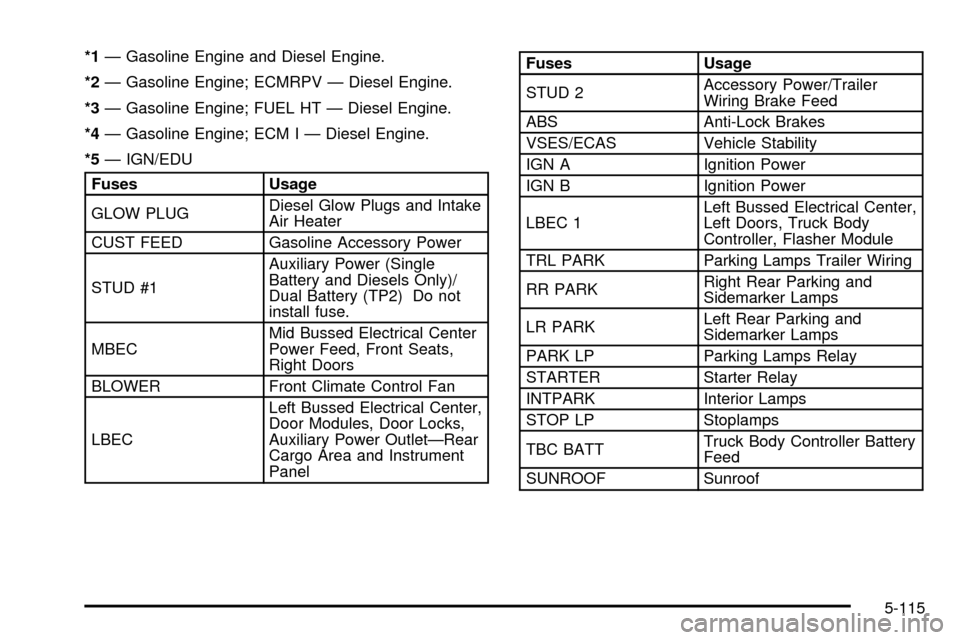
*1Ð Gasoline Engine and Diesel Engine.
*2Ð Gasoline Engine; ECMRPV Ð Diesel Engine.
*3Ð Gasoline Engine; FUEL HT Ð Diesel Engine.
*4Ð Gasoline Engine; ECM I Ð Diesel Engine.
*5Ð IGN/EDU
Fuses Usage
GLOW PLUGDiesel Glow Plugs and Intake
Air Heater
CUST FEED Gasoline Accessory Power
STUD #1Auxiliary Power (Single
Battery and Diesels Only)/
Dual Battery (TP2) Do not
install fuse.
MBECMid Bussed Electrical Center
Power Feed, Front Seats,
Right Doors
BLOWER Front Climate Control Fan
LBECLeft Bussed Electrical Center,
Door Modules, Door Locks,
Auxiliary Power OutletÐRear
Cargo Area and Instrument
Panel
Fuses Usage
STUD 2Accessory Power/Trailer
Wiring Brake Feed
ABS Anti-Lock Brakes
VSES/ECAS Vehicle Stability
IGN A Ignition Power
IGN B Ignition Power
LBEC 1Left Bussed Electrical Center,
Left Doors, Truck Body
Controller, Flasher Module
TRL PARK Parking Lamps Trailer Wiring
RR PARKRight Rear Parking and
Sidemarker Lamps
LR PARKLeft Rear Parking and
Sidemarker Lamps
PARK LP Parking Lamps Relay
STARTER Starter Relay
INTPARK Interior Lamps
STOP LP Stoplamps
TBC BATTTruck Body Controller Battery
Feed
SUNROOF Sunroof
5-115
Page 496 of 556
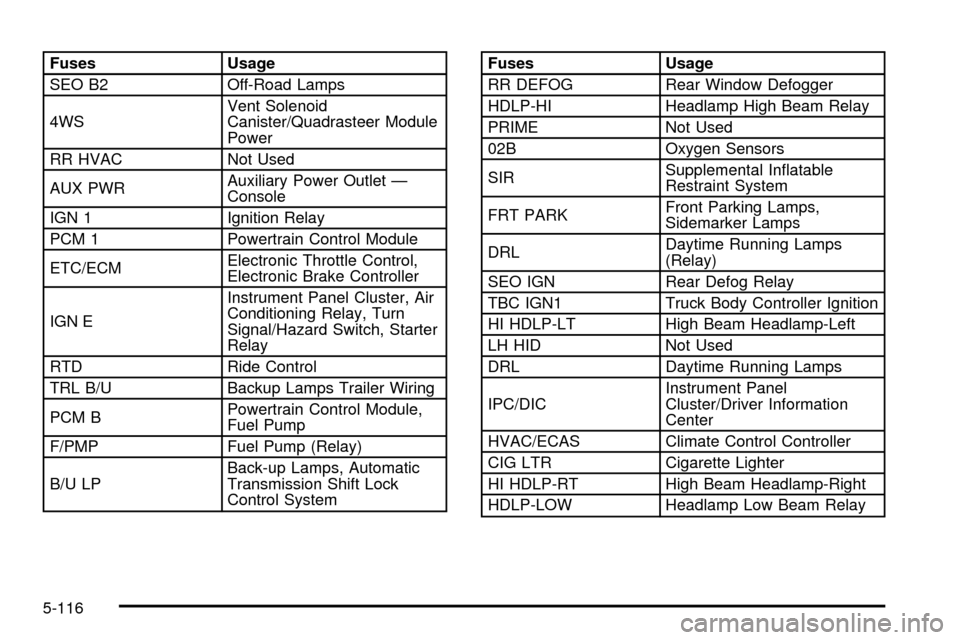
Fuses Usage
SEO B2 Off-Road Lamps
4WSVent Solenoid
Canister/Quadrasteer Module
Power
RR HVAC Not Used
AUX PWRAuxiliary Power Outlet Ð
Console
IGN 1 Ignition Relay
PCM 1 Powertrain Control Module
ETC/ECMElectronic Throttle Control,
Electronic Brake Controller
IGN EInstrument Panel Cluster, Air
Conditioning Relay, Turn
Signal/Hazard Switch, Starter
Relay
RTD Ride Control
TRL B/U Backup Lamps Trailer Wiring
PCM BPowertrain Control Module,
Fuel Pump
F/PMP Fuel Pump (Relay)
B/U LPBack-up Lamps, Automatic
Transmission Shift Lock
Control SystemFuses Usage
RR DEFOG Rear Window Defogger
HDLP-HI Headlamp High Beam Relay
PRIME Not Used
02B Oxygen Sensors
SIRSupplemental In¯atable
Restraint System
FRT PARKFront Parking Lamps,
Sidemarker Lamps
DRLDaytime Running Lamps
(Relay)
SEO IGN Rear Defog Relay
TBC IGN1 Truck Body Controller Ignition
HI HDLP-LT High Beam Headlamp-Left
LH HID Not Used
DRL Daytime Running Lamps
IPC/DICInstrument Panel
Cluster/Driver Information
Center
HVAC/ECAS Climate Control Controller
CIG LTR Cigarette Lighter
HI HDLP-RT High Beam Headlamp-Right
HDLP-LOW Headlamp Low Beam Relay
5-116
Page 540 of 556

Child Restraints (cont.)
Top Strap...................................................1-42
Where to Put the Restraint...........................1-41
Chime Level Adjustment.................................3-125
Cigarette Lighter.............................................3-20
Cleaning Aluminum or Chrome-Plated Wheels . . . 5-105
Cleaning Exterior Lamps/Lenses......................5-104
Cleaning Fabric/Carpet...................................5-100
Cleaning Glass Surfaces................................5-102
Cleaning Interior Plastic Components...............5-102
Cleaning Leather...........................................5-102
Cleaning the Mirror.........................................2-56
Cleaning the Top of the Instrument Panel.........5-102
Cleaning the Windshield and Wiper Blades.......5-104
Cleaning Tires..............................................5-105
Cleaning Vinyl..............................................5-101
Cleaning......................................................5-100
Inside of Your Vehicle.................................5-100
Outside of Your Vehicle..............................5-103
Underbody Maintenance.............................5-106
Video Screen............................................3-125
Weatherstrips............................................5-103
Climate Control System...................................3-20
Dual Automatic............................................3-25
Dual..........................................................3-22
Clutch, Hydraulic.............................................5-29
Compact Disc Messages................3-84, 3-97, 3-110
Compass Calibration...............................2-56, 2-57
Compass Operation.........................................2-57Compass Variance..................................2-55, 2-58
Content Theft-Deferrent....................................2-18
Control of a Vehicle.......................................... 4-5
Coolant.........................................................3-47
Engine Temperature Gage............................3-47
Heater, Engine............................................2-24
Surge Tank Pressure Cap.............................5-33
Cooling System..............................................5-36
Crew Cab......................................................1-53
Cruise Control Light........................................3-52
Cruise Control................................................3-11
Cupholder(s)..................................................2-64
Current and Past Model Order Forms................7-10
Customer Assistance Information........................ 7-7
Courtesy Transportation.................................. 7-7
Customer Assistance for Text Telephone (TTY)
Users....................................................... 7-4
Customer Assistance Offices........................... 7-4
Customer Satisfaction Procedure..................... 7-2
GM Mobility Program for Persons with
Disabilities................................................ 7-5
Reporting Safety Defects to General Motors...... 7-9
Reporting Safety Defects to the Canadian
Government.............................................. 7-9
Reporting Safety Defects to the United States
Government.............................................. 7-8
Roadside Assistance Program......................... 7-5
Service Publications Ordering Information......... 7-9
4
Page 541 of 556

D
Daytime Running Lamps..................................3-15
Defensive Driving............................................. 4-2
Defogging and Defrosting.........................3-23, 3-31
Delayed Locking............................................... 2-9
Dinghy Towing................................................4-55
Doing Your Own Service Work........................... 5-3
Dolly Towing..................................................4-57
Dome Lamps.................................................3-18
Door............................................................... 2-9
Delayed Locking........................................... 2-9
Locks.......................................................... 2-7
Power Door Locks......................................... 2-8
Programmable Automatic Door Locks.............2-10
Rear Door Security Locks.............................2-12
Rear Doors.................................................2-13
DRIVER DOOR AJAR.....................................3-66
Driver Information Center (DIC).........................3-54
DIC Operation and Displays..........................3-55
DIC Warnings and Messages........................3-65
Driver............................................................1-16
Position, Safety Belt.....................................1-16
Driving Across an Incline..................................4-34
Driving Downhill..............................................4-32
Driving in Mud, Sand, Snow or Ice....................4-36
Driving in Water..............................................4-37
Driving On Grades..........................................4-87
Driving on Off-Road Hills.................................4-28
Driving on Snow or Ice....................................4-49Driving Through Deep Standing Water...............4-41
Driving Through Flowing Water.........................4-41
Driving Uphill..................................................4-29
Driving with a Trailer.......................................4-86
Driving..........................................................4-38
At Night.....................................................4-38
City...........................................................4-42
Defensive..................................................... 4-2
Drunken....................................................... 4-2
Freeway.....................................................4-43
Hill and Mountain Roads..............................4-46
In Rain and on Wet Roads...........................4-39
Winter........................................................4-48
Dual Automatic Climate Control System.............3-25
Dual Climate Control System............................3-22
Dual Stage Air Bags........................................1-68
Dual Tire Operation.........................................5-70
DVD ............................................................3-125
Cleaning the Video Screen..........................3-125
Distortion..................................................3-122
Rear Seat Entertainment System..................3-111
DVD Player..................................................3-111
E
Easy Exit Seat...............................................2-67
Electrical System...........................................5-109
Add-On Equipment.....................................5-109
Fuses and Circuit Breakers.........................5-110
5