battery CHEVROLET SILVERADO 2003 1.G Owner's Manual
[x] Cancel search | Manufacturer: CHEVROLET, Model Year: 2003, Model line: SILVERADO, Model: CHEVROLET SILVERADO 2003 1.GPages: 556, PDF Size: 3.56 MB
Page 395 of 556

A. Engine Air Cleaner/Filter. SeeEngine Air
Cleaner/Filter on page 5-21.
B. Coolant Surge Tank. See
Engine Coolant on
page 5-30.
C. Air Filter Restriction Indicator (If Equipped). See
Engine Air Cleaner/Filter on page 5-21.
D. Engine Oil Dipstick. See
Engine Oil on page 5-16.
E. Automatic Transmission Dipstick (If Equipped).
See
Automatic Transmission Fluid (Except Allison
Transmissionž) on page 5-23orAutomatic
Transmission Fluid (Allison Transmissionž)on
page 5-26.
F. Engine Oil Fill. See
Engine Oil on page 5-16.
G. Fan. See
Cooling System on page 5-36.H. Remote Negative (-) Terminal (GND). See
Jump
Starting on page 5-48.
I. Remote Positive (+) Terminal. See
Jump Starting on
page 5-48.
J. Power Steering Fluid Reservoir. See
Power Steering
Fluid on page 5-42.
K. Brake Fluid Reservoir. See
Brakes on page 5-44.
L. Clutch Fluid Reservoir (If Equipped). See
Hydraulic
Clutch on page 5-29.
M. Underhood Fuse Block. See
Fuses and Circuit
Breakers on page 5-110.
N. Battery. See
Battery on page 5-47.
O. Windshield Washer Fluid Reservoir. See
Windshield
Washer Fluid on page 5-43.
5-15
Page 427 of 556

Some driving conditions or climates may cause a brake
squeal when the brakes are ®rst applied or lightly
applied. This does not mean something is wrong with
your brakes.
Properly torqued wheel nuts are necessary to help
prevent brake pulsation. When tires are rotated, inspect
brake pads for wear and evenly tighten wheel nuts in
the proper sequence to GM torque speci®cations.
Brake linings should always be replaced as complete
axle sets.
See
Brake System Inspection on page 6-18.
Brake Pedal Travel
See your dealer if the brake pedal does not return to
normal height, or if there is a rapid increase in
pedal travel. This could be a sign of brake trouble.
Brake Adjustment
Every time you make a brake stop, your disc brakes
adjust for wear.
Replacing Brake System Parts
The braking system on a vehicle is complex. Its many
parts have to be of top quality and work well together if
the vehicle is to have really good braking. Your
vehicle was designed and tested with top-quality GM
brake parts. When you replace parts of your brakingsystem Ð for example, when your brake linings wear
down and you need new ones put in Ð be sure you get
new approved GM replacement parts. If you do not,
your brakes may no longer work properly. For example,
if someone puts in brake linings that are wrong for
your vehicle, the balance between your front and rear
brakes can change Ð for the worse. The braking
performance you have come to expect can change in
many other ways if someone puts in the wrong
replacement brake parts.
Battery
Your new vehicle comes with a maintenance free
ACDelcožbattery. When it's time for a new battery, get
one that has the replacement number shown on the
original battery's label. We recommend an ACDelco
ž
battery. SeeEngine Compartment Overview on
page 5-10for battery location.
Warning:Battery posts, terminals and related
accessories contain lead and lead compounds,
chemicals known to the State of California to cause
cancer and reproductive harm. Wash hands after
handling.
5-47
Page 428 of 556
Vehicle Storage
If you're not going to drive your vehicle for 25 days or
more, remove the black, negative (-) cable from
the battery. This will help keep your battery from
running down.
{CAUTION:
Batteries have acid that can burn you and gas
that can explode. You can be badly hurt if you
are not careful. See
Jump Starting on
page 5-48
for tips on working around a battery
without getting hurt.
Contact your dealer to learn how to prepare your
vehicle for longer storage periods.
Also, for your audio system, see
Theft-Deterrent
Feature on page 3-121.
Jump Starting
If your battery (or batteries) has run down, you may
want to use another vehicle and some jumper cables to
start your vehicle. Be sure to follow the steps below
to do it safely.
{CAUTION:
Batteries can hurt you. They can be dangerous
because:
·They contain acid that can burn you.·They contain gas that can explode or
ignite.
·They contain enough electricity to
burn you.
If you do not follow these steps exactly, some
or all of these things can hurt you.
Notice:Ignoring these steps could result in costly
damage to your vehicle that wouldn't be covered
by your warranty.
Trying to start your vehicle by pushing or pulling it
won't work, and it could damage your vehicle.
1. Check the other vehicle. It must have a 12-volt
battery with a negative ground system.
5-48
Page 429 of 556

Notice:If the other system isn't a 12-volt system
with a negative ground, both vehicles can be
damaged.
2. If you have a vehicle with a diesel engine with two
batteries (or more), you should know before you
begin that, especially in cold weather, you may not
be able to get enough power from a single
battery in another vehicle to start your diesel engine.
If your vehicle has more than one battery, use
the battery that's closer to the starter ± this
will reduce electrical resistance.
3. Get the vehicles close enough so the jumper cables
can reach, but be sure the vehicles aren't touching
each other. If they are, it could cause a ground
connection you don't want. You wouldn't be able to
start your vehicle, and the bad grounding could
damage the electrical systems.
To avoid the possibility of the vehicles rolling, set
the parking brake ®rmly on both vehicles involved in
the jump start procedure. Put an automatic
transmission in PARK (P) or a manual transmission
in NEUTRAL before setting the parking brake. If
you have a four-wheel-drive vehicle, be sure
the transfer case is in a drive gear not in NEUTRAL.Notice:If you leave your radio on, it could be badly
damaged. The repairs wouldn't be covered by
your warranty.
4. Turn off the ignition on both vehicles. Unplug
unnecessary accessories plugged into the cigarette
lighter or accessory power outlets. Turn off the
radio and all lamps that aren't needed. This
will avoid sparks and help save both batteries. And
it could save your radio!
5. Open the hoods and locate the positive (+) and
negative (-) terminal locations of the other vehicle.
Your vehicle has a remote positive (+) jump
starting terminal and a remote negative (-) jump
starting terminal. You should always use these
remote terminals instead of the terminals on the
battery.
The remote positive (+) terminal is located behind a
red plastic cover near the engine accessory drive
bracket. To uncover the remote positive (+) terminal,
open the red plastic cover.
The remote negative (-) terminal is located on the
engine drive bracket on all V8 and diesel engines,
and on the thermostat housing on the 8.1L engine.
On V8 engines it is marked ªGND.²
5-49
Page 430 of 556
On V6 engines the remote negative (-) terminal is
located on a tab attached to the engine accessory
drive bracket where it is marked ªGND.²
See
Engine Compartment Overview on page 5-10for more information on location.
{CAUTION:
Using a match near a battery can cause battery
gas to explode. People have been hurt doing
this, and some have been blinded. Use a
¯ashlight if you need more light.
Be sure the battery has enough water. You do
not need to add water to the ACDelco
žbattery
installed in your new vehicle. But if a battery
has ®ller caps, be sure the right amount of
¯uid is there. If it is low, add water to take care
of that ®rst. If you do not, explosive gas could
be present.
Battery ¯uid contains acid that can burn you.
Do not get it on you. If you accidentally get it
in your eyes or on your skin, ¯ush the place
with water and get medical help immediately.
{CAUTION:
Fans or other moving engine parts can injure
you badly. Keep your hands away from moving
parts once the engine is running.
6. Check that the jumper cables don't have loose or
missing insulation. If they do, you could get a
shock. The vehicles could be damaged too.
Before you connect the cables, here are some
basic things you should know. Positive (+) will go to
positive (+) or a remote positive terminal (+) if the
vehicle has one. Negative (-) will go to a heavy,
unpainted metal engine part or a remote
negative (-) terminal if the vehicle has one.
Don't connect positive (+) to negative (-) or you'll
get a short that would damage the battery and
maybe other parts too. And don't connect the
negative (-) cable to the negative (-) terminal on
the dead battery because this can cause sparks.
On vehicles equipped with dual batteries, make all
battery connections to the remote positive (+)
and remote negative (-) terminals.
5-50
Page 431 of 556
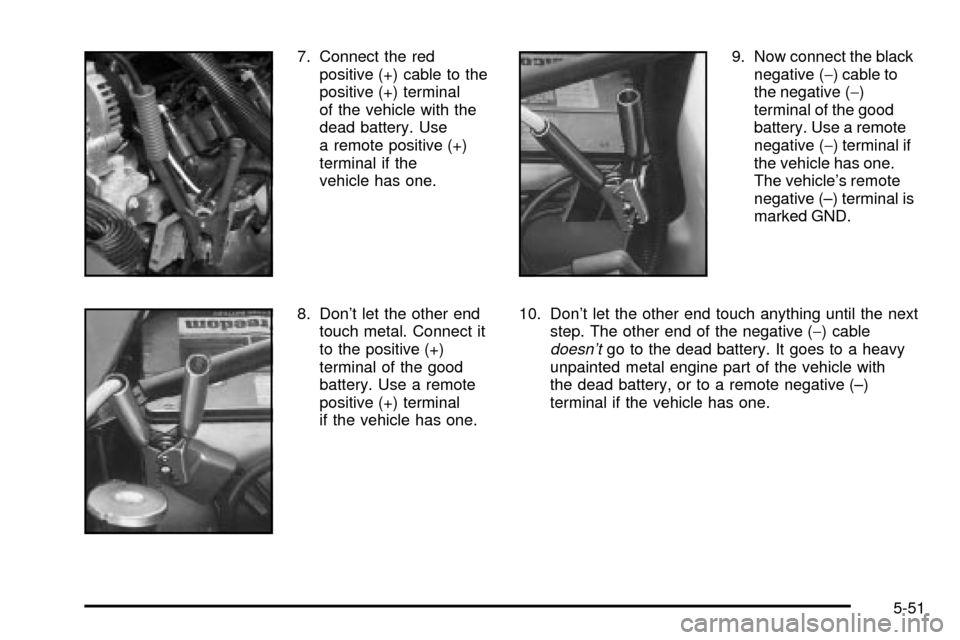
7. Connect the red
positive (+) cable to the
positive (+) terminal
of the vehicle with the
dead battery. Use
a remote positive (+)
terminal if the
vehicle has one.
8. Don't let the other end
touch metal. Connect it
to the positive (+)
terminal of the good
battery. Use a remote
positive (+) terminal
if the vehicle has one.9. Now connect the black
negative (-) cable to
the negative (-)
terminal of the good
battery. Use a remote
negative (-) terminal if
the vehicle has one.
The vehicle's remote
negative (±) terminal is
marked GND.
10. Don't let the other end touch anything until the next
step. The other end of the negative (-) cable
doesn'tgo to the dead battery. It goes to a heavy
unpainted metal engine part of the vehicle with
the dead battery, or to a remote negative (±)
terminal if the vehicle has one.
5-51
Page 432 of 556
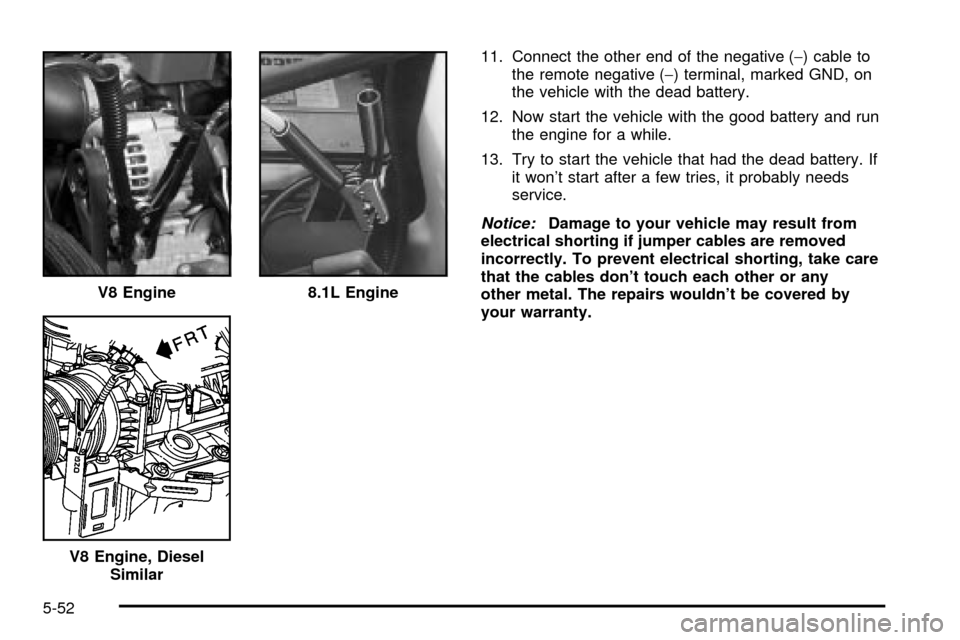
11. Connect the other end of the negative (-) cable to
the remote negative (-) terminal, marked GND, on
the vehicle with the dead battery.
12. Now start the vehicle with the good battery and run
the engine for a while.
13. Try to start the vehicle that had the dead battery. If
it won't start after a few tries, it probably needs
service.
Notice:Damage to your vehicle may result from
electrical shorting if jumper cables are removed
incorrectly. To prevent electrical shorting, take care
that the cables don't touch each other or any
other metal. The repairs wouldn't be covered by
your warranty. V8 Engine
8.1L Engine
V8 Engine, Diesel
Similar
5-52
Page 433 of 556
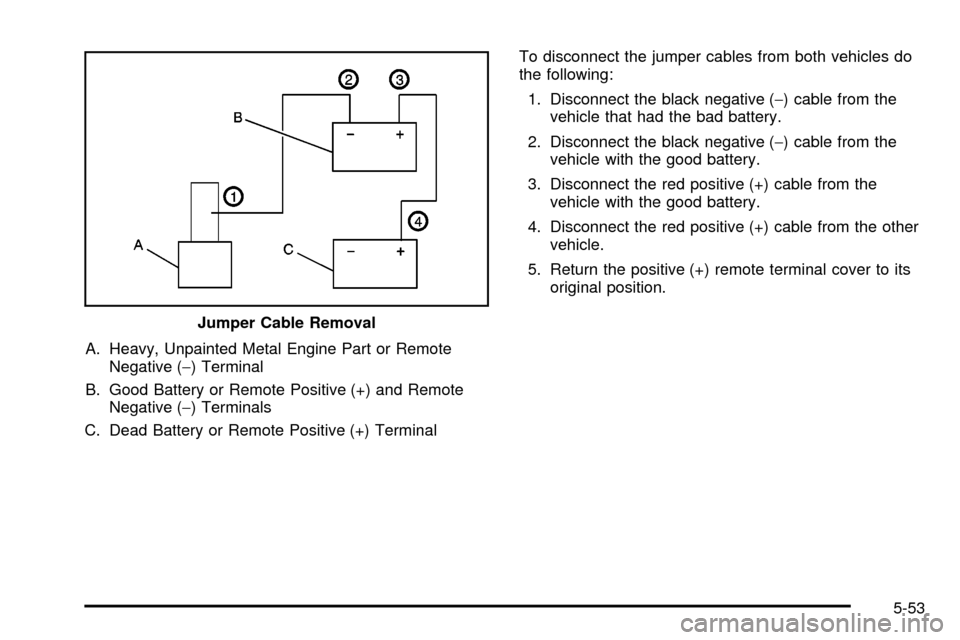
A. Heavy, Unpainted Metal Engine Part or Remote
Negative (-) Terminal
B. Good Battery or Remote Positive (+) and Remote
Negative (-) Terminals
C. Dead Battery or Remote Positive (+) TerminalTo disconnect the jumper cables from both vehicles do
the following:
1. Disconnect the black negative (-) cable from the
vehicle that had the bad battery.
2. Disconnect the black negative (-) cable from the
vehicle with the good battery.
3. Disconnect the red positive (+) cable from the
vehicle with the good battery.
4. Disconnect the red positive (+) cable from the other
vehicle.
5. Return the positive (+) remote terminal cover to its
original position.
Jumper Cable Removal
5-53
Page 491 of 556
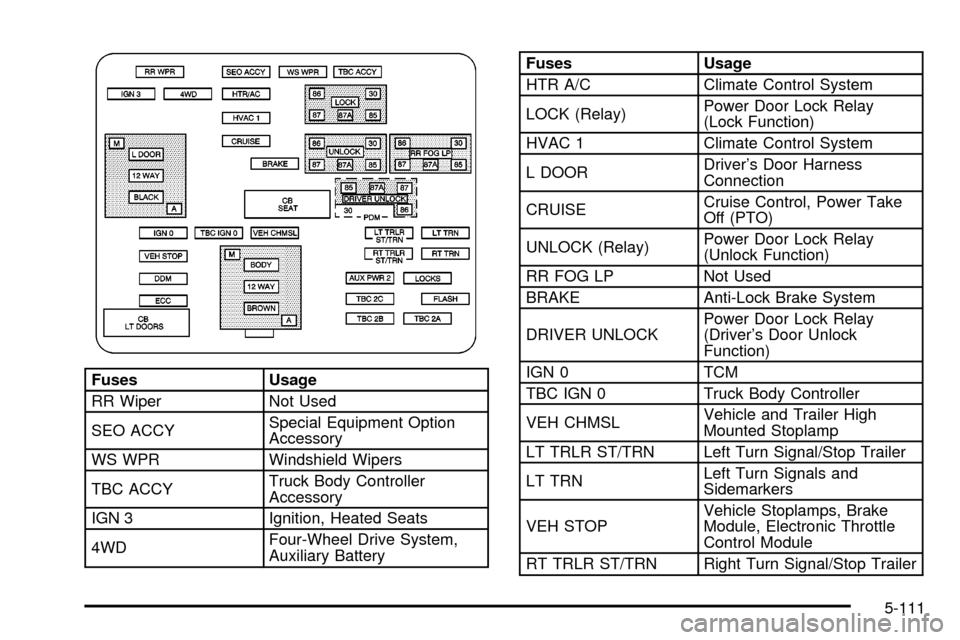
Fuses Usage
RR Wiper Not Used
SEO ACCYSpecial Equipment Option
Accessory
WS WPR Windshield Wipers
TBC ACCYTruck Body Controller
Accessory
IGN 3 Ignition, Heated Seats
4WDFour-Wheel Drive System,
Auxiliary Battery
Fuses Usage
HTR A/C Climate Control System
LOCK (Relay)Power Door Lock Relay
(Lock Function)
HVAC 1 Climate Control System
L DOORDriver's Door Harness
Connection
CRUISECruise Control, Power Take
Off (PTO)
UNLOCK (Relay)Power Door Lock Relay
(Unlock Function)
RR FOG LP Not Used
BRAKE Anti-Lock Brake System
DRIVER UNLOCKPower Door Lock Relay
(Driver's Door Unlock
Function)
IGN 0 TCM
TBC IGN 0 Truck Body Controller
VEH CHMSLVehicle and Trailer High
Mounted Stoplamp
LT TRLR ST/TRN Left Turn Signal/Stop Trailer
LT TRNLeft Turn Signals and
Sidemarkers
VEH STOPVehicle Stoplamps, Brake
Module, Electronic Throttle
Control Module
RT TRLR ST/TRN Right Turn Signal/Stop Trailer
5-111
Page 493 of 556
Device Usage
CB SEATDriver and Passenger Seat
Module Circuit Breaker
CB RT DOORRight Power Windows Circuit
Breaker
SPARE Not Used
INFOInfotainment Harness
Connection
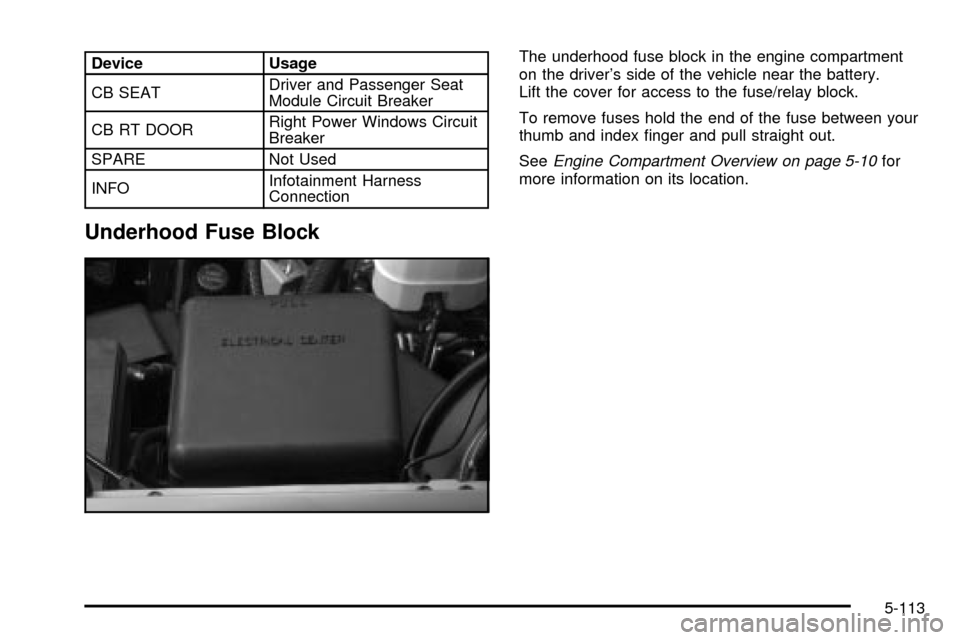
Underhood Fuse Block
The underhood fuse block in the engine compartment
on the driver's side of the vehicle near the battery.
Lift the cover for access to the fuse/relay block.
To remove fuses hold the end of the fuse between your
thumb and index ®nger and pull straight out.
See
Engine Compartment Overview on page 5-10for
more information on its location.
5-113