warning light CHEVROLET SILVERADO 2004 1.G User Guide
[x] Cancel search | Manufacturer: CHEVROLET, Model Year: 2004, Model line: SILVERADO, Model: CHEVROLET SILVERADO 2004 1.GPages: 584, PDF Size: 3.52 MB
Page 216 of 584
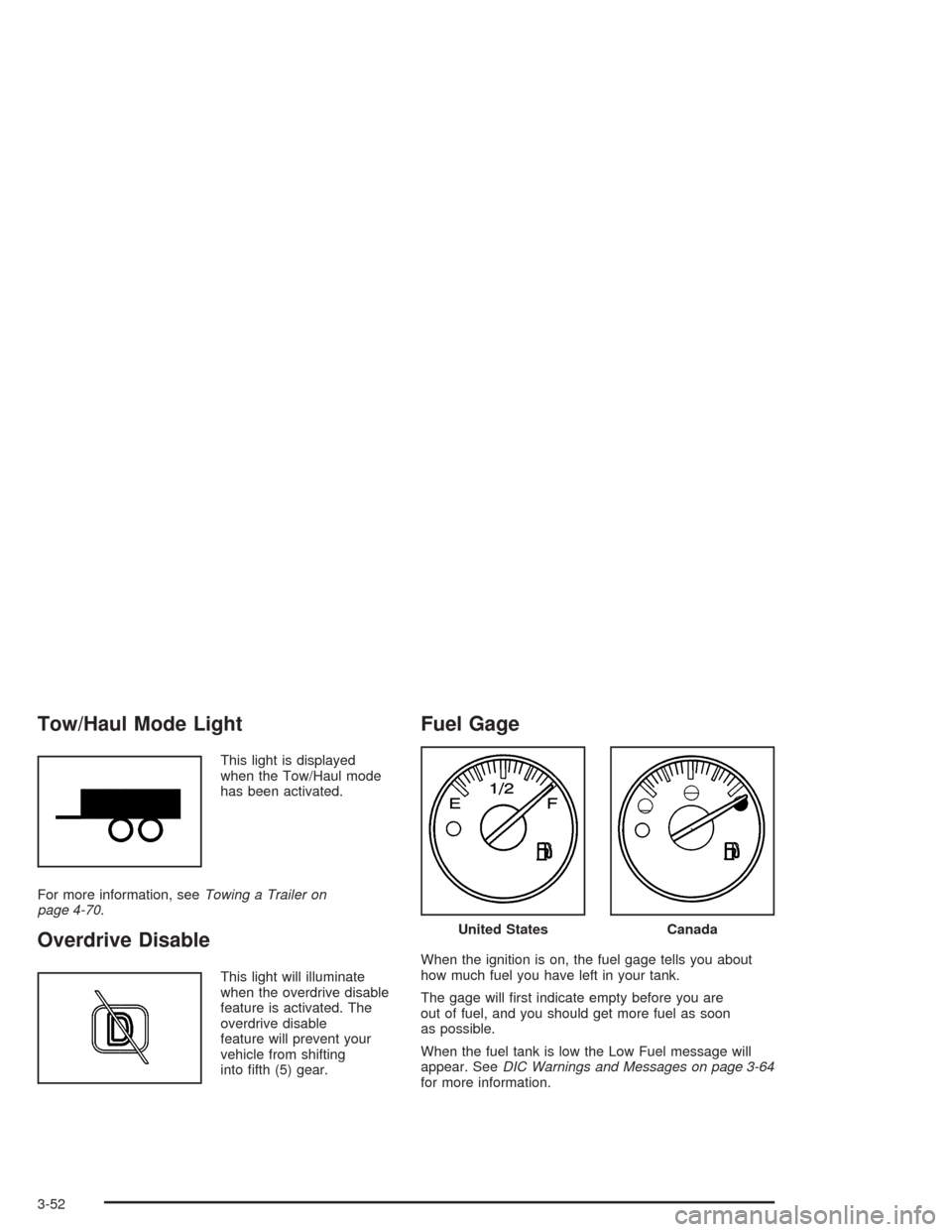
Tow/Haul Mode Light
This light is displayed
when the Tow/Haul mode
has been activated.
For more information, seeTowing a Trailer on
page 4-70.
Overdrive Disable
This light will illuminate
when the overdrive disable
feature is activated. The
overdrive disable
feature will prevent your
vehicle from shifting
into fth (5) gear.
Fuel Gage
When the ignition is on, the fuel gage tells you about
how much fuel you have left in your tank.
The gage will rst indicate empty before you are
out of fuel, and you should get more fuel as soon
as possible.
When the fuel tank is low the Low Fuel message will
appear. SeeDIC Warnings and Messages on page 3-64
for more information.
United StatesCanada
3-52
Page 217 of 584
Here are some situations you may experience with your
fuel gage. None of these indicate a problem with the
fuel gage.
At the gas station, the fuel pump shuts off before
the gage reads full.
It takes a little more or less fuel to ll up than the
fuel gage indicated. For example, the gage may
have indicated the tank was half full, but it actually
took a little more or less than half the tank’s
capacity to ll the tank.
The gage goes back to empty when you turn off
the ignition.
If you have a diesel engine, see “Fuel Gage” in the
Diesel Engine Supplement.
Low Fuel Warning Light
The light next to the fuel gage will come on briey when
you are starting the engine.
This light comes on when the fuel tank is low on fuel.
To turn it off, add fuel to the fuel tank. SeeFuel on
page 5-5.
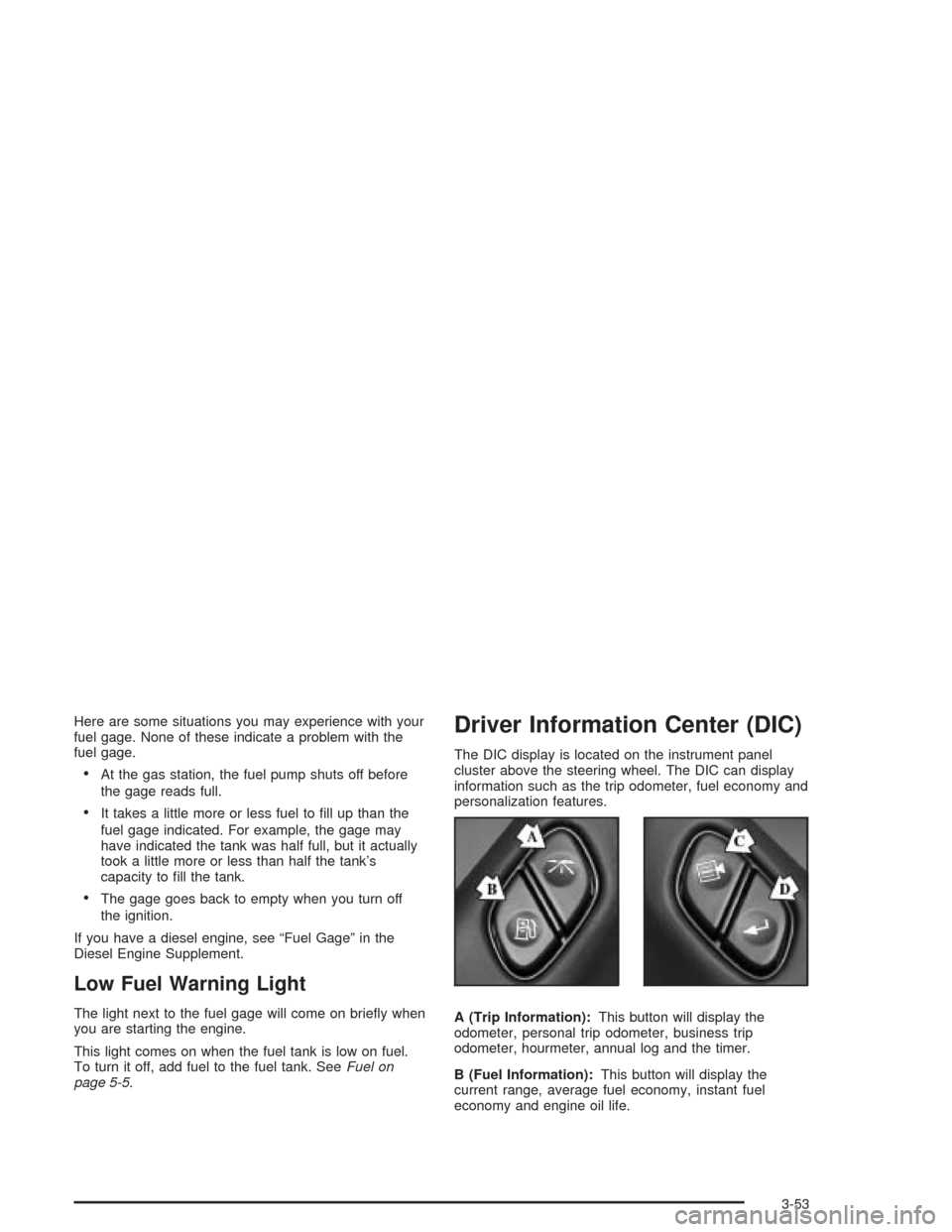
Driver Information Center (DIC)
The DIC display is located on the instrument panel
cluster above the steering wheel. The DIC can display
information such as the trip odometer, fuel economy and
personalization features.
A (Trip Information):This button will display the
odometer, personal trip odometer, business trip
odometer, hourmeter, annual log and the timer.
B (Fuel Information):This button will display the
current range, average fuel economy, instant fuel
economy and engine oil life.
3-53
Page 221 of 584
Instant Fuel Economy
Press the fuel information button until INST ECON
appears in the display. Instant fuel economy is how
many miles per gallon your vehicle is getting at
the particular moment in time. The instant fuel economy
cannot be reset.
GM Oil Life System
Press the fuel information button until ENGINE OIL LIFE
appears in the display. The GM Oil Life System shows
an estimate of the oil’s remaining useful life. It will show
100% when the system is reset after an oil change. It
will alert you to change your oil on a schedule consistent
with your driving conditions.
Always reset the engine oil life after an oil change. To
reset the Oil Life System use the fuel button to reach the
ENGINE OIL LIFE screen and then press and hold
the select button for ve seconds while ENGINE OIL
LIFE is displayed. OIL LIFE RESET will appear on
the display for 10 seconds to let you know the system
is reset.
The DIC does not replace the need to maintain your
vehicle as recommended in the Maintenance Schedule
in this manual. SeeEngine Oil on page 5-20.
Personalization Button
You can program certain features to a preferred setting
for up to two people. Press the personalization button
to scroll through the following personalization features.
All of the personalization options may not be available
on your vehicle. Only the options available will be
displayed on your DIC.
If your vehicle is not equipped with the DIC steering
wheel buttons you will not have any of the following
personalization options except for DISPLAY
LANGUAGE. See DISPLAY LANGUAGE later in this
section for more information.
AUTOMATIC LOCKING
AUTOMATIC UNLOCKING
DELAYED LOCKING
REMOTE LOCK FEEDBACK
ALARM WARNING TYPE
REMOTE UNLOCK FEEDBACK
HEADLAMPS ON AT EXIT
PERIMETER LIGHTING
SEAT POSITION RECALL
EASY EXIT DRIVER SEAT
CURB VIEW ASSIST
DISPLAY LANGUAGE
DISPLAY UNITS (ENG/MET)
3-57
Page 228 of 584
If you accidentally choose a language that you don’t
want or understand, press and hold the personalization
button and the trip information button at the same
time. The DIC will begin scrolling through the languages
in their particular language. English will be in English,
French will be in French and so on. When you see
the language that you would like, release both buttons.
The DIC will then display the information in the
language you chose.
You can also scroll through the different languages by
pressing and holding the trip reset stem for four
seconds, as long as you are in the odometer mode.
Select Button
The select button is used to reset certain functions and
turn off or acknowledge messages on the DIC display.
The select button also toggles through the options
available in each personalization menu. For example,
this button will reset the trip odometers, turn off the
FUEL LEVEL LOW message, and toggle through the
languages you can select the DIC to display
information in.
DIC Warnings and Messages
Warning messages are displayed on the DIC to notify
the driver that the status of the vehicle has changed and
that some action may be needed by the driver to
correct the condition. If there is more than one message
that needs to be displayed they will appear one after
another. Some messages may not require immediate
action but you should press the select button, or
the reset stem, to acknowledge that you received the
message and clear it from the display. Some messages
cannot be cleared from the display because they are
more urgent. These messages require action before they
can be removed from the DIC display. The following
are the possible messages that can be displayed
and some information about them.
BATTERY NOT CHARGING
If the battery is not charging during operation, this
message will appear on the DIC. Driving with this
problem could drain your battery. Have the electrical
system checked as soon as possible. Press the select
button to acknowledge the message and clear it
from the DIC display. SeeBattery Warning Light on
page 3-42.
3-64
Page 232 of 584
RIGHT REAR DOOR AJAR (Crew Cab)
If the passenger’s side rear door is not fully closed,
this message will appear on the display and you
will hear a chime. Stop and turn off the vehicle, check
the door for obstacles, and close the door again. Check
to see if the message still appears on the DIC. Press
the select button to acknowledge the message and clear
it from the DIC display.
SERVICE AIRBAG
If there is a problem with the air bag system, this
message will be displayed on the DIC. Have a qualied
technician inspect the system for problems. Press
the select button to acknowledge the message and clear
it from the DIC display.
SERVICE BRAKE SYSTEM
If there is a problem with the brake system, this
message will be displayed on the DIC. If this message
appears, stop as soon as possible and turn off the
vehicle. Restart the vehicle and check for the message
on the DIC display. If the message is still displayed,
or appears again when you begin driving, the brake
system needs service.
SERVICE BRAKE BOOSTER
If your vehicle has vaccum assist power brakes, this
message will be displayed on the DIC when there is a
problem with the Supplemental Brake Assist system.
If the message is displayed immediately after starting
the vehicle or the message appears while driving,
your Supplemental Brake Assist system needs service.
SeeBrake System Warning Light on page 3-43.
3-68
Page 233 of 584
{CAUTION:
Your brake system may not be working
properly if the SERVICE BRAKE BOOSTER
message is displayed.
If the brake system warning light is also
on, you should have the vehicle towed for
service. See “Brake System Warning Light” in
the Index.
If the brake system warning light isn’t on, you
still have brakes, but the supplemental brake
assist system may not operate properly. In the
event of a vacuum loss, you may not have
vacuum power assist for braking. The brake
pedal will be harder to push and it will take
longer to stop. If you continue to drive with
this message displayed it can lead to a
crash. Have the brake system serviced as
soon as possible.
SERVICE 4 WHEEL STEER
If a problem occurs with the 4-wheel steer system, this
message will appear on the DIC. If this message
appears, stop as soon as possible, and turn off the
vehicle. Restart the vehicle and check for the message
on the DIC display. If the message is still displayed,
or appears again when you being driving, the four-wheel
steer system needs service.
SERVICE 4WD
If a problem occurs with the four-wheel drive system,
this message will appear on the DIC. If this message
appears, stop as soon as possible and turn off the
vehicle. Restart the vehicle and check for the message
on the DIC display. If the message is still displayed,
or appears again when you begin driving, the four wheel
drive system needs service.
SERVICE RIDE CONTROL
If a problem occurs with the suspension system, this
message will appear on the DIC. If this message
appears, stop and turn off the vehicle. Restart the
vehicle and check for the message on the DIC display.
If the message is still displayed, or appears again
when you begin driving, the air suspension system
needs service.
3-69
Page 234 of 584
TIGHTEN FUEL CAP
If the vehicle’s fuel cap is not tightened properly this
message may appear along with the check engine light
on the instrument panel. SeeMalfunction Indicator
Lamp on page 3-48. Fully reinstall the fuel cap.
SeeFilling Your Tank on page 5-9. The diagnostic
system can determine if the fuel cap has been left off or
improperly installed. A loose or missing fuel cap will
allow fuel to evaporate into the atmosphere. A few
driving trips with the cap properly installed should turn
the light and message off.
TRACTION ACTIVE
When the traction control system has detected that any
of the vehicle’s wheels are slipping, the traction
control system will activate and this message will appear
on the DIC. For more information see “Traction Assist”
in the Index.Traction Assist System (TAS) on
page 4-9.
TRANSMISSION HOT
If the transmission uid temperature becomes high, the
message center will display this message.
When the transmission enters the protection mode, you
may notice a change in the transmission shifting
patterns. When the transmission uid temperature
returns to normal, the display will turn off and the
transmission shifting patterns will return to normal.
Notice:If you drive your vehicle while the
transmission uid is overheating and the
transmission temperature warning is displayed on
the instrument panel cluster and/or DIC, you
can damage the transmission. This could lead to
costly repairs that would not be covered by
your warranty. Do not drive your vehicle with
overheated transmission uid or while transmission
temperature warning is displayed.
3-70
Page 301 of 584
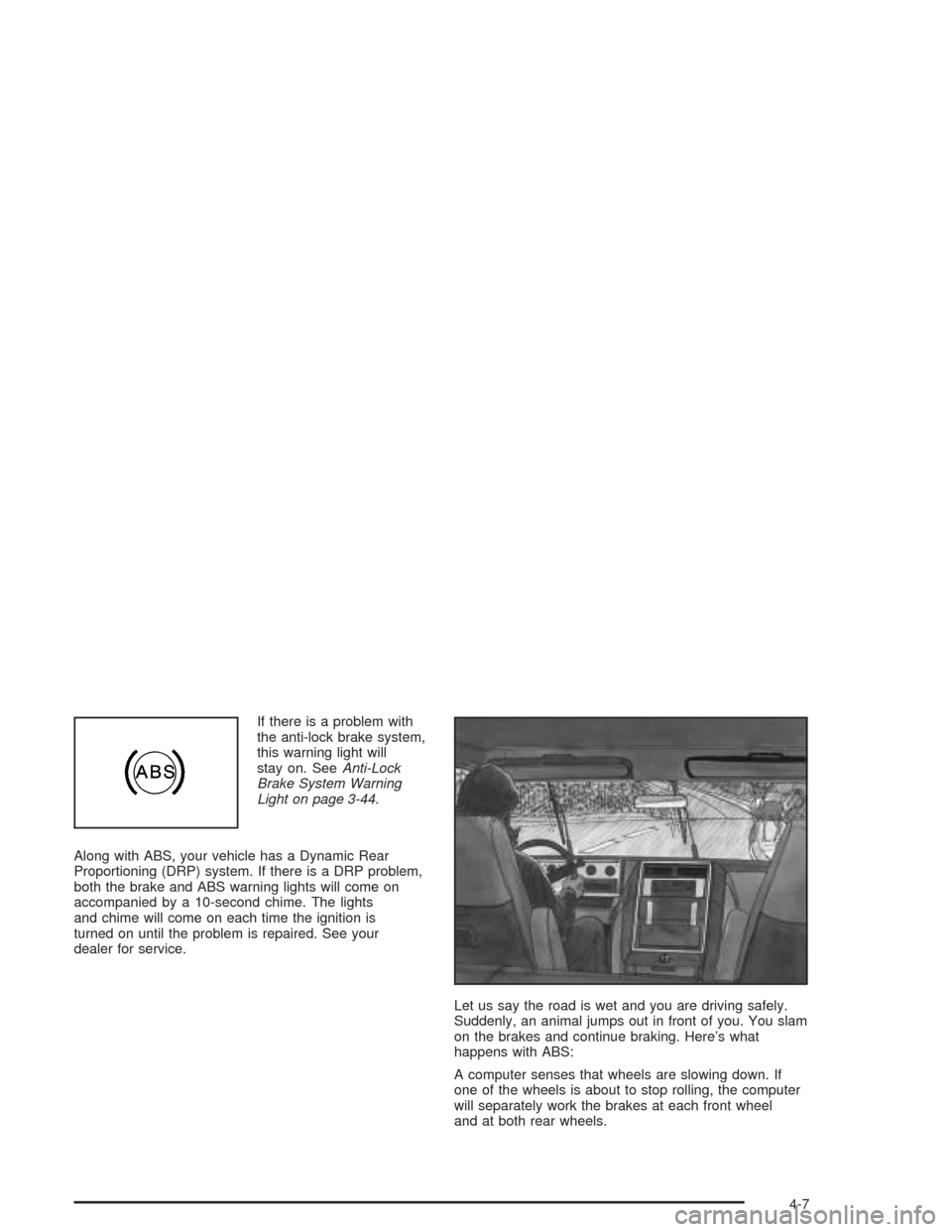
If there is a problem with
the anti-lock brake system,
this warning light will
stay on. SeeAnti-Lock
Brake System Warning
Light on page 3-44.
Along with ABS, your vehicle has a Dynamic Rear
Proportioning (DRP) system. If there is a DRP problem,
both the brake and ABS warning lights will come on
accompanied by a 10-second chime. The lights
and chime will come on each time the ignition is
turned on until the problem is repaired. See your
dealer for service.
Let us say the road is wet and you are driving safely.
Suddenly, an animal jumps out in front of you. You slam
on the brakes and continue braking. Here’s what
happens with ABS:
A computer senses that wheels are slowing down. If
one of the wheels is about to stop rolling, the computer
will separately work the brakes at each front wheel
and at both rear wheels.
4-7
Page 303 of 584
Supplemental Brake Assist System
If your vehicle has vacuum assist power brakes, it is also
equipped with a supplemental brake assist system
that supplies additional vacuum to the vacuum brake
booster if engine vacuum is reduced. Under certain
conditions, the supplemental brake assist system may
run briey after starting your vehicle or when you
apply and release the brake pedal and it may continue
to run even after you have removed your foot from
the brake pedal. When the supplemental brake assist
system is operating, you may hear a motor running
or feel a slight vibration in the steering wheel or brake
pedal. This indicates that the supplemental brake
assist system is working to supply additional vacuum for
your vacuum assist power brakes. This is a normal
operation of your brake system and does not require that
the brake system be serviced.
Each time you start your vehicle and accelerate, the
supplemental brake assist system will perform a
self-diagnostic check of the system and you may hear
or feel the supplemental brake assist motor run
briey. While you are driving your vehicle, the
supplemental brake assist system monitors itself to
ensure that it is operating properly. If there is a problem
with the supplemental brake assist system, the
SERVICE BRAKE BOOSTER message will be displayed
on the Driver Information Center. SeeDIC Warnings
and Messages on page 3-64.If your supplemental brake assist system runs every
time you apply and release the brake pedal or you notice
that the brake pedal has suddenly become much
harder to push and the vehicle takes longer to stop, you
should have your vehicle serviced as soon as possible.
Traction Assist System (TAS)
Your vehicle may have a Traction Assist System (TAS)
that limits wheel spin. This is especially useful in
slippery road conditions. The system operates only if it
senses that one or both of the rear wheels are
spinning or beginning to lose traction. When this
happens, the system reduces engine power to limit
wheel spin.
The traction control system is enabled every time your
vehicle is started. The system will activate if it senses
that any of the wheels are spinning or beginning to
lose traction.
You may hear or feel the system working or notice a
lack of accelerator response, but this is normal.
The Traction Assist System may operate on dry roads
under some conditions. When this happens, you
may notice a reduction in acceleration. This is normal
and doesn’t mean there’s a problem with your vehicle.
Examples of these conditions include a hard
acceleration in a turn, an abrupt upshift or downshift of
the transmission or driving on rough roads.
4-9
Page 333 of 584
Hydroplaning
Hydroplaning is dangerous. So much water can build up
under your tires that they can actually ride on the
water. This can happen if the road is wet enough and
you are going fast enough. When your vehicle is
hydroplaning, it has little or no contact with the road.
Hydroplaning does not happen often. But it can if your
tires do not have much tread or if the pressure in
one or more is low. It can happen if a lot of water is
standing on the road. If you can see reections
from trees, telephone poles or other vehicles, and
raindrops “dimple” the water’s surface, there could
be hydroplaning.
Hydroplaning usually happens at higher speeds. There
just is not a hard and fast rule about hydroplaning.
The best advice is to slow down when it is raining.
Driving Through Deep Standing Water
Notice:If you drive too quickly through deep
puddles or standing water, water can come in
through your engine’s air intake and badly damage
your engine. Never drive through water that is
slightly lower than the underbody of your vehicle. If
you can not avoid deep puddles or standing
water, drive through them very slowly.
Driving Through Flowing Water
{CAUTION:
Flowing or rushing water creates strong forces.
If you try to drive through owing water, as you
might at a low water crossing, your vehicle can
be carried away. As little as six inches of
owing water can carry away a smaller vehicle.
If this happens, you and other vehicle
occupants could drown. Do not ignore police
warning signs, and otherwise be very cautious
about trying to drive through owing water.
4-39