ECU CHEVROLET SILVERADO 2006 1.G Workshop Manual
[x] Cancel search | Manufacturer: CHEVROLET, Model Year: 2006, Model line: SILVERADO, Model: CHEVROLET SILVERADO 2006 1.GPages: 594, PDF Size: 3.41 MB
Page 171 of 594
Reprogramming a Single Universal
Home Remote Button
To program a device to Universal Home Remote using
a Universal Home Remote button previously trained,
follow these steps:
1. Press and hold the desired Universal Home
Remote button. Do not release the button.
2. The indicator light will begin to ash after
20 seconds. While still holding the Universal Home
Remote button, proceed with Step 2 under
“Programming Universal Home Remote” shown
earlier in this section.
For additional information on Universal Home Remote,
seeCustomer Assistance Offices on page 7-4.
Storage Areas
Glove Box
Open the glove box by pulling the bottom of the handle
upward.
Cupholder(s)
Your vehicle may have cupholders located in the front
console, or in the fold-down armrest.
Coinholder(s)
Your vehicle may have a coin holder inside the center
console storage area.
2-75
Page 178 of 594
Up-Shift Light (Manual Transmission)...............3-40
Brake System Warning Light..........................3-41
Anti-Lock Brake System Warning Light.............3-42
Traction Off Light..........................................3-42
Engine Coolant Temperature Gage..................3-43
Transmission Temperature Gage.....................3-43
Malfunction Indicator Lamp.............................3-45
Oil Pressure Gage........................................3-47
Security Light...............................................3-48
Cruise Control Light......................................3-48
Highbeam On Light.......................................3-49
Four-Wheel-Drive Light..................................3-49
Tow/Haul Mode Light....................................3-49
Cargo Lamp Light.........................................3-49
Fuel Gage...................................................3-50
Low Fuel Warning Light.................................3-50
Driver Information Center (DIC).......................3-51
DIC Operation and Displays...........................3-52
DIC Warnings and Messages.........................3-54
DIC Vehicle Customization.............................3-64Audio System(s).............................................3-70
Setting the Time for Radios without Radio
Data Systems (RDS)..................................3-71
Setting the Time for Radios with Radio Data
Systems (RDS).........................................3-71
AM-FM Radio...............................................3-72
Radio with CD..............................................3-74
Radio with Cassette and CD..........................3-85
Radio with Six-Disc CD.................................3-99
Rear Seat Entertainment System...................3-114
Rear Seat Audio (RSA)................................3-125
Theft-Deterrent Feature................................3-126
Audio Steering Wheel Controls......................3-127
Radio Reception.........................................3-128
Care of the Cassette Tape Player.................3-128
Care of Your CDs and DVDs........................3-129
Care of the CD and DVD Player...................3-130
Fixed Mast Antenna....................................3-130
XM™ Satellite Radio Antenna System............3-130
Chime Level Adjustment...............................3-130
Section 3 Instrument Panel
3-2
Page 211 of 594
{CAUTION:
If the airbag readiness light ever comes on
when you have turned off the airbag, it means
that something may be wrong with the airbag
system. The right front passenger’s airbag
could inate even though the switch is off.
If your vehicle is a regular cab pickup and this
ever happens, do not let anyone whom the
national government has identied as a
member of a passenger airbag risk group sit
in the right front passenger’s position (for
example, do not secure a rear-facing child
restraint in your vehicle) until you have your
vehicle serviced.
CAUTION: (Continued)
CAUTION: (Continued)
If your vehicle is an extended cab pickup and
this ever happens, do not let anyone whom
the national government has identied as a
member of the passenger airbag risk group sit
in the right front passenger’s position (for
example, do not secure a rear-facing child
restraint in the right front passenger’s seat)
until you have your vehicle serviced.
3-35
Page 212 of 594
Passenger Airbag Status Indicator
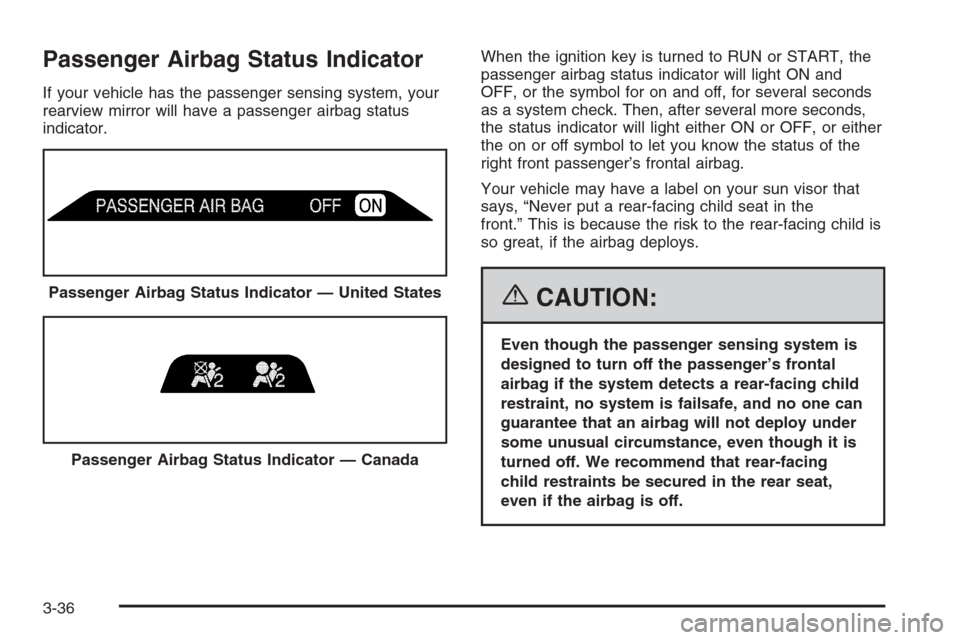
If your vehicle has the passenger sensing system, your
rearview mirror will have a passenger airbag status
indicator.When the ignition key is turned to RUN or START, the
passenger airbag status indicator will light ON and
OFF, or the symbol for on and off, for several seconds
as a system check. Then, after several more seconds,
the status indicator will light either ON or OFF, or either
the on or off symbol to let you know the status of the
right front passenger’s frontal airbag.
Your vehicle may have a label on your sun visor that
says, “Never put a rear-facing child seat in the
front.” This is because the risk to the rear-facing child is
so great, if the airbag deploys.
{CAUTION:
Even though the passenger sensing system is
designed to turn off the passenger’s frontal
airbag if the system detects a rear-facing child
restraint, no system is failsafe, and no one can
guarantee that an airbag will not deploy under
some unusual circumstance, even though it is
turned off. We recommend that rear-facing
child restraints be secured in the rear seat,
even if the airbag is off. Passenger Airbag Status Indicator — United States
Passenger Airbag Status Indicator — Canada
3-36
Page 224 of 594
A reading in the low pressure zone may be caused
by a dangerously low oil level or some other problem
causing low oil pressure. Check your oil as soon
as possible. See “OIL PRESSURE LOW” underDIC
Warnings and Messages on page 3-54andEngine Oil
(Gasoline Engine) on page 5-20.
{CAUTION:
Do not keep driving if the oil pressure is low.
If you do, your engine can become so hot that
it catches re. You or others could be burned.
Check your oil as soon as possible and have
your vehicle serviced.
Notice:Lack of proper engine oil maintenance
may damage the engine. The repairs would not
be covered by your warranty. Always follow
the maintenance schedule in this manual for
changing engine oil.
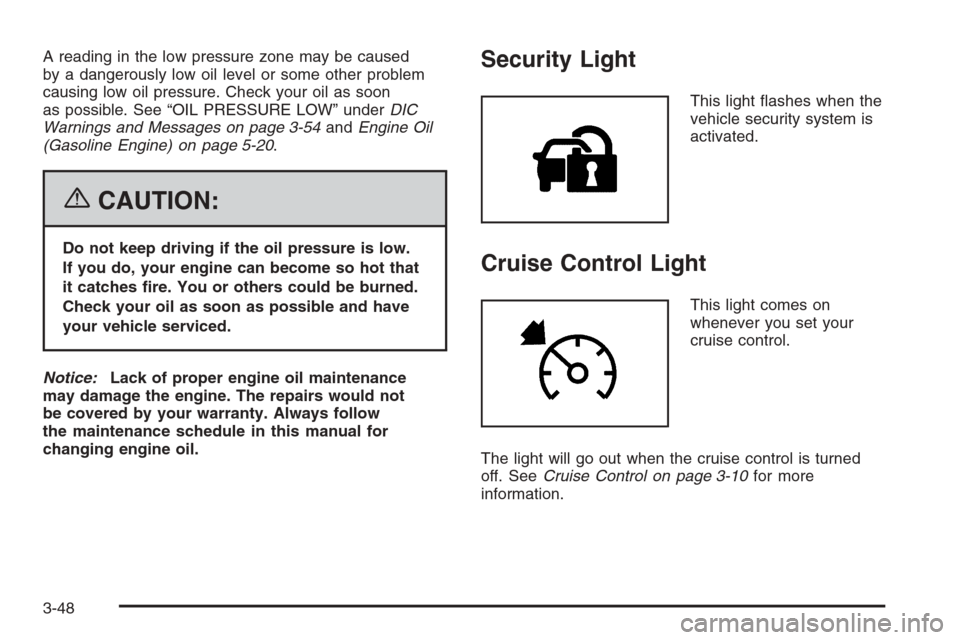
Security Light
This light ashes when the
vehicle security system is
activated.
Cruise Control Light
This light comes on
whenever you set your
cruise control.
The light will go out when the cruise control is turned
off. SeeCruise Control on page 3-10for more
information.
3-48
Page 258 of 594
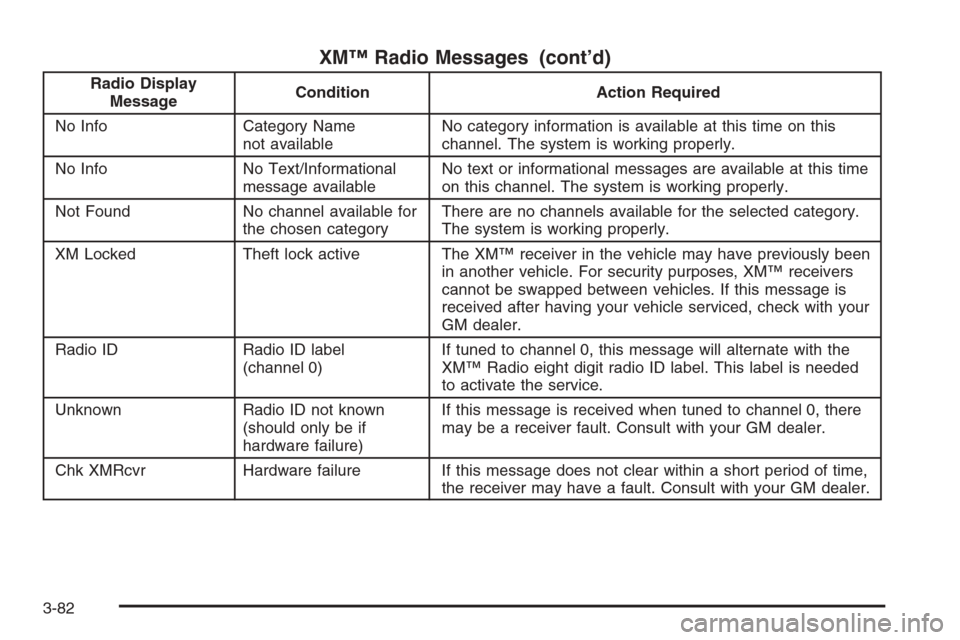
XM™ Radio Messages (cont’d)
Radio Display
MessageCondition Action Required
No Info Category Name
not availableNo category information is available at this time on this
channel. The system is working properly.
No Info No Text/Informational
message availableNo text or informational messages are available at this time
on this channel. The system is working properly.
Not Found No channel available for
the chosen categoryThere are no channels available for the selected category.
The system is working properly.
XM Locked Theft lock active The XM™ receiver in the vehicle may have previously been
in another vehicle. For security purposes, XM™ receivers
cannot be swapped between vehicles. If this message is
received after having your vehicle serviced, check with your
GM dealer.
Radio ID Radio ID label
(channel 0)If tuned to channel 0, this message will alternate with the
XM™ Radio eight digit radio ID label. This label is needed
to activate the service.
Unknown Radio ID not known
(should only be if
hardware failure)If this message is received when tuned to channel 0, there
may be a receiver fault. Consult with your GM dealer.
Chk XMRcvr Hardware failure If this message does not clear within a short period of time,
the receiver may have a fault. Consult with your GM dealer.
3-82
Page 269 of 594
XM™ Radio Messages (cont’d)
Radio Display
MessageCondition Action Required
No Info Category Name
not availableNo category information is available at this time on this
channel. The system is working properly.
No Info No Text/Informational
message availableNo text or informational messages are available at this time
on this channel. The system is working properly.
Not Found No channel available for
the chosen categoryThere are no channels available for the selected category.
The system is working properly.
XM Locked Theft lock active The XM™ receiver in the vehicle may have previously been
in another vehicle. For security purposes, XM™ receivers
cannot be swapped between vehicles. If this message is
received after having your vehicle serviced, check with your
GM dealer.
Radio ID Radio ID label
(channel 0)If tuned to channel 0, this message will alternate with the
XM™ Radio eight digit radio ID label. This label is needed
to activate the service.
Unknown Radio ID not known
(should only be if
hardware failure)If this message is received when tuned to channel 0, there
may be a receiver fault. Consult with your GM dealer.
Chk XMRcvr Hardware failure If this message does not clear within a short period of time,
the receiver may have a fault. Consult with your GM dealer.
3-93
Page 283 of 594
XM™ Radio Messages (cont’d)
Radio Display
MessageCondition Action Required
No Info Category Name
not availableNo category information is available at this time on this
channel. The system is working properly.
No Info No Text/Informational
message availableNo text or informational messages are available at this time
on this channel. The system is working properly.
Not Found No channel available for
the chosen categoryThere are no channels available for the selected category.
The system is working properly.
XM Locked Theft lock active The XM™ receiver in the vehicle may have previously been
in another vehicle. For security purposes, XM™ receivers
cannot be swapped between vehicles. If this message is
received after having your vehicle serviced, check with your
GM dealer.
Radio ID Radio ID label
(channel 0)If tuned to channel 0, this message will alternate with the
XM™ Radio eight digit radio ID label. This label is needed
to activate the service.
Unknown Radio ID not known
(should only be if
hardware failure)If this message is received when tuned to channel 0, there
may be a receiver fault. Consult with your GM dealer.
Chk XMRcvr Hardware failure If this message does not clear within a short period of time,
your receiver may have a fault. Consult with your GM
dealer.
3-107
Page 298 of 594
Battery Replacement
To change the batteries, do the following:
1. Remove the battery compartment door located on
the bottom of the remote control.
2. Replace the two AA batteries in the compartment.
Make sure that they are installed correctly, using
the diagram on the inside of the battery
compartment.
3. Close the battery door securely.
If the remote control is to be stored for a long period of
time, remove the batteries and keep them in a cool,
dry place.
Problem Recommended Action
No power. The ignition might not be
in on or accessory.
The parental control
button might have been
turned on. The power
indicator light will ash.
Disc will not play. The system might be off.
The parental control
button might have been
turned on. The power
indicator light will ash.
The system might be in
auxiliary mode.
The disc is upside down
or is not compatible.
The picture does not
ll the screen. There
are black borders on
the top and bottom or
on both sides or it looks
stretched out.Check the display
mode settings in the
display menu.
The disc was ejected,
but it was pulled back
into the DVD player.The disc is being stored
in the DVD player. Press
the eject button again to
eject the disc.
3-122
Page 326 of 594
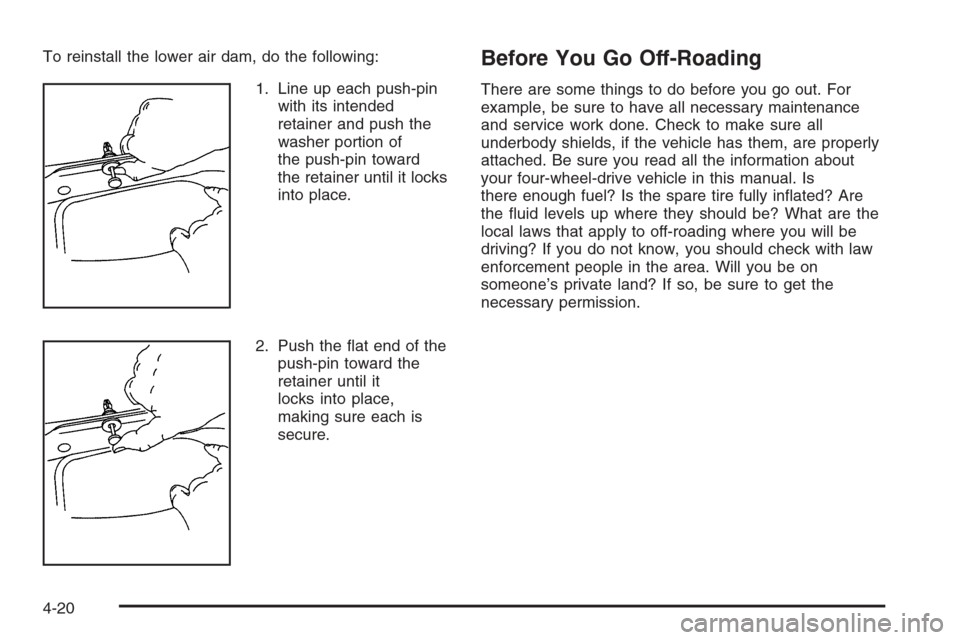
To reinstall the lower air dam, do the following:
1. Line up each push-pin
with its intended
retainer and push the
washer portion of
the push-pin toward
the retainer until it locks
into place.
2. Push the at end of the
push-pin toward the
retainer until it
locks into place,
making sure each is
secure.Before You Go Off-Roading
There are some things to do before you go out. For
example, be sure to have all necessary maintenance
and service work done. Check to make sure all
underbody shields, if the vehicle has them, are properly
attached. Be sure you read all the information about
your four-wheel-drive vehicle in this manual. Is
there enough fuel? Is the spare tire fully inated? Are
the uid levels up where they should be? What are the
local laws that apply to off-roading where you will be
driving? If you do not know, you should check with law
enforcement people in the area. Will you be on
someone’s private land? If so, be sure to get the
necessary permission.
4-20