tow CHEVROLET SILVERADO 2007 1.G Workshop Manual
[x] Cancel search | Manufacturer: CHEVROLET, Model Year: 2007, Model line: SILVERADO, Model: CHEVROLET SILVERADO 2007 1.GPages: 684, PDF Size: 3.4 MB
Page 283 of 684
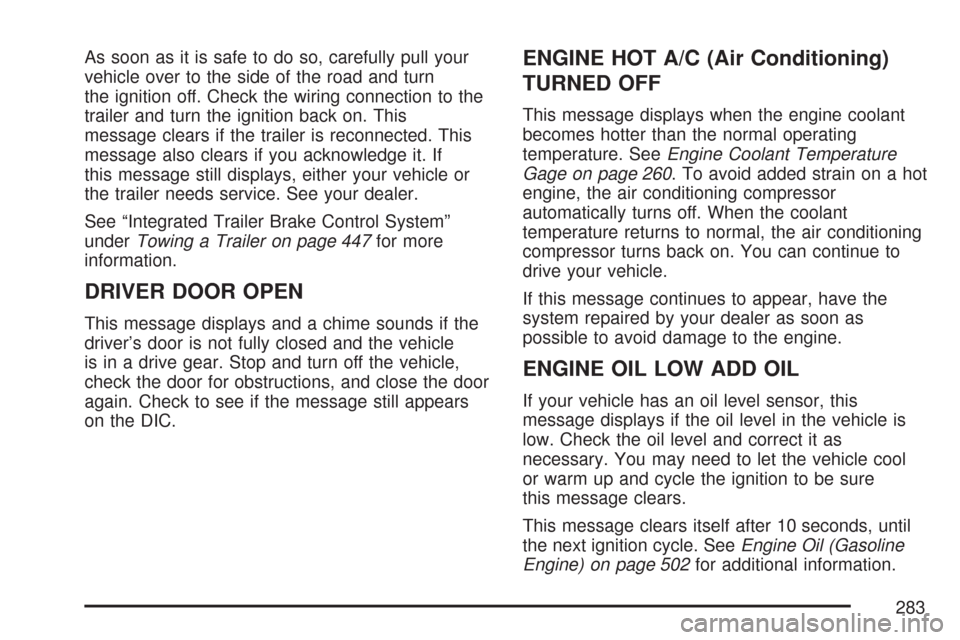
As soon as it is safe to do so, carefully pull your
vehicle over to the side of the road and turn
the ignition off. Check the wiring connection to the
trailer and turn the ignition back on. This
message clears if the trailer is reconnected. This
message also clears if you acknowledge it. If
this message still displays, either your vehicle or
the trailer needs service. See your dealer.
See “Integrated Trailer Brake Control System”
underTowing a Trailer on page 447for more
information.
DRIVER DOOR OPEN
This message displays and a chime sounds if the
driver’s door is not fully closed and the vehicle
is in a drive gear. Stop and turn off the vehicle,
check the door for obstructions, and close the door
again. Check to see if the message still appears
on the DIC.
ENGINE HOT A/C (Air Conditioning)
TURNED OFF
This message displays when the engine coolant
becomes hotter than the normal operating
temperature. SeeEngine Coolant Temperature
Gage on page 260. To avoid added strain on a hot
engine, the air conditioning compressor
automatically turns off. When the coolant
temperature returns to normal, the air conditioning
compressor turns back on. You can continue to
drive your vehicle.
If this message continues to appear, have the
system repaired by your dealer as soon as
possible to avoid damage to the engine.
ENGINE OIL LOW ADD OIL
If your vehicle has an oil level sensor, this
message displays if the oil level in the vehicle is
low. Check the oil level and correct it as
necessary. You may need to let the vehicle cool
or warm up and cycle the ignition to be sure
this message clears.
This message clears itself after 10 seconds, until
the next ignition cycle. SeeEngine Oil (Gasoline
Engine) on page 502for additional information.
283
Page 289 of 684
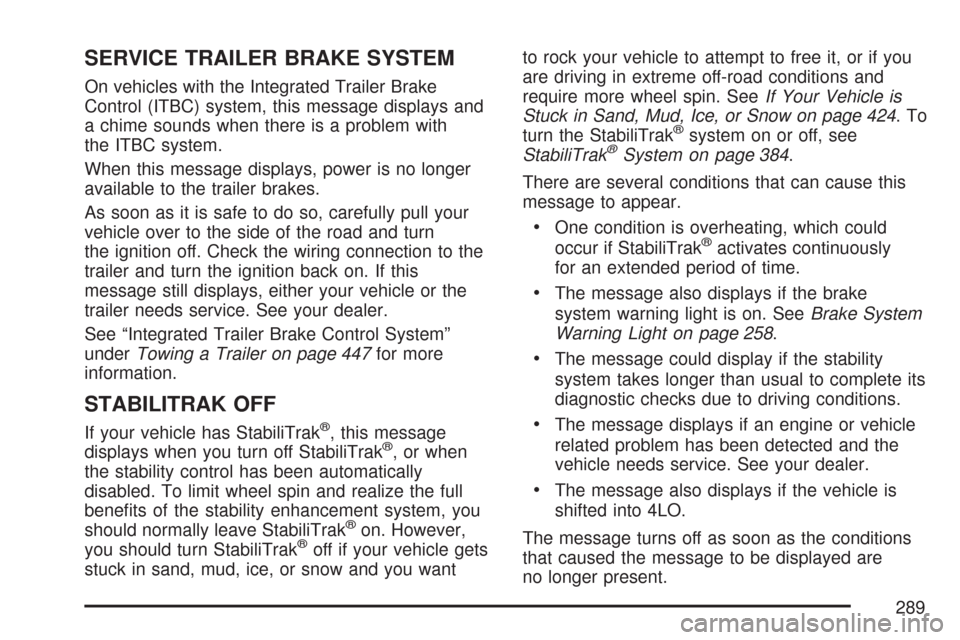
SERVICE TRAILER BRAKE SYSTEM
On vehicles with the Integrated Trailer Brake
Control (ITBC) system, this message displays and
a chime sounds when there is a problem with
the ITBC system.
When this message displays, power is no longer
available to the trailer brakes.
As soon as it is safe to do so, carefully pull your
vehicle over to the side of the road and turn
the ignition off. Check the wiring connection to the
trailer and turn the ignition back on. If this
message still displays, either your vehicle or the
trailer needs service. See your dealer.
See “Integrated Trailer Brake Control System”
underTowing a Trailer on page 447for more
information.
STABILITRAK OFF
If your vehicle has StabiliTrak®, this message
displays when you turn off StabiliTrak®, or when
the stability control has been automatically
disabled. To limit wheel spin and realize the full
benets of the stability enhancement system, you
should normally leave StabiliTrak
®on. However,
you should turn StabiliTrak®off if your vehicle gets
stuck in sand, mud, ice, or snow and you wantto rock your vehicle to attempt to free it, or if you
are driving in extreme off-road conditions and
require more wheel spin. SeeIf Your Vehicle is
Stuck in Sand, Mud, Ice, or Snow on page 424.To
turn the StabiliTrak
®system on or off, see
StabiliTrak®System on page 384.
There are several conditions that can cause this
message to appear.
One condition is overheating, which could
occur if StabiliTrak®activates continuously
for an extended period of time.
The message also displays if the brake
system warning light is on. SeeBrake System
Warning Light on page 258.
The message could display if the stability
system takes longer than usual to complete its
diagnostic checks due to driving conditions.
The message displays if an engine or vehicle
related problem has been detected and the
vehicle needs service. See your dealer.
The message also displays if the vehicle is
shifted into 4LO.
The message turns off as soon as the conditions
that caused the message to be displayed are
no longer present.
289
Page 290 of 684
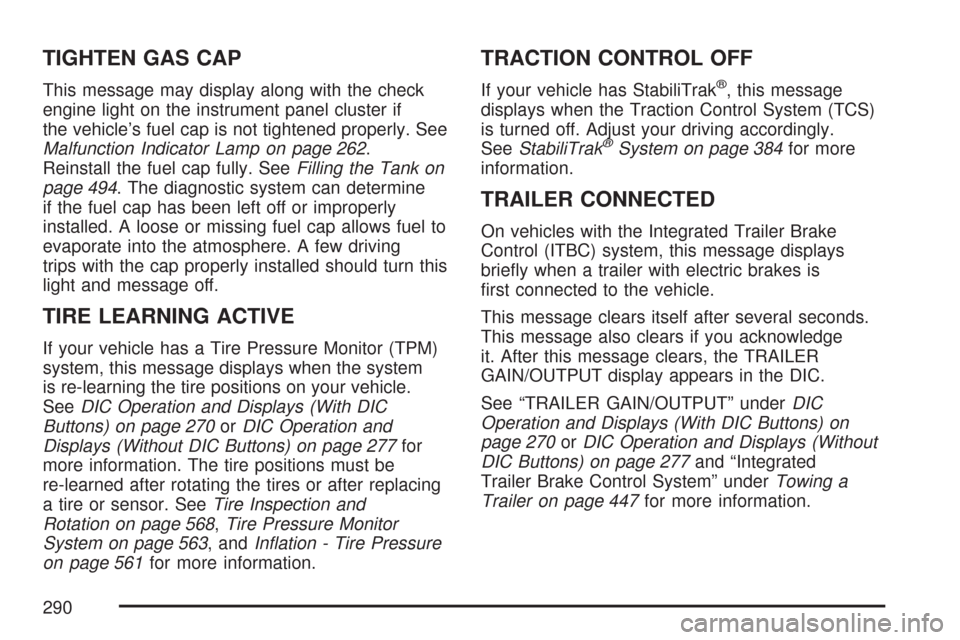
TIGHTEN GAS CAP
This message may display along with the check
engine light on the instrument panel cluster if
the vehicle’s fuel cap is not tightened properly. See
Malfunction Indicator Lamp on page 262.
Reinstall the fuel cap fully. SeeFilling the Tank on
page 494. The diagnostic system can determine
if the fuel cap has been left off or improperly
installed. A loose or missing fuel cap allows fuel to
evaporate into the atmosphere. A few driving
trips with the cap properly installed should turn this
light and message off.
TIRE LEARNING ACTIVE
If your vehicle has a Tire Pressure Monitor (TPM)
system, this message displays when the system
is re-learning the tire positions on your vehicle.
SeeDIC Operation and Displays (With DIC
Buttons) on page 270orDIC Operation and
Displays (Without DIC Buttons) on page 277for
more information. The tire positions must be
re-learned after rotating the tires or after replacing
a tire or sensor. SeeTire Inspection and
Rotation on page 568,Tire Pressure Monitor
System on page 563, andInation - Tire Pressure
on page 561for more information.
TRACTION CONTROL OFF
If your vehicle has StabiliTrak®, this message
displays when the Traction Control System (TCS)
is turned off. Adjust your driving accordingly.
SeeStabiliTrak
®System on page 384for more
information.
TRAILER CONNECTED
On vehicles with the Integrated Trailer Brake
Control (ITBC) system, this message displays
briey when a trailer with electric brakes is
rst connected to the vehicle.
This message clears itself after several seconds.
This message also clears if you acknowledge
it. After this message clears, the TRAILER
GAIN/OUTPUT display appears in the DIC.
See “TRAILER GAIN/OUTPUT” underDIC
Operation and Displays (With DIC Buttons) on
page 270orDIC Operation and Displays (Without
DIC Buttons) on page 277and “Integrated
Trailer Brake Control System” underTowing a
Trailer on page 447for more information.
290
Page 367 of 684
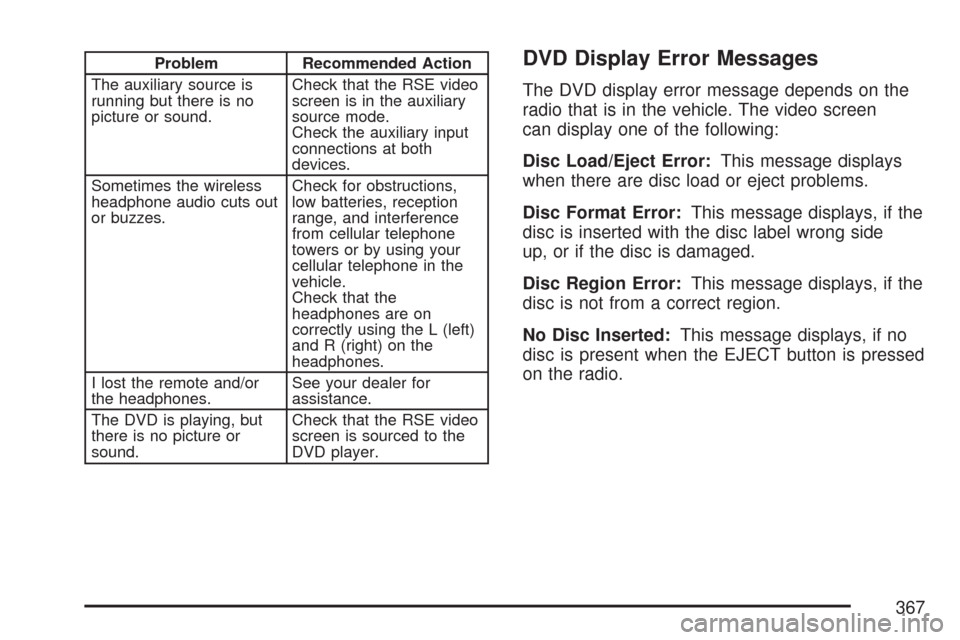
Problem Recommended Action
The auxiliary source is
running but there is no
picture or sound.Check that the RSE video
screen is in the auxiliary
source mode.
Check the auxiliary input
connections at both
devices.
Sometimes the wireless
headphone audio cuts out
or buzzes.Check for obstructions,
low batteries, reception
range, and interference
from cellular telephone
towers or by using your
cellular telephone in the
vehicle.
Check that the
headphones are on
correctly using the L (left)
and R (right) on the
headphones.
I lost the remote and/or
the headphones.See your dealer for
assistance.
The DVD is playing, but
there is no picture or
sound.Check that the RSE video
screen is sourced to the
DVD player.DVD Display Error Messages
The DVD display error message depends on the
radio that is in the vehicle. The video screen
can display one of the following:
Disc Load/Eject Error:This message displays
when there are disc load or eject problems.
Disc Format Error:This message displays, if the
disc is inserted with the disc label wrong side
up, or if the disc is damaged.
Disc Region Error:This message displays, if the
disc is not from a correct region.
No Disc Inserted:This message displays, if no
disc is present when the EJECT button is pressed
on the radio.
367
Page 375 of 684
Your Driving, the Road, and Your
Vehicle..................................................... 376
Defensive Driving...................................... 376
Drunken Driving........................................ 377
Control of a Vehicle.................................. 380
Braking...................................................... 380
Anti-Lock Brake System (ABS).................. 381
Braking in Emergencies............................. 383
Locking Rear Axle..................................... 383
StabiliTrak
®System................................... 384
Steering.................................................... 387
Off-Road Recovery.................................... 389
Passing..................................................... 389
Loss of Control.......................................... 391
Off-Road Driving........................................ 392
Driving at Night......................................... 409
Driving in Rain and on Wet Roads............ 410
City Driving............................................... 414
Freeway Driving........................................ 415Before Leaving on a Long Trip.................. 416
Highway Hypnosis..................................... 417
Hill and Mountain Roads........................... 418
Winter Driving........................................... 420
If Your Vehicle is Stuck in Sand, Mud,
Ice, or Snow.......................................... 424
Rocking Your Vehicle to Get It Out........... 425
Recovery Hooks (Except SS Model).......... 426
Loading Your Vehicle................................ 427
Adding a Snow Plow or Similar
Equipment.............................................. 434
Truck-Camper Loading Information............ 438
Pickup Conversion to Chassis Cab.............. 441
Towing........................................................ 441
Towing Your Vehicle................................. 441
Recreational Vehicle Towing...................... 442
Towing a Trailer........................................ 447
Trailer Recommendations.......................... 484
Section 4 Driving Your Vehicle
375
Page 425 of 684
Notice:Spinning the wheels can destroy parts
of your vehicle as well as the tires. If you
spin the wheels too fast while shifting
the transmission back and forth, you can
destroy the transmission.
For information about using tire chains on your
vehicle, seeTire Chains on page 578.
Rocking Your Vehicle to Get It Out
First, turn the steering wheel left and right.
That will clear the area around the front wheels.
If you have a four-wheel-drive vehicle, shift
into Four-Wheel High. If your vehicle has
StabiliTrak
®, you should turn the system off.
SeeStabiliTrak®System on page 384.Then shift back and forth between REVERSE (R)
and a forward gear, spinning the wheels as
little as possible. Release the accelerator pedal
while you shift, and press lightly on the accelerator
pedal when the transmission is in gear. By slowly
spinning the wheels in the forward and reverse
directions, you will cause a rocking motion
that may free your vehicle. If that does not get
your vehicle out after a few tries, it may need to be
towed out. You can use the recovery hooks, if
your vehicle has them. If your vehicle does need
to be towed out, seeTowing Your Vehicle on
page 441.
425
Page 426 of 684
Recovery Hooks (Except SS Model)
Notice:SS Models have recovery hooks
that are concealed by the front bumper trim
covering. Use of the recovery hooks could
cause damage to your vehicle. If you have the
SS Model, do not use the recovery hooks.
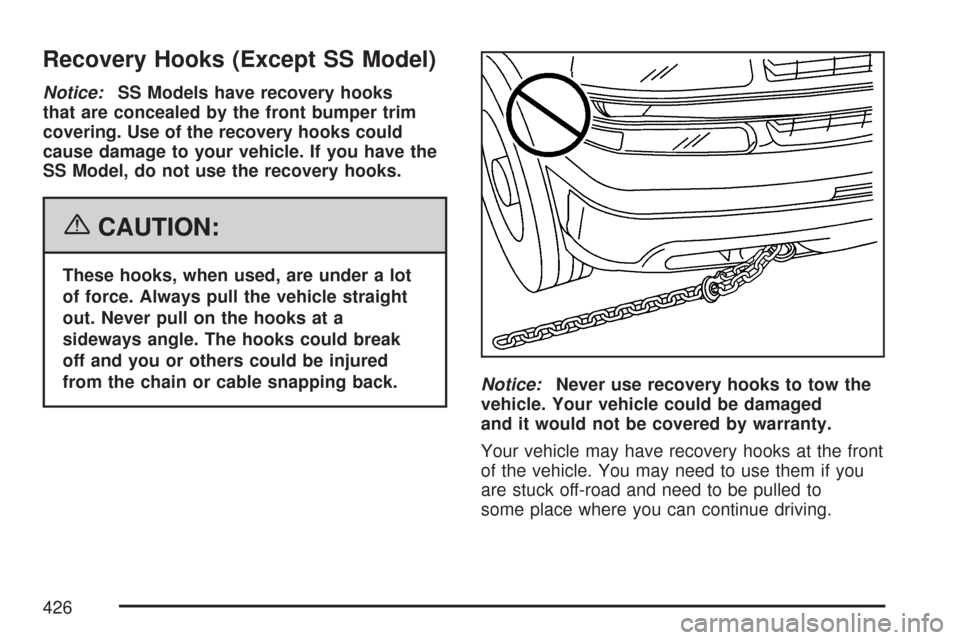
{CAUTION:
These hooks, when used, are under a lot
of force. Always pull the vehicle straight
out. Never pull on the hooks at a
sideways angle. The hooks could break
off and you or others could be injured
from the chain or cable snapping back.
Notice:Never use recovery hooks to tow the
vehicle. Your vehicle could be damaged
and it would not be covered by warranty.
Your vehicle may have recovery hooks at the front
of the vehicle. You may need to use them if you
are stuck off-road and need to be pulled to
some place where you can continue driving.
426
Page 428 of 684
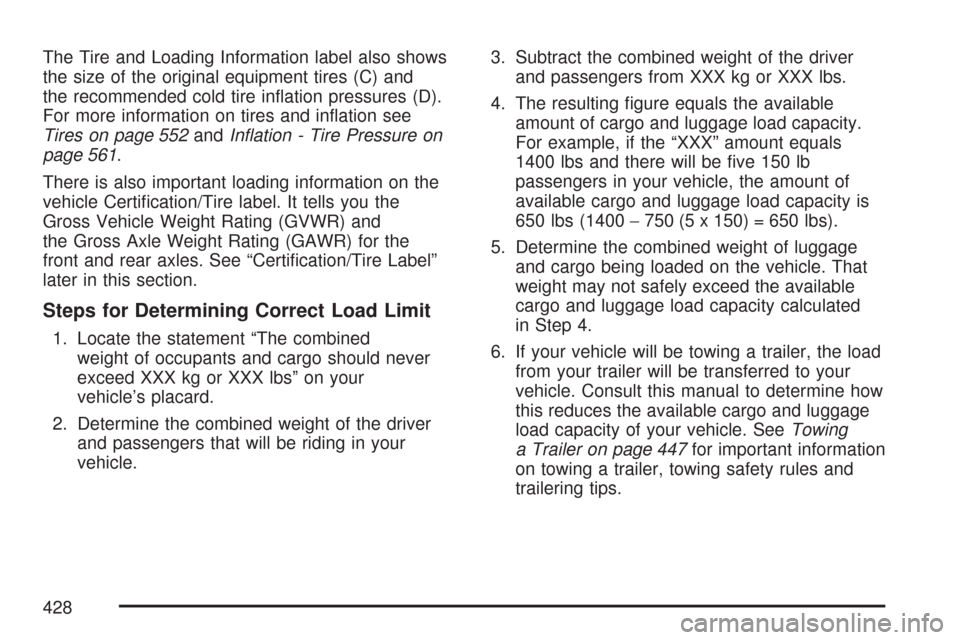
The Tire and Loading Information label also shows
the size of the original equipment tires (C) and
the recommended cold tire ination pressures (D).
For more information on tires and ination see
Tires on page 552andInation - Tire Pressure on
page 561.
There is also important loading information on the
vehicle Certication/Tire label. It tells you the
Gross Vehicle Weight Rating (GVWR) and
the Gross Axle Weight Rating (GAWR) for the
front and rear axles. See “Certication/Tire Label”
later in this section.
Steps for Determining Correct Load Limit
1. Locate the statement “The combined
weight of occupants and cargo should never
exceed XXX kg or XXX lbs” on your
vehicle’s placard.
2. Determine the combined weight of the driver
and passengers that will be riding in your
vehicle.3. Subtract the combined weight of the driver
and passengers from XXX kg or XXX lbs.
4. The resulting gure equals the available
amount of cargo and luggage load capacity.
For example, if the “XXX” amount equals
1400 lbs and there will be ve 150 lb
passengers in your vehicle, the amount of
available cargo and luggage load capacity is
650 lbs (1400−750 (5 x 150) = 650 lbs).
5. Determine the combined weight of luggage
and cargo being loaded on the vehicle. That
weight may not safely exceed the available
cargo and luggage load capacity calculated
in Step 4.
6. If your vehicle will be towing a trailer, the load
from your trailer will be transferred to your
vehicle. Consult this manual to determine how
this reduces the available cargo and luggage
load capacity of your vehicle. SeeTowing
a Trailer on page 447for important information
on towing a trailer, towing safety rules and
trailering tips.
428
Page 437 of 684
For example, adding a 700 lb (318 kg) snow plow
actually adds more than 700 lbs (318 kg) to the
front axle. Using the formula, if the snow plow
is 4 ft (122 cm) in front of the front axle and the
wheel base is 10 ft (305 cm), then:
W = 700 lb (318 kg)
A = 4 ft (122 cm)
W.B. = 10 ft (305 cm)
(W x (A + W.B.))/W.B. = (700 x (4 + 10))/10 =
980 lbs (445 kg)
So, if your truck’s front axle reserve capacity is
more than 980 lbs (445 kg), you could add
the snow plow without exceeding the front GAWR.
Q:What if I want to add heavier equipment
to my vehicle?
A:You can add heavier equipment on the front
of the vehicle if you compensate for it by
carrying fewer passengers, less cargo, or by
positioning cargo towards the rear. This has
the effect of reducing the load on the front.
However, the front GAWR, rear GAWR, and
the Gross Vehicle Weight Rating (GVWR)
must never be exceeded.
{CAUTION:
On some vehicles that have certain front
mounted equipment, such as a snow
plow, it may be possible to load the front
axle to the front gross axle weight rating
(GAWR) but not have enough weight on
the rear axle to have proper braking
performance. If your brakes can not work
properly, you could have a crash. To help
your brakes work properly when a snow
plow is installed, always follow the
snow plow manufacturer or installer’s
recommendation for rear ballast to ensure
a proper front and rear weight distribution
ratio, even though the actual front weight
may be less than the front GAWR, and the
total vehicle weight is less than the gross
vehicle weight rating (GVWR). Maintaining
a proper front and rear weight distribution
ratio is necessary to provide proper
braking performance.
437
Page 441 of 684
Secure loose items to prevent weight shifts that
could affect the balance of your vehicle. When the
truck-camper is loaded, drive to a scale and
weigh on the front and on the rear wheels
separately to determine axle loads. Individual axle
loads should not exceed either of the gross
axle weight ratings (GAWR). The total of the axle
loads should not exceed your vehicle’s gross
vehicle weight rating (GVWR). These ratings are
given on the vehicle certication label attached
to the rear edge of the driver’s door. See
“Certication/Tire Label” underLoading Your
Vehicle on page 427. If weight ratings are
exceeded, move or remove items to bring all
weights below the ratings.
When you install and load your slide-in camper,
check the manufacturer’s instructions.
If you want more information on curb weights,
cargo weights, Cargo Weight Rating and the
correct center of gravity zone for your vehicle,
your dealer can help you. Just ask for a copy of
“Consumer Information, Truck-Camper Loading.”Pickup Conversion to Chassis Cab
General Motors is aware that some vehicle owners
may consider having the pickup box removed
and a commercial or recreational body installed.
Owners should be aware that, as manufactured,
there are differences between a chassis cab and a
pickup with the box removed which may affect
vehicle safety. The components necessary
to adapt a pickup to permit its safe use with a
specialized body should be installed by the
body builder.
Towing
Towing Your Vehicle
Consult your dealer or a professional towing
service if you need to have your disabled vehicle
towed. SeeRoadside Assistance Program on
page 654.
If you want to tow your vehicle behind another
vehicle for recreational purposes (such as behind
a motorhome), see “Recreational Vehicle
Towing” following.
441