automatic transmission CHEVROLET SILVERADO 2008 2.G User Guide
[x] Cancel search | Manufacturer: CHEVROLET, Model Year: 2008, Model line: SILVERADO, Model: CHEVROLET SILVERADO 2008 2.GPages: 596, PDF Size: 3.12 MB
Page 141 of 596
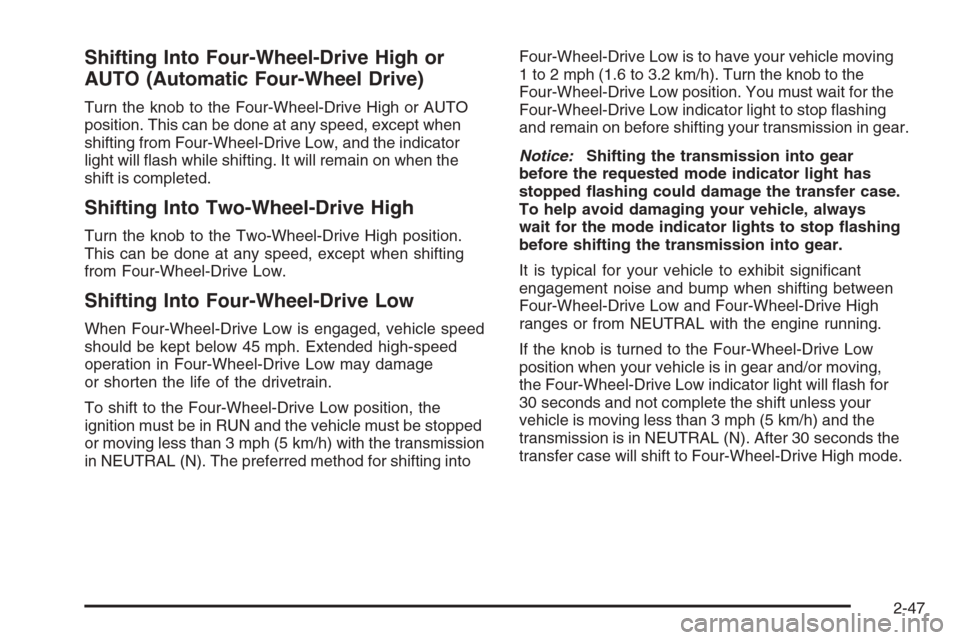
Shifting Into Four-Wheel-Drive High or
AUTO (Automatic Four-Wheel Drive)
Turn the knob to the Four-Wheel-Drive High or AUTO
position. This can be done at any speed, except when
shifting from Four-Wheel-Drive Low, and the indicator
light will ash while shifting. It will remain on when the
shift is completed.
Shifting Into Two-Wheel-Drive High
Turn the knob to the Two-Wheel-Drive High position.
This can be done at any speed, except when shifting
from Four-Wheel-Drive Low.
Shifting Into Four-Wheel-Drive Low
When Four-Wheel-Drive Low is engaged, vehicle speed
should be kept below 45 mph. Extended high-speed
operation in Four-Wheel-Drive Low may damage
or shorten the life of the drivetrain.
To shift to the Four-Wheel-Drive Low position, the
ignition must be in RUN and the vehicle must be stopped
or moving less than 3 mph (5 km/h) with the transmission
in NEUTRAL (N). The preferred method for shifting intoFour-Wheel-Drive Low is to have your vehicle moving
1 to 2 mph (1.6 to 3.2 km/h). Turn the knob to the
Four-Wheel-Drive Low position. You must wait for the
Four-Wheel-Drive Low indicator light to stop ashing
and remain on before shifting your transmission in gear.
Notice:Shifting the transmission into gear
before the requested mode indicator light has
stopped ashing could damage the transfer case.
To help avoid damaging your vehicle, always
wait for the mode indicator lights to stop ashing
before shifting the transmission into gear.
It is typical for your vehicle to exhibit signicant
engagement noise and bump when shifting between
Four-Wheel-Drive Low and Four-Wheel-Drive High
ranges or from NEUTRAL with the engine running.
If the knob is turned to the Four-Wheel-Drive Low
position when your vehicle is in gear and/or moving,
the Four-Wheel-Drive Low indicator light will ash for
30 seconds and not complete the shift unless your
vehicle is moving less than 3 mph (5 km/h) and the
transmission is in NEUTRAL (N). After 30 seconds the
transfer case will shift to Four-Wheel-Drive High mode.
2-47
Page 183 of 596
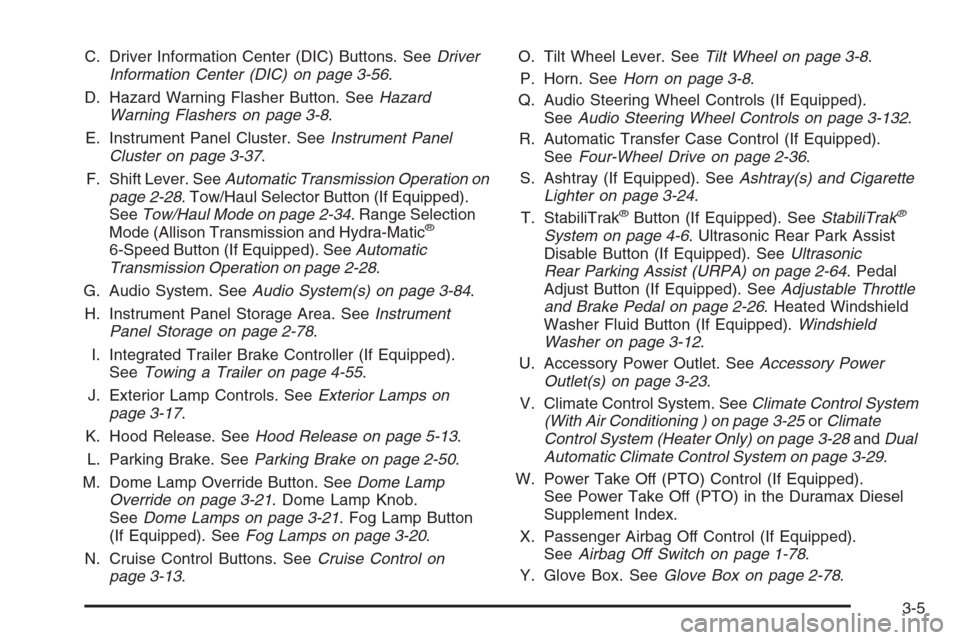
C. Driver Information Center (DIC) Buttons. SeeDriver
Information Center (DIC) on page 3-56.
D. Hazard Warning Flasher Button. SeeHazard
Warning Flashers on page 3-8.
E. Instrument Panel Cluster. SeeInstrument Panel
Cluster on page 3-37.
F. Shift Lever. SeeAutomatic Transmission Operation on
page 2-28. Tow/Haul Selector Button (If Equipped).
SeeTow/Haul Mode on page 2-34. Range Selection
Mode (Allison Transmission and Hydra-Matic
®
6-Speed Button (If Equipped). SeeAutomatic
Transmission Operation on page 2-28.
G. Audio System. SeeAudio System(s) on page 3-84.
H. Instrument Panel Storage Area. SeeInstrument
Panel Storage on page 2-78.
I. Integrated Trailer Brake Controller (If Equipped).
SeeTowing a Trailer on page 4-55.
J. Exterior Lamp Controls. SeeExterior Lamps on
page 3-17.
K. Hood Release. SeeHood Release on page 5-13.
L. Parking Brake. SeeParking Brake on page 2-50.
M. Dome Lamp Override Button. SeeDome Lamp
Override on page 3-21. Dome Lamp Knob.
SeeDome Lamps on page 3-21. Fog Lamp Button
(If Equipped). SeeFog Lamps on page 3-20.
N. Cruise Control Buttons. SeeCruise Control on
page 3-13.O. Tilt Wheel Lever. SeeTilt Wheel on page 3-8.
P. Horn. SeeHorn on page 3-8.
Q. Audio Steering Wheel Controls (If Equipped).
SeeAudio Steering Wheel Controls on page 3-132.
R. Automatic Transfer Case Control (If Equipped).
SeeFour-Wheel Drive on page 2-36.
S. Ashtray (If Equipped). SeeAshtray(s) and Cigarette
Lighter on page 3-24.
T. StabiliTrak
®Button (If Equipped). SeeStabiliTrak®
System on page 4-6. Ultrasonic Rear Park Assist
Disable Button (If Equipped). SeeUltrasonic
Rear Parking Assist (URPA) on page 2-64. Pedal
Adjust Button (If Equipped). SeeAdjustable Throttle
and Brake Pedal on page 2-26. Heated Windshield
Washer Fluid Button (If Equipped).Windshield
Washer on page 3-12.
U. Accessory Power Outlet. SeeAccessory Power
Outlet(s) on page 3-23.
V. Climate Control System. SeeClimate Control System
(With Air Conditioning ) on page 3-25orClimate
Control System (Heater Only) on page 3-28andDual
Automatic Climate Control System on page 3-29.
W. Power Take Off (PTO) Control (If Equipped).
See Power Take Off (PTO) in the Duramax Diesel
Supplement Index.
X. Passenger Airbag Off Control (If Equipped).
SeeAirbag Off Switch on page 1-78.
Y. Glove Box. SeeGlove Box on page 2-78.
3-5
Page 185 of 596
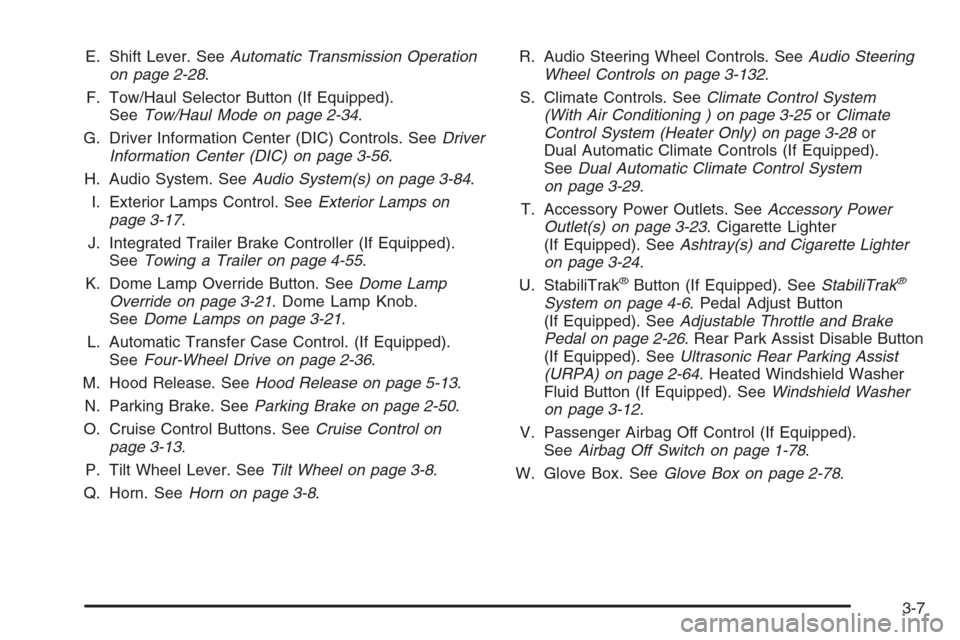
E. Shift Lever. SeeAutomatic Transmission Operation
on page 2-28.
F. Tow/Haul Selector Button (If Equipped).
SeeTow/Haul Mode on page 2-34.
G. Driver Information Center (DIC) Controls. SeeDriver
Information Center (DIC) on page 3-56.
H. Audio System. SeeAudio System(s) on page 3-84.
I. Exterior Lamps Control. SeeExterior Lamps on
page 3-17.
J. Integrated Trailer Brake Controller (If Equipped).
SeeTowing a Trailer on page 4-55.
K. Dome Lamp Override Button. SeeDome Lamp
Override on page 3-21. Dome Lamp Knob.
SeeDome Lamps on page 3-21.
L. Automatic Transfer Case Control. (If Equipped).
SeeFour-Wheel Drive on page 2-36.
M. Hood Release. SeeHood Release on page 5-13.
N. Parking Brake. SeeParking Brake on page 2-50.
O. Cruise Control Buttons. SeeCruise Control on
page 3-13.
P. Tilt Wheel Lever. SeeTilt Wheel on page 3-8.
Q. Horn. SeeHorn on page 3-8.R. Audio Steering Wheel Controls. SeeAudio Steering
Wheel Controls on page 3-132.
S. Climate Controls. SeeClimate Control System
(With Air Conditioning ) on page 3-25orClimate
Control System (Heater Only) on page 3-28or
Dual Automatic Climate Controls (If Equipped).
SeeDual Automatic Climate Control System
on page 3-29.
T. Accessory Power Outlets. SeeAccessory Power
Outlet(s) on page 3-23. Cigarette Lighter
(If Equipped). SeeAshtray(s) and Cigarette Lighter
on page 3-24.
U. StabiliTrak
®Button (If Equipped). SeeStabiliTrak®
System on page 4-6. Pedal Adjust Button
(If Equipped). SeeAdjustable Throttle and Brake
Pedal on page 2-26. Rear Park Assist Disable Button
(If Equipped). SeeUltrasonic Rear Parking Assist
(URPA) on page 2-64. Heated Windshield Washer
Fluid Button (If Equipped). SeeWindshield Washer
on page 3-12.
V. Passenger Airbag Off Control (If Equipped).
SeeAirbag Off Switch on page 1-78.
W. Glove Box. SeeGlove Box on page 2-78.
3-7
Page 192 of 596
When the brakes are applied, cruise control is
turned off.
For vehicles with an Allison
®automatic transmission,
see “Grade Braking and Cruise Grade Braking (Allison
Transmission) underTow/Haul Mode on page 2-34
for an explanation of how cruise control interacts with
the Range Selection Mode, tow/haul and grade braking
systems.
For vehicles with the StabiliTrak
®system that begins
to limit wheel spin while you are using cruise control, the
cruise control will automatically disengage.
SeeStabiliTrak
®System on page 4-6. When road
conditions allow the cruise control to be safely used
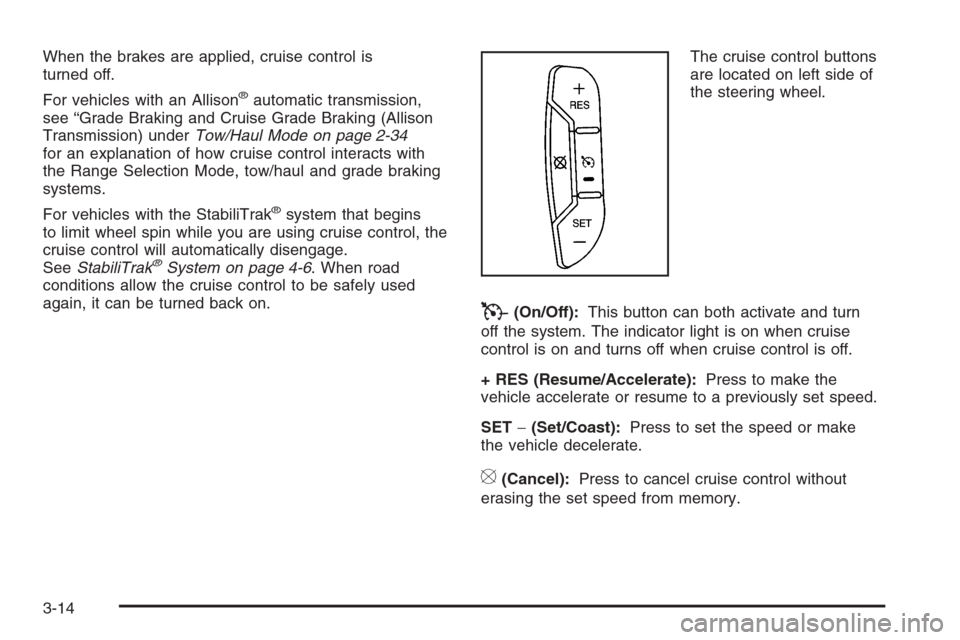
again, it can be turned back on.The cruise control buttons
are located on left side of
the steering wheel.
T(On/Off):This button can both activate and turn
off the system. The indicator light is on when cruise
control is on and turns off when cruise control is off.
+ RES (Resume/Accelerate):Press to make the
vehicle accelerate or resume to a previously set speed.
SET−(Set/Coast):Press to set the speed or make
the vehicle decelerate.
[(Cancel):Press to cancel cruise control without
erasing the set speed from memory.
3-14
Page 196 of 596
2(Headlamps):Turn the control to this position to
turn on the headlamps together with the following:
Parking Lamps
Instrument Panel Lights
Taillamps
License Plate Lamps
When the headlamps are turned on while the vehicle is
on, the headlamps turn off automatically 10 minutes
after the ignition is turned off. When the headlamps are
turned on while the vehicle is off, the headlamps will
stay on for 10 minutes before automatically turning off to
prevent the battery from being drained. Turn the
headlamp control to off and then back to the headlamp
on position to make the headlamps stay on for an
additional 10 minutes.
Push the turn signal/multifunction lever toward the
instrument panel to change the headlamps from low
beam to high beam.
Headlamps on Reminder
A reminder chime will sound when the headlamps or
parking lamps are manually turned on and your ignition
is off and a door is open. To disable the chime, turn
the light off.
Daytime Running Lamps (DRL)
Daytime Running Lamps (DRL) can make it easier for
others to see the front of your vehicle during the day.
DRL can be helpful in many different driving conditions,
but they can be especially helpful in the short periods
after dawn and before sunset. Fully functional daytime
running lamps are required on all vehicles rst sold
in Canada.
The DRL system will come on when the following
conditions are met:
The ignition is on.
The exterior lamps control is in AUTO.
The transmission is not in PARK (P).
The light sensor determines it is daytime.
When the DRL are on, only the DRL lamps will be on.
The taillamps, sidemarker, and other lamps will not
be on. The instrument panel will not be lit up either.
When it begins to get dark, the automatic headlamp
system will switch from DRL to the headlamps.
To turn off the DRL lamps, turn the exterior lamps
control to the OFF position and then release. For
vehicles rst sold in Canada, the transmission must be
in the PARK (P) position, before the DRL lamps can
be turned off.
3-18
Page 197 of 596
Automatic Headlamp System
When it is dark enough outside, the automatic headlamp
system will turn on the headlamps at the normal
brightness, along with the taillamps, sidemarker, parking
lamps, and the instrument panel lights. The radio lights
will also be dim.
To turn off the automatic headlamp system, turn the
exterior lamps switch to the off position and then release
it. For vehicles rst sold in Canada, the transmission
must be in the PARK (P) position, before the automatic
headlamp system can be turned off.
The vehicle has a light sensor located on the top of the
instrument panel in the defroster grille that regulates
when the automatic headlamps turn on. Be sure it is not
covered, or the headlamps will come on whenever
the ignition is on.
The system may also turn on the headlamps when
driving through a parking garage, heavy overcast
weather, or a tunnel. This is normal.
There is a delay in the transition between the
daytime and nighttime operation of the Daytime
Running Lamps (DRL) and the automatic headlamp
systems so that driving under bridges or bright
overhead street lights does not affect the system.The DRL and automatic headlamp system will only be
affected when the light sensor detects a change in
lighting lasting longer than the delay.
If the vehicle is started in a dark garage, the automatic
headlamp system will come on immediately. Once the
vehicle leaves the garage, it takes approximately
one minute for the automatic headlamp system to
change to DRL if it is bright enough outside. During that
delay, the instrument panel cluster may not be as
bright as usual. Make sure the instrument panel
brightness control is in the full bright position.
SeeInstrument Panel Brightness on page 3-21.
To idle the vehicle with the automatic headlamp system
off, turn the control to the off position.
The headlamps will also stay on after you exit the
vehicle. This feature can be programmed using the
Driver Information Center (DIC). SeeDIC Vehicle
Customization (With DIC Buttons) on page 3-76.
The regular headlamp system can be turned on
when needed.
3-19
Page 238 of 596
Timer
Press the trip/fuel button until TIMER displays.
This display can be used as a timer.
To start the timer, press the set/reset button while
TIMER is displayed. The display will show the amount
of time that has passed since the timer was last
reset, not including time the ignition is off. Time will
continue to be counted as long as the ignition is
on, even if another display is being shown on the DIC.
The timer will record up to 99 hours, 59 minutes
and 59 seconds (99:59:59) after which the display will
return to zero.
To stop the timer, press the set/reset button briey while
TIMER is displayed.
To reset the timer to zero, press and hold the set/reset
button while TIMER is displayed.
Transmission Temperature
Press the trip/fuel button until TRANS TEMP displays.
This display shows the temperature of the automatic
transmission uid in either degrees Fahrenheit (°F) or
degrees Celsius (°C).
Instantaneous Economy and Active
Fuel Management™ Indicator
If your vehicle has this display, press the trip/fuel
button until INST ECONOMY V8 MODE displays.
This display shows the current fuel economy at a
particular moment and will change frequently as driving
conditions change. This display shows the instantaneous
fuel economy in miles per gallon (mpg) or liters per
100 kilometers (L/100 km). Unlike average economy,
this screen cannot be reset.
An Active Fuel Management™ indicator will display on
the right side of the DIC, while INST ECONOMY
displays on the left side. Active Fuel Management™
allows the engine to operate on either four or eight
cylinders, depending on your driving demands. When
Active Fuel Management™ is active, V4 MODE will
display on the DIC. When Active Fuel Management™
is inactive, V8 MODE will display. SeeActive Fuel
Management™ on page 2-28for more information.
Blank Display
This display shows no information.
3-60
Page 242 of 596
To use the retro-active reset feature, press and hold the
trip odometer reset stem for at least four seconds.
The trip odometer will display the number of miles (mi)
or kilometers (km) driven since the ignition was last
turned on and the vehicle was moving. Once the vehicle
begins moving, the trip odometer will accumulate
mileage. For example, if the vehicle was driven
5 miles (8 km) before it is started again, and then the
retro-active reset feature is activated, the display
will show 5 miles (8 km). As the vehicle begins moving,
the display will then increase to 5.1 miles (8.2 km),
5.2 miles (8.4 km), etc.
Transmission Temperature
Press the trip odometer reset stem until TRANS TEMP
displays. This display shows the temperature of the
automatic transmission uid in either degrees
Fahrenheit (°F) or degrees Celsius (°C).
Trailer Gain and Output
On vehicles with the Integrated Trailer Brake Control
(ITBC) system, the trailer brake display appears in the
DIC. Press the trip odometer reset stem until TRAILER
GAIN and OUTPUT display.TRAILER GAIN shows the trailer gain setting. This
setting can be adjusted from 0.0 to 10.0 with either a
trailer connected or disconnected. To adjust this setting,
see “Integrated Trailer Brake Control System” under
Towing a Trailer on page 4-55for more information.
OUTPUT shows the power output to the trailer anytime
a trailer with electric brakes is connected. Output is
displayed in 0 to 10 bars. Dashes may appear in
the OUTPUT display. See “Integrated Trailer Brake
Control System” underTowing a Trailer on page 4-55
for more information.
Oil Life
To access this display, the vehicle must be in PARK (P).
Press the trip odometer reset stem until OIL LIFE
REMAINING displays. This display shows an estimate
of the oil’s remaining useful life. If you see 99% OIL LIFE
REMAINING on the display, that means 99% of the
current oil life remains. The engine oil life system
will alert you to change the oil on a schedule consistent
with your driving conditions.
When the remaining oil life is low, the CHANGE
ENGINE OIL SOON message will appear on the
display. See “CHANGE ENGINE OIL SOON” under
DIC Warnings and Messages on page 3-66.
3-64
Page 320 of 596
In this mode, engine power is not reduced automatically
and the driven wheels can spin more freely. This can
cause the brake-traction control to activate constantly.
Notice:If you allow the wheel(s) of one axle to spin
excessively while the StabiliTrak
®, ABS and brake
warning lights and the SERVICE STABILITRAK
message are displayed, you could damage the
transfer case. The repairs would not be covered by
your warranty. Reduce engine power and do not
spin the wheel(s) excessively while these lights and
this message are displayed.
The traction control system may activate on dry or
rough roads or under conditions such as heavy
acceleration while turning or abrupt upshifts/downshifts
of the transmission. When this happens, you may
notice a reduction in acceleration, or may hear a noise
or vibration. This is normal.
If your vehicle is in cruise control when the system
activates, the StabiliTrak
®light will ash and the cruise
control will automatically disengage. When road
conditions allow you to use cruise again, you may
re-engage the cruise control. SeeCruise Control on
page 3-13.
StabiliTrak
®may also turn off automatically if it
determines that a problem exists with the system. If the
problem does not clear itself after restarting the
vehicle, you should see your dealer/retailer for service.
Steering
Power Steering
If you lose power steering assist because the engine
stops or the system is not functioning, you can steer but
it will take much more effort.
Steering Tips
It is important to take curves at a reasonable speed.
A lot of the “driver lost control” accidents mentioned on
the news happen on curves. Here is why:
Experienced driver or beginner, each of us is subject to
the same laws of physics when driving on curves.
The traction of the tires against the road surface makes
it possible for the vehicle to change its path when
you turn the front wheels. If there is no traction, inertia
will keep the vehicle going in the same direction. If
you have ever tried to steer a vehicle on wet ice, you
will understand this.
Traction in a curve depends on the condition of the tires
and the road surface, the angle at which the curve is
banked, and your speed. While in a curve, speed is the
one factor you can control.
4-8
Page 402 of 596
When You Are Ready to Leave After
Parking on a Hill
1. Apply your regular brakes and hold the pedal down
while you:
Start your engine
Shift into a gear
Release the parking brake
2. Let up on the brake pedal.
3. Drive slowly until the trailer is clear of the chocks.
4. Stop and have someone pick up and store the
chocks.
Maintenance When Trailer Towing
Your vehicle will need service more often when you’re
pulling a trailer. SeeScheduled Maintenance (Gasoline
Engine) on page 6-4for more information. Things
that are especially important in trailer operation are
automatic transmission uid (don’t overll), engine oil,
axle lubricant, belt, cooling system and brake system.
Each of these is covered in this manual, and the Index
will help you nd them quickly. If you’re trailering, it’s
a good idea to review these sections before you
start your trip.
Check periodically to see that all hitch nuts and bolts
are tight.
Trailer Wiring Harness
Your vehicle is equipped with one of the following wiring
harnesses for towing a trailer or hauling a slide-in
camper.
Basic Trailer Wiring
All regular, extended cab and crew cab pickups have a
seven-wire trailer towing harness.
For vehicles not equipped with heavy duty trailering, the
harness is clipped to the vehicle’s frame behind the
spare tire mount. The harness requires the installation
of a trailer connector, which is available through
your dealer.
If you need to tow a light-duty trailer with a standard
four-way round pin connector, you can also get an
adapter from your dealer.
4-90