AUX CHEVROLET SILVERADO 2008 2.G Owner's Manual
[x] Cancel search | Manufacturer: CHEVROLET, Model Year: 2008, Model line: SILVERADO, Model: CHEVROLET SILVERADO 2008 2.GPages: 596, PDF Size: 3.12 MB
Page 311 of 596
If your vehicle has the navigation system, press and
hold this button for longer than one second to initiate
voice recognition. See “Voice Recognition” in the
Navigation System manual for more information.
If your vehicle has OnStar
®, press and hold this button
for longer than one second to interact with the
OnStar
®system. If your vehicle also has the navigation
system, press and hold this button for longer than
one second to initiate voice recognition and say “OnStar”
to enter OnStar
®mode. See theOnStar®System on
page 2-67in this manual for more information.
SRCE (Source):Press this button to switch between
the radio (AM, FM), XM™ (if equipped), CD, and if your
vehicle has these features, DVD, front auxiliary, and
rear auxiliary.
+
e−e(Volume):Press the plus or minus volume
button to increase or to decrease the radio volume.
¨(Seek):Press the seek arrow to go to the next
radio station while in AM, FM, or XM™ (if equipped).
Press the seek arrow to go to the next track or chapter
while sourced to the CD or DVD slot.
Press the seek arrow to go to the next disc while
sourced to a six-disc CD player, if multiple discs
are loaded.
Radio Reception
Frequency interference and static can occur during
normal radio reception if items such as cell phone
chargers, vehicle convenience accessories, and external
electronic devices are plugged into the accessory
power outlet. If there is interference or static, unplug the
item from the accessory power outlet.
AM
The range for most AM stations is greater than for FM,
especially at night. The longer range can cause
station frequencies to interfere with each other.
For better radio reception, most AM radio stations
boost the power levels during the day, and then reduce
these levels during the night. Static can also occur
when things like storms and power lines interfere with
radio reception. When this happens, try reducing
the treble on the radio.
FM Stereo
FM stereo gives the best sound, but FM signals only
reach about 10 to 40 miles (16 to 65 km). Tall buildings
or hills can interfere with FM signals, causing the
sound to fade in and out.
3-133
Page 359 of 596
Keep in mind that reserve capacity numbers are
intended as a guide when selecting the amount of
equipment or cargo your truck can carry. If you
are unsure of your vehicle’s front, rear, or total weight,
go to a weigh station and weigh your vehicle. Your
dealer/retailer can also help you with this.
The total vehicle reserve capacity for your vehicle can
be found in the lower right corner of the Certication/Tire
label as shown previously.
See your dealer/retailer for additional advice and
information about using a snow plow on your vehicle.
Also, seeLoading Your Vehicle on page 4-36.
Emergency Roof Lamp Provisions
Vehicles with the RPO VYU snow plow prep package
also have an emergency roof lamp provision package,
RPO TRW. Wiring for the emergency roof lamp is
provided above the overhead console. SeeAuxiliary
Roof Mounted Lamp on page 3-20for switch location.
Truck-Camper Loading Information
A vehicle specic Truck-Camper Loading
information label is attached to the inside of your
vehicle’s glove box. This label will tell you if
your vehicle can carry a slide-in camper, how
much of a load your vehicle can carry, and how to
correctly spread out the load. Also, it will help
you match the right slide-in camper to your vehicle.
When you carry a slide-in camper, the total
cargo load of your vehicle is the weight of the
camper, plus the following:
Everything else added to the camper after it
left the factory
Everything in the camper
All the people inside
The Cargo Weight Rating (CWR) is the maximum
weight of the load your vehicle can carry. It does not
include the weight of the people inside. But, you
can gure about 150 lbs (68 kg) for each seat.
The total cargo load must not be more than your
vehicle’s CWR.
4-47
Page 403 of 596
Heavy-Duty Trailer Wiring Harness
Package
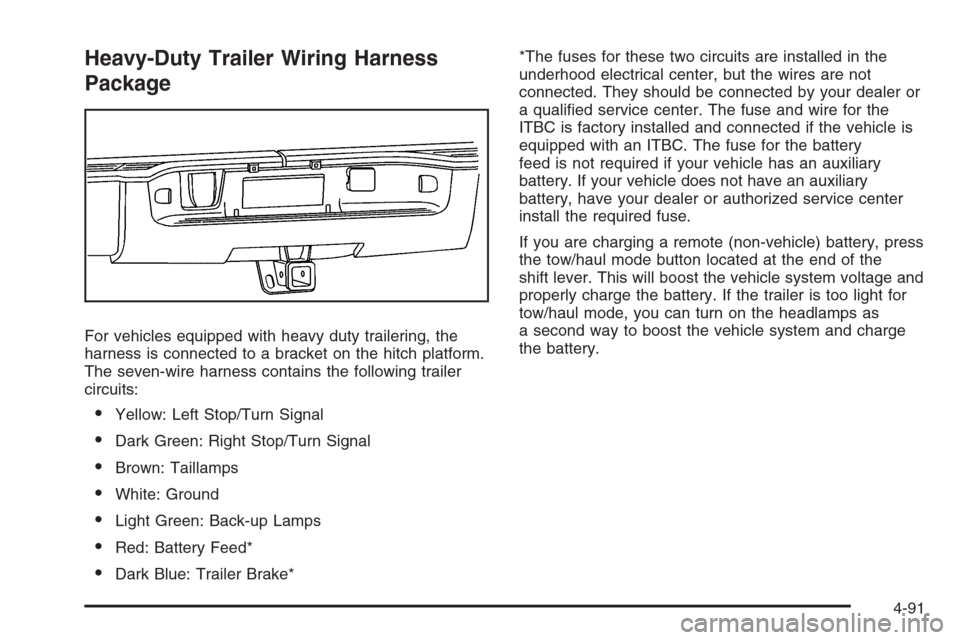
For vehicles equipped with heavy duty trailering, the
harness is connected to a bracket on the hitch platform.
The seven-wire harness contains the following trailer
circuits:
Yellow: Left Stop/Turn Signal
Dark Green: Right Stop/Turn Signal
Brown: Taillamps
White: Ground
Light Green: Back-up Lamps
Red: Battery Feed*
Dark Blue: Trailer Brake**The fuses for these two circuits are installed in the
underhood electrical center, but the wires are not
connected. They should be connected by your dealer or
a qualied service center. The fuse and wire for the
ITBC is factory installed and connected if the vehicle is
equipped with an ITBC. The fuse for the battery
feed is not required if your vehicle has an auxiliary
battery. If your vehicle does not have an auxiliary
battery, have your dealer or authorized service center
install the required fuse.
If you are charging a remote (non-vehicle) battery, press
the tow/haul mode button located at the end of the
shift lever. This will boost the vehicle system voltage and
properly charge the battery. If the trailer is too light for
tow/haul mode, you can turn on the headlamps as
a second way to boost the vehicle system and charge
the battery.
4-91
Page 405 of 596
Electric Brake Control Wiring
Provisions
These wiring provisions are included with your vehicle
as part of the trailer wiring package. These provisions
are for an electric brake controller. The instrument panel
contains blunt cut wires near the data link connector
for the trailer brake controller. The harness contains the
following wires:
Dark Blue: Brake Signal to Trailer Connector
Red/Black: Battery
Light Blue/White: Brake Switch
White: Ground
It should be installed by your dealer or a qualied
service center.
If your vehicle is equipped with an ITBC, the blunt cuts
exist, but are not connected further in the harness. If
you install an aftermarket trailer brake controller,
the ITBC must be disconnected. Do not power both
ITBC and aftermarket controllers to control the trailer
brakes at the same time.
Auxiliary Battery
The auxiliary battery provision can be used to supply
electrical power to additional equipment that you may
choose to add, such as a slide-in camper. If your vehicle
has this provision, this relay will be located on the driver’s
side of the vehicle, next to the underhood electrical
center.
Be sure to follow the proper installation instructions that
are included with any electrical equipment that you install.
Notice:Leaving electrical equipment on for
extended periods will drain the battery. Always turn
off electrical equipment when not in use and do
not use equipment that exceeds the maximum
amperage rating for the auxiliary battery provision.
Trailer Recommendations
You must subtract your hitch loads from the CWR for
your vehicle. Weigh your vehicle with the trailer
attached, so that you won’t go over the GVWR or
GAWR. If you are using a weight-distributing hitch,
weigh the vehicle without the spring bars in place.
You’ll get the best performance if you spread out the
weight of your load the right way, and if you choose the
correct hitch and trailer brakes.
For more information, seeTowing a Trailer on
page 4-55.
4-93
Page 537 of 596
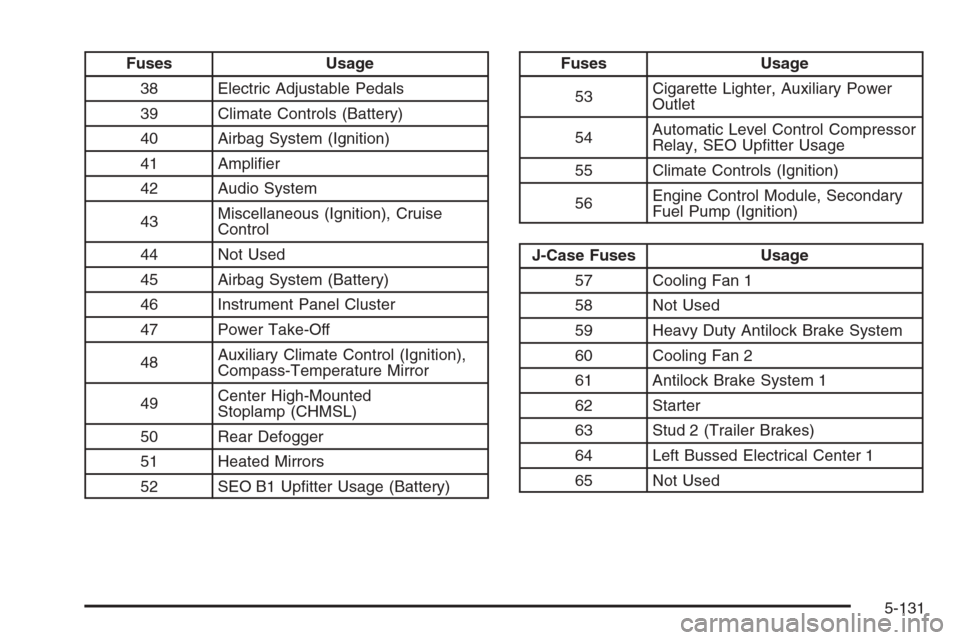
Fuses Usage
38 Electric Adjustable Pedals
39 Climate Controls (Battery)
40 Airbag System (Ignition)
41 Amplier
42 Audio System
43Miscellaneous (Ignition), Cruise
Control
44 Not Used
45 Airbag System (Battery)
46 Instrument Panel Cluster
47 Power Take-Off
48Auxiliary Climate Control (Ignition),
Compass-Temperature Mirror
49Center High-Mounted
Stoplamp (CHMSL)
50 Rear Defogger
51 Heated Mirrors
52 SEO B1 Uptter Usage (Battery)Fuses Usage
53Cigarette Lighter, Auxiliary Power
Outlet
54Automatic Level Control Compressor
Relay, SEO Uptter Usage
55 Climate Controls (Ignition)
56Engine Control Module, Secondary
Fuel Pump (Ignition)
J-Case Fuses Usage
57 Cooling Fan 1
58 Not Used
59 Heavy Duty Antilock Brake System
60 Cooling Fan 2
61 Antilock Brake System 1
62 Starter
63 Stud 2 (Trailer Brakes)
64 Left Bussed Electrical Center 1
65 Not Used
5-131
Page 582 of 596
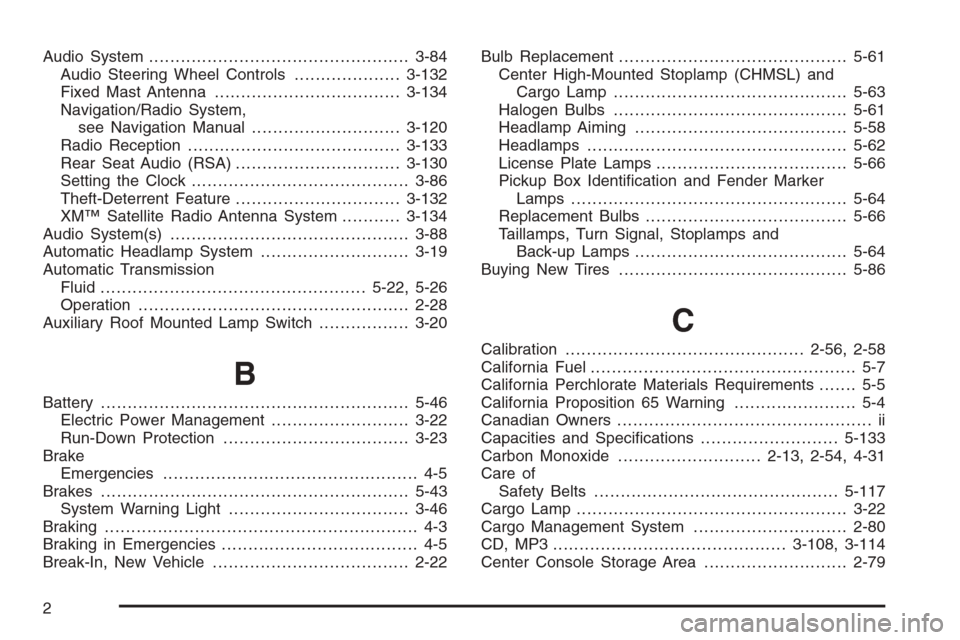
Audio System.................................................3-84
Audio Steering Wheel Controls....................3-132
Fixed Mast Antenna...................................3-134
Navigation/Radio System,
see Navigation Manual............................3-120
Radio Reception........................................3-133
Rear Seat Audio (RSA)...............................3-130
Setting the Clock.........................................3-86
Theft-Deterrent Feature...............................3-132
XM™ Satellite Radio Antenna System...........3-134
Audio System(s).............................................3-88
Automatic Headlamp System............................3-19
Automatic Transmission
Fluid..................................................5-22, 5-26
Operation...................................................2-28
Auxiliary Roof Mounted Lamp Switch.................3-20
B
Battery..........................................................5-46
Electric Power Management..........................3-22
Run-Down Protection...................................3-23
Brake
Emergencies................................................ 4-5
Brakes..........................................................5-43
System Warning Light..................................3-46
Braking........................................................... 4-3
Braking in Emergencies..................................... 4-5
Break-In, New Vehicle.....................................2-22Bulb Replacement...........................................5-61
Center High-Mounted Stoplamp (CHMSL) and
Cargo Lamp............................................5-63
Halogen Bulbs............................................5-61
Headlamp Aiming........................................5-58
Headlamps.................................................5-62
License Plate Lamps....................................5-66
Pickup Box Identication and Fender Marker
Lamps ....................................................5-64
Replacement Bulbs......................................5-66
Taillamps, Turn Signal, Stoplamps and
Back-up Lamps........................................5-64
Buying New Tires...........................................5-86
C
Calibration.............................................2-56, 2-58
California Fuel.................................................. 5-7
California Perchlorate Materials Requirements....... 5-5
California Proposition 65 Warning....................... 5-4
Canadian Owners................................................ ii
Capacities and Specications..........................5-133
Carbon Monoxide...........................2-13, 2-54, 4-31
Care of
Safety Belts..............................................5-117
Cargo Lamp...................................................3-22
Cargo Management System.............................2-80
CD, MP3 ............................................3-108, 3-114
Center Console Storage Area...........................2-79
2
Page 588 of 596
L
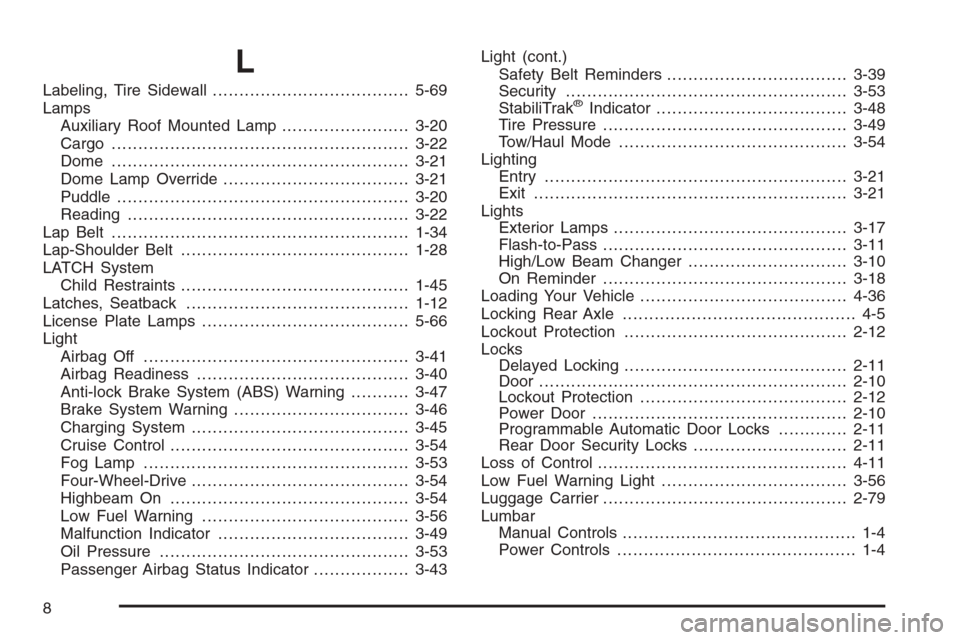
Labeling, Tire Sidewall.....................................5-69
Lamps
Auxiliary Roof Mounted Lamp........................3-20
Cargo........................................................3-22
Dome ........................................................3-21
Dome Lamp Override...................................3-21
Puddle.......................................................3-20
Reading.....................................................3-22
Lap Belt ........................................................1-34
Lap-Shoulder Belt...........................................1-28
LATCH System
Child Restraints...........................................1-45
Latches, Seatback..........................................1-12
License Plate Lamps.......................................5-66
Light
Airbag Off..................................................3-41
Airbag Readiness........................................3-40
Anti-lock Brake System (ABS) Warning...........3-47
Brake System Warning.................................3-46
Charging System.........................................3-45
Cruise Control.............................................3-54
Fog Lamp ..................................................3-53
Four-Wheel-Drive.........................................3-54
Highbeam On.............................................3-54
Low Fuel Warning.......................................3-56
Malfunction Indicator....................................3-49
Oil Pressure...............................................3-53
Passenger Airbag Status Indicator..................3-43Light (cont.)
Safety Belt Reminders..................................3-39
Security.....................................................3-53
StabiliTrak®Indicator....................................3-48
Tire Pressure..............................................3-49
Tow/Haul Mode ...........................................3-54
Lighting
Entry.........................................................3-21
Exit...........................................................3-21
Lights
Exterior Lamps............................................3-17
Flash-to-Pass..............................................3-11
High/Low Beam Changer..............................3-10
On Reminder..............................................3-18
Loading Your Vehicle.......................................4-36
Locking Rear Axle............................................ 4-5
Lockout Protection..........................................2-12
Locks
Delayed Locking..........................................2-11
Door ..........................................................2-10
Lockout Protection.......................................2-12
Power Door................................................2-10
Programmable Automatic Door Locks.............2-11
Rear Door Security Locks.............................2-11
Loss of Control...............................................4-11
Low Fuel Warning Light...................................3-56
Luggage Carrier..............................................2-79
Lumbar
Manual Controls............................................ 1-4
Power Controls............................................. 1-4
8