seats CHEVROLET SILVERADO 2008 2.G Owner's Manual
[x] Cancel search | Manufacturer: CHEVROLET, Model Year: 2008, Model line: SILVERADO, Model: CHEVROLET SILVERADO 2008 2.GPages: 596, PDF Size: 3.12 MB
Page 243 of 596
You should change the oil as soon as you can.
SeeEngine Oil (Gasoline Engine) on page 5-15.
In addition to the engine oil life system monitoring
the oil life, additional maintenance is recommended
in the Maintenance Schedule in this manual.
SeeScheduled Maintenance (Gasoline Engine) on
page 6-4for more information.
Remember, you must reset the OIL LIFE display
yourself after each oil change. It will not reset itself.
Also, be careful not to reset the OIL LIFE display
accidentally at any time other than when the oil has just
been changed. It cannot be reset accurately until the
next oil change. To reset the engine oil life system,
seeEngine Oil Life System on page 5-18.
Relearn Tire Positions
Your vehicle may have this display. To access this
display, the vehicle must be in PARK (P). If your vehicle
has the Tire Pressure Monitor System (TPMS), after
rotating the tires or after replacing a tire or sensor,
the system must re-learn the tire positions. To re-learn
the tire positions, seeTire Pressure Monitor System
on page 5-78. SeeTire Inspection and Rotation
on page 5-83andDIC Warnings and Messages on
page 3-66for more information.
Relearn Remote Key
To access this display, the vehicle must be in PARK (P).
This display allows you to match Remote Keyless
Entry (RKE) transmitters to your vehicle. To match an
RKE transmitter to your vehicle:
1. Press the trip odometer reset stem until RELEARN
REMOTE KEY displays.
2. Press and hold the trip odometer reset stem for
three seconds.
The message REMOTE KEY LEARNING ACTIVE
will display.
3. Press and hold the lock and unlock buttons on
the rst transmitter at the same time for about
15 seconds.
On vehicles with memory recall seats, the rst
transmitter learned will match driver 1 and
the second will match driver 2.
A chime will sound indicating that the transmitter
is matched.
4. To match additional transmitters at this time,
repeat Step 3.
Each vehicle can have a maximum of
eight transmitters matched to it.
5. To exit the programming mode, you must cycle
the key to LOCK/OFF.
3-65
Page 353 of 596
Notice:Overloading your vehicle may cause
damage. Repairs would not be covered by your
warranty. Do not overload your vehicle.
Using heavier suspension components to get
added durability might not change your weight
ratings. Ask your dealer to help you load your
vehicle the right way.
If you put things inside your vehicle — like
suitcases, tools, packages, or anything
else — they go as fast as the vehicle goes. If you
have to stop or turn quickly, or if there is a
crash, they will keep going.
{CAUTION:
Things you put inside your vehicle can
strike and injure people in a sudden stop
or turn, or in a crash.
Put things in the cargo area of your
vehicle. Try to spread the weight
evenly.
Never stack heavier things, like
suitcases, inside the vehicle so that
some of them are above the tops of
the seats.
Do not leave an unsecured child
restraint in your vehicle.
When you carry something inside the
vehicle, secure it whenever you can.
Do not leave a seat folded down
unless you need to.
There is also important loading information for
off-road driving in this manual. See “Loading Your
Vehicle for Off-Road Driving“ underOff-Road
Driving on page 4-12.
4-41
Page 479 of 596
Tire Terminology and Denitions
Air Pressure:The amount of air inside the
tire pressing outward on each square inch of the
tire. Air pressure is expressed in pounds per
square inch (psi) or kilopascal (kPa).
Accessory Weight
:This means the combined
weight of optional accessories. Some examples of
optional accessories are, automatic transmission,
power steering, power brakes, power windows,
power seats, and air conditioning.
Aspect Ratio
:The relationship of a tire’s height
to its width.
Belt
:A rubber coated layer of cords that is located
between the plies and the tread. Cords may be
made from steel or other reinforcing materials.
Bead
:The tire bead contains steel wires wrapped
by steel cords that hold the tire onto the rim.
Bias Ply Tire
:A pneumatic tire in which the plies
are laid at alternate angles less than 90 degrees
to the centerline of the tread.Cold Tire Pressure
:The amount of air pressure
in a tire, measured in pounds per square inch (psi)
or kilopascals (kPa) before a tire has built up heat
from driving. SeeInflation - Tire Pressure on
page 5-76.
Curb Weight
:The weight of a motor vehicle with
standard and optional equipment including the
maximum capacity of fuel, oil, and coolant,
but without passengers and cargo.
DOT Markings
:A code molded into the sidewall
of a tire signifying that the tire is in compliance
with the U.S. Department of Transportation (DOT)
motor vehicle safety standards. The DOT code
includes the Tire Identication Number (TIN),
an alphanumeric designator which can also identify
the tire manufacturer, production plant, brand,
and date of production.
GVWR
:Gross Vehicle Weight Rating.
SeeLoading Your Vehicle on page 4-36.
GAWR FRT
:Gross Axle Weight Rating for the
front axle. SeeLoading Your Vehicle on
page 4-36.
5-73
Page 511 of 596
11. Turn the wheel wrench counterclockwise to lower
the vehicle. Lower the jack completely.
{CAUTION:
Incorrect or improperly tightened wheel nuts
can cause the wheel to come loose and
even come off. This could lead to a crash.
If you have to replace them, be sure to
get new original equipment wheel nuts.
Stop somewhere as soon as you can and have
the nuts tightened with a torque wrench to the
proper torque specication. SeeCapacities
and Specifications on page 5-133for wheel nut
torque specication.
Notice:Improperly tightened wheel nuts can lead
to brake pulsation and rotor damage. To avoid
expensive brake repairs, evenly tighten the wheel
nuts in the proper sequence and to the proper
torque specication. SeeCapacities and
Specifications on page 5-133for the wheel nut
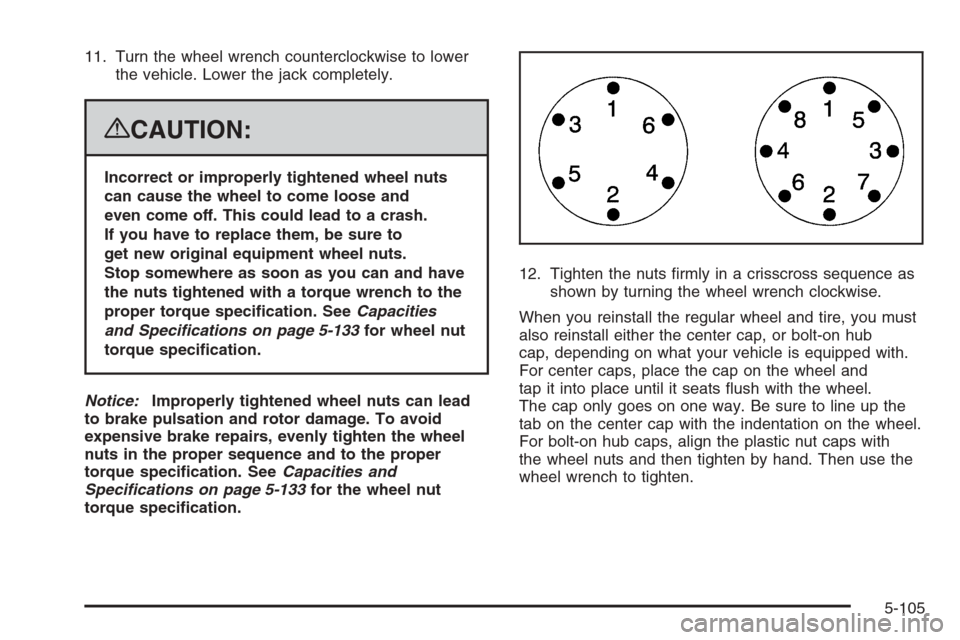
torque specication.12. Tighten the nuts rmly in a crisscross sequence as
shown by turning the wheel wrench clockwise.
When you reinstall the regular wheel and tire, you must
also reinstall either the center cap, or bolt-on hub
cap, depending on what your vehicle is equipped with.
For center caps, place the cap on the wheel and
tap it into place until it seats ush with the wheel.
The cap only goes on one way. Be sure to line up the
tab on the center cap with the indentation on the wheel.
For bolt-on hub caps, align the plastic nut caps with
the wheel nuts and then tighten by hand. Then use the
wheel wrench to tighten.
5-105
Page 532 of 596
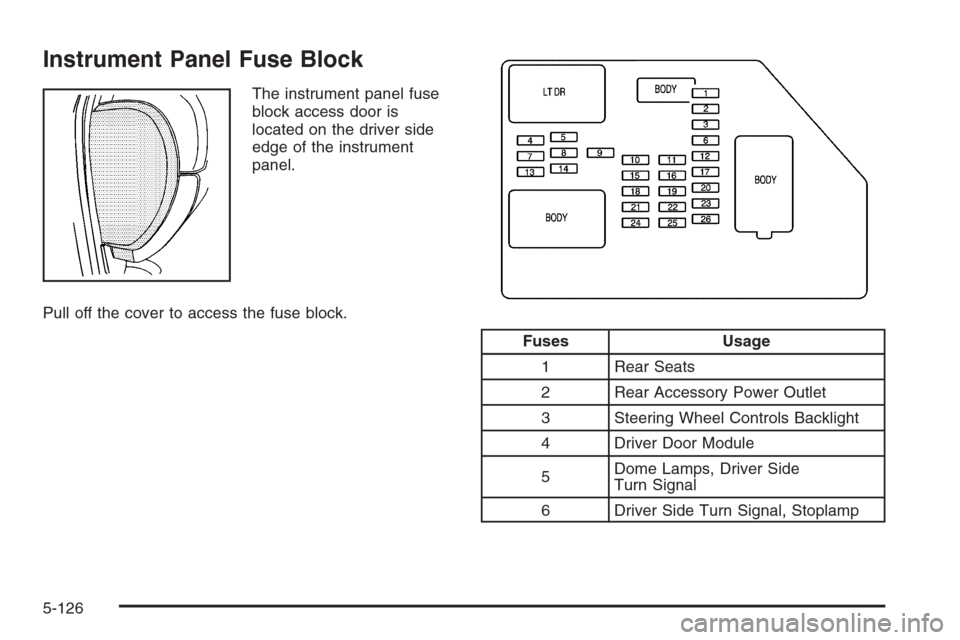
Instrument Panel Fuse Block
The instrument panel fuse
block access door is
located on the driver side
edge of the instrument
panel.
Pull off the cover to access the fuse block.
Fuses Usage
1 Rear Seats
2 Rear Accessory Power Outlet
3 Steering Wheel Controls Backlight
4 Driver Door Module
5Dome Lamps, Driver Side
Turn Signal
6 Driver Side Turn Signal, Stoplamp
5-126
Page 557 of 596
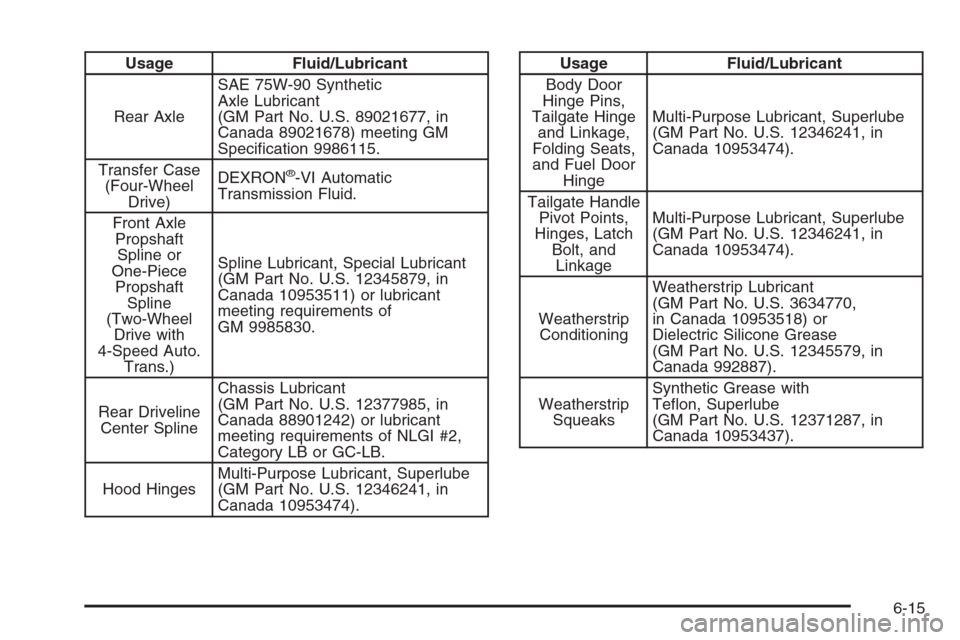
Usage Fluid/Lubricant
Rear AxleSAE 75W-90 Synthetic
Axle Lubricant
(GM Part No. U.S. 89021677, in
Canada 89021678) meeting GM
Specication 9986115.
Transfer Case
(Four-Wheel
Drive)DEXRON
®-VI Automatic
Transmission Fluid.
Front Axle
Propshaft
Spline or
One-Piece
Propshaft
Spline
(Two-Wheel
Drive with
4-Speed Auto.
Trans.)Spline Lubricant, Special Lubricant
(GM Part No. U.S. 12345879, in
Canada 10953511) or lubricant
meeting requirements of
GM 9985830.
Rear Driveline
Center SplineChassis Lubricant
(GM Part No. U.S. 12377985, in
Canada 88901242) or lubricant
meeting requirements of NLGI #2,
Category LB or GC-LB.
Hood HingesMulti-Purpose Lubricant, Superlube
(GM Part No. U.S. 12346241, in
Canada 10953474).
Usage Fluid/Lubricant
Body Door
Hinge Pins,
Tailgate Hinge
and Linkage,
Folding Seats,
and Fuel Door
HingeMulti-Purpose Lubricant, Superlube
(GM Part No. U.S. 12346241, in
Canada 10953474).
Tailgate Handle
Pivot Points,
Hinges, Latch
Bolt, and
LinkageMulti-Purpose Lubricant, Superlube
(GM Part No. U.S. 12346241, in
Canada 10953474).
Weatherstrip
ConditioningWeatherstrip Lubricant
(GM Part No. U.S. 3634770,
in Canada 10953518) or
Dielectric Silicone Grease
(GM Part No. U.S. 12345579, in
Canada 992887).
Weatherstrip
SqueaksSynthetic Grease with
Teon, Superlube
(GM Part No. U.S. 12371287, in
Canada 10953437).
6-15
Page 587 of 596
H
Hazard Warning Flashers................................... 3-8
Head Restraints..............................................1-11
Headlamp
Aiming .......................................................5-58
Headlamps....................................................5-62
Bulb Replacement.......................................5-61
Daytime Running Lamps...............................3-18
Exterior Lamps............................................3-17
Flash-to-Pass..............................................3-11
Halogen Bulbs............................................5-61
High/Low Beam Changer..............................3-10
On Reminder..............................................3-18
Pickup Box Identication and
Fender Marker Lamps...............................5-64
Heated Seats................................................... 1-5
Heater...................................................3-25, 3-28
Engine Coolant...........................................2-27
Heater...........................................................3-29
Highbeam On Light.........................................3-54
Highway Hypnosis...........................................4-29
Hill and Mountain Roads..................................4-30
Hood
Checking Things Under................................5-12
Release.....................................................5-13
Horn ............................................................... 3-8
How to Wear Safety Belts Properly...................1-19
I
Ignition Positions.............................................2-22
Infants and Young Children, Restraints...............1-39
Ination - Tire Pressure...................................5-76
Instrument Panel
Brightness..................................................3-21
Cluster.......................................................3-37
Overview...............................................3-4, 3-6
Storage Area..............................................2-78
J
Jump Starting.................................................5-47
K
Keyless Entry System....................................... 2-4
Keys............................................................... 2-3
7
Page 589 of 596
M
Maintenance Schedule
Additional Required Services........................... 6-6
At Each Fuel Fill.........................................6-10
At Least Once a Month................................6-11
At Least Once a Year..................................6-12
At the First 100, 1,000 and 6,000 Miles
(160, 1 600 and 10 000km).......................6-10
Introduction.................................................. 6-2
Maintenance Footnotes.................................. 6-8
Maintenance Record....................................6-18
Maintenance Replacement Parts....................6-16
Maintenance Requirements............................. 6-2
Owner Checks and Services.........................6-10
Recommended Fluids and Lubricants.............6-14
Scheduled Maintenance................................. 6-4
Using.......................................................... 6-2
Your Vehicle and the Environment................... 6-2
Malfunction Indicator Light................................3-49
Manual Lumbar Controls.................................... 1-4
Manual Seats................................................... 1-2
Manual, Using.................................................... iii
Manual Windows............................................2-15Memory Seat, Mirrors, and Pedals...................... 1-6
Message
DIC Warnings and Messages........................3-66
Mirrors
Automatic Dimming Rearview with Compass
and Temperature Display...........................2-58
Automatic Dimming Rearview with OnStar
®,
Compass and Temperature Display.............2-56
Manual Rearview Mirror................................2-56
Outside Manual Mirrors................................2-59
Outside Power Foldaway Mirrors....................2-62
Outside Power Mirrors..................................2-61
Outside Towing Mirrors.................................2-60
MP3 ..................................................3-108, 3-114
MyGMLink.com................................................ 7-4
N
Navigation System, Privacy..............................7-18
Navigation/Radio System,
see Navigation Manual...............................3-120
New Vehicle Break-In......................................2-22
Noise Control System, Tampering......................5-57
9
Page 592 of 596
Retained Accessory Power (RAP)......................2-24
Roadside
Assistance Program....................................... 7-7
Rocking Your Vehicle to Get it Out....................4-34
Routing, Engine Drive Belt...............................6-17
Running Out of Fuel........................................2-54
S
Safety Belt
Reminder Light............................................3-39
Safety Belts
Care of ....................................................5-117
How to Wear Safety Belts Properly................1-19
Lap Belt .....................................................1-34
Lap-Shoulder Belt........................................1-28
Safety Belt Extender....................................1-35
Safety Belt Use During Pregnancy.................1-33
Safety Belts Are for Everyone.......................1-14
Safety Warnings and Symbols.............................. iii
Scheduled Maintenance..................................... 6-4
Seatback Latches...........................................1-12
Seats
Center Seat................................................1-12
Head Restraints..........................................1-11
Heated Seats............................................... 1-5
Manual Lumbar............................................. 1-4
Memory, Mirrors and Pedals........................... 1-6
Power Lumbar .............................................. 1-4Seats (cont.)
Power Seats................................................. 1-3
Rear Seat Operation............................1-12, 1-13
Reclining Seatbacks...................................... 1-8
Seatback Latches........................................1-12
Secondary Latch System................................5-106
Securing a Child Restraint
Center Front Seat Position............................1-57
Rear Seat Position......................................1-54
Right Front Seat Position..............1-57, 1-62, 1-66
Security Light.................................................3-53
Service........................................................... 5-4
Accessories and Modications......................... 5-4
Adding Equipment to the Outside of
Your Vehicle.............................................. 5-5
California Perchlorate Materials Requirements.... 5-5
California Proposition 65 Warning.................... 5-4
Doing Your Own Work................................... 5-5
Engine Soon Light.......................................3-49
Publications Ordering Information...................7-15
Service, Scheduling Appointments....................... 7-9
Servicing Your Airbag-Equipped Vehicle..............1-86
Setting the Clock............................................3-86
Sheet Metal Damage.....................................5-121
Shifting Into Park............................................2-51
Shifting Out of Park........................................2-53
Signals, Turn and Lane-Change........................3-10
Sliding Rear Window, Power.............................2-17
Snow Plow....................................................4-43
12