transmission CHEVROLET SILVERADO 2008 2.G Owner's Manual
[x] Cancel search | Manufacturer: CHEVROLET, Model Year: 2008, Model line: SILVERADO, Model: CHEVROLET SILVERADO 2008 2.GPages: 596, PDF Size: 3.12 MB
Page 137 of 596
Shifting Into Four-Wheel Drive Low
When Four-Wheel-Drive Low is engaged, vehicle speed
should be kept below 45 mph. Extended high-speed
operation in Four-Wheel-Drive Low may damage
or shorten the life of the drivetrain.
To shift to the Four-Wheel-Drive Low position, the
ignition must be in RUN and the vehicle must be stopped
or moving less than 3 mph (5 km/h) with the transmission
in NEUTRAL (N). The preferred method for shifting into
Four-Wheel-Drive Low is to have your vehicle moving
1 to 2 mph (1.6 to 3.2 km/h). Turn the knob to the
Four-Wheel-Drive Low position. You must wait for the
Four-Wheel-Drive Low indicator light to stop ashing and
remain on before shifting your transmission in gear.Notice:Shifting the transmission into gear before
the requested mode indicator light has stopped
ashing could damage the transfer case. To help
avoid damaging your vehicle, always wait for the
mode indicator lights to stop ashing before shifting
the transmission into gear.
It is typical for your vehicle to exhibit signicant
engagement noise and bump when shifting between
Four-Wheel-Drive Low and Four-Wheel-Drive High
ranges or from NEUTRAL with the engine running.
If the knob is turned to the Four-Wheel-Drive Low
position when your vehicle is in gear and/or moving,
the Four-Wheel-Drive Low indicator light will ash for
30 seconds and not complete the shift unless your
vehicle is moving less than 3 mph (5 km/h) and the
transmission is in NEUTRAL (N). After 30 seconds the
transfer case will shift to Four-Wheel-Drive High mode.
2-43
Page 138 of 596
Shifting Out of Four-Wheel-Drive Low
To shift from Four-Wheel-Drive Low to
Four-Wheel-Drive High, or Two-Wheel-Drive High,
your vehicle must be stopped or moving less than 3 mph
(5 km/h) with the transmission in NEUTRAL (N) and the
ignition in ON/RUN. The preferred method for shifting
out of Four-Wheel-Drive Low is to have your vehicle
moving 1 to 2 mph (1.6 to 3.2 km/h). Turn the knob to
the Four-Wheel-Drive High, or Two-Wheel-Drive High
position. You must wait for the Four-Wheel-Drive High,
or Two-Wheel-Drive High indicator light to stop ashing
and remain on before shifting the transmission into gear.
Notice:Shifting the transmission into gear before
the requested mode indicator light has stopped
ashing could damage the transfer case. To help
avoid damaging your vehicle, always wait for the
mode indicator lights to stop ashing before shifting
the transmission into gear.
It is typical for your vehicle to exhibit signicant
engagement noise and bump when shifting between
Four-Wheel-Drive Low and Four-Wheel-Drive High
ranges or from NEUTRAL with the engine running.
If the knob is turned to the Four-Wheel-Drive High, or
Two-Wheel-Drive High switch position when your vehicle
is in gear and/or moving, the Four-Wheel-Drive High,
or Two-Wheel-Drive High indicator light will ash for
30 seconds but will not complete the shift unless your
vehicle is moving less than 3 mph (5 km/h) and the
transmission is in NEUTRAL (N).
Shifting into NEUTRAL
To shift the transfer case to NEUTRAL do the following:
1. Make sure the vehicle is parked so that it will
not roll.
2. Set the parking brake and press and hold the
regular brake pedal. SeeParking Brake on
page 2-50for more information.
3. Start the vehicle or turn the ignition to ON/RUN.
4. Shift the transmission to NEUTRAL (N).
5. Shift the transfer case to Two-Wheel-Drive High.
6. Turn the transfer case dial clockwise to NEUTRAL
till it stops and hold it for 10 seconds. Then slowly
release the dial to the four low position. The
NEUTRAL light will come on when the transfer
case shift to NEUTRAL is complete.
7. If the engine is running, verify that the transfer case
is in NEUTRAL (N) by shifting the transmission to
REVERSE (R) for one second, then shift the
transmission to DRIVE (D) for one second.
8. Turn the ignition to ACC/ACCESSORY, which will
turn the engine off.
9. Place the transmission shift lever in PARK (P).
10. Release the parking brake prior to moving
the vehicle.
11. Turn the ignition to LOCK/OFF.
2-44
Page 139 of 596
Shifting Out of NEUTRAL
To shift out of NEUTRAL do the following:
1. Set the parking brake and apply the regular
brake pedal.
2. Shift the transmission to NEUTRAL (N) and turn the
ignition to RUN with the engine off.
3. Turn the transfer case dial to Two-Wheel-Drive High.
After the transfer case has shifted out of NEUTRAL
the NEUTRAL light will go out.
4. Release the parking brake prior to moving the
vehicle.
Notice:Shifting the transmission into gear
before the requested mode indicator light has
stopped ashing could damage the transfer case.
To help avoid damaging your vehicle, always
wait for the mode indicator lights to stop ashing
before shifting the transmission into gear.
5. Start the engine and shift the transmission to the
desired position.
Excessively shifting the transfer case into or out of the
different modes may cause the transfer case to enter the
shift protection mode. This will protect the transfer case
from possible damage and will only allow the transfer
case to respond to one shift per 10 seconds. The transfer
case may stay in this mode for up to three minutes.
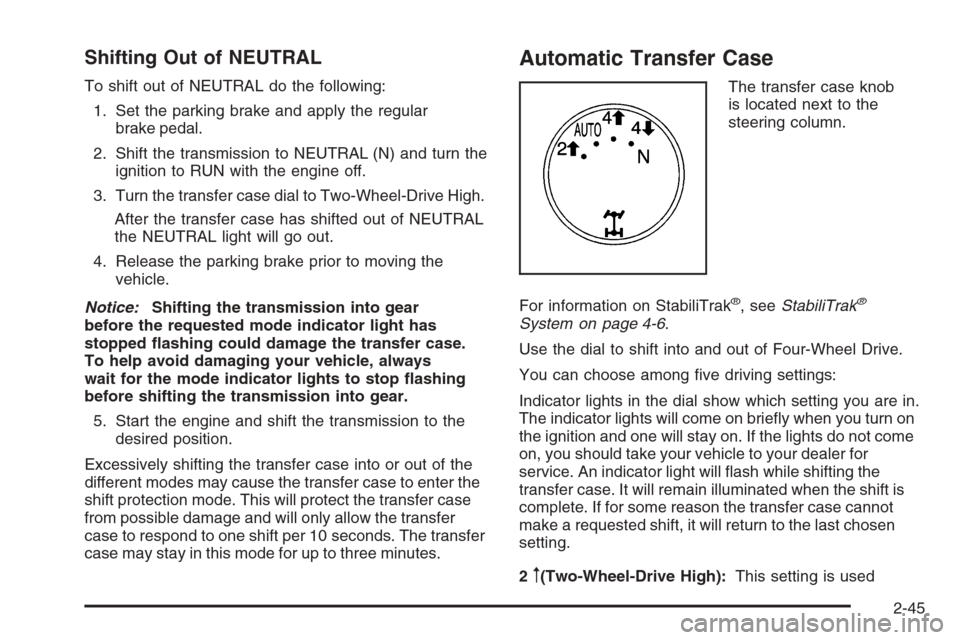
Automatic Transfer Case
The transfer case knob
is located next to the
steering column.
For information on StabiliTrak
®, seeStabiliTrak®
System on page 4-6.
Use the dial to shift into and out of Four-Wheel Drive.
You can choose among ve driving settings:
Indicator lights in the dial show which setting you are in.
The indicator lights will come on briey when you turn on
the ignition and one will stay on. If the lights do not come
on, you should take your vehicle to your dealer for
service. An indicator light will ash while shifting the
transfer case. It will remain illuminated when the shift is
complete. If for some reason the transfer case cannot
make a requested shift, it will return to the last chosen
setting.
2
m(Two-Wheel-Drive High):This setting is used
2-45
Page 140 of 596
for driving in most street and highway situations. The
front axle is not engaged in Two-Wheel Drive.
This setting also provides the best fuel economy.
AUTO (Automatic Four-Wheel Drive):This setting is
ideal for use when road surface traction conditions are
variable. When driving your vehicle in AUTO, the front
axle is engaged, but the vehicle’s power is sent only to
the front and rear wheels automatically based on driving
conditions. Driving in this mode results in slightly lower
fuel economy than Two-Wheel-Drive High.
4
m(Four-Wheel-Drive High):Use the
Four-Wheel-Drive High position when extra traction is
needed, such as on snowy or icy roads or in most off-road
situations. This setting also engages the front axle to help
drive your vehicle. This is the best setting to use when
plowing snow.
4
n(Four-Wheel-Drive Low):This setting also
engages the front axle and delivers extra torque.
You may never need this setting. It sends maximum
power to all four wheels. You might choose
Four-Wheel-Drive Low if you are driving off-road in
deep sand, deep mud, deep snow, and while climbing
or descending steep hills. StabiliTrak
®will not engage
in this mode. SeeStabiliTrak®System on page 4-6for
more information.
{CAUTION:
Shifting the transfer case to NEUTRAL
can cause your vehicle to roll even if the
transmission is in PARK (P). You or someone
else could be seriously injured. Be sure to set
the parking brake before placing the transfer
case in NEUTRAL. SeeParking Brake on
page 2-50.
N (NEUTRAL):Shift the vehicle’s transfer case
to NEUTRAL only when towing your vehicle. See
Recreational Vehicle Towing on page 4-50orTowing
Your Vehicle on page 4-50for more information.
If the SERVICE 4–Wheel Drive message stays on, you
should take your vehicle to your dealer for service.
See “Service 4–Wheel Drive message” underDIC
Warnings and Messages on page 3-66.
2-46
Page 141 of 596
Shifting Into Four-Wheel-Drive High or
AUTO (Automatic Four-Wheel Drive)
Turn the knob to the Four-Wheel-Drive High or AUTO
position. This can be done at any speed, except when
shifting from Four-Wheel-Drive Low, and the indicator
light will ash while shifting. It will remain on when the
shift is completed.
Shifting Into Two-Wheel-Drive High
Turn the knob to the Two-Wheel-Drive High position.
This can be done at any speed, except when shifting
from Four-Wheel-Drive Low.
Shifting Into Four-Wheel-Drive Low
When Four-Wheel-Drive Low is engaged, vehicle speed
should be kept below 45 mph. Extended high-speed
operation in Four-Wheel-Drive Low may damage
or shorten the life of the drivetrain.
To shift to the Four-Wheel-Drive Low position, the
ignition must be in RUN and the vehicle must be stopped
or moving less than 3 mph (5 km/h) with the transmission
in NEUTRAL (N). The preferred method for shifting intoFour-Wheel-Drive Low is to have your vehicle moving
1 to 2 mph (1.6 to 3.2 km/h). Turn the knob to the
Four-Wheel-Drive Low position. You must wait for the
Four-Wheel-Drive Low indicator light to stop ashing
and remain on before shifting your transmission in gear.
Notice:Shifting the transmission into gear
before the requested mode indicator light has
stopped ashing could damage the transfer case.
To help avoid damaging your vehicle, always
wait for the mode indicator lights to stop ashing
before shifting the transmission into gear.
It is typical for your vehicle to exhibit signicant
engagement noise and bump when shifting between
Four-Wheel-Drive Low and Four-Wheel-Drive High
ranges or from NEUTRAL with the engine running.
If the knob is turned to the Four-Wheel-Drive Low
position when your vehicle is in gear and/or moving,
the Four-Wheel-Drive Low indicator light will ash for
30 seconds and not complete the shift unless your
vehicle is moving less than 3 mph (5 km/h) and the
transmission is in NEUTRAL (N). After 30 seconds the
transfer case will shift to Four-Wheel-Drive High mode.
2-47
Page 142 of 596
Shifting Out of Four-Wheel-Drive Low
To shift from Four-Wheel-Drive Low to
Four-Wheel-Drive High, AUTO or Two-Wheel-Drive High,
your vehicle must be stopped or moving less than 3 mph
(5 km/h) with the transmission in NEUTRAL (N) and the
ignition in RUN. The preferred method for shifting out of
Four-Wheel-Drive Low is to have your vehicle moving
1 to 2 mph (1.6 to 3.2 km/h). Turn the knob to the
Four-Wheel-Drive High, AUTO or Two-Wheel-Drive High
position. You must wait for the Four-Wheel-Drive High,
AUTO or Two-Wheel-Drive High indicator light to stop
ashing and remain on before shifting your transmission
into gear.
Notice:Shifting the transmission into gear
before the requested mode indicator light has
stopped ashing could damage the transfer case.
To help avoid damaging your vehicle, always
wait for the mode indicator lights to stop ashing
before shifting the transmission into gear.It is typical for your vehicle to exhibit signicant
engagement noise and bump when shifting between
Four-Wheel-Drive Low and Four-Wheel-Drive High
ranges or from NEUTRAL with the engine running.
If the knob is turned to the Four-Wheel-Drive High,
AUTO, or Two-Wheel-Drive High switch position
when your vehicle is in gear and/or moving, the
Four-Wheel-Drive High, AUTO or Two-Wheel-Drive
High indicator light will ash for 30 seconds but will
not complete the shift unless your vehicle is moving
less than 3 mph (5 km/h) and the transmission is
in NEUTRAL (N).
2-48
Page 143 of 596
Shifting into NEUTRAL
To shift the transfer case to NEUTRAL do the following:
1. Make sure the vehicle is parked so that it will not roll.
2. Set the parking brake and apply the regular brake
pedal. SeeParking Brake on page 2-50for more
information.
3. Start the vehicle or turn the ignition to ON/RUN.
4. Put the transmission in NEUTRAL (N).
5. Shift the transfer case to Two-Wheel Drive High.
6. Turn the transfer case dial clockwise to NEUTRAL
till it stops and hold it for 10 seconds. Then slowly
release the dial to the four low position. The
NEUTRAL light will come on when the transfer
case shift to NEUTRAL is complete.
7. If the engine is running, make sure that the transfer
case is in NEUTRAL (N) by shifting the transmission
to REVERSE (R) for one second, then shift the
transmission to DRIVE (D) for one second.
8. Turn the ignition to ACC/ACCESSORY, which will
turn the engine off.
9. Place the transmission shift lever in PARK (P).
10. Release the parking brake prior to moving
the vehicle.
11. Turn the ignition to LOCK/OFF.
Shifting Out of NEUTRAL
To shift out of NEUTRAL do the following:
1. Set the parking brake and apply the regular
brake pedal.
2. Shift the transmission to NEUTRAL (N) and turn the
ignition to RUN with the engine off.
3. Turn the transfer case dial to Two-Wheel-Drive
High, Four-Wheel-Drive High, AUTO.
After the transfer case has shifted out of NEUTRAL
the NEUTRAL light will go out.
4. Release the parking brake prior to moving the
vehicle.
Notice:Shifting the transmission into gear
before the requested mode indicator light has
stopped ashing could damage the transfer case.
To help avoid damaging your vehicle, always
wait for the mode indicator lights to stop ashing
before shifting the transmission into gear.
5. Start the engine and shift the transmission to the
desired position.
2-49
Page 146 of 596
Leaving Your Vehicle With the Engine
Running
{CAUTION:
It can be dangerous to leave your vehicle with
the engine running. Your vehicle could move
suddenly if the shift lever is not fully in PARK
(P) with the parking brake rmly set.
If you have four-wheel drive and your transfer
case is in NEUTRAL, your vehicle will be free
to roll, even if your shift lever is in PARK (P).
So be sure the transfer case is in a drive
gear — not in NEUTRAL.
And, if you leave the vehicle with the engine
running, it could overheat and even catch re.
You or others could be injured. Do not leave
your vehicle with the engine running unless
you have to.If you have to leave your vehicle with the engine
running, be sure your vehicle is in PARK (P) and the
parking brake is rmly set before you leave it. After you
move the shift lever into PARK (P), hold the regular
brake pedal down. Then, see if you can move the
shift lever away from PARK (P) without rst pulling
it toward you. If you can, it means that the shift lever
was not fully locked into PARK (P).
Torque Lock
If you are parking on a hill and you do not shift your
transmission into PARK (P) properly, the weight of the
vehicle may put too much force on the parking pawl
in the transmission. You may nd it difficult to pull the
shift lever out of PARK (P). This is called torque lock.
To prevent torque lock, set the parking brake and
then shift into PARK (P) properly before you leave
the driver’s seat. To nd out how, seeShifting Into
Park on page 2-51.
When you are ready to drive, move the shift lever out of
PARK (P) before you release the parking brake.
If torque lock does occur, you may need to have another
vehicle push yours a little uphill to take some of the
pressure from the parking pawl in the transmission, then
you will be able to pull the shift lever out of PARK (P).
2-52
Page 183 of 596
C. Driver Information Center (DIC) Buttons. SeeDriver
Information Center (DIC) on page 3-56.
D. Hazard Warning Flasher Button. SeeHazard
Warning Flashers on page 3-8.
E. Instrument Panel Cluster. SeeInstrument Panel
Cluster on page 3-37.
F. Shift Lever. SeeAutomatic Transmission Operation on
page 2-28. Tow/Haul Selector Button (If Equipped).
SeeTow/Haul Mode on page 2-34. Range Selection
Mode (Allison Transmission and Hydra-Matic
®
6-Speed Button (If Equipped). SeeAutomatic
Transmission Operation on page 2-28.
G. Audio System. SeeAudio System(s) on page 3-84.
H. Instrument Panel Storage Area. SeeInstrument
Panel Storage on page 2-78.
I. Integrated Trailer Brake Controller (If Equipped).
SeeTowing a Trailer on page 4-55.
J. Exterior Lamp Controls. SeeExterior Lamps on
page 3-17.
K. Hood Release. SeeHood Release on page 5-13.
L. Parking Brake. SeeParking Brake on page 2-50.
M. Dome Lamp Override Button. SeeDome Lamp
Override on page 3-21. Dome Lamp Knob.
SeeDome Lamps on page 3-21. Fog Lamp Button
(If Equipped). SeeFog Lamps on page 3-20.
N. Cruise Control Buttons. SeeCruise Control on
page 3-13.O. Tilt Wheel Lever. SeeTilt Wheel on page 3-8.
P. Horn. SeeHorn on page 3-8.
Q. Audio Steering Wheel Controls (If Equipped).
SeeAudio Steering Wheel Controls on page 3-132.
R. Automatic Transfer Case Control (If Equipped).
SeeFour-Wheel Drive on page 2-36.
S. Ashtray (If Equipped). SeeAshtray(s) and Cigarette
Lighter on page 3-24.
T. StabiliTrak
®Button (If Equipped). SeeStabiliTrak®
System on page 4-6. Ultrasonic Rear Park Assist
Disable Button (If Equipped). SeeUltrasonic
Rear Parking Assist (URPA) on page 2-64. Pedal
Adjust Button (If Equipped). SeeAdjustable Throttle
and Brake Pedal on page 2-26. Heated Windshield
Washer Fluid Button (If Equipped).Windshield
Washer on page 3-12.
U. Accessory Power Outlet. SeeAccessory Power
Outlet(s) on page 3-23.
V. Climate Control System. SeeClimate Control System
(With Air Conditioning ) on page 3-25orClimate
Control System (Heater Only) on page 3-28andDual
Automatic Climate Control System on page 3-29.
W. Power Take Off (PTO) Control (If Equipped).
See Power Take Off (PTO) in the Duramax Diesel
Supplement Index.
X. Passenger Airbag Off Control (If Equipped).
SeeAirbag Off Switch on page 1-78.
Y. Glove Box. SeeGlove Box on page 2-78.
3-5
Page 185 of 596
E. Shift Lever. SeeAutomatic Transmission Operation
on page 2-28.
F. Tow/Haul Selector Button (If Equipped).
SeeTow/Haul Mode on page 2-34.
G. Driver Information Center (DIC) Controls. SeeDriver
Information Center (DIC) on page 3-56.
H. Audio System. SeeAudio System(s) on page 3-84.
I. Exterior Lamps Control. SeeExterior Lamps on
page 3-17.
J. Integrated Trailer Brake Controller (If Equipped).
SeeTowing a Trailer on page 4-55.
K. Dome Lamp Override Button. SeeDome Lamp
Override on page 3-21. Dome Lamp Knob.
SeeDome Lamps on page 3-21.
L. Automatic Transfer Case Control. (If Equipped).
SeeFour-Wheel Drive on page 2-36.
M. Hood Release. SeeHood Release on page 5-13.
N. Parking Brake. SeeParking Brake on page 2-50.
O. Cruise Control Buttons. SeeCruise Control on
page 3-13.
P. Tilt Wheel Lever. SeeTilt Wheel on page 3-8.
Q. Horn. SeeHorn on page 3-8.R. Audio Steering Wheel Controls. SeeAudio Steering
Wheel Controls on page 3-132.
S. Climate Controls. SeeClimate Control System
(With Air Conditioning ) on page 3-25orClimate
Control System (Heater Only) on page 3-28or
Dual Automatic Climate Controls (If Equipped).
SeeDual Automatic Climate Control System
on page 3-29.
T. Accessory Power Outlets. SeeAccessory Power
Outlet(s) on page 3-23. Cigarette Lighter
(If Equipped). SeeAshtray(s) and Cigarette Lighter
on page 3-24.
U. StabiliTrak
®Button (If Equipped). SeeStabiliTrak®
System on page 4-6. Pedal Adjust Button
(If Equipped). SeeAdjustable Throttle and Brake
Pedal on page 2-26. Rear Park Assist Disable Button
(If Equipped). SeeUltrasonic Rear Parking Assist
(URPA) on page 2-64. Heated Windshield Washer
Fluid Button (If Equipped). SeeWindshield Washer
on page 3-12.
V. Passenger Airbag Off Control (If Equipped).
SeeAirbag Off Switch on page 1-78.
W. Glove Box. SeeGlove Box on page 2-78.
3-7