air condition CHEVROLET SILVERADO 2009 2.G User Guide
[x] Cancel search | Manufacturer: CHEVROLET, Model Year: 2009, Model line: SILVERADO, Model: CHEVROLET SILVERADO 2009 2.GPages: 600, PDF Size: 3.24 MB
Page 161 of 600
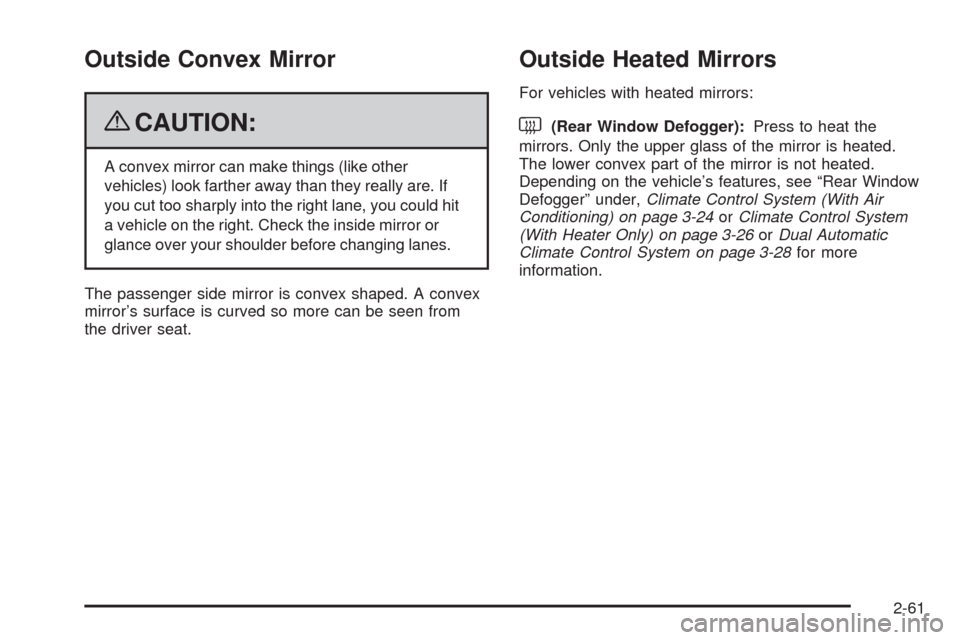
Outside Convex Mirror
{CAUTION:
A convex mirror can make things (like other
vehicles) look farther away than they really are. If
you cut too sharply into the right lane, you could hit
a vehicle on the right. Check the inside mirror or
glance over your shoulder before changing lanes.
The passenger side mirror is convex shaped. A convex
mirror’s surface is curved so more can be seen from
the driver seat.
Outside Heated Mirrors
For vehicles with heated mirrors:
<(Rear Window Defogger):Press to heat the
mirrors. Only the upper glass of the mirror is heated.
The lower convex part of the mirror is not heated.
Depending on the vehicle’s features, see “Rear Window
Defogger” under,Climate Control System (With Air
Conditioning) on page 3-24orClimate Control System
(With Heater Only) on page 3-26orDual Automatic
Climate Control System on page 3-28for more
information.
2-61
Page 164 of 600
The system can be
disabled by pressing the
rear park aid disable button
located next to the radio.
The indicator light will come on and PARK ASSIST OFF
displays on the Driver Information Center (DIC) to
indicate that URPA is off, seeDIC Warnings and
Messages on page 3-66for information about clearing
the message.
Notice:If you use URPA while the tailgate is
lowered, it may not detect an object behind your
vehicle, and you might back into the object and
damage your vehicle. Always verify the tailgate is
closed when using URPA or turn off URPA when
driving with the tailgate lowered.When the System Does Not Seem to
Work Properly
If the URPA system will not activate due to a temporary
condition, the message PARK ASSIST OFF will be
displayed on the DIC and a red light will be shown on
the rear URPA display when the shift lever is moved into
R (Reverse). This occurs under the following conditions:
The driver disables the system.
The ultrasonic sensors are not clean. Keep the
vehicle’s rear bumper free of mud, dirt, snow, ice and
slush. For cleaning instructions, seeWashing Your
Vehicle on page 5-118.
A trailer was attached to the vehicle, or a bicycle or
an object was hanging out of the tailgate during the
last drive cycle, the red light may illuminate in the
rear display. Once the attached object is removed,
URPA will return to normal operation.
A tow bar is attached to the vehicle.
The vehicle’s bumper is damaged. Take the vehicle
to your dealer/retailer to repair the system.
Other conditions may affect system performance,
such as vibrations from a jackhammer or the
compression of air brakes on a very large truck.
If the system is still disabled, after driving forward at
least 15 mph (25 km/h), take the vehicle to your
dealer/retailer.
2-64
Page 171 of 600
OnStar®System
OnStar uses several innovative technologies and live
advisors to provide a wide range of safety, security,
information, and convenience services. If the airbags
deploy, the system is designed to make an automatic call
to OnStar Emergency advisors who can request
emergency services be sent to your location. If the keys
are locked in the vehicle, call OnStar at 1-888-4-ONSTAR
to have a signal sent to unlock the doors. OnStar
Hands-Free Calling, including 30 trial minutes good for
60 days, is available on most vehicles. OnStar
Turn-by-Turn Navigation service, with one trial route, is
available on most vehicles. Press the OnStar button to
have an OnStar advisor contact Roadside Service.
OnStar service is provided subject to the OnStar Terms
and Conditions included in the OnStar Subscriber
glove box literature.Some services such as Remote Door Unlock or Stolen
Vehicle Location Assistance may not be available
until the owner of the vehicle registers with OnStar. After
the rst prepaid year, contact OnStar to select a
monthly or annual subscription payment plan. If a
payment plan is not selected, the OnStar system and all
services, including airbag notication and emergency
services, may be deactivated and no longer available.
For more information visit onstar.com (U.S.) or onstar.ca
(Canada), or press the OnStar button to speak with
an advisor.
Not all OnStar services are available on all vehicles. To
check if this vehicle is able to provide the services
described below, or for a full description of OnStar
services and system limitations, see the OnStar Owner’s
Guide in the glove box or visit onstar.com (U.S.) or
onstar.ca (Canada), contact OnStar at 1-888-4-ONSTAR
(1-888-466-7827) or TTY 1-877-248-2080, or press the
OnStar button to speak with an OnStar advisor 24 hours
a day, 7 days a week.
2-71
Page 187 of 600
Instrument Panel Overview...............................3-4
Instrument Panel Overview
(Base/Uplevel version).................................3-4
Instrument Panel Overview (Premium version). . . .3-6
Hazard Warning Flashers................................3-8
Horn .............................................................3-8
Tilt Wheel.....................................................3-8
Turn Signal/Multifunction Lever.........................3-9
Turn and Lane-Change Signals........................3-9
Headlamp High/Low-Beam Changer.................3-10
Flash-to-Pass...............................................3-10
Windshield Wipers........................................3-10
Rainsense™ II Wipers...................................3-11
Windshield Washer.......................................3-12
Cruise Control..............................................3-13
Exterior Lamps.............................................3-16
Headlamps on Reminder................................3-17
Daytime Running Lamps (DRL).......................3-17
Automatic Headlamp System..........................3-18
Puddle Lamps..............................................3-19
Fog Lamps ..................................................3-19
Auxiliary Roof Mounted Lamp.........................3-19
Instrument Panel Brightness...........................3-20
Dome Lamps ...............................................3-20
Dome Lamp Override....................................3-20
Entry Lighting...............................................3-20
Exit Lighting.................................................3-20Reading Lamps............................................3-21
Cargo Lamp.................................................3-21
Electric Power Management...........................3-21
Battery Run-Down Protection..........................3-22
Accessory Power Outlet(s).............................3-22
Ashtray(s) and Cigarette Lighter......................3-23
Climate Controls............................................3-24
Climate Control System
(With Air Conditioning)...............................3-24
Climate Control System
(With Heater Only).....................................3-26
Dual Automatic Climate Control System...........3-28
Outlet Adjustment.........................................3-33
Warning Lights, Gages, and Indicators............3-33
Instrument Panel Cluster................................3-34
Speedometer and Odometer...........................3-35
Trip Odometer..............................................3-35
Tachometer.................................................3-35
Safety Belt Reminders...................................3-36
Airbag Readiness Light..................................3-37
Airbag Off Light............................................3-38
Passenger Airbag Status Indicator...................3-40
Charging System Light..................................3-41
Voltmeter Gage............................................3-41
Brake System Warning Light..........................3-42
Antilock Brake System (ABS) Warning Light.....3-43
Section 3 Instrument Panel
3-1
Page 191 of 600
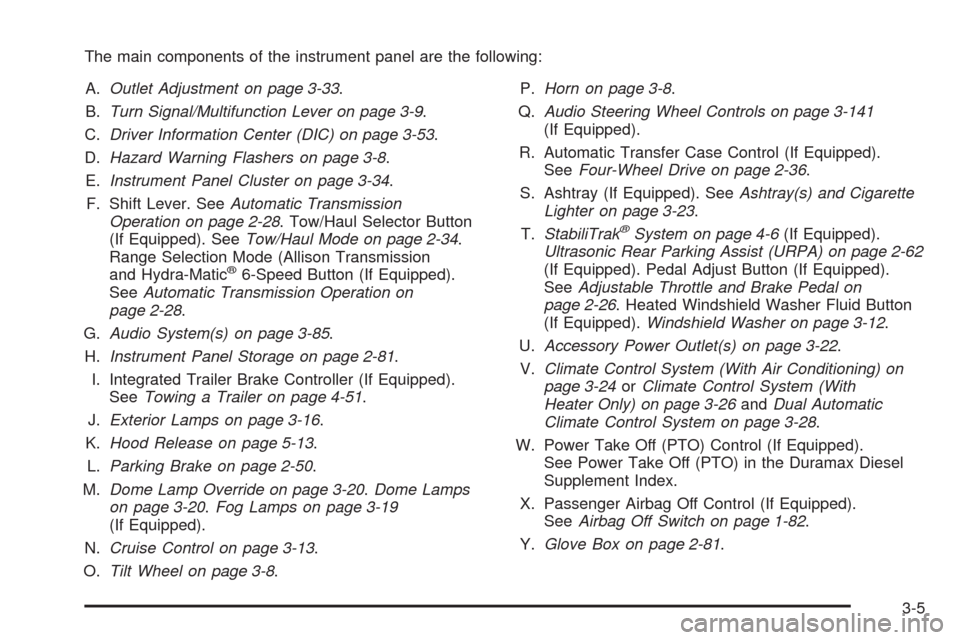
The main components of the instrument panel are the following:
A.Outlet Adjustment on page 3-33.
B.Turn Signal/Multifunction Lever on page 3-9.
C.Driver Information Center (DIC) on page 3-53.
D.Hazard Warning Flashers on page 3-8.
E.Instrument Panel Cluster on page 3-34.
F. Shift Lever. SeeAutomatic Transmission
Operation on page 2-28. Tow/Haul Selector Button
(If Equipped). SeeTow/Haul Mode on page 2-34.
Range Selection Mode (Allison Transmission
and Hydra-Matic
®6-Speed Button (If Equipped).
SeeAutomatic Transmission Operation on
page 2-28.
G.Audio System(s) on page 3-85.
H.Instrument Panel Storage on page 2-81.
I. Integrated Trailer Brake Controller (If Equipped).
SeeTowing a Trailer on page 4-51.
J.Exterior Lamps on page 3-16.
K.Hood Release on page 5-13.
L.Parking Brake on page 2-50.
M.Dome Lamp Override on page 3-20.Dome Lamps
on page 3-20.Fog Lamps on page 3-19
(If Equipped).
N.Cruise Control on page 3-13.
O.Tilt Wheel on page 3-8.P.Horn on page 3-8.
Q.Audio Steering Wheel Controls on page 3-141
(If Equipped).
R. Automatic Transfer Case Control (If Equipped).
SeeFour-Wheel Drive on page 2-36.
S. Ashtray (If Equipped). SeeAshtray(s) and Cigarette
Lighter on page 3-23.
T.StabiliTrak
®System on page 4-6(If Equipped).
Ultrasonic Rear Parking Assist (URPA) on page 2-62
(If Equipped). Pedal Adjust Button (If Equipped).
SeeAdjustable Throttle and Brake Pedal on
page 2-26. Heated Windshield Washer Fluid Button
(If Equipped).Windshield Washer on page 3-12.
U.Accessory Power Outlet(s) on page 3-22.
V.Climate Control System (With Air Conditioning) on
page 3-24orClimate Control System (With
Heater Only) on page 3-26andDual Automatic
Climate Control System on page 3-28.
W. Power Take Off (PTO) Control (If Equipped).
See Power Take Off (PTO) in the Duramax Diesel
Supplement Index.
X. Passenger Airbag Off Control (If Equipped).
SeeAirbag Off Switch on page 1-82.
Y.Glove Box on page 2-81.
3-5
Page 193 of 600
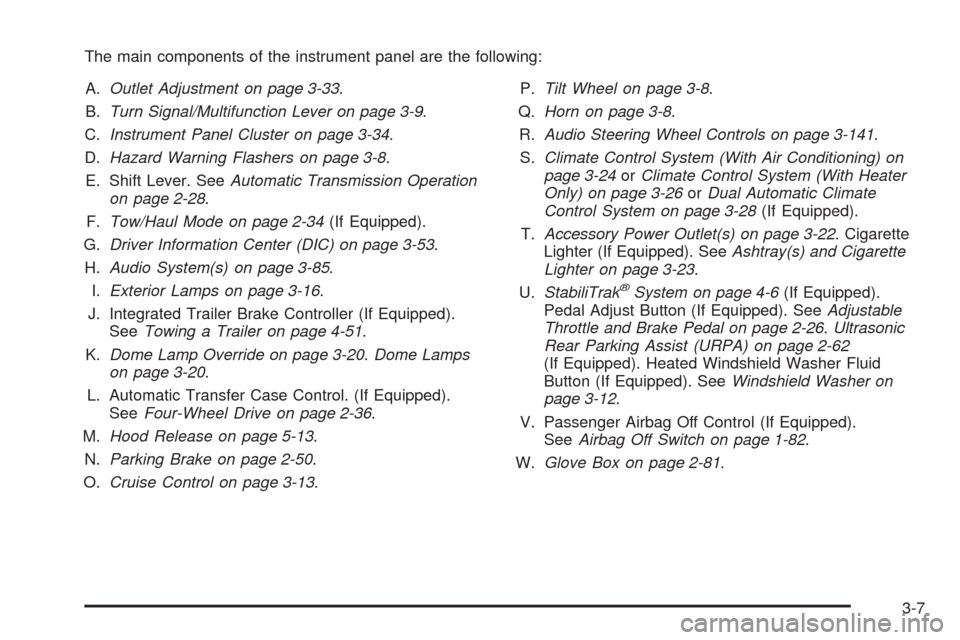
The main components of the instrument panel are the following:
A.Outlet Adjustment on page 3-33.
B.Turn Signal/Multifunction Lever on page 3-9.
C.Instrument Panel Cluster on page 3-34.
D.Hazard Warning Flashers on page 3-8.
E. Shift Lever. SeeAutomatic Transmission Operation
on page 2-28.
F.Tow/Haul Mode on page 2-34(If Equipped).
G.Driver Information Center (DIC) on page 3-53.
H.Audio System(s) on page 3-85.
I.Exterior Lamps on page 3-16.
J. Integrated Trailer Brake Controller (If Equipped).
SeeTowing a Trailer on page 4-51.
K.Dome Lamp Override on page 3-20.Dome Lamps
on page 3-20.
L. Automatic Transfer Case Control. (If Equipped).
SeeFour-Wheel Drive on page 2-36.
M.Hood Release on page 5-13.
N.Parking Brake on page 2-50.
O.Cruise Control on page 3-13.P.Tilt Wheel on page 3-8.
Q.Horn on page 3-8.
R.Audio Steering Wheel Controls on page 3-141.
S.Climate Control System (With Air Conditioning) on
page 3-24orClimate Control System (With Heater
Only) on page 3-26orDual Automatic Climate
Control System on page 3-28(If Equipped).
T.Accessory Power Outlet(s) on page 3-22. Cigarette
Lighter (If Equipped). SeeAshtray(s) and Cigarette
Lighter on page 3-23.
U.StabiliTrak
®System on page 4-6(If Equipped).
Pedal Adjust Button (If Equipped). SeeAdjustable
Throttle and Brake Pedal on page 2-26.Ultrasonic
Rear Parking Assist (URPA) on page 2-62
(If Equipped). Heated Windshield Washer Fluid
Button (If Equipped). SeeWindshield Washer on
page 3-12.
V. Passenger Airbag Off Control (If Equipped).
SeeAirbag Off Switch on page 1-82.
W.Glove Box on page 2-81.
3-7
Page 210 of 600
Climate Controls
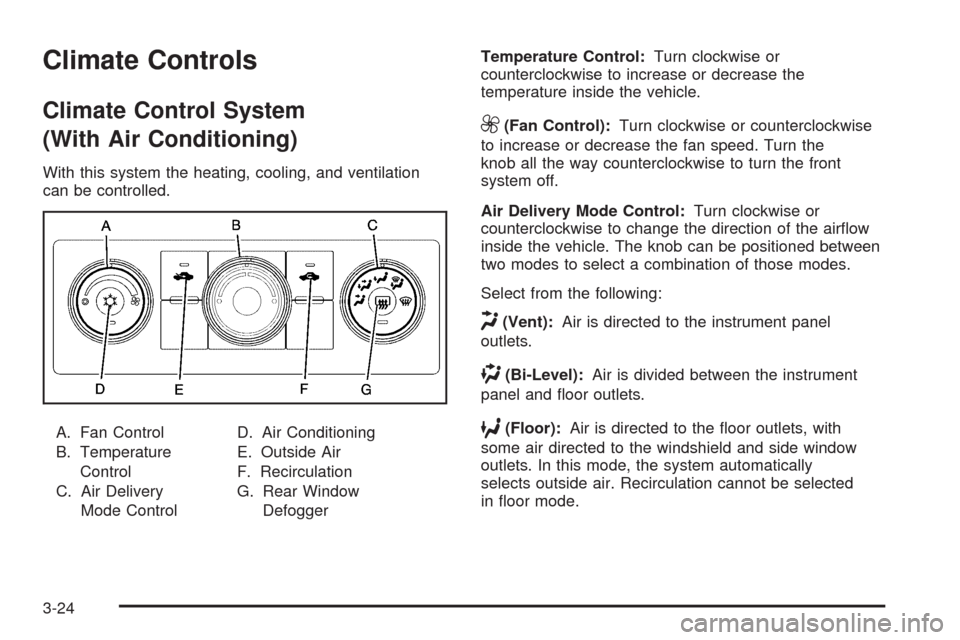
Climate Control System
(With Air Conditioning)
With this system the heating, cooling, and ventilation
can be controlled.
A. Fan Control
B. Temperature
Control
C. Air Delivery
Mode ControlD. Air Conditioning
E. Outside Air
F. Recirculation
G. Rear Window
DefoggerTemperature Control:Turn clockwise or
counterclockwise to increase or decrease the
temperature inside the vehicle.
9(Fan Control):Turn clockwise or counterclockwise
to increase or decrease the fan speed. Turn the
knob all the way counterclockwise to turn the front
system off.
Air Delivery Mode Control:Turn clockwise or
counterclockwise to change the direction of the airow
inside the vehicle. The knob can be positioned between
two modes to select a combination of those modes.
Select from the following:
H(Vent):Air is directed to the instrument panel
outlets.
)(Bi-Level):Air is divided between the instrument
panel and oor outlets.
6(Floor):Air is directed to the oor outlets, with
some air directed to the windshield and side window
outlets. In this mode, the system automatically
selects outside air. Recirculation cannot be selected
in oor mode.
3-24
Page 211 of 600
-(Defog):This mode clears the windows of fog or
moisture. Air is directed to the windshield, oor outlets,
and side window vents.
0(Defrost):This mode removes fog or frost from
the windshield more quickly. Air is directed to the
windshield and the side window vents, with some air
directed to the oor vents. The system automatically
forces outside air into the vehicle.
The recirculation mode cannot be selected in the defog
or defrost mode. When either mode is selected, the
system runs the air conditioning compressor, unless the
outside temperature is close to freezing.
Do not drive the vehicle until all the windows are clear.
:(Outside Air):Press to turn the outside air
mode on. An indicator light comes on to show that
outside air is on. In this mode outside air circulates
throughout the vehicle. The outside air mode can
be used with all modes, but it cannot be used with the
recirculation mode.
?(Recirculation):Press to turn the recirculation
mode on. An indicator light comes on to show that
recirculation is on.This mode recirculates and helps to quickly cool the
air inside the vehicle. It can be used to help prevent
outside air and odors from entering the vehicle.
The recirculation mode cannot be used with oor,
defog or defrost modes. If recirculation is selected with
one of these modes, the indicator light ashes
three times and then turns off. While in recirculation
mode the windows may fog when the weather is cold
and damp. To clear the fog, select either the defog
or defrost mode and increase the fan speed.
The recirculation mode can be turned off by pressing
the outside air button, or by turning off the ignition.
#(Air Conditioning):Press to turn the air conditioning
system on or off. An indicator light comes on to show
that the air conditioning is on. The air conditioning
can be selected in any mode as long as the fan switch
is on.
The air conditioning system removes moisture from the
air, so a small amount of water might drip under the
vehicle while idling or after turning off the engine.
This is normal.
3-25
Page 214 of 600
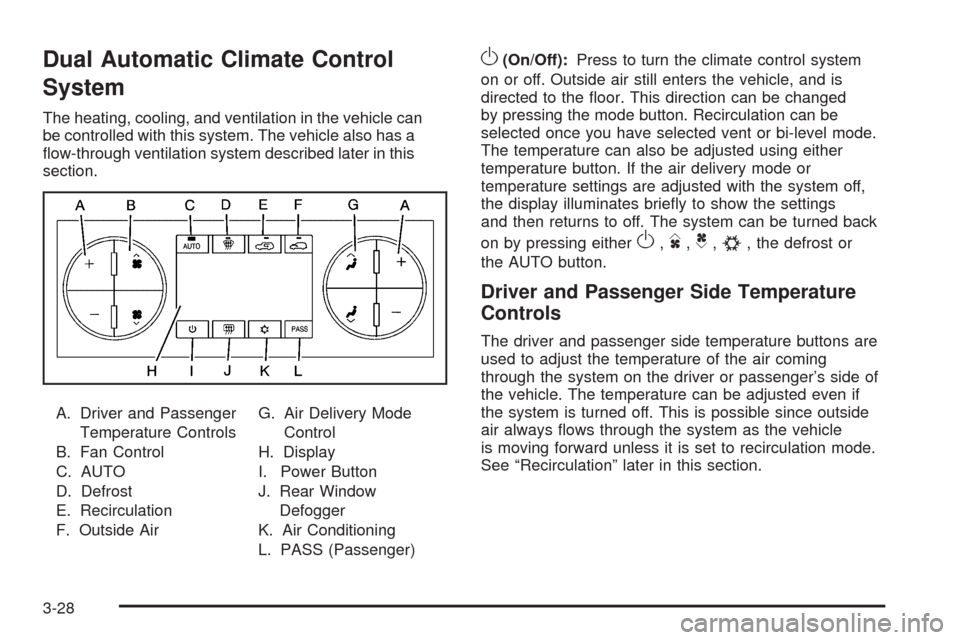
Dual Automatic Climate Control
System
The heating, cooling, and ventilation in the vehicle can
be controlled with this system. The vehicle also has a
ow-through ventilation system described later in this
section.
A. Driver and Passenger
Temperature Controls
B. Fan Control
C. AUTO
D. Defrost
E. Recirculation
F. Outside AirG. Air Delivery Mode
Control
H. Display
I. Power Button
J. Rear Window
Defogger
K. Air Conditioning
L. PASS (Passenger)
O(On/Off):Press to turn the climate control system
on or off. Outside air still enters the vehicle, and is
directed to the oor. This direction can be changed
by pressing the mode button. Recirculation can be
selected once you have selected vent or bi-level mode.
The temperature can also be adjusted using either
temperature button. If the air delivery mode or
temperature settings are adjusted with the system off,
the display illuminates briey to show the settings
and then returns to off. The system can be turned back
on by pressing either
O,D,C,#, the defrost or
the AUTO button.
Driver and Passenger Side Temperature
Controls
The driver and passenger side temperature buttons are
used to adjust the temperature of the air coming
through the system on the driver or passenger’s side of
the vehicle. The temperature can be adjusted even if
the system is turned off. This is possible since outside
air always ows through the system as the vehicle
is moving forward unless it is set to recirculation mode.
See “Recirculation” later in this section.
3-28
Page 215 of 600
Press the + or−buttons to increase or decrease the
cabin temperature. The driver side or passenger
side temperature display shows the temperature setting
decreasing or increasing.
The passenger’s temperature setting can be set to
match the driver’s temperature setting by pressing the
PASS button and turning off the PASS indicator.
When the passenger’s temperature setting is set
different than the driver’s setting, the indicator on the
PASS button illuminates and both the driver side
and passenger side temperature displays are shown.
Automatic Operation
AUTO (Automatic):When automatic operation is
active the system controls the inside temperature,
the air delivery, and the fan speed.
Use the steps below to place the entire system in
automatic mode:
1. Press the AUTO button.
When AUTO is selected, the display changes to
show the current temperature(s) and AUTO is lit on
the display. The current air delivery mode and
fan speed are also displayed for about 5 seconds.
When AUTO is selected, the air conditioning
operation and air inlet are automatically controlled.
The air conditioning compressor may run when
the outside temperature is above freezing. The air
inlet will normally be set to outside air. If it ishot outside, the air inlet may automatically switch to
the recirculate mode to help quickly cool down
the air inside the vehicle. The light on the button
comes on in recirculation.
2. Set the driver’s and passenger’s temperature.
To nd your comfort setting, start with a 74°F (23°C)
temperature setting and allow about 20 minutes
for the system to regulate. Use the driver or
passenger temperature buttons to adjust the
temperature setting as necessary. If a temperature
setting of 60°F (15°C) is chosen, the system
remains at the maximum cooling setting. If a
temperature setting of 90°F (32°C) is chosen, the
system remains at the maximum heat setting.
Choosing either maximum setting will not cause the
vehicle to heat or cool any faster.
Do not cover the solar sensor located on the top of the
instrument panel near the windshield. This sensor
regulates air temperature based on sun load. For more
information on the solar sensor, see “Sensors” later
in this section.
To avoid blowing cold air in cold weather, the system
delays turning the fan on until warm air is available.
The length of delay depends on the engine coolant
temperature. Pressing the fan switch overrides this delay
and changes the fan to a selected speed.
3-29