heater CHEVROLET SILVERADO 2009 2.G User Guide
[x] Cancel search | Manufacturer: CHEVROLET, Model Year: 2009, Model line: SILVERADO, Model: CHEVROLET SILVERADO 2009 2.GPages: 600, PDF Size: 3.24 MB
Page 212 of 600
Rear Window Defogger
For vehicles with a rear window defogger, a warming
grid is used to remove fog from the rear window.
<(Rear):Press to turn the rear window defogger on
or off. An indicator light on the button comes on to
show that the rear window defogger is on.
The rear window defogger only works when the ignition
is in ON/RUN. The rear window defogger stays on
for approximately 10 minutes after the button is pressed,
unless the ignition is turned to ACC/ACCESSORY or
LOCK/OFF. The defogger can also be turned off by
turning off the engine.
Notice:Do not use anything sharp on the inside
of the rear window. If you do, you could cut or
damage the warming grid, and the repairs would
not be covered by the vehicle warranty. Do not
attach a temporary vehicle license, tape, a decal or
anything similar to the defogger grid.
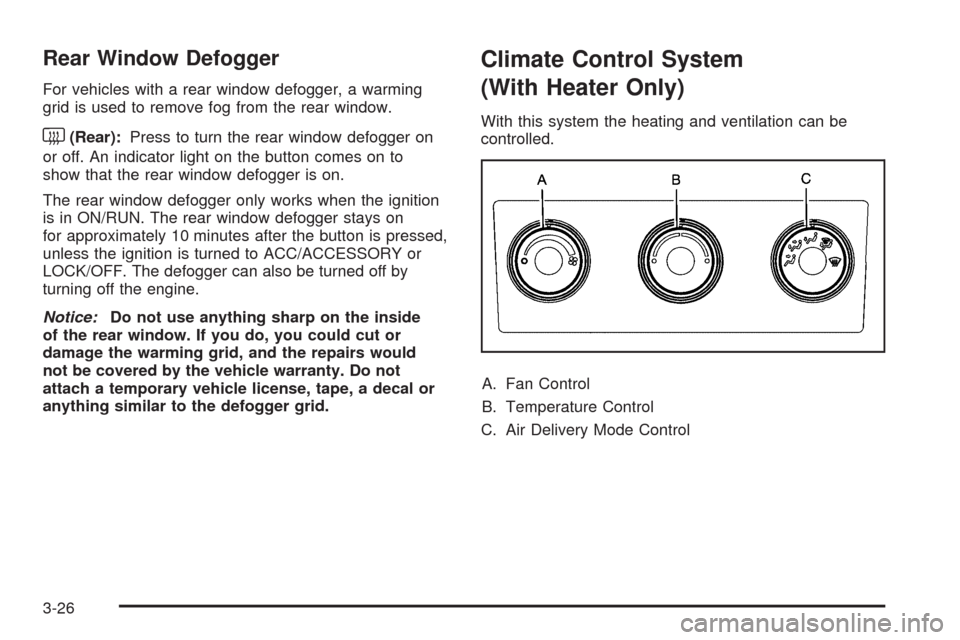
Climate Control System
(With Heater Only)
With this system the heating and ventilation can be
controlled.
A. Fan Control
B. Temperature Control
C. Air Delivery Mode Control
3-26
Page 276 of 600
Radios with CD and DVD
Radios with CD and DVD have a Bose®Surround
Sound System. Some of its features are explained
later in this section under, “Adjusting the Speakers
(Balance/Fade)”.
If the vehicle has a Rear Seat Entertainment (RSE)
system, it has a CD/DVD radio. SeeRear Seat
Entertainment (RSE) System on page 3-129for more
information on the vehicle’s RSE system.
The DVD player is the top slot on the radio faceplate.
The player is capable of reading the DTS programmed
DVD Audio or DVD Video media, (DTS and DTS
Digital Surround are registered trademarks of Digital
Theater Systems, Inc.).
Manufactured under license from Dolby Laboratories.
Dolby and the double-D symbol are trademarks of
Dolby Laboratories.
Radio Data System (RDS)
The audio system has a Radio Data System (RDS).
The RDS feature is available for use only on FM stations
that broadcast RDS information. This system relies
upon receiving specic information from these stations
and only works when the information is available.
While the radio is tuned to an FM-RDS station, the
station name or call letters displays. In rare cases,
a radio station could broadcast incorrect information that
causes the radio features to work improperly. If this
happens, contact the radio station.
Playing the Radio
O
(Power/Volume):Press to turn the system on
and off.
Turn clockwise or counterclockwise to increase or
decrease the volume.
4(Information) (AM-FM Radio):Press to switch the
display between the radio station frequency and
the time. While the ignition is off, press this button to
display the time.
3-90
Page 421 of 600
At a minimum, E85 should meet ASTM Specication
D 5798. By denition, this means that fuel labeled E85
will have an ethanol content between 70% and 85%.
Filling the fuel tank with fuel mixtures that do not meet
ASTM specications can affect driveability and could
cause the malfunction indicator lamp to come on.
To ensure quick starts in the wintertime, the E85 fuel
must be formulated properly for your climate according to
ASTM specication D 5798. If you have trouble starting
on E85, it could be because the E85 fuel is not properly
formulated for your climate. If this happens, switching to
gasoline or adding gasoline to the fuel tank can improve
starting. For good starting and heater efficiency below
32°F (0°C), the fuel mix in the fuel tank should contain
no more than 70% ethanol. It is best not to alternate
repeatedly between gasoline and E85. If you do switch
fuels, it is recommended that you add as much fuel as
possible — do not add less than three gallons (11 L)
when refueling. You should drive the vehicle immediately
after refueling for at least seven miles (11 km) to allow the
vehicle to adapt to the change in ethanol concentration.
E85 has less energy per gallon than gasoline, so you will
need to rell the fuel tank more often when using E85
than when you are using gasoline. SeeFilling the
Tank on page 5-10.Notice:Some additives are not compatible with
E85 fuel and can harm the vehicle’s fuel system.
Do not add anything to E85. Damage caused
by additives would not be covered by the vehicle
warranty.
Notice:This vehicle was not designed for fuel
that contains methanol. Do not use fuel containing
methanol. It can corrode metal parts in the fuel
system and also damage plastic and rubber parts.
That damage would not be covered under the vehicle
warranty.
Fuels in Foreign Countries
If you plan on driving in another country outside the
United States or Canada, the proper fuel might be hard
to nd. Never use leaded gasoline or any other fuel not
recommended in the previous text on fuel. Costly repairs
caused by use of improper fuel would not be covered by
the vehicle warranty.
To check the fuel availability, ask an auto club, or
contact a major oil company that does business in the
country where you will be driving.
5-9
Page 441 of 600
{CAUTION:
An electric engine cooling fan can start even when
the engine is not running. To avoid injury, always
keep hands, clothing, and tools away from any
engine cooling fan.
{CAUTION:
Heater and radiator hoses, and other engine parts,
can be very hot. Do not touch them. If you do, you
can be burned.
Do not run the engine if there is a leak. If you run
the engine, it could lose all coolant. That could
cause an engine re, and you could be burned.
Get any leak xed before you drive the vehicle.Notice:Using coolant other than DEX-COOL
®can
cause premature engine, heater core, or radiator
corrosion. In addition, the engine coolant could
require changing sooner, at 30,000 miles (50 000 km)
or 24 months, whichever occurs rst. Any repairs
would not be covered by the vehicle warranty.
Always use DEX-COOL
®(silicate-free) coolant in
the vehicle.
Engine Coolant
The cooling system in the vehicle is lled with
DEX-COOL®engine coolant. This coolant is designed
to remain in the vehicle for ve years or 150,000 miles
(240 000 km), whichever occurs rst.
The following explains the cooling system and how to
check and add coolant when it is low. If there is a
problem with engine overheating, seeEngine
Overheating on page 5-34.
5-29
Page 443 of 600
Notice:If an improper coolant mixture is used,
the engine could overheat and be badly damaged.
The repair cost would not be covered by the vehicle
warranty. Too much water in the mixture can freeze
and crack the engine, radiator, heater core, and
other parts.
Notice:If extra inhibitors and/or additives are used
in the vehicle’s cooling system, the vehicle could be
damaged. Use only the proper mixture of the engine
coolant listed in this manual for the cooling system.
SeeRecommended Fluids and Lubricants on
page 6-15for more information.Checking Coolant
The coolant surge tank is located in the engine
compartment on the passenger side of the vehicle.
SeeEngine Compartment Overview on page 5-14for
more information on location.
The vehicle must be on a level surface when checking
the coolant level.
Check to see if coolant is visible in the coolant surge tank.
If the coolant inside the coolant surge tank is boiling, do
not do anything else until it cools down. If coolant is
visible but the coolant level is not at or above the FULL
COLD mark, add a 50/50 mixture of clean, drinkable
water and DEX-COOL
®coolant at the coolant surge tank,
but be sure the cooling system is cool before this is done.
5-31
Page 448 of 600
If No Steam Is Coming From The
Engine Compartment
The ENGINE OVERHEATED STOP ENGINE or the
ENGINE OVERHEATED IDLE ENGINE message, along
with a low coolant condition, can indicate a serious
problem.
If you get an engine overheat warning, but see or hear no
steam, the problem may not be too serious. Sometimes
the engine can get a little too hot when you:
Climb a long hill on a hot day.
Stop after high-speed driving.
Idle for long periods in traffic.
Tow a trailer. SeeTowing a Trailer on page 4-51.If you get the ENGINE OVERHEATED STOP ENGINE or
the ENGINE OVERHEATED IDLE ENGINE message
with no sign of steam, try this for a minute or so:
1. Turn the air conditioning off.
2. Turn the heater on to the highest temperature and
to the highest fan speed. Open the windows as
necessary.
3. If you are stopped in a traffic jam, apply the brake,
shift to N (Neutral); otherwise, shift to the highest
gear while driving—D(Drive) or 3 (Third).
If the temperature overheat gage is no longer in the
overheat zone or an overheat warning no longer displays,
the vehicle can be driven. Continue to drive the vehicle
slow for about 10 minutes. Keep a safe vehicle distance
from the car in front of you. If the warning does not come
back on, continue to drive normally.
If the warning continues, pull over, stop, and park the
vehicle right away.
If there is no sign of steam, idle the engine for
ve minutes while parked. If the warning is still
displayed, turn off the engine until it cools down.
Also, see “Overheated Engine Protection Operating
Mode” later in this section.
5-36
Page 589 of 600
Driving (cont.)
Highway Hypnosis.......................................4-26
Hill and Mountain Roads..............................4-27
In Rain and on Wet Roads...........................4-25
Off-Road ....................................................4-12
Recovery Hooks..........................................4-31
Rocking Your Vehicle to Get it Out.................4-30
Winter........................................................4-28
Driving for Better Fuel Economy......................... 4-2
Dual Automatic Climate Control System.............3-28
Dual Tire Operation.........................................5-75
DVD
Rear Seat Entertainment System..................3-129
E
EDR .............................................................7-16
Electrical System
Add-On Equipment.....................................5-123
Center Instrument Panel Fuse Block.............5-126
Fuses and Circuit Breakers.........................5-123
Instrument Panel Fuse Block.......................5-124
Power Windows and Other Power Options....5-123
Underhood Fuse Block...............................5-127
Windshield Wiper Fuses.............................5-123Electronic Immobilizer
PASS-Key
®III+...........................................2-19
Electronic Immobilizer Operation
PASS-Key
®III+...........................................2-19
Engine
Air Cleaner/Filter.........................................5-19
Check and Service Engine Soon Lamp...........3-45
Coolant......................................................5-29
Coolant Heater............................................2-26
Coolant Temperature Gage...........................3-44
Drive Belt Routing.......................................6-18
Engine Compartment Overview......................5-14
Exhaust.....................................................2-55
Fan Noise..................................................5-37
Fast Idle System.........................................2-25
Oil .............................................................5-15
Oil Life System...........................................5-18
Overheated Protection Operating Mode...........5-37
Overheating................................................5-34
Starting......................................................2-23
Entry Lighting.................................................3-20
Event Data Recorders.....................................7-17
Exit Lighting...................................................3-20
Extender, Safety Belt.......................................1-37
Exterior Lamps...............................................3-16
5
Page 591 of 600
Gasoline
Octane........................................................ 5-6
Specications............................................... 5-7
Glove Box.....................................................2-81
GM Mobility Reimbursement Program.................. 7-7
H
Hazard Warning Flashers................................... 3-8
Head Restraints............................................... 1-3
Headlamp
Aiming .......................................................5-55
Headlamps....................................................5-58
Bulb Replacement.......................................5-58
Daytime Running Lamp................................3-17
Exterior Lamps............................................3-16
Flash-to-Pass..............................................3-10
Halogen Bulbs............................................5-58
High/Low Beam Changer..............................3-10
On Reminder..............................................3-17
Pickup Box Identication and Fender Marker
Lamps ....................................................5-60
Heated Seats................................................... 1-8Heater...................................................3-24, 3-26
Engine Coolant...........................................2-26
Heater...........................................................3-28
Highbeam On Light.........................................3-50
High-Speed Operation, Tires.............................5-74
Highway Hypnosis...........................................4-26
Hill and Mountain Roads..................................4-27
Hood
Checking Things Under................................5-12
Release.....................................................5-13
Horn ............................................................... 3-8
How to Wear Safety Belts Properly...................1-21
I
Ignition Positions.............................................2-21
Infants and Young Children, Restraints...............1-41
Ination - Tire Pressure...................................5-73
Instrument Panel
Brightness..................................................3-20
Cluster.......................................................3-34
Overview...............................................3-4, 3-6
Storage Area..............................................2-81
7