lights CHEVROLET SILVERADO 2009 2.G User Guide
[x] Cancel search | Manufacturer: CHEVROLET, Model Year: 2009, Model line: SILVERADO, Model: CHEVROLET SILVERADO 2009 2.GPages: 600, PDF Size: 3.24 MB
Page 146 of 600
Automatic Transfer Case
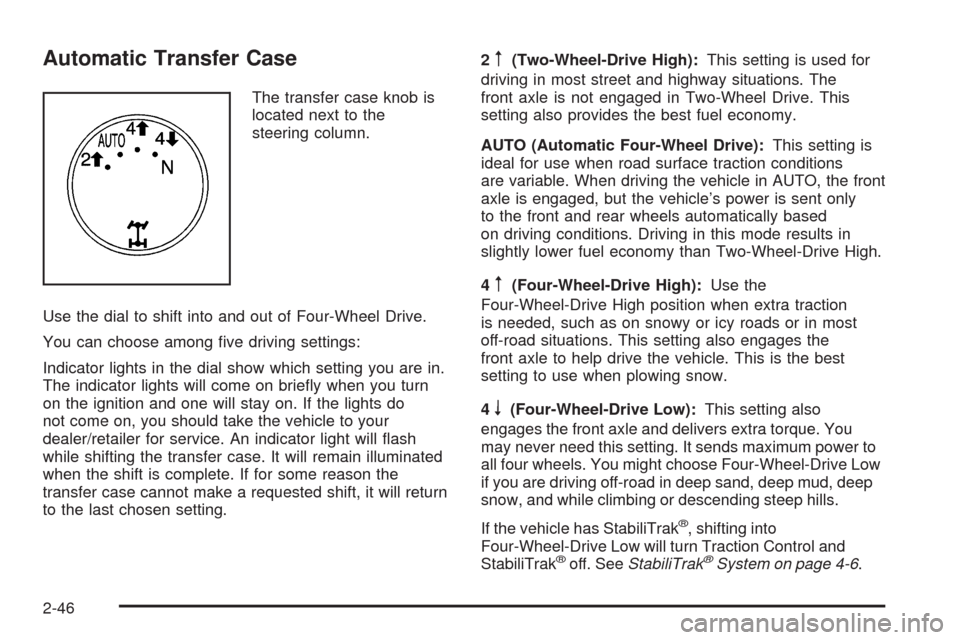
The transfer case knob is
located next to the
steering column.
Use the dial to shift into and out of Four-Wheel Drive.
You can choose among ve driving settings:
Indicator lights in the dial show which setting you are in.
The indicator lights will come on briey when you turn
on the ignition and one will stay on. If the lights do
not come on, you should take the vehicle to your
dealer/retailer for service. An indicator light will ash
while shifting the transfer case. It will remain illuminated
when the shift is complete. If for some reason the
transfer case cannot make a requested shift, it will return
to the last chosen setting.2
m(Two-Wheel-Drive High):This setting is used for
driving in most street and highway situations. The
front axle is not engaged in Two-Wheel Drive. This
setting also provides the best fuel economy.
AUTO (Automatic Four-Wheel Drive):This setting is
ideal for use when road surface traction conditions
are variable. When driving the vehicle in AUTO, the front
axle is engaged, but the vehicle’s power is sent only
to the front and rear wheels automatically based
on driving conditions. Driving in this mode results in
slightly lower fuel economy than Two-Wheel-Drive High.
4
m(Four-Wheel-Drive High):Use the
Four-Wheel-Drive High position when extra traction
is needed, such as on snowy or icy roads or in most
off-road situations. This setting also engages the
front axle to help drive the vehicle. This is the best
setting to use when plowing snow.
4
n(Four-Wheel-Drive Low):This setting also
engages the front axle and delivers extra torque. You
may never need this setting. It sends maximum power to
all four wheels. You might choose Four-Wheel-Drive Low
if you are driving off-road in deep sand, deep mud, deep
snow, and while climbing or descending steep hills.
If the vehicle has StabiliTrak
®, shifting into
Four-Wheel-Drive Low will turn Traction Control and
StabiliTrak
®off. SeeStabiliTrak®System on page 4-6.
2-46
Page 148 of 600
You must wait for the Four-Wheel-Drive Low indicator
light to stop ashing and remain on before shifting
the transmission into gear.
Notice:Shifting the transmission into gear before
the requested mode indicator light has stopped
ashing could damage the transfer case. To
help avoid damaging the vehicle, always wait for the
mode indicator lights to stop ashing before
shifting the transmission into gear.
It is typical for the vehicle to exhibit signicant
engagement noise and bump when shifting between
Four-Wheel-Drive Low and Four-Wheel-Drive High
ranges or from N (Neutral) with the engine running.
If the knob is turned to the Four-Wheel-Drive Low
position when the vehicle is in gear and/or moving, the
Four-Wheel-Drive Low indicator light will ash for
30 seconds and not complete the shift unless the vehicle
is moving less than 3 mph (5 km/h) and the transmission
is in N (Neutral). After 30 seconds the transfer case
will shift to Four-Wheel-Drive High mode.
Shifting Out of Four-Wheel-Drive Low
To shift from Four-Wheel-Drive Low to Four-Wheel-Drive
High, AUTO or Two-Wheel-Drive High, the vehicle
must be stopped or moving less than 3 mph (5 km/h)
with the transmission in N (Neutral) and the ignitionin ON/RUN. The preferred method for shifting out of
Four-Wheel-Drive Low is to have the vehicle moving
1 to 2 mph (1.6 to 3.2 km/h). Turn the knob to the
Four-Wheel-Drive High, AUTO or Two-Wheel-Drive High
position. You must wait for the Four-Wheel-Drive
High, AUTO or Two-Wheel-Drive High indicator light to
stop ashing and remain on before shifting the
transmission into gear.
Notice:Shifting the transmission into gear before
the requested mode indicator light has stopped
ashing could damage the transfer case. To
help avoid damaging the vehicle, always wait for the
mode indicator lights to stop ashing before
shifting the transmission into gear.
It is typical for the vehicle to exhibit signicant
engagement noise and bump when shifting between
Four-Wheel-Drive Low and Four-Wheel-Drive High
ranges or from N (Neutral) with the engine running.
If the knob is turned to the Four-Wheel-Drive High,
AUTO, or Two-Wheel-Drive High switch position
when the vehicle is in gear and/or moving, the
Four-Wheel-Drive High, AUTO or Two-Wheel-Drive High
indicator light will ash for 30 seconds but will not
complete the shift unless the vehicle is moving less than
3 mph (5 km/h) and the transmission is in N (Neutral).
2-48
Page 149 of 600
Shifting into Neutral
To shift the transfer case to N (Neutral) do the following:
1. Make sure the vehicle is parked so that it will
not roll.
2. Set the parking brake and apply the regular brake
pedal. SeeParking Brake on page 2-50for more
information.
3. Start the vehicle or turn the ignition to ON/RUN.
4. Put the transmission in N (Neutral).
5. Shift the transfer case to Two-Wheel Drive High.
6. Turn the transfer case dial clockwise to N (Neutral)
until it stops and hold it there until the N (Neutral)
light starts blinking. This will take at least
10 seconds. Then slowly release the dial to the four
low position. The N (Neutral) light will come on
when the transfer case shift to N (Neutral) is
complete.
7. If the engine is running, make sure that the transfer
case is in N (Neutral) by shifting the transmission to
R (Reverse) for one second, then shift the
transmission to D (Drive) for one second.
8. Turn the ignition to ACC/ACCESSORY, which will
turn the engine off.
9. Place the transmission shift lever in P (Park).10. Release the parking brake prior to moving the
vehicle.
11. Turn the ignition to LOCK/OFF.
Shifting Out of Neutral
To shift out of N (Neutral) do the following:
1. Set the parking brake and apply the regular brake
pedal.
2. Turn the ignition to ON/RUN with the engine off,
and shift the transmission to N (Neutral).
3. Turn the transfer case dial to Two-Wheel-Drive
High, Four-Wheel-Drive High, AUTO.
After the transfer case has shifted out of N (Neutral),
the N (Neutral) light will go out.
4. Release the parking brake prior to moving the
vehicle.
Notice:Shifting the transmission into gear before
the requested mode indicator light has stopped
ashing could damage the transfer case. To
help avoid damaging the vehicle, always wait for the
mode indicator lights to stop ashing before
shifting the transmission into gear.
5. Start the engine and shift the transmission to the
desired position.
2-49
Page 163 of 600
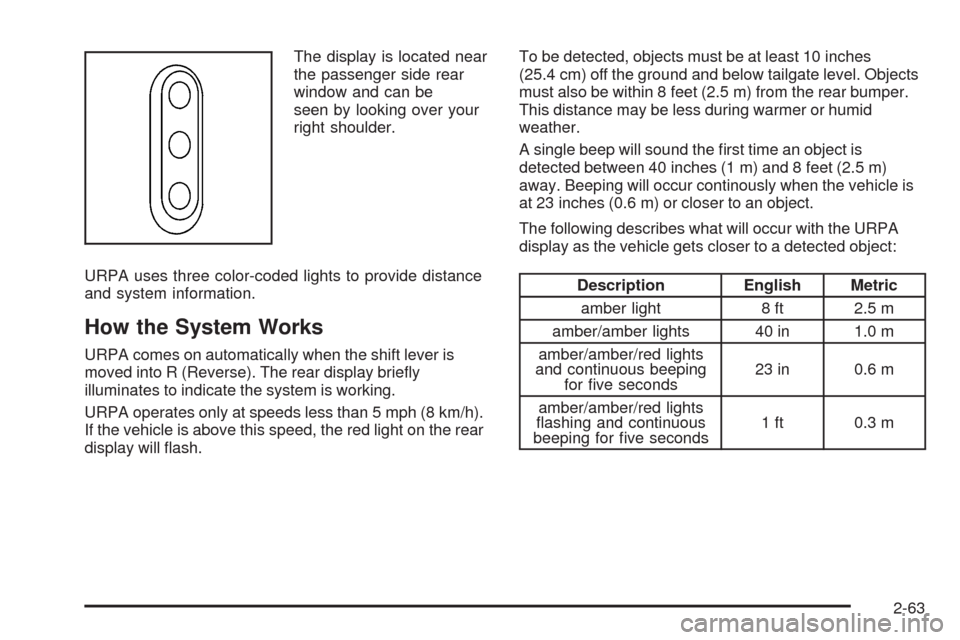
The display is located near
the passenger side rear
window and can be
seen by looking over your
right shoulder.
URPA uses three color-coded lights to provide distance
and system information.
How the System Works
URPA comes on automatically when the shift lever is
moved into R (Reverse). The rear display briey
illuminates to indicate the system is working.
URPA operates only at speeds less than 5 mph (8 km/h).
If the vehicle is above this speed, the red light on the rear
display will ash.To be detected, objects must be at least 10 inches
(25.4 cm) off the ground and below tailgate level. Objects
must also be within 8 feet (2.5 m) from the rear bumper.
This distance may be less during warmer or humid
weather.
A single beep will sound the rst time an object is
detected between 40 inches (1 m) and 8 feet (2.5 m)
away. Beeping will occur continously when the vehicle is
at 23 inches (0.6 m) or closer to an object.
The following describes what will occur with the URPA
display as the vehicle gets closer to a detected object:
Description English Metric
amber light 8 ft 2.5 m
amber/amber lights 40 in 1.0 m
amber/amber/red lights
and continuous beeping
for ve seconds23 in 0.6 m
amber/amber/red lights
ashing and continuous
beeping for ve seconds1 ft 0.3 m
2-63
Page 170 of 600
When the System Does Not Seem To
Work Properly
The rear vision camera system might not work properly
or display a clear image if:
The RVC is turned off. See “Turning the Rear
Camera System On or Off” earlier in this section.
It is dark.
The sun or the beam of headlights is shining
directly into the camera lens.
Ice, snow, mud, or anything else builds up on the
camera lens. Clean the lens, rinse it with water,
and wipe it with a soft cloth.
The back of the vehicle is in an accident, the
position and mounting angle of the camera
can change or the camera can be affected. Be sure
to have the camera and its position and mounting
angle checked at your dealer/retailer.
There are extreme temperature changes.The rear vision camera system display in the rearview
mirror may turn off or not appear as expected due to one
of the following conditions. If this occurs the left
indicator light on the mirror will ash.
A slow ash may indicate a loss of video signal, or
no video signal present during the reverse cycle.
A fast ash may indicate that the display has been
on for the maximum allowable time during a
reverse cycle, or the display has reached an Over
Temperature limit.
The fast ash conditions are used to protect the
video device from high temperature conditions. Once
conditions return to normal the device will reset
and the green indicator will stop ashing.
During any of these fault conditions, the display will be
blank and the indicator will continue to ash as long
as the vehicle is in R (Reverse) or until the conditions
return to normal.
Pressing and holding
zwhen the left indicator light is
ashing will turn off the video display along with the
left indicator light.
2-70
Page 175 of 600
Universal Home Remote System
Operation (With Three Round LED)
This vehicle may have the Universal Home Remote
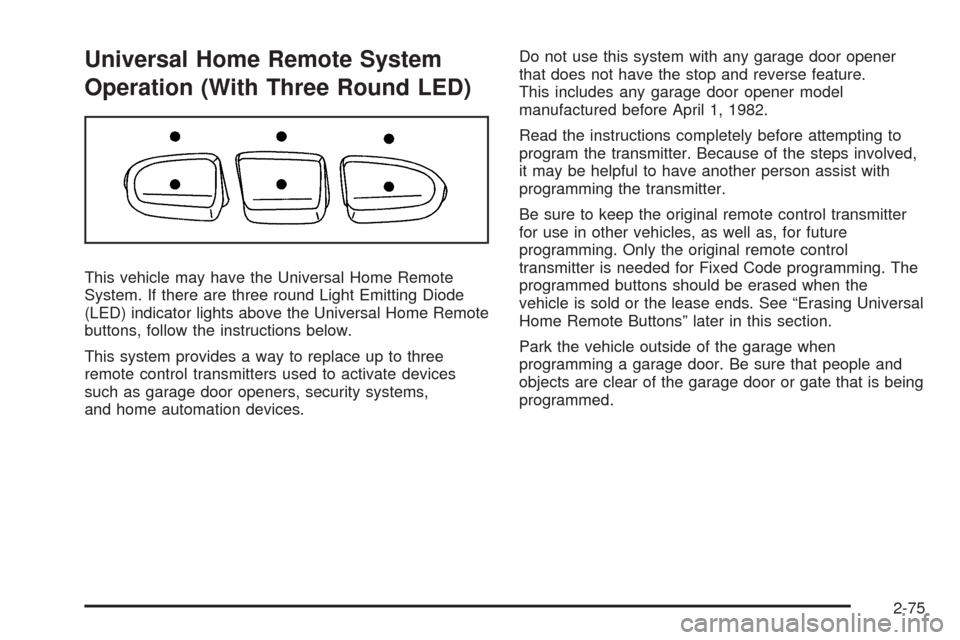
System. If there are three round Light Emitting Diode
(LED) indicator lights above the Universal Home Remote
buttons, follow the instructions below.
This system provides a way to replace up to three
remote control transmitters used to activate devices
such as garage door openers, security systems,
and home automation devices.Do not use this system with any garage door opener
that does not have the stop and reverse feature.
This includes any garage door opener model
manufactured before April 1, 1982.
Read the instructions completely before attempting to
program the transmitter. Because of the steps involved,
it may be helpful to have another person assist with
programming the transmitter.
Be sure to keep the original remote control transmitter
for use in other vehicles, as well as, for future
programming. Only the original remote control
transmitter is needed for Fixed Code programming. The
programmed buttons should be erased when the
vehicle is sold or the lease ends. See “Erasing Universal
Home Remote Buttons” later in this section.
Park the vehicle outside of the garage when
programming a garage door. Be sure that people and
objects are clear of the garage door or gate that is being
programmed.
2-75
Page 179 of 600
2. Write down the eight to 12 switch settings from left
to right as follows:
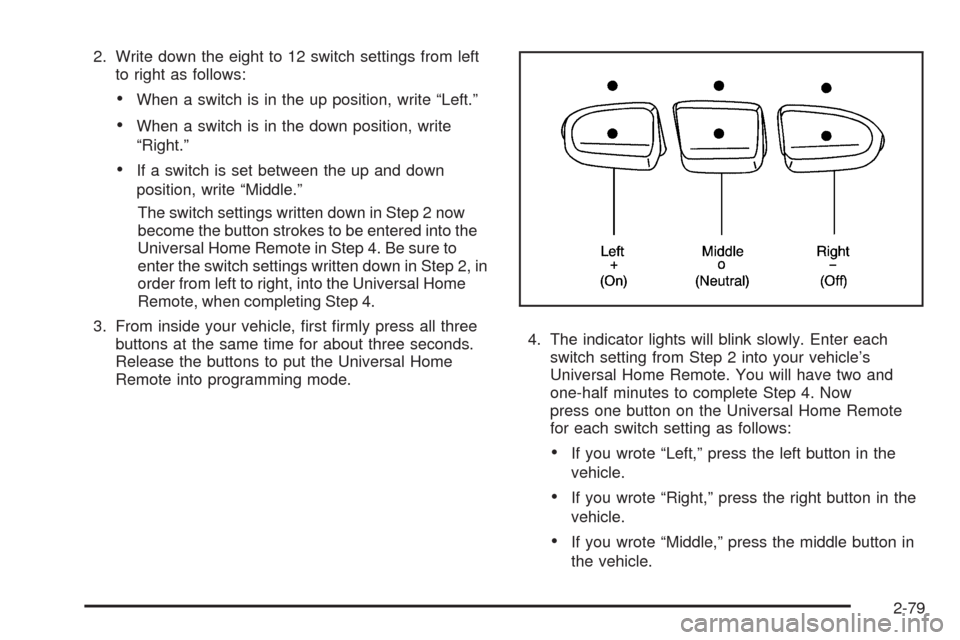
When a switch is in the up position, write “Left.”
When a switch is in the down position, write
“Right.”
If a switch is set between the up and down
position, write “Middle.”
The switch settings written down in Step 2 now
become the button strokes to be entered into the
Universal Home Remote in Step 4. Be sure to
enter the switch settings written down in Step 2, in
order from left to right, into the Universal Home
Remote, when completing Step 4.
3. From inside your vehicle, rst rmly press all three
buttons at the same time for about three seconds.
Release the buttons to put the Universal Home
Remote into programming mode.4. The indicator lights will blink slowly. Enter each
switch setting from Step 2 into your vehicle’s
Universal Home Remote. You will have two and
one-half minutes to complete Step 4. Now
press one button on the Universal Home Remote
for each switch setting as follows:
If you wrote “Left,” press the left button in the
vehicle.
If you wrote “Right,” press the right button in the
vehicle.
If you wrote “Middle,” press the middle button in
the vehicle.
2-79
Page 180 of 600
5. After entering all of the switch positions, again,
rmly press and release all three buttons at the
same time. The indicator lights will turn on.
6. Press and hold the button that will be used to
control the garage door until the garage door
moves. The indicator light above the selected button
should slowly blink. This button may need to be
held for up to 55 seconds.
7. Immediately release the button when the garage
door moves. The indicator light will blink rapidly
until programming is complete.
8. Press and release the same button again. The
garage door should move, conrming that
programming is successful and complete.
To program another Fixed Code device such as an
additional garage door opener, a security device,
or home automation device, repeat Steps 1-8, choosing
a different button in Step 6 than what was used for
the garage door opener.
Using Universal Home Remote
Press and hold the appropriate button for at least half of
a second. The indicator light will come on while the
signal is being transmitted.
Reprogramming Universal Home
Remote Buttons
Any of the three buttons can be reprogrammed by
repeating the instructions.
Erasing Universal Home Remote
Buttons
The programmed buttons should be erased when the
vehicle is sold or the lease ends.
To erase either Rolling Code or Fixed Code on the
Universal Home Remote device:
1. Press and hold the two outside buttons at the same
time for approximately 20 seconds, until the
indicator lights, located directly above the buttons,
begin to blink rapidly.
2. Once the indicator lights begin to blink, release both
buttons. The codes from all buttons will be erased.
For help or information on the Universal Home Remote
System, call the customer assistance phone number
underCustomer Assistance Offices on page 7-6.
2-80
Page 187 of 600
Instrument Panel Overview...............................3-4
Instrument Panel Overview
(Base/Uplevel version).................................3-4
Instrument Panel Overview (Premium version). . . .3-6
Hazard Warning Flashers................................3-8
Horn .............................................................3-8
Tilt Wheel.....................................................3-8
Turn Signal/Multifunction Lever.........................3-9
Turn and Lane-Change Signals........................3-9
Headlamp High/Low-Beam Changer.................3-10
Flash-to-Pass...............................................3-10
Windshield Wipers........................................3-10
Rainsense™ II Wipers...................................3-11
Windshield Washer.......................................3-12
Cruise Control..............................................3-13
Exterior Lamps.............................................3-16
Headlamps on Reminder................................3-17
Daytime Running Lamps (DRL).......................3-17
Automatic Headlamp System..........................3-18
Puddle Lamps..............................................3-19
Fog Lamps ..................................................3-19
Auxiliary Roof Mounted Lamp.........................3-19
Instrument Panel Brightness...........................3-20
Dome Lamps ...............................................3-20
Dome Lamp Override....................................3-20
Entry Lighting...............................................3-20
Exit Lighting.................................................3-20Reading Lamps............................................3-21
Cargo Lamp.................................................3-21
Electric Power Management...........................3-21
Battery Run-Down Protection..........................3-22
Accessory Power Outlet(s).............................3-22
Ashtray(s) and Cigarette Lighter......................3-23
Climate Controls............................................3-24
Climate Control System
(With Air Conditioning)...............................3-24
Climate Control System
(With Heater Only).....................................3-26
Dual Automatic Climate Control System...........3-28
Outlet Adjustment.........................................3-33
Warning Lights, Gages, and Indicators............3-33
Instrument Panel Cluster................................3-34
Speedometer and Odometer...........................3-35
Trip Odometer..............................................3-35
Tachometer.................................................3-35
Safety Belt Reminders...................................3-36
Airbag Readiness Light..................................3-37
Airbag Off Light............................................3-38
Passenger Airbag Status Indicator...................3-40
Charging System Light..................................3-41
Voltmeter Gage............................................3-41
Brake System Warning Light..........................3-42
Antilock Brake System (ABS) Warning Light.....3-43
Section 3 Instrument Panel
3-1
Page 202 of 600
Exterior Lamps
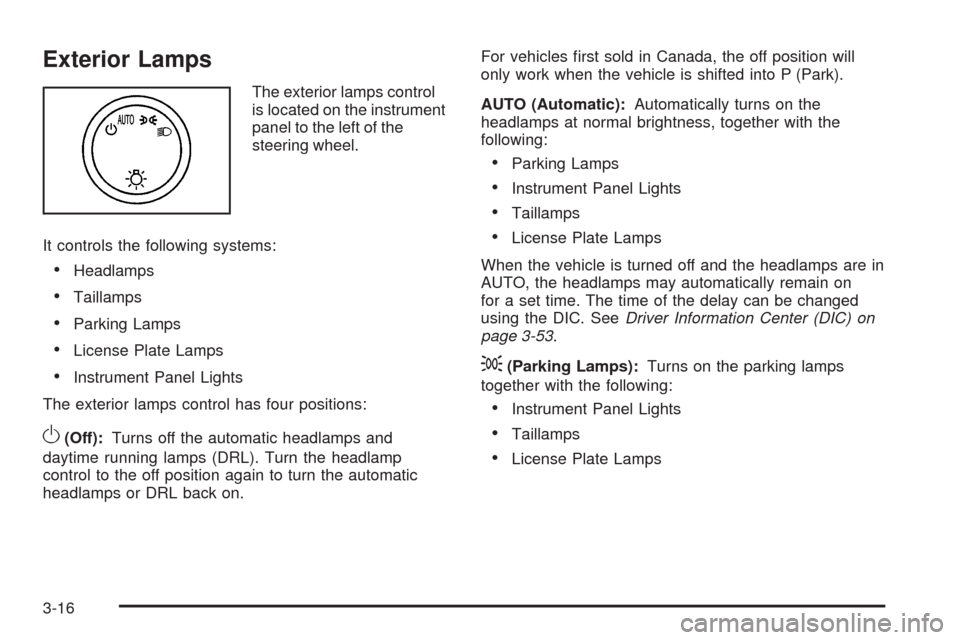
The exterior lamps control
is located on the instrument
panel to the left of the
steering wheel.
It controls the following systems:
Headlamps
Taillamps
Parking Lamps
License Plate Lamps
Instrument Panel Lights
The exterior lamps control has four positions:
O(Off):Turns off the automatic headlamps and
daytime running lamps (DRL). Turn the headlamp
control to the off position again to turn the automatic
headlamps or DRL back on.For vehicles rst sold in Canada, the off position will
only work when the vehicle is shifted into P (Park).
AUTO (Automatic):Automatically turns on the
headlamps at normal brightness, together with the
following:
Parking Lamps
Instrument Panel Lights
Taillamps
License Plate Lamps
When the vehicle is turned off and the headlamps are in
AUTO, the headlamps may automatically remain on
for a set time. The time of the delay can be changed
using the DIC. SeeDriver Information Center (DIC) on
page 3-53.
;(Parking Lamps):Turns on the parking lamps
together with the following:
Instrument Panel Lights
Taillamps
License Plate Lamps
3-16