remote start CHEVROLET SILVERADO 2009 2.G Owner's Manual
[x] Cancel search | Manufacturer: CHEVROLET, Model Year: 2009, Model line: SILVERADO, Model: CHEVROLET SILVERADO 2009 2.GPages: 600, PDF Size: 3.24 MB
Page 460 of 600
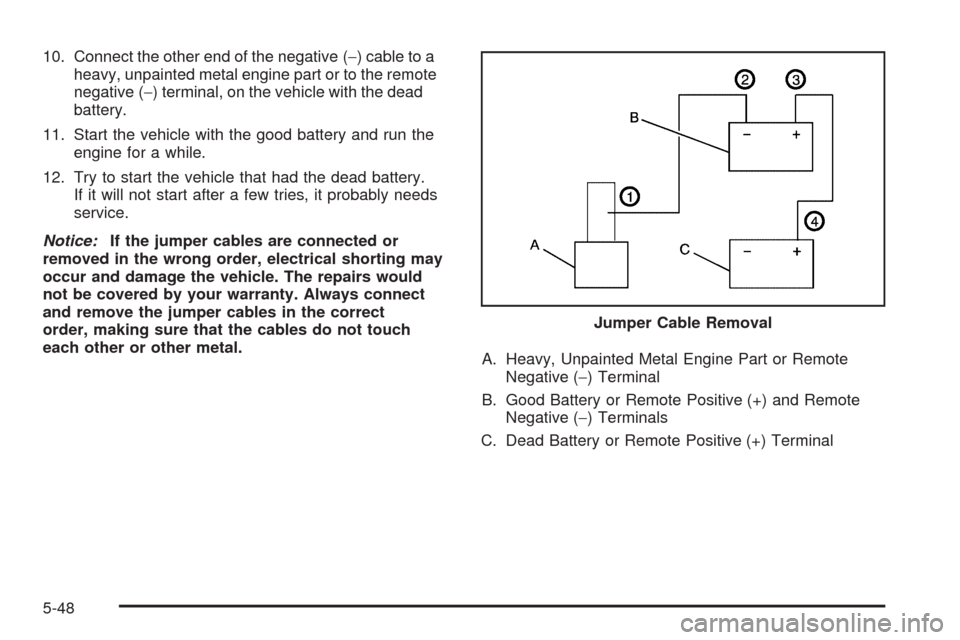
10. Connect the other end of the negative (−) cable to a
heavy, unpainted metal engine part or to the remote
negative (−) terminal, on the vehicle with the dead
battery.
11. Start the vehicle with the good battery and run the
engine for a while.
12. Try to start the vehicle that had the dead battery.
If it will not start after a few tries, it probably needs
service.
Notice:If the jumper cables are connected or
removed in the wrong order, electrical shorting may
occur and damage the vehicle. The repairs would
not be covered by your warranty. Always connect
and remove the jumper cables in the correct
order, making sure that the cables do not touch
each other or other metal.
A. Heavy, Unpainted Metal Engine Part or Remote
Negative (−) Terminal
B. Good Battery or Remote Positive (+) and Remote
Negative (−) Terminals
C. Dead Battery or Remote Positive (+) TerminalJumper Cable Removal
5-48
Page 492 of 600
The TPMS sensor matching process is outlined below:
1. Set the parking brake.
2. Turn the ignition switch to ON/RUN with the
engine off.
3. Press the Remote Keyless Entry (RKE) transmitter’s
LOCK and UNLOCK buttons at the same time for
approximately ve seconds. The horn sounds twice
to signal the receiver is in relearn mode and TIRE
LEARNING ACTIVE message displays on the DIC
screen.
If your vehicle does not have RKE, press the Driver
Information Center (DIC) vehicle information button
until the PRESS
VTO RELEARN TIRE POSITIONS
message displays. The horn sounds twice to signal
the receiver is in relearn mode and TIRE LEARNING
ACTIVE message displays on the DIC screen.
If your vehicle does not have RKE or DIC buttons,
press the trip odometer reset stem located on the
instrument panel cluster until the PRESS
VTO
RELEARN TIRE POSITIONS message displays.
The horn sounds twice to signal the receiver is in
relearn mode and TIRE LEARNING ACTIVE
message displays on the DIC screen.
4. Start with the driver side front tire.5. Remove the valve cap from the valve cap stem.
Activate the TPMS sensor by increasing or
decreasing the tire’s air pressure for ve seconds, or
until a horn chirp sounds. The horn chirp, which may
take up to 30 seconds to sound, conrms that the
sensor identication code has been matched to this
tire and wheel position.
6. Proceed to the passenger side front tire, and repeat
the procedure in Step 5.
7. Proceed to the passenger side rear tire, and repeat
the procedure in Step 5.
8. Proceed to the driver side rear tire, and repeat the
procedure in Step 5. The horn sounds two times to
indicate the sensor identication code has been
matched to the driver side rear tire, and that the
TPMS sensor matching process is no longer active.
The TIRE LEARNING ACTIVE message on the DIC
display screen goes off.
9. Turn the ignition switch to LOCK/OFF.
10. Set all four tires to the recommended air pressure
level as indicated on the Tire and Loading
Information label.
11. Put the valve caps back on the valve stems.
5-80
Page 584 of 600
OnStar®
If your vehicle has OnStar and you subscribe to the
OnStar services, please refer to the OnStar Terms and
Conditions for information on data collection and use.
See alsoOnStar
®System on page 2-71in this manual
for more information.
Navigation System
If your vehicle has a navigation system, use of the
system may result in the storage of destinations,
addresses, telephone numbers, and other trip
information. Refer to the navigation system operating
manual for information on stored data and for deletion
instructions.
Radio Frequency
Identication (RFID)
RFID technology is used in some vehicles for functions
such as tire pressure monitoring and ignition system
security, as well as in connection with conveniences
such as key fobs for remote door locking/unlocking and
starting, and in-vehicle transmitters for garage door
openers. RFID technology in GM vehicles does not use
or record personal information or link with any other
GM system containing personal information.
7-18
Page 596 of 600
Rainsense™ II Wipers.....................................3-11
Reading Lamps..............................................3-21
Rear Axle......................................................5-49
Locking........................................................ 4-9
Rear Door Security Locks................................2-10
Rear Doors....................................................2-11
Rear Seat Armrest..........................................2-83
Rear Seat Audio (RSA)..................................3-139
Rear Seat Entertainment System.....................3-129
Rear Seat Operation...............................1-14, 1-15
Rear Vision Camera........................................2-65
Rearview Mirror, Automatic Dimming..................2-57
Rearview Mirrors.............................................2-57
Reclining Seatbacks........................................1-10
Recommended Fluids and Lubricants.................6-15
Recovery Hooks.............................................4-31
Recreational Vehicle Towing.............................4-46
Remote Keyless Entry (RKE) System.................. 2-4
Remote Keyless Entry (RKE) System,
Operation..................................................... 2-4
Remote Vehicle Start........................................ 2-7
Removing the Flat Tire and Installing the
Spare Tire..................................................5-99
Removing the Spare Tire and Tools...................5-94
Replacement Bulbs.........................................5-63
Replacement Parts, Maintenance......................6-17Reporting Safety Defects
Canadian Government..................................7-15
General Motors...........................................7-15
United States Government............................7-14
Restraint System Check
Checking the Restraint Systems....................1-92
Replacing Restraint System Parts After a
Crash.....................................................1-93
Retained Accessory Power...............................2-23
Roadside
Assistance Program....................................... 7-7
Rocking Your Vehicle to Get it Out....................4-30
Routing, Engine Drive Belt...............................6-18
Running the Vehicle While Parked
.....................2-56
S
Safety Belt Reminders.....................................3-36
Safety Belts
Care of ....................................................5-117
How to Wear Safety Belts Properly................1-21
Lap Belt.....................................................1-36
Lap-Shoulder Belt........................................1-30
Safety Belt Extender....................................1-37
Safety Belt Use During Pregnancy.................1-36
Safety Belts Are for Everyone.......................1-16
12
Page 597 of 600
Safety Warnings and Symbols.............................. iii
Scheduled Maintenance..................................... 6-4
Seatback Latches...........................................1-13
Seats
Center Seat................................................1-14
Heated Seats............................................... 1-8
Manual Lumbar............................................. 1-6
Memory, Mirrors and Pedals........................... 1-8
Power Lumbar .............................................. 1-7
Power Seats................................................. 1-5
Rear Seat Operation............................1-14, 1-15
Reclining Seatbacks.....................................1-10
Seatback Latches........................................1-13
Secondary Latch System................................5-107
Securing a Child Restraint
Center Front Seat Position............................1-61
Rear Seat Position......................................1-58
Right Front Seat Position..............1-61, 1-66, 1-71
Security Light.................................................3-50
Service........................................................... 5-4
Accessories and Modications......................... 5-4
Adding Equipment to the Outside of the
Vehicle..................................................... 5-6
California Perchlorate Materials Requirements . . . 5-5
California Proposition 65 Warning.................... 5-5Service (cont.)
Doing Your Own Work................................... 5-5
Engine Soon Lamp......................................3-45
Publications Ordering Information...................7-15
Service, Scheduling Appointments.....................7-10
Servicing Your Airbag-Equipped Vehicle..............1-90
Setting the Clock............................................3-86
Sheet Metal Damage.....................................5-121
Shifting Into Park............................................2-52
Shifting Out of Park........................................2-54
Signals, Turn and Lane-Change.......................... 3-9
Sliding Rear Window, Power.............................2-16
Snow Plow....................................................4-39
Spare Tire....................................................5-114
Installing....................................................5-99
Removing...................................................5-94
Storing.....................................................5-110
Specications, Capacities
...............................5-130
Speedometer..................................................3-35
StabiliTrak
®Indicator Light...............................3-44
StabiliTrak®System.......................................... 4-6
Start Vehicle, Remote....................................... 2-7
Starting the Engine.........................................2-23
Steering.......................................................... 4-9
Steering Wheel Controls, Audio.......................3-141
13
Page 599 of 600
Tires (cont.)
Tire Sidewall Labeling..................................5-66
Tire Terminology and Denitions....................5-70
Uniform Tire Quality Grading.........................5-86
Wheel Alignment and Tire Balance.................5-88
Wheel Replacement.....................................5-89
When It Is Time for New Tires......................5-83
Tow/Haul Mode ...............................................2-34
Tow/Haul Mode Light.......................................3-51
Towing
Recreational Vehicle.....................................4-46
Towing a Trailer..........................................4-51
Your Vehicle...............................................4-45
Traction
StabiliTrak
®System....................................... 4-6
Trailer
Recommendations.......................................4-83
Transmission
Fluid, Automatic..................................5-21, 5-24
Transmission Operation, Automatic....................2-28
Trip Odometer................................................3-35
Truck-Camper Loading Information....................4-43
Turn and Lane-Change Signals.......................... 3-9
Turn Signal/Multifunction Lever........................... 3-9
U
Ultrasonic Rear Parking Assist (URPA)...............2-62
Uniform Tire Quality Grading............................5-86
Universal Home Remote System.......................2-74
Operation...................................................2-75
V
Vehicle
Control........................................................ 4-3
Loading......................................................4-32
Running While Parked..................................2-56
Symbols......................................................... iii
Vehicle Customization, DIC..............................3-76
Vehicle Data Recording and Privacy..................7-16
Vehicle Identication
Number (VIN)............................................5-122
Service Parts Identication Label..................5-122
Vehicle, Remote Start....................................... 2-7
Ventilation Adjustment......................................3-33
Visors...........................................................2-17
Voltmeter Gage..............................................3-41
15