light CHEVROLET SILVERADO 2010 2.G Owner's Manual
[x] Cancel search | Manufacturer: CHEVROLET, Model Year: 2010, Model line: SILVERADO, Model: CHEVROLET SILVERADO 2010 2.GPages: 626, PDF Size: 4.8 MB
Page 117 of 626
{WARNING:
Children who are up against, or very close to, any
airbag when it inflates can be seriously injured or
killed. Airbags plus lap-shoulder belts offer
protection for adults and older children, but not for
young children and infants. Neither the vehicle's
safety belt system nor its airbag system is
designed for them. Young children and infants
need the protection that a child restraint system
can provide. Always secure children properly in
your vehicle. To read how, seeOlder Children
on
page 2‑39
or Infants and Young Childrenon
page 2‑42
.
There is an airbag
readiness light on the
instrument panel cluster,
which shows the airbag
symbol. The system checks the airbag electrical system for
malfunctions. The light tells you if there is an electrical
problem. See
Airbag Readiness Light
on page 4‑32for
more information.
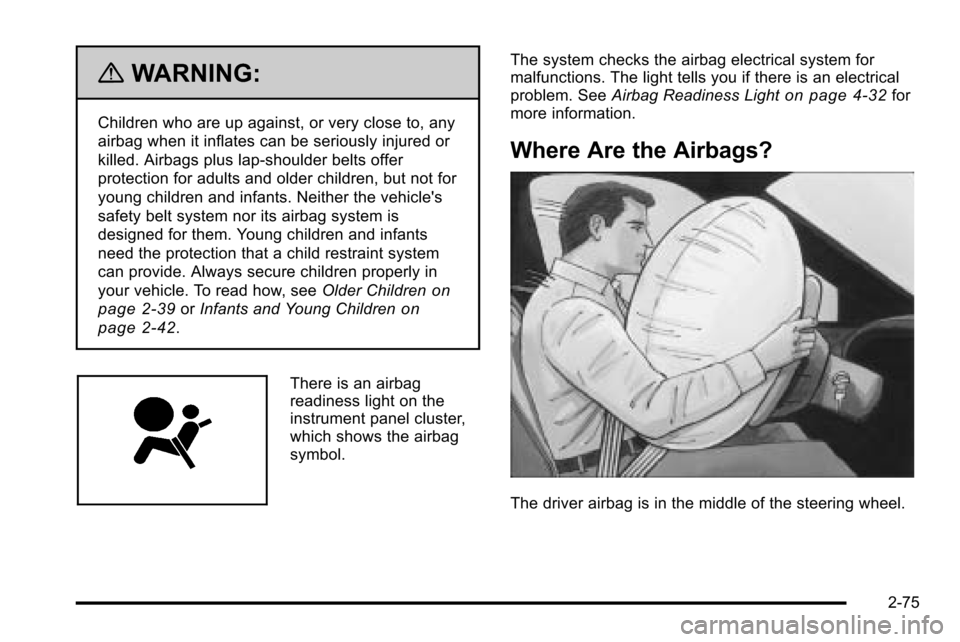
Where Are the Airbags?
The driver airbag is in the middle of the steering wheel.
2-75
Page 126 of 626
Medical Condition. A passenger has a
medical condition which, according to his
or her physician:
.Causes the passenger airbag to pose a special
risk for the passenger; and
.Makes the potential harm from the passenger
airbag in a crash greater than the potential harm
from turning off the airbag and allowing the
passenger, even if belted, to hit the dashboard or
windshield in a crash.
{WARNING:
If the right front passenger's airbag is turned off
for a person who is not in a risk group identified
by the national government, that person will not
have the extra protection of an airbag. In a crash,
the airbag will not be able to inflate and help
protect the person sitting there. Do not turn off the
passenger's airbag unless the person sitting there
is in a risk group.
United StatesCanada
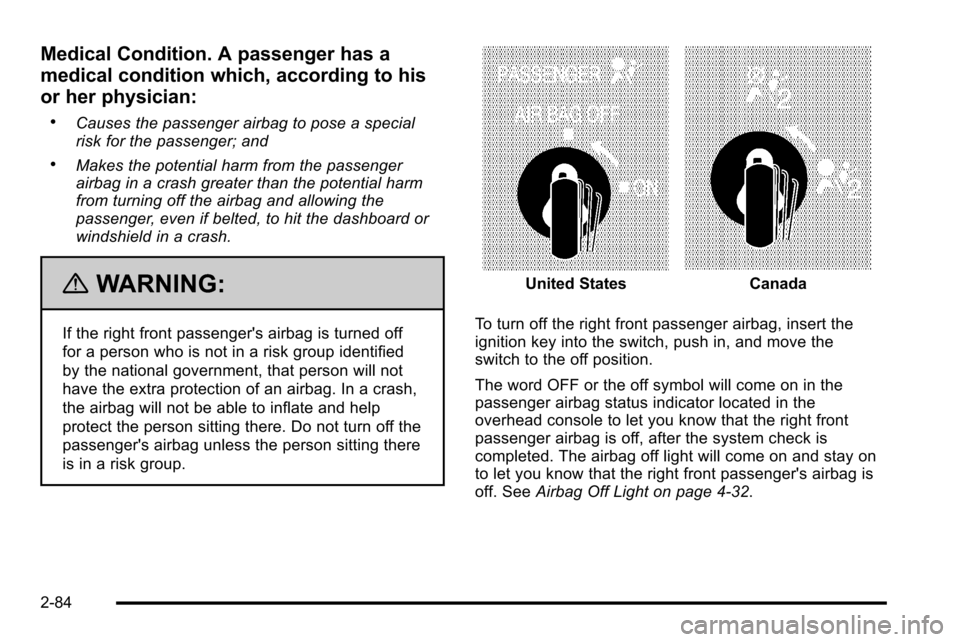
To turn off the right front passenger airbag, insert the
ignition key into the switch, push in, and move the
switch to the off position.
The word OFF or the off symbol will come on in the
passenger airbag status indicator located in the
overhead console to let you know that the right front
passenger airbag is off, after the system check is
completed. The airbag off light will come on and stay on
to let you know that the right front passenger's airbag is
off. See Airbag Off Light on page 4‑32.
2-84
Page 127 of 626
{WARNING:
If the airbag readiness light ever comes on and
stays on, it means that something may be wrong
with the airbag system. For example, the right
front passenger airbag could inflate even though
the airbag on-off switch is turned off.
To help avoid injury to yourself or others, have the
vehicle serviced right away. SeeAirbag
Readiness Light
on page 4‑32for more
information, including important safety information.
United StatesCanada
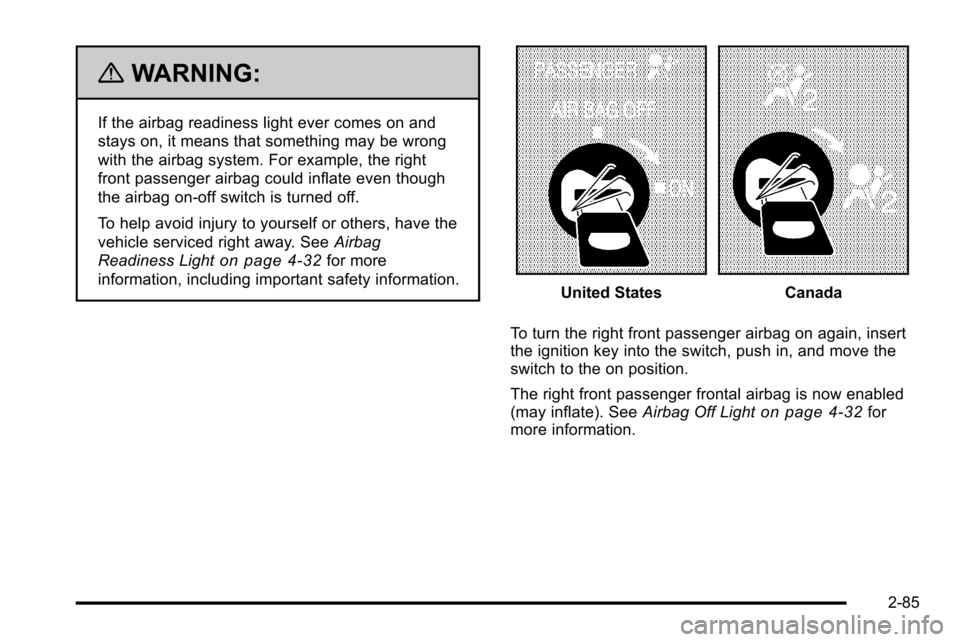
To turn the right front passenger airbag on again, insert
the ignition key into the switch, push in, and move the
switch to the on position.
The right front passenger frontal airbag is now enabled
(may inflate). See Airbag Off Light
on page 4‑32for
more information.
2-85
Page 130 of 626
The passenger sensing system is designed to turn off
the right front passenger frontal airbag if:
.The right front passenger seat is unoccupied.
.The system determines an infant is present in a
child restraint.
.A right front passenger takes his/her weight off of
the seat for a period of time.
.Or, if there is a critical problem with the airbag
system or the passenger sensing system.
When the passenger sensing system has turned off the
right front passenger frontal airbag, the off indicator will
light and stay lit to remind you that the airbag is off. See
Passenger Airbag Status Indicator on page 4‑34.
The passenger sensing system is designed to turn on
(may inflate) the right front passenger frontal airbag
anytime the system senses that a person of adult size is
sitting properly in the right front passenger seat.
When the passenger sensing system has allowed the
airbag to be enabled, the on indicator will light and stay
lit to remind you that the airbag is active. For some children, including children in child restraints,
and for very small adults, the passenger sensing
system may or may not turn off the right front passenger
frontal airbag, depending upon the person's seating
posture and body build. Everyone in your vehicle who
has outgrown child restraints should wear a safety belt
properly
—whether or not there is an airbag for that
person.
{WARNING:
If the airbag readiness light ever comes on and
stays on, it means that something may be wrong
with the airbag system. To help avoid injury to
yourself or others, have the vehicle serviced right
away. See Airbag Readiness Light
on page 4‑32
for more information, including important safety
information.
2-88
Page 131 of 626
If the On Indicator is Lit for a Child
Restraint
If a child restraint has been installed and the on
indicator is lit:1. Turn the vehicle off.
2. Remove the child restraint from the vehicle.
3. Remove any additional items from the seat such as blankets, cushions, seat covers, seat heaters,
or seat massagers.
4. Reinstall the child restraint following the directions provided by the child restraint manufacturer and
refer to Securing a Child Restraint in the Right
Front Seat Position With Passenger Sensing
System in the Index. 5. If, after reinstalling the child restraint and restarting
the vehicle, the on indicator is still lit, turn the
vehicle off. Then slightly recline the vehicle
seatback and adjust the seat cushion, if adjustable,
to make sure that the vehicle seatback is not
pushing the child restraint into the seat cushion.
Also make sure the child restraint is not trapped
under the vehicle head restraint. If this happens,
adjust the head restraint. See Head Restraints
on
page 2‑3.
6. Restart the vehicle. The passenger sensing system may or may not
turn off the airbag for a child in a child restraint
depending upon the child’s seating posture and
body build. It is better to secure the child restraint
in a rear seat.
2-89
Page 136 of 626
Restraint System Check
Checking the Restraint Systems
Safety Belts
Now and then, check that the safety belt reminder light,
safety belts, buckles, latch plates, retractors, and
anchorages are all working properly.
Look for any other loose or damaged safety belt system
parts that might keep a safety belt system from doing its
job. See your dealer to have it repaired. Torn or frayed
safety belts may not protect you in a crash. They can rip
apart under impact forces. If a belt is torn or frayed, get
a new one right away.
Make sure the safety belt reminder light is working. See
Safety Belt Reminders
on page 4‑31for more
information.
Keep safety belts clean and dry. See Care of Safety
Belts
on page 6‑112.
Airbags
The airbag system does not need regularly scheduled
maintenance or replacement. Make sure the airbag
readiness light is working. See Airbag Readiness Light
on page 4‑32for more information.
Notice: If an airbag covering is damaged, opened,
or broken, the airbag may not work properly. Do not
open or break the airbag coverings. If there are any
opened or broken airbag covers, have the airbag
covering and/or airbag module replaced. For the
location of the airbag modules, see What Makes an
Airbag Inflate?
on page 2‑79. See your dealer for
service.
2-94
Page 137 of 626
Replacing Restraint System Parts
After a Crash
{WARNING:
A crash can damage the restraint systems in your
vehicle. A damaged restraint system may not
properly protect the person using it, resulting in
serious injury or even death in a crash. To help
make sure your restraint systems are working
properly after a crash, have them inspected and
any necessary replacements made as soon as
possible.
If the vehicle has been in a crash, do you need new
safety belts or LATCH system (if equipped) parts?
After a very minor crash, nothing may be necessary. But
the safety belt assemblies that were used during any
crash may have been stressed or damaged. See your
dealer to have the safety belt assemblies inspected or
replaced. If the vehicle has the LATCH system and it was being
used during a crash, you may need new LATCH system
parts.
New parts and repairs may be necessary even if the
safety belt or LATCH system (if equipped), was not
being used at the time of the crash.
If an airbag inflates, you will need to replace airbag
system parts. See the part on the airbag system earlier
in this section.
Have the safety belt pretensioners checked if the
vehicle has been in a crash, if the airbag readiness light
stays on after the vehicle is started, or while you are
driving. See
Airbag Readiness Light
on page 4‑32.
2-95
Page 143 of 626
/(Remote Vehicle Start):For vehicles with this
feature, press /to start the engine from outside the
vehicle using the RKE transmitter. See Remote Vehicle
Start
on page 3‑7for additional information.
Q(Lock): Press to lock all the doors.
If enabled through the Driver Information Center (DIC),
the turn signal lamps flash once to indicate locking has
occurred. If enabled through the DIC, the horn chirps
when
Qis pressed again within three seconds. See DIC
Vehicle Customization (With DIC Buttons)
on
page 4‑73for additional information.
Pressing
Qarms the content theft‐deterrent system.
See Content Theft-Deterrent on page 3‑17.
K(Unlock): Press once to unlock only the driver door.
If
Kis pressed again within three seconds, all
remaining doors unlock. The interior lamps may come
on and stay on for 20 seconds or until the ignition is
turned on.
If enabled through the DIC, the turn signal lamps flash
twice to indicate unlocking has occurred. See DIC
Vehicle Customization (With DIC Buttons)
on
page 4‑73. If enabled through the DIC, the exterior
lights may turn on. See “APPROACH LIGHTING” under
DIC Vehicle Customization (With DIC Buttons)
on
page 4‑73. Pressing
Kon the RKE transmitter disarms the content
theft‐deterrent system. See Content Theft-Deterrent
on
page 3‑17.
L(Vehicle Locator/Panic Alarm): Press and release
to locate the vehicle. The turn signal lamps flash and
the horn sounds three times.
Press and hold
Lfor more than two seconds to
activate the panic alarm. The turn signal lamps flash
and the horn sounds repeatedly for 30 seconds. The
alarm turns off when the ignition is moved to ON/RUN
or
Lis pressed again. The ignition must be in LOCK/
OFF for the panic alarm to work.
The vehicle comes with two transmitters. Each
transmitter will have a number on it, “1”or“2”. These
numbers correspond to the driver of the vehicle. For
example, the memory seat position for driver 1 will be
recalled when using the transmitter labeled “1”,
if enabled through the DIC. See Memory Seat, Mirrors,
and Pedals
on page 2‑8and DIC Vehicle
Customization (With DIC Buttons)on page 4‑73for
more information.
3-5
Page 145 of 626
Remote Vehicle Start
Your vehicle may have a remote starting feature. This
feature allows you to start the engine from outside of
the vehicle. It may also start up the vehicle's heating or
air conditioning systems and rear window defogger.
Normal operation of the system will return after the key
is turned to the ON/RUN position.
If your vehicle has an automatic climate control system,
the climate control system will default to a heating or
cooling mode depending on the outside temperatures.
If your vehicle does not have an automatic climate
control system, the system will turn on at the setting the
vehicle was set to when the vehicle was last turned off.
During a remote start, if your vehicle has an automatic
climate control system and heated seats, the heated
seats will turn on during colder outside temperatures
and will shut off when the key is turned to ON/RUN.
If your vehicle does not have an automatic climate
control system, during remote start, you will need to
manually turn the heated seats on and off. SeeHeated
Seats
on page 2‑8for additional information.
Laws in some communities may restrict the use of
remote starters. For example, some laws may require a
person using the remote start to have the vehicle in
view when doing so. Check local regulations for any
requirements on remote starting of vehicles. Do not use the remote start feature if your vehicle is low
on fuel. Your vehicle may run out of fuel.
If your vehicle has the remote start feature, the RKE
transmitter functions will have an increased range of
operation. However, the range may be less while the
vehicle is running.
There are other conditions which can affect the
performance of the transmitter, see
Remote Keyless
Entry (RKE) System
on page 3‑4for additional
information.
/ (Remote Start): This button will be on the RKE
transmitter if you have remote start.
To start the vehicle using the remote start feature:
1. Aim the transmitter at the vehicle.
2. Press and release the transmitter's lock button. The vehicle's doors will lock. Immediately press
and hold the transmitter's remote start button until
the turn signal lights flash. If you cannot see the
vehicle's lights, press and hold the remote start
button for two to four seconds. Pressing the remote
start button again after the vehicle has started will
turn the engine off.
When the vehicle starts, the parking lamps will turn
on and remain on while the vehicle is running.
If the vehicle is left running it will automatically shut
off after 10 minutes unless a time extension has
been done.
3-7
Page 146 of 626
3. If it is the first remote start since the vehicle hasbeen driven, repeat these steps, while the engine
is still running, to extend the engine running time
by 10 minutes. Remote start can be extended
one time.
After entering the vehicle during a remote start, insert
and turn the key to RUN to drive the vehicle.
To manually shut off a remote start, do any of the
following:
.Aim the RKE transmitter at the vehicle and press
the remote start button until the parking lamps
turn off.
.Turn on the hazard warning flashers.
.Turn the ignition switch on and then off.
The vehicle can be remote started two separate times
between driving sequences. The engine will run for
10 minutes after each remote start.
Or, you can extend the engine run time by another
10 minutes within the first 10 minute remote start time
frame, and before the engine stops.
For example, if the lock button and then the remote start
buttons are pressed again after the vehicle has been
running for five minutes, 10 minutes are added, allowing
the engine to run for 15 minutes.
The additional ten minutes are considered a second
remote vehicle start. Once two remote starts, or a single remote start with
one time extension has been done, the vehicle must be
started with the key. After the key is removed from the
ignition, the vehicle can be remote started again.
The vehicle cannot be remote started if the key is in the
ignition, the hood is not closed, or if there is an
emission control system malfunction and the check
engine light comes on.
Also, the engine will turn off during a remote vehicle
start if the coolant temperature gets too high or if the oil
pressure gets low.
Vehicles that have the remote vehicle start feature are
shipped from the factory with the remote vehicle start
system enabled. The system may be enabled or
disabled through the DIC. See
“REMOTE START”
under DIC Vehicle Customization (With DIC Buttons)
on
page 4‑73for additional information. If your vehicle
does not have DIC buttons, see your dealer to enable
or disable the remote vehicle start system.
Remote Start Ready
If your vehicle does not have the remote vehicle start
feature, it may have the remote start ready feature. This
feature allows your dealer to add the manufacturer's
remote vehicle start feature.
See your dealer if you would like to add the
manufacturer's remote vehicle start feature to your
vehicle.
3-8