park assist CHEVROLET SILVERADO 2011 2.G User Guide
[x] Cancel search | Manufacturer: CHEVROLET, Model Year: 2011, Model line: SILVERADO, Model: CHEVROLET SILVERADO 2011 2.GPages: 588, PDF Size: 7.99 MB
Page 328 of 588
Black plate (34,1)Chevrolet Silverado Owner Manual - 2011
9-34 Driving and Operating
In an emergency:
1. Brake using a firm and steadypressure. Do not pump the
brakes repeatedly. This may
deplete power assist, requiring
increased brake pedal force.
2. Shift the vehicle to neutral. This can be done while the
vehicle is moving. After shifting
to neutral, firmly apply the
brakes and steer the vehicle
to a safe location.
3. Come to a complete stop. Shift to P (Park) with an
automatic transmission,
or neutral with a manual
transmission. Turn the ignition
to LOCK/OFF.
4. Set the parking brake. See Parking Brake on page 9‑68
On vehicles with an automatic
transmission, the shift lever must be
in P (Park) to turn the ignition switch
to LOCK/OFF. The steering can bind with the
wheels turned off center. If this
happens, move the steering wheel
from right to left while turning the
key to ACC/ACCESSORY. If this
doesn't work, then the vehicle needs
service.
Notice:
Using a tool to force the
key to turn in the ignition could
cause damage to the switch or
break the key. Use the correct
key, make sure it is all the way in,
and turn it only with your hand.
If the key cannot be turned by
hand, see your dealer.
B (ACC/ACCESSORY): This
position lets things like the radio
and the windshield wipers operate
while the engine is off. Use this
position if the vehicle must be
pushed or towed.
C (ON/RUN): This position can
be used to operate the electrical
accessories and to display some instrument panel cluster warning
and indicator lights. The switch
stays in this position when the
engine is running. The transmission
is also unlocked in this position on
automatic transmission vehicles.
If you leave the key in the ACC/
ACCESSORY or ON/RUN position
with the engine off, the battery could
be drained. You may not be able to
start the vehicle if the battery is
allowed to drain for an extended
period of time.
D (START):
This is the position that
starts the engine. When the engine
starts, release the key. The ignition
switch returns to ON/RUN for
driving.
If the vehicle is equipped with a
radio, a warning tone will sound
when the driver door is opened,
the ignition is in ACC/ACCESSORY
or LOCK/OFF and the key is in the
ignition.
Page 363 of 588
Black plate (69,1)Chevrolet Silverado Owner Manual - 2011
Driving and Operating 9-69
If you are towing a trailer and are
parking on any hill, seeDriving
Characteristics and Towing Tips
on
page 9‑90.
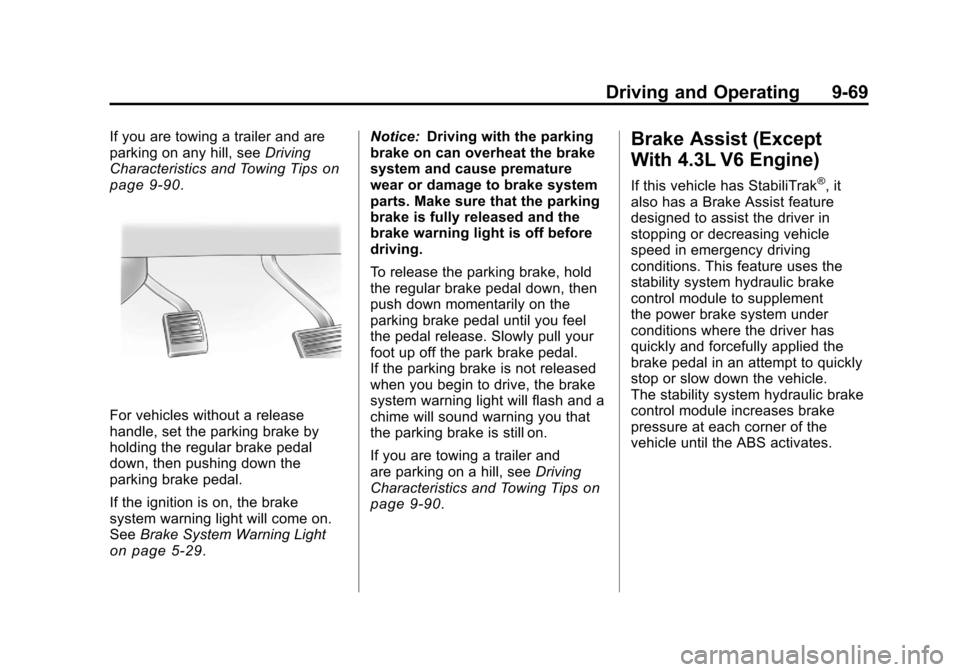
For vehicles without a release
handle, set the parking brake by
holding the regular brake pedal
down, then pushing down the
parking brake pedal.
If the ignition is on, the brake
system warning light will come on.
See Brake System Warning Light
on page 5‑29. Notice:
Driving with the parking
brake on can overheat the brake
system and cause premature
wear or damage to brake system
parts. Make sure that the parking
brake is fully released and the
brake warning light is off before
driving.
To release the parking brake, hold
the regular brake pedal down, then
push down momentarily on the
parking brake pedal until you feel
the pedal release. Slowly pull your
foot up off the park brake pedal.
If the parking brake is not released
when you begin to drive, the brake
system warning light will flash and a
chime will sound warning you that
the parking brake is still on.
If you are towing a trailer and
are parking on a hill, see Driving
Characteristics and Towing Tips
on
page 9‑90.
Brake Assist (Except
With 4.3L V6 Engine)
If this vehicle has StabiliTrak®, it
also has a Brake Assist feature
designed to assist the driver in
stopping or decreasing vehicle
speed in emergency driving
conditions. This feature uses the
stability system hydraulic brake
control module to supplement
the power brake system under
conditions where the driver has
quickly and forcefully applied the
brake pedal in an attempt to quickly
stop or slow down the vehicle.
The stability system hydraulic brake
control module increases brake
pressure at each corner of the
vehicle until the ABS activates.
Page 370 of 588
Black plate (76,1)Chevrolet Silverado Owner Manual - 2011
9-76 Driving and Operating
Object Detection
Systems
Ultrasonic Parking Assist
For vehicles with the Ultrasonic
Rear Parking Assist (URPA) system,
it operates at speeds less than
8 km/h (5 mph), and assists the
driver with parking and avoiding
objects while in R (Reverse).
The sensors on the rear bumper
are used to detect the distance to
an object up to 2.5 m (8 ft) behind
the vehicle, and at least 25.4 cm
(10 in) off the ground.
{WARNING
The Ultrasonic Rear Parking
Assist (URPA) system does not
replace driver vision. It cannot
detect:
.Objects that are below the
bumper, underneath the
vehicle, or too close or far
from the vehicle
.Children, pedestrians,
bicyclists, or pets.
If you do not use proper care
before and while backing, vehicle
damage, injury, or death could
occur. Even with URPA, always
check behind the vehicle before
backing up. While backing, be
sure to look for objects and check
the vehicle's mirrors.
How the System Works
URPA comes on automatically
when the shift lever is moved into
R (Reverse). A single tone sounds
to indicate the system is working.
URPA operates only at speeds less
than 8 km/h (5 mph).
An obstacle is indicated by audible
beeps. The interval between the
beeps becomes shorter as the
vehicle gets closer to the obstacle.
When the distance is less than
30 cm (12 in) the beeps are
continuous.
To be detected, objects must be at
least 25.4 cm (10 in) off the ground
and below tailgate level. Objects
must also be within 2.5 m (8 ft) from
the rear bumper. This distance may
be less during warmer or humid
weather.
Page 371 of 588
Black plate (77,1)Chevrolet Silverado Owner Manual - 2011
Driving and Operating 9-77
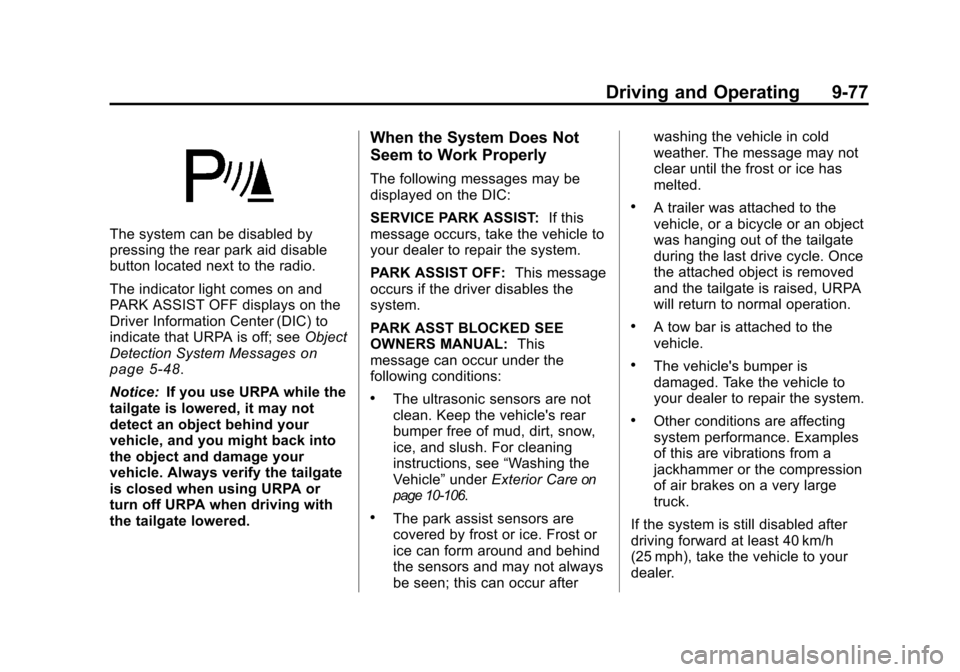
The system can be disabled by
pressing the rear park aid disable
button located next to the radio.
The indicator light comes on and
PARK ASSIST OFF displays on the
Driver Information Center (DIC) to
indicate that URPA is off; seeObject
Detection System Messages
on
page 5‑48.
Notice: If you use URPA while the
tailgate is lowered, it may not
detect an object behind your
vehicle, and you might back into
the object and damage your
vehicle. Always verify the tailgate
is closed when using URPA or
turn off URPA when driving with
the tailgate lowered.
When the System Does Not
Seem to Work Properly
The following messages may be
displayed on the DIC:
SERVICE PARK ASSIST: If this
message occurs, take the vehicle to
your dealer to repair the system.
PARK ASSIST OFF: This message
occurs if the driver disables the
system.
PARK ASST BLOCKED SEE
OWNERS MANUAL: This
message can occur under the
following conditions:
.The ultrasonic sensors are not
clean. Keep the vehicle's rear
bumper free of mud, dirt, snow,
ice, and slush. For cleaning
instructions, see “Washing the
Vehicle” underExterior Care
on
page 10‑106.
.The park assist sensors are
covered by frost or ice. Frost or
ice can form around and behind
the sensors and may not always
be seen; this can occur after washing the vehicle in cold
weather. The message may not
clear until the frost or ice has
melted.
.A trailer was attached to the
vehicle, or a bicycle or an object
was hanging out of the tailgate
during the last drive cycle. Once
the attached object is removed
and the tailgate is raised, URPA
will return to normal operation.
.A tow bar is attached to the
vehicle.
.The vehicle's bumper is
damaged. Take the vehicle to
your dealer to repair the system.
.Other conditions are affecting
system performance. Examples
of this are vibrations from a
jackhammer or the compression
of air brakes on a very large
truck.
If the system is still disabled after
driving forward at least 40 km/h
(25 mph), take the vehicle to your
dealer.
Page 374 of 588
Black plate (80,1)Chevrolet Silverado Owner Manual - 2011
9-80 Driving and Operating
Symbols
The navigation system may have
a feature that lets the driver view
symbols on the navigation screen
while using the RVC. The Ultrasonic
Rear Park Assist (URPA) system
must not be disabled to use the
caution symbols. If URPA has
been disabled and the symbols
have been turned on, the Rear
Parking Assist Symbols Unavailable
error message may display.
SeeUltrasonic Parking Assist
on
page 9‑76.
The symbols appear when an object
has been detected by the URPA
system. The symbol may cover the
object when viewing the navigation
screen.
To turn the symbols on or off:
1. Make sure that URPA has not been disabled.
2. Shift into P (Park). 3. Press the MENU hard key
to enter the configure menu
options, then press the MENU
hard key repeatedly until Display
is selected or touch the Display
screen button.
4. Select the Rear Camera Options screen button. The Rear Camera
Options screen will display.
5. Touch the Symbols screen button. The screen button will
be highlighted when on.Rear Vision Camera Error
Messages
Service Rear Vision Camera
System: This message can display
when the system is not receiving
information it requires from other
vehicle systems.
If any other problem occurs or if a
problem persists, see your dealer.
Rear Vision Camera Location
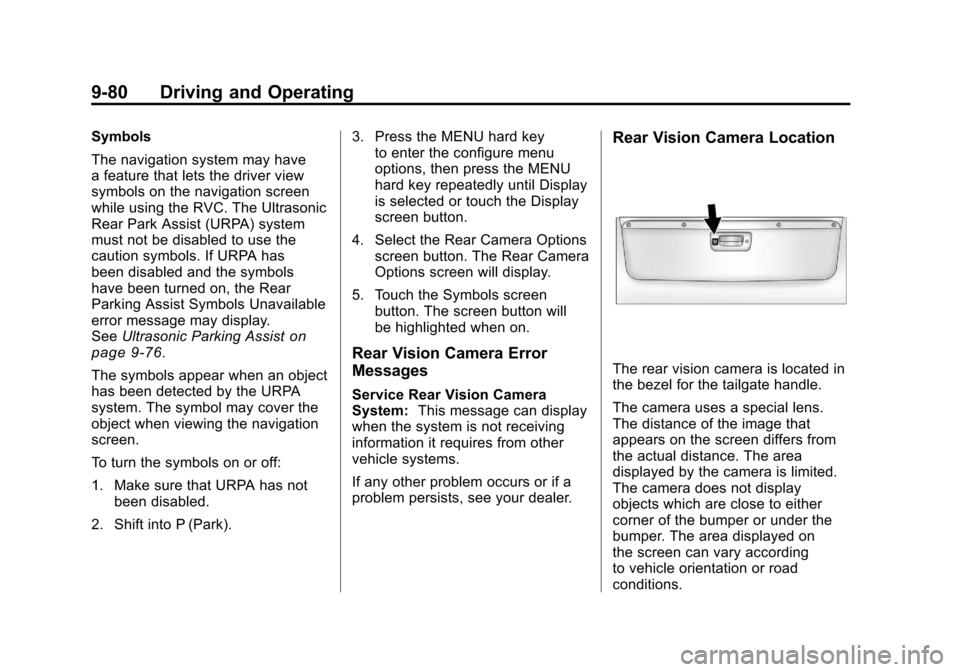
The rear vision camera is located in
the bezel for the tailgate handle.
The camera uses a special lens.
The distance of the image that
appears on the screen differs from
the actual distance. The area
displayed by the camera is limited.
The camera does not display
objects which are close to either
corner of the bumper or under the
bumper. The area displayed on
the screen can vary according
to vehicle orientation or road
conditions.
Page 410 of 588
Black plate (116,1)Chevrolet Silverado Owner Manual - 2011
9-116 Driving and Operating
This indicator light on the instrument
panel cluster comes on when the
Tow/Haul Mode is on.
Tow/Haul is a feature that assists
when pulling a heavy trailer or a
large or heavy load. SeeTow/Haul
Mode
on page 9‑49for more
information.
Tow/Haul is designed to be most
effective when the vehicle and
trailer combined weight is at least
75 percent of the vehicle's Gross
Combined Weight Rating (GCWR).
See “Weight of the Trailer” under
Trailer Towing
on page 9‑94.
Tow/Haul is most useful under
the following driving conditions:
.When pulling a heavy trailer or
a large or heavy load through
rolling terrain.
.When pulling a heavy trailer
or a large or heavy load in
stop-and-go traffic.
.When pulling a heavy trailer or
a large or heavy load in busy
parking lots where improved low
speed control of the vehicle is
desired.
Operating the vehicle in Tow/Haul
when lightly loaded or with no
trailer at all will not cause damage.
However, there is no benefit to the
selection of Tow/Haul when the
vehicle is unloaded. Such a
selection when unloaded may
result in unpleasant engine and
transmission driving characteristics
and reduced fuel economy. Tow/
Haul is recommended only when
pulling a heavy trailer or a large
or heavy load.
Integrated Trailer Brake
Control System
The vehicle may have an Integrated
Trailer Brake Control (ITBC) system
for electric trailer brakes.
This symbol is located on the
Trailer Brake Control Panel on
vehicles with an Integrated Trailer
Brake Control system. The power
output to the trailer brakes is based
on the amount of brake pressure
being applied by the vehicle’s brake
system. This available power output
to the trailer brakes can be adjusted
to a wide range of trailering
situations.
The ITBC system is integrated
with the vehicle’s brake, antilock
brake, and StabiliTrak (if equipped)
systems. In trailering conditions that
cause the vehicle’s antilock brake or
Page 446 of 588
Black plate (24,1)Chevrolet Silverado Owner Manual - 2011
10-24 Vehicle Care
4. With the coolant surge tankpressure cap off, start the
engine and let it run until the
engine coolant temperature
gauge indicates approximately
90°C (195°F).
By this time, the coolant level
inside the coolant surge tank
may be lower. If the level is
lower, add more of the proper
mixture to the coolant surge
tank until the level reaches
the FULL COLD mark.
5. Replace the pressure cap. Be sure the pressure cap is
hand-tight and fully seated.
6. Verify coolant level after the engine is shut off and the
coolant is cold. If necessary,
repeat coolant fill procedure
Steps 1 through 6.
Notice: If the pressure cap is not
tightly installed, coolant loss and
possible engine damage may
occur. Be sure the cap is properly
and tightly secured.Engine Overheating
If the vehicle has the Duramax®
Diesel engine, see the Duramax
Diesel Supplement for more
information.
The vehicle has several indicators
to warn of engine overheating.
There is a coolant temperature
gauge on the vehicle's instrument
panel. See Engine Coolant
Temperature Gauge on page 5‑19.
In addition, there are ENGINE
OVERHEATED STOP ENGINE,
ENGINE OVERHEATED IDLE
ENGINE, and ENGINE POWER IS
REDUCED messages in the Driver
Information Center (DIC) on the
instrument panel. See Engine
Cooling System Messages
on
page 5‑46and Engine Power
Messages on page 5‑47.
If the decision is made not to
lift the hood when this warning
appears, get service help right
away. See Roadside Assistance
Program on page 13‑7. If the decision is made to lift the
hood, make sure the vehicle is
parked on a level surface.
Then check to see if the engine
cooling fans are running. If the
engine is overheating, both fans
should be running. If they are not,
do not continue to run the engine
and have the vehicle serviced.
Notice:
Engine damage from
running your engine without
coolant is not covered by the
vehicle warranty. See Overheated
Engine Protection Operating
Mode for information on driving
to a safe place in an emergency.
Notice: If the engine catches fire
while driving with no coolant, the
vehicle can be badly damaged.
The costly repairs would not be
covered by the vehicle warranty.
See Overheated Engine
Protection Operating Mode
on
page 10‑26for information on
driving to a safe place in an
emergency.
Page 475 of 588
Black plate (53,1)Chevrolet Silverado Owner Manual - 2011
Vehicle Care 10-53
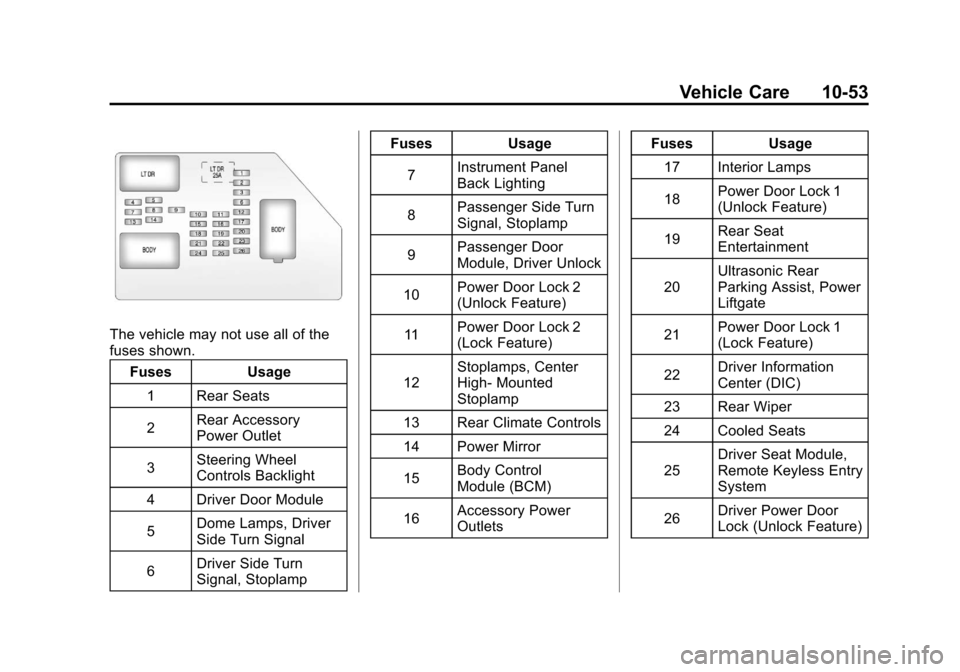
The vehicle may not use all of the
fuses shown.Fuses Usage
1 Rear Seats
2 Rear Accessory
Power Outlet
3 Steering Wheel
Controls Backlight
4 Driver Door Module
5 Dome Lamps, Driver
Side Turn Signal
6 Driver Side Turn
Signal, Stoplamp Fuses Usage
7 Instrument Panel
Back Lighting
8 Passenger Side Turn
Signal, Stoplamp
9 Passenger Door
Module, Driver Unlock
10 Power Door Lock 2
(Unlock Feature)
11 Power Door Lock 2
(Lock Feature)
12 Stoplamps, Center
High‐
Mounted
Stoplamp
13 Rear Climate Controls
14 Power Mirror
15 Body Control
Module (BCM)
16 Accessory Power
Outlets Fuses Usage
17 Interior Lamps
18 Power Door Lock 1
(Unlock Feature)
19 Rear Seat
Entertainment
20 Ultrasonic Rear
Parking Assist, Power
Liftgate
21 Power Door Lock 1
(Lock Feature)
22 Driver Information
Center (DIC)
23 Rear Wiper
24 Cooled Seats
25 Driver Seat Module,
Remote Keyless Entry
System
26 Driver Power Door
Lock (Unlock Feature)
Page 576 of 588

Black plate (2,1)Chevrolet Silverado Owner Manual - 2011
i-2 INDEX
Audio SystemFixed Mast Antenna . . . . . . . . . . 7-14
Radio Reception . . . . . . . . . . . . . . 7-13
Rear Seat (RSA) . . . . . . . . . . . . . 7-47
Theft-Deterrent Feature . . . . . . . . 7-2
Automatic Door Locks . . . . . . . . . . . . . . . . . . . . 2-9
Headlamp System . . . . . . . . . . . . . 6-4
Automatic Transmission . . . . . . . 9-43 Fluid . . . . . . . . . . . . . . . . . 10-11, 10-14
Manual Mode . . . . . . . . . . . . . . . . . 9-47
Automatic Transmission Shift Lock Control
Function Check . . . . . . . . . . . . . 10-38
Auxiliary Roof Mounted Lamp . . . . . . . . . . . 6-7
Auxiliary Devices . . . . . . . . . . . . . . 7-33
Axle, Front . . . . . . . . . . . . . . . . . . . . 10-34
Axle, Rear . . . . . . . . . . . . . . . . . . . . 10-35B
Battery . . . . . . . . . . . . . . . . . . . . . . . 10-32 Jump Starting . . . . . . . . . . . . . . . 10-96
Load Management . . . . . . . . . . . . . 6-9
Power Protection . . . . . . . . . . . . . 6-10
Voltage and ChargingMessages . . . . . . . . . . . . . . . . . . . 5-43
Blade Replacement, Wiper . . . . . . . . . . . . . . . . . . . . . . . 10-39
Bluetooth . . . . . . . . . . . . . . . . . . . . . . 7-49
Brake Pedal and AdjustableThrottle . . . . . . . . . . . . . . . . . . . . . . 9-32
Brakes . . . . . . . . . . . . . . . . . . . . . . . . 10-29 Antilock . . . . . . . . . . . . . . . . . . . . . . . 9-67
Assist . . . . . . . . . . . . . . . . . . . . . . . . . 9-69
Fluid . . . . . . . . . . . . . . . . . . . . . . . . 10-30
Parking . . . . . . . . . . . . . . . . . . . . . . . 9-68
System Messages . . . . . . . . . . . . 5-44 Braking . . . . . . . . . . . . . . . . . . . . . . . . . 9-3
Break-In, New Vehicle . . . . . . . . . 9-32
Bulb Replacement . . . . . . . . . . . . 10-46
Center High-MountedStoplamp (CHMSL) and
Cargo Lamp . . . . . . . . . . . . . . . 10-45
Fog Lamps . . . . . . . . . . . . . . . . . . . . 6-6
Halogen Bulbs . . . . . . . . . . . . . . 10-43
Headlamp Aiming . . . . . . . . . . . 10-40
Headlamps . . . . . . . . . . . . . . . . . 10-43
License Plate Lamps . . . . . . . 10-46
Pickup-Box Identification
and Fender Marker
Lamps . . . . . . . . . . . . . . . . . . . . 10-44
Taillamps . . . . . . . . . . . . . . . . . . . 10-44
Taillamps, Turn Signal, Stoplamps, and
Back-Up Lamps . . . . . . . . . . . 10-45
Buying New Tires . . . . . . . . . . . . . 10-75
Page 583 of 588

Black plate (9,1)Chevrolet Silverado Owner Manual - 2011
INDEX i-9
MirrorsAutomatic Dimming
Rearview . . . . . . . . . . . . . . . . . . . . 2-19
Convex . . . . . . . . . . . . . . . . . . . . . . . 2-15
Folding . . . . . . . . . . . . . . . . . . . . . . . 2-17
Heated . . . . . . . . . . . . . . . . . . . . . . . 2-18
Manual . . . . . . . . . . . . . . . . . . . . . . . 2-16
Manual Rearview . . . . . . . . . . . . . 2-19
Park Tilt . . . . . . . . . . . . . . . . . . . . . . 2-19
Power . . . . . . . . . . . . . . . . . . . . . . . . 2-16
Trailer Tow . . . . . . . . . . . . . . . . . . . . 2-16
Monitor System, Tire Pressure . . . . . . . . . . . . . . . . . . . . 10-65
N
Navigation SystemVehicle Data Recordingand Privacy . . . . . . . . . . . . . . . 13-18
New Vehicle Break-In . . . . . . . . . . 9-32
Noise Control System . . . . . . . . 10-36
O
Object Detection System Messages . . . . . . . . . . . . . . . . . . . . 5-48
Odometer . . . . . . . . . . . . . . . . . . . . . . 5-16 Trip . . . . . . . . . . . . . . . . . . . . . . . . . . . 5-16
Off-Road . . . . . . . . . . . . . . . . . . . . . . . 9-7 Driving . . . . . . . . . . . . . . . . . . . . . . . . . 9-7
Recovery . . . . . . . . . . . . . . . . . . . . . . 9-5
Oil Engine . . . . . . . . . . . . . . . . . . . . . . . . 10-7
Engine Oil Life System . . . . . . . 10-9
Engine Oil PressureGauge . . . . . . . . . . . . . . . . . . . . . . 5-18
Messages . . . . . . . . . . . . . . . . . . . . 5-47
Pressure Light . . . . . . . . . . . . . . . . 5-32
Older Children, Restraints . . . . . 3-51
Online Owner Center . . . . . . . . . . 13-6
OnStar
®System . . . . . . . . . . . . . . . 1-35
Operation, Infotainment System . . . . . . . . . . . . . . . . . . . . . . . . 7-2
Outlets Power . . . . . . . . . . . . . . . . . . . . . . . . 5-10 Overheated Engine
Protection
Operating Mode . . . . . . . . . . . . . 10-26
Overheating, Engine . . . . . . . . . . 10-24
P
Park Shifting Into . . . . . . . . . . . . . . . . . . . 9-38
Shifting Out of . . . . . . . . . . . . . . . . 9-40
Park Tilt Mirrors . . . . . . . . . . . . . . . . 2-19
Parking . . . . . . . . . . . . . . . . . . . . . . . . 9-41 Assist, Ultrasonic . . . . . . . . . . . . . 9-76
Brake . . . . . . . . . . . . . . . . . . . . . . . . . 9-68
Brake and P (Park)Mechanism Check . . . . . . . . 10-39
Over Things That Burn . . . . . . . 9-41
Passenger Airbag Status Indicator . . . . . . . . . . . . . . . . . . . . . 5-25
Passenger Sensing System . . . . . . . . . . . . . . . . . . . . . . . 3-42
Perchlorate Materials Requirements, California . . . . . 10-3
Phone
Bluetooth . . . . . . . . . . . . . . . . . . . . . 7-49