power steering CHEVROLET SILVERADO 2011 2.G User Guide
[x] Cancel search | Manufacturer: CHEVROLET, Model Year: 2011, Model line: SILVERADO, Model: CHEVROLET SILVERADO 2011 2.GPages: 588, PDF Size: 7.99 MB
Page 306 of 588
Black plate (12,1)Chevrolet Silverado Owner Manual - 2011
9-12 Driving and Operating
Approaching a Hill
When you approach a hill, decide
if it is too steep to climb, descend,
or cross. Steepness can be hard
to judge. On a very small hill, for
example, there may be a smooth,
constant incline with only a small
change in elevation where you can
easily see all the way to the top.
On a large hill, the incline may get
steeper as you near the top, but
you might not see this because the
crest of the hill is hidden by bushes,
grass, or shrubs.
Consider this as you approach a hill:
.Is there a constant incline,
or does the hill get sharply
steeper in places?
.Is there good traction on the
hillside, or will the surface cause
tire slipping?
.Is there a straight path up
or down the hill so you will
not have to make turning
maneuvers?
.Are there obstructions on the hill
that can block your path, such
as boulders, trees, logs, or ruts?
.What is beyond the hill? Is
there a cliff, an embankment, a
drop-off, a fence? Get out and
walk the hill if you do not know.
It is the smart way to find out.
.Is the hill simply too rough?
Steep hills often have ruts,
gullies, troughs, and exposed
rocks because they are more
susceptible to the effects of
erosion.
Driving Uphill
Once you decide it is safe to drive
up the hill:
.Use a low gear and get a firm
grip on the steering wheel.
.Get a smooth start up the
hill and try to maintain speed.
Not using more power than
needed can avoid spinning
the wheels or sliding.
{WARNING
Turning or driving across steep
hills can be dangerous. You could
lose traction, slide sideways, and
possibly roll over. You could be
seriously injured or killed. When
driving up hills, always try to go
straight up.
.Try to drive straight up the hill if
at all possible. If the path twists
and turns, you might want to find
another route.
Page 327 of 588
Black plate (33,1)Chevrolet Silverado Owner Manual - 2011
Driving and Operating 9-33
Press the bottom of the control to
move the pedals closer. Press the
top of the control to move the
pedals away.
Before you start driving, fully
press the brake pedal to confirm
the adjustment is right for you.
While driving, make only small
adjustments.
The vehicle may have a memory
function which lets pedal settings
be saved and recalled. SeePower
Seat Adjustment
on page 3‑5for
more information.
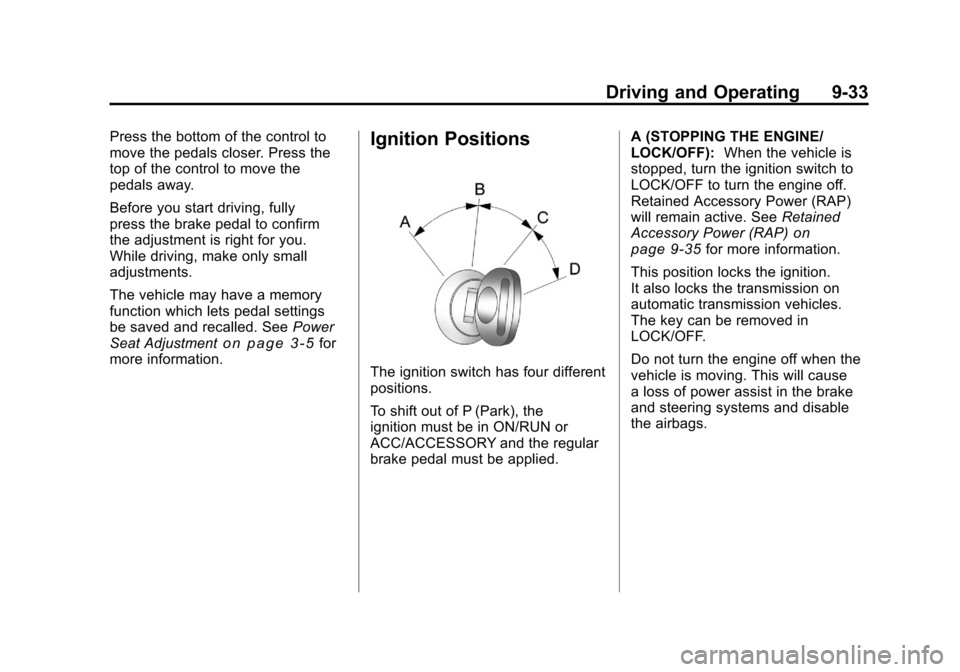
Ignition Positions
The ignition switch has four different
positions.
To shift out of P (Park), the
ignition must be in ON/RUN or
ACC/ACCESSORY and the regular
brake pedal must be applied. A (STOPPING THE ENGINE/
LOCK/OFF):
When the vehicle is
stopped, turn the ignition switch to
LOCK/OFF to turn the engine off.
Retained Accessory Power (RAP)
will remain active. See Retained
Accessory Power (RAP)
on
page 9‑35for more information.
This position locks the ignition.
It also locks the transmission on
automatic transmission vehicles.
The key can be removed in
LOCK/OFF.
Do not turn the engine off when the
vehicle is moving. This will cause
a loss of power assist in the brake
and steering systems and disable
the airbags.
Page 328 of 588
Black plate (34,1)Chevrolet Silverado Owner Manual - 2011
9-34 Driving and Operating
In an emergency:
1. Brake using a firm and steadypressure. Do not pump the
brakes repeatedly. This may
deplete power assist, requiring
increased brake pedal force.
2. Shift the vehicle to neutral. This can be done while the
vehicle is moving. After shifting
to neutral, firmly apply the
brakes and steer the vehicle
to a safe location.
3. Come to a complete stop. Shift to P (Park) with an
automatic transmission,
or neutral with a manual
transmission. Turn the ignition
to LOCK/OFF.
4. Set the parking brake. See Parking Brake on page 9‑68
On vehicles with an automatic
transmission, the shift lever must be
in P (Park) to turn the ignition switch
to LOCK/OFF. The steering can bind with the
wheels turned off center. If this
happens, move the steering wheel
from right to left while turning the
key to ACC/ACCESSORY. If this
doesn't work, then the vehicle needs
service.
Notice:
Using a tool to force the
key to turn in the ignition could
cause damage to the switch or
break the key. Use the correct
key, make sure it is all the way in,
and turn it only with your hand.
If the key cannot be turned by
hand, see your dealer.
B (ACC/ACCESSORY): This
position lets things like the radio
and the windshield wipers operate
while the engine is off. Use this
position if the vehicle must be
pushed or towed.
C (ON/RUN): This position can
be used to operate the electrical
accessories and to display some instrument panel cluster warning
and indicator lights. The switch
stays in this position when the
engine is running. The transmission
is also unlocked in this position on
automatic transmission vehicles.
If you leave the key in the ACC/
ACCESSORY or ON/RUN position
with the engine off, the battery could
be drained. You may not be able to
start the vehicle if the battery is
allowed to drain for an extended
period of time.
D (START):
This is the position that
starts the engine. When the engine
starts, release the key. The ignition
switch returns to ON/RUN for
driving.
If the vehicle is equipped with a
radio, a warning tone will sound
when the driver door is opened,
the ignition is in ACC/ACCESSORY
or LOCK/OFF and the key is in the
ignition.
Page 347 of 588
Black plate (53,1)Chevrolet Silverado Owner Manual - 2011
Driving and Operating 9-53
Drive Systems
Four-Wheel Drive
If the vehicle has Four-Wheel
Drive, you can send the engine's
driving power to all four wheels
for extra traction. To get the most
satisfaction out of Four-Wheel
Drive, you must be familiar with
its operation. Read the following
before using Four-Wheel Drive.
See the appropriate text for the
transfer case in the vehicle.
Notice:Driving on clean, dry
pavement in Four-Wheel Drive
High or Four-Wheel Drive Low for
an extended period of time may
cause premature wear on the
vehicle's powertrain. Do not
drive on clean, dry pavement
in Four-Wheel Drive High or
Four-Wheel Drive Low for
extended periods of time. While driving on clean dry pavement
and during tight turns, you may
experience vibration in the steering
system.
If the vehicle has StabiliTrak®,
shifting into Four-Wheel Drive
Low will turn Traction Control and
StabiliTrak
®off. See StabiliTrak®
System on page 9‑70.
Front Axle
The front axle engages and
disengages automatically when you
shift the transfer case. Some delay
for the axle to engage or disengage
is normal.
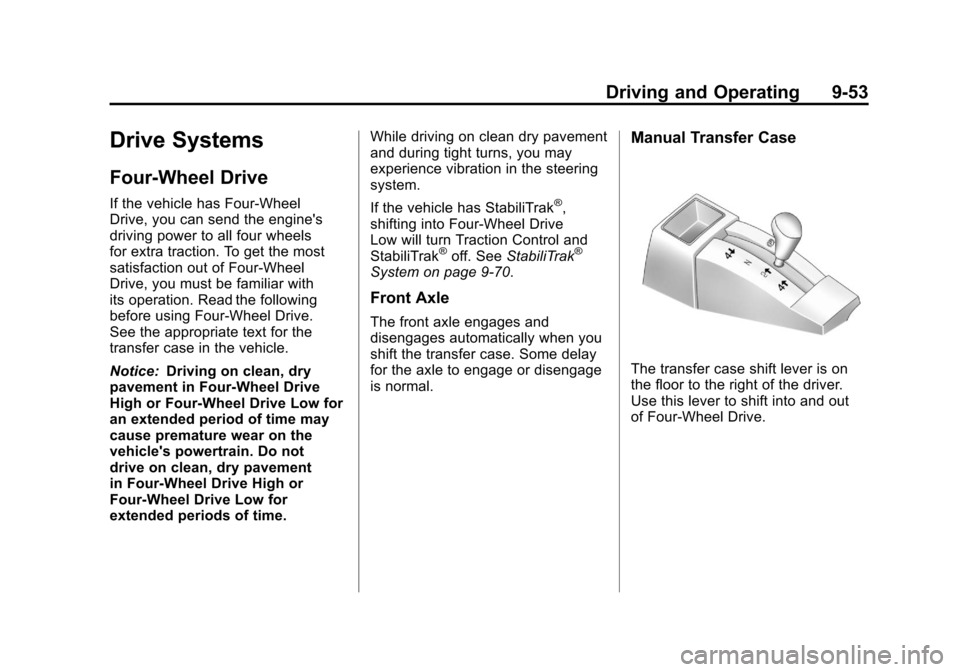
Manual Transfer Case
The transfer case shift lever is on
the floor to the right of the driver.
Use this lever to shift into and out
of Four-Wheel Drive.
Page 409 of 588
Black plate (115,1)Chevrolet Silverado Owner Manual - 2011
Driving and Operating 9-115
.Red: Battery Feed
.Dark Blue: Trailer Brake
If the vehicle is equipped with the
“Heavy-Duty Trailering”option,
please refer to “Heavy-Duty Trailer
Wiring Package” earlier in this
section.
When the camper-wiring harness
is ordered without the heavy-duty
trailering package, an eight-wire
harness with a seven-pin connector
is located at the rear of the vehicle
and is tied to the vehicle's frame.
Electric Brake Control Wiring
Provisions
These wiring provisions are
included with the vehicle as part of
the trailer wiring package. These
provisions are for an electric brake
controller. The instrument panel
contains blunt cut wires behind the
steering column for the trailer brake
controller. The harness contains the
following wires:
.Dark Blue: Brake Signal to
Trailer Connector
.Red/Black: Battery
.Light Blue/White: Brake Switch
.White: Ground
The harness should be installed by
your dealer or a qualified service
center. If the vehicle is equipped with an
Integrated Trailer Brake Control
(ITBC) System, the blunt cuts exist,
but are not connected further in the
harness. If an aftermarket trailer
brake controller is installed, the
ITBC must be disconnected. Do not
power both ITBC and aftermarket
controllers to control the trailer
brakes at the same time.
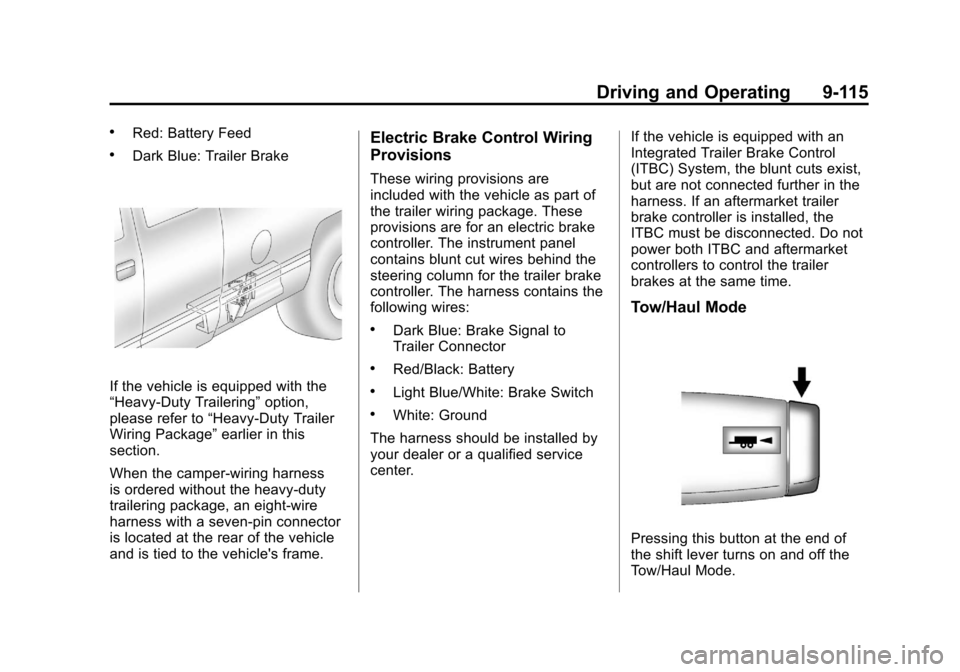
Tow/Haul Mode
Pressing this button at the end of
the shift lever turns on and off the
Tow/Haul Mode.
Page 412 of 588
Black plate (118,1)Chevrolet Silverado Owner Manual - 2011
9-118 Driving and Operating
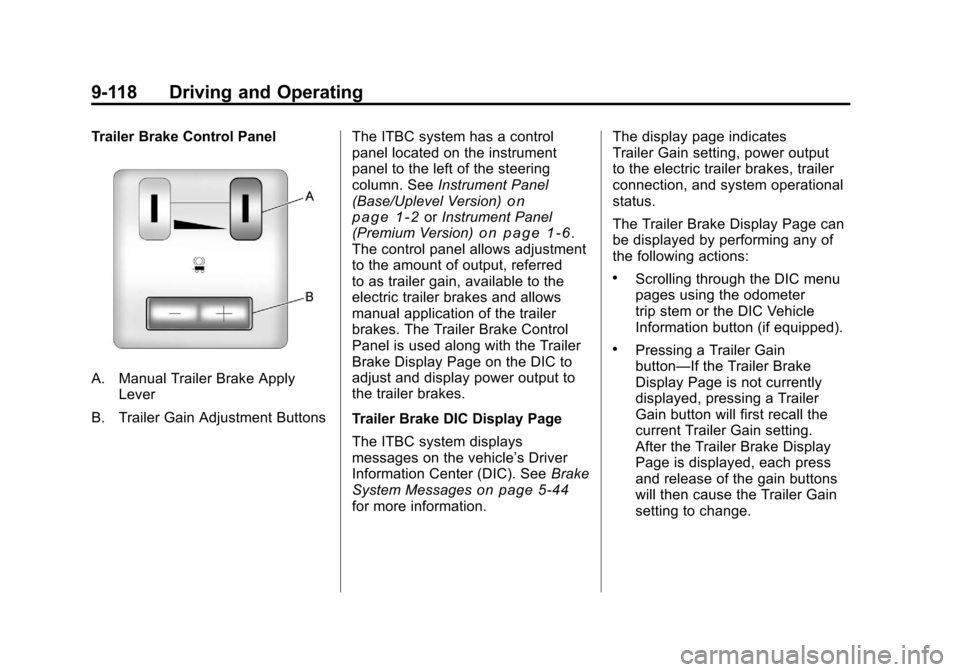
Trailer Brake Control Panel
A. Manual Trailer Brake ApplyLever
B. Trailer Gain Adjustment Buttons The ITBC system has a control
panel located on the instrument
panel to the left of the steering
column. See
Instrument Panel
(Base/Uplevel Version)
on
page 1‑2or Instrument Panel
(Premium Version)on page 1‑6.
The control panel allows adjustment
to the amount of output, referred
to as trailer gain, available to the
electric trailer brakes and allows
manual application of the trailer
brakes. The Trailer Brake Control
Panel is used along with the Trailer
Brake Display Page on the DIC to
adjust and display power output to
the trailer brakes.
Trailer Brake DIC Display Page
The ITBC system displays
messages on the vehicle’s Driver
Information Center (DIC). See Brake
System Messages
on page 5‑44for more information. The display page indicates
Trailer Gain setting, power output
to the electric trailer brakes, trailer
connection, and system operational
status.
The Trailer Brake Display Page can
be displayed by performing any of
the following actions:
.Scrolling through the DIC menu
pages using the odometer
trip stem or the DIC Vehicle
Information button (if equipped).
.Pressing a Trailer Gain
button—If the Trailer Brake
Display Page is not currently
displayed, pressing a Trailer
Gain button will first recall the
current Trailer Gain setting.
After the Trailer Brake Display
Page is displayed, each press
and release of the gain buttons
will then cause the Trailer Gain
setting to change.
Page 423 of 588
Black plate (1,1)Chevrolet Silverado Owner Manual - 2011
Vehicle Care 10-1
Vehicle Care
General Information
General Information . . . . . . . . . . 10-3
California Proposition65 Warning . . . . . . . . . . . . . . . . . 10-3
California Perchlorate Materials Requirements . . . . 10-3
Accessories and Modifications . . . . . . . . . . . . . . . 10-3
Vehicle Checks
Doing Your OwnService Work . . . . . . . . . . . . . . . 10-4
Hood . . . . . . . . . . . . . . . . . . . . . . . . 10-5
Engine Compartment Overview . . . . . . . . . . . . . . . . . . . 10-6
Engine Oil . . . . . . . . . . . . . . . . . . . 10-7
Engine Oil Life System . . . . . . 10-9
Automatic Transmission Fluid (4-Speed Transmission) . . . 10-11
Automatic Transmission Fluid (6-Speed
Transmission) . . . . . . . . . . . . . 10-14 Manual Transmission
Fluid . . . . . . . . . . . . . . . . . . . . . . 10-17
Hydraulic Clutch . . . . . . . . . . . . 10-17
Engine Air Cleaner/Filter . . . . 10-18
Cooling System . . . . . . . . . . . . 10-19
Engine Coolant . . . . . . . . . . . . . 10-20
Engine Overheating . . . . . . . . 10-24
Overheated Engine Protection
Operating Mode . . . . . . . . . . . 10-26
Engine Fan . . . . . . . . . . . . . . . . . 10-26
Power Steering Fluid . . . . . . . 10-27
Washer Fluid . . . . . . . . . . . . . . . 10-28
Brakes . . . . . . . . . . . . . . . . . . . . . 10-29
Brake Fluid . . . . . . . . . . . . . . . . . 10-30
Battery . . . . . . . . . . . . . . . . . . . . . 10-32
Four-Wheel Drive . . . . . . . . . . . 10-32
Front Axle . . . . . . . . . . . . . . . . . . 10-34
Rear Axle . . . . . . . . . . . . . . . . . . 10-35
Noise Control System . . . . . . 10-36
Starter Switch Check . . . . . . . 10-37
Automatic Transmission Shift Lock Control Function
Check . . . . . . . . . . . . . . . . . . . . . 10-38
Ignition Transmission Lock Check . . . . . . . . . . . . . . . . . . . . . 10-38 Park Brake and P (Park)
Mechanism Check . . . . . . . . 10-39
Wiper Blade Replacement . . . . . . . . . . . . . . 10-39
Glass Replacement . . . . . . . . 10-40
Headlamp Aiming
Headlamp Aiming . . . . . . . . . . 10-40
Bulb Replacement
Bulb Replacement . . . . . . . . . . 10-43
Halogen Bulbs . . . . . . . . . . . . . . 10-43
Headlamps (Silverado) . . . . . 10-43
Pick-Up Box Identification
and Fender Marker
Lamps . . . . . . . . . . . . . . . . . . . . 10-44
Taillamps (Chassis Cab Models) . . . . . . . . . . . . . . . . . . . 10-44
Taillamps, Turn Signal, Stoplamps, and Back-Up
Lamps . . . . . . . . . . . . . . . . . . . . 10-45
Center High-Mounted Stoplamp (CHMSL) and
Cargo Lamp . . . . . . . . . . . . . . 10-45
License Plate Lamp . . . . . . . . 10-46
Replacement Bulbs . . . . . . . . . 10-46
Page 429 of 588
Black plate (7,1)Chevrolet Silverado Owner Manual - 2011
Vehicle Care 10-7
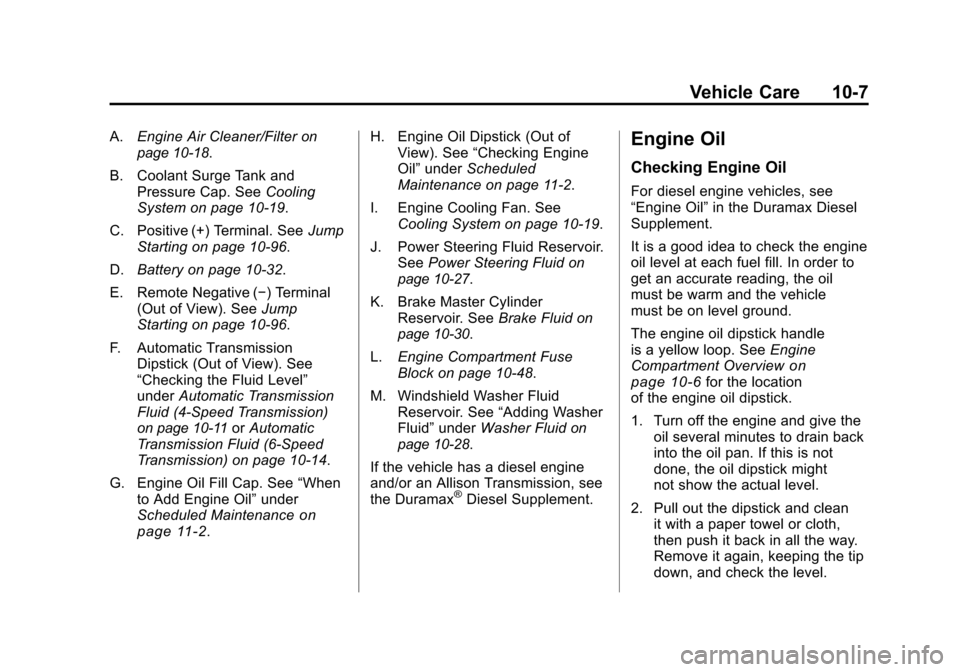
A.Engine Air Cleaner/Filteron
page 10‑18.
B. Coolant Surge Tank and Pressure Cap. See Cooling
System on page 10‑19.
C. Positive (+) Terminal. See Jump
Starting on page 10‑96.
D. Battery on page 10‑32.
E. Remote Negative (−) Terminal (Out of View). See Jump
Starting on page 10‑96.
F. Automatic Transmission Dipstick (Out of View). See
“Checking the Fluid Level”
under Automatic Transmission
Fluid (4-Speed Transmission)
on page 10‑11or Automatic
Transmission Fluid (6-Speed
Transmission) on page 10‑14.
G. Engine Oil Fill Cap. See “When
to Add Engine Oil” under
Scheduled Maintenance
on
page 11‑2. H. Engine Oil Dipstick (Out of
View). See “Checking Engine
Oil” under Scheduled
Maintenance on page 11‑2.
I. Engine Cooling Fan. See Cooling System on page 10‑19.
J. Power Steering Fluid Reservoir. See Power Steering Fluid
on
page 10‑27.
K. Brake Master Cylinder Reservoir. See Brake Fluid
on
page 10‑30.
L. Engine Compartment Fuse
Block on page 10‑48.
M. Windshield Washer Fluid Reservoir. See “Adding Washer
Fluid” under Washer Fluid
on
page 10‑28.
If the vehicle has a diesel engine
and/or an Allison Transmission, see
the Duramax
®Diesel Supplement.
Engine Oil
Checking Engine Oil
For diesel engine vehicles, see
“Engine Oil” in the Duramax Diesel
Supplement.
It is a good idea to check the engine
oil level at each fuel fill. In order to
get an accurate reading, the oil
must be warm and the vehicle
must be on level ground.
The engine oil dipstick handle
is a yellow loop. See Engine
Compartment Overview
on
page 10‑6for the location
of the engine oil dipstick.
1. Turn off the engine and give the oil several minutes to drain back
into the oil pan. If this is not
done, the oil dipstick might
not show the actual level.
2. Pull out the dipstick and clean it with a paper towel or cloth,
then push it back in all the way.
Remove it again, keeping the tip
down, and check the level.
Page 449 of 588
Black plate (27,1)Chevrolet Silverado Owner Manual - 2011
Vehicle Care 10-27
If the vehicle has electric cooling
fans, the fans may be heard
spinning at low speed during
most everyday driving. The fans
may turn off if no cooling is required.
Under heavy vehicle loading, trailer
towing, high outside temperatures,
or operation of the air conditioning
system, the fans may change to
high speed and an increase in
fan noise may be heard. This is
normal and indicates that the
cooling system is functioning
properly. The fans will change
to low speed when additional
cooling is no longer required.Power Steering Fluid
SeeEngine Compartment Overviewon page 10‑6for reservoir location.
When to Check Power Steering
Fluid
It is not necessary to regularly
check power steering fluid unless
there is a leak suspected in the
system or an unusual noise is
heard. A fluid loss in this system
could indicate a problem. Have the
system inspected and repaired.
How to Check Power Steering
Fluid
To check the power steering fluid:
1. Turn the key off and let the
engine compartment cool down.
2. Wipe the cap and the top of the reservoir clean.
3. Unscrew the cap and wipe the dipstick with a clean rag.
4. Replace the cap and completely tighten it.
5. Remove the cap again and look at the fluid level on the dipstick.
The level should be at the FULL
COLD mark. If necessary, add only
enough fluid to bring the level up to
the mark.
Page 475 of 588
Black plate (53,1)Chevrolet Silverado Owner Manual - 2011
Vehicle Care 10-53
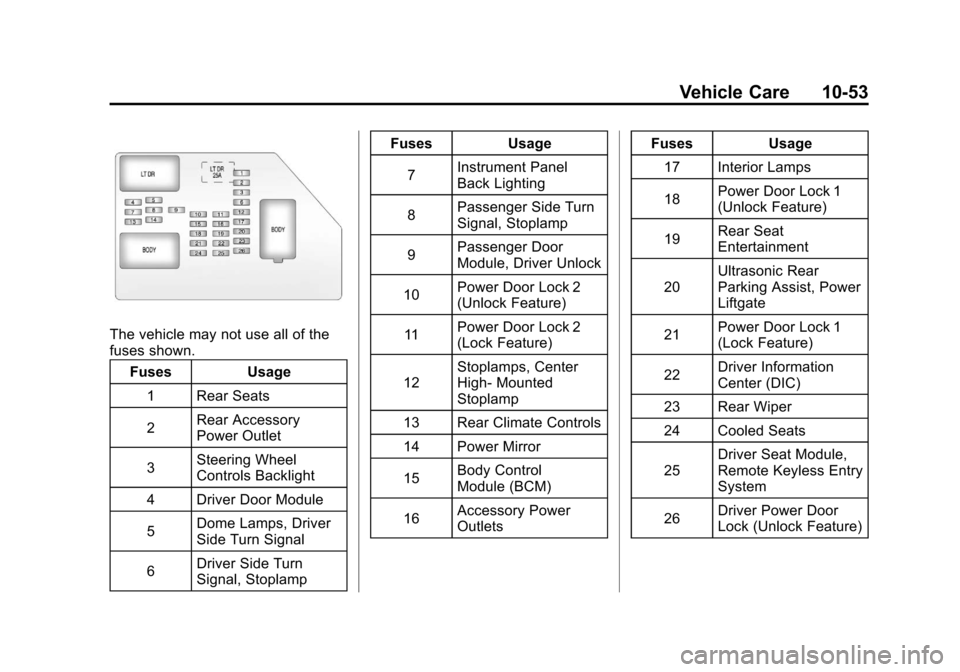
The vehicle may not use all of the
fuses shown.Fuses Usage
1 Rear Seats
2 Rear Accessory
Power Outlet
3 Steering Wheel
Controls Backlight
4 Driver Door Module
5 Dome Lamps, Driver
Side Turn Signal
6 Driver Side Turn
Signal, Stoplamp Fuses Usage
7 Instrument Panel
Back Lighting
8 Passenger Side Turn
Signal, Stoplamp
9 Passenger Door
Module, Driver Unlock
10 Power Door Lock 2
(Unlock Feature)
11 Power Door Lock 2
(Lock Feature)
12 Stoplamps, Center
High‐
Mounted
Stoplamp
13 Rear Climate Controls
14 Power Mirror
15 Body Control
Module (BCM)
16 Accessory Power
Outlets Fuses Usage
17 Interior Lamps
18 Power Door Lock 1
(Unlock Feature)
19 Rear Seat
Entertainment
20 Ultrasonic Rear
Parking Assist, Power
Liftgate
21 Power Door Lock 1
(Lock Feature)
22 Driver Information
Center (DIC)
23 Rear Wiper
24 Cooled Seats
25 Driver Seat Module,
Remote Keyless Entry
System
26 Driver Power Door
Lock (Unlock Feature)