lights CHEVROLET SILVERADO 2011 2.G Owner's Manual
[x] Cancel search | Manufacturer: CHEVROLET, Model Year: 2011, Model line: SILVERADO, Model: CHEVROLET SILVERADO 2011 2.GPages: 588, PDF Size: 7.99 MB
Page 225 of 588
Black plate (9,1)Chevrolet Silverado Owner Manual - 2011
Lighting 6-9
Lighting Features
Entry Lighting
The vehicle has an illuminated entry
feature.
When the doors are opened, the
dome lamps will come on if the
dome override button is in the
extended position. If the dome
override button is pressed in,
the lamps will not come on.
Exit Lighting
The interior lamps come on when
the key is removed from the ignition.
They turn off automatically in
20 seconds. The lights do not come
on if the dome override button is
pressed in.
Battery Load
Management
The vehicle has Electric Power
Management (EPM) that estimates
the battery's temperature and state
of charge. It then adjusts the voltage
for best performance and extended
life of the battery.
When the battery's state of charge
is low, the voltage is raised slightly
to quickly bring the charge back up.
When the state of charge is high,
the voltage is lowered slightly to
prevent overcharging. If the vehicle
has a voltmeter gauge or a voltage
display on the Driver Information
Center (DIC), you may see the
voltage move up or down. This is
normal. If there is a problem, an
alert will be displayed.The battery can be discharged at
idle if the electrical loads are very
high. This is true for all vehicles.
This is because the generator
(alternator) may not be spinning
fast enough at idle to produce all
the power that is needed for very
high electrical loads.
A high electrical load occurs when
several of the following are on,
such as: headlamps, high beams,
fog lamps, rear window defogger,
climate control fan at high speed,
heated seats, engine cooling fans,
trailer loads, and loads plugged into
accessory power outlets.
EPM works to prevent excessive
discharge of the battery. It does this
by balancing the generator's output
and the vehicle's electrical needs.
It can increase engine idle speed
to generate more power, whenever
needed. It can temporarily reduce
the power demands of some
accessories.
Page 305 of 588
Black plate (11,1)Chevrolet Silverado Owner Manual - 2011
Driving and Operating 9-11
Surface Obstacles:Unseen or
hidden obstacles can be hazardous.
A rock, log, hole, rut, or bump can
startle you if you are not prepared
for them. Often these obstacles are
hidden by grass, bushes, snow,
or even the rise and fall of the
terrain itself.
Some things to consider:
.Is the path ahead clear?
.Will the surface texture change
abruptly up ahead?
.Does the travel take you uphill or
downhill?
.Will you have to stop suddenly
or change direction quickly?
When driving over obstacles or
rough terrain, keep a firm grip on
the steering wheel. Ruts, troughs,
or other surface features can jerk
the wheel out of your hands. When driving over bumps, rocks,
or other obstacles, the wheels can
leave the ground. If this happens,
even with one or two wheels, you
cannot control the vehicle as well
or at all.
Because you will be on an unpaved
surface, it is especially important to
avoid sudden acceleration, sudden
turns, or sudden braking.
Off-roading requires a different kind
of alertness from driving on paved
roads and highways. There are no
road signs, posted speed limits,
or signal lights. Use good judgment
about what is safe and what is not.
Driving on Hills
Off-road driving often takes you up,
down, or across a hill. Driving safely
on hills requires good judgment
and an understanding of what the
vehicle can and cannot do. There
are some hills that simply cannot be
driven, no matter how well built the
vehicle.
{WARNING
Many hills are simply too steep
for any vehicle. If you drive up
them, you will stall. If you drive
down them, you cannot control
your speed. If you drive across
them, you will roll over. You could
be seriously injured or killed.
If you have any doubt about the
steepness, do not drive the hill.
Page 328 of 588
Black plate (34,1)Chevrolet Silverado Owner Manual - 2011
9-34 Driving and Operating
In an emergency:
1. Brake using a firm and steadypressure. Do not pump the
brakes repeatedly. This may
deplete power assist, requiring
increased brake pedal force.
2. Shift the vehicle to neutral. This can be done while the
vehicle is moving. After shifting
to neutral, firmly apply the
brakes and steer the vehicle
to a safe location.
3. Come to a complete stop. Shift to P (Park) with an
automatic transmission,
or neutral with a manual
transmission. Turn the ignition
to LOCK/OFF.
4. Set the parking brake. See Parking Brake on page 9‑68
On vehicles with an automatic
transmission, the shift lever must be
in P (Park) to turn the ignition switch
to LOCK/OFF. The steering can bind with the
wheels turned off center. If this
happens, move the steering wheel
from right to left while turning the
key to ACC/ACCESSORY. If this
doesn't work, then the vehicle needs
service.
Notice:
Using a tool to force the
key to turn in the ignition could
cause damage to the switch or
break the key. Use the correct
key, make sure it is all the way in,
and turn it only with your hand.
If the key cannot be turned by
hand, see your dealer.
B (ACC/ACCESSORY): This
position lets things like the radio
and the windshield wipers operate
while the engine is off. Use this
position if the vehicle must be
pushed or towed.
C (ON/RUN): This position can
be used to operate the electrical
accessories and to display some instrument panel cluster warning
and indicator lights. The switch
stays in this position when the
engine is running. The transmission
is also unlocked in this position on
automatic transmission vehicles.
If you leave the key in the ACC/
ACCESSORY or ON/RUN position
with the engine off, the battery could
be drained. You may not be able to
start the vehicle if the battery is
allowed to drain for an extended
period of time.
D (START):
This is the position that
starts the engine. When the engine
starts, release the key. The ignition
switch returns to ON/RUN for
driving.
If the vehicle is equipped with a
radio, a warning tone will sound
when the driver door is opened,
the ignition is in ACC/ACCESSORY
or LOCK/OFF and the key is in the
ignition.
Page 352 of 588
Black plate (58,1)Chevrolet Silverado Owner Manual - 2011
9-58 Driving and Operating
Electronic Transfer Case
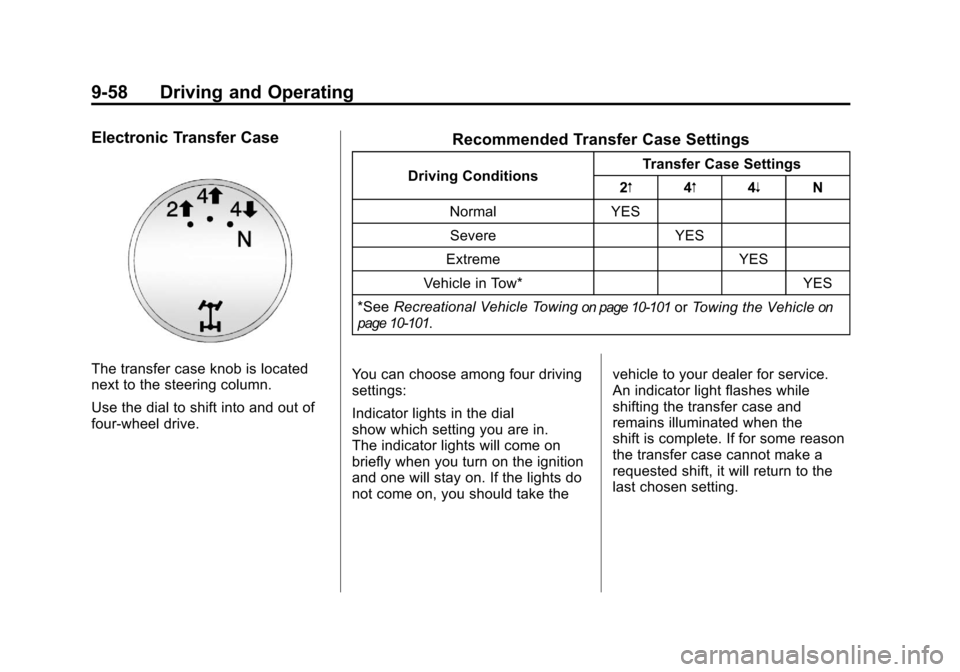
The transfer case knob is located
next to the steering column.
Use the dial to shift into and out of
four-wheel drive.
Recommended Transfer Case Settings
Driving ConditionsTransfer Case Settings
2m 4m4n N
Normal YES Severe YES
Extreme YES
Vehicle in Tow* YES
*See Recreational Vehicle Towing
on page 10‑101orTowing the Vehicleon
page 10‑101.
You can choose among four driving
settings:
Indicator lights in the dial
show which setting you are in.
The indicator lights will come on
briefly when you turn on the ignition
and one will stay on. If the lights do
not come on, you should take the vehicle to your dealer for service.
An indicator light flashes while
shifting the transfer case and
remains illuminated when the
shift is complete. If for some reason
the transfer case cannot make a
requested shift, it will return to the
last chosen setting.
Page 354 of 588
Black plate (60,1)Chevrolet Silverado Owner Manual - 2011
9-60 Driving and Operating
Shifting Into Four-Wheel
Drive Low
When Four-Wheel Drive Low is
engaged, vehicle speed should
be kept below 72 km/h (45 mph).
Extended high-speed operation in
Four-Wheel Drive Low may damage
or shorten the life of the drivetrain.
To shift to the Four-Wheel Drive
Low position, the ignition must be
in ON/RUN and the vehicle must be
stopped or moving less than 5 km/h
(3 mph) with the transmission in
N (Neutral). The preferred method
for shifting into Four-Wheel Drive
Low is to have the vehicle moving
1.6 to 3.2 km/h (1 to 2 mph). Turn the
knob to the Four-Wheel Drive Low
position. You must wait for the
Four-Wheel Drive Low indicator
light to stop flashing and remain
on before shifting the transmission
in gear.
Notice:Shifting the transmission
into gear before the requested
mode indicator light has stopped flashing could damage the
transfer case. To help avoid
damaging the vehicle, always wait
for the mode indicator lights to
stop flashing before shifting the
transmission into gear.
It is typical for the vehicle to
exhibit significant engagement
noise and bump when shifting
between Four-Wheel Drive Low
and Four-Wheel Drive High ranges
or from transfer case N (Neutral)
with the engine running.
If the knob is turned to the
Four-Wheel Drive Low position
when the vehicle is in gear and/or
moving, the Four-Wheel Drive
Low indicator light will flash for
30 seconds and not complete the
shift unless the vehicle is moving
less than 5 km/h (3 mph) and the
transmission is in N (Neutral).
After 30 seconds the transfer case
will shift to Four-Wheel Drive
High mode.
Shifting Out of Four-Wheel
Drive Low
To shift from Four-Wheel Drive
Low to Four-Wheel Drive High,
or Two-Wheel Drive High, the
vehicle must be stopped or
moving less than 5 km/h (3 mph)
with the transmission in N (Neutral)
and the ignition in ON/RUN.
The preferred method for shifting
out of Four-Wheel Drive Low
is to have the vehicle moving
1.6 to 3.2 km/h (1 to 2 mph). Turn the
knob to the Four-Wheel Drive High
or Two-Wheel Drive High position.
You must wait for the Four-Wheel
Drive High or Two-Wheel Drive High
indicator light to stop flashing and
remain on before shifting the
transmission into gear.
Page 355 of 588
Black plate (61,1)Chevrolet Silverado Owner Manual - 2011
Driving and Operating 9-61
Notice:Shifting the transmission
into gear before the requested
mode indicator light has stopped
flashing could damage the
transfer case. To help avoid
damaging the vehicle, always
wait for the mode indicator lights
to stop flashing before shifting
the transmission into gear.
It is typical for the vehicle to exhibit
significant engagement noise
and bump when shifting between
Four-Wheel Drive Low and
Four-Wheel Drive High ranges
or from transfer case N (Neutral)
with the engine running.
If the knob is turned to the
Four-Wheel Drive High,
or Two-Wheel Drive High switch
position when the vehicle is in gear
and/or moving, the Four-Wheel
Drive High, or Two-Wheel Drive
High indicator light will flash for
30 seconds but will not complete the
shift unless your vehicle is moving
less than 3 mph (5 km/h) and the
transmission is in N (Neutral). Shifting into Neutral
To shift the transfer case to
N (Neutral) do the following:
1. Make sure the vehicle is parked
so that it will not roll.
2. Set the parking brake and press and hold the regular brake
pedal. See Parking Brake
on
page 9‑68for more information.
3. Start the vehicle or turn the ignition to ON/RUN.
4. Shift the transmission to N (Neutral).
5. Shift the transfer case to Two-Wheel Drive High.
6. Turn the transfer case dial clockwise to N (Neutral) until
it stops and hold it there until
the Neutral light starts blinking. This will take at least
10 seconds. Then slowly release
the dial to the four low position.
The N (Neutral) light will come
on when the transfer case shift
to N (Neutral) is complete.
7. If the engine is running, verify that the transfer case is in
N (Neutral) by shifting the
transmission to R (Reverse)
for one second, then shift the
transmission to D (Drive) for
one second.
8. Turn the ignition to ACC/ ACCESSORY, which will turn
the engine off.
9. Place the transmission shift lever in P (Park).
10. Release the parking brake prior to moving the vehicle.
11. Turn the ignition to LOCK/OFF.
Page 356 of 588
Black plate (62,1)Chevrolet Silverado Owner Manual - 2011
9-62 Driving and Operating
Shifting Out of Neutral
To shift the transfer case out of
N (Neutral) do the following:
1. Set the parking brake and applythe regular brake pedal.
2. Turn the ignition to ON/RUN with the engine off, and shift the
transmission to N (Neutral).
3. Turn the transfer case dial to Two-Wheel Drive High.
After the transfer case has
shifted out of N (Neutral), the
N (Neutral) light will go out.
4. Release the parking brake prior to moving the vehicle. Notice:
Shifting the transmission
into gear before the requested
mode indicator light has stopped
flashing could damage the
transfer case. To help avoid
damaging the vehicle, always
wait for the mode indicator lights
to stop flashing before shifting
the transmission into gear.
5. Start the engine and shift the
transmission to the desired
position.
Excessively shifting the transfer
case into or out of the different
modes may cause the transfer case
to enter the shift protection mode.
This will protect the transfer case
from possible damage and will only
allow the transfer case to respond
to one shift per 10 seconds. The
transfer case may stay in this mode
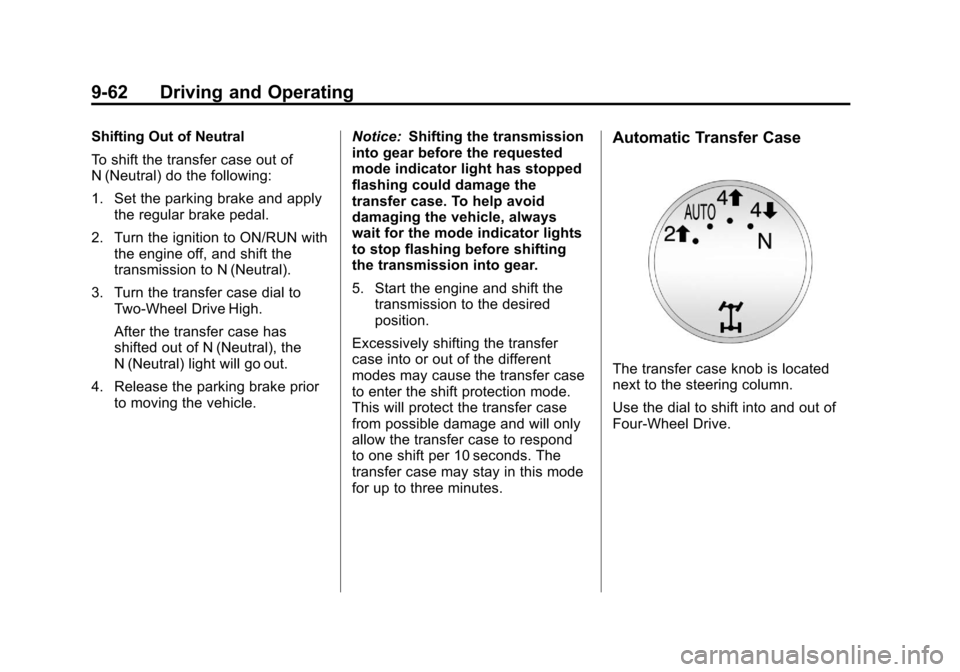
for up to three minutes.Automatic Transfer Case
The transfer case knob is located
next to the steering column.
Use the dial to shift into and out of
Four-Wheel Drive.
Page 357 of 588
Black plate (63,1)Chevrolet Silverado Owner Manual - 2011
Driving and Operating 9-63
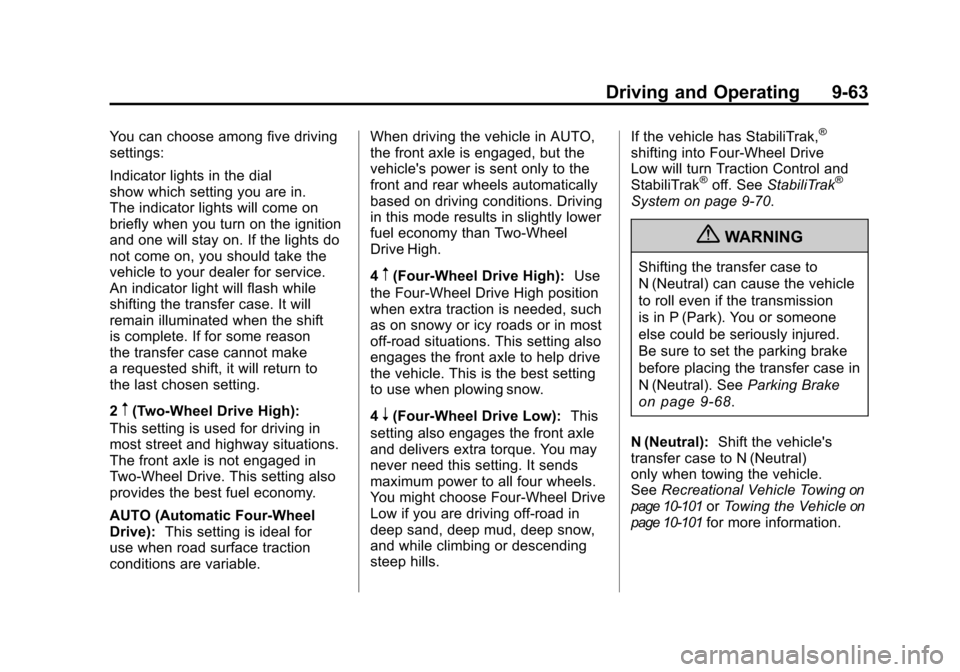
You can choose among five driving
settings:
Indicator lights in the dial
show which setting you are in.
The indicator lights will come on
briefly when you turn on the ignition
and one will stay on. If the lights do
not come on, you should take the
vehicle to your dealer for service.
An indicator light will flash while
shifting the transfer case. It will
remain illuminated when the shift
is complete. If for some reason
the transfer case cannot make
a requested shift, it will return to
the last chosen setting.
2
m(Two-Wheel Drive High):
This setting is used for driving in
most street and highway situations.
The front axle is not engaged in
Two-Wheel Drive. This setting also
provides the best fuel economy.
AUTO (Automatic Four-Wheel
Drive): This setting is ideal for
use when road surface traction
conditions are variable. When driving the vehicle in AUTO,
the front axle is engaged, but the
vehicle's power is sent only to the
front and rear wheels automatically
based on driving conditions. Driving
in this mode results in slightly lower
fuel economy than Two-Wheel
Drive High.
4
m(Four-Wheel Drive High):
Use
the Four-Wheel Drive High position
when extra traction is needed, such
as on snowy or icy roads or in most
off-road situations. This setting also
engages the front axle to help drive
the vehicle. This is the best setting
to use when plowing snow.
4
n(Four-Wheel Drive Low): This
setting also engages the front axle
and delivers extra torque. You may
never need this setting. It sends
maximum power to all four wheels.
You might choose Four-Wheel Drive
Low if you are driving off-road in
deep sand, deep mud, deep snow,
and while climbing or descending
steep hills. If the vehicle has StabiliTrak,
®
shifting into Four-Wheel Drive
Low will turn Traction Control and
StabiliTrak
®off. See
StabiliTrak®
System on page 9‑70.
{WARNING
Shifting the transfer case to
N (Neutral) can cause the vehicle
to roll even if the transmission
is in P (Park). You or someone
else could be seriously injured.
Be sure to set the parking brake
before placing the transfer case in
N (Neutral). See Parking Brake
on page 9‑68.
N (Neutral): Shift the vehicle's
transfer case to N (Neutral)
only when towing the vehicle.
See Recreational Vehicle Towing
on
page 10‑101or Towing the Vehicleon
page 10‑101for more information.
Page 358 of 588
Black plate (64,1)Chevrolet Silverado Owner Manual - 2011
9-64 Driving and Operating
If the SERVICE 4 WHEEL DRIVE
message stays on, you should
take the vehicle to your dealer
for service. See“SERVICE
4 WHEEL DRIVE message”
under Transmission Messages
on
page 5‑52.
Shifting Into Four-Wheel Drive
High or AUTO (Automatic
Four-Wheel Drive)
Turn the knob to the Four-Wheel
Drive High or AUTO position. This
can be done at any speed, except
when shifting from Four-Wheel
Drive Low. The indicator light will
flash while shifting. It will remain
on when the shift is completed.
Shifting Into Two-Wheel
Drive High
Turn the knob to the Two-Wheel
Drive High position. This can be
done at any speed, except when
shifting from Four-Wheel Drive Low.
The indicator light will flash while
shifting. It will remain on when the
shift is completed. Shifting Into Four-Wheel
Drive Low
When Four-Wheel Drive Low is
engaged, vehicle speed should
be kept below 72 km/h (45 mph).
Extended high-speed operation in
Four-Wheel Drive Low may damage
or shorten the life of the drivetrain.
To shift to the Four-Wheel Drive
Low position, the ignition must be
in ON/RUN and the vehicle must
be stopped or moving less than
5 km/h (3 mph) with the transmission
in N (Neutral). The preferred method
for shifting into Four-Wheel Drive
Low is to have the vehicle moving
1.6 to 3.2 km/h (1 to 2 mph). Turn the
knob to the Four-Wheel Drive Low
position. You must wait for the
Four-Wheel Drive Low indicator light
to stop flashing and remain on
before shifting the transmission
into gear.
Notice:
Shifting the transmission
into gear before the requested
mode indicator light has stopped flashing could damage the
transfer case. To help avoid
damaging the vehicle, always
wait for the mode indicator lights
to stop flashing before shifting
the transmission into gear.
It is typical for the vehicle to exhibit
significant engagement noise
and bump when shifting between
Four-Wheel Drive Low and
Four-Wheel Drive High ranges
or from N (Neutral) with the
engine running.
If the knob is turned to the
Four-Wheel Drive Low position
when the vehicle is in gear and/or
moving, the Four-Wheel Drive
Low indicator light will flash for
30 seconds and not complete the
shift unless the vehicle is moving
less than 5 km/h (3 mph) and the
transmission is in N (Neutral).
After 30 seconds the transfer
case will shift to Four-Wheel
Drive High mode.
Page 359 of 588
Black plate (65,1)Chevrolet Silverado Owner Manual - 2011
Driving and Operating 9-65
Shifting Out of Four-Wheel
Drive Low
To shift from Four-Wheel Drive
Low to Four-Wheel Drive High,
AUTO or Two-Wheel Drive High,
the vehicle must be stopped or
moving less than 5 km/h (3 mph)
with the transmission in N (Neutral)
and the ignition in ON/RUN. The
preferred method for shifting out of
Four-Wheel Drive Low is to have
the vehicle moving 1 to 2 mph
(1.6 to 3.2 km/h). Turn the knob to
the Four-Wheel Drive High, AUTO
or Two-Wheel Drive High position.
You must wait for the Four-Wheel
Drive High, AUTO or Two-Wheel
Drive High indicator light to stop
flashing and remain on before
shifting the transmission into gear.
Notice:Shifting the transmission
into gear before the requested
mode indicator light has stopped
flashing could damage the
transfer case. To help avoid damaging the vehicle, always
wait for the mode indicator lights
to stop flashing before shifting
the transmission into gear.
It is typical for the vehicle to
exhibit significant engagement
noise and bump when shifting
between Four-Wheel Drive Low
and Four-Wheel Drive High ranges
or from N (Neutral) with the engine
running.
If the knob is turned to the
Four-Wheel Drive High, AUTO,
or Two-Wheel Drive High switch
position when the vehicle is in gear
and/or moving, the Four-Wheel
Drive High, AUTO or Two-Wheel
Drive High indicator light will flash
for 30 seconds but will not complete
the shift unless the vehicle is
moving less than 5 km/h (3 mph)
and the transmission is in
N (Neutral).
Shifting into Neutral
To shift the transfer case to
N (Neutral) do the following:
1. Make sure the vehicle is parked
so that it will not roll.
2. Set the parking brake and apply the regular brake pedal.
See Parking Brake
on
page 9‑68for more information.
3. Shifting the transfer case into N (Neutral) can be done with
or without the engine running.
Shifting without the engine
running should be done with
the ignition in ON/RUN.
4. Put the transmission in N (Neutral).
5. Shift the transfer case to Two-Wheel Drive High.