stop start CHEVROLET SILVERADO 2011 2.G Owner's Manual
[x] Cancel search | Manufacturer: CHEVROLET, Model Year: 2011, Model line: SILVERADO, Model: CHEVROLET SILVERADO 2011 2.GPages: 588, PDF Size: 7.99 MB
Page 271 of 588
Black plate (45,1)Chevrolet Silverado Owner Manual - 2011
Infotainment System 7-45
}10 (Double Digit Entries):Press
this button to select chapter or track
numbers greater than nine. Press
this button before entering the
number.
Battery Replacement
To change the remote control
batteries, do the following:
1. Slide the rear cover back on the remote control.
2. Replace the two batteries in the compartment. Make sure they
are installed correctly using the
diagram on the inside of the
remote control.
3. Replace the battery cover.
If the remote control is to be stored
for a long period of time, remove the
batteries and keep them in a cool,
dry place.Tips and Troubleshooting Chart
Problem Recommended Action
There is no power. The ignition might not be turned to
ON/RUN or ACC/ACCESSORY.
The picture does not fill the screen.
There are black borders on the top
and bottom or on both sides, or the
picture looks stretched out. Check the display mode settings
in the setup menu by pressing the
display menu button on the remote
control.
In auxiliary mode, the picture moves
or scrolls. Check the auxiliary input
connections at both devices.
The remote control does not work. Check to make sure there is no obstruction between the remote
control and the transmitter window.
Check the batteries to make sure
they are not dead or installed
incorrectly.
After stopping the player, and
pushing Play, sometimes the
DVD starts where it left off and
sometimes at the beginning. If the stop button was pressed one
time, the DVD player resumes
playing where the DVD was
stopped. If the stop button was
pressed two times, the DVD player
begins to play from the beginning
of the DVD.
Page 274 of 588
Black plate (48,1)Chevrolet Silverado Owner Manual - 2011
7-48 Infotainment System
Depending on the audio system,
the rear speakers may continue to
play when the RSA audio is active
through the headphones.
To listen to an iPod or portable
audio device through the RSA,
attach the iPod or portable audio
device to the front auxiliary input
(if available), located on the front
audio system. Turn the iPod on,
then choose the front auxiliary input
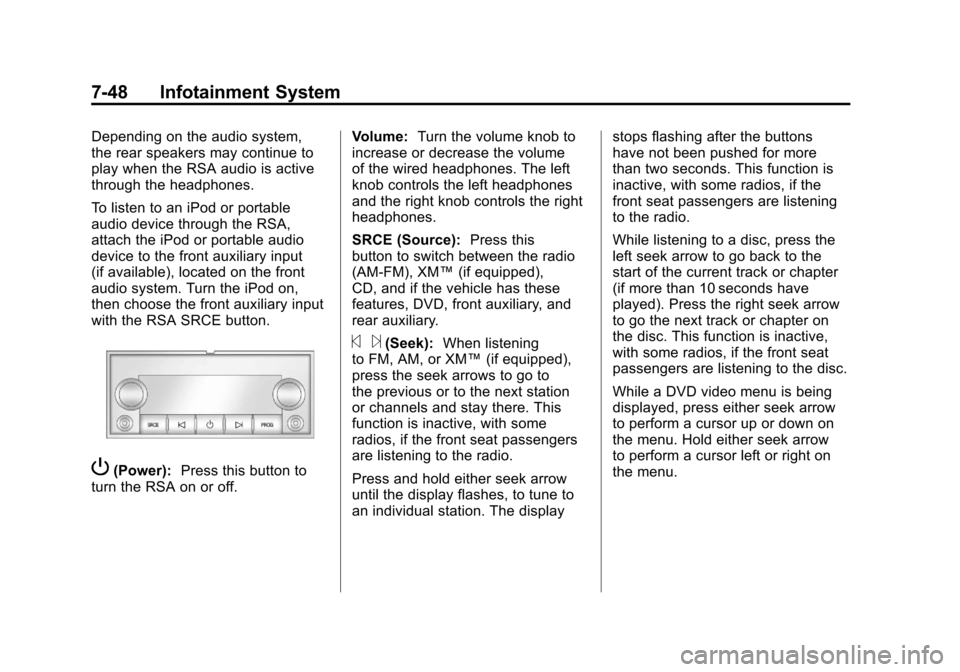
with the RSA SRCE button.
P(Power):Press this button to
turn the RSA on or off. Volume:
Turn the volume knob to
increase or decrease the volume
of the wired headphones. The left
knob controls the left headphones
and the right knob controls the right
headphones.
SRCE (Source): Press this
button to switch between the radio
(AM‐FM), XM™ (if equipped),
CD, and if the vehicle has these
features, DVD, front auxiliary, and
rear auxiliary.
© ¨(Seek): When listening
to FM, AM, or XM™ (if equipped),
press the seek arrows to go to
the previous or to the next station
or channels and stay there. This
function is inactive, with some
radios, if the front seat passengers
are listening to the radio.
Press and hold either seek arrow
until the display flashes, to tune to
an individual station. The display stops flashing after the buttons
have not been pushed for more
than two seconds. This function is
inactive, with some radios, if the
front seat passengers are listening
to the radio.
While listening to a disc, press the
left seek arrow to go back to the
start of the current track or chapter
(if more than 10 seconds have
played). Press the right seek arrow
to go the next track or chapter on
the disc. This function is inactive,
with some radios, if the front seat
passengers are listening to the disc.
While a DVD video menu is being
displayed, press either seek arrow
to perform a cursor up or down on
the menu. Hold either seek arrow
to perform a cursor left or right on
the menu.
Page 300 of 588
Black plate (6,1)Chevrolet Silverado Owner Manual - 2011
9-6 Driving and Operating
Ease off the accelerator and then,
if there is nothing in the way, steer
so that the vehicle straddles the
edge of the pavement. Turn the
steering wheel 8 to 13 cm (3 to
5 inches), about one-eighth turn,
until the right front tire contacts
the pavement edge. Then turn the
steering wheel to go straight down
the roadway.
Loss of Control
Let us review what driving experts
say about what happens when the
three control systems—brakes,
steering, and acceleration —do not
have enough friction where the tires
meet the road to do what the driver
has asked.
In any emergency, do not give up.
Keep trying to steer and constantly
seek an escape route or area of
less danger.
Skidding
In a skid, a driver can lose control of
the vehicle. Defensive drivers avoid
most skids by taking reasonable
care suited to existing conditions,
and by not overdriving those
conditions. But skids are always
possible.
The three types of skids correspond
to the vehicle's three control
systems. In the braking skid,
the wheels are not rolling. In the
steering or cornering skid, too much
speed or steering in a curve causes
tires to slip and lose cornering force.
And in the acceleration skid, too
much throttle causes the driving
wheels to spin.
If the vehicle starts to slide, ease
your foot off the accelerator pedal
and quickly steer the way you
want the vehicle to go. If you start
steering quickly enough, the vehicle
may straighten out. Always be ready
for a second skid if it occurs. Of course, traction is reduced when
water, snow, ice, gravel, or other
material is on the road. For safety,
slow down and adjust your driving
to these conditions. It is important
to slow down on slippery surfaces
because stopping distance is longer
and vehicle control more limited.
While driving on a surface with
reduced traction, try to avoid
sudden steering, acceleration,
or braking, including reducing
vehicle speed by shifting to a lower
gear. Any sudden changes could
cause the tires to slide. You might
not realize the surface is slippery
until the vehicle is skidding. Learn
to recognize warning clues
—such
as enough water, ice, or packed
snow on the road to make a
mirrored surface —and slow down
when you have any doubt.
Remember: Antilock brakes help
avoid only the braking skid.
Page 305 of 588
Black plate (11,1)Chevrolet Silverado Owner Manual - 2011
Driving and Operating 9-11
Surface Obstacles:Unseen or
hidden obstacles can be hazardous.
A rock, log, hole, rut, or bump can
startle you if you are not prepared
for them. Often these obstacles are
hidden by grass, bushes, snow,
or even the rise and fall of the
terrain itself.
Some things to consider:
.Is the path ahead clear?
.Will the surface texture change
abruptly up ahead?
.Does the travel take you uphill or
downhill?
.Will you have to stop suddenly
or change direction quickly?
When driving over obstacles or
rough terrain, keep a firm grip on
the steering wheel. Ruts, troughs,
or other surface features can jerk
the wheel out of your hands. When driving over bumps, rocks,
or other obstacles, the wheels can
leave the ground. If this happens,
even with one or two wheels, you
cannot control the vehicle as well
or at all.
Because you will be on an unpaved
surface, it is especially important to
avoid sudden acceleration, sudden
turns, or sudden braking.
Off-roading requires a different kind
of alertness from driving on paved
roads and highways. There are no
road signs, posted speed limits,
or signal lights. Use good judgment
about what is safe and what is not.
Driving on Hills
Off-road driving often takes you up,
down, or across a hill. Driving safely
on hills requires good judgment
and an understanding of what the
vehicle can and cannot do. There
are some hills that simply cannot be
driven, no matter how well built the
vehicle.
{WARNING
Many hills are simply too steep
for any vehicle. If you drive up
them, you will stall. If you drive
down them, you cannot control
your speed. If you drive across
them, you will roll over. You could
be seriously injured or killed.
If you have any doubt about the
steepness, do not drive the hill.
Page 307 of 588
Black plate (13,1)Chevrolet Silverado Owner Manual - 2011
Driving and Operating 9-13
.Ease up on the speed as you
approach the top of the hill.
.Attach a flag to the vehicle to
be more visible to approaching
traffic on trails or hills.
.Sound the horn as you approach
the top of the hill to let opposing
traffic know you are there.
.Use headlamps even during the
day to make the vehicle more
visible to oncoming traffic.
{WARNING
Driving to the top (crest) of a
hill at full speed can cause an
accident. There could be a
drop-off, embankment, cliff,
or even another vehicle. You
could be seriously injured or
killed. As you near the top of a
hill, slow down and stay alert.If the vehicle stalls, or is about to
stall, and you cannot make it up
the hill:
.Push the brake pedal to stop
the vehicle and keep it from
rolling backwards and apply
the parking brake.
.If the engine is still running, shift
the transmission to R (Reverse),
release the parking brake, and
slowly back down the hill in
R (Reverse).
.If the engine has stopped
running, you need to restart it.
With the brake pedal pressed
and the parking brake still
applied, shift the transmission to
P (Park) and restart the engine.
Then, shift to R (Reverse),
release the parking brake,
and slowly back down the
hill as straight as possible
in R (Reverse).
.While backing down the hill, put
your left hand on the steering
wheel at the 12 o'clock position so you can tell if the wheels are
straight and can maneuver as
you back down. It is best to back
down the hill with the wheels
straight rather than in the left or
right direction. Turning the wheel
too far to the left or right will
increase the possibility of a
rollover.
Things not to do if the vehicle stalls,
or is about to stall, when going up
a hill:
.Never attempt to prevent a stall
by shifting into N (Neutral) to
rev-up the engine and regain
forward momentum. This will
not work. The vehicle can roll
backward very quickly and could
go out of control.
.Never try to turn around if about
to stall when going up a hill.
If the hill is steep enough to stall
the vehicle, it is steep enough
to cause it to roll over. If you
cannot make it up the hill,
back straight down the hill.
Page 309 of 588
Black plate (15,1)Chevrolet Silverado Owner Manual - 2011
Driving and Operating 9-15
Vehicles are much more likely to
stall when going uphill, but if it
happens when going downhill:
1. Stop the vehicle by applying theregular brakes and apply the
parking brake.
2. Shift to P (Park) and, while still braking, restart the engine.
3. Shift back to a low gear, release the parking brake, and drive
straight down.
4. If the engine will not start, get out and get help.Driving Across an Incline
An off-road trail will probably go
across the incline of a hill. To decide
whether to try to drive across the
incline, consider the following:
{WARNING
Driving across an incline that is
too steep will make your vehicle
roll over. You could be seriously
injured or killed. If you have any
doubt about the steepness of the
incline, do not drive across it.
Find another route instead.
.A hill that can be driven straight
up or down might be too steep
to drive across. When going
straight up or down a hill, the
length of the wheel base —the
distance from the front wheels to
the rear wheels —reduces the
likelihood the vehicle will tumble
end over end. But when driving across an incline, the narrower
track width
—the distance
between the left and right
wheels —might not prevent the
vehicle from tilting and rolling
over. Driving across an incline
puts more weight on the downhill
wheels which could cause a
downhill slide or a rollover.
.Surface conditions can be a
problem. Loose gravel, muddy
spots, or even wet grass can
cause the tires to slip sideways,
downhill. If the vehicle slips
sideways, it can hit something
that will trip it —a rock, a rut,
etc. —and roll over.
.Hidden obstacles can make the
steepness of the incline even
worse. If you drive across a rock
with the uphill wheels, or if the
downhill wheels drop into a rut
or depression, the vehicle can tilt
even more.
Page 310 of 588
Black plate (16,1)Chevrolet Silverado Owner Manual - 2011
9-16 Driving and Operating
For these reasons, carefully
consider whether to try to drive
across an incline. Just because
the trail goes across the incline
does not mean you have to drive it.
The last vehicle to try it might have
rolled over.
If you feel the vehicle starting
to slide sideways, turn downhill.
This should help straighten out
the vehicle and prevent the side
slipping. The best way to prevent
this is to“walk the course” first, so
you know what the surface is like
before driving it.Stalling on an Incline
{WARNING
Getting out on the downhill (low)
side of a vehicle stopped across
an incline is dangerous. If the
vehicle rolls over, you could be
crushed or killed. Always get out
on the uphill (high) side of the
vehicle and stay well clear of the
rollover path.
If the vehicle stalls when crossing
an incline, be sure you, and any
passengers, get out on the uphill
side, even if the door there is harder
to open. If you get out on the
downhill side and the vehicle starts
to roll over, you will be right in
its path.
If you have to walk down the slope,
stay out of the path the vehicle will
take if it does roll over.
Driving in Mud, Sand, Snow,
or Ice
When you drive in mud, snow,
or sand, the wheels do not get good
traction. Acceleration is not as
quick, turning is more difficult,
and braking distances are longer.
It is best to use a low gear when in
mud —the deeper the mud, the
lower the gear. In really deep mud,
keep the vehicle moving so it does
not get stuck.
When driving on sand, wheel
traction changes. On loosely packed
sand, such as on beaches or sand
dunes, the tires will tend to sink
into the sand. This affects steering,
accelerating, and braking. Drive at
a reduced speed and avoid sharp
turns or abrupt maneuvers.
Page 311 of 588
Black plate (17,1)Chevrolet Silverado Owner Manual - 2011
Driving and Operating 9-17
Hard packed snow and ice offer
the worst tire traction. On these
surfaces, it is very easy to lose
control. On wet ice, for example,
the traction is so poor that you will
have difficulty accelerating. And,
if the vehicle does get moving, poor
steering and difficult braking can
cause it to slide out of control.
{WARNING
Driving on frozen lakes, ponds,
or rivers can be dangerous.
Underwater springs, currents
under the ice, or sudden thaws
can weaken the ice. Your vehicle
could fall through the ice and
you and your passengers could
drown. Drive your vehicle on safe
surfaces only.
Driving in Water
{WARNING
Driving through rushing water can
be dangerous. Deep water can
sweep your vehicle downstream
and you and your passengers
could drown. If it is only shallow
water, it can still wash away the
ground from under your tires, and
you could lose traction and roll
the vehicle over. Do not drive
through rushing water.
Heavy rain can mean flash flooding,
and flood waters demand extreme
caution. Find out how deep the water is
before driving through it. Do not
try it if it is deep enough to cover
the wheel hubs, axles, or exhaust
pipe
—you probably will not get
through. Deep water can damage
the axle and other vehicle parts.
If the water is not too deep, drive
slowly through it. At faster speeds,
water splashes on the ignition
system and the vehicle can stall.
Stalling can also occur if you get the
tailpipe under water. If the tailpipe is
under water, you will never be able
to start the engine. When going
through water, remember that when
the brakes get wet, it might take
longer to stop. See Driving on Wet
Roads on page 9‑18.
Page 326 of 588
Black plate (32,1)Chevrolet Silverado Owner Manual - 2011
9-32 Driving and Operating
Starting and
Operating
New Vehicle Break-In
Notice:The vehicle does not
need an elaborate break-in. But it
will perform better in the long run
if you follow these guidelines:
.Keep your speed at 88 km/h
(55 mph) or less for the first
805 km (500 miles).
.Do not drive at any one
constant speed, fast or
slow, for the first 805 km
(500 miles). Do not make
full-throttle starts. Avoid
downshifting to brake or
slow the vehicle.
.Avoid making hard stops for
the first 322 km (200 miles) or
so. During this time the new
brake linings are not yet
broken in. Hard stops with
new linings can mean
premature wear and earlier
replacement. Follow this
breaking-in guideline every
time you get new brake
linings.
.Do not tow a trailer during
break-in. See Trailer Towing
on page 9‑94for the
trailer towing capabilities
of the vehicle and more
information.
Following break‐in, engine speed
and load can be gradually
increased.
Adjustable Throttle and
Brake Pedal
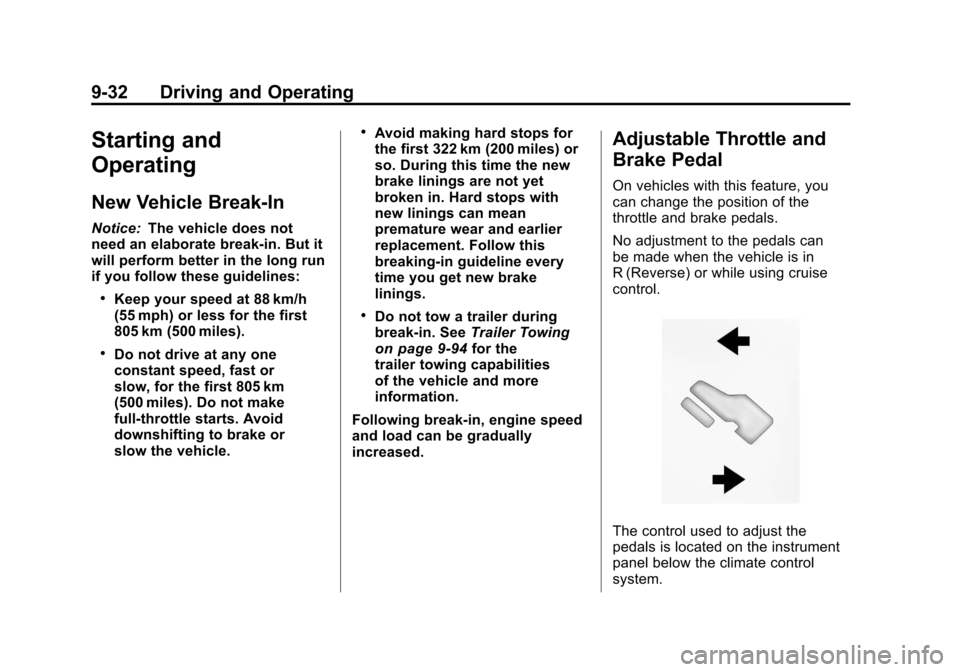
On vehicles with this feature, you
can change the position of the
throttle and brake pedals.
No adjustment to the pedals can
be made when the vehicle is in
R (Reverse) or while using cruise
control.
The control used to adjust the
pedals is located on the instrument
panel below the climate control
system.
Page 327 of 588
Black plate (33,1)Chevrolet Silverado Owner Manual - 2011
Driving and Operating 9-33
Press the bottom of the control to
move the pedals closer. Press the
top of the control to move the
pedals away.
Before you start driving, fully
press the brake pedal to confirm
the adjustment is right for you.
While driving, make only small
adjustments.
The vehicle may have a memory
function which lets pedal settings
be saved and recalled. SeePower
Seat Adjustment
on page 3‑5for
more information.
Ignition Positions
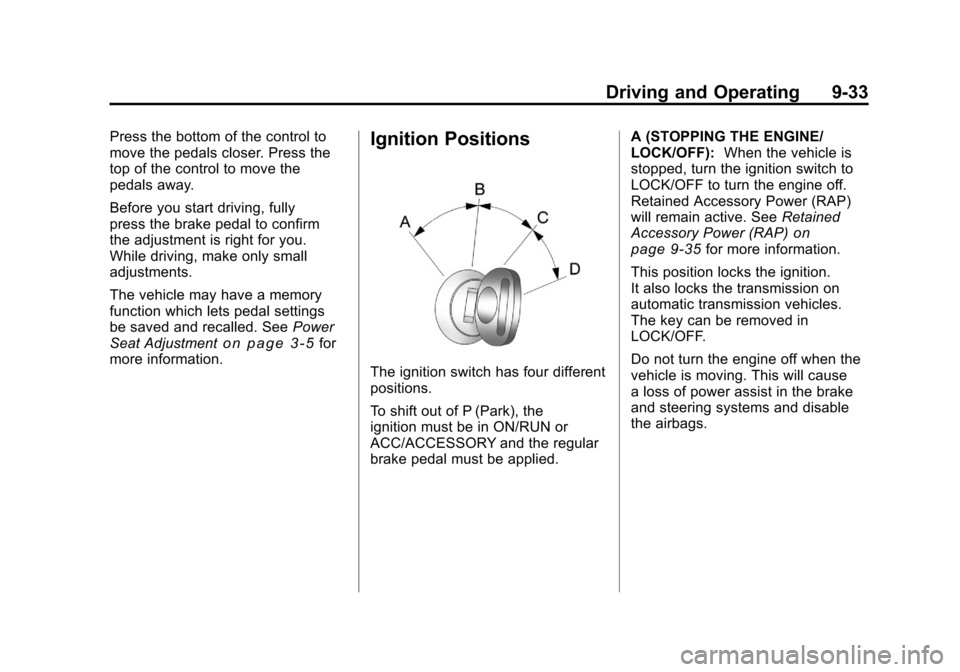
The ignition switch has four different
positions.
To shift out of P (Park), the
ignition must be in ON/RUN or
ACC/ACCESSORY and the regular
brake pedal must be applied. A (STOPPING THE ENGINE/
LOCK/OFF):
When the vehicle is
stopped, turn the ignition switch to
LOCK/OFF to turn the engine off.
Retained Accessory Power (RAP)
will remain active. See Retained
Accessory Power (RAP)
on
page 9‑35for more information.
This position locks the ignition.
It also locks the transmission on
automatic transmission vehicles.
The key can be removed in
LOCK/OFF.
Do not turn the engine off when the
vehicle is moving. This will cause
a loss of power assist in the brake
and steering systems and disable
the airbags.