buttons CHEVROLET SILVERADO 2011 2.G Workshop Manual
[x] Cancel search | Manufacturer: CHEVROLET, Model Year: 2011, Model line: SILVERADO, Model: CHEVROLET SILVERADO 2011 2.GPages: 588, PDF Size: 7.99 MB
Page 368 of 588
Black plate (74,1)Chevrolet Silverado Owner Manual - 2011
9-74 Driving and Operating
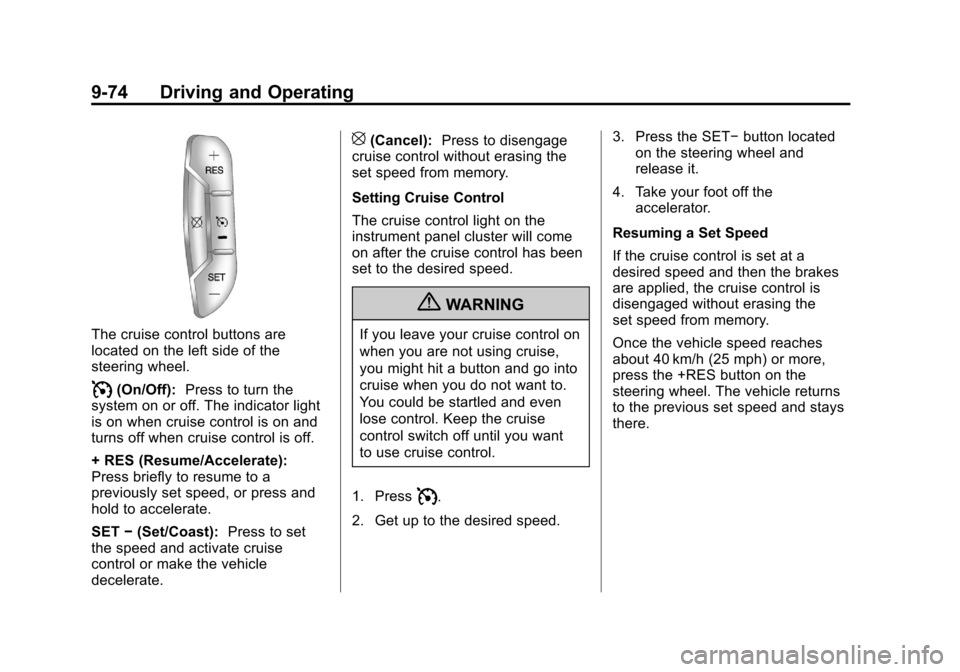
The cruise control buttons are
located on the left side of the
steering wheel.
I(On/Off):Press to turn the
system on or off. The indicator light
is on when cruise control is on and
turns off when cruise control is off.
+ RES (Resume/Accelerate):
Press briefly to resume to a
previously set speed, or press and
hold to accelerate.
SET −(Set/Coast): Press to set
the speed and activate cruise
control or make the vehicle
decelerate.
[(Cancel): Press to disengage
cruise control without erasing the
set speed from memory.
Setting Cruise Control
The cruise control light on the
instrument panel cluster will come
on after the cruise control has been
set to the desired speed.
{WARNING
If you leave your cruise control on
when you are not using cruise,
you might hit a button and go into
cruise when you do not want to.
You could be startled and even
lose control. Keep the cruise
control switch off until you want
to use cruise control.
1. Press
I.
2. Get up to the desired speed. 3. Press the SET−
button located
on the steering wheel and
release it.
4. Take your foot off the accelerator.
Resuming a Set Speed
If the cruise control is set at a
desired speed and then the brakes
are applied, the cruise control is
disengaged without erasing the
set speed from memory.
Once the vehicle speed reaches
about 40 km/h (25 mph) or more,
press the +RES button on the
steering wheel. The vehicle returns
to the previous set speed and stays
there.
Page 373 of 588
Black plate (79,1)Chevrolet Silverado Owner Manual - 2011
Driving and Operating 9-79
Vehicles with Navigation
System
The RVC system is designed to
help the driver when backing up by
displaying a view of the area behind
the vehicle. When the driver shifts
the vehicle into R (Reverse), the
video image automatically appears
on the navigation screen. Once the
driver shifts out of R (Reverse), the
navigation screen will go back to the
last screen that had been displayed,
after a delay.
Turning the Rear Vision Camera
System On or Off
To turn the RVC system on or off:
1. Shift into P (Park).
2. Press the MENU button to enterthe configure menu options,
then press the MENU hard key
to select Display or touch the
Display screen button.
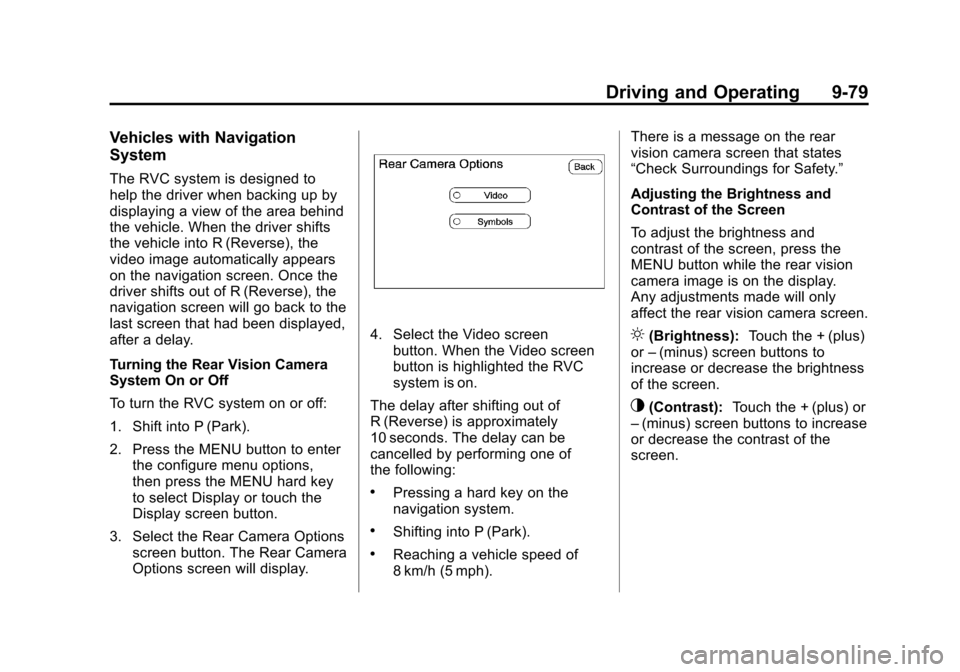
3. Select the Rear Camera Options screen button. The Rear Camera
Options screen will display.
4. Select the Video screenbutton. When the Video screen
button is highlighted the RVC
system is on.
The delay after shifting out of
R (Reverse) is approximately
10 seconds. The delay can be
cancelled by performing one of
the following:
.Pressing a hard key on the
navigation system.
.Shifting into P (Park).
.Reaching a vehicle speed of
8 km/h (5 mph). There is a message on the rear
vision camera screen that states
“Check Surroundings for Safety.”
Adjusting the Brightness and
Contrast of the Screen
To adjust the brightness and
contrast of the screen, press the
MENU button while the rear vision
camera image is on the display.
Any adjustments made will only
affect the rear vision camera screen.
](Brightness):
Touch the + (plus)
or –(minus) screen buttons to
increase or decrease the brightness
of the screen.
_(Contrast): Touch the + (plus) or
– (minus) screen buttons to increase
or decrease the contrast of the
screen.
Page 412 of 588
Black plate (118,1)Chevrolet Silverado Owner Manual - 2011
9-118 Driving and Operating
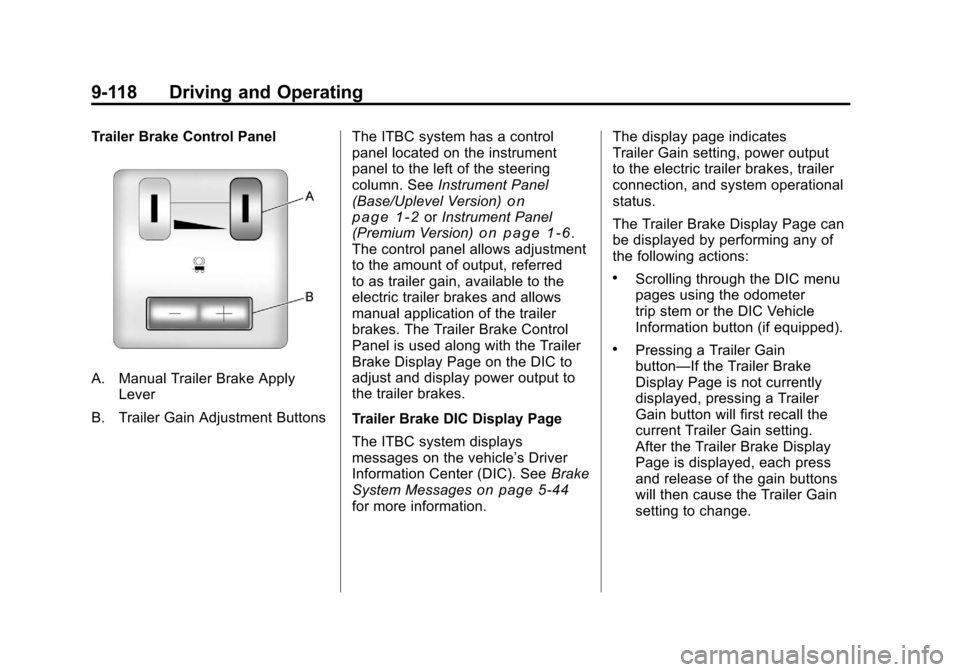
Trailer Brake Control Panel
A. Manual Trailer Brake ApplyLever
B. Trailer Gain Adjustment Buttons The ITBC system has a control
panel located on the instrument
panel to the left of the steering
column. See
Instrument Panel
(Base/Uplevel Version)
on
page 1‑2or Instrument Panel
(Premium Version)on page 1‑6.
The control panel allows adjustment
to the amount of output, referred
to as trailer gain, available to the
electric trailer brakes and allows
manual application of the trailer
brakes. The Trailer Brake Control
Panel is used along with the Trailer
Brake Display Page on the DIC to
adjust and display power output to
the trailer brakes.
Trailer Brake DIC Display Page
The ITBC system displays
messages on the vehicle’s Driver
Information Center (DIC). See Brake
System Messages
on page 5‑44for more information. The display page indicates
Trailer Gain setting, power output
to the electric trailer brakes, trailer
connection, and system operational
status.
The Trailer Brake Display Page can
be displayed by performing any of
the following actions:
.Scrolling through the DIC menu
pages using the odometer
trip stem or the DIC Vehicle
Information button (if equipped).
.Pressing a Trailer Gain
button—If the Trailer Brake
Display Page is not currently
displayed, pressing a Trailer
Gain button will first recall the
current Trailer Gain setting.
After the Trailer Brake Display
Page is displayed, each press
and release of the gain buttons
will then cause the Trailer Gain
setting to change.
Page 413 of 588
Black plate (119,1)Chevrolet Silverado Owner Manual - 2011
Driving and Operating 9-119
.Activating the Manual Trailer
Brake Apply lever.
.Connecting a trailer equipped
with electric trailer brakes.
All DIC warning and service
messages must first be
acknowledged by the driver
by pressing the odometer trip stem
or the DIC Vehicle Information
button (if equipped) before the
Trailer Brake Display Page can
be displayed and Trailer Gain
can be adjusted.
TRAILER GAIN: This setting is
displayed any time the Trailer Brake
Display Page is active. This setting
can be adjusted from 0.0 to 10.0
with either a trailer connected or
disconnected. To adjust the Trailer
Gain, press one of the Trailer Gain
adjustment buttons located on the
Trailer Brake Control Panel. Press
and hold a gain button to cause the
Trailer Gain to continuously adjust.
To turn the output to the trailer off,
adjust the Trailer Gain setting to
0.0 (zero). 0.0 (zero) gain is the factory default
setting. To properly adjust trailer
gain, see
“Trailer Gain Adjustment
Procedure” later in this section.
TRAILER OUTPUT: This is
displayed any time a trailer with
electric brakes is connected. Output
to the electric brakes is based on
the amount of vehicle braking
present and relative to the Trailer
Gain setting. Output is displayed
from 0 to 10 bars for each gain
setting.
On vehicles with Trailer Sway
Control (TSC) or Hill Start Assist
(HSA), output to the electric trailer
brakes may be displayed when the
systems are active. See Trailer
Sway Control (TSC)
on page 9‑123and Hill Start Assist (HSA)on
page 9‑70. The Trailer Output will indicate
“- - - - - -”
on the Trailer Brake
Display Page whenever the
following occur:
.No trailer is connected
.A trailer without electric brakes
is connected (no DIC message
is displayed)
.A trailer with electric brakes
has become disconnected
(a CHECK TRAILER WIRING
message will also be displayed
on the DIC)
.There is a fault present in the
wiring to the electric trailer
brakes (a CHECK TRAILER
WIRING message will also be
displayed on the DIC)
.There is a fault in the ITBC
system (a SERVICE TRAILER
BRAKE SYSTEM message will
also be displayed in the DIC)
Page 415 of 588
Black plate (121,1)Chevrolet Silverado Owner Manual - 2011
Driving and Operating 9-121
.In the Trailer Output display
on the DIC,“- - - - - -”will
disappear if there is no
error present. Connecting
a trailer without electric
brakes will not clear the
six dashed lines.
4. Adjust the Trailer Gain by using the gain adjustment (+ / -)
buttons on the Trailer Brake
Control Panel.
5. Drive the vehicle with the trailer attached on a level road surface
representative of the towing
condition and free of traffic at
about 32 to 40 km/h (20 to
25 mph) and fully apply the
Manual Trailer Brake Apply
Lever.
Adjusting trailer gain at speeds
lower than 32 to 40 km/h
(20 to 25 mph) may result
in an incorrect gain setting. 6. Adjust the Trailer Gain to just
below the point of trailer wheel
lock-up, indicated by trailer
wheel squeal or tire smoke
when a trailer wheel locks.
Trailer wheel lock-up may not
occur if towing a heavily loaded
trailer. In this case, adjust the
Trailer Gain to the highest
allowable setting for the towing
condition.
7. Re-adjust Trailer Gain any time vehicle loading, trailer loading or
road surface conditions change
or if trailer wheel lock-up is
noticed at any time while towing.
Other ITBC-Related DIC Messages
In addition to displaying TRAILER
GAIN and TRAILER OUTPUT
through the DIC, trailer connection
and ITBC system status are
displayed on the DIC.
TRAILER CONNECTED: This
message will be briefly displayed
when a trailer with electric brakes
is first connected to the vehicle. This message will automatically turn
off in about 10 seconds. The driver
can also acknowledge this message
before it automatically turns off.
CHECK TRAILER WIRING: This
message will be displayed if:
1. The ITBC system first
determines connection to a
trailer with electric brakes and
then the trailer harness becomes
disconnected from the vehicle.
If the disconnect occurs while
the vehicle is stationary, this
message will automatically
turn off in about 30 seconds.
This message will also turn off if
the driver acknowledges this
message or if the trailer harness
is re-connected.
If the disconnect occurs while
the vehicle is moving, this
message will continue until
the ignition is turned off.
This message will also turn
off if the driver acknowledges
this message or if the trailer
harness is re-connected.
Page 432 of 588
Black plate (10,1)Chevrolet Silverado Owner Manual - 2011
10-10 Vehicle Care
How to Reset the Engine Oil
Life System
The Engine Oil Life System
calculates when to change the
engine oil and filter based on
vehicle use. Whenever the oil is
changed, reset the system so it
can calculate when the next oil
change is required. If a situation
occurs where the oil is changed
prior to a CHANGE ENGINE OIL
SOON message coming on, reset
the system.
Always reset the engine oil life to
100% after every oil change. It will
not reset itself. To reset the Engine
Oil Life System on most vehicles:
1. Display the OIL LIFEREMAINING on the DIC.
If the vehicle does not have
DIC buttons, the vehicle must
be in P (Park) to access this
display. See Driver Information
Center (DIC) on page 5‑34. 2. Press and hold the SET/RESET
button on the DIC, or the trip
odometer reset stem if the
vehicle does not have DIC
buttons, for more than
five seconds. The oil life
will change to 100%.
On all vehicles, the Engine Oil Life
System can be reset as follows:
1. Turn the ignition to ON/RUN with the engine off.
2. Fully press the accelerator pedal slowly three times within
five seconds.
3. Display the OIL LIFE REMAINING on the DIC. If the
display shows 100%, the system
is reset. See Driver Information
Center (DIC) on page 5‑34.
If the vehicle has a CHANGE
ENGINE OIL SOON message
and it comes back on when the
vehicle is started and/or the OIL
LIFE REMAINING is near 0%, the
Engine Oil Life System has not
reset. Repeat the procedure.
What to Do with Used Oil
Used engine oil contains certain
elements that can be unhealthy for
your skin and could even cause
cancer. Do not let used oil stay on
your skin for very long. Clean your
skin and nails with soap and water,
or a good hand cleaner. Wash or
properly dispose of clothing or rags
containing used engine oil. See the
manufacturer's warnings about the
use and disposal of oil products.
Used oil can be a threat to the
environment. If you change your
own oil, be sure to drain all the oil
from the filter before disposal. Never
dispose of oil by putting it in the
trash, pouring it on the ground, into
sewers, or into streams or bodies of
water. Recycle it by taking it to a
place that collects used oil.
Page 489 of 588
Black plate (67,1)Chevrolet Silverado Owner Manual - 2011
Vehicle Care 10-67
Federal Communications
Commission (FCC) and
Industry Canada
SeeRadio Frequency Statementon
page 13‑18for information
regarding Part 15 of the Federal
Communications Commission
(FCC) rules and Industry Canada
Standards RSS-210/220/310.
Tire Pressure Monitor
Operation
This vehicle may have a Tire
Pressure Monitor System (TPMS).
The TPMS is designed to warn the
driver when a low tire pressure
condition exists. TPMS sensors are
mounted onto each tire and wheel
assembly, excluding the spare tire
and wheel assembly. The TPMS
sensors monitor the air pressure in
the vehicle's tires and transmits the
tire pressure readings to a receiver
located in the vehicle.
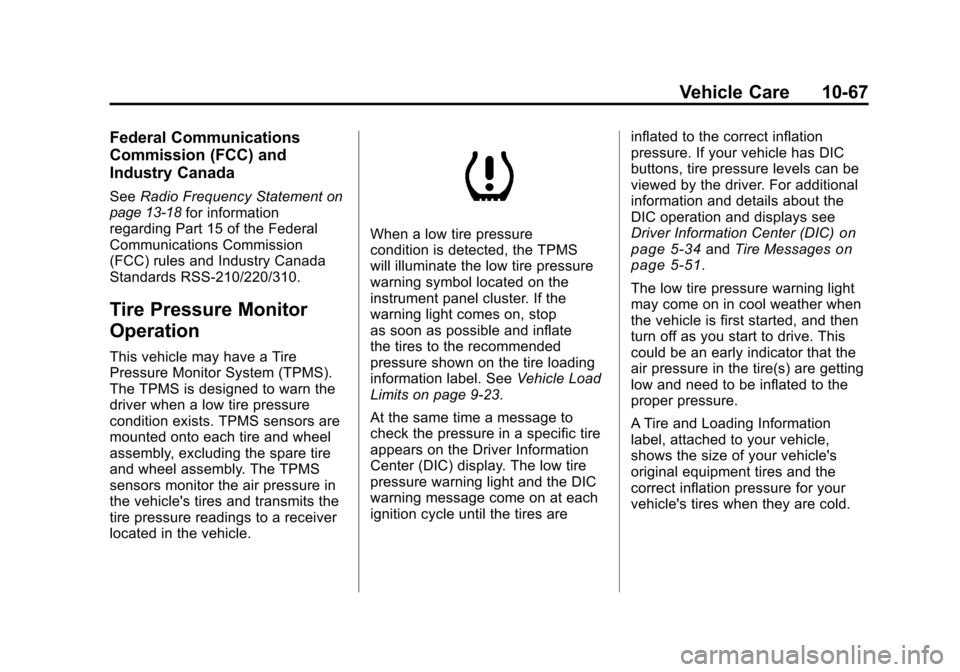
When a low tire pressure
condition is detected, the TPMS
will illuminate the low tire pressure
warning symbol located on the
instrument panel cluster. If the
warning light comes on, stop
as soon as possible and inflate
the tires to the recommended
pressure shown on the tire loading
information label. See Vehicle Load
Limits on page 9‑23.
At the same time a message to
check the pressure in a specific tire
appears on the Driver Information
Center (DIC) display. The low tire
pressure warning light and the DIC
warning message come on at each
ignition cycle until the tires are inflated to the correct inflation
pressure. If your vehicle has DIC
buttons, tire pressure levels can be
viewed by the driver. For additional
information and details about the
DIC operation and displays see
Driver Information Center (DIC)on
page 5‑34and Tire Messageson
page 5‑51.
The low tire pressure warning light
may come on in cool weather when
the vehicle is first started, and then
turn off as you start to drive. This
could be an early indicator that the
air pressure in the tire(s) are getting
low and need to be inflated to the
proper pressure.
A Tire and Loading Information
label, attached to your vehicle,
shows the size of your vehicle's
original equipment tires and the
correct inflation pressure for your
vehicle's tires when they are cold.
Page 492 of 588

Black plate (70,1)Chevrolet Silverado Owner Manual - 2011
10-70 Vehicle Care
3. Press the Remote KeylessEntry (RKE) transmitter's LOCK
and UNLOCK buttons at the
same time for approximately
five seconds. The horn sounds
twice to signal the receiver
is in relearn mode and TIRE
LEARNING ACTIVE message
displays on the DIC screen.
If your vehicle does not
have RKE, press the Driver
Information Center (DIC) vehicle
information button until the
PRESS
VTO RELEARN TIRE
POSITIONS message displays.
The horn sounds twice to signal
the receiver is in relearn mode
and TIRE LEARNING ACTIVE
message displays on the DIC
screen.
If your vehicle does not have
RKE or DIC buttons, press
the trip odometer reset stem
located on the instrument panel
cluster until the PRESS
VTO RELEARN TIRE POSITIONS
message displays. The horn
sounds twice to signal the
receiver is in relearn mode
and TIRE LEARNING ACTIVE
message displays on the DIC
screen.
4. Start with the driver side front tire.
5. Remove the valve cap from the valve cap stem. Activate the
TPMS sensor by increasing
or decreasing the tire's air
pressure for five seconds,
or until a horn chirp sounds.
The horn chirp, which may take
up to 30 seconds to sound,
confirms that the sensor
identification code has been
matched to this tire and wheel
position.
6. Proceed to the passenger side front tire, and repeat the
procedure in Step 5. 7. Proceed to the passenger
side rear tire, and repeat the
procedure in Step 5.
8. Proceed to the driver side rear tire, and repeat the procedure in
Step 5. The horn sounds two
times to indicate the sensor
identification code has been
matched to the driver side rear
tire, and that the TPMS sensor
matching process is no longer
active. The TIRE LEARNING
ACTIVE message on the DIC
display screen goes off.
9. Turn the ignition switch to LOCK/OFF.
10. Set all four tires to the recommended air pressure
level as indicated on the Tire
and Loading Information label.
11. Put the valve caps back on the valve stems.
Page 533 of 588
Black plate (111,1)Chevrolet Silverado Owner Manual - 2011
Vehicle Care 10-111
Interior Care
The vehicle's interior will continue to
look its best if it is cleaned often.
Although not always visible,
dust and dirt can accumulate
on the upholstery. Dirt can damage
carpet, fabric, leather, and plastic
surfaces. Regular vacuuming is
recommended to remove particles
from the upholstery. It is important to
keep the upholstery from becoming
and remaining heavily soiled. Soils
should be removed as quickly as
possible. The vehicle's interior may
experience extremes of heat that
could cause stains to set rapidly.Lighter colored interiors may require
more frequent cleaning. Use care
because newspapers and garments
that transfer color to home
furnishings may also transfer
color to the vehicle's interior.
When cleaning the vehicle's interior,
only use cleaners specifically
designed for the surfaces being
cleaned. Permanent damage may
result from using cleaners on
surfaces for which they were not
intended. Use glass cleaner only
on glass. Remove any accidental
over-spray from other surfaces
immediately. To prevent over-spray,
apply cleaner directly to the
cleaning cloth.Notice:
Using abrasive cleaners
when cleaning glass surfaces on
the vehicle, could scratch the
glass and/or cause damage to
the rear window defogger. When
cleaning the glass on the vehicle,
use only a soft cloth and glass
cleaner.
Many cleaners contain solvents that
may become concentrated in the
vehicle's breathing space. Before
using cleaners, read and adhere to
all safety instructions on the label.
While cleaning the vehicle's interior,
maintain adequate ventilation by
opening the vehicle's doors and
windows.
Dust may be removed from small
buttons and knobs using a small
brush with soft bristles.
Products that remove odors from
the vehicle's upholstery and clean
the vehicle's glass can be obtained
from your dealer.