radio CHEVROLET SILVERADO 2011 2.G Owners Manual
[x] Cancel search | Manufacturer: CHEVROLET, Model Year: 2011, Model line: SILVERADO, Model: CHEVROLET SILVERADO 2011 2.GPages: 588, PDF Size: 7.99 MB
Page 1 of 588

Black plate (1,1)Chevrolet Silverado Owner Manual - 2011
2011 Chevrolet Silverado Owner ManualM
In Brief. . . . . . . . . . . . . . . . . . . . . . . . 1-1
Instrument Panel . . . . . . . . . . . . . . 1-2
Initial Drive Information . . . . . . . . 1-8
Vehicle Features . . . . . . . . . . . . . 1-25
Performance and Maintenance . . . . . . . . . . . . . . . . 1-32
Keys, Doors and Windows . . . 2-1
Keys and Locks . . . . . . . . . . . . . . . 2-2
Doors . . . . . . . . . . . . . . . . . . . . . . . . 2-10
Vehicle Security . . . . . . . . . . . . . . 2-12
Exterior Mirrors . . . . . . . . . . . . . . . 2-15
Interior Mirrors . . . . . . . . . . . . . . . . 2-19
Windows . . . . . . . . . . . . . . . . . . . . . 2-20
Roof . . . . . . . . . . . . . . . . . . . . . . . . . . 2-22
Seats and Restraints . . . . . . . . . 3-1
Head Restraints . . . . . . . . . . . . . . . 3-2
Front Seats . . . . . . . . . . . . . . . . . . . . 3-3
Rear Seats . . . . . . . . . . . . . . . . . . . 3-12
Safety Belts . . . . . . . . . . . . . . . . . . 3-14
Airbag System . . . . . . . . . . . . . . . . 3-31
Child Restraints . . . . . . . . . . . . . . 3-51 Storage
. . . . . . . . . . . . . . . . . . . . . . . 4-1
Storage Compartments . . . . . . . . 4-1
Instruments and Controls . . . . 5-1
Controls . . . . . . . . . . . . . . . . . . . . . . . 5-2
Warning Lights, Gauges, and Indicators . . . . . . . . . . . . . . . . . . . 5-12
Information Displays . . . . . . . . . . 5-34
Vehicle Messages . . . . . . . . . . . . 5-43
Vehicle Personalization . . . . . . . 5-53
Universal Remote System . . . . 5-61
Lighting . . . . . . . . . . . . . . . . . . . . . . . 6-1
Exterior Lighting . . . . . . . . . . . . . . . 6-1
Interior Lighting . . . . . . . . . . . . . . . . 6-7
Lighting Features . . . . . . . . . . . . . . 6-9
Infotainment System . . . . . . . . . 7-1
Introduction . . . . . . . . . . . . . . . . . . . . 7-1
Radio . . . . . . . . . . . . . . . . . . . . . . . . . . 7-8
Audio Players . . . . . . . . . . . . . . . . 7-14
Rear Seat Infotainment . . . . . . . 7-38
Phone . . . . . . . . . . . . . . . . . . . . . . . . 7-49 Climate Controls
. . . . . . . . . . . . . 8-1
Climate Control Systems . . . . . . 8-1
Air Vents . . . . . . . . . . . . . . . . . . . . . 8-11
Driving and Operating . . . . . . . . 9-1
Driving Information . . . . . . . . . . . . . 9-2
Starting and Operating . . . . . . . 9-32
Engine Exhaust . . . . . . . . . . . . . . 9-42
Automatic Transmission . . . . . . 9-43
Manual Transmission . . . . . . . . . 9-51
Drive Systems . . . . . . . . . . . . . . . . 9-53
Brakes . . . . . . . . . . . . . . . . . . . . . . . 9-67
Ride Control Systems . . . . . . . . 9-70
Cruise Control . . . . . . . . . . . . . . . . 9-73
Object Detection Systems . . . . 9-76
Fuel . . . . . . . . . . . . . . . . . . . . . . . . . . 9-83
Towing . . . . . . . . . . . . . . . . . . . . . . . 9-90
Conversions and
Add-Ons . . . . . . . . . . . . . . . . . . . 9-123
Page 7 of 588
Black plate (1,1)Chevrolet Silverado Owner Manual - 2011
In Brief 1-1
In Brief
Instrument Panel
Instrument Panel (Base/UplevelVersion) . . . . . . . . . . . . . . . . . . . . . 1-2
Instrument Panel (Premium Version) . . . . . . . . . . . . . . . . . . . . . 1-6
Initial Drive Information
Initial Drive Information . . . . . . . . 1-8
Remote Keyless Entry (RKE)System . . . . . . . . . . . . . . . . . . . . . . 1-8
Remote Vehicle Start . . . . . . . . . 1-9
Door Locks . . . . . . . . . . . . . . . . . . . 1-9
Windows . . . . . . . . . . . . . . . . . . . . . 1-10
Seat Adjustment . . . . . . . . . . . . . 1-11
Memory Features . . . . . . . . . . . . 1-13
Heated Seats . . . . . . . . . . . . . . . . 1-14
Head Restraint Adjustment . . . . . . . . . . . . . . . . . 1-15
Safety Belt . . . . . . . . . . . . . . . . . . . 1-15 Sensing System for
Passenger Airbag . . . . . . . . . . 1-15
Mirror Adjustment . . . . . . . . . . . . 1-16
Steering Wheel Adjustment . . . . . . . . . . . . . . . . . 1-17
Throttle and Brake Pedal Adjustment . . . . . . . . . . . . . . . . . 1-17
Interior Lighting . . . . . . . . . . . . . . 1-18
Exterior Lighting . . . . . . . . . . . . . 1-19
Windshield Wiper/Washer . . . . 1-19
Climate Controls . . . . . . . . . . . . . 1-20
Transmission . . . . . . . . . . . . . . . . 1-22
Four-Wheel Drive . . . . . . . . . . . . 1-23
Vehicle Features
Radio(s) . . . . . . . . . . . . . . . . . . . . . 1-25
Satellite Radio . . . . . . . . . . . . . . . 1-26
Portable Audio Devices . . . . . . 1-27
Bluetooth
®. . . . . . . . . . . . . . . . . . . 1-27
Steering Wheel Controls . . . . . 1-27
Navigation System . . . . . . . . . . . 1-28 Driver Information
Center (DIC) . . . . . . . . . . . . . . . 1-28
Cruise Control . . . . . . . . . . . . . . . 1-29
Rear Vision Camera (RVC) . . . . . . . . . . . . . 1-30
Ultrasonic Parking Assist . . . . 1-30
Power Outlets . . . . . . . . . . . . . . . 1-30
Universal Remote System . . . 1-31
Sunroof . . . . . . . . . . . . . . . . . . . . . . 1-31
Performance and Maintenance
StabiliTrak®System . . . . . . . . . 1-32
Tire Pressure Monitor . . . . . . . . 1-33
Engine Oil Life System . . . . . . 1-34
Fuel E85 (85% Ethanol) . . . . . 1-34
Driving for Better Fuel Economy . . . . . . . . . . . . . . . . . . . 1-34
Roadside Assistance Program . . . . . . . . . . . . . . . . . . . . 1-35
OnStar
®. . . . . . . . . . . . . . . . . . . . . 1-35
Page 9 of 588

Black plate (3,1)Chevrolet Silverado Owner Manual - 2011
In Brief 1-3
A.Air Vents on page 8‑11.
B. Turn and Lane-Change Signals
on page 6‑6.
Windshield Wiper/Washer
on
page 5‑5.
C. Driver Information Center (DIC) Buttons. See Driver Information
Center (DIC) on page 5‑34.
D. Hazard Warning Flashers
on
page 6‑5.
E. Instrument Cluster
on
page 5‑13.
F. Shift Lever. See Automatic
Transmission
on page 9‑43.
Tow/Haul Selector Button
(If Equipped). See Tow/Haul
Mode on page 9‑49.
Range Selection Mode (Allison
Transmission and Hydra-Matic
®
6‐Speed Button (If Equipped).
See Manual Modeon
page 9‑47. G.
AM-FM Radio on page 7‑8.
H. Instrument Panel Storage
on
page 4‑1.
I. Integrated Trailer Brake Controller (If Equipped).
See Trailer Towing
on
page 9‑94.
J. Exterior Lamp Controls
on
page 6‑1.
K. Data Link Connector (DLC). See Malfunction Indicator Lamp
on page 5‑27.
L. Hood on page 10‑5.
M. Parking Brake on page 9‑68.
N. Dome Lamps on page 6‑8.
Fog Lamps
on page 6‑6(If Equipped).
O. Cruise Control on page 9‑73. P.
Steering Wheel Adjustment
on
page 5‑2.
Q. Horn on page 5‑5.
R. Steering Wheel Controls
on
page 5‑3(If Equipped).
S. Automatic Transfer Case Control (If Equipped).
See Four-Wheel Drive
on
page 10‑32.
T. Ashtray (If Equipped). See Ashtrays
on page 5‑12andCigarette Lighteron
page 5‑11.
U. StabiliTrak
®Systemon
page 9‑70(If Equipped).
Ultrasonic Parking Assist
on
page 9‑76(If Equipped).
Pedal Adjust Button
(If Equipped). See Adjustable
Throttle and Brake Pedal
on
page 9‑32.
Exhaust Brake (If Equipped).
See "Brakes" in the Duramax
Diesel Supplement.
Page 13 of 588

Black plate (7,1)Chevrolet Silverado Owner Manual - 2011
In Brief 1-7
A.Air Vents on page 8‑11.
B. Turn and Lane-Change Signals
on page 6‑6.
Windshield Wiper/Washer
on
page 5‑5.
C. Instrument Cluster
on
page 5‑13.
D. Hazard Warning Flashers
on
page 6‑5.
E. Shift Lever. See Automatic
Transmission on page 9‑43.
F. Tow/Haul Mode
on page 9‑49(If Equipped).
G. Driver Information Center (DIC) Buttons. See Driver Information
Center (DIC) on page 5‑34.
H. AM-FM Radio on page 7‑8.
I. Exterior Lamp Controls
on
page 6‑1.
J. Integrated Trailer Brake Controller (If Equipped).
See Trailer Towing
on
page 9‑94. K.
Dome Lamps
on page 6‑8.
L. Automatic Transfer Case Control. (If Equipped).
See Four-Wheel Drive
on
page 10‑32.
M. Data Link Connector (DLC). See Malfunction Indicator Lamp
on page 5‑27.
N. Hood on page 10‑5.
O. Parking Brake on page 9‑68.
P. Cruise Control on page 9‑73.
Q. Steering Wheel Adjustment
on
page 5‑2.
R. Horn on page 5‑5.
S. Steering Wheel Controls
on
page 5‑3.
T. Climate Control Systems (with
Air Conditioning)
on page 8‑1orClimate Control Systems
(with Heater Only)on
page 8‑4(If equipped).
Dual Automatic Climate
Control System
on page 8‑5(If Equipped). U.
Power Outlets on page 5‑10.
Cigarette Lighter (If Equipped).
See Ashtrays
on page 5‑12andCigarette Lighteron
page 5‑11.
V. StabiliTrak
®Systemon
page 9‑70(If Equipped).
Pedal Adjust Button
(If Equipped). See Adjustable
Throttle and Brake Pedal
on
page 9‑32.
Ultrasonic Parking Assist
on
page 9‑76(If Equipped).
Exhaust Brake (If Equipped).
See "Brakes" in the Duramax
Diesel Supplement.
W. Passenger Airbag Off Control (If Equipped). See Airbag
On-Off Switch on page 3‑39.
X. Glove Box on page 4‑1.
Page 31 of 588
Black plate (25,1)Chevrolet Silverado Owner Manual - 2011
In Brief 1-25
Vehicle Features
Radio(s)
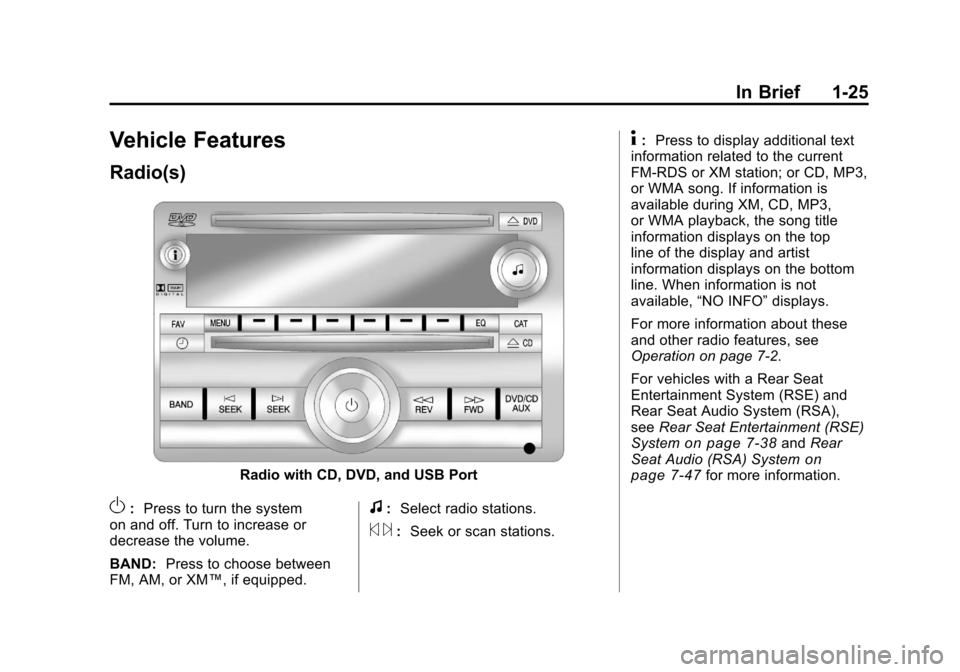
Radio with CD, DVD, and USB Port
O:Press to turn the system
on and off. Turn to increase or
decrease the volume.
BAND: Press to choose between
FM, AM, or XM™, if equipped.f: Select radio stations.
© ¨:Seek or scan stations.
4: Press to display additional text
information related to the current
FM-RDS or XM station; or CD, MP3,
or WMA song. If information is
available during XM, CD, MP3,
or WMA playback, the song title
information displays on the top
line of the display and artist
information displays on the bottom
line. When information is not
available, “NO INFO” displays.
For more information about these
and other radio features, see
Operation on page 7‑2.
For vehicles with a Rear Seat
Entertainment System (RSE) and
Rear Seat Audio System (RSA),
see Rear Seat Entertainment (RSE)
System
on page 7‑38and Rear
Seat Audio (RSA) Systemon
page 7‑47for more information.
Page 32 of 588
Black plate (26,1)Chevrolet Silverado Owner Manual - 2011
1-26 In Brief
Storing Radio Stations
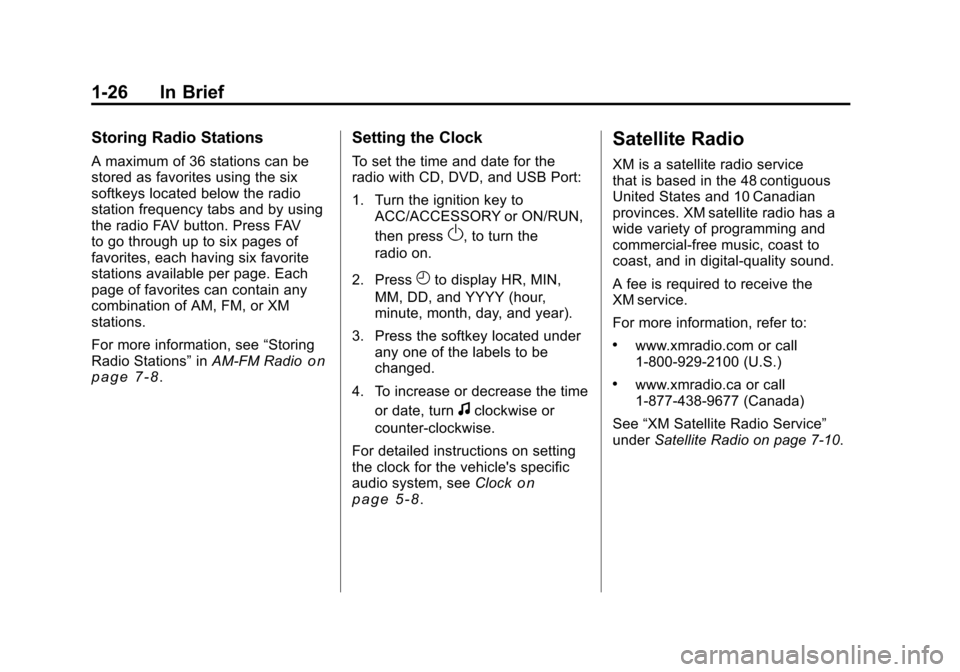
A maximum of 36 stations can be
stored as favorites using the six
softkeys located below the radio
station frequency tabs and by using
the radio FAV button. Press FAV
to go through up to six pages of
favorites, each having six favorite
stations available per page. Each
page of favorites can contain any
combination of AM, FM, or XM
stations.
For more information, see“Storing
Radio Stations” inAM-FM Radio
on
page 7‑8.
Setting the Clock
To set the time and date for the
radio with CD, DVD, and USB Port:
1. Turn the ignition key to
ACC/ACCESSORY or ON/RUN,
then press
O, to turn the
radio on.
2. Press
Hto display HR, MIN,
MM, DD, and YYYY (hour,
minute, month, day, and year).
3. Press the softkey located under any one of the labels to be
changed.
4. To increase or decrease the time or date, turn
fclockwise or
counter‐clockwise.
For detailed instructions on setting
the clock for the vehicle's specific
audio system, see Clock
on
page 5‑8.
Satellite Radio
XM is a satellite radio service
that is based in the 48 contiguous
United States and 10 Canadian
provinces. XM satellite radio has a
wide variety of programming and
commercial-free music, coast to
coast, and in digital-quality sound.
A fee is required to receive the
XM service.
For more information, refer to:
.www.xmradio.com or call
1-800-929-2100 (U.S.)
.www.xmradio.ca or call
1-877-438-9677 (Canada)
See “XM Satellite Radio Service”
under Satellite Radio on page 7‑10.
Page 33 of 588
Black plate (27,1)Chevrolet Silverado Owner Manual - 2011
In Brief 1-27
Portable Audio Devices
This vehicle may have an auxiliary
input located on the radio faceplate
and a USB port located in the center
console or on the dashboard.
External devices such as an iPod
®,
laptop computer, MP3 player, CD
changer, or USB storage device.
can be connected to the auxiliary
port using a 3.5 mm (1/8 in) input
cable or the USB port depending
on the audio system.
See “Using the Auxiliary Input Jack”
and “Using the USB Port” in
Auxiliary Devices on page 7‑33.
Bluetooth®
For vehicles with a Bluetooth
system, it allows users with a
Bluetooth‐enabled cell phone to
make and receive hands-free calls
using the vehicle’ s audio system
and controls. The Bluetooth‐enabled cell phone
must be paired with the Bluetooth
system before it can be used in the
vehicle. Not all phones will support
all functions. For more information,
visit www.gm.com/bluetooth.
For more information, see
Bluetooth
on page 7‑49.
Steering Wheel Controls
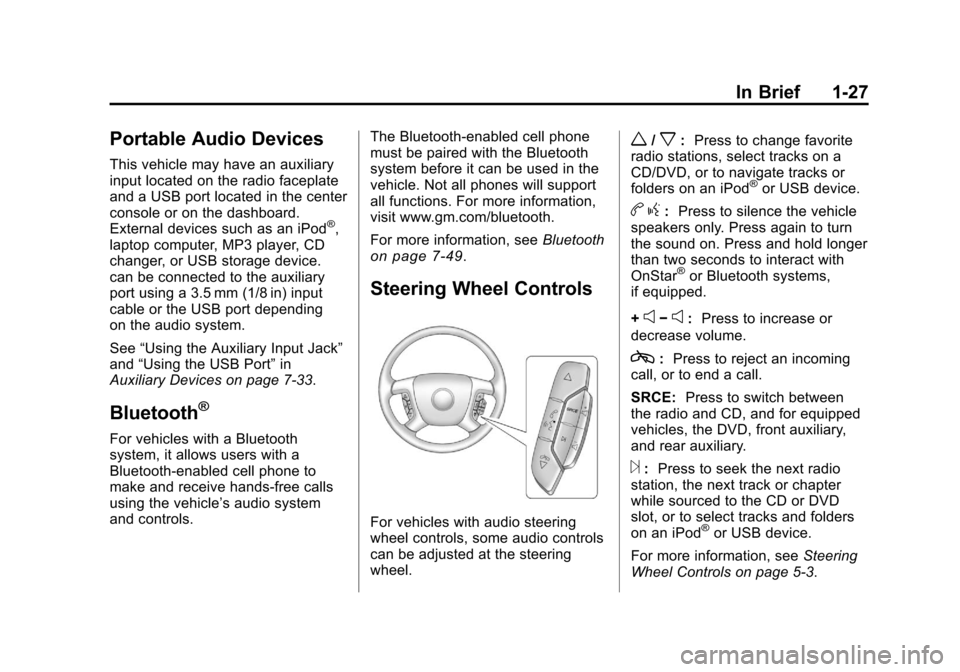
For vehicles with audio steering
wheel controls, some audio controls
can be adjusted at the steering
wheel.
w/x:Press to change favorite
radio stations, select tracks on a
CD/DVD, or to navigate tracks or
folders on an iPod
®or USB device.
b g: Press to silence the vehicle
speakers only. Press again to turn
the sound on. Press and hold longer
than two seconds to interact with
OnStar
®or Bluetooth systems,
if equipped.
+
e−e: Press to increase or
decrease volume.
c: Press to reject an incoming
call, or to end a call.
SRCE: Press to switch between
the radio and CD, and for equipped
vehicles, the DVD, front auxiliary,
and rear auxiliary.
¨: Press to seek the next radio
station, the next track or chapter
while sourced to the CD or DVD
slot, or to select tracks and folders
on an iPod
®or USB device.
For more information, see Steering
Wheel Controls on page 5‑3.
Page 36 of 588
Black plate (30,1)Chevrolet Silverado Owner Manual - 2011
1-30 In Brief
Rear Vision
Camera (RVC)
The rear vision camera displays a
view of the area behind the vehicle
when the vehicle is shifted into
R (Reverse). This is displayed on
the inside rearview mirror or the
navigation screen, if equipped.
To clean the camera lens, located
in the bezel for the tailgate handle,
rinse it with water and wipe it with a
soft cloth.
For more information, seeRear
Vision Camera (RVC) on page 9‑78.
Ultrasonic Parking Assist
Ultrasonic Rear Parking
Assist (URPA) uses sensors
on the rear bumper to detect
objects while parking the vehicle.
URPA comes on automatically
when the shift lever is moved into
R (Reverse) and operates at speeds
less than 8 km/h (5 mph). URPA
uses audio beeps to provide
distance and system information.
Keep the sensors on the vehicle's
rear bumper clean to ensure proper
operation.
The system can be disabled by
pressing the rear park aid disable
button located next to the radio.
See Ultrasonic Parking Assist
on
page 9‑76for more information.
Power Outlets
Accessory power outlets can be
used to plug in electrical equipment,
such as a cell phone, MP3
player, etc. The vehicle may have two
accessory power outlets located
below the climate control system,
or may have one accessory power
outlet and one cigarette lighter.
The cigarette lighter is designed to
fit only in the receptacle closest to
the driver.
There may be another accessory
power outlet in the rear cargo area.
If the vehicle has a floor console,
there is an accessory power outlet
inside the storage bin and one on
the rear of the floor console.
The accessory power outlets are
powered, even when the ignition is
in LOCK/OFF. Continuing to use
power outlets while the ignition is in
LOCK/OFF may cause the vehicle's
battery to run down.
See
Power Outlets on page 5‑10.
Page 43 of 588
Black plate (37,1)Chevrolet Silverado Owner Manual - 2011
In Brief 1-37
OnStar Steering Wheel
Controls
This vehicle may have a Talk/Mute
button that can be used to interact
with OnStar Hands-Free calling.
SeeSteering Wheel Controls
on
page 5‑3for more information.
On some vehicles, the mute button
can be used to dial numbers into
voice mail systems, or to dial phone
extensions. See the OnStar Owner's
Guide for more information.
Your Responsibility
Increase the volume of the radio if
the OnStar advisor cannot be heard.
If the light next to the OnStar
buttons is red, the system may
not be functioning properly. Push
the
Qbutton and request a vehicle
diagnostic. If the light appears clear
(no light appears), your OnStar
subscription has expired and all
services have been deactivated.
Push the
Qbutton to confirm that
the OnStar equipment is active.
Page 47 of 588
Black plate (3,1)Chevrolet Silverado Owner Manual - 2011
Keys, Doors and Windows 2-3
Remote Keyless Entry
(RKE) System
SeeRadio Frequency Statementon
page 13‑18for information
regarding Part 15 of the Federal
Communications Commission (FCC)
rules and Industry Canada
Standards RSS-210/220/310.
If there is a decrease in the RKE
operating range:
.Check the distance.
The transmitter may be
too far from the vehicle.
.Check the location. Other
vehicles or objects may be
blocking the signal.
.Check the transmitter's battery.
See “Battery Replacement” later
in this section.
.If the transmitter is still not
working correctly, see your
dealer or a qualified technician
for service.
Remote Keyless Entry
(RKE) System Operation
The Remote Keyless Entry (RKE)
transmitter functions work up to
60 m (195 ft) away from the vehicle.
There are other conditions which
can affect the performance of the
transmitter. See Remote Keyless
Entry (RKE) System on page 2‑3.
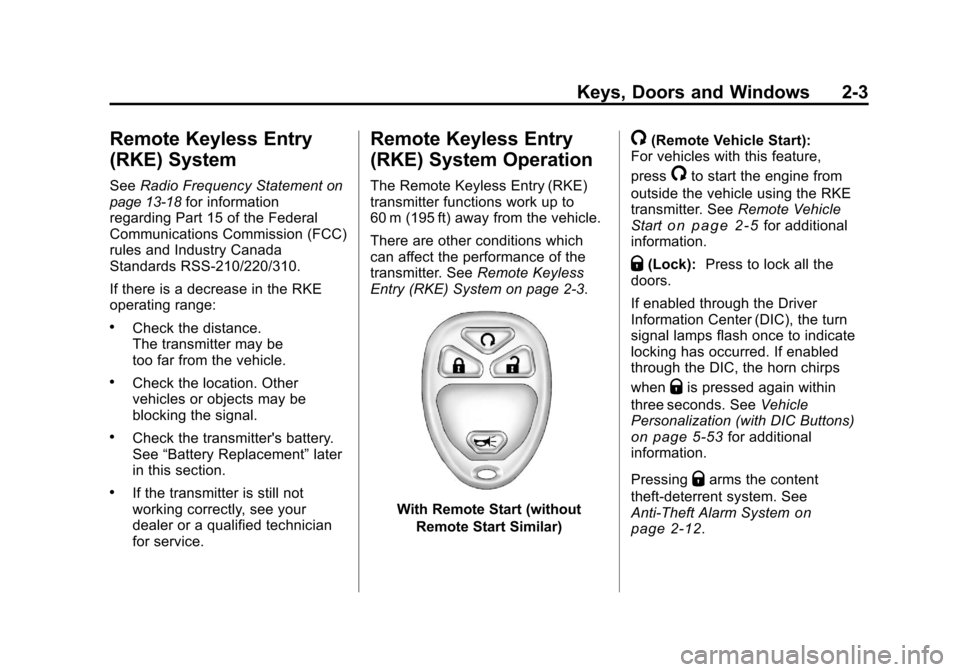
With Remote Start (without
Remote Start Similar)
/(Remote Vehicle Start):
For vehicles with this feature,
press
/to start the engine from
outside the vehicle using the RKE
transmitter. See Remote Vehicle
Start
on page 2‑5for additional
information.
Q(Lock): Press to lock all the
doors.
If enabled through the Driver
Information Center (DIC), the turn
signal lamps flash once to indicate
locking has occurred. If enabled
through the DIC, the horn chirps
when
Qis pressed again within
three seconds. See Vehicle
Personalization (with DIC Buttons)
on page 5‑53for additional
information.
Pressing
Qarms the content
theft‐deterrent system. See
Anti-Theft Alarm System
on
page 2‑12.