change wheel CHEVROLET SILVERADO 2012 2.G User Guide
[x] Cancel search | Manufacturer: CHEVROLET, Model Year: 2012, Model line: SILVERADO, Model: CHEVROLET SILVERADO 2012 2.GPages: 584, PDF Size: 8.03 MB
Page 292 of 584
Black plate (6,1)Chevrolet Silverado Owner Manual - 2012
9-6 Driving and Operating
Defensive drivers avoid most skids
by taking reasonable care suited to
existing conditions, and by not
overdriving those conditions.
But skids are always possible.
If the vehicle starts to slide, follow
these suggestions:
.Ease your foot off the
accelerator pedal and quickly
steer the way you want the
vehicle to go. The vehicle may
straighten out. Be ready for a
second skid if it occurs.
.Slow down and adjust your
driving according to weather
conditions. Stopping distance
can be longer and vehicle
control can be affected when
traction is reduced by water,
snow, ice, gravel, or other
material on the road. Learn to
recognize warning clues—such
as enough water, ice, or packed
snow on the road to make a
mirrored surface —and slow
down when you have any doubt.
.Try to avoid sudden steering,
acceleration, or braking,
including reducing vehicle
speed by shifting to a lower
gear. Any sudden changes
could cause the tires to slide.
Remember: Antilock brakes help
avoid only the braking skid.
Off-Road Driving
Four-wheel-drive vehicles can be
used for off-road driving. Vehicles
without four-wheel drive and
vehicles not equipped with All
Terrain (AT) or On-Off Road (OOR)
tires must not be driven off-road
except on a level, solid surface.
To contact the tire manufacturer for
more information about the original
equipment tires, see the Limited
Warranty and Owner Assistance
Information manual. Controlling the vehicle is the key to
successful off-road driving. One of
the best ways to control the vehicle
is to control the speed.
{WARNING
When driving off-road, bouncing
and quick changes in direction
can easily throw you out of
position. This could cause you to
lose control and crash. You and
your passengers should always
wear safety belts.
Before Driving Off-Road
.Have all necessary maintenance
and service work completed.
.Fuel the vehicle, fill fluid levels,
and check inflation pressure in
all tires, including the spare,
if equipped.
Page 296 of 584
Black plate (10,1)Chevrolet Silverado Owner Manual - 2012
9-10 Driving and Operating
3. If the vehicle cannot be restartedafter stalling, set the parking
brake, shift an automatic
transmission into P (Park) or a
manual transmission into
1 (First), and turn the vehicle off.
3.1. Leave the vehicle and
seek help.
3.2. Stay clear of the path the vehicle would take if it
rolled downhill.
.Avoid turns that take the vehicle
across the incline of the hill.
A hill that can be driven straight
up or down might be too steep to
drive across. Driving across an
incline puts more weight on the
downhill wheels which could
cause a downhill slide or a
rollover.
.Surface conditions can be a
problem. Loose gravel, muddy
spots, or even wet grass can
cause the tires to slip sideways,
downhill. If the vehicle slips sideways, it can hit something
that will trip it
–a rock, a rut,
etc. –and roll over.
.Hidden obstacles can make the
steepness of the incline more
severe. If a rock is driven across
with the uphill wheels, or if the
downhill wheels drop into a rut
or depression, the vehicle can tilt
even more.
.If an incline must be driven
across, and the vehicle starts to
slide, turn downhill. This should
help straighten out the vehicle
and prevent the side slipping.
{WARNING
Getting out of the vehicle on the
downhill side when stopped
across an incline is dangerous.
If the vehicle rolls over, you could
be crushed or killed. Always get
out on the uphill side of the
vehicle and stay well clear of the
rollover path.
Driving in Mud, Sand, Snow,
or Ice
Use a low gear when driving in
mud –the deeper the mud, the
lower the gear. Keep the vehicle
moving to avoid getting stuck.
Traction changes when driving on
sand. On loose sand, such as on
beaches or sand dunes, the tires
tend to sink into the sand. This
affects steering, accelerating, and
braking. Drive at a reduced speed
and avoid sharp turns or abrupt
maneuvers.
Traction is reduced on hard packed
snow and ice and it is easy to lose
control. Reduce vehicle speed
when driving on hard packed snow
and ice.
Page 308 of 584
Black plate (22,1)Chevrolet Silverado Owner Manual - 2012
9-22 Driving and Operating
Using heavier suspension
components to get added
durability might not change your
weight ratings. Ask your dealer
to help you load your vehicle the
right way.
If you put things inside your
vehicle—like suitcases,
tools, packages, or anything
else —they go as fast as the
vehicle goes. If you have to stop
or turn quickly, or if there is a
crash, they will keep going.
{WARNING
Things you put inside the
vehicle can strike and injure
people in a sudden stop or
turn, or in a crash.
.Put things in the cargo
area of the vehicle.
Try to spread the weight
evenly.
(Continued)
WARNING (Continued)
.Never stack heavier
things, like suitcases,
inside the vehicle so that
some of them are above
the tops of the seats.
.Do not leave an
unsecured child restraint
in the vehicle.
.When you carry something
inside the vehicle, secure
it whenever you can.
.Do not leave a seat folded
down unless you need to.
There is also important loading
information for off-road driving in
this manual. See “Loading Your
Vehicle for Off-Road Driving“
under Off-Road Driving on
page 9‑6. Two-Tiered Loading
Depending on the model of your
pick‐up, an upper load platform
can be created by positioning
three or four 5 cm (2 inches) by
15 cm (6 inches) wooden planks
across the width of the pickup
box. The planks must be
inserted in the pickup box
depressions.
When using this upper load
platform, be sure the load is
securely tied down to prevent it
from shifting. The load's center
of gravity should be positioned
in a zone over the rear axle.
The zone is located in the area
between the front of each wheel
well and the rear of each wheel
well. The center of gravity height
must not extend above the top
of the pickup box flareboard.
Page 328 of 584
Black plate (42,1)Chevrolet Silverado Owner Manual - 2012
9-42 Driving and Operating
Manual Mode
Range Selection Mode
(Allison®Transmission or
Hydra-Matic®6-Speed
Transmission)
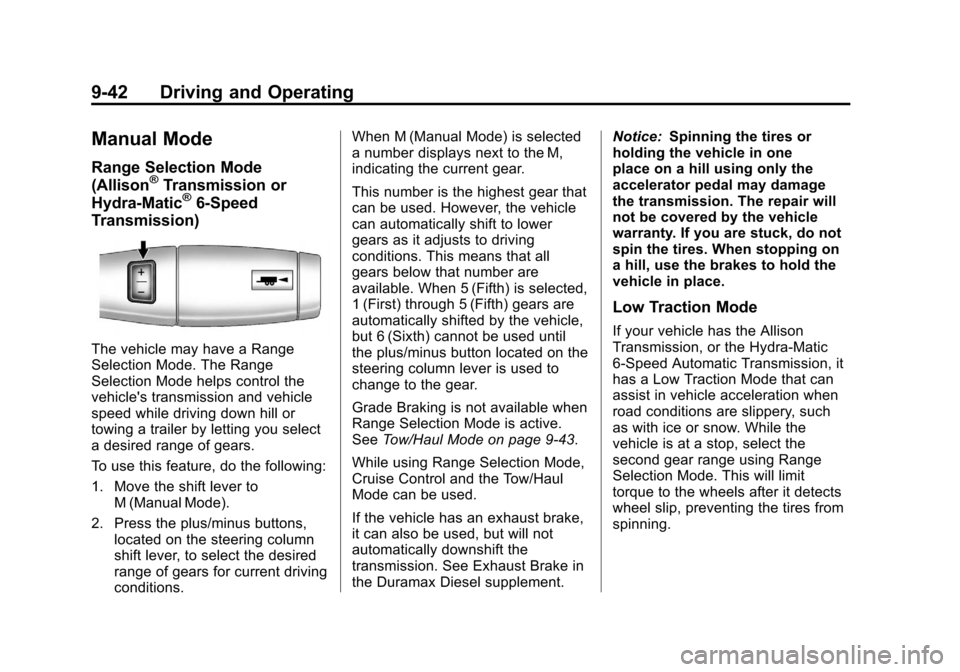
The vehicle may have a Range
Selection Mode. The Range
Selection Mode helps control the
vehicle's transmission and vehicle
speed while driving down hill or
towing a trailer by letting you select
a desired range of gears.
To use this feature, do the following:
1. Move the shift lever to
M (Manual Mode).
2. Press the plus/minus buttons, located on the steering column
shift lever, to select the desired
range of gears for current driving
conditions. When M (Manual Mode) is selected
a number displays next to the M,
indicating the current gear.
This number is the highest gear that
can be used. However, the vehicle
can automatically shift to lower
gears as it adjusts to driving
conditions. This means that all
gears below that number are
available. When 5 (Fifth) is selected,
1 (First) through 5 (Fifth) gears are
automatically shifted by the vehicle,
but 6 (Sixth) cannot be used until
the plus/minus button located on the
steering column lever is used to
change to the gear.
Grade Braking is not available when
Range Selection Mode is active.
See
Tow/Haul Mode on page 9‑43.
While using Range Selection Mode,
Cruise Control and the Tow/Haul
Mode can be used.
If the vehicle has an exhaust brake,
it can also be used, but will not
automatically downshift the
transmission. See Exhaust Brake in
the Duramax Diesel supplement. Notice:
Spinning the tires or
holding the vehicle in one
place on a hill using only the
accelerator pedal may damage
the transmission. The repair will
not be covered by the vehicle
warranty. If you are stuck, do not
spin the tires. When stopping on
a hill, use the brakes to hold the
vehicle in place.
Low Traction Mode
If your vehicle has the Allison
Transmission, or the Hydra-Matic
6-Speed Automatic Transmission, it
has a Low Traction Mode that can
assist in vehicle acceleration when
road conditions are slippery, such
as with ice or snow. While the
vehicle is at a stop, select the
second gear range using Range
Selection Mode. This will limit
torque to the wheels after it detects
wheel slip, preventing the tires from
spinning.
Page 345 of 584
Black plate (59,1)Chevrolet Silverado Owner Manual - 2012
Driving and Operating 9-59
ABS can change the brake pressure
to each wheel, as required, faster
than any driver could. This can help
the driver steer around the obstacle
while braking hard.
As the brakes are applied, the
computer keeps receiving updates
on wheel speed and controls
braking pressure accordingly.
Remember: ABS does not change
the time needed to get a foot up to
the brake pedal or always decrease
stopping distance. If you get too
close to the vehicle in front of you,
there will not be enough time to
apply the brakes if that vehicle
suddenly slows or stops. Always
leave enough room up ahead to
stop, even with ABS.Using ABS
Do not pump the brakes. Just hold
the brake pedal down firmly and let
antilock work. You might feel the
brakes vibrate or hear some noise,
but this is normal.
Braking in Emergencies
If the vehicle has ABS, it allows the
driver to steer and brake at the
same time. However, if the vehicle
does not have ABS, the first
reaction, to hit the brake pedal hard
and hold it down, might be the
wrong thing to do. The wheels can
stop rolling. Once they do, the
vehicle cannot respond to the
driver's steering. Momentum will
carry it in whatever direction it was
headed when the wheels stopped
rolling. That could be off the road,
into the very thing the driver was
trying to avoid, or into traffic.If the vehicle does not have ABS,
use a squeeze braking technique.
This gives maximum braking while
maintaining steering control. Do this
by pushing on the brake pedal with
steadily increasing pressure.
In an emergency, you will probably
want to squeeze the brakes hard
without locking the wheels. If you
hear or feel the wheels sliding, ease
off the brake pedal. This helps
retain steering control. With ABS,
it is different.
In many emergencies, steering can
help more than even the very best
braking.
Page 352 of 584
Black plate (66,1)Chevrolet Silverado Owner Manual - 2012
9-66 Driving and Operating
Cruise Control
{WARNING
Cruise control can be dangerous
where you cannot drive safely at
a steady speed. So, do not use
the cruise control on winding
roads or in heavy traffic.
Cruise control can be dangerous
on slippery roads. On such roads,
fast changes in tire traction can
cause excessive wheel slip, and
you could lose control. Do not use
cruise control on slippery roads.
For vehicles with cruise control, a
speed of about 40 km/h (25 mph) or
more can be maintained without
keeping your foot on the
accelerator. Cruise control does not
work at speeds below about 40 km/h
(25 mph). When the brakes are applied, cruise
control is turned off.
For vehicles with an Allison or
Hydra‐Matic 6‐speed automatic
transmission, see
“Grade Braking”
under Tow/Haul Mode on page 9‑43
for an explanation of how cruise
control interacts with the Range
Selection Mode, tow/haul and grade
braking systems.
For vehicles with the StabiliTrak
system that begins to limit wheel
spin while you are using cruise
control, the cruise control will
automatically disengage. See
StabiliTrak
®System on page 9‑62.
When road conditions allow the
cruise control to be safely used
again, it can be turned back on.
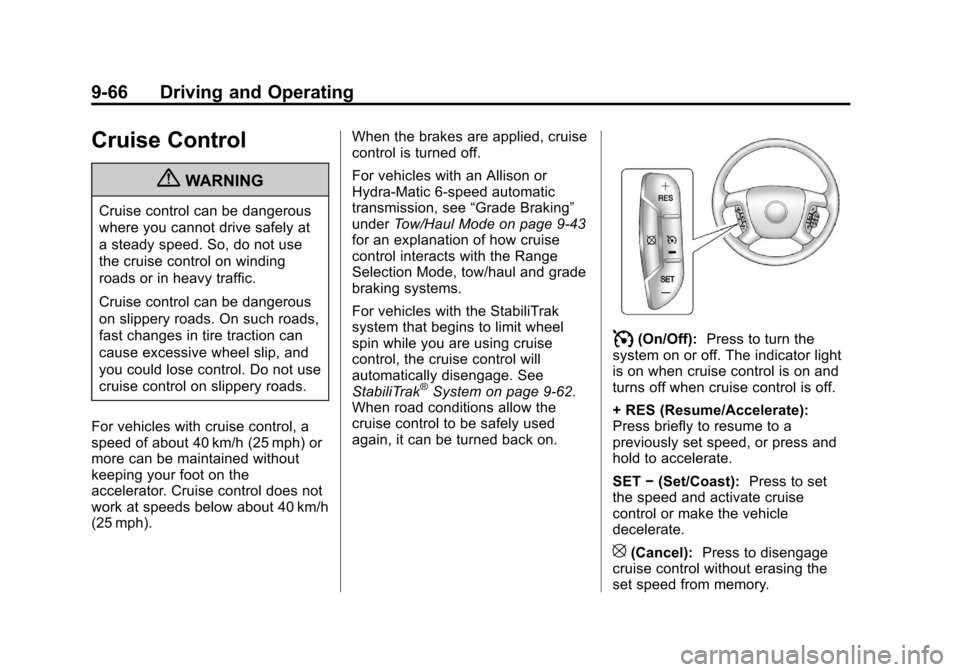
I(On/Off): Press to turn the
system on or off. The indicator light
is on when cruise control is on and
turns off when cruise control is off.
+ RES (Resume/Accelerate):
Press briefly to resume to a
previously set speed, or press and
hold to accelerate.
SET −(Set/Coast): Press to set
the speed and activate cruise
control or make the vehicle
decelerate.
[(Cancel): Press to disengage
cruise control without erasing the
set speed from memory.
Page 398 of 584
Black plate (112,1)Chevrolet Silverado Owner Manual - 2012
9-112 Driving and Operating
Trailer Gain Adjustment Procedure
Trailer Gain should be set for a
specific trailering condition and must
be adjusted any time vehicle
loading, trailer loading, or road
surface conditions change.
Setting the Trailer Gain properly is
needed for the best trailer stopping
performance. A trailer that is
over-gained may result in locked
trailer brakes. A trailer that is
under-gained may result in not
enough trailer braking. Both of these
conditions may result in poorer
stopping and stability of the vehicle
and trailer.
Use the following procedure to
correctly adjust Trailer Gain for each
towing condition:
1. Make sure the trailer brakes arein proper working condition.
2. Connect a properly loaded trailer to the vehicle and make
all necessary mechanical
and electrical connections.
See Vehicle Load Limits on
page 9‑17 for more information. 3. After the electrical connection is
made to a trailer equipped with
electric brakes:
.A TRAILER CONNECTED
message will be briefly
displayed on the DIC.
.The Trailer Brake Display
Page will appear on the
DIC showing TRAILER
GAIN and TRAILER
OUTPUT.
.In the Trailer Output display
on the DIC, “- - - - - -”will
disappear if there is no
error present. Connecting a
trailer without electric
brakes will not clear the
six dashed lines.
4. Adjust the Trailer Gain by using the gain adjustment (+ / -)
buttons on the Trailer Brake
Control Panel.
5. Drive the vehicle with the trailer attached on a level road surface
representative of the towing
condition and free of traffic at about 32 to 40 km/h (20 to
25 mph) and fully apply the
Manual Trailer Brake Apply
Lever.
Adjusting trailer gain at speeds
lower than 32 to 40 km/h
(20 to 25 mph) may result in an
incorrect gain setting.
6. Adjust the Trailer Gain to just below the point of trailer wheel
lock-up, indicated by trailer
wheel squeal or tire smoke when
a trailer wheel locks.
Trailer wheel lock-up may not
occur if towing a heavily loaded
trailer. In this case, adjust the
Trailer Gain to the highest
allowable setting for the towing
condition.
7. Re-adjust Trailer Gain any time vehicle loading, trailer loading or
road surface conditions change
or if trailer wheel lock-up is
noticed at any time while towing.
Page 435 of 584
Black plate (29,1)Chevrolet Silverado Owner Manual - 2012
Vehicle Care 10-29
{WARNING
The brake wear warning sound
means that soon the brakes will
not work well. That could lead to
a crash. When the brake wear
warning sound is heard, have the
vehicle serviced.
Notice: Continuing to drive with
worn-out brake pads could result
in costly brake repair.
Some driving conditions or climates
can cause a brake squeal when the
brakes are first applied or lightly
applied. This does not mean
something is wrong with the brakes.
Properly torqued wheel nuts are
necessary to help prevent brake
pulsation. When tires are rotated,
inspect brake pads for wear and
evenly tighten wheel nuts in the
proper sequence to torque
specifications in Capacities and
Specifications on page 12‑2. If the vehicle has rear drum brakes,
they do not have wear indicators,
but if a rear brake rubbing noise is
heard, have the rear brake linings
inspected immediately. Rear brake
drums should be removed and
inspected each time the tires are
removed for rotation or changing.
Drum brakes have an inspection
hole to inspect lining wear during
scheduled maintenance. When the
front brake pads are replaced, have
the rear brakes inspected, too.
Brake linings should always be
replaced as complete axle sets.
Brake Pedal Travel
See your dealer if the brake pedal
does not return to normal height,
or if there is a rapid increase in
pedal travel. This could be a sign
that brake service might be
required.
Brake Adjustment
Every time the brakes are applied,
with or without the vehicle moving,
the brakes adjust for wear.
Replacing Brake System Parts
The braking system on a vehicle is
complex. Its many parts have to be
of top quality and work well together
if the vehicle is to have really good
braking. The vehicle was designed
and tested with top-quality brake
parts. When parts of the braking
system are replaced, be sure to get
new, approved replacement parts.
If this is not done, the brakes might
not work properly. For example,
installing disc brake pads that are
wrong for the vehicle, can change
the balance between the front and
rear brakes
—for the worse. The
braking performance expected can
change in many other ways if the
wrong replacement brake parts are
installed.
Page 476 of 584
Black plate (70,1)Chevrolet Silverado Owner Manual - 2012
10-70 Vehicle Care
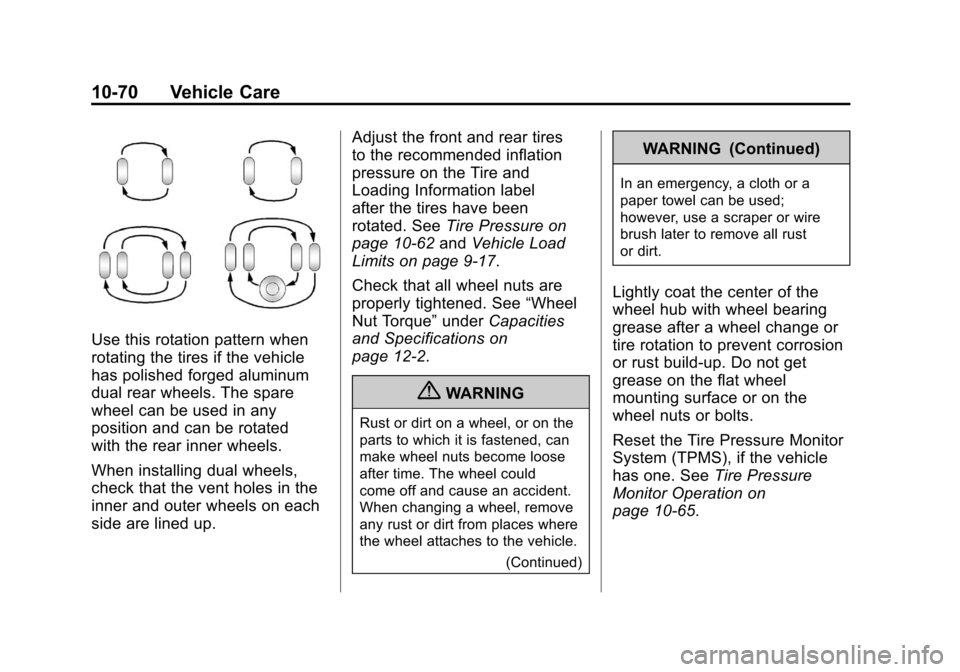
Use this rotation pattern when
rotating the tires if the vehicle
has polished forged aluminum
dual rear wheels. The spare
wheel can be used in any
position and can be rotated
with the rear inner wheels.
When installing dual wheels,
check that the vent holes in the
inner and outer wheels on each
side are lined up.Adjust the front and rear tires
to the recommended inflation
pressure on the Tire and
Loading Information label
after the tires have been
rotated. See
Tire Pressure on
page 10‑62 andVehicle Load
Limits on page 9‑17.
Check that all wheel nuts are
properly tightened. See “Wheel
Nut Torque” underCapacities
and Specifications on
page 12‑2.
{WARNING
Rust or dirt on a wheel, or on the
parts to which it is fastened, can
make wheel nuts become loose
after time. The wheel could
come off and cause an accident.
When changing a wheel, remove
any rust or dirt from places where
the wheel attaches to the vehicle.
(Continued)
WARNING (Continued)
In an emergency, a cloth or a
paper towel can be used;
however, use a scraper or wire
brush later to remove all rust
or dirt.
Lightly coat the center of the
wheel hub with wheel bearing
grease after a wheel change or
tire rotation to prevent corrosion
or rust build-up. Do not get
grease on the flat wheel
mounting surface or on the
wheel nuts or bolts.
Reset the Tire Pressure Monitor
System (TPMS), if the vehicle
has one. SeeTire Pressure
Monitor Operation on
page 10‑65.
Page 486 of 584
Black plate (80,1)Chevrolet Silverado Owner Manual - 2012
10-80 Vehicle Care
{WARNING
Changing a tire can be
dangerous. The vehicle can slip
off the jack and roll over or fall
causing injury or death. Find a
level place to change the tire.
To help prevent the vehicle from
moving:1. Set the parking brake firmly.
2. Put an automatic transmission in P (Park) or
a manual transmission in
1 (First) or R (Reverse).
3. For four-wheel-drive vehicles, be sure the
transfer case is in a drive
gear –not in N (Neutral).
4. Turn off the engine and do not restart while the
vehicle is raised.
(Continued)
WARNING (Continued)
5. Do not allow passengers toremain in the vehicle.
6. Place wheel blocks on both sides of the tire at the
opposite corner of the tire
being changed.
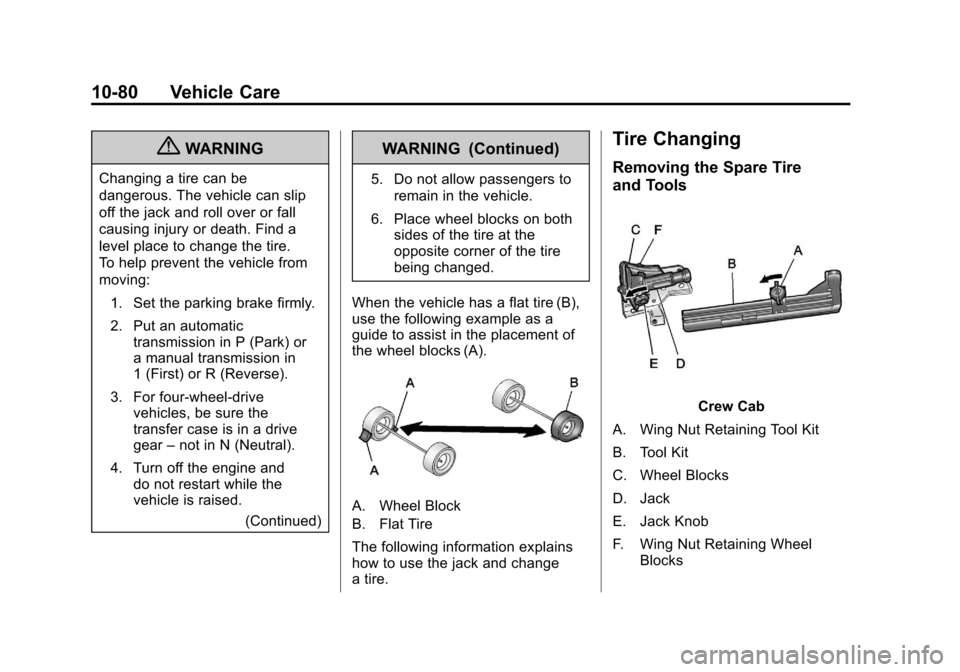
When the vehicle has a flat tire (B),
use the following example as a
guide to assist in the placement of
the wheel blocks (A).
A. Wheel Block
B. Flat Tire
The following information explains
how to use the jack and change
a tire.
Tire Changing
Removing the Spare Tire
and Tools
Crew Cab
A. Wing Nut Retaining Tool Kit
B. Tool Kit
C. Wheel Blocks
D. Jack
E. Jack Knob
F. Wing Nut Retaining Wheel Blocks