center console CHEVROLET SILVERADO 2012 2.G Owners Manual
[x] Cancel search | Manufacturer: CHEVROLET, Model Year: 2012, Model line: SILVERADO, Model: CHEVROLET SILVERADO 2012 2.GPages: 584, PDF Size: 8.03 MB
Page 32 of 584
Black plate (26,1)Chevrolet Silverado Owner Manual - 2012
1-26 In Brief
Storing Radio Stations
A maximum of 36 stations can be
stored as favorites using the six
softkeys located below the radio
station frequency tabs and by using
the radio FAV button. Press FAV to
go through up to six pages of
favorites, each having six favorite
stations available per page. Each
page of favorites can contain any
combination of AM, FM, or XM
stations.
For more information, see“Storing
Radio Stations” inAM-FM Radio on
page 7‑8.
Setting the Clock
To set the time and date:
1. Turn the ignition key to ACC/ACCESSORY or
ON/RUN, then press
O,
to turn the radio on.
2. Press
Hto display HR, MIN,
MM, DD, and YYYY (hour,
minute, month, day, and year).
3. Press the softkey located under any one of the labels to be
changed.
4. To increase or decrease the time or date, turn
fclockwise or
counter‐clockwise.
For detailed instructions on setting
the clock for the vehicle's specific
audio system, see Clock on
page 5‑8.
Satellite Radio
XM is a satellite radio service based
in the 48 contiguous United States
and 10 Canadian provinces.
XM satellite radio has a wide
variety of programming and
commercial-free music, coast to
coast, and in digital-quality sound.
A fee is required to receive the
XM service.
For more information, refer to:
.www.xmradio.com or call
1-800-929-2100 (U.S.)
.www.xmradio.ca or call
1-877-438-9677 (Canada)
See Satellite Radio on page 7‑10.
Portable Audio Devices
This vehicle may have an auxiliary
input located on the radio faceplate
and a USB port located in the center
console or on the instrument panel.
Page 62 of 584
Black plate (20,1)Chevrolet Silverado Owner Manual - 2012
2-20 Keys, Doors, and Windows
Rear Windows
Power Sliding Rear Window
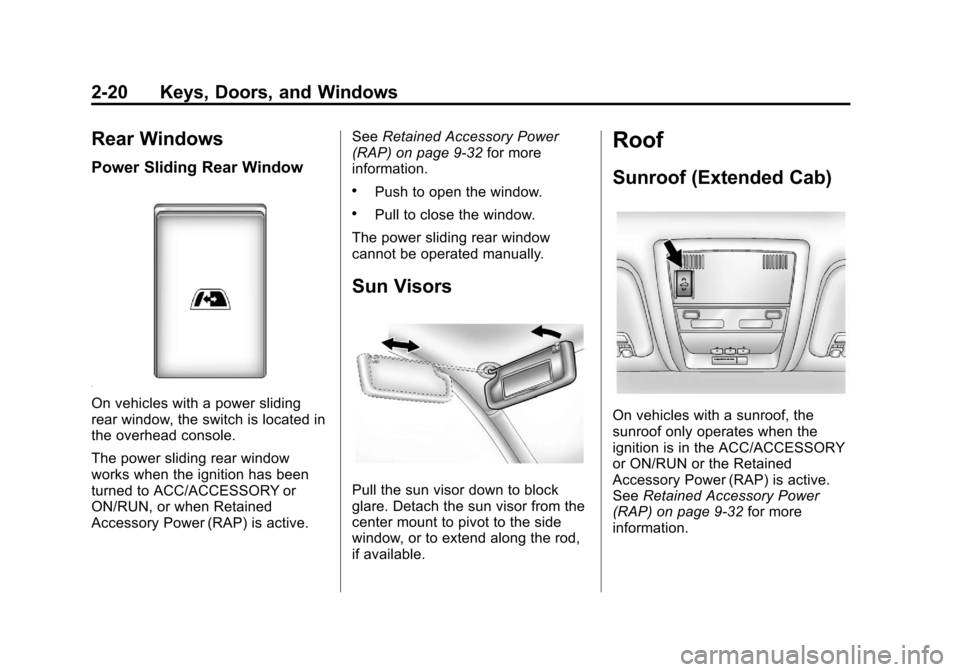
On vehicles with a power sliding
rear window, the switch is located in
the overhead console.
The power sliding rear window
works when the ignition has been
turned to ACC/ACCESSORY or
ON/RUN, or when Retained
Accessory Power (RAP) is active.See
Retained Accessory Power
(RAP) on page 9‑32 for more
information.
.Push to open the window.
.Pull to close the window.
The power sliding rear window
cannot be operated manually.
Sun Visors
Pull the sun visor down to block
glare. Detach the sun visor from the
center mount to pivot to the side
window, or to extend along the rod,
if available.
Roof
Sunroof (Extended Cab)
On vehicles with a sunroof, the
sunroof only operates when the
ignition is in the ACC/ACCESSORY
or ON/RUN or the Retained
Accessory Power (RAP) is active.
See Retained Accessory Power
(RAP) on page 9‑32 for more
information.
Page 137 of 584
Black plate (1,1)Chevrolet Silverado Owner Manual - 2012
Storage 4-1
Storage
Storage Compartments
Instrument Panel Storage . . . . . 4-1
Glove Box . . . . . . . . . . . . . . . . . . . . 4-1
Cupholders . . . . . . . . . . . . . . . . . . . 4-1
Armrest Storage . . . . . . . . . . . . . . 4-1
Center Console Storage . . . . . . 4-2
Storage
Compartments
Instrument Panel Storage
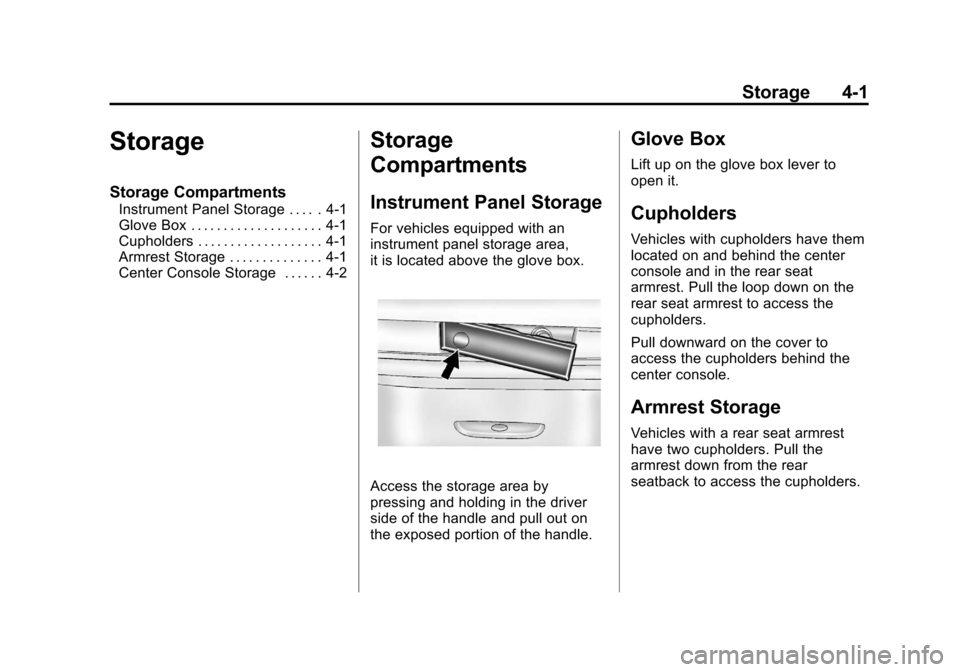
For vehicles equipped with an
instrument panel storage area,
it is located above the glove box.
Access the storage area by
pressing and holding in the driver
side of the handle and pull out on
the exposed portion of the handle.
Glove Box
Lift up on the glove box lever to
open it.
Cupholders
Vehicles with cupholders have them
located on and behind the center
console and in the rear seat
armrest. Pull the loop down on the
rear seat armrest to access the
cupholders.
Pull downward on the cover to
access the cupholders behind the
center console.
Armrest Storage
Vehicles with a rear seat armrest
have two cupholders. Pull the
armrest down from the rear
seatback to access the cupholders.
Page 138 of 584
Black plate (2,1)Chevrolet Silverado Owner Manual - 2012
4-2 Storage
Center Console Storage
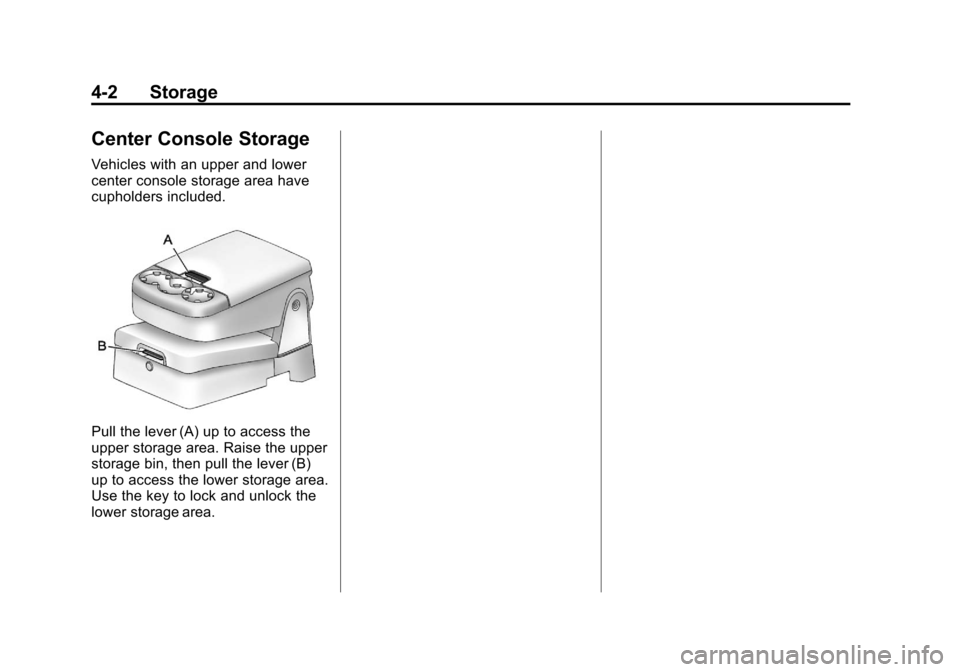
Vehicles with an upper and lower
center console storage area have
cupholders included.
Pull the lever (A) up to access the
upper storage area. Raise the upper
storage bin, then pull the lever (B)
up to access the lower storage area.
Use the key to lock and unlock the
lower storage area.
Page 158 of 584
Black plate (20,1)Chevrolet Silverado Owner Manual - 2012
5-20 Instruments and Controls
Airbag Readiness Light
The system checks the airbag's
electrical system for possible
malfunctions. If the light stays on it
indicates there is an electrical
problem. The system check
includes the airbag sensor(s), the
pretensioners, the airbag modules,
the wiring, and the crash sensing
and diagnostic module. For more
information on the airbag system,
seeAirbag System on page 3‑23.
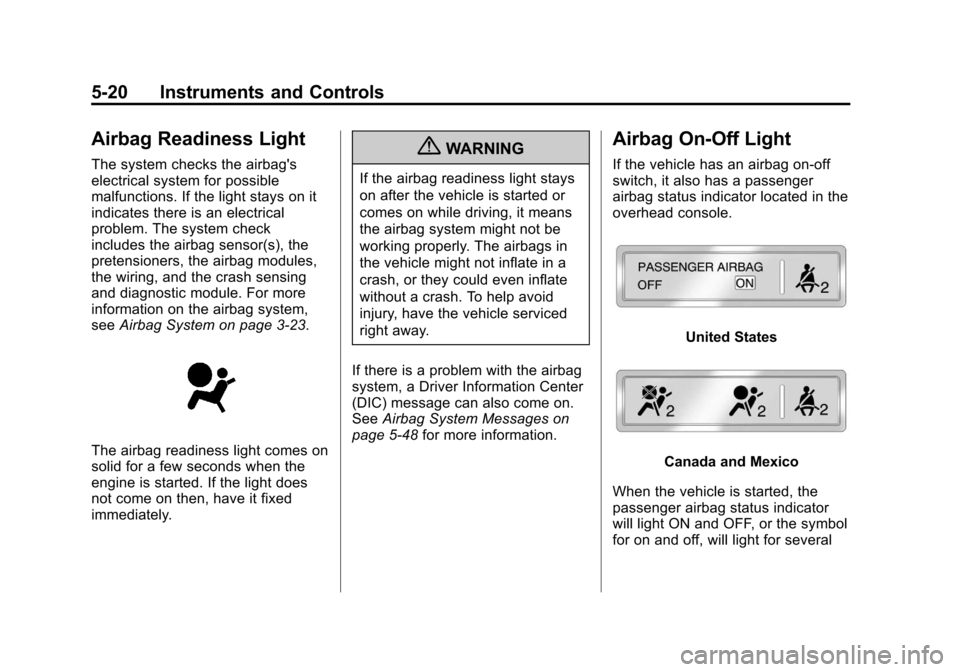
The airbag readiness light comes on
solid for a few seconds when the
engine is started. If the light does
not come on then, have it fixed
immediately.
{WARNING
If the airbag readiness light stays
on after the vehicle is started or
comes on while driving, it means
the airbag system might not be
working properly. The airbags in
the vehicle might not inflate in a
crash, or they could even inflate
without a crash. To help avoid
injury, have the vehicle serviced
right away.
If there is a problem with the airbag
system, a Driver Information Center
(DIC) message can also come on.
See Airbag System Messages on
page 5‑48 for more information.
Airbag On-Off Light
If the vehicle has an airbag on-off
switch, it also has a passenger
airbag status indicator located in the
overhead console.
United States
Canada and Mexico
When the vehicle is started, the
passenger airbag status indicator
will light ON and OFF, or the symbol
for on and off, will light for several
Page 211 of 584
Black plate (7,1)Chevrolet Silverado Owner Manual - 2012
Lighting 6-7
#(Fog Lamps):Press to turn the
fog lamps on or off. A light will come
on in the instrument panel cluster.
When the fog lamps are turned on,
the parking lamps automatically
turn on.
When the headlamps are changed
to high beam, the fog lamps also go
off. When the high-beam headlamps
are turned off, the fog lamps will
come on again.
Some localities have laws that
require the headlamps to be on with
the fog lamps.Auxiliary
Roof-Mounted Lamp
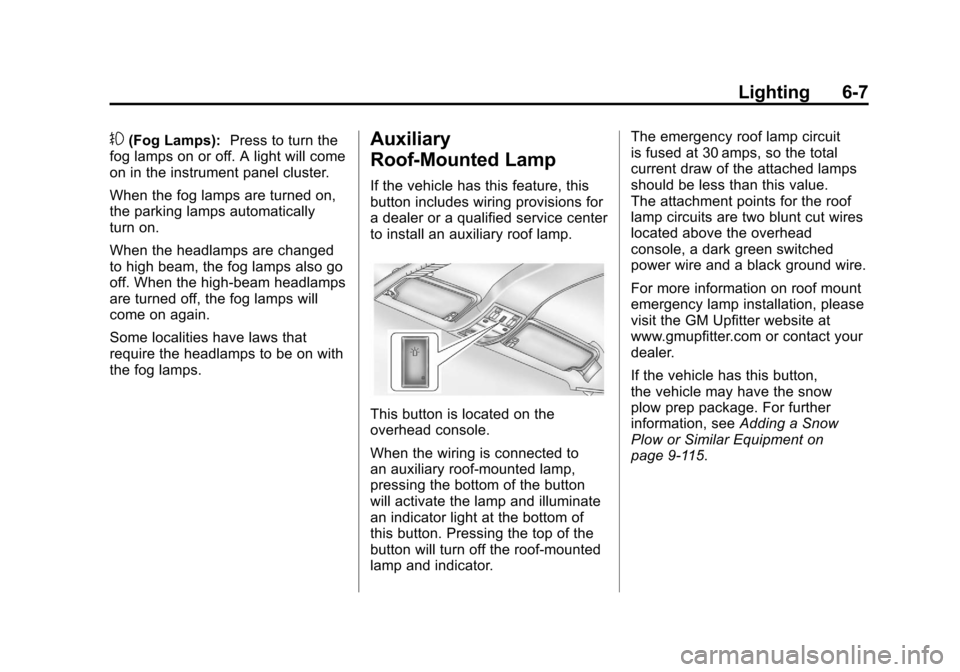
If the vehicle has this feature, this
button includes wiring provisions for
a dealer or a qualified service center
to install an auxiliary roof lamp.
This button is located on the
overhead console.
When the wiring is connected to
an auxiliary roof‐mounted lamp,
pressing the bottom of the button
will activate the lamp and illuminate
an indicator light at the bottom of
this button. Pressing the top of the
button will turn off the roof‐mounted
lamp and indicator. The emergency roof lamp circuit
is fused at 30 amps, so the total
current draw of the attached lamps
should be less than this value.
The attachment points for the roof
lamp circuits are two blunt cut wires
located above the overhead
console, a dark green switched
power wire and a black ground wire.
For more information on roof mount
emergency lamp installation, please
visit the GM Upfitter website at
www.gmupfitter.com or contact your
dealer.
If the vehicle has this button,
the vehicle may have the snow
plow prep package. For further
information, see
Adding a Snow
Plow or Similar Equipment on
page 9‑115.
Page 213 of 584
Black plate (9,1)Chevrolet Silverado Owner Manual - 2012
Lighting 6-9
Reading Lamps
For vehicles with reading lamps,
they are located on the overhead
console.
To turn on the reading lamps, press
the button located next to each
lamp. To turn them off, press the
button again.
The vehicle may also have reading
lamps in other locations. To turn the
lamps on or off, press the button
located next to the lamp.
If the vehicle has a DVD Rear Seat
Entertainment (RSE) system, press
the lamp lenses to turn the lamps
on or off.
The lamps are fixed and cannot be
adjusted.
Lighting Features
Entry Lighting
The vehicle has an illuminated
entry feature.
When the doors are opened, the
dome lamps will come on if the
dome override button is in the
extended position. If the dome
override button is pressed in, the
lamps will not come on.
Exit Lighting
The interior lamps come on when
the key is removed from the ignition.
They turn off automatically in
20 seconds. The lights do not come
on if the dome override button is
pressed in.
Battery Load
Management
The vehicle has Electric Power
Management (EPM) that estimates
the battery's temperature and state
of charge. It then adjusts the voltage
for best performance and extended
life of the battery.
When the battery's state of charge
is low, the voltage is raised slightly
to quickly bring the charge back up.
When the state of charge is high,
the voltage is lowered slightly to
prevent overcharging. If the vehicle
has a voltmeter gauge or a voltage
display on the Driver Information
Center (DIC), you may see the
voltage move up or down. This is
normal. If there is a problem,
an alert will be displayed.
Page 250 of 584
Black plate (36,1)Chevrolet Silverado Owner Manual - 2012
7-36 Infotainment System
USB Support
The USB connector is located on
the instrument panel or in the center
console, and uses the USB 2.0
standard.
USB‐Supported Devices
.USB flash drive
.Portable USB hard drive
.Fifth generation or later iPod
.iPod nano
.iPod touch
.iPod classic
Not all iPods and USB drives are
compatible with the USB port.
Make sure the iPod has the latest
firmware from Apple
®for proper
operation. iPod firmware can be
updated using the latest iTunes
®
application. See www.apple.com/
itunes. For help with identifying the iPod,
go to www.apple.com/support.
Radios that have a USB port can
play .mp3 and .wma files that are
stored on a USB storage device as
well as AAC files that are stored on
an iPod.
USB‐Supported File and Folder
Structure
The radio supports:
.Up to 700 folders
.Up to eight folders in depth
.Up to 65,535 files.
.Folder and file names up to
64 bytes
.Files with an .mp3 or .wma file
extension
.AAC files stored on an iPod
.FAT16
.FAT32
Connecting a USB Storage
Device or iPod®
The USB port can be used to
control an iPod or a USB storage
device.
To connect a USB storage device,
connect the device to the USB port
located in the center console or on
the instrument panel.
To connect an iPod, connect one
end of the USB cable that came
with the iPod to the iPod’s dock
connector and connect the other
end to the USB port located in the
center console or on the instrument
panel. If the vehicle is on and the
USB connection works,
“OK to
disconnect” and a GM logo may
appear on the iPod, and iPod
appears on the radio display.
The iPod music appears on the
radio’s display and begins playing.
Page 573 of 584

Black plate (3,1)Chevrolet Silverado Owner Manual - 2012
INDEX i-3
Cargo Lamp . . . . . . . . . . . . . . . . . . . . 6-8
Cautions, Danger, andWarnings . . . . . . . . . . . . . . . . . . . . . . . . iv
CD Player . . . . . . . . . . . . . . . . . . . . . 7-16
CD/DVD Player . . . . . . . . . . . . . . . . 7-23
Center Console Storage . . . . . . . . 4-2
Center High-Mounted Stoplamp (CHMSL) and
Cargo Lamp . . . . . . . . . . . . . . . . . 10-44
Center Seat . . . . . . . . . . . . . . . . . . . . 3-5
Chains, Tire . . . . . . . . . . . . . . . . . . 10-78
Charging System Light . . . . . . . . 5-23
Check Engine Light . . . . . . . . . . . . . . . . . . 5-24
IgnitionTransmission Lock . . . . . . . . 10-38
Child Restraints Infants and YoungChildren . . . . . . . . . . . . . . . . . . . . . 3-44
Lower Anchors and Tethers for Children . . . . . . . . . 3-51
Older Children . . . . . . . . . . . . . . . . 3-42
Securing . . . . . . . . . . 3-60, 3-62, 3-63
Systems . . . . . . . . . . . . . . . . . . . . . . 3-47 Cigarette Lighter . . . . . . . . . . . . . . . 5-11
Circuit Breakers . . . . . . . . . . . . . . 10-47
Cleaning
Exterior Care . . . . . . . . . . . . . . 10-102
Interior Care . . . . . . . . . . . . . . . 10-105
Climate Control Systems . . . . . . . . . . . . . . . . . . 8-1, 8-4
Air Conditioning . . . . . . . . . . 8-1, 8-4
Dual Automatic . . . . . . . . . . . . . . . . 8-5
Heating . . . . . . . . . . . . . . . . . . . 8-1, 8-4
Clock . . . . . . . . . . . . . . . . . . . . . . . . . . . 5-8
Cluster, Instrument . . . . . . . . . . . . 5-13
Clutch, Hydraulic . . . . . . . . . . . . . 10-17
Collision Damage Repair . . . . . 13-15
Compass . . . . . . . . . . . . . . . . . . . . . . . 5-6
Connections, OnStar
®. . . . . . . . . 14-4
Control of a Vehicle . . . . . . . . . . . . . 9-4
Convex Mirrors . . . . . . . . . . . . . . . . 2-14
Coolant Engine . . . . . . . . . . . . . . . . . . . . . . 10-20
Engine TemperatureGauge . . . . . . . . . . . . . . . . . . . . . . 5-17
Cooling System . . . . . . . . . . . . . . . 10-19 Engine Messages . . . . . . . . . . . . 5-44 Courtesy Transportation
Program . . . . . . . . . . . . . . . . . . . . . 13-13
Cruise Control . . . . . . . . . . . . . . . . . 9-66 Light . . . . . . . . . . . . . . . . . . . . . . . . . . 5-31
Cupholders . . . . . . . . . . . . . . . . . . . . . 4-1
Customer Assistance . . . . . . . . . . 13-6 Offices . . . . . . . . . . . . . . . . . . 13-4, 13-5
Text Telephone (TTY)
Users . . . . . . . . . . . . . . . . . . . . . . . 13-6
Customer Information Service Publications
Ordering Information . . . . . . 13-17
Customer Satisfaction Procedure . . . . . . . . . . . . . . 13-1, 13-3D
Damage Repair, Collision . . . . . 13-15
Danger, Warnings, andCautions . . . . . . . . . . . . . . . . . . . . . . . . iv
Data Recorders, Event . . . . . . . 13-20
Daytime Running Lamps (DRL) . . . . . . . . . . . . . . . . . . 6-3
Defensive Driving . . . . . . . . . . . . . . . 9-3
Delayed Locking . . . . . . . . . . . . . . . . 2-8
Page 582 of 584

Black plate (12,1)Chevrolet Silverado Owner Manual - 2012
i-12 INDEX
Start Vehicle, Remote . . . . . . . . . . 2-5
Starter Switch Check . . . . . . . . . 10-36
Starting the Engine . . . . . . . . . . . . 9-29
Starting the VehicleMesssages . . . . . . . . . . . . . . . . . . . 5-49
Steering . . . . . . . . . . . . . . . . . . . . . . . . 9-4 Fluid, Power . . . . . . . . . . . . . . . . 10-27
Wheel Adjustment . . . . . . . . . . . . . 5-2
Wheel Controls . . . . . . . . . . . . . . . . 5-3
Stoplamps and Back-up Lamps Bulb Replacement . . . . . . . . . . 10-44
Storage Areas Armrest . . . . . . . . . . . . . . . . . . . . . . . . 4-1
Center Console . . . . . . . . . . . . . . . . 4-2
Glove Box . . . . . . . . . . . . . . . . . . . . . 4-1
Instrument Panel . . . . . . . . . . . . . . 4-1
Stuck Vehicle . . . . . . . . . . . . . . . . . . 9-16
Sun Visors . . . . . . . . . . . . . . . . . . . . . 2-20
Sunroof . . . . . . . . . . . . . . . . . . 2-20, 2-22
Switches Airbag On-Off . . . . . . . . . . . . . . . . . 3-30
Symbols . . . . . . . . . . . . . . . . . . . . . . . . . . iv
System Infotainment . . . . . . . . . . . . . . . . . . . 7-1
Noise Control . . . . . . . . . . . . . . . 10-36T
Tachometer . . . . . . . . . . . . . . . . . . . . 5-14
Tailgate . . . . . . . . . . . . . . . . . . . . . . . . 2-10
Taillamps . . . . . . . . . . . . . . . . . . . . . 10-43Bulb Replacement . . . . . . . . . . 10-44
Text Telephone (TTY) Users . . . 13-6
Theft-Deterrent Systems . . . . . . . 2-12 Immobilizer . . . . . . . . . . . . . . . . . . . 2-12
Throttle, Adjustable . . . . . . . . . . . . 9-26
Time . . . . . . . . . . . . . . . . . . . . . . . . . . . . 5-8
Tires Buying New Tires . . . . . . . . . . . 10-72
Chains . . . . . . . . . . . . . . . . . . . . . . 10-78
Changing . . . . . . . . . . . . . . . . . . . 10-80
Designations . . . . . . . . . . . . . . . 10-57
Different Size . . . . . . . . . . . . . . . 10-74
Dual Rotation . . . . . . . . . . . . . . . 10-71
Full-Size Spare . . . . . . . . . . . . . 10-91
If a Tire Goes Flat . . . . . . . . . . 10-79
Inflation Monitor System . . . . 10-65
Inspection . . . . . . . . . . . . . . . . . . 10-68
Messages . . . . . . . . . . . . . . . . . . . . 5-49
Pressure . . . . . . . . . . . . . . . . . . . . 10-63 Tires (cont'd)
Pressure Light . . . . . . . . . . . . . . . . 5-29
Pressure Monitor System . . . 10-64
Rotation . . . . . . . . . . . . . . . . . . . . 10-69
Sidewall Labeling . . . . . . . . . . . 10-55
Terminology and
Definitions . . . . . . . . . . . . . . . . . 10-59
Uniform Tire Quality Grading . . . . . . . . . . . . . . . . . . . 10-74
Wheel Alignment and Tire Balance . . . . . . . . . . . . . . . . . . . 10-76
Wheel Replacement . . . . . . . . 10-77
When It Is Time for New Tires . . . . . . . . . . . . . . . . . . . . . . 10-71
Tow/Haul Mode . . . . . . . . . . . . . . . . 9-43
Tow/Haul Mode Light . . . . . . . . . . 5-28
Towing Driving Characteristics . . . . . . . . 9-82
Equipment . . . . . . . . . . . . . . . . . . 9-102
General Information . . . . . . . . . . 9-82
Recreational Vehicle . . . . . . . . 10-97
Trailer . . . . . . . . . . . . . . . . . . . . . . . . 9-86
Trailer Sway
Control (TSC) . . . . . . . . . . . . . .9-114
Vehicle . . . . . . . . . . . . . . . . . . . . . 10-97