light CHEVROLET SILVERADO 2015 3.G Owners Manual
[x] Cancel search | Manufacturer: CHEVROLET, Model Year: 2015, Model line: SILVERADO, Model: CHEVROLET SILVERADO 2015 3.GPages: 543, PDF Size: 7.01 MB
Page 292 of 543
Black plate (25,1)Chevrolet 2015i Silverado Owner Manual (GMNA-Localizing-U.S./Canada/
Mexico-8425172) - 2015 - crc - 2/9/15
Driving and Operating 9-25
Do not turn the engine off when the
vehicle is moving. This will cause a
loss of power assist in the brake
and steering systems and disable
the airbags.
If the vehicle must be shut off in an
emergency:
1. Brake using a firm and steadypressure. Do not pump the
brakes repeatedly. This may
deplete power assist, requiring
increased brake pedal force.
2. Shift the vehicle to N (Neutral). This can be done while the
vehicle is moving. After shifting
to N (Neutral), continue to firmly
apply the brakes and steer the
vehicle to a safe location.
3. Come to a complete stop. Shift to P (Park) with an automatic
transmission, or Neutral with a
manual transmission. Turn the
ignition to LOCK/OFF.
4. Set the parking brake. See Parking Brake on page 9-51.{Warning
Turning off the vehicle while
moving may cause loss of power
assist in the brake and steering
systems and disable the airbags.
While driving, only shut the
vehicle off in an emergency.
If the vehicle cannot be pulled over,
and must be shut off while driving,
turn the ignition to ACC/
ACCESSORY.
On vehicles with an automatic
transmission, the shift lever must be
in P (Park) to turn the ignition switch
to LOCK/OFF.
{Caution
Using a tool to force the key to
turn in the ignition could cause
damage to the switch or break the
key. Use the correct key, make
sure it is all the way in, and turn it (Continued)
Caution (Continued)
only with your hand. If the key
cannot be turned by hand, see
your dealer.
2 (ACC/ACCESSORY): This
position lets things like the radio
and the windshield wipers operate
while the engine is off. It also
unlocks the steering wheel. Use this
position if the vehicle must be
pushed or towed.
3 (ON/RUN): This position can be
used to operate the electrical
accessories and to display some
instrument cluster warning and
indicator lights. This position can
also be used for service and
diagnostics, and to verify the proper
operation of the malfunction
indicator lamp as may be required
for emission inspection purposes.
The switch stays in this position
when the engine is running. The
Page 294 of 543
Black plate (27,1)Chevrolet 2015i Silverado Owner Manual (GMNA-Localizing-U.S./Canada/
Mexico-8425172) - 2015 - crc - 2/9/15
Driving and Operating 9-27
Starting Procedure
1. With your foot off the acceleratorpedal, turn the ignition key to
START. When the engine starts,
let go of the key. The idle speed
will go down as the engine gets
warm. Do not race the engine
immediately after starting it.
Operate the engine and
transmission gently to allow the
oil to warm up and lubricate all
moving parts.
When the low fuel warning light
is on and the FUEL LEVEL LOW
message is displayed in the
Driver Information Center (DIC),
hold the ignition switch in the
START position to continue
engine cranking.
{Caution
Cranking the engine for long
periods of time, by returning the
ignition to the START position
immediately after cranking has
(Continued)
Caution (Continued)
ended, can overheat and damage
the cranking motor, and drain the
battery. Wait at least 15 seconds
between each try, to let the
cranking motor cool down.
2. If the engine does not start after five to 10 seconds, especially in
very cold weather (below −18° C
or 0° F), it could be flooded with
too much gasoline. Try pushing
the accelerator pedal all the way
to the floor and holding it there
while holding the key in START
for up to 15 seconds. Wait at
least 15 seconds between each
try, to allow the cranking motor
to cool down. When the engine
starts, let go of the key and
accelerator. If the vehicle starts
briefly but then stops again, do
the same thing. This clears the
extra gasoline from the engine.
Do not race the engine
immediately after starting it. Operate the engine and
transmission gently until the oil
warms up and lubricates all
moving parts.
Fast Idle System
If equipped, this feature is available
only with cruise control. The manual
fast idle switch is operated using the
cruise control buttons on the left
side of the steering wheel.
This system can be used to
increase engine idle speed
whenever the following conditions
are met:
.The parking brake is set.
.The brake pedal is not pressed.
.The vehicle must not be moving
and the accelerator must not be
pressed.
Page 295 of 543
Black plate (28,1)Chevrolet 2015i Silverado Owner Manual (GMNA-Localizing-U.S./Canada/
Mexico-8425172) - 2015 - crc - 2/9/15
9-28 Driving and Operating
To control the fast idle:
.To enable the Fast Idle System,
press and release the cruise
control on/off button and ensure
that the switch indicator light
is lit.
.Press and release the cruise
control SET- button. Engine
speed will be held at
approximately 1200 rpm.
One of the following actions will turn
off the fast idle:
.Pressing the brake.
.Selecting the cruise control
cancel button.
.Releasing the parking brake.
.Moving the transmission shift
lever out of P (Park) or
N (Neutral).
.Selecting the cruise control on/
off button when it was
previously on.
.Pressing the cruise control SET-
button a second time.
.Pressing the accelerator more
than one-quarter of the
way down.
.Turning the ignition switch to the
LOCK/OFF position.
Retained Accessory
Power (RAP)
The following vehicle accessories
can be used for up to 10 minutes
after the engine is turned off:
.Audio System
.Power Windows
.OnStar System (if equipped)
.Sunroof (if equipped)
These features work when the key
is in ON/RUN or ACC/
ACCESSORY. Once the key is
turned from ON/RUN to LOCK/OFF,
the windows and sunroof continue
to work up to 10 minutes or until any
door is opened. The radio continues
to work for up to 10 minutes or until
the driver door is opened. Accessory Power Outlets (APOs)
The vehicle may have APOs in
several locations. See
Power
Outlets on page 5-6.
The APOs in the console or center
seat position are powered by RAP.
They will continue to work for up to
10 minutes after the key is turned
from ON/RUN to LOCK/OFF, or until
the driver door is opened.
The APOs on the center stack come
from the factory powered directly
from the vehicle battery, and supply
accessory power at all times,
regardless of ignition key position.
If electronic items are left plugged
into these APOs for long periods of
time with the vehicle off, the vehicle
battery could be drained. The
vehicle may not start if the battery is
allowed to drain for an extended
period of time.
Page 307 of 543
Black plate (40,1)Chevrolet 2015i Silverado Owner Manual (GMNA-Localizing-U.S./Canada/
Mexico-8425172) - 2015 - crc - 2/9/15
9-40 Driving and Operating
Low Traction Mode
If equipped, Low Traction Mode
assists in vehicle acceleration when
road conditions are slippery, such
as with ice or snow. While the
vehicle is at a stop, select M2 using
Range Selection Mode. This will
limit torque to the wheels and help
to prevent the tires from spinning.
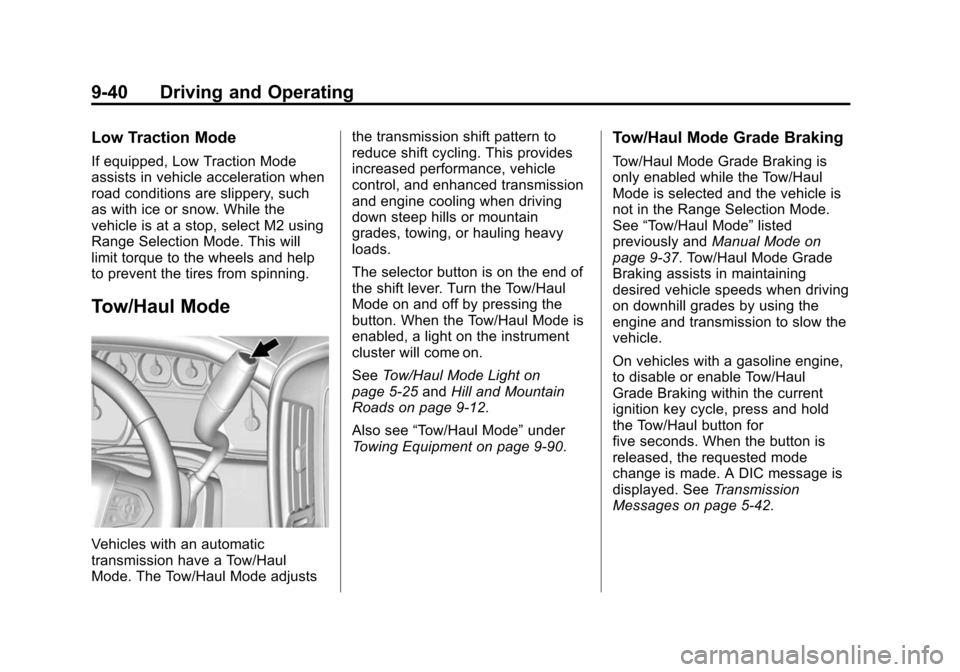
Tow/Haul Mode
Vehicles with an automatic
transmission have a Tow/Haul
Mode. The Tow/Haul Mode adjuststhe transmission shift pattern to
reduce shift cycling. This provides
increased performance, vehicle
control, and enhanced transmission
and engine cooling when driving
down steep hills or mountain
grades, towing, or hauling heavy
loads.
The selector button is on the end of
the shift lever. Turn the Tow/Haul
Mode on and off by pressing the
button. When the Tow/Haul Mode is
enabled, a light on the instrument
cluster will come on.
See
Tow/Haul Mode Light on
page 5-25 andHill and Mountain
Roads on page 9-12.
Also see “Tow/Haul Mode” under
Towing Equipment on page 9-90.
Tow/Haul Mode Grade Braking
Tow/Haul Mode Grade Braking is
only enabled while the Tow/Haul
Mode is selected and the vehicle is
not in the Range Selection Mode.
See “Tow/Haul Mode” listed
previously and Manual Mode on
page 9-37. Tow/Haul Mode Grade
Braking assists in maintaining
desired vehicle speeds when driving
on downhill grades by using the
engine and transmission to slow the
vehicle.
On vehicles with a gasoline engine,
to disable or enable Tow/Haul
Grade Braking within the current
ignition key cycle, press and hold
the Tow/Haul button for
five seconds. When the button is
released, the requested mode
change is made. A DIC message is
displayed. See Transmission
Messages on page 5-42.
Page 310 of 543
Black plate (43,1)Chevrolet 2015i Silverado Owner Manual (GMNA-Localizing-U.S./Canada/
Mexico-8425172) - 2015 - crc - 2/9/15
Driving and Operating 9-43
{Warning
Shifting the transfer case to
N (Neutral) can cause the vehicle
to roll even if the transmission is
in P (Park). You or someone else
could be seriously injured. Be
sure to set the parking brake
before placing the transfer case in
N (Neutral). SeeParking Brake on
page 9-51.
{Caution
Extended high-speed operation in
4
nmay damage or shorten the
life of the drivetrain.
Engagement noise and bump when
shifting between 4
nand 4mor from
N (Neutral), with the engine running,
is normal. Shifting into 4
nwill turn Traction
Control and StabiliTrak®off. See
Traction Control/Electronic Stability
Control on page 9-54.
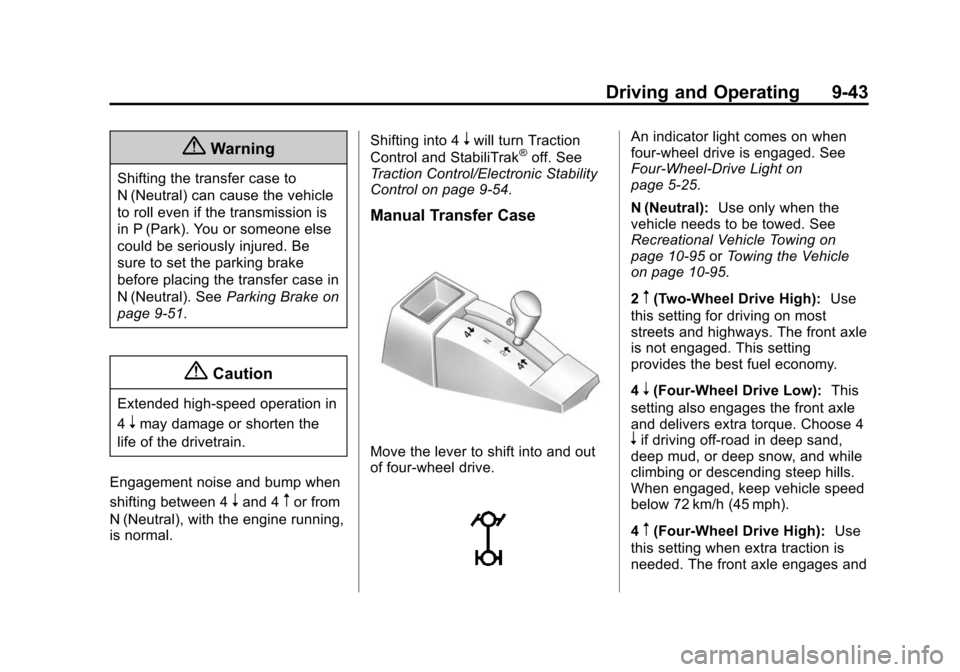
Manual Transfer Case
Move the lever to shift into and out
of four-wheel drive.
An indicator light comes on when
four-wheel drive is engaged. See
Four-Wheel-Drive Light on
page 5-25.
N (Neutral): Use only when the
vehicle needs to be towed. See
Recreational Vehicle Towing on
page 10-95 orTowing the Vehicle
on page 10-95.
2
m(Two-Wheel Drive High): Use
this setting for driving on most
streets and highways. The front axle
is not engaged. This setting
provides the best fuel economy.
4
n(Four-Wheel Drive Low): This
setting also engages the front axle
and delivers extra torque. Choose 4
nif driving off-road in deep sand,
deep mud, or deep snow, and while
climbing or descending steep hills.
When engaged, keep vehicle speed
below 72 km/h (45 mph).
4
m(Four-Wheel Drive High): Use
this setting when extra traction is
needed. The front axle engages and
Page 312 of 543
Black plate (45,1)Chevrolet 2015i Silverado Owner Manual (GMNA-Localizing-U.S./Canada/
Mexico-8425172) - 2015 - crc - 2/9/15
Driving and Operating 9-45
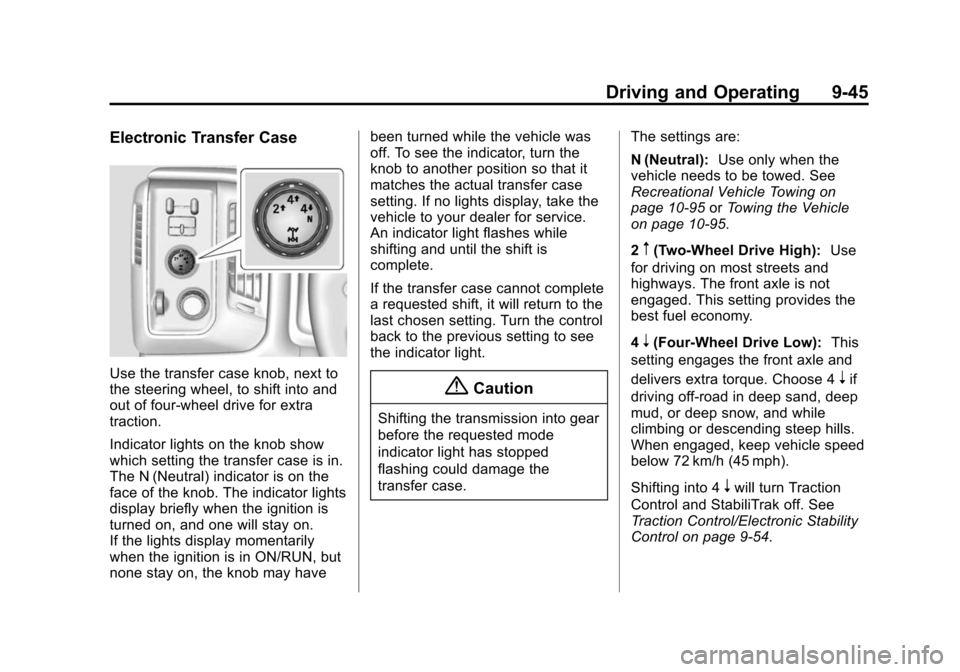
Electronic Transfer Case
Use the transfer case knob, next to
the steering wheel, to shift into and
out of four-wheel drive for extra
traction.
Indicator lights on the knob show
which setting the transfer case is in.
The N (Neutral) indicator is on the
face of the knob. The indicator lights
display briefly when the ignition is
turned on, and one will stay on.
If the lights display momentarily
when the ignition is in ON/RUN, but
none stay on, the knob may havebeen turned while the vehicle was
off. To see the indicator, turn the
knob to another position so that it
matches the actual transfer case
setting. If no lights display, take the
vehicle to your dealer for service.
An indicator light flashes while
shifting and until the shift is
complete.
If the transfer case cannot complete
a requested shift, it will return to the
last chosen setting. Turn the control
back to the previous setting to see
the indicator light.
{Caution
Shifting the transmission into gear
before the requested mode
indicator light has stopped
flashing could damage the
transfer case.
The settings are:
N (Neutral):
Use only when the
vehicle needs to be towed. See
Recreational Vehicle Towing on
page 10-95 orTowing the Vehicle
on page 10-95.
2
m(Two-Wheel Drive High): Use
for driving on most streets and
highways. The front axle is not
engaged. This setting provides the
best fuel economy.
4
n(Four-Wheel Drive Low): This
setting engages the front axle and
delivers extra torque. Choose 4
nif
driving off-road in deep sand, deep
mud, or deep snow, and while
climbing or descending steep hills.
When engaged, keep vehicle speed
below 72 km/h (45 mph).
Shifting into 4
nwill turn Traction
Control and StabiliTrak off. See
Traction Control/Electronic Stability
Control on page 9-54.
Page 313 of 543
Black plate (46,1)Chevrolet 2015i Silverado Owner Manual (GMNA-Localizing-U.S./Canada/
Mexico-8425172) - 2015 - crc - 2/9/15
9-46 Driving and Operating
4m(Four-Wheel Drive High):Use
when extra traction is needed. The
front axle engages and helps when
driving on snowy or icy roads, when
off-roading, or when plowing snow.
The vehicle can be shifted from 2
m
to 4mwhile the vehicle is moving.
Shifting Into 4
m
Turn the knob to 4mat any speed
up to 121 km/h (75 mph), except
from 4
n. The indicator light will flash
while shifting and will remain on the
selected setting.
Shifting Into 2
m
Turn the knob to 2mat any speed,
except when shifting from 4
n.
Shifting Into 4
n
When 4nis engaged, vehicle speed
should be kept below 72 km/h
(45 mph). 1. The ignition must be in ON/RUN
and the vehicle must be stopped
or moving less than 5 km/h
(3 mph) with the transmission in
N (Neutral). It is best for the
vehicle to be moving
1.6 to 3.2 km/h (1 to 2 mph).
2. Turn the knob to 4
n. Wait for the
4
nindicator light to stop flashing
before shifting the transmission
into gear.
If the transmission is in gear and/or
moving more than 5 km/h (3 mph),
the 4
nindicator light will flash for
30 seconds and not complete the
shift. After 30 seconds the transfer
case will shift to 4
m. Turn the knob
to 4
mto see the indicator. With the
vehicle moving less than 5 km/h
(3 mph), and the transmission in
N (Neutral), attempt the shift again.
Shifting Out of 4
n
1. To shift out of 4nthe vehicle
must be stopped or moving less
than 5 km/h (3 mph) with the transmission in N (Neutral) and
the ignition in ON/RUN. It is best
for the vehicle to be moving
1.6 to 3.2 km/h (1 to 2 mph).
2. Turn the knob to 4
mor 2m. Wait
for the 4
mor 2mindicator light to
stop flashing before shifting the
transmission into gear.
If the transmission is in gear and/or
moving more than 5 km/h (3 mph),
the 4
mor 2mindicator light will flash
for 30 seconds, but will not complete
the shift. With the vehicle moving
less than 5 km/h (3 mph), and the
transmission in N (Neutral), attempt
the shift again.
Shifting Into N (Neutral)
To shift:
1. Park the vehicle on a level surface.
2. Set the parking brake and press and hold the brake pedal. See
Parking Brake on page 9-51.
3. Start the vehicle or turn the ignition to ON/RUN.
Page 314 of 543
Black plate (47,1)Chevrolet 2015i Silverado Owner Manual (GMNA-Localizing-U.S./Canada/
Mexico-8425172) - 2015 - crc - 2/9/15
Driving and Operating 9-47
4. Shift the transmission toN (Neutral).
5. Shift the transfer case to 2
m.
6. Turn the transfer case knob clockwise to N (Neutral) until it
stops and hold it there until the
N (Neutral) light starts blinking.
This will take at least
10 seconds. Then slowly release
the dial to the 4
nposition. The
N (Neutral) light will come on
when the transfer case shift to
N (Neutral) is complete.
7. With the engine running, verify that the transfer case is in
N (Neutral) by shifting the
transmission to R (Reverse),
then to D (Drive). There should
be no movement of the vehicle
while shifting the transmission.
8. Turn the engine off, and the ignition to ACC/ACCESSORY.
9. Place the transmission shift lever in P (Park). See
Recreational Vehicle Towing on
page 10-95. 10. Turn the ignition to LOCK/OFF.
Shifting Out of N (Neutral)
To shift:
1. Set the parking brake and apply
the brake pedal.
2. Turn the ignition to ON/RUN with the engine off.
3. Shift the transmission to N (Neutral).
4. Turn the transfer case knob to 2
m.
After the transfer case has
shifted out of N (Neutral), the
N (Neutral) light will go out.
5. Release the parking brake.
{Caution
Shifting the transmission into gear
before the requested mode
indicator light has stopped
flashing could damage the
transfer case. 6. Start the engine and shift the
transmission to the desired gear.
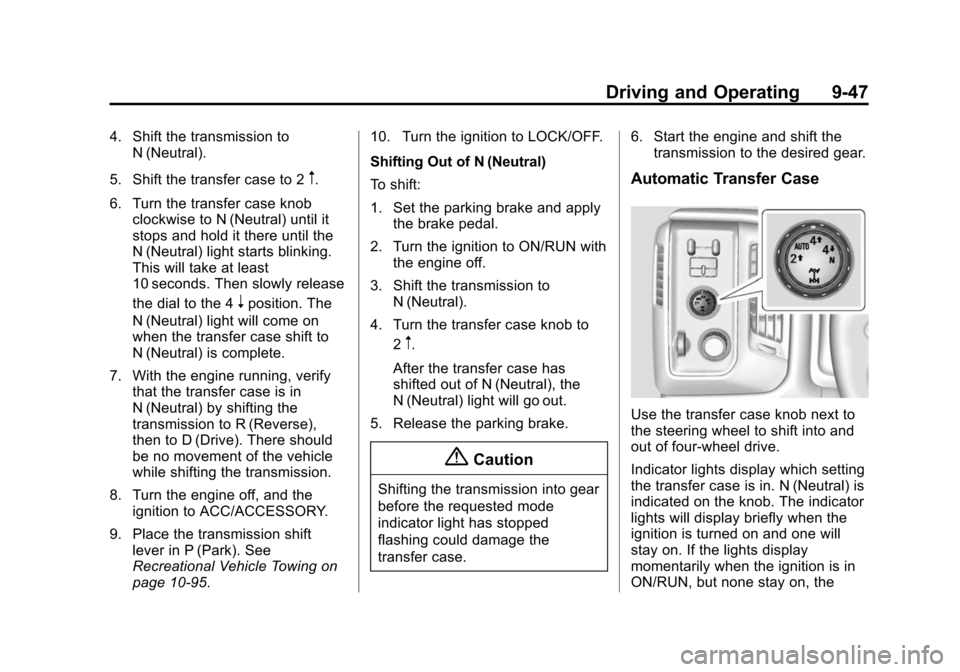
Automatic Transfer Case
Use the transfer case knob next to
the steering wheel to shift into and
out of four-wheel drive.
Indicator lights display which setting
the transfer case is in. N (Neutral) is
indicated on the knob. The indicator
lights will display briefly when the
ignition is turned on and one will
stay on. If the lights display
momentarily when the ignition is in
ON/RUN, but none stay on, the
Page 315 of 543
Black plate (48,1)Chevrolet 2015i Silverado Owner Manual (GMNA-Localizing-U.S./Canada/
Mexico-8425172) - 2015 - crc - 2/9/15
9-48 Driving and Operating
knob may have been turned while
the vehicle was off. To see the
indicator, turn the knob to another
position so that it matches the
actual transfer case setting. If no
lights display, take the vehicle to
your dealer for service. An indicator
light flashes while shifting the
transfer case and remains
illuminated when the shift is
complete.
If the transfer case cannot make a
requested shift, it will return to the
last chosen setting. Turn the knob
back to the previous transfer case
setting to see the indicator.
The settings are:
N (Neutral):Use only when the
vehicle needs to be towed. See
Recreational Vehicle Towing on
page 10-95 orTowing the Vehicle
on page 10-95.
2
m(Two-Wheel Drive High): Use
for driving on most streets and
highways. The front axle is not
engaged. This setting provides the
best fuel economy. AUTO (Automatic Four-Wheel
Drive):
Use when road surface
traction conditions are variable.
When driving in AUTO, the front
axle is engaged, and the vehicle's
power is sent to the front and rear
wheels automatically based on
driving conditions. This setting
provides slightly lower fuel economy
than 2
m.
Do not use AUTO mode to park on
a steep grade with poor traction
such as ice, snow, mud, or gravel.
In AUTO mode only the rear wheels
will hold the vehicle from sliding
when parked. If parking on a steep
grade, use 4
mto keep all four
wheels engaged.
4
m(Four-Wheel Drive High): Use
this position when extra traction is
needed, such as when driving on
snowy or icy roads, when
off-roading, or when plowing snow.
4
n(Four-Wheel Drive Low): This
setting engages the front axle and
delivers extra torque. Choose 4
n
when driving off-road in deep sand,
deep mud, or deep snow, and while
climbing or descending steep hills.
Shifting into 4
nwill turn Traction
Control and StabiliTrak off. See
Traction Control/Electronic Stability
Control on page 9-54.
Shifting Into 4
mor AUTO
Turn the knob to the 4
mor AUTO
position at any speed, except from 4
n. The indicator light will flash while
shifting and will remain on when the
shift is completed.
Shifting Into 2
m
Turn the knob to 2mat any speed,
except when shifting from 4
n. The
indicator light will flash while shifting
and will remain on when the shift is
completed.
Shifting Into 4
n
When 4nis engaged, keep vehicle
speed below 72 km/h (45 mph).
Page 316 of 543
Black plate (49,1)Chevrolet 2015i Silverado Owner Manual (GMNA-Localizing-U.S./Canada/
Mexico-8425172) - 2015 - crc - 2/9/15
Driving and Operating 9-49
To shift:
1. The ignition must be in ON/RUNand the vehicle must be stopped
or moving less than 5 km/h
(3 mph) with the transmission in
N (Neutral). It is best for the
vehicle to be moving
1.6 to 3.2 km/h (1 to 2 mph).
2. Turn the knob to 4
n. Wait for the
4
nindicator light to stop flashing
before shifting the transmission
into gear.
{Caution
Shifting the transmission into gear
before the requested mode
indicator light has stopped
flashing could damage the
transfer case.
If the transmission is in gear and/or
moving more than 5 km/h (3 mph),
the 4
nindicator light will flash for
30 seconds and not complete the
shift. After 30 seconds the transfer case will shift to 4
m. Turn the knob
to 4
mto display the indicator. With
the vehicle moving less than 5 km/h
(3 mph), and the transmission in
N (Neutral), attempt the shift again.
Shifting Out of 4
n
To shift:
1. The vehicle must be stopped or moving less than 5 km/h (3 mph)
with the transmission in
N (Neutral) and the ignition in
ON/RUN. It is best for the
vehicle to be moving
1.6 to 3.2 km/h (1 to 2 mph).
2. Turn the knob to 4
m, AUTO, or 2
m. Wait for the 4m, AUTO, or 2mindicator light to stop flashing
before shifting the transmission
into gear.
{Caution
Shifting the transmission into gear
before the requested mode
indicator light has stopped
flashing could damage the
transfer case.
If the transmission is in gear and/or
moving more than 5 km/h (3 mph),
the 4
m, AUTO, or 2mindicator light
will flash for 30 seconds but will not
complete the shift. With the vehicle
moving less than 5 km/h (3 mph),
and the transmission in N (Neutral),
attempt the shift again.
Shifting Into N (Neutral)
To shift into N (Neutral):
1. Park the vehicle on a level surface.
2. Set the parking brake and press and hold the brake pedal. See
Parking Brake on page 9-51.
3. Start the vehicle or turn the ignition to ON/RUN.